Competitors change their prices, ship features, open roles, and launch ad campaigns. Most of that activity appears on public pages. By the time someone checks a competitor's pricing page by hand, the change is already old. That delay can cost you a deal. Asking a chat assistant gets you today's answer. It leaves no snapshot to compare against next time.
An AI agent can watch those pages for you. The agent can pull them on demand, the moment you ask, or it can check them on a schedule. Either way, it detects what changed, decides whether the change matters, and routes the result to the right place. Six kinds are one way to group them, and all six share a four-step shape.
These agents also share one dependency. The data an agent can pull limits its reasoning. Competitor data sits on pages built for people to read, not for programs to parse. Many of those pages render in a browser and change their structure without notice. Apify handles the extraction step, turning a competitor's live page into structured data an agent can act on.
How AI agents turn competitor data into action
Across all six patterns, the four steps are the same: trigger, extraction, detection and reasoning, and action.
A trigger decides when the agent runs. Two modes cover almost every setup. An on-demand trigger fires in the middle of a task, when the agent decides it needs current data to answer the question in front of it. Asked whether your price is higher than a competitor's, the agent can pull that competitor's live pricing page before it answers, instead of trusting a number someone last checked months ago. A scheduled trigger runs the agent at a fixed interval, every night or every hour. This mode suits systematic monitoring, which needs a running history of changes.
Extraction pulls the current state of the page. The agent reads a page the competitor controls and gets structured data back. That page might be a pricing page, a changelog, a job board, or an ad library. This step decides whether everything after it works, because the page is built for a human reader, not for an agent that needs a handful of fields.
Detection and reasoning find what changed and whether it matters. The agent compares the new snapshot against the last one and identifies the difference. The agent then has to decide whether that difference matters. That decision is the hard part. A page gets edited often in cosmetic ways: a moved section, a reworded line. The step has to separate those cosmetic edits from a real move, a new tier or a price cut, and forward only the real ones.
Action routes the result somewhere useful. The result can be a message to the sales team's channel, a new row in a tracking sheet, or an answer inside the conversation that triggered the pull.
A developer on r/SideProject got tired of checking pages by hand and built the same four-step loop, pulling each URL, comparing the new snapshot against the last, flagging the meaningful changes, and sending an alert. The problem itself leads to those four steps.
The trigger and the action are the straightforward parts. The reasoning step is harder to build well. But the reasoning runs on whatever extraction hands it. Extraction is the step most exposed to a site's anti-bot protection.
Apify is a marketplace of ready-made tools for AI. Those tools, called Actors, handle this step. Actors run through Apify Proxy and anti-blocking, so rate limits and bot detection are far less likely to block the pull. Purpose-built Actors already cover the specific sources these agents read, and each returns the fields the agent needs rather than the whole page.
Apify covers more than extraction, with a piece at each of the four steps.
| Step | What Apify provides |
|---|---|
| Trigger | A schedule, or an on-demand tool call from an agent through the Model Context Protocol (MCP) server |
| Extract | Actors that return structured data, running through Apify Proxy and anti-blocking |
| Detect and reason | Named datasets that keep each pull to compare against the next, and Actors that diff the snapshots and score the changes |
| Act | Integrations that push the result to Slack, a sheet, or a webhook |
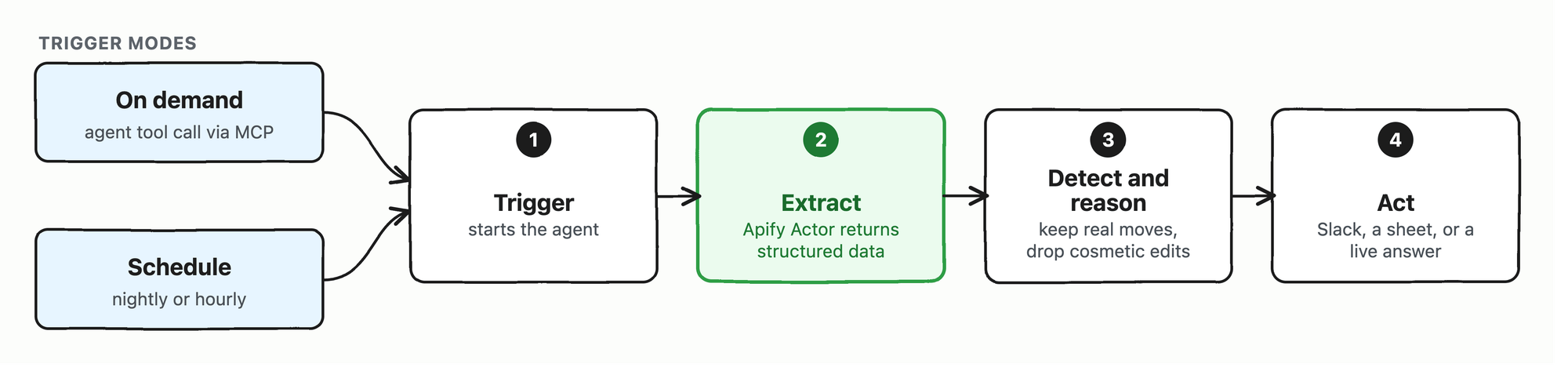
The four-step shape all six patterns share, with an Apify Actor at the extraction step.
The six competitor-monitoring patterns at a glance
The six patterns differ mainly in what they read and what they do with the result.
| Agent type | Best fit | Trigger | Source it reads | Downstream action |
|---|---|---|---|---|
| Pricing | Software as a service (SaaS), e-commerce, travel | schedule or on demand | Competitor pricing pages, product listings, marketplaces | Alert sales, update your pricing model, answer a live pricing question |
| Feature monitoring | SaaS and product teams | schedule | Changelogs, docs, release notes, "what's new" pages | Update battlecards, brief the product and marketing teams |
| Review and sentiment | Any | schedule | G2, Capterra, app stores, forums | Feed the roadmap, sharpen positioning |
| Hiring signals | Any competitive market | schedule | Careers pages, job boards | Anticipate a competitor's expansion and strategy, brief the leadership team |
| Ad monitoring | Direct-to-consumer, performance marketing | schedule | Public ad libraries from Meta, Google, TikTok, LinkedIn | Track creative and campaign-volume shifts, brief the growth team |
| AI visibility | Any | schedule | Answers from ChatGPT, Perplexity, Gemini, Google AI Overviews | Guide generative engine optimization, track share of voice |
Pricing is the clearest pattern to walk through.
A pricing agent, step by step
A pricing agent watches a competitor's pricing page and alerts you when a price or a plan changes. The pattern is the four steps pointed at one page.
Extract. Point Website Content Crawler at the page, keep the crawl to that one page, respect robots.txt, and include the required proxy configuration:
{
  "startUrls": [{ "url": "https://sentry.io/pricing/" }],
  "maxCrawlDepth": 0,
  "maxResults": 1,
  "crawlerType": "playwright:adaptive",
  "respectRobotsTxtFile": true,
  "proxyConfiguration": { "useApifyProxy": true }
}
playwright:adaptive switches between a headless browser and a plain HTTP client, so prices rendered by JavaScript still get captured. When the page renders prices as text, the Actor returns readable Markdown rather than raw HTML. The top of that output covers the first three plans:
# Pricing: Free Developer Plan, Pay as You Grow

## Pricing plans for dev teams of all sizes

For solo devs working on small projects

Free

$0

Limited to one user

## team

Everything to monitor your application as it scales

$26/mo

When billed annually with default pre-paid data

## business

For teams that need more powerful debugging

$80/mo

When billed annually with default pre-paid data
Those prices were current at the time of the run, with the paid tiers billed annually. The pull cost $0.006, less than a cent.
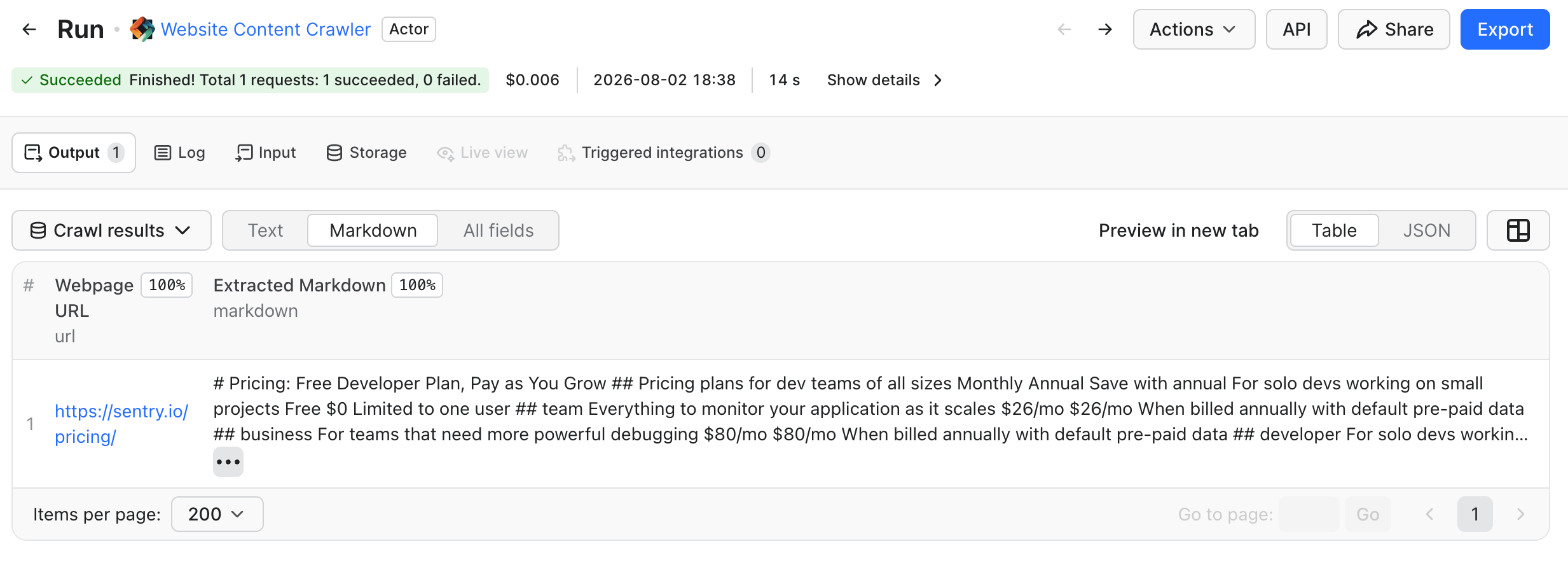
The same pull as a run in Apify Console.
Detect and reason. Extraction gives you the current state. The agent still has to decide whether the price moved, and whether the move matters. Website Change Monitor is one ready-made way to make that call: the Actor snapshots each page, diffs it against the previous snapshot, and has a model summarize what changed. Point the Actor at the same page, keep it to that one URL, and set the competitor lens:
{
  "urls": ["https://sentry.io/pricing/"],
  "exactUrlsOnly": true,
  "useCase": "competitor",
  "companyAnalysis": "on-first-run"
}
A first run has nothing to compare against, so it records a baseline:
{
  "url": "https://sentry.io/pricing/",
  "pageType": "pricing",
  "changeType": "baseline",
  "significance": 0,
  "summary": "Now monitoring this pricing page. Baseline captured...",
  "evidence": ["Skip to main content", "Pricing plans for dev teams of all sizes", "Monthly", "Annual"]
}
Two of those fields do the work that makes an alert worth acting on. Every later change gets a significance score, so cosmetic edits can be filtered out before they reach anyone. Each change also carries an evidence array with the exact page text behind the score, so a person can verify an alert without reopening the page.
That first run also builds a one-time profile of the site. Later runs read each change against that profile:
Positioning & messaging Sentry positions itself as an error monitoring and application troubleshooting platform for development teams of all sizes.
Pricing • Developer: Free (1 user; 5k errors/month, 50 session replays, limited features) • Team: $26/month (unlimited users; 50k errors/month, API & integrations, 20 custom dashboards) • Business: $80/month (Team features + unlimited custom dashboards, 1,000 metric monitors, advanced quota management)
A single-page run cost about $0.11, model call included.
Act. The agent routes a confirmed price move to where the team already looks. Website Change Monitor delivers the digest by email or to a Notion archive. Email needs only an address in outputEmail; You authorize Notion once under Settings → API & Integrations → MCP connectors in Apify Console. notifyThreshold decides which changes reach email. On demand, the answer comes back inside the conversation instead. Retailer price monitoring covers the same watch across many pages.
Outside SaaS, the same pattern works with a different source and a different Actor. For e-commerce, Amazon Product Scraper tracks price, rating, and review changes across 19 Amazon marketplaces and reports incrementally, sending only the products that changed since the last run.
The same shape for features, reviews, hiring, ads, and AI visibility
If you change the source and the downstream action, the pricing agent becomes another of the patterns. The four steps stay the same. Extraction needs a purpose-built Actor for most of those sources, a job-board scraper or a review scraper, rather than one crawler pointed at everything.
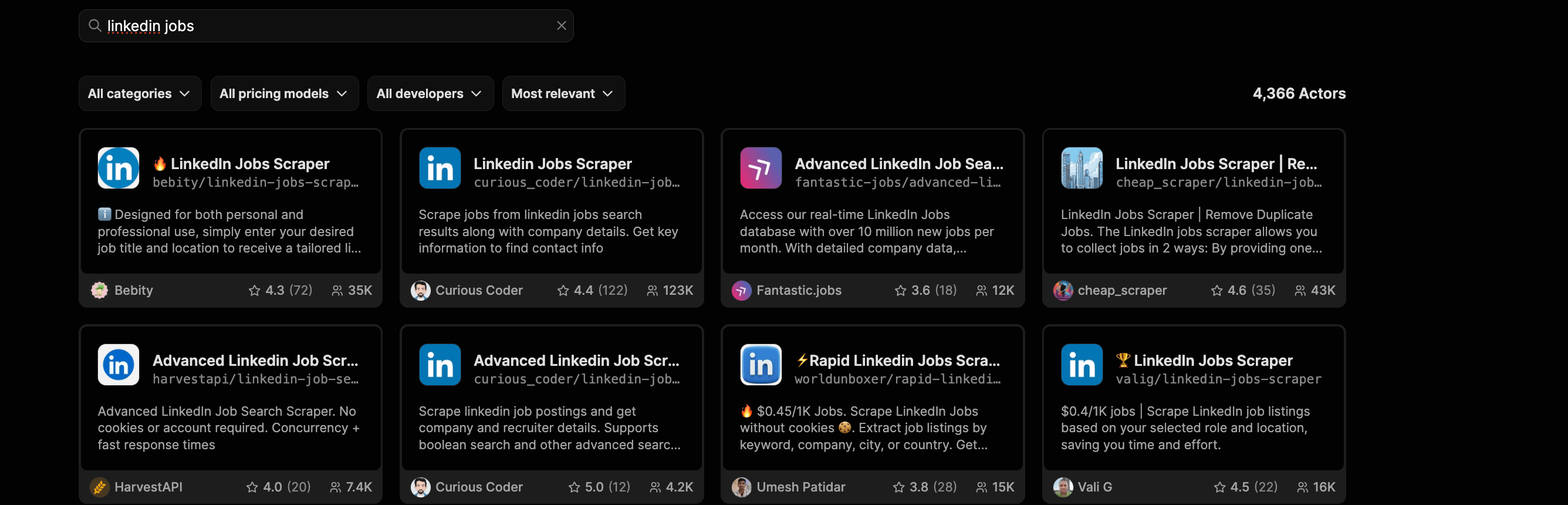
Apify Store also lists a Competitive Intelligence Agent. That Actor maps local competitors from Google Maps listings and reviews, so it answers a different question from the six patterns.
Feature monitoring watches a changelog, a documentation page, or a "what's new" page. This pattern points Website Change Monitor at a different page. The same comparison separates a shipped feature from a fixed typo, and the significance score does the filtering. When a competitor ships something that affects your deals, the change reaches your product and marketing teams in time to update a battlecard. Set up an alert when a web page changes walks through a simpler setup built on Content Checker.
Review and sentiment monitoring reads customer feedback on G2, Capterra, app stores, and forums, then clusters it into complaint themes and feature requests. This pattern pairs naturally with feature monitoring. When a competitor ships a feature, reviews follow after a longer delay. Those reviews ask why your product lacks the same feature. The same extract-and-reason steps turn scattered reviews into a short list your roadmap can use. Monitoring online reviews builds a version for Google, Yelp, and Tripadvisor.
Hiring-signal monitoring reads careers pages and job boards. A cluster of new roles in one city often reveals a competitor's plan before any public announcement. A first senior hire in a new function can reveal the same plan. Both changes are early signals for your leadership team. This pattern has its own walkthrough, analyzing job listings for a competitive edge, including how to build a salary benchmark from public postings.
Ad monitoring reads the public ad libraries that Meta, Google, TikTok, and LinkedIn maintain. The EU's Digital Services Act requires several of those libraries. New creatives and campaigns appear in these libraries while the ads are live, so your growth team can catch a shift in a competitor's messaging or campaign volume while it still matters. Facebook Ads Library Scraper pulls the Meta side. Building an ad monitoring tool with Apify builds the full pipeline across the Meta, Google, and TikTok libraries on a schedule.
AI visibility monitoring is the outlier of the six, watching a model rather than a competitor's page. This pattern asks ChatGPT, Perplexity, Gemini, and Google AI Overviews the questions your buyers ask, then checks whether your brand and your competitors appear in the answers. That check is the competitor-facing side of generative engine optimization (GEO). Model answers vary between runs, so the signal comes from asking the same questions repeatedly rather than once. Measuring LLM brand visibility covers the pattern end to end.
On-demand retrieval and scheduled monitoring
Teams often run both trigger modes.
With on-demand retrieval, the agent pulls fresh data at the moment it's needed, inside a task. The agent reaches the Actor through MCP, a standard way for an agent to call an external tool. Apify runs an MCP server that exposes Actors as tools an agent can call by name. A live pull takes tens of seconds, so this mode suits a question worth waiting on.
After apify login, one command from the Apify command-line interface (CLI) wires that server into a supported client: apify mcp install cursor, or vscode, or claude-code. Clients outside that list point at https://mcp.apify.com instead, and Claude Desktop has its own setup guide.
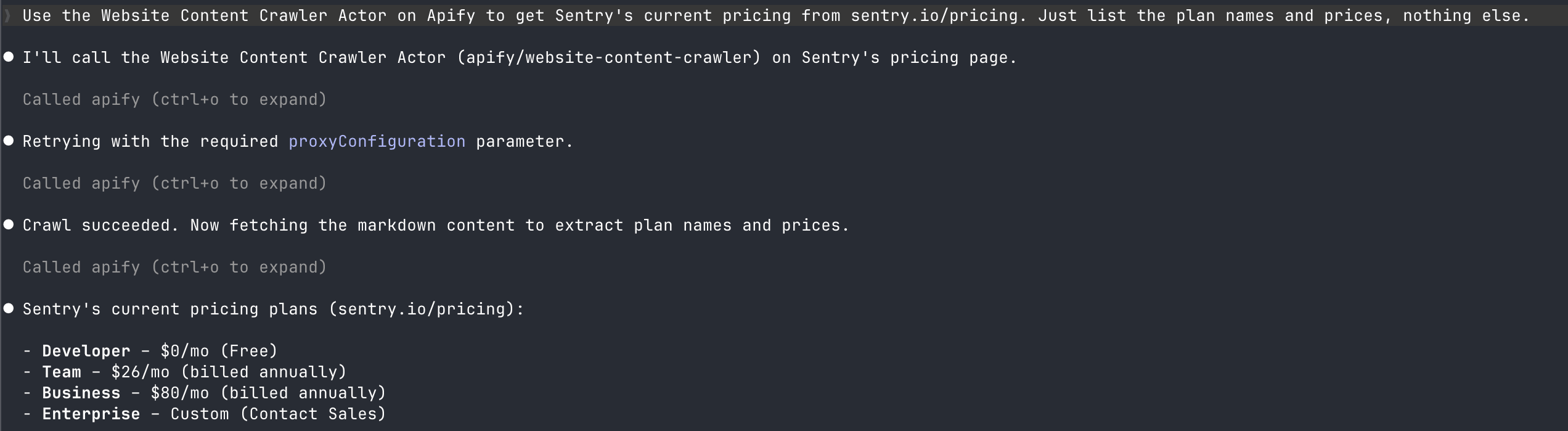
Through the Apify MCP server, an agent can reach the Actors behind any of the six sources.
Scheduled monitoring is the other mode. It runs without a client and without a human in the loop. You point an Actor at a page, put it on a schedule, and the Actor runs on its own. Apify stores each pull in a Dataset, and the detection step compares against that history. A failed run and a quiet one look the same from outside, so set notifyOnQuietRun and hear from it either way.
MCP handles delivery too, not just retrieval. Website Change Monitor archives its digest to Notion through an MCP connector.
Apify AI, the chat in Apify Console, answers a one-off competitor question without any of this setup. If you ask what a competitor charges right now and confirm the Actor it proposes, you have the answer. RAG Web Browser answers the same question inside an agent loop rather than in Console. These patterns are the next step: an agent that keeps asking on its own and alerts you when the answer changes. The MCP server and a schedule make that possible.
What makes the results trustworthy
A monitoring agent is only useful if you can act on its alerts without re-verifying every one by hand. Four factors matter most.
Noise is the main failure mode. A page you monitor changes often in ways that don't matter: a rotated banner, a refreshed timestamp. Extraction strips the obvious noise first, dropping navigation, footers, and cookie banners before anything is compared. Without the reasoning step, the rest still becomes alerts your team learns to ignore.
False positives come from a loose prompt. If your prompt asks only "what changed", a language model can over-report, calling a moved paragraph a strategy shift. If you scope the prompt to specific fields, such as prices and plan names, the summaries stay honest. Scope it too tightly and you miss the changes you did not think to ask about.
An alert without its evidence is just a claim. Every alert should carry the exact change it fired on, the line or the value that moved. Before your team reacts to "competitor dropped its entry price", a person can check the source of that alert. Without that trace, the team re-verifies every alert one by one.
Maintenance never stops. Competitor pages get redesigned, and any extraction tied to a page's structure eventually breaks. The rules around automated access keep shifting too, as more sites block or gate agents altogether. A well-maintained marketplace Actor gets fixed by its maintainer, not by you; a scraper you wrote or generated yourself is always yours to repair.
One boundary applies to all six patterns. These agents read what anyone can see, whether that is a public page or a model's answer. They do not log in to a competitor's systems, and they do not touch private data.
When a platform makes more sense
A platform is sometimes the better choice. Enterprise competitive-intelligence platforms bundle the same signals into battlecards, customer relationship management (CRM) workflows, and vendor support. For a sales-enablement team that needs those things, the bundle is the product. Those platforms are sold through a sales call. Assembling the pieces yourself fits the opposite case: you want the raw data, you want to own the logic, and you'd rather pay per run than per seat.
Where to start with competitor data agents
The six patterns are one architecture pointed at six different sources. The reasoning models will keep improving, and the sources will shift. But the four steps hold, and extraction stays the step that decides whether the rest works.
To see the pattern work, point Website Content Crawler at one competitor's pricing page and read what it returns. The free plan includes monthly usage credits and doesn't ask for a credit card.
To give an agent the same access, run apify mcp install cursor, swapping in your own client. Assemble the same steps from Actors when you want to own the data and the logic yourself. When no ready-made Actor fits, build your own with Crawlee on Apify Proxy and storage.
FAQ
What is an AI agent for competitor data?
An AI agent for competitor data is a program that automates competitive intelligence: it pulls a competitor's public data, detects what has changed, and takes an action, such as an alert or a report. Six patterns cover pricing, features, reviews, hiring, ads, and AI visibility, all built on the same four steps.
How do AI agents monitor competitors?
On a schedule or on demand, they pull a competitor's public pages with an extraction tool that returns structured data instead of raw HTML, compare each pull against the last, and act only on the changes that matter. On Apify, ready-made Actors handle rendering and bot detection, and a well-maintained one gets fixed by its maintainer when a site's layout changes.
How much does it cost to track a competitor's page?
Extraction is the cheap part. A single pull of a pricing page through Website Content Crawler costs $0.006, less than a cent. Detection and a written summary cost more: a Website Change Monitor run over one page costs about $0.11, model call included. The bill climbs with how often you pull, how many pages you watch, and how hard the site is to reach, so a page behind heavy anti-bot protection costs more than a plain one, because it needs a residential proxy rather than a datacenter.
Can an AI agent track competitor prices in real time?
A scheduled agent checks a pricing page as often as you set it. An hourly or nightly schedule comes close to real time. An on-demand agent pulls the live page during a task through a tool call. That pull takes tens of seconds, so the answer is current rather than instant.
Can I build my own competitor-tracking AI agent?
Yes. Point an Actor at the pages you care about, put it on a schedule, or expose it to your agent through MCP, and add a reasoning step that decides which changes matter. Start with a pricing agent, the smallest complete version. The same shape covers the rest of the competitor analysis: features, reviews, hiring, ads, and AI visibility.
Is it legal to collect competitor data this way?
These patterns read only what anyone can see, and they do not log in to a competitor's systems or touch private data. Rules still vary by source and region, so check robots.txt and the terms of service for the sources you monitor before you scale up.