A competitor launched a new Meta campaign on Thursday. Your team only noticed the next Tuesday, after someone finally checked the Ad Library by hand, and by then the creative was already almost a week old. The founder asked about it twice, and nobody had a good answer.
This is the real problem an ad monitoring tool should solve. Search that phrase on Google, and you mostly find SaaS list articles that try to sell you Adbeat (from ~$249/mo), BigSpy, Madgicx, Semrush. Put 2 or 3 of them together, and you pay $300-800/mo. And the data still stays in their tool, on their schedule. You can export a CSV, but you can't build your own live archive that you can query freely.
There's a cheaper option: build it yourself. The same data these tools charge you for sits in 4 free, public ad libraries. Regulators forced the platforms to publish it. So you can pull it yourself, on your own schedule, and pay around $50-80 a month in compute for 5 competitors across 4 platforms, refreshed daily.
You might be an AI builder who needs competitor ad creative as live context for an agent. Or you might be a growth lead who is tired of tools that almost fit. Either way, the build is the same: pre-built Actors from the Apify marketplace, then scheduled runs, a deduped dataset, and a Slack alert when something new arrives.
What an ad monitoring tool does
It does 3 jobs, in roughly the order you'll use them:
- Surveillance - who is running what right now, on which platforms, in which countries. This is the daily question.
- Alerting - what appeared in the last 24 hours that you haven't seen yet. The alert comes to you, so you don't have to keep checking by hand.
- Archive - what a competitor was running 6 months ago, when their conversion rate doubled. This is useful only if you collected the data from the start.
A few nearby categories show up in the same search results and are easy to confuse with ad monitoring, but they solve different problems:
- Ad performance tracking (Voluum, Hyros, RedTrack, Triple Whale) measures your own ads (clicks, conversions, attribution). We don't cover that here.
- Creative inspiration tools (Foreplay, Motion) collect swipe files of "winning" ads. They're close, but they sit on top of the same scraping problem this article is about.
Build the surveillance, alerting, and archive layer once, and any of these can sit on top of it. But first you need to know where the data actually lives.
Where ad data lives in 2026
In the end, the ad creative these tools show you comes from the same 4 public ad libraries. These libraries exist because regulators (mostly the EU's Digital Services Act, or DSA) made the platforms publish them. What each one gives you, and what it doesn't, is the thing to check before you pick a tool or build your own.
Meta Ad Library. It's the most useful of the 4. The public web library covers active ads on Facebook, Instagram, Threads, Messenger, and WhatsApp across the EU/UK (DSA), plus political and social-issue ads worldwide. The official Meta Ad Library API is more limited than people usually assume. It returns political and social-issue ads worldwide and all EU/UK ads under DSA scope. But you can get commercial non-EU ads (for example, what a US competitor runs right now on Instagram) only through the web library. And the web library means scraping.
Google Ads Transparency Center. It covers ads across Search, YouTube, Display, and other Google surfaces, from any verified advertiser. Google offers an API for EEA ad data under the Transparency Center terms, but for ads outside the EEA, API access is limited to approved regulators and self-regulatory bodies. So for global or US competitor monitoring, there's no usable API, and every third-party "Google ad transparency API" you find is, in practice, a scraper with a wrapper around it.
TikTok. Three surfaces, and people often confuse them:
- Commercial Content Library (
library.tiktok.com) - required by the DSA, EEA/UK/CH only. - Commercial Content API - official, but only for researchers. No commercial access at all.
- Creative Center (
ads.tiktok.com/business/creativecenter/) - the trending-ads marketing tool. No API, browser only. This is the surface most competitor research teams actually want.
LinkedIn Ad Library. LinkedIn launched it in mid-2023 to follow the DSA. It shows creative, advertiser, date range, and country. It has no impressions, no spend, and no first-party API for competitor ads. The LinkedIn Marketing API is only for your own campaigns.
The pattern across all 4 is the same: where there's no API, you scrape, or you pay someone who scrapes. These libraries aren't going away. Regulators required them, and now they enforce them. And the data only gets richer over time.
Build vs. buy
The 2 paths differ in time, cost, coverage, and who owns the data:
| SaaS (Adbeat / Madgicx / BigSpy) | DIY pipeline (Apify Actors + glue code) | |
|---|---|---|
| Time to first result | ~10 min | 1-3 days end-to-end (half a day if you know Apify) |
| Monthly cost (5 competitors, 4 platforms) | $300-800 bundled | ~$50-80 in compute |
| Platforms covered | Each tool covers a subset | All 4 (Meta / Google / TikTok / LinkedIn) |
| Data ownership | Vendor-owned, CSV export | Your DB, your warehouse |
| Modeled spend estimates | Yes (modeled, not measured) | No - only what platforms publish |
| Alerting | Email digest, vendor cadence | Slack/webhook, your cadence |
| Custom enrichment (LLM tagging, embeddings) | No | Trivial |
The decision usually comes down to 2 questions:
- Do you have someone comfortable with Python who will own this (roughly a day to set it up, plus about an hour a month to maintain)?
- Do you specifically need modeled spend estimates with confidence intervals, or is the raw creative plus whatever the platforms publish enough?
If the answers are "yes" and "raw is fine", then build. Otherwise, buy.
Build the pipeline
The target is 5 competitors, 4 platforms, a daily refresh, and a Slack alert on anything new. Here's how to wire it up.
Realistic time budget. If you're new to Apify and don't have a Slack workspace ready, plan for 1-3 days end-to-end, not a single afternoon:
- Day 1 - Apify account + run one Actor through the UI + inspect what the dataset actually returns
- Day 2 - Wire the Python pull → normalize → SQLite dedup
- Day 3 - Schedules + Slack webhook + watch the first scheduled run fire
An experienced Apify builder can do this in half a day, but most people can't.
Step 1 - scrape the Meta Ad Library
Give the apify/facebook-ads-scraper Actor a Facebook Page URL, and it returns the active ads that the page runs across FB / IG / Threads / Messenger / WhatsApp: creative, CTA, link, dates, the full record. This is an official Apify Actor, with 22k users and a 99.6% success rate. The input is 3 fields: a list of Ad Library URLs, a results limit, and an active-status filter.
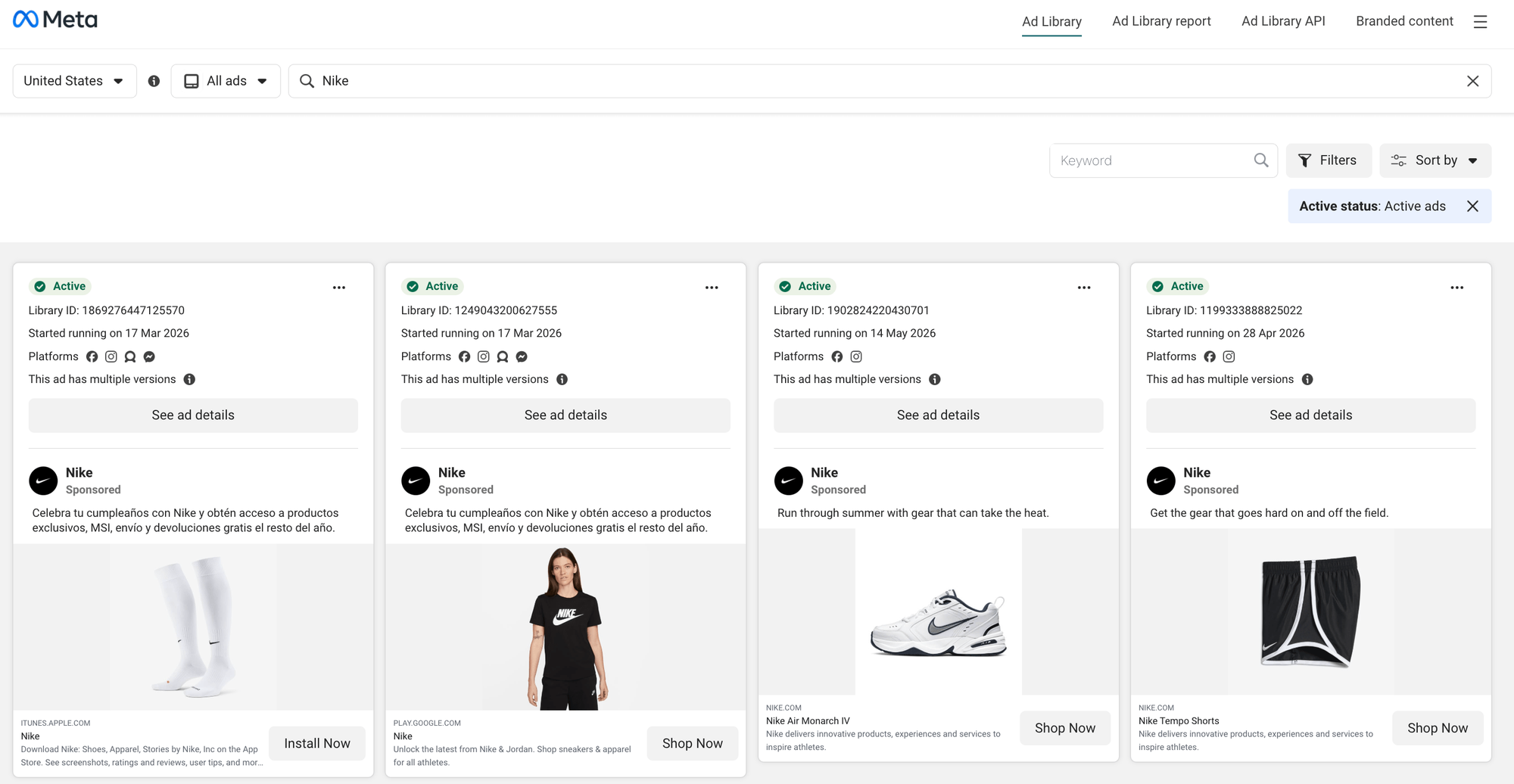
Before the code, look at what you actually scrape. Meta's public Ad Library shows active ads for any page, indexed by a Library ID:
To set up the scrape, you can use the Form view in Apify Console. (In Console, the Actor shows as "Facebook Ads Library Scraper", which is the same Actor as apify/facebook-ads-scraper in code, only with a different display name.)
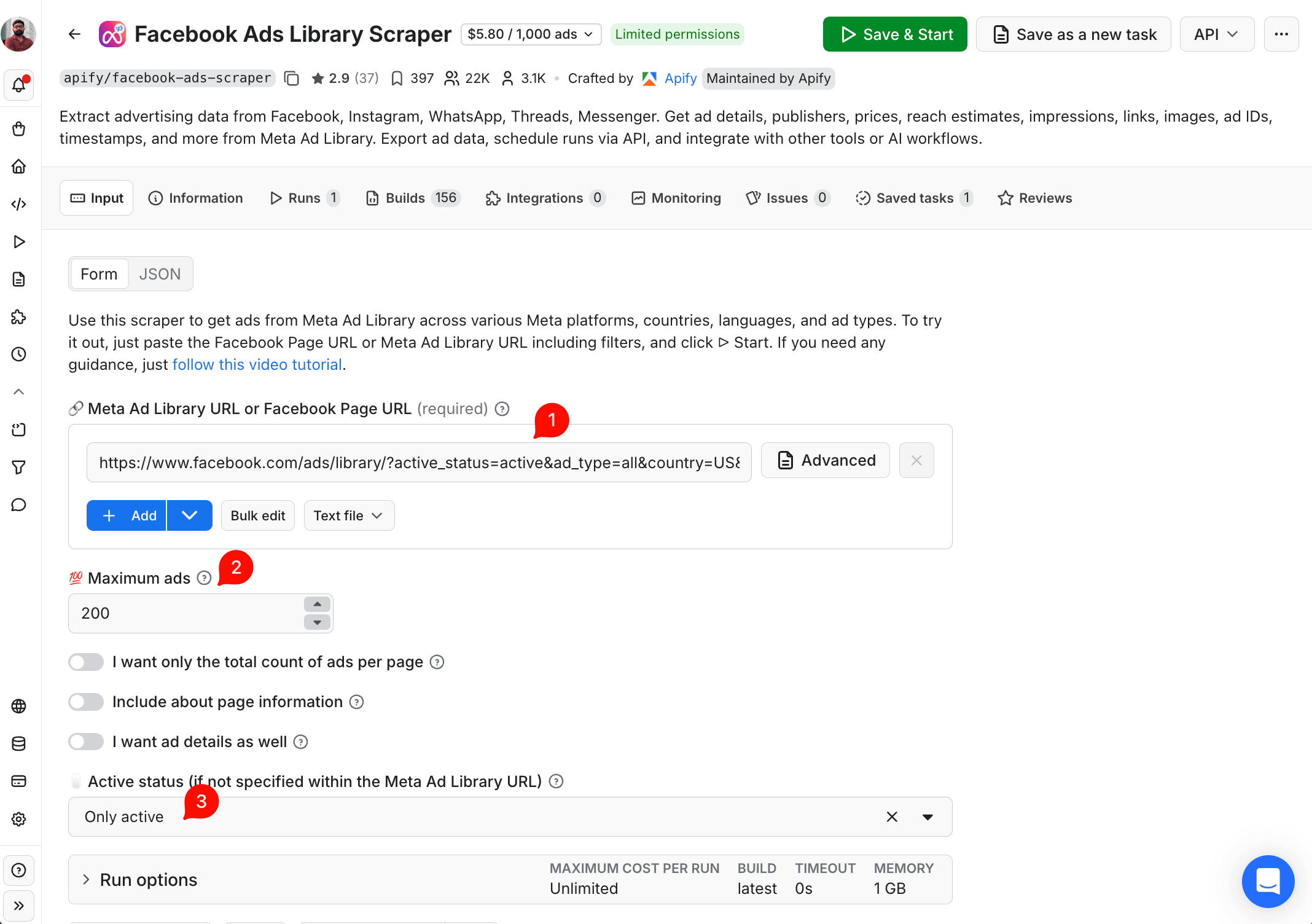
Or switch to the JSON view on the same page and paste the input directly. It's the same JSON you'd send through the API. The UI labels map cleanly to the JSON keys: "Meta Ad Library URL" → startUrls, "Maximum ads" → resultsLimit, "Only active" → activeStatus: "active". Here's the full input:
{
  "startUrls": [
    {
      "url": "<https://www.facebook.com/ads/library/?active_status=active&ad_type=all&country=US&search_type=page&view_all_page_id=15087023444>"
    }
  ],
  "resultsLimit": 200,
  "activeStatus": "active"
}
The view_all_page_id is the competitor's Facebook Page ID. Paste their Page URL into the Ad Library UI, copy the URL that the filter builds, and put it into startUrls. Run one Actor per competitor, or put all of them into a single startUrls array. Two optional flags are good to know: includeAboutPage: true adds the page business info, and isDetailsPerAd: true adds per-ad audience details.
Here's the output shape for one carousel ad (shortened). Carousels are the most common e-commerce format:
{
  "adArchiveID": "1869276447125570",
  "pageID": "15087023444",
  "pageName": "Nike",
  "publisherPlatform": ["FACEBOOK", "INSTAGRAM", "AUDIENCE_NETWORK", "MESSENGER"],
  "isActive": true,
  "startDateFormatted": "2026-03-17T07:00:00.000Z",
  "currency": "",
  "spend": null,
  "reachEstimate": null,
  "snapshot": {
    "displayFormat": "DPA",
    "body": { "text": "Celebra tu cumpleaños con Nike..." },
    "title": "Nike: Shoes, Apparel, Stories",
    "ctaText": "Install now",
    "linkUrl": "<http://itunes.apple.com/app/id1095459556>",
    "images": [],
    "videos": [],
    "cards": [
      {
        "title": "Nike",
        "body": "Celebra tu cumpleaños con Nike...",
        "originalImageUrl": "<https://scontent.xx.fbcdn.net/>...",
        "resizedImageUrl": "<https://scontent.xx.fbcdn.net/>...",
        "linkUrl": "<https://www.nike.com/mx/t/>..."
      }
    ]
  }
}
Keep 4 things in mind:
- Field names use camelCase, and the ad copy is at
snapshot.body.text, not at a top-level field. The link headline is atsnapshot.title, and the CTA is atsnapshot.ctaText/snapshot.linkUrl. - Creative images are in 3 different places, depending on
snapshot.displayFormat. Single-image ads usesnapshot.images[], carousel/DPA ads usesnapshot.cards[].originalImageUrl, and video ads usesnapshot.videos[].videoPreviewImageUrl. Thenormalize()function in Step 5 goes through all 3. spend,reachEstimate, andcurrencyarenull(or an empty string) for most US commercial ads. Meta shows these only for EU/UK ads under the DSA, and for political and social-issue ads worldwide. This isn't a scraper bug. It's what Meta publishes.- The Actor "displays the extracted results only at the very end of the run." So don't watch the progress counter. Check the dataset after the run finishes.
Pricing depends on your Apify plan: $5.80/1k ads on Free, $5.00/1k on Starter, $4.20/1k on Scale, and $3.40/1k on Business. There's also a community alternative, curious_coder/facebook-ads-library-scraper, which is cheaper at $0.75/1k and has a 4.6 star rating.
If you want the wider Meta field set, the Apify guide on how to extract all data from Facebook Ads goes deeper than this step.
Step 2 - scrape the Google Ads Transparency Center
Give the lexis-solutions/google-ads-scraper Actor a Google Ads Transparency Center URL, and it returns the Google ads that the advertiser runs across Search, YouTube, Display, and other Google surfaces. It also includes per-country impression bands when the ad falls under EEA disclosure rules. It's a well-rated Actor (4.77 star) from Lexis Solutions, a certified Apify Partner. It costs $1.60/1k ads on the Starter plan, and less on higher-volume tiers. The input takes either an advertiser profile URL or a domain search:
{
  "startUrls": [
    {
      "url": "<https://adstransparency.google.com/advertiser/AR10303883279069085697?region=anywhere>"
    }
  ],
  "cookies": [],
  "maxItems": 500,
  "downloadMedia": false,
  "proxyConfiguration": { "useApifyProxy": true }
}
To find the advertiser ID, search for the name on adstransparency.google.com and copy the ID from the URL. The Actor also accepts domain-based URLs (?region=anywhere&domain=facebook.com) and region- or date-filtered URLs. These are useful when you track what a competitor runs in a specific market.
Here's what the Transparency Center UI looks like for a single advertiser. This UI is the same surface the Actor scrapes, with the same filter chips that you would pass into the input:
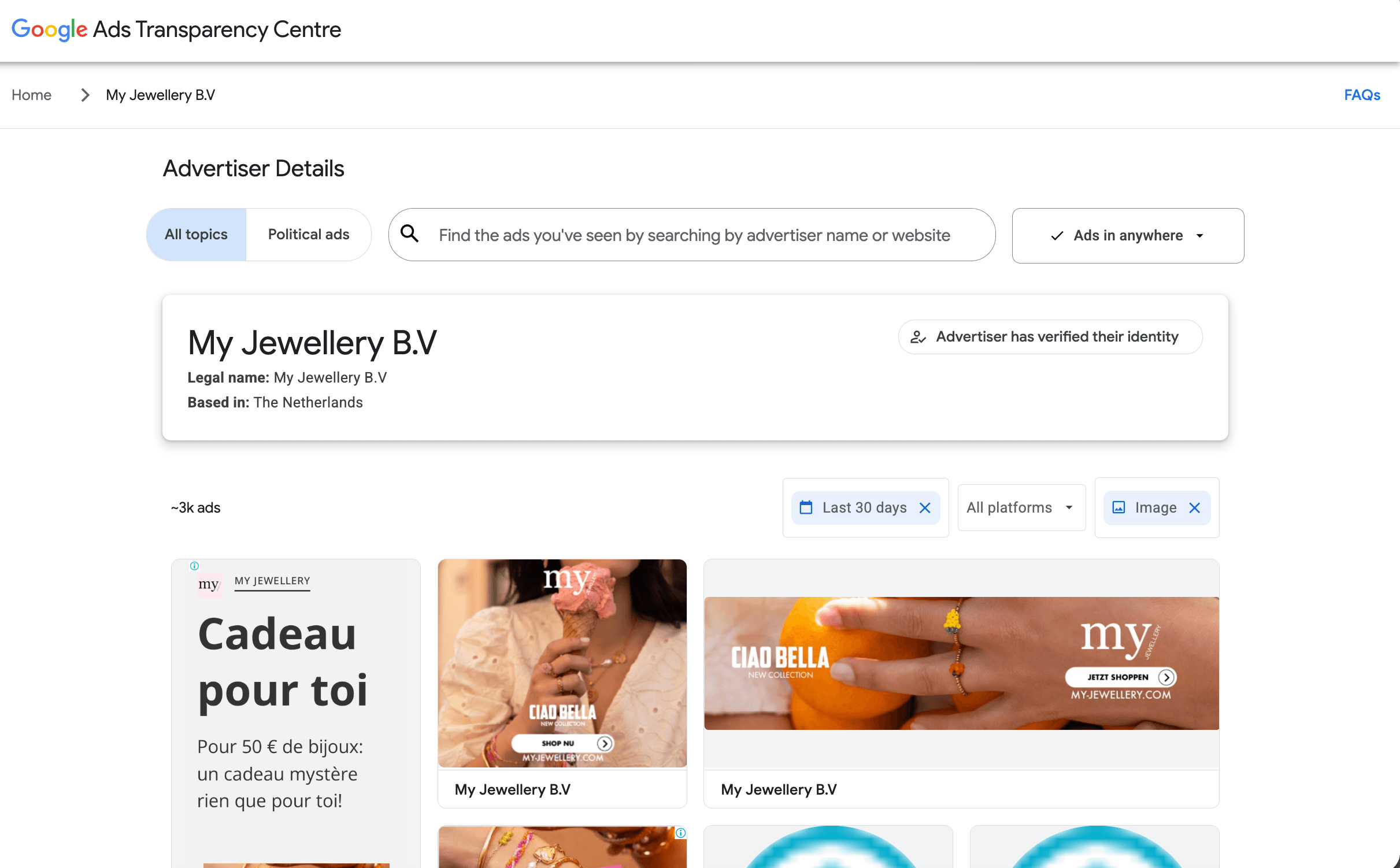
Here's the output shape for one IMAGE creative (real Actor output, shortened):
{
  "creativeId": "CR18363621621714911233",
  "advertiserId": "AR10303883279069085697",
  "advertiserName": "My Jewellery B.V",
  "format": "IMAGE",
  "url": "<https://adstransparency.google.com/advertiser/AR10303883279069085697/creative/CR18363621621714911233?region=anywhere>",
  "previewUrl": "<https://tpc.googlesyndication.com/archive/simgad/7568045751646301385>",
  "firstShownAt": "1779428243",
  "lastShownAt": "1779876885",
  "shownCountries": ["France"],
  "countryStats": [
    {
      "code": "FR",
      "name": "France",
      "firstShownAt": "2026-05-22T00:00:00.000Z",
      "lastShownAt": "2026-05-27T00:00:00.000Z",
      "impressions": { "lowerBound": null, "upperBound": null },
      "platformStats": []
    }
  ],
  "audienceSelections": [
    { "name": "Demographic info", "hasIncludedCriteria": true, "hasExcludedCriteria": true },
    { "name": "Geographic locations", "hasIncludedCriteria": true, "hasExcludedCriteria": true }
  ],
  "variants": [
    {
      "textContent": "",
      "images": ["<https://tpc.googlesyndication.com/archive/simgad/7568045751646301385>"]
    }
  ]
}
The output fields you'll use:
creativeId,advertiserName,format(TEXT/IMAGE/VIDEO)firstShownAt/lastShownAt- unix timestamps as strings, not ISO dates. Convert them withint()anddatetime.fromtimestamp()before you compare.countryStats[]- per-countryimpressions.lowerBound/upperBoundbands, split further byplatformStats[](Search, YouTube, Shopping, Display).variants[].textContentandvariants[].images[]- the actual creative.audienceSelections[]- targeting categories like "Demographic info" and "Geographic locations". This is EEA-only, and it needs logged-in cookies in thecookiesarray to show the full values. Without cookies, you see only the category names, with thehasIncludedCriteria/hasExcludedCriteriabooleans, but not the real targeting values.
If you want the media files saved to your run's Key-Value Store, set downloadMedia: true. The Actor then adds previewStoreKey and imageStoreKeys[], so you can fetch the binary files later with the Apify client.
If you want to go wider on Google, the Apify guide on Google Ads competitor analysis is worth a look.
Step 3 - scrape TikTok ads
Give the coregent/tiktok-ads-library-creative-center-scraper Actor a search term (or a TikTok Ad Library URL), and it returns top TikTok ads from both the EU Commercial Content Library (library.tiktok.com) and the global Creative Center. It also includes TikTok's own "top creative" signals (CTR ranking, position, isTopCreative). A simple rule: use the Creative Center for trend inspiration, and the EU Commercial Content Library to track competitors you already know. Note that TikTok is the newest of these 4 legs, and there's no official Apify Actor for it yet, so this step uses a community-built one. It needs a little more maintenance than the others, so watch its row counts and keep a manual fallback for it. Before you wire it into a daily schedule, check the Actor's reviews and Issues tab.
The input is filter-based, with search terms, countries, industries, ad formats, and a mode array:
{
  "mode": ["adsLibrary", "creativeCenter"],
  "searchTerms": ["sneakers"],
  "countries": ["US", "GB"],
  "industries": ["Apparel & Accessories"],
  "objectives": ["Conversions"],
  "adFormats": ["Video"],
  "maxResults": 200,
  "includeCreativeAnalysis": true,
  "includeLandingPageFields": true,
  "deduplicateAds": true,
  "proxyConfiguration": { "useApifyProxy": true }
}
The mode field is an array. You can set it to ["adsLibrary"], ["creativeCenter"], or both. If you want to search by an Ad Library URL directly, instead of filters, replace the filter fields with adLibraryUrls: ["<https://library.tiktok.com/ads?region=US&adv_name=Nike>"].
The Creative Center Top Ads Dashboard is where TikTok publishes its own ranked view of high-performing ads. This is exactly what the Actor's creativeCenter mode reads from:
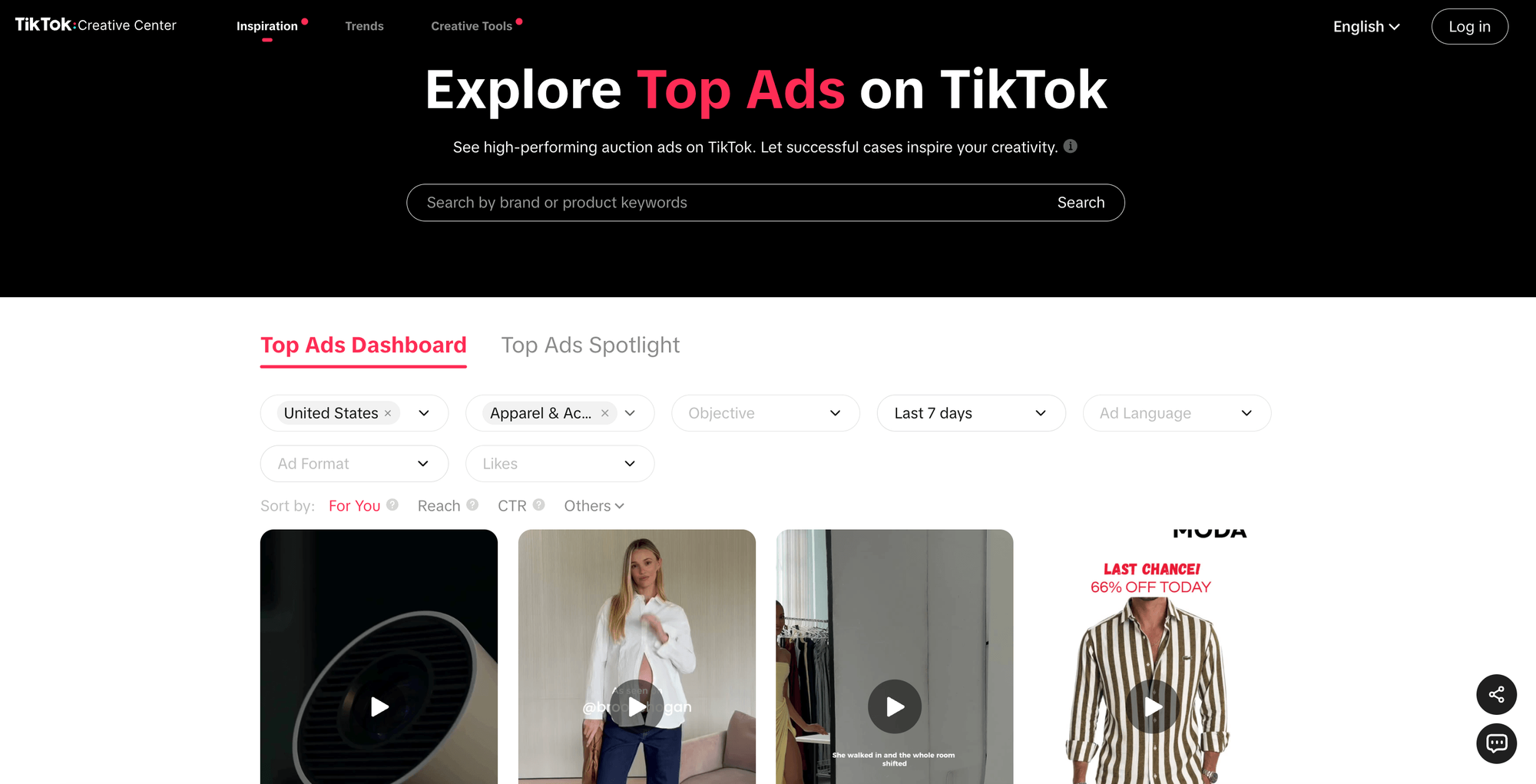
Here's the output shape for one Creative Center ad (real Actor output, shortened):
{
  "sourceSurface": "creativeCenter",
  "sourceInputType": "filters",
  "sourceSearchTerms": ["sneakers"],
  "sourceCountries": ["US"],
  "scrapedAt": "2026-05-27T12:08:33.651Z",
  "adId": "7639820113639129096",
  "caption": "Every $1 spent earns you 1X entries to win our fully custom GMC or $30,000 cash giveaway.",
  "adFormat": "Video",
  "industry": "label_24112000000",
  "videoThumbnailUrl": "<https://p16-common-sign.tiktokcdn.com/>...",
  "ctrRanking": "0.21",
  "isTopCreative": true,
  "position": 1,
  "advertiserName": null,
  "brandName": null,
  "impressions": null, "likes": null, "comments": null, "shares": null,
  "startDate": null, "endDate": null
}
A note about the 2 modes. Creative Center returns thin metadata: advertiser name, dates, and most engagement numbers come back null, because TikTok doesn't expose them on that surface. In return, you get the ctrRanking / isTopCreative / position signals (what TikTok's algorithm considers a top creative right now). This is the main reason competitor research teams use Creative Center. Search behaves loosely on this surface: because TikTok ranks by what's trending, searchTerms and industries act as hints, not hard filters. The sample above is a giveaway ad, not footwear, even though the search was for sneakers under Apparel & Accessories. So narrow the results in your own code if you need a clean category.
Ads Library mode (EEA-only) returns the richer advertiser, date, and spend metadata, but covers fewer countries. Run both modes if you want the full picture, then dedupe by adId.
The fields each item has (most can be null, depending on the mode): adId, advertiserName, brandName, caption, adFormat, videoThumbnailUrl, plus optional engagement metrics (likes, comments, shares, ctrRanking) where TikTok exposes them publicly. Each item also has a sourceSurface field, so you can tell whether a row came from Ads Library or Creative Center.
A few limitations, taken from the Actor's own README: the creative-analysis fields are "derived heuristics, not official TikTok data", the metrics are "approximations based on publicly visible data", and "TikTok may change page structure or API responses at any time". So plan for some run failures and re-runs.
For a broader TikTok walkthrough, see the Apify guide on how to scrape data from TikTok.
Step 4 - schedule the runs
Now that the scrapers are chosen, the next job is to make them run on their own, every day, without you touching anything.
One detail worth knowing first: you can schedule a raw Actor directly, but the cleaner pattern is to save a task (an Actor and an input, saved together) and schedule that. The flow is this:
- Open the Actor page in Apify Console (for example,
apify/facebook-ads-scraper). - Paste your input JSON → click Save as a new task → give it a clear name.
- Console sidebar → Schedules → Create new schedule → cron
0 6 * * *→ attach the Task you just saved.
Here is that task in Apify Console, with its input shown as JSON:
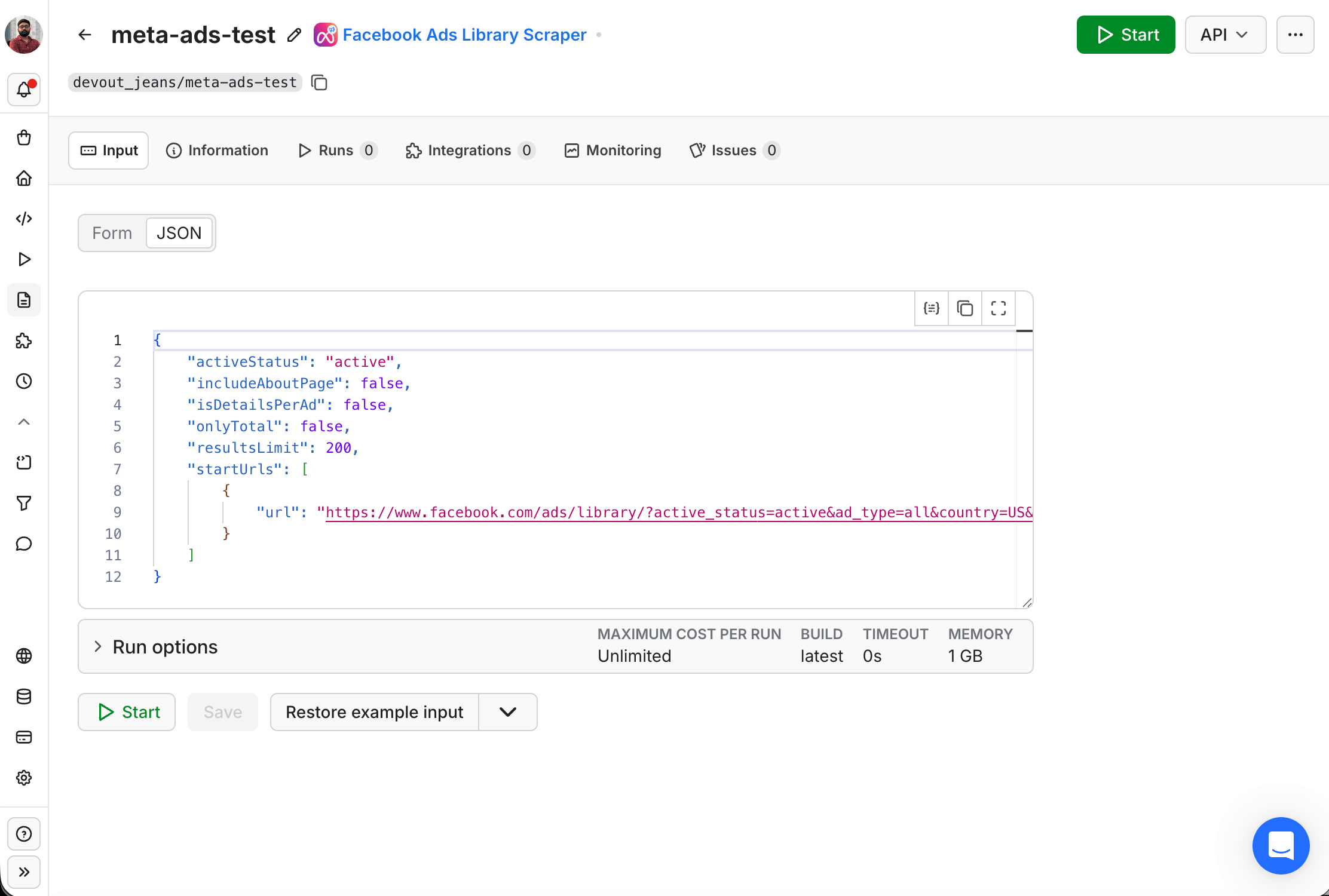
One schedule can run up to 10 tasks at once, with per-run input overrides. So instead of 15 separate schedules (3 platforms × 5 competitors), you can have one morning-competitor-sweep schedule that runs the Meta, Google, and TikTok Tasks for all your competitors in parallel. Use the input overrides to pass the per-competitor view_all_page_id or searchQuery at schedule time, not at task time.
Once it's wired up, a scheduled task looks like this in Console, with the cron at the top and the task you run in the "Actors and tasks" section below:
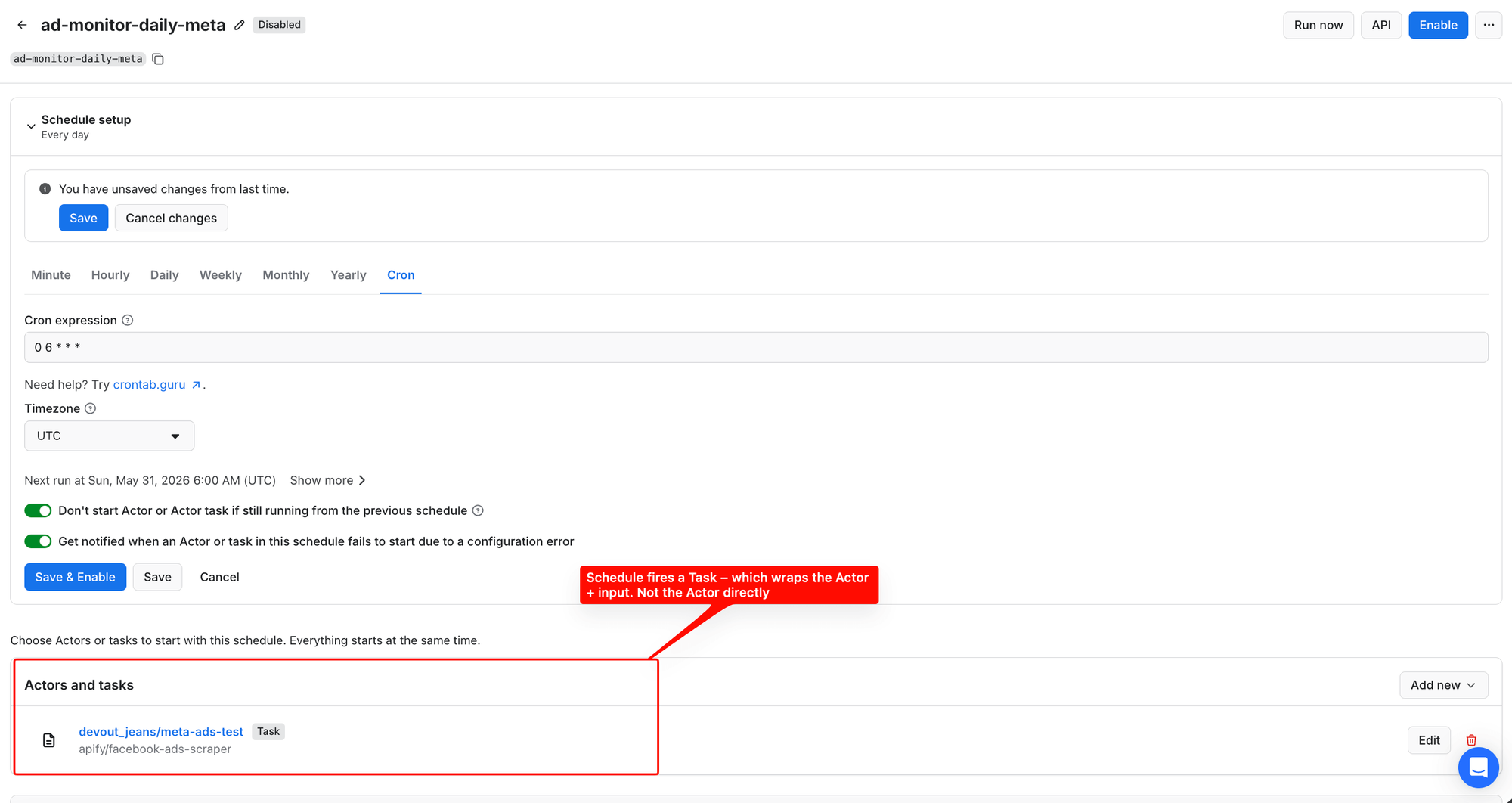
Each scheduled run writes to its own dataset, which the pull script in Step 5 reads via client.actor(...).runs().list(limit=1, desc=True).
Why use Apify Schedules instead of your own cron job? No infra to maintain, the runs keep working when your laptop is offline, and you get a run history in Console. You set it once, and it runs on its own from then on.
The order doesn't matter much here. Scheduling is independent of the consumer code, so you can set it up now (the scrapers collect data while you build) or later. The next steps assume the scrapers are already producing runs.
Step 5 - pull, normalize, dedup
The dataset viewer in Apify Console shows you exactly what the Actor returned, before you write a line of Python. You get 3 Nike ads, with columns mapped to API field names (pageInfo.page.name, snapshot.title, isActive, spend, reachEstimate, and more). The "30 hidden fields" hint reminds you there's much more data available through iterate_items():
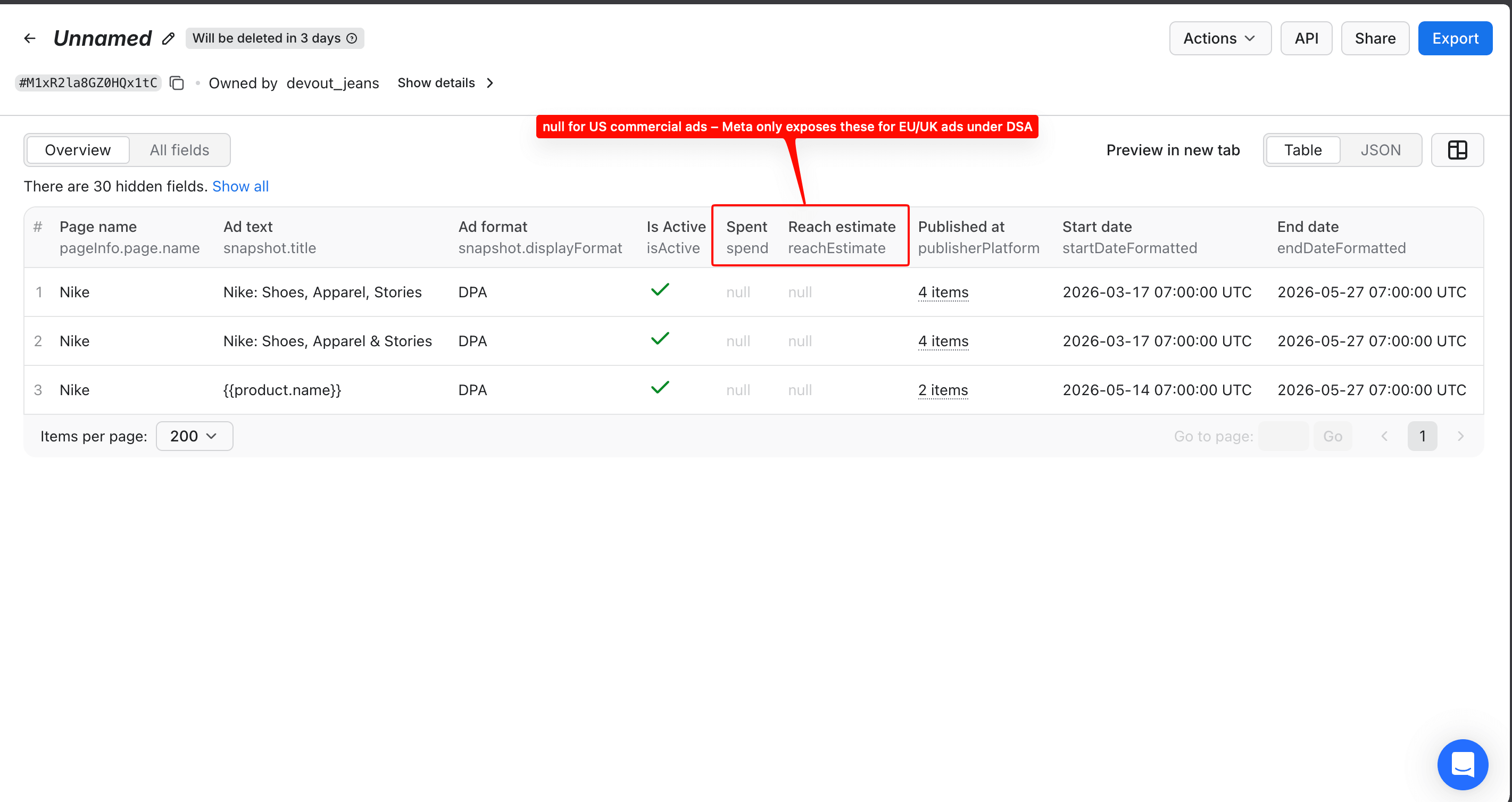
Now, in code, you pull the latest run from each Actor, normalize the 3 sources into one shared shape, and dedup into SQLite. The normalize step is the one piece worth getting right: the 3 platforms return 3 completely different JSON shapes, so the same field sits under a different key on each. Read the wrong key and that field comes back empty on the first run. That's why the normalize() function below maps all 3 for you. Here's the full pull → normalize → dedup script:
import os, sqlite3
from datetime import datetime, timezone
from apify_client import ApifyClient

client = ApifyClient(os.environ["APIFY_TOKEN"])

def latest_run_items(actor_id: str):
    # Most recent finished run for this Actor
    run = next(iter(
        client.actor(actor_id).runs().list(limit=1, desc=True).items
    ))
    return list(client.dataset(run["defaultDatasetId"]).iterate_items())

meta_ads   = latest_run_items("apify/facebook-ads-scraper")
google_ads = latest_run_items("lexis-solutions/google-ads-scraper")
tiktok_ads = latest_run_items("coregent/tiktok-ads-library-creative-center-scraper")

def meta_image_url(snap):
    """Meta stores images in 3 places depending on ad format."""
    for img in (snap.get("images") or []):
        if isinstance(img, dict):
            url = img.get("originalImageUrl") or img.get("resizedImageUrl")
            if url:
                return url
        elif isinstance(img, str):
            return img
    for card in (snap.get("cards") or []):
        url = card.get("originalImageUrl") or card.get("videoPreviewImageUrl")
        if url:
            return url
    for vid in (snap.get("videos") or []):
        url = vid.get("videoPreviewImageUrl")
        if url:
            return url
    return None

def normalize(ad, source):
    if source == "meta":
        snap = ad.get("snapshot") or {}
        return {
            "id":         ad["adArchiveID"],
            "src":        "meta",
            "advertiser": ad["pageName"],
            "body":       (snap.get("body") or {}).get("text", ""),
            "first_seen": ad["startDateFormatted"],
            "url":        f"<https://www.facebook.com/ads/library/?id={ad['adArchiveID']}>",
            "image_url":  meta_image_url(snap),
        }
    if source == "google":
        variant = (ad.get("variants") or [{}])[0]
        first_seen = datetime.fromtimestamp(
            int(ad["firstShownAt"]), tz=timezone.utc
        ).isoformat()
        v_images = variant.get("images") or []
        return {
            "id":         ad["creativeId"],
            "src":        "google",
            "advertiser": ad["advertiserName"],
            "body":       variant.get("textContent", ""),
            "first_seen": first_seen,
            "url":        ad["url"],
            "image_url":  v_images[0] if v_images else None,
        }
    if source == "tiktok":
        return {
            "id":         ad["adId"],
            "src":        "tiktok",
            "advertiser": ad.get("advertiserName") or ad.get("brandName") or "",
            "body":       ad.get("caption") or "",
            "first_seen": ad.get("startDate") or ad.get("scrapedAt"),
            "url":        ad.get("adUrl") or ad.get("landingPageUrl") or "",
            "image_url":  ad.get("videoThumbnailUrl"),
        }

rows = (
    [normalize(a, "meta")   for a in meta_ads]
    + [normalize(a, "google") for a in google_ads]
    + [normalize(a, "tiktok") for a in tiktok_ads]
)

db = sqlite3.connect("ads.db")
db.execute("""CREATE TABLE IF NOT EXISTS ads (
    id TEXT, src TEXT, advertiser TEXT, body TEXT,
    first_seen TEXT, url TEXT, image_url TEXT, captured_at TEXT,
    PRIMARY KEY (id, src))""")
for r in rows:
    db.execute("""INSERT OR IGNORE INTO ads
        VALUES (?, ?, ?, ?, ?, ?, ?, datetime('now'))""",
        (r["id"], r["src"], r["advertiser"], r["body"],
         r["first_seen"], r["url"], r["image_url"]))
db.commit()
Save this as pipeline.py. The scheduled runs feed it, and the rest of this article uses that name. A few notes on the code above:
- The code uses
iterate_items()instead oflist_items().items, because the iterator streams pages. So you don't run out of memory on a large dataset. normalize()gives every source the same shape, including animage_urlfield that the LLM step needs. The Meta helper checks all 3 image locations, because most e-commerce ads are carousels (snapshot.cards[]), not single-image (snapshot.images[]). If you run the Actor against a known brand like Nike or SHEIN, you get mostly carousel ads. Google stores images undervariants[0].images[]as plain URL strings. TikTok usesvideoThumbnailUrl. Check your actual dataset once before you rely on any of these, because schemas drift.- Google's
firstShownAtis a unix-timestamp string, not ISO. So the code converts it before storing. INSERT OR IGNOREon the(id, src)composite primary key gives you idempotent dedup for free. If you re-run yesterday's data, it becomes a no-op.
Cross-platform content dedup. The (id, src) primary key catches re-fetched duplicates from the same source. But it doesn't catch the same creative that runs on Meta and TikTok under different IDs. If you need that, add a content_hash column (a perceptual hash of the image, plus a normalized hash of the body text) and dedup on (content_hash, advertiser) instead. This catches reposts and cross-platform re-runs.
In production, replace SQLite with Postgres. The schema is the same.
Step 6 - diff and alert
The diff is one query for what arrived in the last day, sent straight to a webhook:
import requests

new_today = db.execute("""
    SELECT advertiser, src, body, url
    FROM ads
    WHERE captured_at >= datetime('now','-1 day')
      AND first_seen  >= date('now','-2 day')
""").fetchall()

for advertiser, src, body, url in new_today:
    requests.post(os.environ["SLACK_WEBHOOK"], json={
        "text": f"*New {src} ad from {advertiser}*\\n>{body[:200]}\\n<{url}|Open>"
    })
That's the whole alerting layer: 8 lines and 1 webhook. Here's what it looks like in Slack: 3 real Nike ads and 1 TikTok ad, sent by the script above, posting as an "Ad Monitor" incoming webhook:
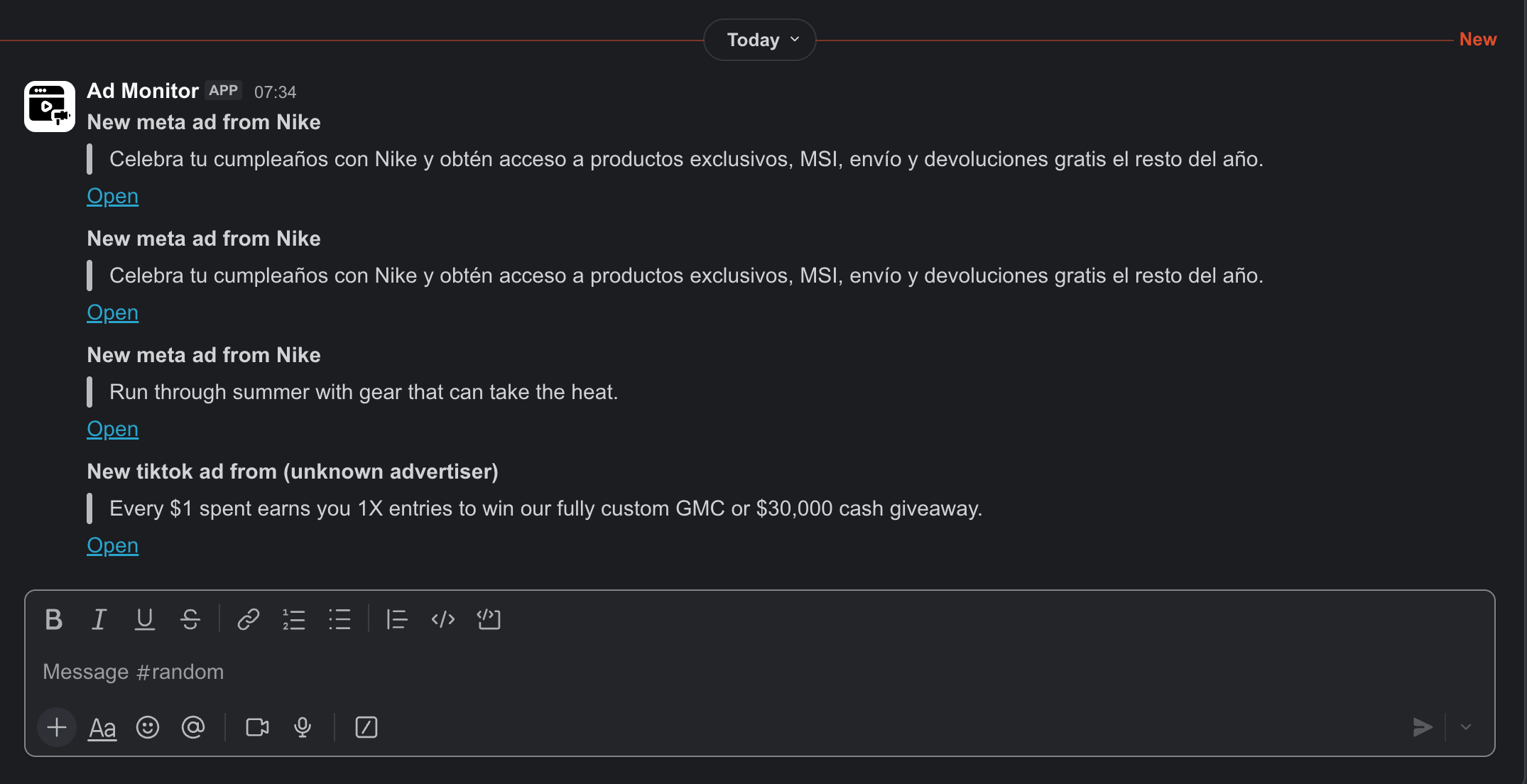
The "(unknown advertiser)" on the TikTok line is honest behavior: Creative Center doesn't expose advertiser names, as we noted in Step 3. If a competitor posts 20 creatives in a single day, you get 20 messages. So add a LIMIT 10 to the SQL, and a one-line summary message, if you want to keep the volume low.
Don't want Slack? Every Apify dataset has direct export URLs for JSON, CSV, XLSX, XML, HTML, and RSS. RSS is the useful one here. Point your Feedly or Slack RSS app at https://api.apify.com/v2/datasets/<DATASET_ID>/items?format=rss&clean=true, and you get a per-Actor competitor-ad feed with no alerting code at all. It's useful as a backup channel, even if you already use Slack.
Step 7 - tag creatives with an LLM
This step is optional for the basic pipeline, but it's where the AI-builder use case is most valuable. Once the raw ads are in your DB, you can enrich them with anything: a vision model that tags creative themes, an LLM that classifies offer types, an embedding model for visual clustering. Send each new ad through Claude to get back structured tags:
import anthropic

llm = anthropic.Anthropic()

def tag_ad(ad):
    content = [
        {"type": "text",
         "text": f"Ad copy: {ad['body']}\\n\\n"
                 "Return JSON only: {theme, offer_type, hook, sentiment}"}
    ]
    if ad.get("image_url"):
        content.insert(0, {
            "type": "image",
            "source": {"type": "url", "url": ad["image_url"]},
        })
    resp = llm.messages.create(
        model="claude-sonnet-4-6",
        max_tokens=300,
        messages=[{"role": "user", "content": content}],
    )
    return resp.content[0].text
Claude returns something like this:
{
  "theme": "Birthday membership perks",
  "offer_type": "Exclusive products + interest-free installments + free shipping and returns for the rest of the year",
  "hook": "Celebrate your birthday with Nike",
  "sentiment": "celebratory, aspirational"
}
Here it is, running against the same Nike ad in claude.ai. You can see the full flow from start to finish: image and ad copy go in, structured JSON comes out:
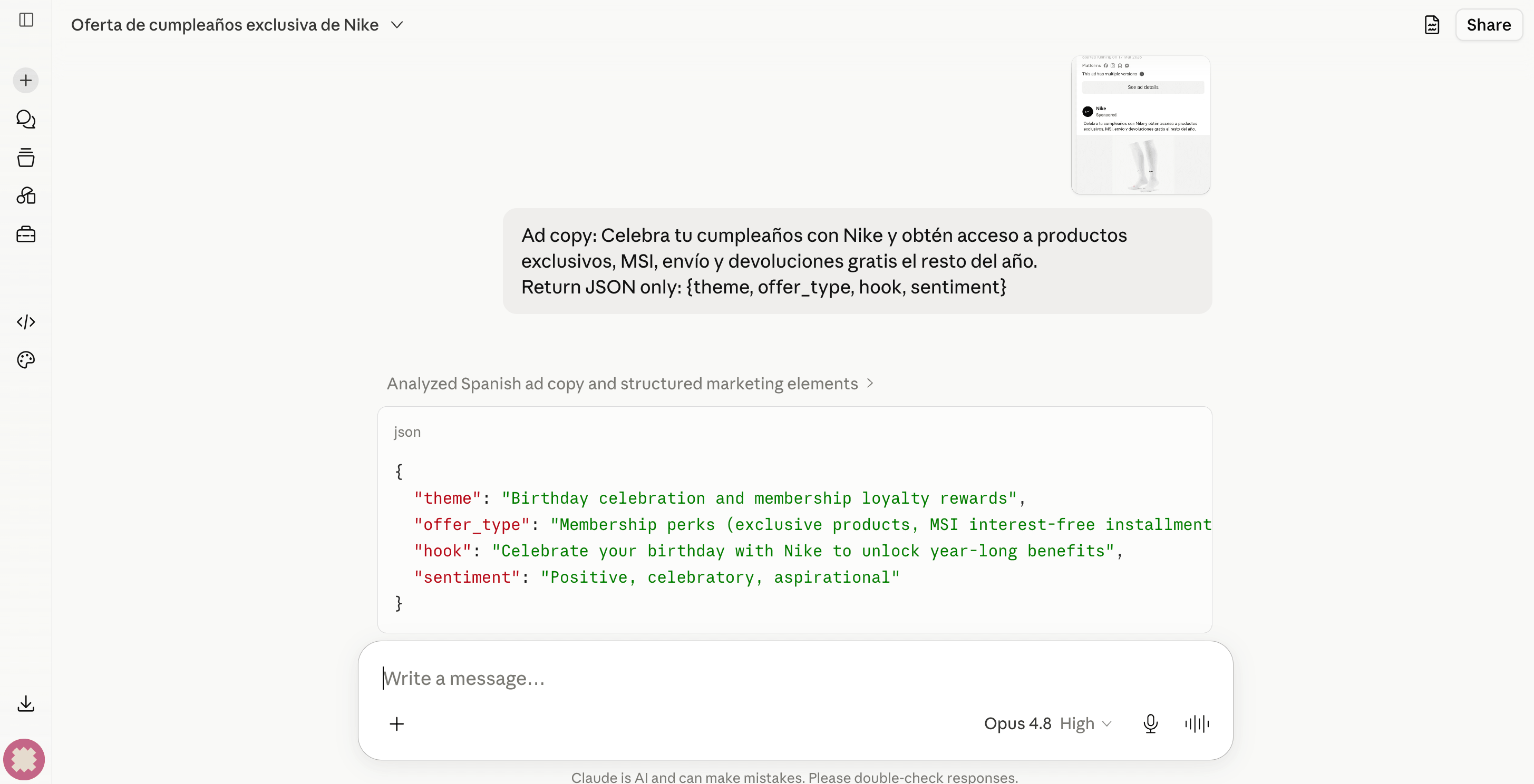
Write that JSON back into a tags column on your ads table. Now you can ask something like "show me every discount-driven creative from Brand X in the last 90 days" and get the answer directly in SQL. Point an agent at the same table, and those tags become structured context that it can query: the "competitor creative as live context for an agent" idea, now real.
What this costs
Take 5 competitors across 4 platforms, refreshed daily, and assume ~50 active ads per competitor per platform on the days they're active. That gives you ~6,000 ads per platform per month.
Treat these as illustrative, not a quote. Ad volume per competitor runs anywhere from 5 to 500+, so the only honest estimate is one you measure. Run the pipeline for 7 days against a single competitor, on Meta only, count your real rows per day, and extrapolate. A typical 5-competitor setup comes to about $50-80/month. A quiet niche competitor can bring it near $30, while a brand running 500+ live creatives can push it past $150. And a daily run is often more than you need. Weekly is usually fine.
| Platform | Actor | Volume / mo | Rate (Starter plan) | Cost / mo |
|---|---|---|---|---|
| Meta | apify/facebook-ads-scraper |
~6,000 ads | $5.00 / 1k | ~$30 |
| Google ATC | lexis-solutions/google-ads-scraper |
~6,000 ads | $1.60 / 1k | ~$10 |
| TikTok | coregent/tiktok-ads-library-... |
~6,000 ads | $3.60 / 1k | ~$22 |
automation-lab/linkedin-ad-library-scraper |
~1,400 ads (24 cap × fan-out) | ~$0.001 / event | ~$2 | |
| Actor usage subtotal | ~$64 | |||
| LLM tagging (optional, Step 7) | Anthropic Claude Sonnet | ~6,000 ads tagged | ~$0.003/ad | ~$18 |
| LLM tagging with Haiku instead | Anthropic Claude Haiku | ~6,000 ads tagged | ~$0.0005/ad | ~$3 |
| Apify Starter plan ($29 base + $29 prepaid usage credit) | $29 base; first $29 of usage absorbed | |||
| Effective monthly total (without LLM tagging) | ~$64 | |||
| Effective monthly total (with Sonnet tagging) | ~$82 |
LinkedIn is the optional fourth platform here: the prose-only add-on from Step 3, not part of the core pipeline.py. If you leave it out, the Actor subtotal drops to ~$62.
Two cheaper paths are worth knowing:
- The Free plan ($0/mo, $5 prepaid) is fine if you test the pipeline against 1 or 2 competitors, weekly, on Meta and Google only. Beyond that, you use up the $5 credit in a day, and then you pay per-Actor rates on top.
- If Meta is your biggest cost line, replace the official
apify/facebook-ads-scraperwith the communitycurious_coder/facebook-ads-library-scraperat $0.75/1k (vs. $5/1k on Starter). That drops the Meta line from ~$30 to ~$5. Read the reviews before you commit. It uses a different schema and, as a community Actor, is maintained by its author rather than backed by official Apify support.
Either way, compare this to Adbeat at ~$249/mo, plus Madgicx (priced on your monthly ad spend), plus a TikTok-specific tool (competitor pricing as of 2026, so check current rates). At this scale, the DIY pipeline costs roughly 15-25% of that bundle. Past ~20 competitors or an hourly run, the volume climbs enough that you would move to Apify's Scale or Business tiers, which lower the per-ad rate. So re-run the math there before you assume a flat-rate SaaS wins.
When things break (and how to recover)
Production pipelines break. Plan for it before the first scheduled run.
Actor run failures. An Actor can fail because of a platform change (Meta changes the Ad Library DOM), a rate limit upstream, or an unreliable proxy. Apify gives you 6 different run events that you can hook into: CREATED, SUCCEEDED, FAILED, ABORTED, TIMED_OUT, and RESURRECTED. The 2 that matter most for ad monitoring are FAILED (something broke) and TIMED_OUT (the run reached its time limit before it finished, which is common on big Meta scrapes). Treat them separately: failures need investigation, while timeouts often only need a longer timeout or a smaller resultsLimit.
Attach a run-finished webhook to each task in Apify Console (Console → your Task → Integrations → Webhooks). Point it at a Slack channel or a /pipeline-alerts endpoint on your own server. Branch on the eventType field in the payload.
Run resurrection - the cost-saving trick. When a Meta scrape times out at row 8,000 of 10,000 under pay-per-result, you don't want to restart the whole run and pay twice. Apify lets you resurrect the finished or failed run, with the same storage and a reset timeout:
client.run(run_id).resurrect(timeout_secs=3600)
This continues from where the run stopped, charges only for the remaining items, and writes to the original dataset. Use it from your failure-webhook handler before you decide to alert a human.
Apify-native monitoring is worth a look before you build a custom row-count check. Console → your Actor → Monitoring lets you set thresholds on 25+ metrics: Actor status (success or failure rate), unusual run duration, number of results, dataset field fill-rate, compute units, even cost per result. It's free, needs no code, and the alerts go to email, Slack, or Console. The SQL check below is still useful for cross-platform logic that Apify can't see, but try Monitoring first.
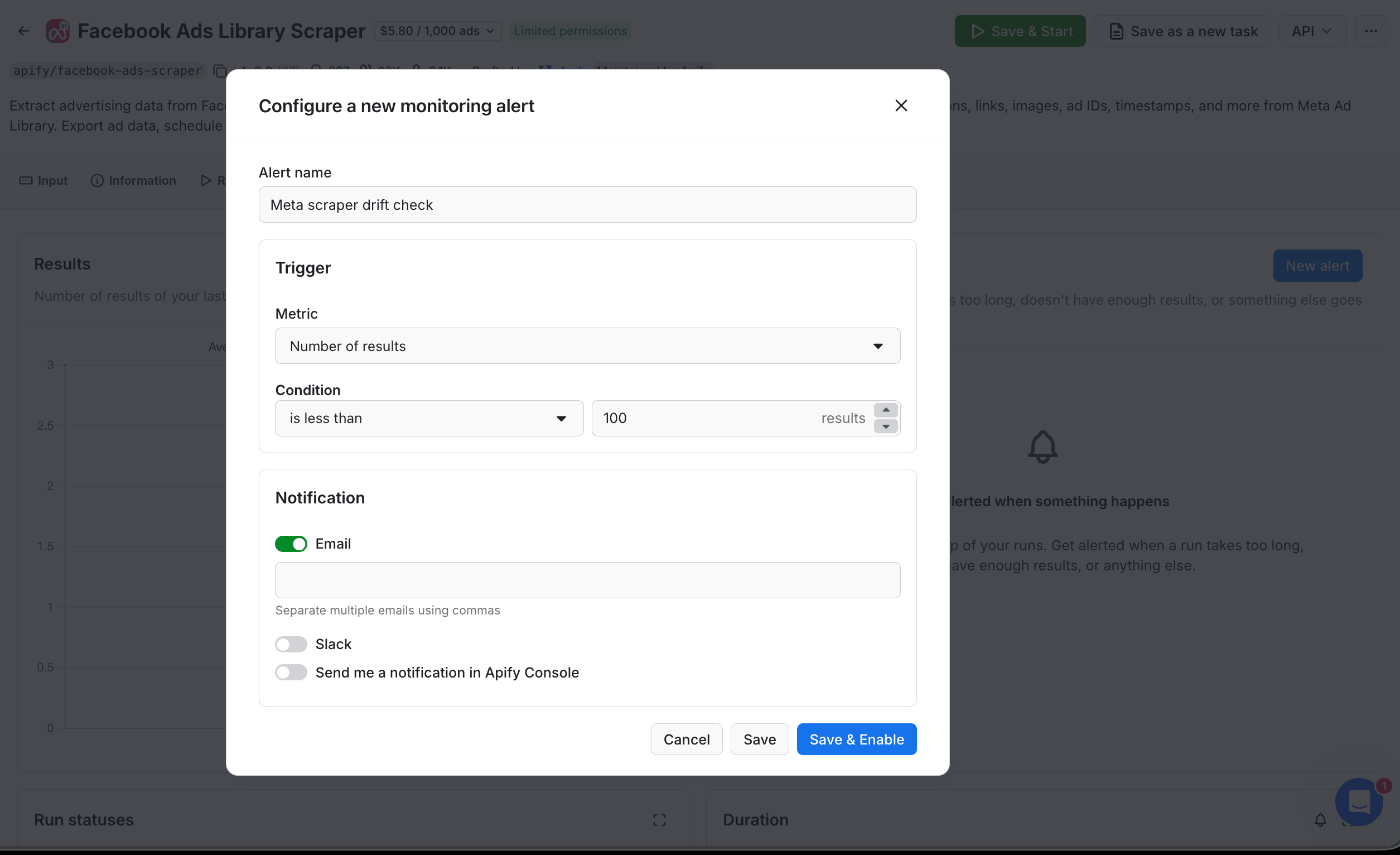
(The Email field below the toggle accepts comma-separated addresses. Leave it empty to use the account owner's email by default.)
The metrics you can set alerts on go well beyond run status: Dataset field stats (for example, "alert if image_url is null on more than 20% of new rows"), Cost per result, and more.
Schema drift. Actors get updated. A field you depended on (snapshot.body.text) can move to (snapshot.body.markdown). The cheapest defense: after every nightly pipeline.py run, count today's rows per source, and alert if the count is less than half of the previous 7-day daily average. This catches most schema breakage within 24 hours. Here's the check:
# Drop-in check after pipeline.py completes
drift = db.execute("""
    WITH today AS (
        SELECT src, COUNT(*) c FROM ads
        WHERE date(captured_at) = date('now')
        GROUP BY src
    ),
    prev7 AS (
        SELECT src, COUNT(*) / 7.0 c FROM ads
        WHERE date(captured_at) BETWEEN date('now','-7 day') AND date('now','-1 day')
        GROUP BY src
    )
    SELECT today.src, today.c AS today_count,
           ROUND(prev7.c, 1) AS prev_7day_avg
    FROM today JOIN prev7 USING (src)
    WHERE today.c < prev7.c * 0.5
""").fetchall()
# If `drift` is non-empty, post a "row count dropped" alert to Slack.
Image URLs expire. Facebook's scontent-*.fbcdn.net URLs are signed and short-lived (often less than 24 hours). If you store the URL and try to load it days later (or pass it to Claude for tagging the next morning), you get a 403. Fix: either download the image to your own storage (Apify Key-Value Store, S3) when you first read it, or run the LLM tagging step only on the same day the ad is captured.
TikTok shifts the most. Of the 4 platforms, TikTok reshapes the internal JSON of its Creative Center most often, so this is the leg most likely to need a maintainer re-deploy. If the Actor returns zero rows for 2 days in a row, check the Apify Issues tab on the Actor's page, where the maintainer posts any fix or workaround. Keep a tiktok_last_success_at timestamp. If it's more than 72 hours old, fall back to a manual check on the Creative Center until the fix is out.
Apify Free plan runs out of credit mid-run. When the $5 Free credit is used up, the Actor stops with a LIMIT_REACHED status. Upgrade to Starter ($29 + $29 prepaid), or slow down your test runs.
When you shouldn't build this
Not every team should build it. Here are a few cases where SaaS makes more sense:
- Either Build vs. buy answer points to "buy". You have no Python owner for the hour-a-month of maintenance, or you have a firm need for modeled spend (which the public libraries don't expose, so scraping can't rebuild it).
- You need attribution back to your own conversions. That's a different category (Voluum, Hyros, Triple Whale).
- Your legal team has a strict no-scrape policy. Even where scraping is legal, some organizations won't do it. Respect that decision.
Going further
If you did build it, here are a few ways to extend the pipeline once it's running:
- Automate runs from your own backend with
client.actor(...).start()instead of Schedules, as often as your product needs. - Send datasets directly into your warehouse. Apify has native push integrations for Airtable, Google Drive (auto-upload on success), Keboola, Airbyte (for BigQuery, Snowflake, Redshift), Pinecone, and Qdrant (the last 2 if you embed creatives for visual similarity). Console → your Task → Integrations.
- Turn the pipeline into a real-time API with Standby Actors. Put any of the Actors in Standby mode, and Apify gives you a persistent HTTP endpoint instead of a cold start on every run. This is good for a Slack bot or a dashboard that needs a sub-second answer.
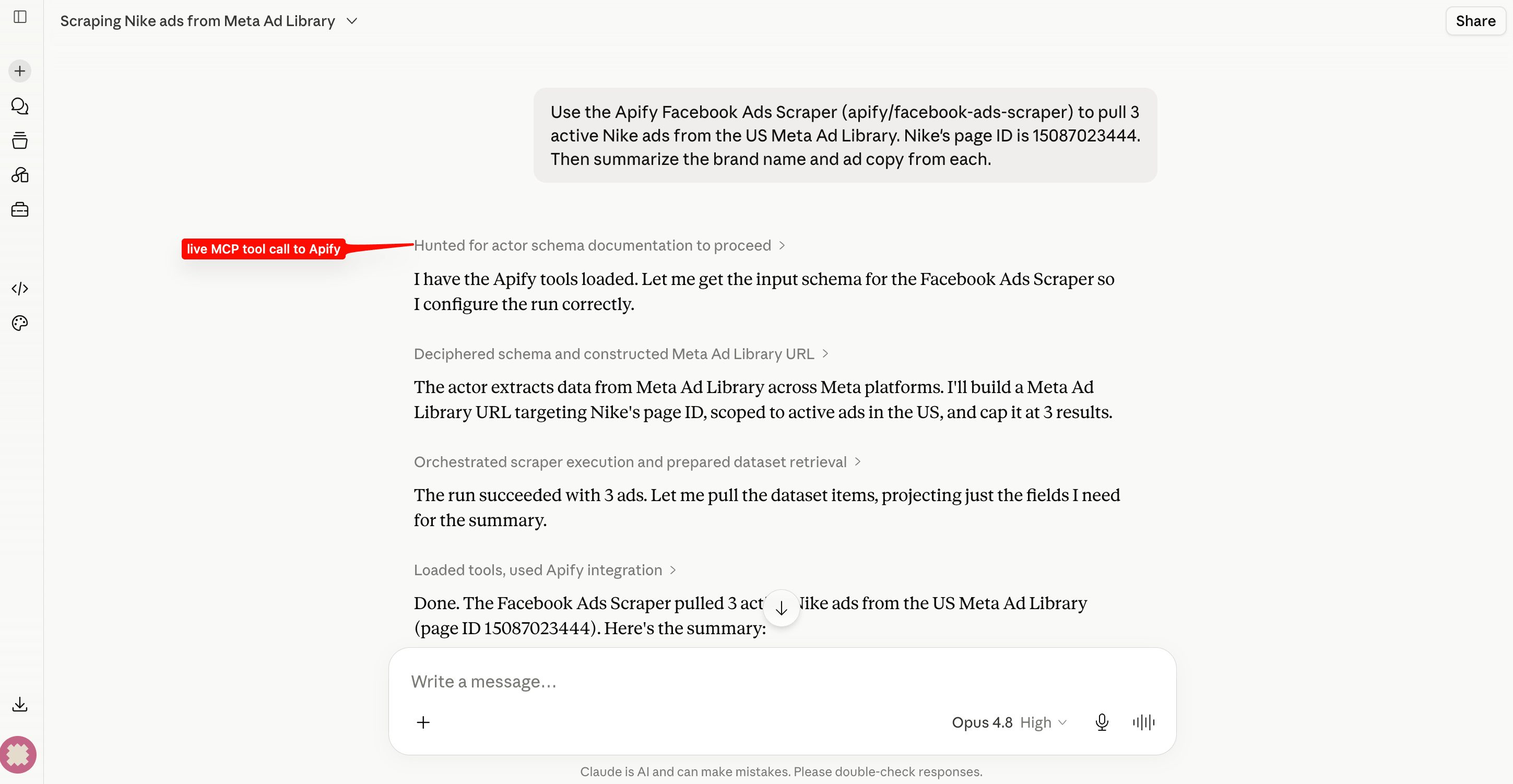
- Use the Apify MCP server at
https://mcp.apify.com. Connect it from Claude Desktop with OAuth (no token to paste). Claude can then run any of your tasks and query their datasets in plain English. Ask "pull 3 active Nike ads from the US Meta Ad Library", and Claude runs the whole loop itself, with no glue code and no scheduled runs.
- Replace the Python glue with Actor-to-Actor integration for the no-code version. Each Actor's Integrations tab has a "Connect Actor or task" option. Run a normalizer Actor on each scraper's success, and
{{resource.defaultDatasetId}}is passed automatically. You trade flexibility for simplicity. - Reach for Make, Zapier, or n8n if you'd rather not write code. Apify has native integrations for all three, so a non-engineer can trigger the scrapers and route results to Slack or a Google Sheet. The dedup is still easier to keep in code.
Whichever way you extend it, the core stays the same: a pipeline you own, on your data and your schedule, at a small part of the SaaS price. Start with Facebook Ads Library Scraper on the free tier, add Google Ads Scraper and a Tiktok Ads Library Creative Center Scraper, and you'll be diffing competitor creatives in Slack within a day or so. These 4 Actors are a small slice of the Apify marketplace. To go deeper on Meta, the Apify post track competitor ads and prices on Meta is a good next read.

FAQ
Is it legal to scrape public ad libraries?
Yes, as long as you adhere to regulations concerning copyright and personal data. Personal data is protected by GDPR (EU Regulation 2016/679), and by other regulations around the world. You should not scrape personal data unless you have a legitimate reason to do so. If you're unsure whether your reason is legitimate, please consult your lawyers. You can also read our blog post on the legality of web scraping
How often should I run it?
Daily is enough for most competitor tracking. Hourly is too much, unless you're tracking a specific live launch. Weekly is fine if you mostly archive for historical analysis.
Will scraping get me banned, or do I need to log in?
These ad libraries are public, so you scrape them logged-out. There's no account to ban, and logged-out access is also what keeps it legally safer. Apify Proxy rotates IPs, which helps with IP-level blocks. Google's deeper targeting fields need logged-in cookies, which is optional and higher-risk.
What's the cheapest way to start?
Start with the Apify Free plan ($0/mo, $5 prepaid credit). Run Facebook Ads Library Scraper against a single competitor, look at the dataset, and decide if the data shape works for you. Then scale up from there.