LLM brand visibility is how often, how prominently, and how favorably AI engines like ChatGPT, Perplexity, and Gemini name your brand on the questions you should win. In 2026, AI is increasingly where buying journeys start: G2's 2026 Answer Economy report found 51% of B2B software buyers now begin research with an AI chatbot more often than with Google. But there's no Search Console for AI, so most brands have no clear view of where they stand. Run a manual check, and you'll get a different answer every time you refresh.
This guide gives you a repeatable way to measure LLM brand visibility with real numbers - across every major engine, with the raw data in your hands, not locked in someone else's dashboard. No black-box score. Just a pipeline you own.
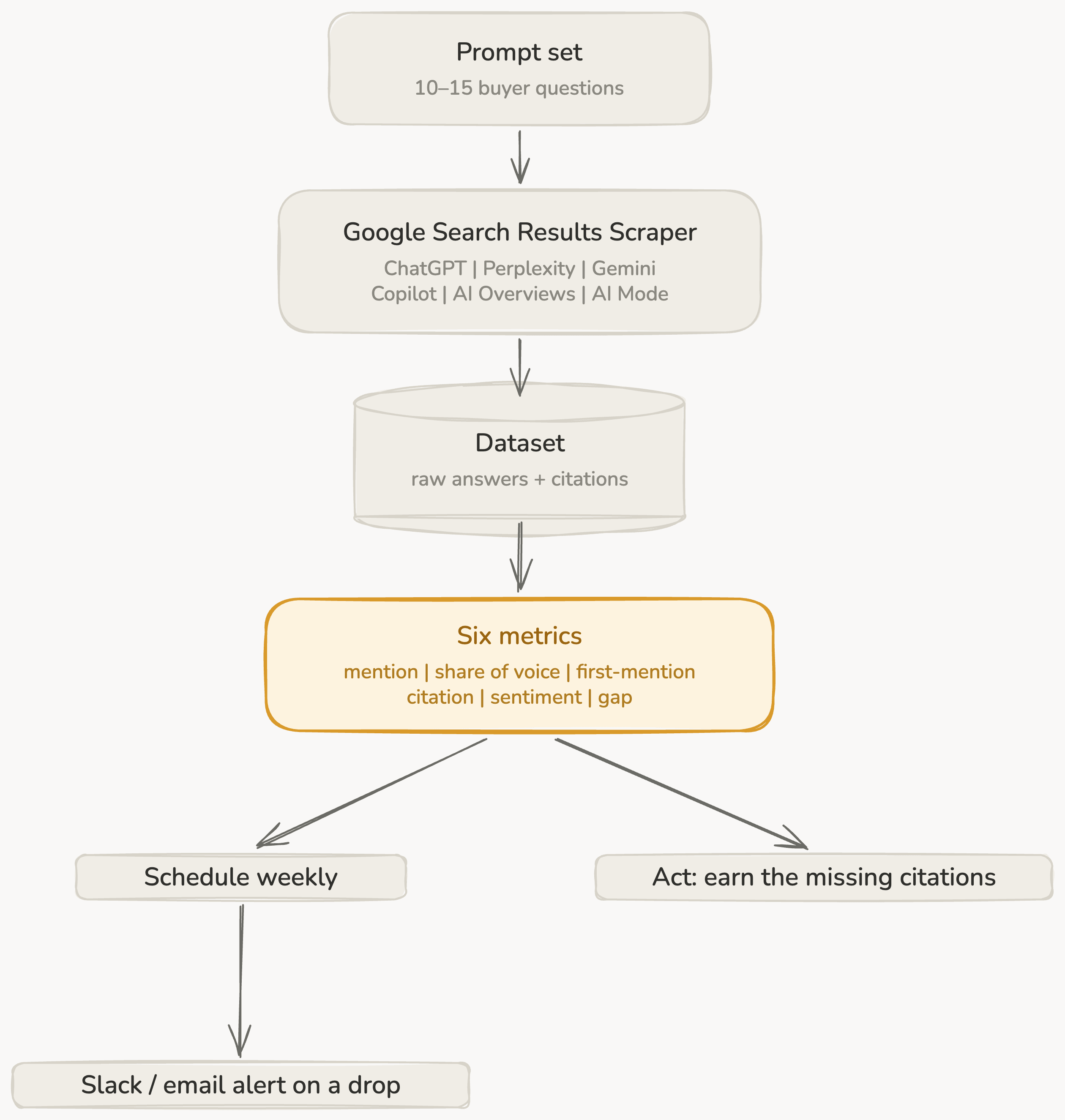
Here's the full pipeline. You take a fixed set of prompts and run them through one Apify Actor, Google Search Results Scraper. With its AI add-ons, it covers all 6 AI engines, and gives you back a dataset of the raw answers and their citations. From that data, you compute a few visibility metrics, then put the run on a weekly schedule with alerts. You can see these steps in the diagram below:
What is LLM brand visibility (and what to measure)?
LLM brand visibility comes down to one question, asked many ways: when an AI engine answers a buying question in your category, does it name you, where does it rank you, how does it frame you, and does it point the buyer back to your site? You can't improve what you don't measure, so define these 6 metrics before you run anything.
| Metric | What it tells you |
|---|---|
| Mention rate (presence) | How often you show up at all |
| Share of voice | Your slice of the category conversation |
| First-mention rate | Whether you're the default or an afterthought |
| Citation rate | Whether the engine links your site as a source |
| Sentiment | How the AI frames you |
| Competitive gap | Where rivals win and you don't |
The rest of this guide produces these 6 numbers reliably, and it keeps them honest run after run.
Why a single check can't be trusted
Ask ChatGPT or any other LLM the same question twice and you can get 2 different brand line-ups. LLMs are non-deterministic, answers shift with the user's location and history, and the models get retrained without warning. So one screenshot proves nothing. It's just a random result you've mistaken for a real measurement.
The fix is method, not luck: a fixed prompt set, several samples per prompt, every engine covered, and a regular schedule. That's the difference between real data and a guess - and it's exactly what the rest of this guide builds, step by step.
LLM brand visibility pipeline
Step 1: Build a prompt set that mirrors how buyers ask
Don't measure vanity prompts. Measure the questions that decide deals, mapped to the funnel:
- Category: "best [category] tools", "top [category] platforms for 2026"
- Comparison: "[competitor] alternatives", "[competitor] vs [competitor]"
- Use case: "best tool to [job your product does]"
- Branded: "what does [your brand] do", "is [your brand] any good"
Add your competitors by name and every alias of your own brand (the legal name, the product names, common misspellings). Then freeze the list. A fixed prompt set is what makes next month's numbers mean anything next to this month's. 10-15 prompts is plenty to start.
Not sure which prompts buyers actually use? The same tool gives you a starting point: every run also returns Google's People Also Ask and related queries, so you can find the real questions in your category instead of guessing.
A starter set to copy and adapt (swap in your category, brand, and competitors):
- best [category] tools 2026
- top [category] software for [audience]
- [competitor] alternatives
- [competitor A] vs [competitor B]
- best [category] tool for [use case]
- what is [your brand] and what does it do
- is [your brand] worth it
- [your brand] vs [top competitor]
Step 2: Choose the engines that matter
Your buyers aren't all on one assistant, so measure where they actually ask: ChatGPT, Perplexity, Gemini, Copilot, and Google's AI Overviews and AI Mode. That's 6 surfaces in all. Each one builds its answers differently - different sources, different ranking, different preferences - so a brand that dominates one can be invisible on another. Here's the same question - "What is the best CRM for managing a sales pipeline?" - asked across 5 of the 6 surfaces (Copilot was switched on too but returned no answer this run):
| Engine | Named first |
|---|---|
| ChatGPT | Pipedrive |
| Perplexity | Pipedrive |
| Google AI Mode | Pipedrive |
| Gemini | HubSpot |
| Google AI Overviews | no brand named |
Same question, 5 engines, 3 different outcomes - so strong visibility on one tells you little about another.
The good news: you don't need a stack of separate tools and logins. One Actor (Apify's name for a ready-to-run cloud tool) covers all of them.
Step 3: Collect every answer at scale with one Actor
Google Search Results Scraper pulls Google's organic results and AI Overviews, and ships with add-ons for ChatGPT, Perplexity, Gemini, Copilot, and Google AI Mode search. So your whole prompt set runs across all 6 engines in a single job.
Here's the flow:
- Paste your frozen prompt set into the Search term(s) field.
- Expand the AI search visibility add-on and switch on the engines you want - ChatGPT, Perplexity, Gemini, Copilot, and AI Mode.
- Set your country and language to match your market.
- Run it a few times, or schedule repeat runs, to average out the variation between answers. There is no "samples" field. Sampling here just means you run the job again.
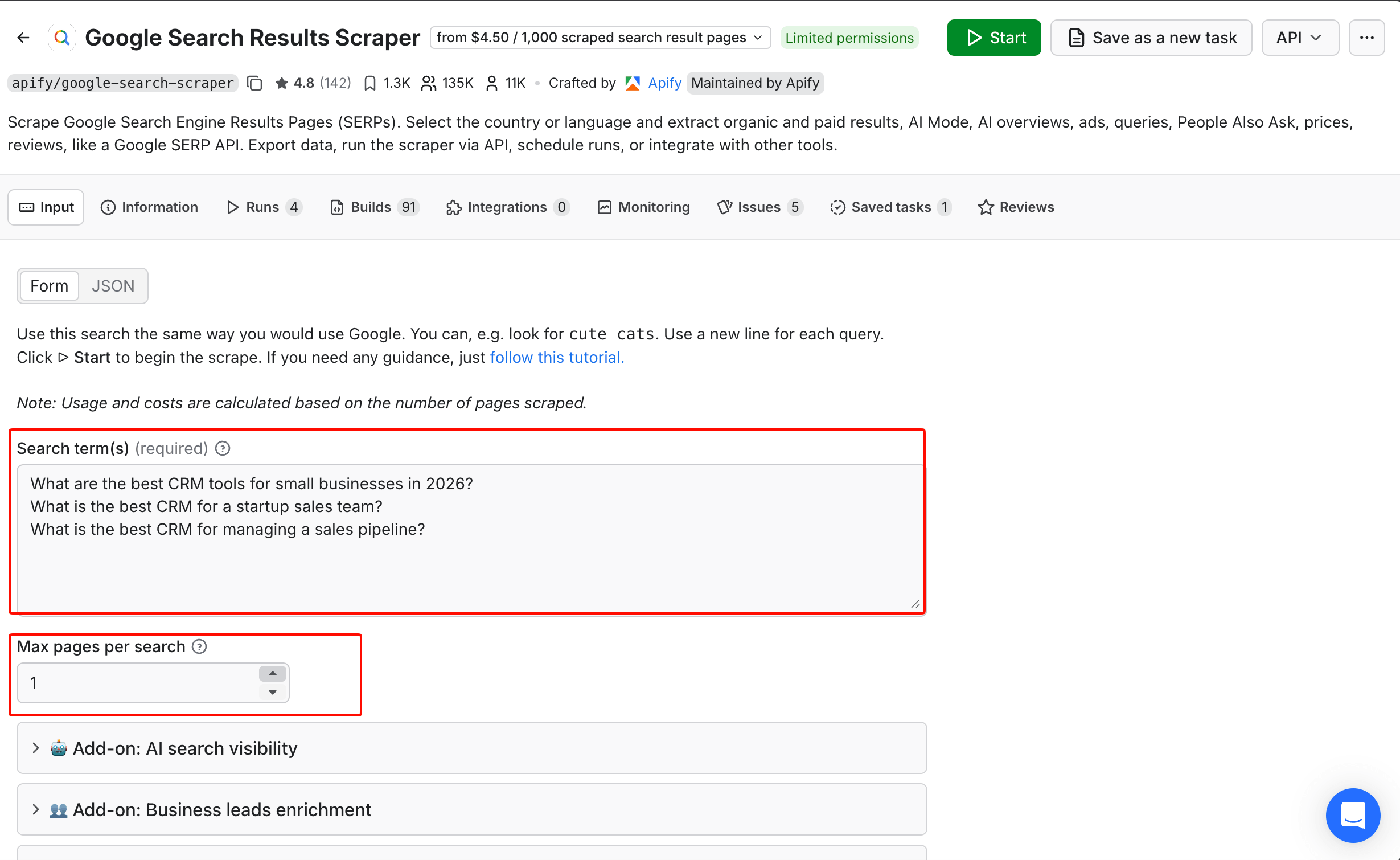
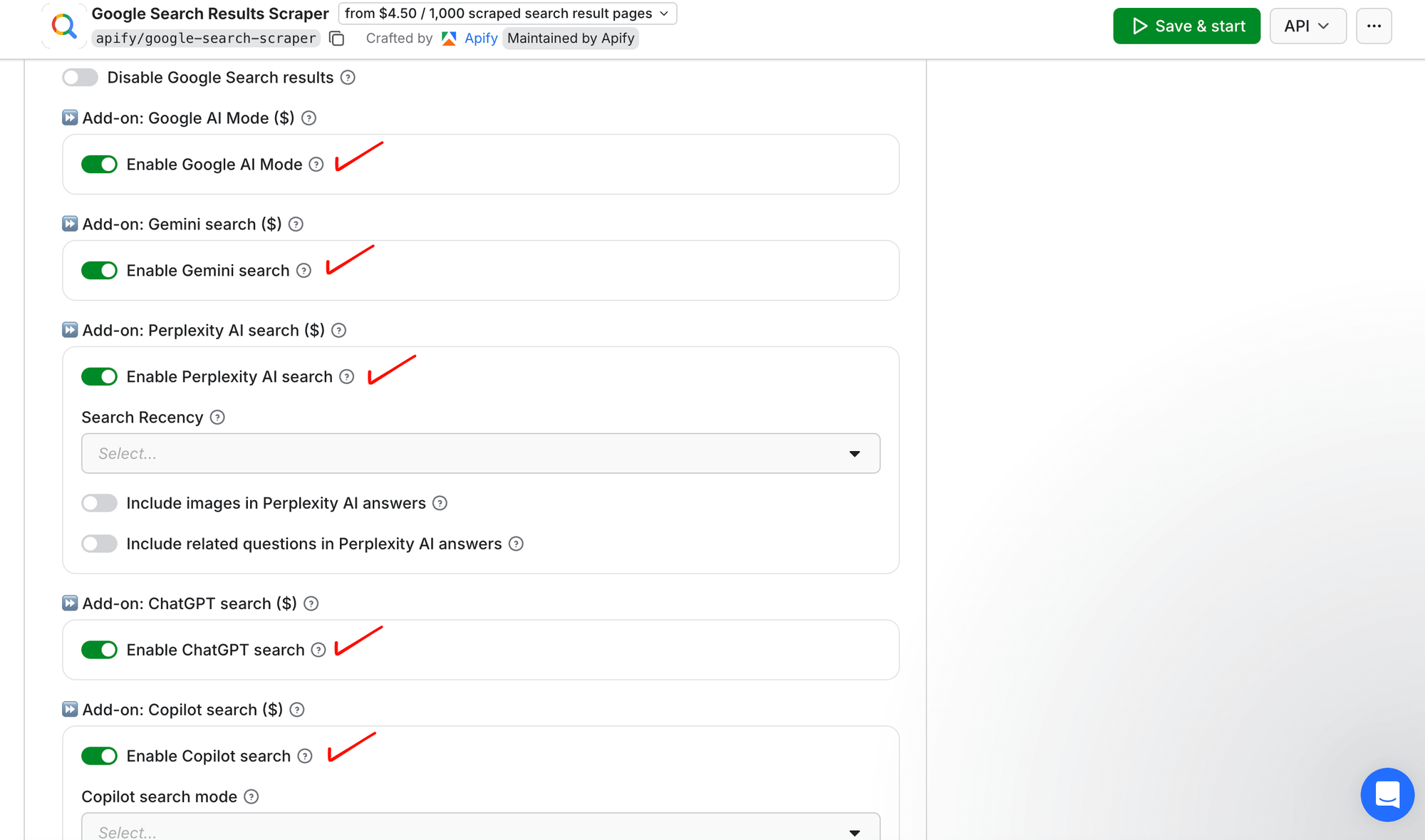
Leave every other field at its default. The Actor packs plenty more - lead enrichment, ads, advanced search filters - but none of them apply here.
Prefer to skip the clicking? Paste this straight into the Actor's JSON input, swap in your own queries, and then start the run. This JSON runs 3 prompts across every AI surface in the US:
{
  "queries": "What are the best CRM tools for small businesses in 2026?\\nWhat is the best CRM for a startup sales team?\\nWhat is the best CRM for managing a sales pipeline?",
  "countryCode": "us",
  "chatGptSearch": { "enableChatGpt": true },
  "perplexitySearch": { "enablePerplexity": true },
  "geminiSearch": { "enableGemini": true },
  "copilotSearch": { "enableCopilot": true },
  "aiModeSearch": { "enableAiMode": true }
}
Every answer is returned as structured JSON, and each record contains the response text, the engine, the query, and a sources array of the citations behind it (often a dozen or more - ChatGPT returned up to 20 per answer in this run; some engines, like Gemini here, returned fewer or none). Here's a real (trimmed) record:
{
  "searchQuery": { "term": "What is the best CRM for managing a sales pipeline?" },
  "chatGptSearchResult": {
    "engine": "chatgpt",
    "text": "1. Pipedrive - Best overall for visual pipeline tracking... 2. Salesforce Sales Cloud... 3. HubSpot CRM...",
    "sources": [
      { "title": "Sales Pipeline Management: Best Tools & Guide | Salesforce", "url": "<https://www.salesforce.com/sales/pipeline/management/>" },
      { "title": "9 sales pipeline management tools | TechTarget", "url": "<https://www.techtarget.com/searchcustomerexperience/tip/Sales-pipeline-management-tools>" },
      { "title": "Best Sales CRM Software (Top 11) | CRM.org", "url": "<https://crm.org/crmland/sales-crm>" }
    ]
  }
}
Look at what ChatGPT cited: Salesforce, TechTarget, CRM.org - review and vendor pages, not pipedrive.com, even though it named Pipedrive #1. It mentions the brand but credits the third parties. (Other engines differ: Google AI Mode and Perplexity did link pipedrive.com directly.) That gap between getting mentioned and getting cited is exactly why you track both. And you get the raw answers and the citations behind them, which is what most black-box scoring tools never give you.
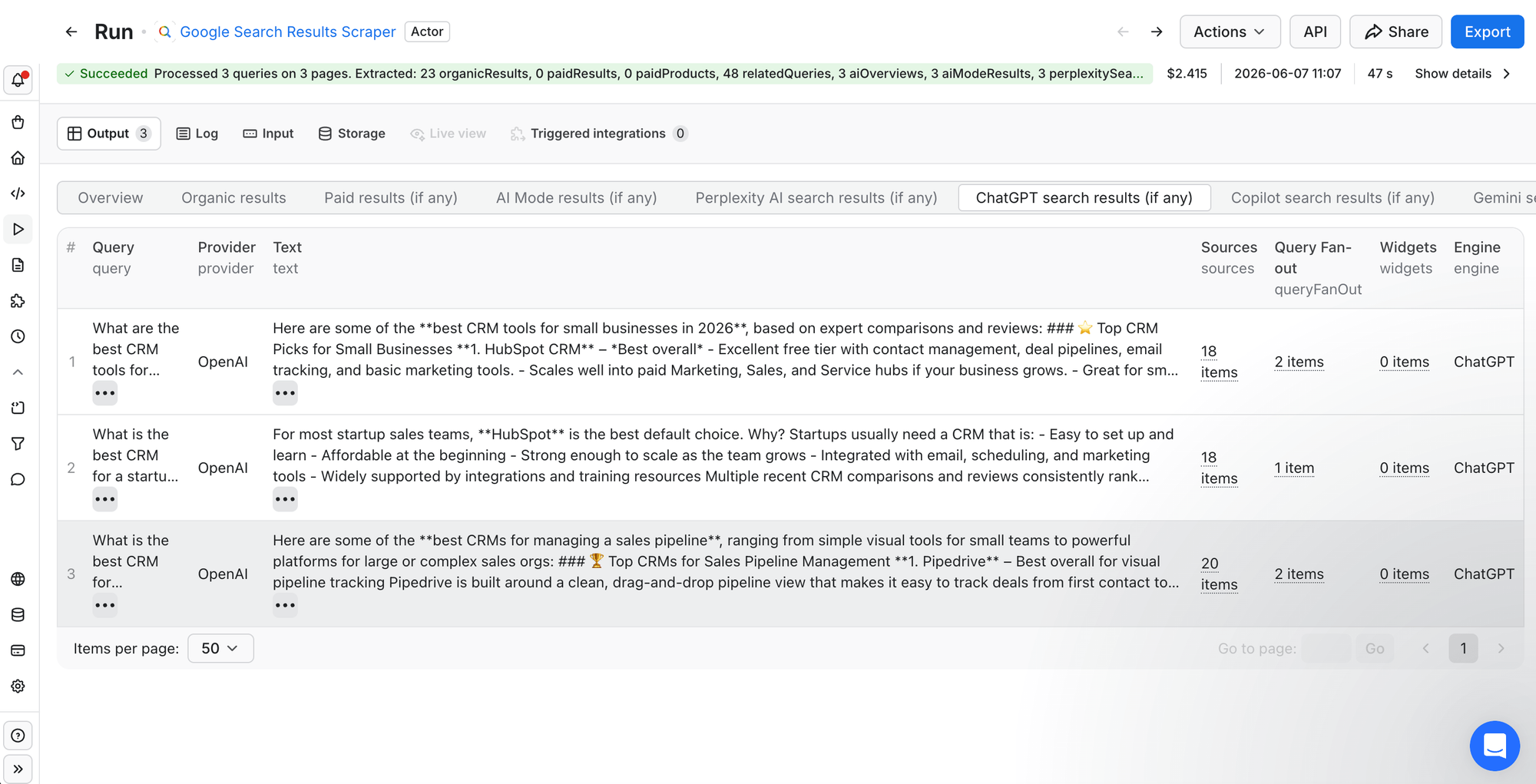
Pricing is pay-per-event: you pay per query, not per seat, and the raw answers are yours. The 15-answer example below cost about $2.45. A quick spot-check is a dollar or two; for a full weekly program (every engine, several samples), the per-query rate on the AI add-ons drops sharply on paid plans, so check the Actor's Pricing tab and size it to the decisions you need. Either way, you control every lever: prompts, engines, samples, frequency.
Step 4: Turn raw answers into your 6 metrics
Now the dataset does the work. From the answers you collected:
- Mention rate: match your brand and its aliases against each answer; your mention rate is the share of answers that name you.
- Share of voice: count mentions of your brand and the competitors you're tracking, then divide yours by that total - scoping to your tracked set (not every brand the AI ever names) makes the number more stable run to run.
- First-mention rate: check whether you're the first tracked brand named (the AI's default pick), rather than buried somewhere in paragraph 4 - and on branded prompts, ignore the echo of your own name from the question itself.
- Citation rate: scan each answer's
sourcesarray (the cited URLs the engine returned) for your domain. - Sentiment: classify each mention as positive, neutral, or negative (a few keyword rules or a quick LLM pass will do) - and note the framing too, because words like "cheap", "niche", or "risky" tell you more than a plus sign.
- Competitive gap: put your share of voice next to each rival's and look at the deltas.
None of this needs a data team. For a quick read on a small set, you can tally by hand. To get 5 of the 6 metrics in one pass - including first-mention, which depends on reading order, and the citation-source scans - export the run's dataset as JSON (open Export on the run's output and choose JSON), and then run this scorer. Edit the settings at the top of the script. The script handles Apify's per-engine nesting for you. One sanity check: if a metric comes back 0, open a single dataset record and confirm each engine's field name still matches the ENGINES list - Apify can rename those keys between releases, and a mismatch makes the scorer quietly skip that engine instead of erroring. (Don't code? Paste the script and your dataset into ChatGPT or Claude and ask it to run them and return the scorecard - works best on a small dataset.)
import json
from collections import Counter

# --- edit these ---
TRACKED = {                        # every brand you track, with lowercase aliases
    "Pipedrive":  ["pipedrive"],
    "HubSpot":    ["hubspot"],
    "Salesforce": ["salesforce", "sales cloud"],
    "Zoho":       ["zoho"],
}
YOU, YOUR_DOMAIN = "Pipedrive", "pipedrive.com"

# Apify nests each engine's answer under its own key (the names aren't uniform):
ENGINES = [("chatGptSearchResult", "text"), ("perplexitySearchResult", "text"),
           ("geminiSearchResult", "text"), ("copilotSearchResult", "text"),
           ("aiModeResult", "text"), ("aiOverview", "content")]   # AI Overview uses "content"

dataset = json.load(open("dataset.json"))       # the run's exported dataset

def each_answer(data):
    for item in data:
        for key, field in ENGINES:
            r = item.get(key)
            if r and r.get(field):
                yield r[field].lower(), r.get("sources", [])

mentions, first, cited, total = Counter(), Counter(), 0, 0
# branded prompts ("is X worth it") echo your name - drop those before scoring first-mention
for text, sources in each_answer(dataset):
    total += 1
    present = {b: min(text.find(a) for a in al if a in text)
               for b, al in TRACKED.items() if any(a in text for a in al)}
    for b in present: mentions[b] += 1
    if present: first[min(present, key=present.get)] += 1        # earliest-named brand
    if any(YOUR_DOMAIN in s.get("url", "") for s in sources): cited += 1

voice = sum(mentions.values())
print(f"answers:         {total}")
print(f"mention rate:    {mentions[YOU] / total:.0%}")
print(f"first-mention:   {first[YOU] / total:.0%}")
print(f"share of voice:  {mentions[YOU] / voice:.0%}")
print(f"citation rate:   {cited / total:.0%}")
print("share of voice, all brands:", {b: f"{mentions[b] / voice:.0%}" for b in TRACKED})
Point it at the example dataset (3 prompts × 5 engines = 15 answers) and it prints the scorecard below - no black box, every number traces to a line you can read. The sixth metric, sentiment, is the one you read directly from the matched answers, using a few keyword rules or a quick LLM pass. Naive scoring misleads.
Lay them out as a scorecard. Here's what one run looks like for Pipedrive (a well-known CRM, used here as a neutral example), across 3 buying-intent prompts and 5 of those 6 surfaces - ChatGPT, Perplexity, Gemini, Google AI Mode, and AI Overviews (Copilot was switched on too but returned no data this run - a real result, not a skipped engine). Read it as one snapshot of the output: it's a single sample, so your own numbers will move - average 3-5 per prompt for a figure you'd base a decision on.
| Metric | Pipedrive (one run) | What it tells you |
|---|---|---|
| Mention rate | 87% (13/15) | Almost always in the conversation |
| Share of voice | 28% (second, just behind HubSpot's 30%) | Right in the mix with the category's biggest names |
| First-mention rate | 27% | Named first mainly on the prompt that matches its strength |
| Citation rate | 20% | Cited by Google AI Mode (67%) and Perplexity (33%), but not by ChatGPT, Gemini, or AI Overviews - ChatGPT names Pipedrive yet credits review and vendor pages, not pipedrive.com |
| Sentiment | Positive | "intuitive", "built by salespeople", with one repeated caveat (light on marketing) |
The numbers tell a clear story, and it's a prominence problem, not a presence one. Pipedrive is named in almost every answer - 87% mention rate - and sits just behind category leader HubSpot on share of voice, so presence isn't the problem at all. The gap appears in first-mention: Pipedrive is named first most often on "best CRM for managing a sales pipeline" (60%), which matches its exact positioning. Pipedrive is named first sometimes on "best CRM for startups" (20%), and never on "best CRM for small business" (0%), where HubSpot is the default first pick. And the engines split on citations - so the brand earns the mention without always earning the click-through.
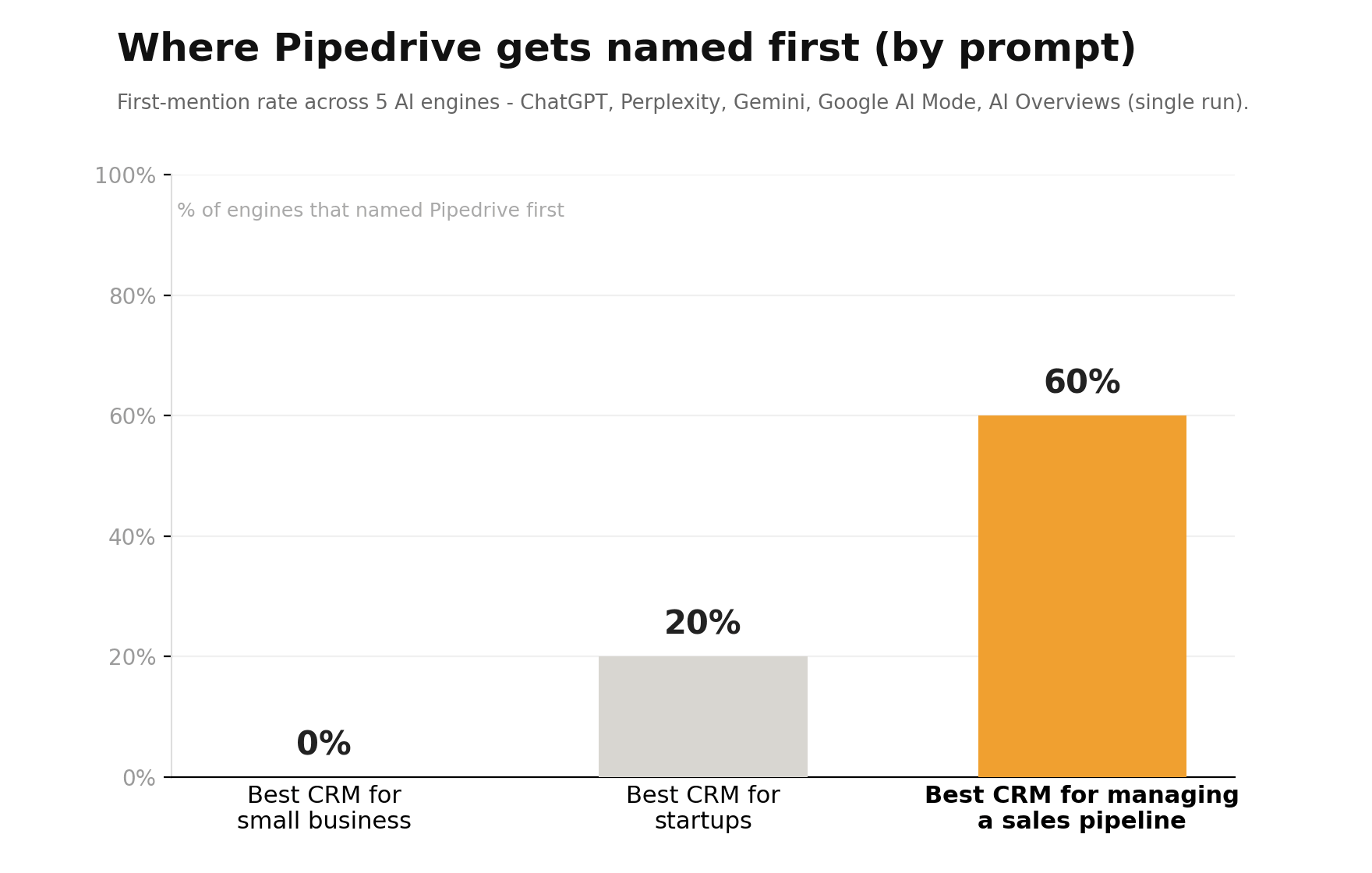
So the next steps are obvious: earn prominence on the category prompts, not just the niche one, and turn mentions into citations by winning placements on the review sites the engines actually trust. That's the point of a scorecard: it doesn't just say "you're doing okay", it points at the exact prompt and the exact gap to fix next. (That single run took about 47 seconds; when you do sample, pool every run's answers into one set before you compute the rates.)
Push the dataset into Google Sheets, BigQuery, or Looker and you've got a living scorecard instead of a screenshot.
Step 5: Track your visibility over time
A single run is a baseline. The value compounds when you schedule the run: save your setup as a task and put it on a weekly schedule in Apify, so you can watch share of voice climb after you ship new content, or see it drop after a model update.
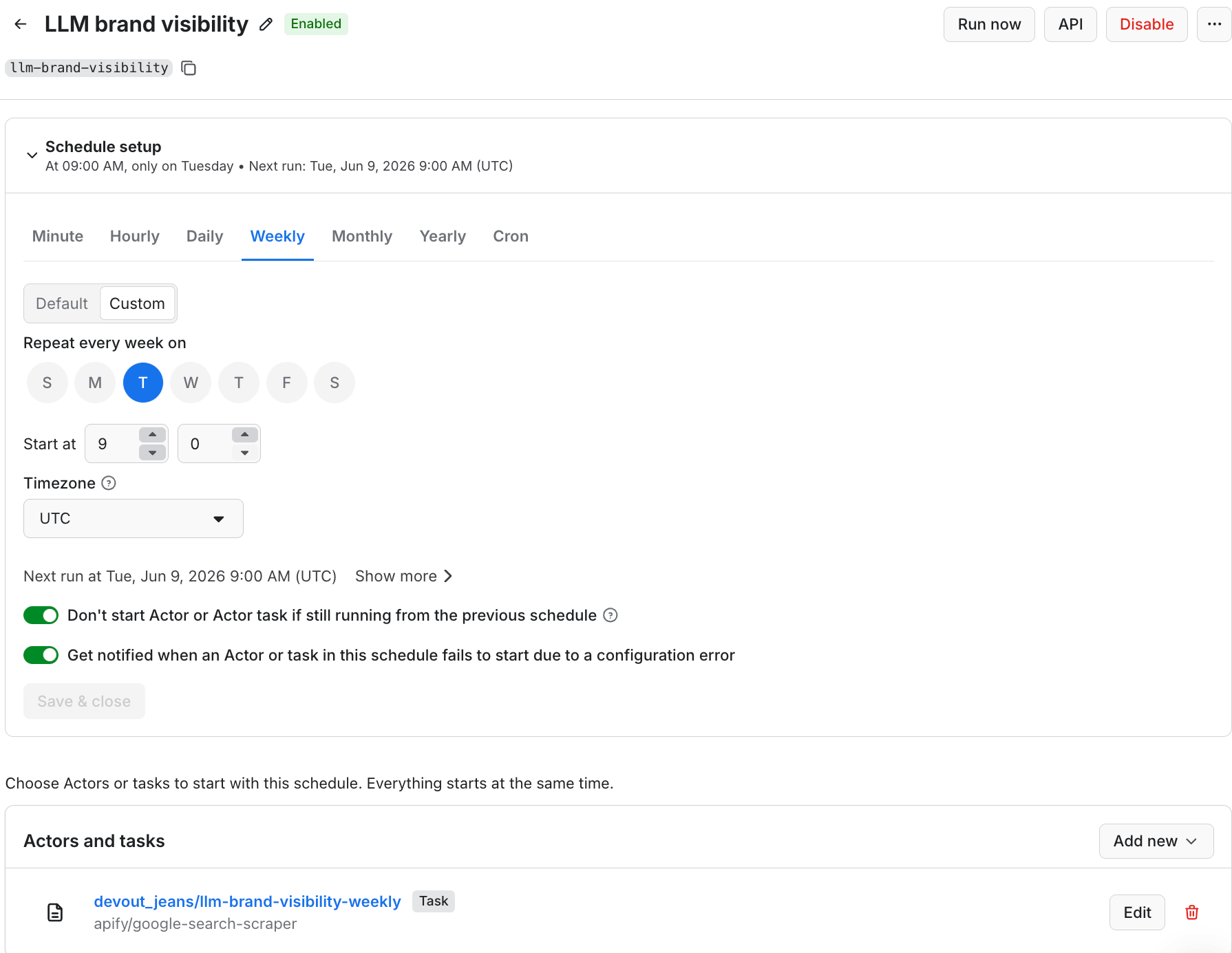
Then set up alerts: from the Actor's Integrations tab, connect Slack, email, or Make/Zapier to fire on each finished run - so a drop notifies you the same day it happens, instead of a quarter later when you finally check the numbers.
If you'd rather not assemble the scoring by hand each week, then an engineer can wrap the whole flow (collect, score, store, alert) into a custom Actor and let Apify run it on a schedule. Collection and computation now live in one place, end to end: this is the Search Console you never got for AI - except you built it, and you own every number in it.
Step 6: Act on the gaps you find
Measurement is the start, not the finish. When a competitor keeps winning a prompt you care about, find out why: take the cited URLs (from the answer text and the sources arrays) and crawl them with Website Content Crawler, Apify's page-to-Markdown tool, to see what the engines reward. In this run, the cited sources were overwhelmingly review sites, comparison pages (TechRadar, CRM.org, Forbes), and Reddit threads, rarely the brands' own domains - so that's where to earn a place. You can pull and monitor those sources with Apify too, then re-measure to watch your citation rate move.
That's where this connects to the rest of the work: measuring LLM brand visibility tells you where you stand; generative engine optimization (GEO) is how you climb.
Where the numbers stop: the honest limits
No method is perfect, and pretending otherwise is how you lose trust:
- Answers are personalized and localized, so your numbers reflect the profile and region you measured from.
- Models change without notice, so a swing might be them, not you - which is why the trend matters more than any single run.
- Some engines sit behind logins, so coverage is broad, not total.
- More samples and more engines mean higher cost, so scale to the decisions you actually need to make.
Measure with those caveats in view and your numbers stay defensible - which is exactly what a black-box score can never be.
Measure your LLM brand visibility, then own it
LLM brand visibility isn't a score you buy and hope is right. It's a transparent pipeline you build and own yourself: a fixed prompt set, every major engine, samples averaged, raw data exported, trend tracked, action taken. The brands that win AI search in 2026 will be the ones who can see exactly where they stand, because they measure their visibility honestly, with numbers they can defend in a meeting.

FAQ
Does ChatGPT actually recommend specific brands?
Yes. Ask it for the best tools in almost any category and it will name them, rank them, and often cite sources. That list is increasingly where buyers start. Measuring LLM brand visibility tells you whether your brand is on it.
What if my brand barely shows up - or doesn't at all?
That's normal for newer or niche brands, and the reason to measure. First, focus on the one prompt where you do appear - it's how Pipedrive leads on "sales pipeline". Then get listed on the sources the engines cite (review sites, comparison pages, Reddit). Finally, re-measure on a schedule.
My scorecard has several gaps - which do I fix first?
Work in order: presence, prominence, then citation. First, get mentioned at all on the prompts that matter. If your mention rate is near zero, that's your only priority. Then get named earlier: move up from paragraph 4 to a first pick. Then earn the citation: get your domain linked as a source.
How is this different from a tool that just gives me a visibility score?
Those tools give you a number and keep the method hidden. This gives you the raw answers, the citations, and the math - so you can trust the number, defend it, and feed it into your own dashboards. No lock-in.
Does this catch AI saying the wrong thing about my brand?
Not directly - the metrics measure visibility (named, ranked, cited), not accuracy. But because you keep the raw answers, you can read them and catch an engine quoting old pricing, inventing a feature, or confusing you with a rival. When you find a recurring error, fix it on the cited pages, and then re-measure.
How much does it cost to measure LLM brand visibility this way?
Pay-per-event, so cost scales with use. A quick spot-check runs a dollar or two; the 15-answer demo cost about $2.45. A full weekly program across every engine costs more, but the per-query rate on the AI add-ons drops sharply on paid plans, so check the Actor's Pricing tab for current rates.
Can I run this from my own app or AI agent?
Yes. The Actor runs via Apify's API and is available as a Model Context Protocol (MCP) server, so you can trigger runs and pull results directly into your own app, dashboard, or agent. This is useful when you're automating visibility checks inside a larger system, instead of running them by hand.