You’ve used APIs today, probably in the last hour. When you check the weather, order food, send a message, or search for a flight, APIs are the invisible messengers that fetch the data and trigger the actions apps need to give you instant results.
In this article, we’ll make sense of APIs: What they are, why they’re everywhere, and how they enable apps and services to exchange data and functionality behind the scenes.
What is an API?
API stands for Application Programming Interface. It’s a standardized way for two systems to communicate, defining what you can ask for, how to ask for it, and what you’ll get in return.
Using a simple analogy, an API is a messenger between two people who don’t speak the same language, and enables them to communicate. The messenger acts as a translator and knows exactly how each person needs their messages formatted, carries those messages back and forth, and makes sure nothing is misunderstood.
That’s what an API does for software systems: it translates requests and responses in a predictable, agreed-upon way, so two very different systems can communicate smoothly.
What an API is not
Here are a few things people often confuse APIs with:
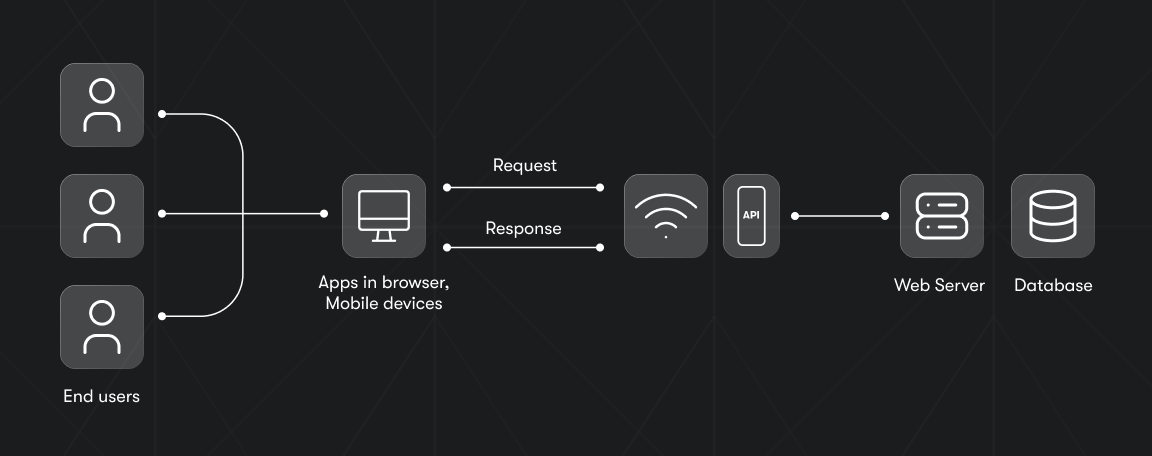
- An API is not a full application or piece of software. Software may provide an API, but the API itself is only the programming interface, not the software doing the work.
- An API is not a user interface. You don’t click or tap an API. Apps and websites use an API behind the scenes, but the API is invisible to users.
- An API is not a server. A server can host APIs, but the API is just the contract that defines how to ask that server for data or actions. In larger systems, an API gateway sits in front of multiple APIs to handle routing, authentication, and rate limiting - but it's still not the API itself.
- An API is not a database. It may let you read or write data, but the API is just the doorway, not the storage room.
API use cases
APIs are integral to many of the digital services we use every day. Some of the most common use cases include:
- Authentication (social logins, when you use Google or Facebook to sign in): APIs allow apps to verify who you are without storing your password themselves. Instead, they ask a trusted identity provider to confirm your identity and return a secure token.
- Payments: When a user enters credit card details, your app passes them securely to the payment provider (like Stripe, PayPal, Apple Pay) through their API.
- Maps and location services: Apps pull maps, routes, and place details from providers like the Google Places API instead of building their own location data.
- Messaging and notifications: Apps use messaging APIs to send texts, push notifications, or chat messages without running their own telecom or messaging systems.
- Connectivity and telecom: Instead of building complex physical cellular networks, modern travel and fintech apps can now integrate telecom APIs to instantly operate, for example, as a global eSIM reseller. This allows them to provide users with instant mobile data plans directly in-app without managing any underlying infrastructure.
- Social media integrations: APIs let apps fetch posts, upload photos, share links, or display social content.
- Pulling live data such as weather, stock prices, news, or flight information. Instead of maintaining their own global data sources, these services call APIs that gather and update real-time data.
- E-commerce and product data: Online stores expose APIs so other apps can retrieve product lists, check availability, or update orders.
- Automation and workflows: Tools such as Make or Zapier rely entirely on APIs to connect different apps and trigger actions between them.
If an app needs to verify a user, process a transaction, fetch information, or trigger an action somewhere else, it’s an API doing the work behind the scenes.
API types
APIs come in various forms to serve specific purposes and cater to different needs:
- Private (internal) APIs
Private APIs are used only inside a company. They let internal systems communicate without exposing anything to the outside world.
Example: A company might use a private API to let its customer database communicate with its internal email marketing or billing systems. - Public APIs
Public APIs are available to outside developers (sometimes fully open, sometimes behind sign-up or usage limits). They enable third-party apps to integrate data or functionality from a provider.
Example: A weather service offering an API so developers can add weather forecasts to their apps. - Partner APIs
Partner APIs are shared privately with specific business partners. They often require contracts, strict authentication, and controlled access. They’re used for deeper, trusted integrations between companies.
Example: A shipping company granting API access to retailers so they can fetch shipping rates or tracking data.
API communication models
These five foundational API communication styles and protocols define how modern systems exchange data and interact across applications and services:
- REST APIs
Representational State Transfer APIs are resource-based and widely used for web services. REST APIs use standard HTTP methods and typically return data in JSON, making them flexible, simple to use, and compatible with nearly every platform. - SOAP APIs
Simple Object Access Protocol is a highly structured, XML-based protocol common in enterprise environments such as banking, healthcare, and telecom. SOAP enforces strict rules around messaging, security, and error handling. - GraphQL APIs
Built around the GraphQL query language and schema, this API type lets clients request exactly the data they need. It treats data as a graph of connected objects. GraphQL is ideal for applications with complex data relationships or bandwidth constraints. - gRPC APIs
Google Remote Procedure Calls framework was designed for fast, efficient service-to-service communication: data is passed between the client and the server-side target function in binary format. It’s often used in microservice architectures where speed matters.
How an API works: understanding REST
REST remains the dominant approach for public APIs and SaaS integrations, and it serves as a great baseline for further API learning. It cleanly illustrates API fundamentals. If you try out an API for the first time, chances are it will be a REST API.
REST is a simple, standardized way for one application to request data or actions from another over the internet.
1. Client-server communication
A REST API sits on a server. A client - like a mobile app or website - sends a request to that server. The server processes it and sends back a response.
2. It uses standard HTTP methods
REST relies on the same HTTP methods that power everyday web browsing, but it uses them in a consistent way to describe what the client wants to do with a resource. Each method has a clear purpose:
- GET - retrieve data
Example: asking the server for a list of users
import requests

response = requests.get("https://reqres.in/api/users?page=2")

print(response.status_code)
print(response.json())
- POST - create something new
Example: Sending new user data to the API and getting back a created record.
import requests

new_user = {
    "name": "morpheus",
    "job": "leader"
}

response = requests.post("https://reqres.in/api/users", json=new_user)

print(response.status_code)
print(response.json())
- PUT/PATCH - update existing data
Example: Updating user #2 with new information.
import requests

update_user = {
    "name": "morpheus",
    "job": "zion resident"
}

response = requests.put("https://reqres.in/api/users/2", json=update_user)

print(response.status_code)
print(response.json())
- DELETE - remove data
Example: Deleting user #2.
import requests

response = requests.delete("https://reqres.in/api/users/2")

print(response.status_code)
3. Everything is a “resource”
In a REST API, data is treated like a collection of things you can point to with a URL - and the internet itself is a collection of resources. Users, products, orders, blog posts - all of them are resources.
Example: /users might represent all users, while /users/3 represents user #3.
For a practical example, working with content through the WordPress REST API means treating posts, pages, and media as resources, then using HTTP methods to retrieve or update them.
4. Data is usually sent as JSON
REST APIs typically exchange data in JSON, a lightweight format supported by every modern programming language.
5. Responses use standard status codes
Every request returns a status code so the client knows what happened. Some examples include:
- 200 OK - request has succeeded
- 201 Created - something new was added
- 404 Not Found - the resource doesn’t exist
- 500 Internal Server Error - something broke on the server
These codes make troubleshooting much easier.
What is an API client?
An API client is a development tool that makes it easier to communicate with an API. Instead of manually constructing URLs, handling authentication, formatting requests, or parsing responses, an API client wraps all of that complexity into simple functions you can call from your program, such as getUser() or listItems() . These functions internally translate your intentions into the correct API requests.
A client abstracts the API complexity away, leaving you with a simple interface to work with. This makes API clients especially valuable for beginners.
API tokens and data security
An API token is a secret, unique string of characters that proves your identity when you make requests to an API. It’s a digital key: anyone who has the token can unlock the API and use its features. Because anyone holding the token gets full access, developers rely on secrets management practices to keep API tokens out of their code and safely stored instead.
When you send a request, the API checks your token to verify who you are and what you’re allowed to do. API tokens protect your account and data. Without authentication, anyone could send requests pretending to be you. Tokens ensure only authorized users can access an API.
Using API for data collection
If you’re building an app that needs fresh web data, you can use an API to automate data collection. Apify makes this easy by offering ready-made scrapers (called Actors) that you can control entirely through the Apify API. With a few API calls, you can start a scraper, configure what you want it to extract, and download the results as JSON. For the wider landscape, see the best web scraping APIs.
Your application communicates with the Apify API by sending requests to run scrapers and receiving extracted data back. When you request to run a scraper, the Apify API creates and manages a scraper run instance on the platform.
Apify also provides its own official API client - available in JavaScript and Python - that gives you an easy, developer-friendly way to interact with the Apify platform.
The Apify client for Python is the official library to access the Apify REST API from your Python applications. It provides useful features like automatic retries and convenience functions that improve the experience of using the Apify API. All requests and responses (including errors) are encoded in JSON format with UTF-8 encoding. The client provides both synchronous and asynchronous interfaces.
There’s also an official library to access the Apify REST API from your JavaScript/TypeScript applications. It runs both in Node.js and the browser and provides useful features like automatic retries and convenience functions that improve the experience of using the Apify API.
How to start using APIs
The best way to learn APIs is to use them. The best place to begin is the API documentation - this is the instruction manual that explains what the API can do, the URLs (endpoints) you can call, the type of data you need to send, and whether you need an API token for authentication.
After that, start experimenting with real requests: You can make simple GET requests directly in your browser or use tools (such as Postman) to test more complex calls and see the raw responses.
Once you’re comfortable with how the API behaves, you can start using it in code. Pick a language you’re familiar with and use a simple HTTP library to send requests and handle the responses. That way, with just a few small steps, APIs go from something abstract to something you can actually build with.