On about one in six Google searches, an AI Overview answers the question at the top of the page, by Semrush's 2025 count. Pew Research Center, measuring real user searches, put it closer to one in five. AI Overview optimization means getting cited inside Google's AI Overviews, not just ranked below them. Pew also found that when an AI summary shows, people click a normal result only 8% of the time, against 15% without one. So the citation inside the answer is what reaches the reader.
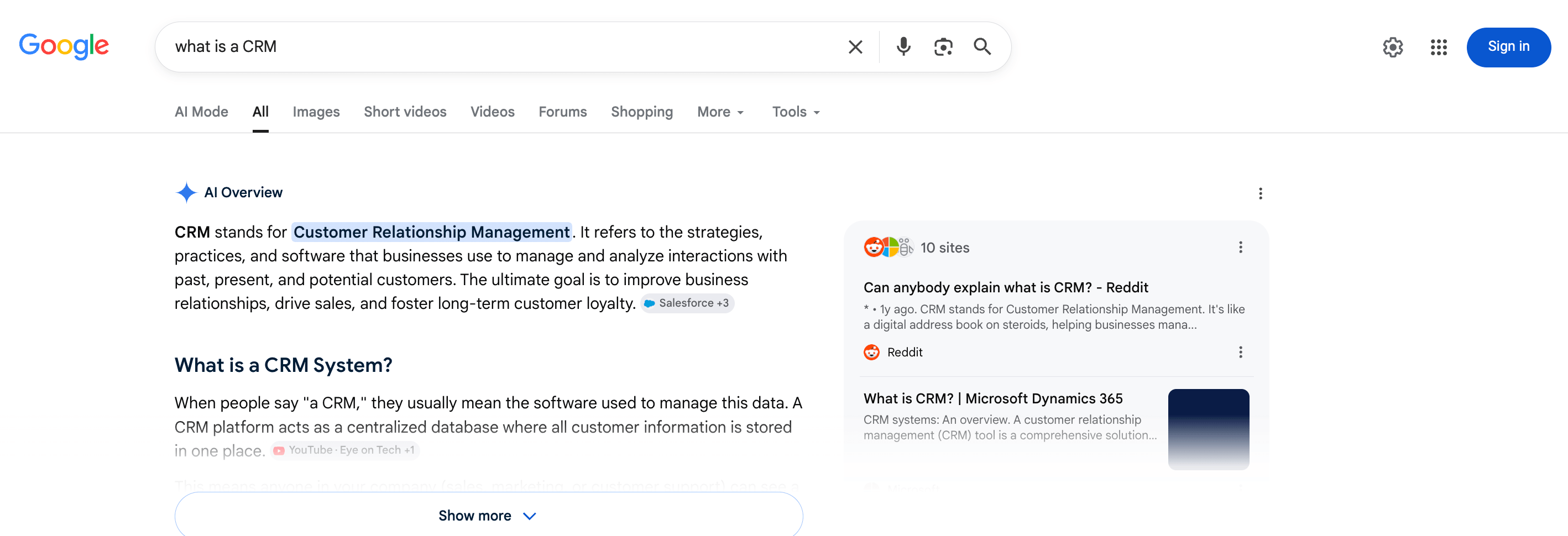
The hard part is that Google doesn't tell you who it cites or why. And ranking first doesn't guarantee a citation anymore. In Ahrefs's 2026 study, about 38% of AI Overview citations also ranked in the organic top 10, down from roughly 76% about a year earlier. So you have to measure this yourself. You scrape the AI Overviews in your category, find what they cite, then optimize your pages to earn those citations. And the data stays yours.
The whole method is 5 steps, and starting is cheap. A scan of 10 to 15 queries costs only cents, and a run finishes in seconds, so you can pull a first citation baseline today.
What AI Overview optimization means
Ranking high used to be the main goal of search engine optimization (SEO). AI Overviews move the target. Google's Gemini model reads across many pages and lifts the passages that best answer each part of a question. Then it combines those passages into one answer and adds a few inline citations. So your job is no longer to rank first. Now you need the best passage for each part of the question.
A citation pays off even without a click. It puts your brand inside the answer. The reader sees your name while they compare options and decide, without visiting your site. And it's common. In Semrush's 2025 survey, 43% of AI-using shoppers said they had found a new brand through AI, and McKinsey found that about half of consumers use AI search to evaluate and discover brands.
The 38% overlap isn't the whole story. It comes from one Ahrefs study of 863k searches and 4M citations, and studies measure overlap differently, so the number varies a lot by category. The customer relationship management (CRM) run later in this guide lands at 67%. So treat any single number as a starting point, not a rule, and measure your own category.
How Google AI Overviews choose their sources
Google builds each Overview from passages across many pages. The SEO community has reconstructed how it works. Here are the stages.
- Query fan-out. Your search is split into several related sub-questions, each searched at the same time.
- Passage retrieval. Candidate passages are pulled from across the web, by meaning as well as keyword.
- Quality filtering. Those passages pass through core ranking signals like authority, freshness, and E-E-A-T (Experience, Expertise, Authoritativeness, and Trustworthiness).
- Gemini re-rank. The model picks the passage that most completely answers each sub-question.
- Fusion. The winners are combined into one answer, with a citation on each claim.
Because of fan-out, a page can be cited for a sub-question it answers well, even when it doesn't rank for the main query. Citation is passage-level, not position-level. The cited links Google attaches to each Overview are a direct readout of which pages it drew from. You collect them across your query set.
AI Overviews run on Google's Gemini models and cite their sources. But Google doesn't publish how it picks them. So the stages above are the community's best reconstruction, not documentation.
How to optimize your content for AI Overviews
Step 1: Build your query set
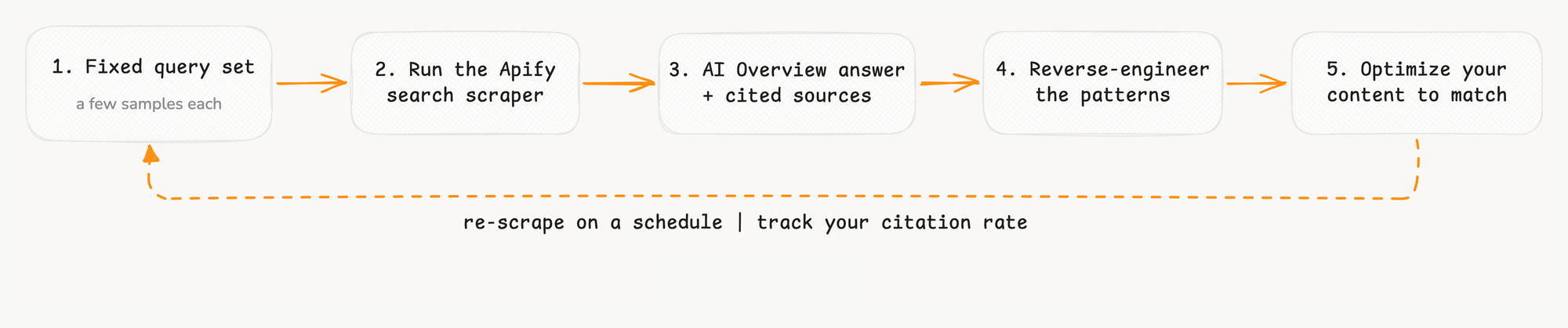
A common approach is a static checklist. Write a short answer, add schema, build authority. The tips aren't wrong, but a one-time checklist goes stale fast. AI Overviews are non-deterministic, so the same query can return different citations. Results are personalized too, and Google keeps updating Gemini, so what wins this quarter can shift next. The fix is a loop you re-run on a fixed query set, with several samples per query and a schedule. (For the cross-engine version, see the guide on measuring your brand across AI engines.)
Start with the questions your buyers ask, because those trigger AI Overviews. They're question-shaped, multi-word, informational searches, like definitions, comparisons, and how-tos.
Map them to the funnel.
- Category queries, like "best [category] tools" or "top [category] software for [year]"
- Comparison queries, like "[competitor] vs [competitor]" or "[competitor] alternatives"
- Definitional queries, like "what is [category term]" or "how does [category term] work"
- How-to queries, like "how to choose a [category] tool"
Add your competitors by name and every alias of your own brand. Then cover the fan-out. This part loops back later. After your first run in Step 2, read the relatedQueries and peopleAlsoAsk fields it returns, and add the sub-questions Google breaks your topic into. Keep the final list fixed so next month's numbers stay comparable to this month's. 10 to 15 queries is plenty to start.
Step 2: Capture the AI Overviews with Apify
To read what AI Overviews cite at scale, you need the answer text and the cited links for every query, as structured data. Apify's Google Search Results Scraper gives you exactly that, from a single Actor.
AI Overviews come back in the standard search scrape, with no paid AI add-on. A plain run returns the Overview whenever Google shows one. You pay only per search page ($0.0045 on the free tier, less on paid plans). So a scan of a few dozen queries costs only cents.
Paste your query set into the Search term(s) field, set your Country, and leave Max pages per search at 1 (the Overview only appears on the first page).
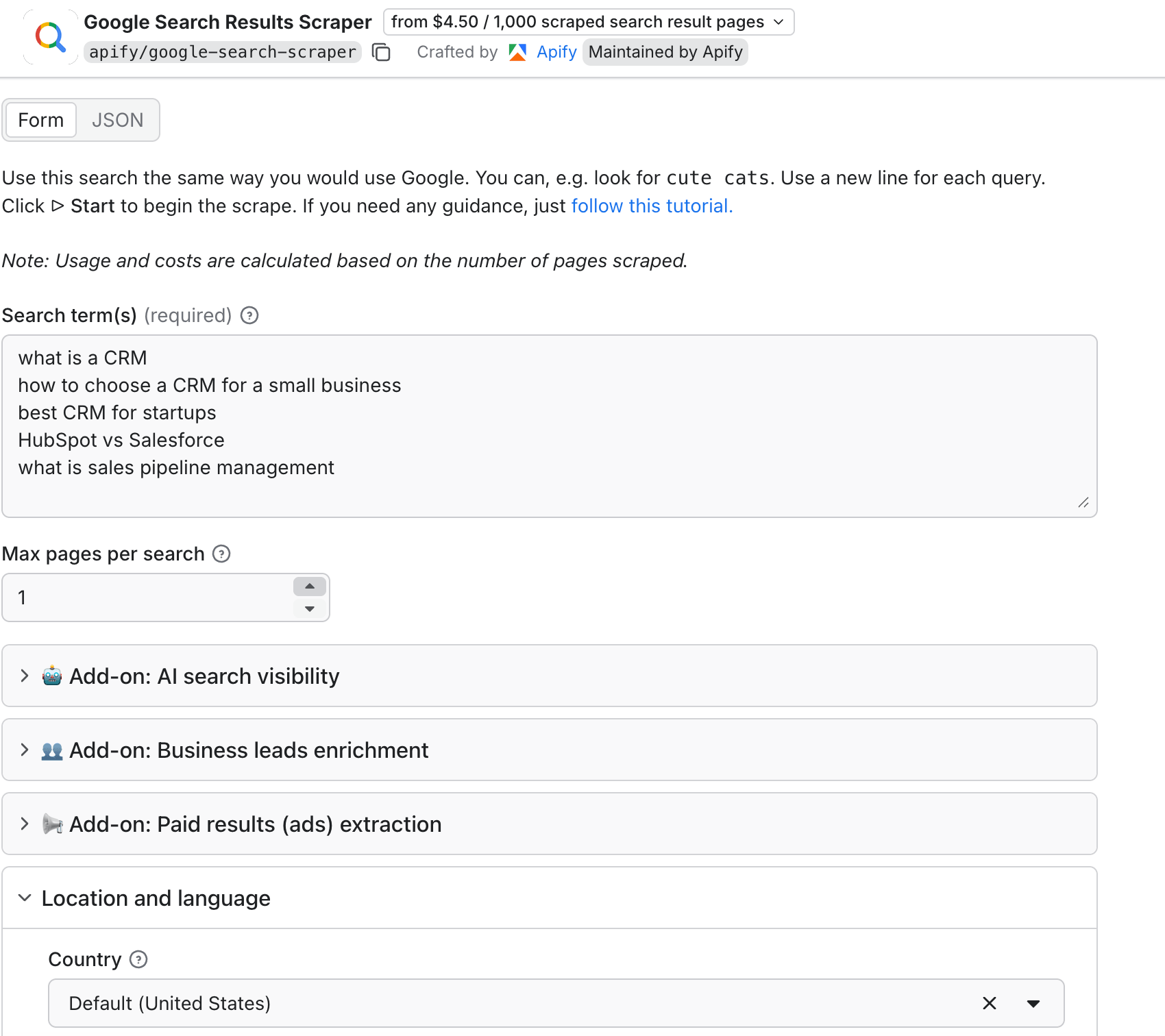
The Search term(s) field holds the CRM queries, Max pages per search is 1, and Country is set to Default (United States).
Or skip the clicking and paste this straight into the Actor's JSON input.
{
  "queries": "what is a CRM\nhow to choose a CRM for a small business\nbest CRM for startups\nHubSpot vs Salesforce\nwhat is sales pipeline management",
  "countryCode": "us",
  "maxPagesPerQuery": 1
}
Because Overviews are non-deterministic, one run is only a snapshot. Sample each query several times and pool the results.
Each result is one search page. When Google shows an Overview, the record carries an aiOverview object.
{
  "searchQuery": { "term": "what is a CRM" },
  "aiOverview": {
    "type": "static",
    "content": "CRM stands for Customer Relationship Management...",
    "sources": [
      { "url": "<https://www.reddit.com/r/CRM/comments/1f0yp7n/>...", "title": "Can anybody explain what is CRM? - Reddit" }
    ]
  },
  "organicResults": [ { "url": "<https://www.reddit.com/r/CRM/comments/1f0yp7n/>...", "position": 1 } ]
}
aiOverview.content is the answer text, and aiOverview.sources is the list of cited links. The sibling organicResults field gives you each page's organic position, which you'll need to measure overlap. The same record also carries relatedQueries and peopleAlsoAsk, the sub-questions Google breaks your topic into, which you feed back into your Step 1 query set. When no Overview is shown, the record has no aiOverview, so null-check it in code. That absence is data, not an error. It's your AI Overview coverage rate.
Here's that object in the live run:
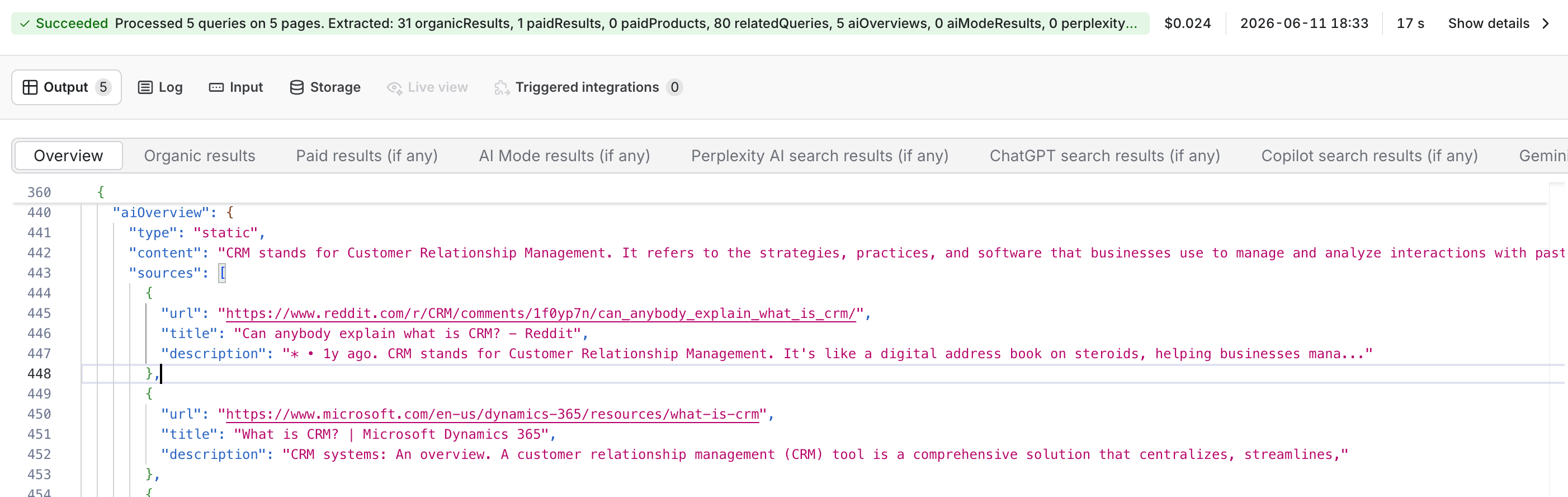
The expanded aiOverview object shows its type as static, the answer content, and cited sources starting with Reddit and Microsoft.
Step 3: Reverse-engineer what gets cited
Turn the raw citations into patterns. From the dataset, compute 4 things:
- The citation tally. Count which domains appear in
aiOverview.sourcesacross your queries, and how often. - The overlap. Count how many cited links also rank in the organic top 10 for the same query.
- The coverage rate. Find the share of your queries that show any Overview at all.
- The winning formats. Read the
contentand note whether the Overview is a table, a numbered list, a definition, or a ranked list.
To compute the first three, export the run's dataset (open Export on the run's output and choose JSON, saved as something like dataset.json), then run this short Python script. The fourth, formats, has no code. You read it from the content, as the worked example below shows:
import json
from collections import Counter
from urllib.parse import urlparse

dataset = json.load(open("dataset.json"))      # the run's exported dataset
YOUR_DOMAIN = "yourbrand.com"                   # the domain you want cited

def domain(url):
    # Google sometimes wraps a source in a /goto redirect with no domain;
    # flag those so you can resolve the few by hand from the source title.
    return urlparse(url).netloc.replace("www.", "") or "(redirect - read by title)"

domains, cited, overlap, shown, you = Counter(), 0, 0, 0, 0
for item in dataset:
    aio = item.get("aiOverview")
    if not aio:                                 # no AI Overview for this query
        continue
    shown += 1
    top10 = {domain(r["url"]) for r in item.get("organicResults", [])[:10]}
    for source in aio.get("sources", []):
        d = domain(source["url"])
        domains[d] += 1
        cited += 1
        if d in top10:
            overlap += 1
        if d == YOUR_DOMAIN:
            you += 1

print(f"AI Overview coverage: {shown}/{len(dataset)}")
print(f"your citations:       {you}")
print(f"organic overlap:      {overlap}/{cited} ({overlap/cited:.0%})")
print("most-cited domains:", domains.most_common(10))
Set YOUR_DOMAIN to your own domain before you run it, or the your-citations count stays 0.
If you don't write Python, paste the script and your exported dataset into ChatGPT or Claude, and ask it to run them and return the numbers. This works best on a small dataset, like the first baseline you're building here.
Watch for one quirk. Google sometimes returns an Overview's source links as redirects like /goto?url=..., which won't parse to a domain. When that happens, read the domain from the source's title instead.
If you pooled several samples per query, run the script over all of them at once, and the tally and overlap add up across every record on their own. Only coverage needs care, because len(dataset) now counts samples, not queries. Read it as the share of sampled pages that showed an Overview, or group by query for the share that ever did.
A worked example: the CRM category
To show what the method finds, here's a real run across 5 CRM queries, scraped from the United States. It took 17 seconds and cost about 2 cents ($0.024 for the 5 search pages). It's one run. In practice, you would pool several samples per query.
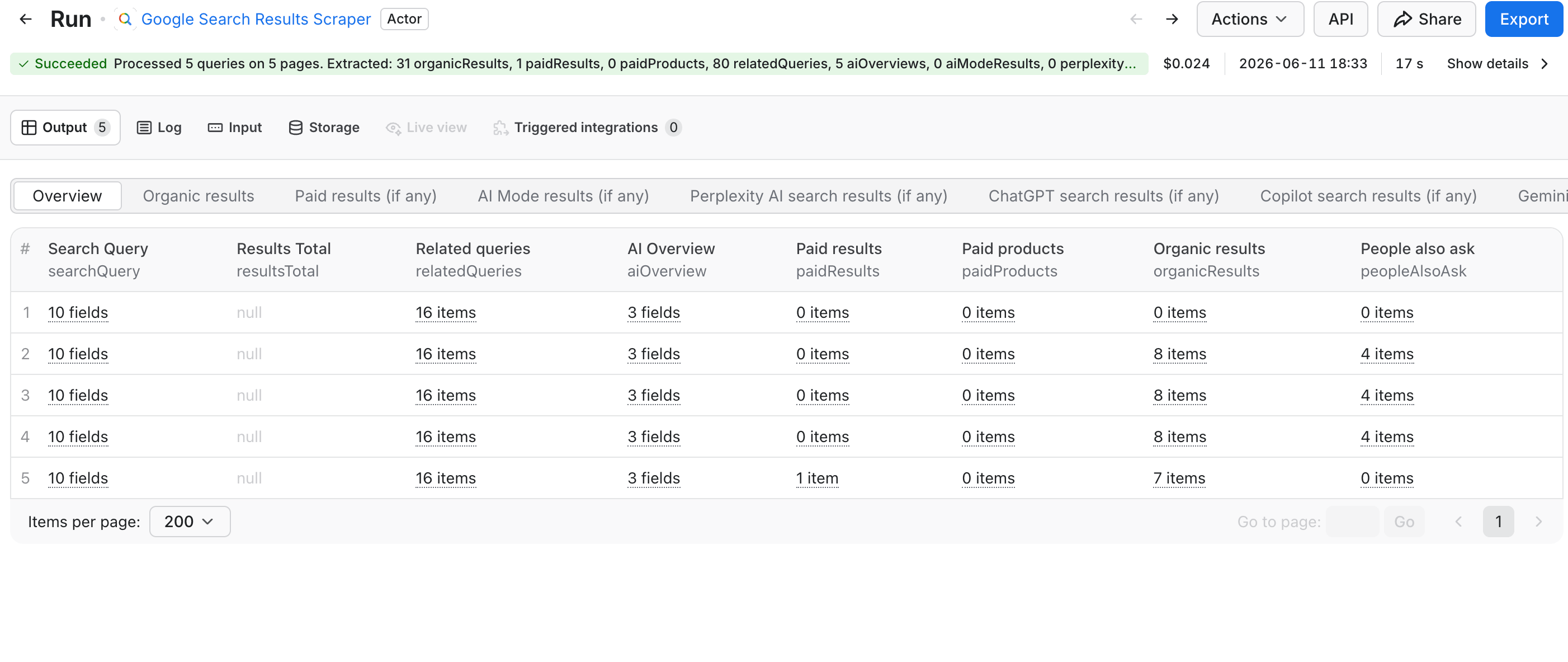
Every query showed an AI Overview (coverage of 5 out of 5), which is high. Overviews fire far more on informational and how-to queries like these than on niche or transactional ones, so many categories will see a lower rate. A low coverage rate isn't a failure. It tells you which queries to focus on, and whether AI Overviews are a battle worth fighting in your category yet. Here's what each one cited, and whether those links also ranked organically.
| Query | Cited in the AI Overview | Also ranked in the organic top 10? |
|---|---|---|
| what is a CRM | Reddit, Microsoft, IBM | all three (Reddit #1, IBM #3, Microsoft #4) |
| HubSpot vs Salesforce | Reddit, RevOps Co-op, YouTube | all three (Reddit #1, RevOps #2, YouTube #4) |
| what is sales pipeline management | Salesforce, Outreach, Business.com | Salesforce #1 and Outreach #2, not Business.com |
| best CRM for startups | Reddit, Podium, HubSpot | no organic results returned for this query |
| how to choose a CRM for a small business | Reddit, Xero, Enterprise Nation | Reddit #1 and Xero #6, not Enterprise Nation |
The chart counts citations across the 5 CRM AI Overviews, and Reddit appears 4 times, while every other domain appears once:
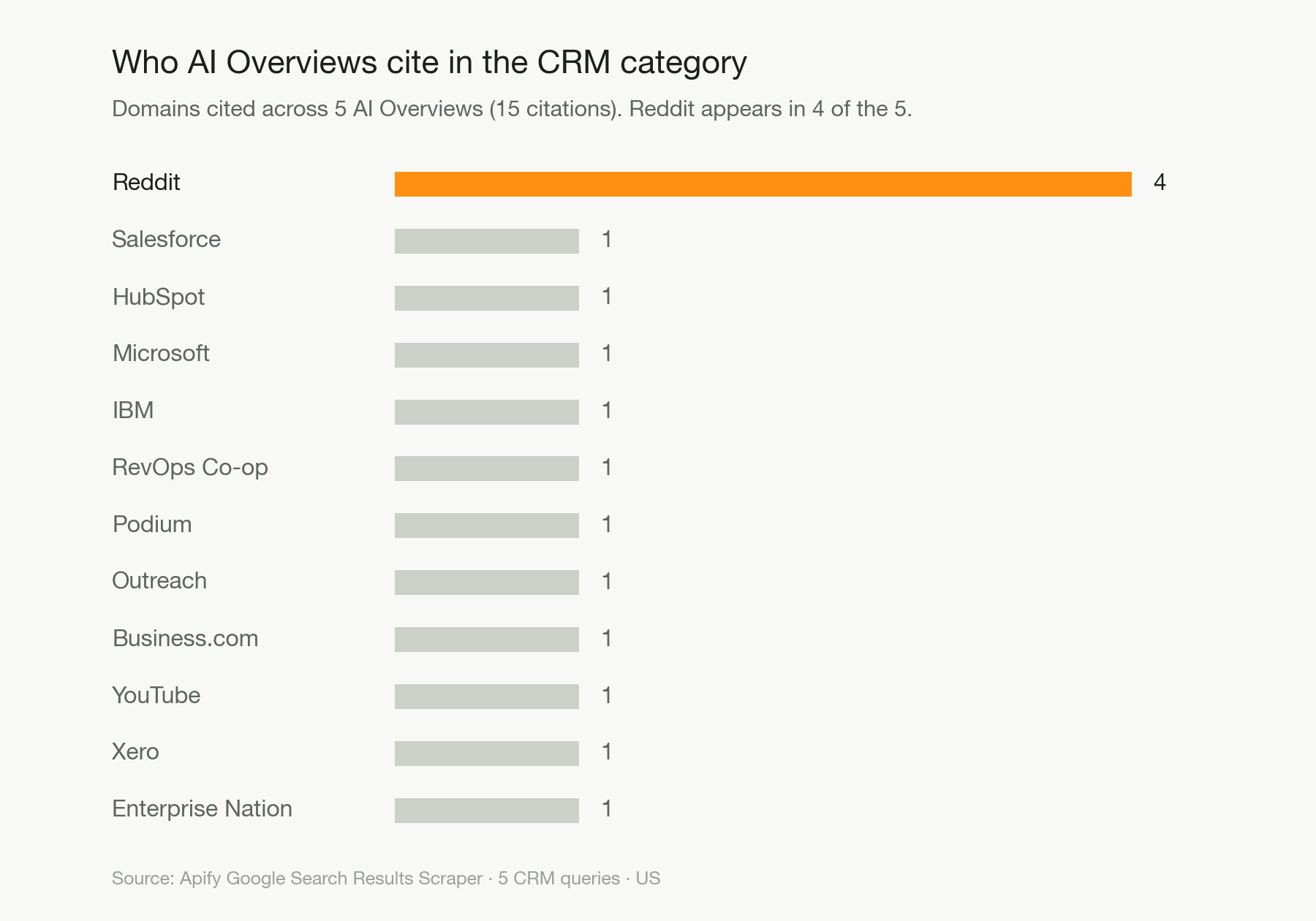
The tally points to a few patterns worth acting on.
- Reddit was cited in 4 of the 5 Overviews, and ranked first organically on three of them. Google leans very hard on community threads for this category, so a strong Reddit presence can matter more than your own page.
- Ranking helps here, but it still doesn't guarantee a citation. 10 of the 15 cited links (67%, matched by domain) also rank in the organic top 10, well above the 38% industry figure. Google leans on already-ranking content in trust-heavy categories like CRM. For "what is a CRM", the #2 and #5 organic results weren't cited at all, while the Overview pulled in Reddit, IBM, and Microsoft.
- One query, "best CRM for startups," returned an AI Overview with no organic results at all. The AI answer and ads took the whole page, and its three source links came back as Google redirects. The script labels those as
(redirect - read by title), so you resolve them from their titles to Reddit, Podium, and HubSpot. The Reddit one is why Reddit's count is 4, not the 3 the raw script shows. With no organic results for this query, none of the three overlap.
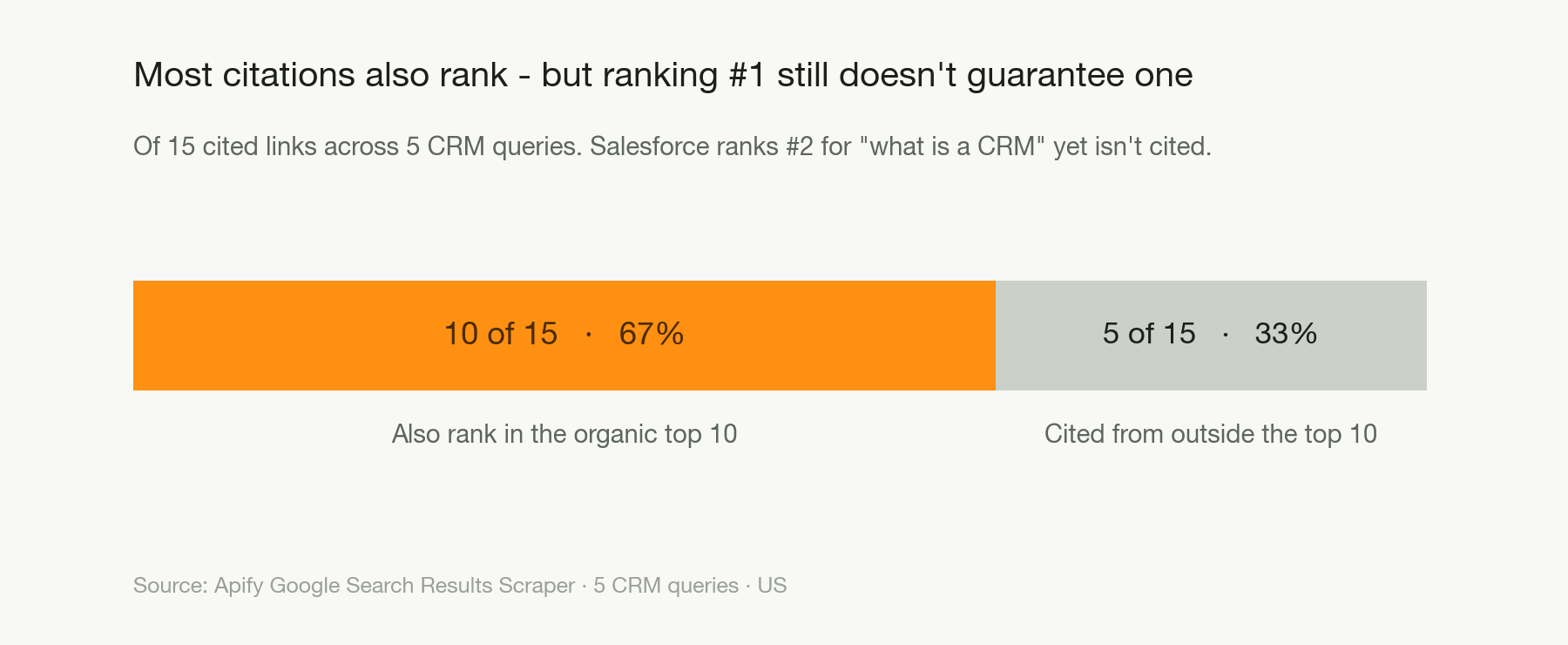
The formats track the query type, which tells you how to shape each page.
| Query type | What the Overview looked like |
|---|---|
| Definitional ("what is a CRM") | A short definition followed by bulleted sub-points |
| Comparison ("HubSpot vs Salesforce") | A feature comparison table |
| "Best" ("best CRM for startups") | A ranked list with bolded tool names |
| How-to ("how to choose a CRM for a small business") | A numbered, step-by-step answer |
To see why a page was chosen, take the cited URLs and crawl them with Website Content Crawler, Apify's page-to-Markdown tool, then compare the page text to the content Google lifted, so you see what to copy, not just who got cited.
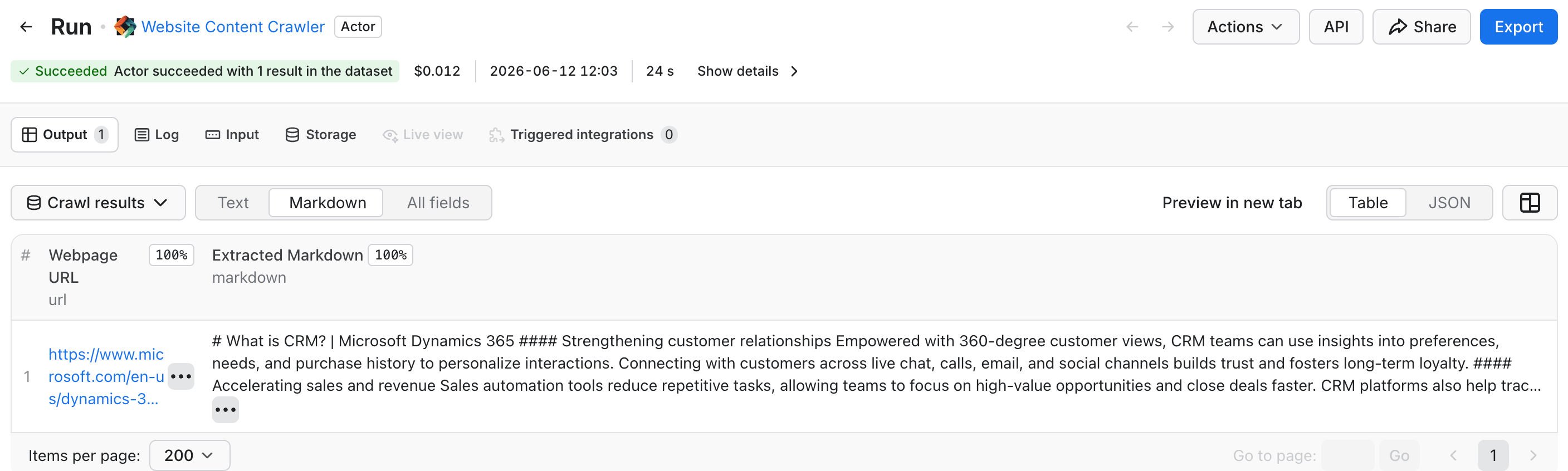
If you want to skip the manual reading, pull the cited pages as clean Markdown with RAG Web Browser, which is free and built to feed large language models (LLMs). Then hand them to an LLM and ask it to report the common formats, angles, and entities across the winners. You can run that analysis step through Apify itself, on your Apify token, so the whole loop stays in one place.
Step 4: Optimize your content to match
First, find the page to fix. The same dataset shows where you already rank. Scan organicResults for your domain to find the page that targets each query, or to spot a query you have no page for yet (a gap worth a new page). And if you rank nowhere and aren't cited at all, don't start by rewriting your homepage. Start where Google already looks. Your Step 3 tally names the sources it trusts in your category, and earning a mention there (in the CRM run, that meant Reddit and review sites like Podium) is usually faster than displacing a top-ranked page.
Your Step 3 numbers also tell you which moves matter most. Here, community presence and page format matter as much as raw rankings. Turn each pattern into a concrete edit.
- Front-load a self-contained answer. Open each section with a direct answer to one sub-question. Make it a tight paragraph of roughly 40 to 60 words, so Google can lift it whole. The passages Google lifts tend to be short and pulled from near the top of the page, so lead with the answer.
- Match the format to the query. Use a comparison table for "X vs Y", numbered steps for "how to", a tight definition for "what is", and a ranked list for "best". Your Step 3 run showed these formats tracking the query type.
- Cover the fan-out. Answer the
relatedQueriesandpeopleAlsoAsksub-questions explicitly on the page. This is likely how non-ranking pages still get cited. - Add structured data. Mark up the page with JSON-LD schema (Article, FAQPage, and HowTo) and a named author with credentials to reinforce E-E-A-T.
- Go where the citations already are. If Reddit and other third-party sites win your category, a strong community answer or a how-to video can earn citations your own page may never reach. Treat this as a project, not a quick edit. Reddit communities limit self-promotion, and a video is real production work.
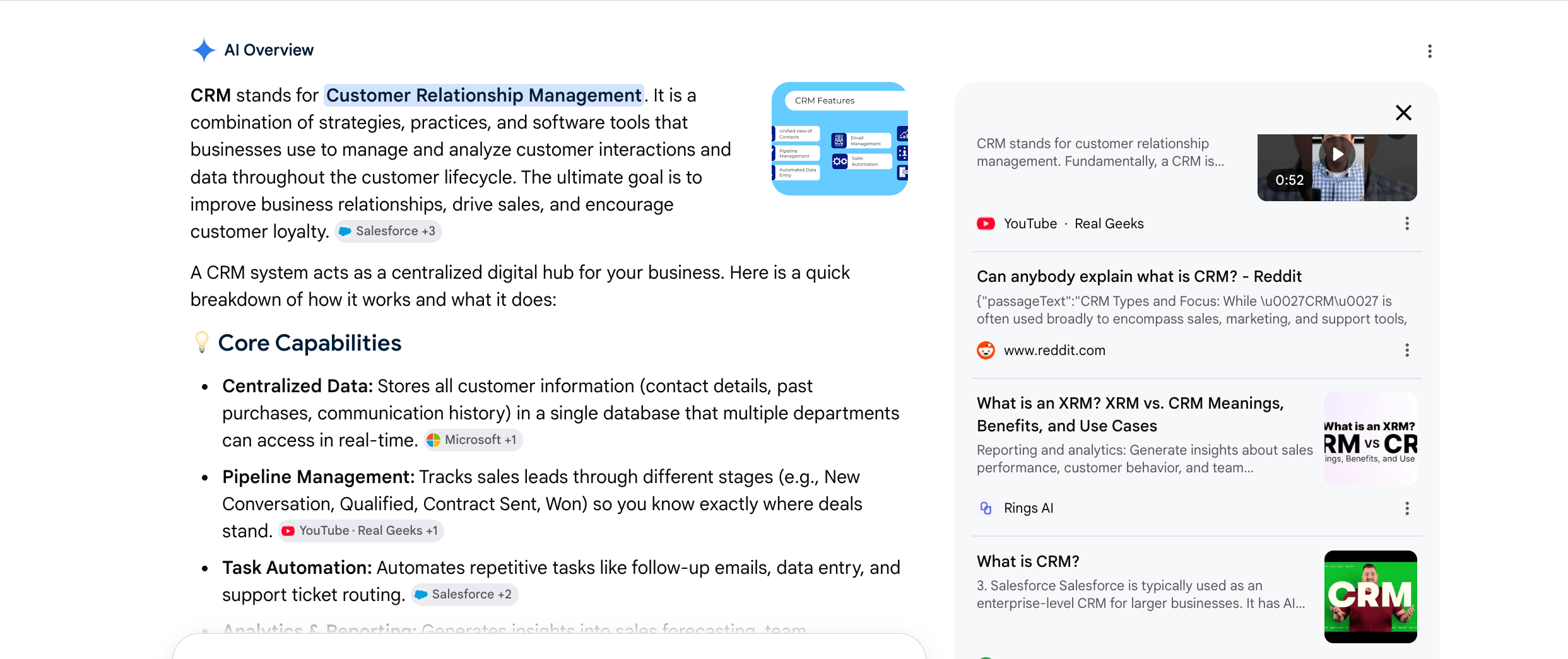
The sources panel for this AI Overview lists a Reddit thread and a YouTube clip, not only vendor pages.
Here's the front-loading move in practice. A typical page buries the answer under filler.
Google can't lift that. Rewrite it as a self-contained answer it can.
It's the same page and topic. The second version answers the question in the first 50 words, in the definition-and-list shape the data showed wins.
Before you publish a target page, run it through this checklist.
- Does it open with a direct, liftable answer to the exact query?
- Is the format the one your data showed wins for that query type (table, steps, definition, or list)?
- Does it answer the fan-out sub-questions, not just the head term?
- Are the schema and author markup in place?
- For the queries where community or video wins, do you have a presence there too?
Know what these moves can and can't do. They raise your odds, but they don't guarantee a citation. You're matching observed patterns, not buying a result.
Step 5: Track the loop over time
A single run is a baseline. The real value comes when you put the run on a schedule, save it as a task, and re-run the same query set every week or month. Chart your AI Overview citation rate. This is the share of category queries where your domain shows up in aiOverview.sources. Then track whether it moves after you ship the optimized content. Give it time, though. Google has to recrawl your page and regenerate the Overview.
From general SEO experience, it takes a few weeks, and longer for lower-authority sites. (Google doesn't publish a timeline, so treat this as a rule of thumb.) Re-run weekly or monthly, not daily, and after you ship a change, requesting indexing in Google Search Console may help prompt a recrawl.
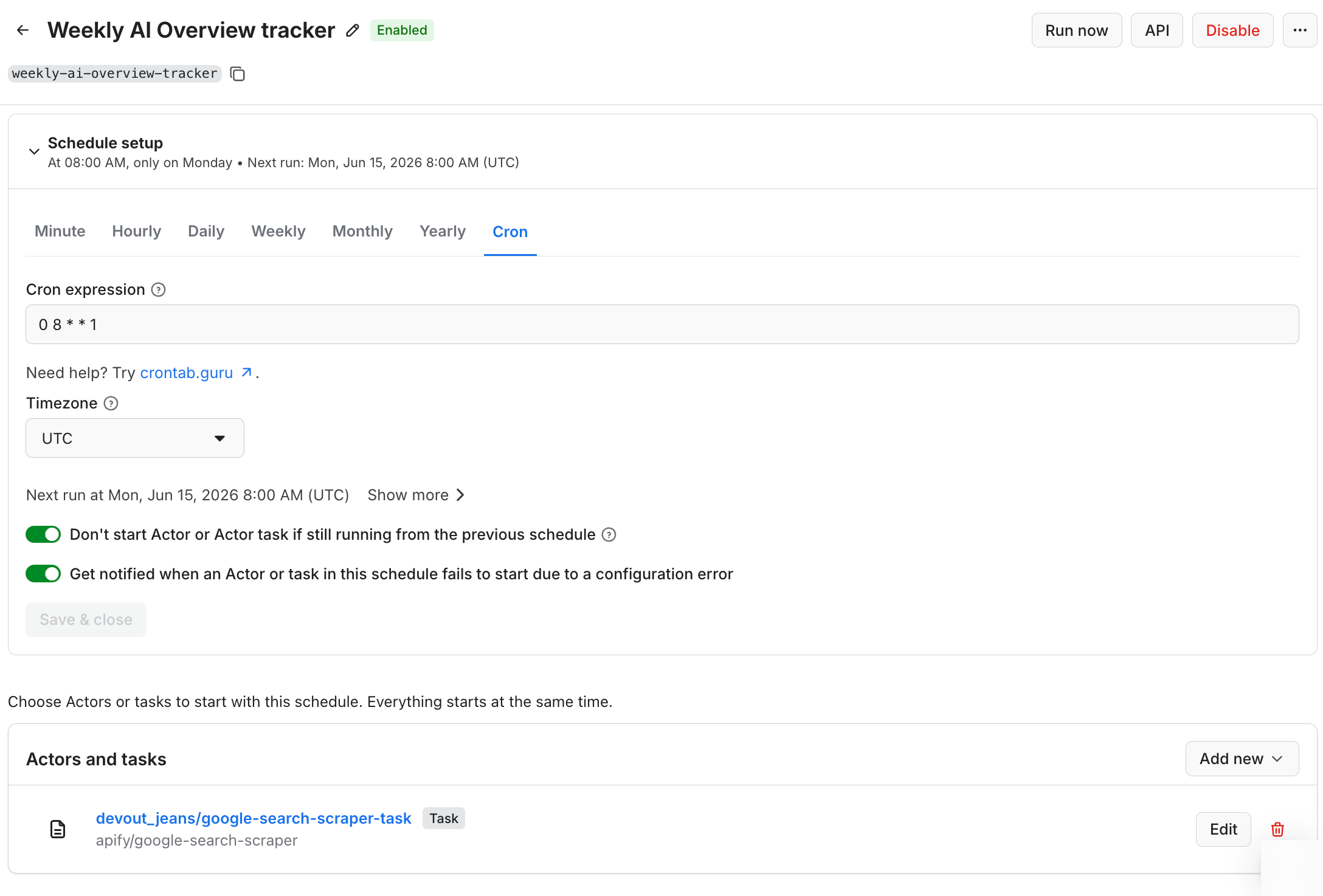
0 8 * * 1, so it runs every Monday at 8 am UTC.To close the loop without checking by hand, set up a Monitoring alert on the task, which notifies you by email, Slack, or in Apify Console. Out of the box, it watches run metrics, so you can catch a run that breaks or comes back short. The example here pings you when a run returns fewer results than your query set.
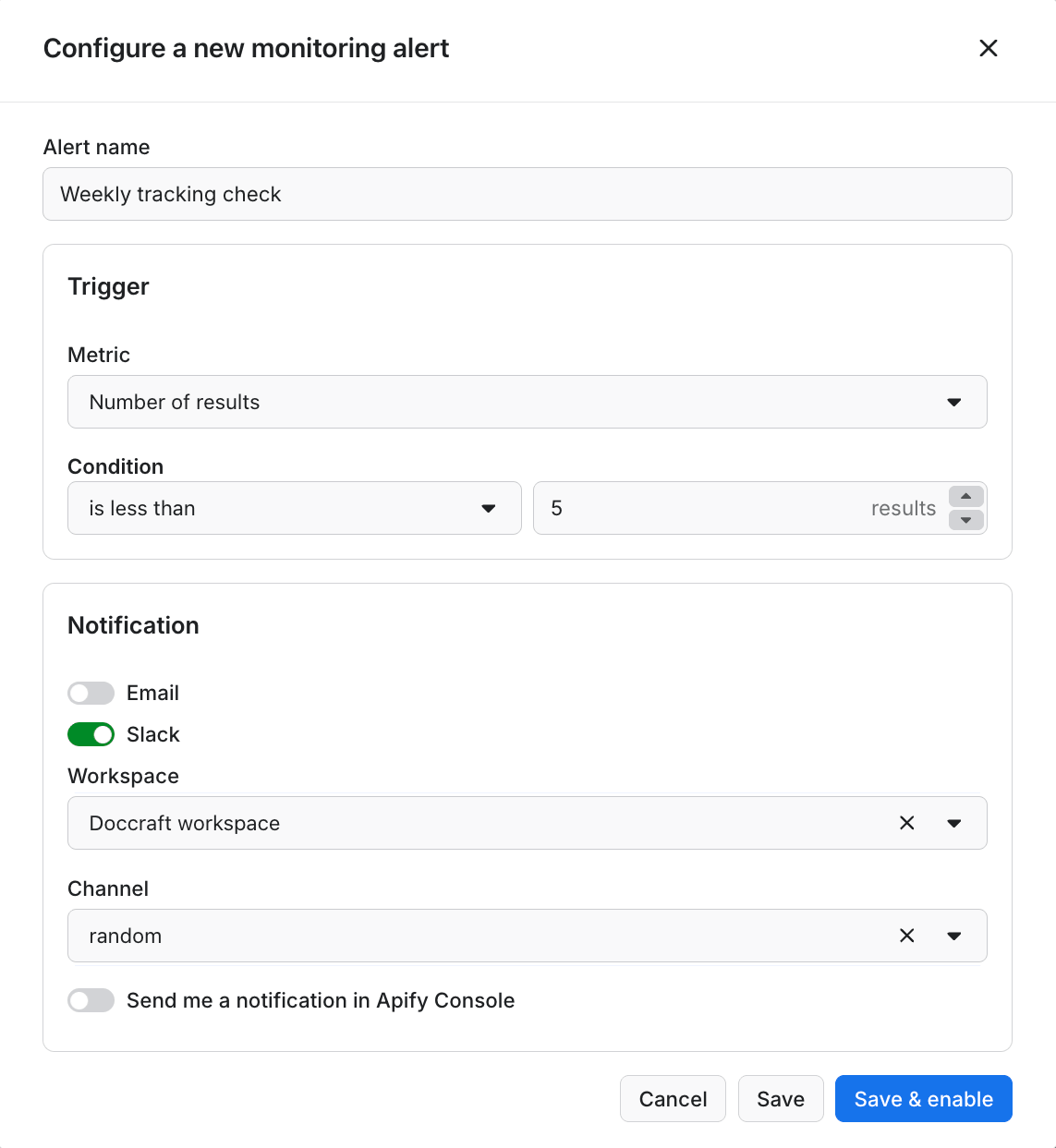
If you have an engineer on the team, you can automate the whole thing from your own stack. The Actor runs through Apify's API and as a Model Context Protocol (MCP) server, so a script or an agent can trigger runs and pull results directly. An engineer can go one step further and wrap the whole loop (capture, analyze, store, and alert) into a single custom Actor on the Apify platform. Then the tracker runs itself on a schedule, and your own agents can call it as one tool.
Once that Actor outputs your citation count as a dataset field, the same Monitoring alert can watch your citation rate, not just the run count. And with Apify's MCP connectors, that Actor can write its results straight into your own authenticated tools. It can post the weekly citation report to Notion or the alerts to Slack. The raw data stays with you.
Limitations and caveats
Keep these limits in mind before you act on the numbers:
- One run is a snapshot. Because Overviews are non-deterministic, run each query several times and pool the answers before you report a number.
- AI Overviews aren't Google AI Mode. Overviews are the snippet in normal search. AI Mode is the separate conversational surface (and a paid add-on). This method targets Overviews.
- Overlap figures are methodology-dependent. Published numbers vary widely depending on how "overlap" is defined and which category is measured. Your own data is the number that matters.
- Vendor "citation lift" multipliers are directional. Most come from individual studies, not Google. Use them as signals, not promises.
- The selection model is inferred, not documented. You can see what Google cited, never directly why, so you optimize against what Google actually does, not against a guess at its reasons.
- Results are local. They reflect the country, language, and device you measured from.
Get cited, not just ranked
AI Overview optimization isn't a checklist you follow or a dashboard you rent. It's a loop you own, built on the citations you scrape yourself. You set a fixed query set, capture the Overviews and their sources, reverse-engineer the patterns, reshape your content to match, and track the trend over time. It's also one engine of a wider practice, GEO, and the same loop applies across other AI surfaces, not just Google.
From here, measure your standing everywhere with the guide on tracking your brand across AI engines, then widen the loop to every category that matters to you. The payoff comes from reading what AI Overviews actually cite.

FAQ
Does ranking #1 get you into the AI Overview?
Ranking #1 helps, but doesn't guarantee it. Google splits each query into sub-questions and cites the best passage for each, so a page can be cited even when it ranks lower. In a 5-query CRM run, 67% of cited links also ranked in the top 10, against Ahrefs's 38%. So answer each sub-question directly on your page.
What if my brand isn't cited in any AI Overview?
Not being cited yet is normal, not a failure. Your citation tally already names the sources Google trusts in your category. In a CRM run, that was Reddit and review sites like Podium, not vendor pages. Earning a mention there is usually a faster first citation than rewriting your own pages.
How much does it cost to track AI Overviews?
50 queries sampled 5 times is about 1,000 pages a month, roughly $5. AI Overviews come back in the standard search scrape with no paid AI add-on, so you pay only per search page ($0.0045 on Apify's free tier), and a one-off spot-check costs cents.
Is AI Overview optimization worth it if AI Overviews reduce clicks?
Yes, because the click is often gone either way. Pew found that when an AI summary shows, people click a normal result 8% of the time, against 15% without one. So the citation inside the answer, where your brand still reaches the reader, is the visibility you can still win.
Is an AI Overview the same as Google AI Mode?
No. An AI Overview is the summary above normal search results. AI Mode is Google's separate conversational surface, where a follow-up chat can pull different sources than the Overview shows. This method targets Overviews. In the Apify Actor, AI Mode is a paid add-on while Overviews are not.
How many times should you run each query?
Run each query at least 3 to 5 times, then pool the answers. Because AI Overviews are non-deterministic, a single run is a snapshot. The average is the signal, and the spread tells you how stable your citations are.