If you have caught the Apify team at a conference recently, you may have seen a TV at the booth filling up with products: a mechanical keyboard, a pair of headphones, and an absurdly large bag of coffee. That is Wishlist Raffle. Scan the QR code, paste a product link from a store like Amazon, and your pick lands on the leaderboard. At the end of the day, one wish comes true.
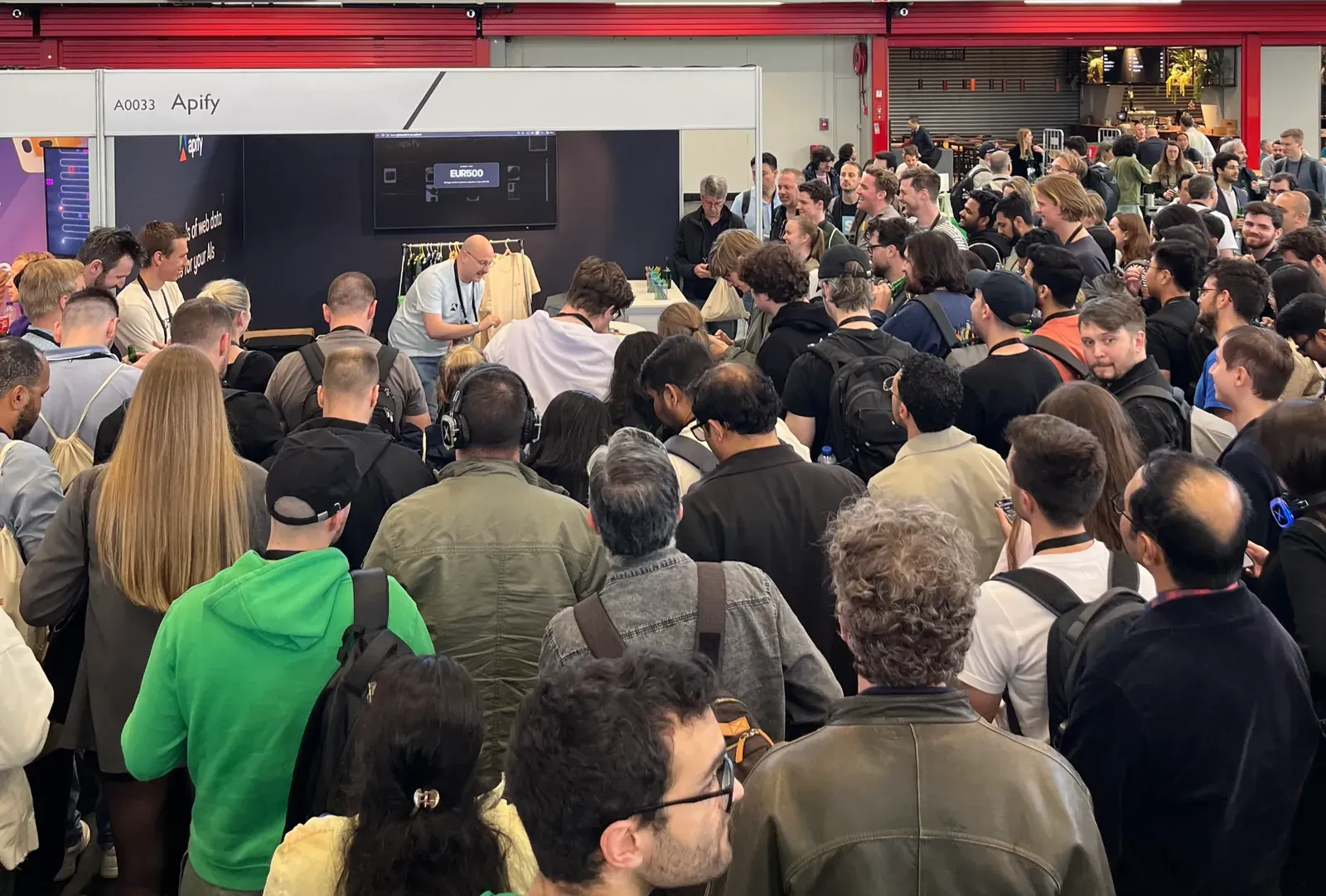
It is a fun prize mechanic, but the reason the team built it is to put the Apify platform directly in an attendee's hands. Every part of it, from the submission form to the live display to the winner draw, runs as an Apify Actor. No separate backend, no extra hosting, no glue server holding it together. This post covers why the team built it that way and a couple of platform tricks that make it work.
What a booth demo actually needs to do
A booth demo has a few competing jobs, and most of them have nothing to do with looking clever.
It has to let attendees touch the product, not just watch a slide. It has to be passive, because the people working the booth want to talk to developers, not babysit a laptop. It has to be collaborative rather than competitive. A scoreboard makes people glance once and move on, but a wall of other people's wishes does the opposite: you see a split keyboard you have been eyeing, a camera someone is clearly saving for, a coffee grinder that makes no sense until you ask about it, and it stokes ideas about what you would put up yourself. That pull is half the point. It gives the team something to talk about with attendees that is not just tech, which is often the easiest way into a real conversation. And it needs an honest opt-in for following up after the event.
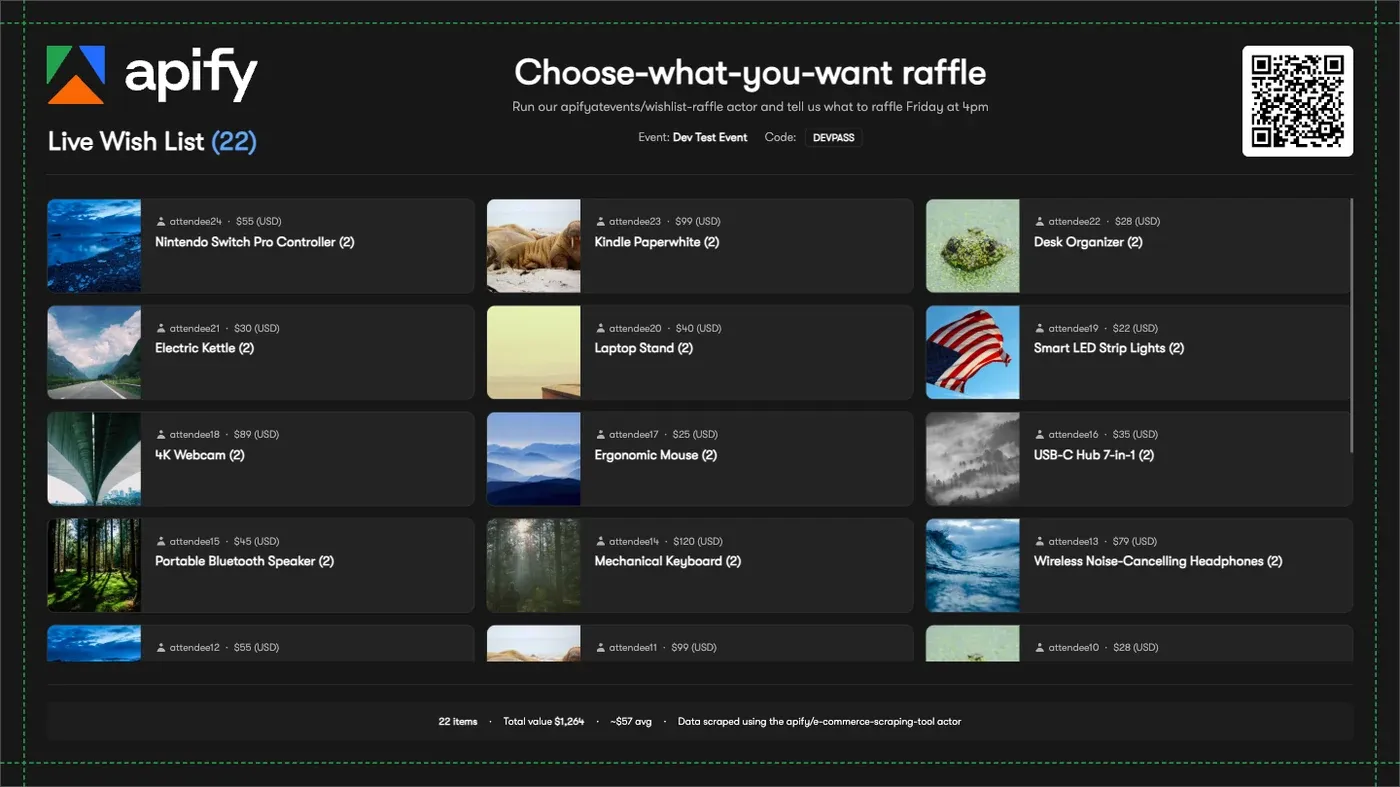
Wishlist Raffle answers all four. The thing attendees touch is a real Apify Actor run, the same way they would use any tool on Apify Store. The display updates itself. The wislist TV display turns everyone's picks into a conversation starter rather than a contest. And signing up to participate is an explicit, low-pressure action.
How it works
The attendee flow is four steps and takes about a minute:
- Scan the QR code at the booth, which opens the Submission Actor in the browser. New visitors create a free Apify account.
- Paste a product URL from a supported store, enter the event passcode shown on the screen, optionally set a display handle, and accept the terms.
- The Actor scrapes the product, validates it against the event rules (allowed domains, currency, max price), and writes the entry to the event dataset.
- The product card shows up on the booth display, which reads the dataset and refreshes on its own.
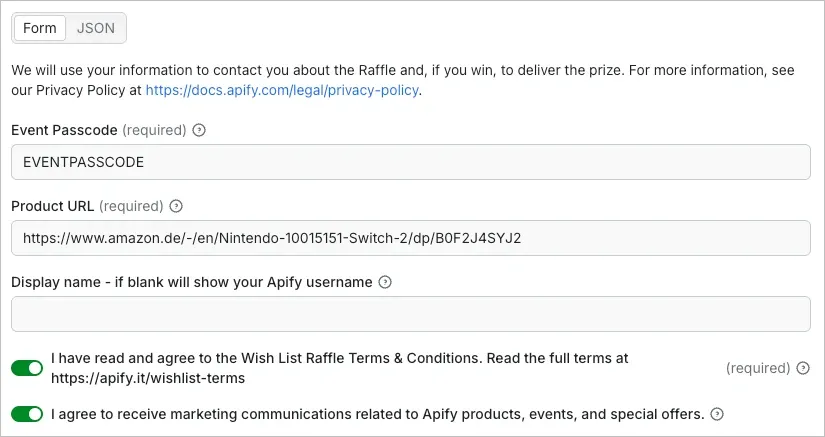
One submission per person, and duplicates are rejected automatically. When the raffle time comes around, a staff member opens an admin panel and draws a winner by budget tier, and the result goes up on the same screen.
The architecture
The project is a pnpm and Nx monorepo with three Actors and two shared packages. The split is deliberate: each Actor does one job, and they coordinate through Apify storage rather than talking to each other directly.
| Component | Role |
|---|---|
| Configuration Actor | One-time setup. Writes an event config (passcode, currency, max price, budget tiers, allowed domains) into a shared key-value store and provisions the event dataset. |
| Submission Actor | The attendee-facing one. Validates input, scrapes the product, and pushes the entry to the event dataset. |
| Display Actor | An always-on Express and React web server. Serves the public display and the staff admin panel. |
packages/types |
Shared TypeScript types like EventConfig and Submission. |
packages/hashing |
bcrypt-based hashing for the admin code. |
State lives in two places. A single shared key-value store holds every event's configuration in one events-config record. Each event then gets its own dataset (its ID stored on EventConfig.datasetId): the Submission Actor writes to it, the Display Actor reads from it. That is the whole data layer. There is no database to stand up, because Apify storage already is one.
Highlight 1: The display is an Actor running as a live web server
The most useful platform feature here is Actor Standby mode. An Actor does not have to be a batch job that takes input, runs, and exits. It can run as a web server at a public URL and respond to requests, which is exactly what the Display Actor does.
Start it with an eventId, and its run URL becomes the live booth page:
- Booth display:
https://<containerKey>.runs.apify.net/ - Admin panel:
https://<containerKey>.runs.apify.net/admin
One Actor serves both the public leaderboard the whole room can see and the authenticated admin panel where staff start the event, edit submissions, and draw the winner. Put the first URL on the TV, open the second on a laptop, and the booth is live. No Vercel project, no separate API, no reverse proxy. The display reads straight from the event dataset, so a new submission appears on screen on the next refresh without anything pushing it there.
There is a nice operational detail baked in too. Because the Display Actor runs on the organization account that owns the shared key-value store and the datasets, its own run token already has access to everything it needs. No extra API token to create, store, or rotate. The Actor's identity is the auth.
Highlight 2: One Actor calls another, on the attendee's own account
When an attendee submits a product link, the Submission Actor does not parse the page itself but calls another Actor instead: the E-commerce Scraping Tool. Actors calling Actors is a normal pattern on the platform, and it is what keeps the Submission Actor small. It does not own any scraping logic. It validates the input, hands the URL to a scraper that already exists on Apify Store, and stores what comes back.
The Submission Actor also calls E-commerce Scraping Tool using the attendee's own Apify token, not Apify's. So the person at the booth is not watching a demo of Apify scraping a product. They are running an Apify scraper, on their own account, against a URL they chose thirty seconds ago, and seeing structured data come back. The Submission Actor runs under limited permissions and prints extra logs so they can follow exactly what it is doing. That is a far better pitch than any slide: the abstract idea of "Apify scrapes any site" becomes a concrete thing that just happened to a link they picked.
Highlight 3: Shared storage is the coordination layer
The three Actors never call each other to share state. They coordinate entirely through Apify storage, and that is what lets them stay independent.
The Configuration Actor writes an event into a shared key-value store. The Submission Actor reads that config to know the rules, then writes accepted entries into the event's dataset. The Display Actor reads the same config and the same dataset to render the screen. Nobody holds a reference to anybody else. You could redeploy any one of them without touching the other two.
This is the part that would normally be a database plus an API plus the code that talks to both. Here, it's a key-value store record and a dataset, addressed by name and ID. The Configuration Actor and Submission Actor reach the shared store with an organization token (WISHLIST_APIFY_TOKEN), and the store name comes from a single WISHLIST_KVS_NAME env var, so pointing a whole deployment at a different store is a one-line change.
Improvements since the first use
The main improvement has been in the admin panel, which has grown a bit since launch. Staff can now soft-remove or edit submissions, restore them later, edit event config mid-event without touching the Configuration Actor, and jump straight to a participant's Apify Console profile from a winning entry so we can check email addresses, names, etc. Multi-day events restart cleanly, and previous days' winners are excluded from later draws.
Why this shape works
The whole demo is small. The interesting thing is how little of it is custom infrastructure. The storage layer is Apify storage. The web server is an Actor in Standby mode. The scraping is an existing Store Actor run on the attendee's account. The auth is the org run token. What is left to actually build is the booth-specific logic: validation rules, the display, and the draw.
That is the same lesson the platform sells to every developer who publishes an Actor. You bring the idea and the thin layer of logic that makes it yours. Scheduling, storage, proxies, scaling, and a public URL come with the platform. Wishlist Raffle is the Apify team taking its own advice, and dressing the result in a party hat.