Most TikTok lead generation guides assume you've already got an ad budget or an audience. Paid ads need $600 to $9,000 to test properly, and organic Instant Forms need 1,000 followers or a Business Registration before you can even turn them on.
This post covers all three paths, but the one most guides skip is the third: if you don't have the budget or the audience, you can still build a prospect list by scraping public comment and profile data from TikTok videos in your niche.
We'll walk through paid ads, organic capture, and the scraping workflow - with real costs from a test run and an n8n template to automate it.
Paid ads and organic lead capture
TikTok has both paid and organic options for collecting leads.
Paid ads
TikTok Ads Manager has a Lead Generation objective with five optimization locations: Instant form, Website, TikTok direct messages, Instant messaging apps (WhatsApp, Messenger, Zalo, LINE), and Phone call. Instant Form is the most common choice because it tends to produce a lower cost per lead (CPL) - the form loads in-app and auto-fills from the user's TikTok profile.
TikTok's learning phase runs up to 7 days per ad group, and the system needs around 50 conversions before delivery stabilizes. That puts the minimum test budget between $600 and $9,000 at the benchmarked CPL range. TikTok's rebate program for Smart+ campaigns can lower the effective minimum to $210 (check TikTok Ads Manager for current terms).
Industry CPL ranges:
| Vertical | TikTok CPL | Facebook CPL (WordStream) | Google CPL (MetricNexus) |
|---|---|---|---|
| Education | $12-$55 | $28.22 | $90 |
| Solar | $25-$95 | N/A | N/A |
| Home Services | $18-$70 | N/A | N/A |
| Insurance (Auto) | $18-$60 | N/A | N/A |
| Legal (Personal Injury) | $45-$180 | $18.17 | $132 |
| Real Estate | $20-$90 | $16.61 | $100 |
Facebook is cheaper for legal and real estate, but TikTok reaches 18-34 year-olds who are harder to find on Facebook.
Organic
TikTok Business Accounts can collect leads without ad spend through in-app Instant Forms attached to a CTA button on the profile, a Video Anchor overlay on organic videos, or a Live Anchor overlay during livestreams. All three require 1,000 followers or Business Registration. The cap is 420 leads per week per account, combined across placements.
Business Accounts also include native DM automation: welcome messages, keyword replies, suggested questions, and chat prompts. The comment-to-DM workflow is to say "DM me [keyword]" in your video - the viewer sends the keyword and TikTok auto-replies with your lead magnet.
The downside is that a Business Account restricts your music library to the Commercial Music Library, which removes access to the trending sounds that help organic reach.
Both paid ads and organic require you to be the content creator - you need videos, an audience, or an ad budget. Scraping lets you prospect from other creators' audiences instead.
Building prospect lists from TikTok with Apify
You can scrape TikTok comment and profile data to build prospect lists for cold outreach. The tools are two Actors on Apify - the free tier covered our test run. Scraped contacts are not opted-in leads, so treat them as cold outreach prospects.
How it works: step-by-step walkthrough
If you want to automate this workflow instead of running it manually, jump to the n8n workflow.
The two Actors are the TikTok Comments Scraper (extracts commenters from videos in your niche) and the TikTok Profile Scraper (enriches those usernames with profile data).
Our test run cost $0.70 total ($0.635 for comments, $0.06 for profiles) - well within the free tier. Check the Actor pricing tabs for current rates.
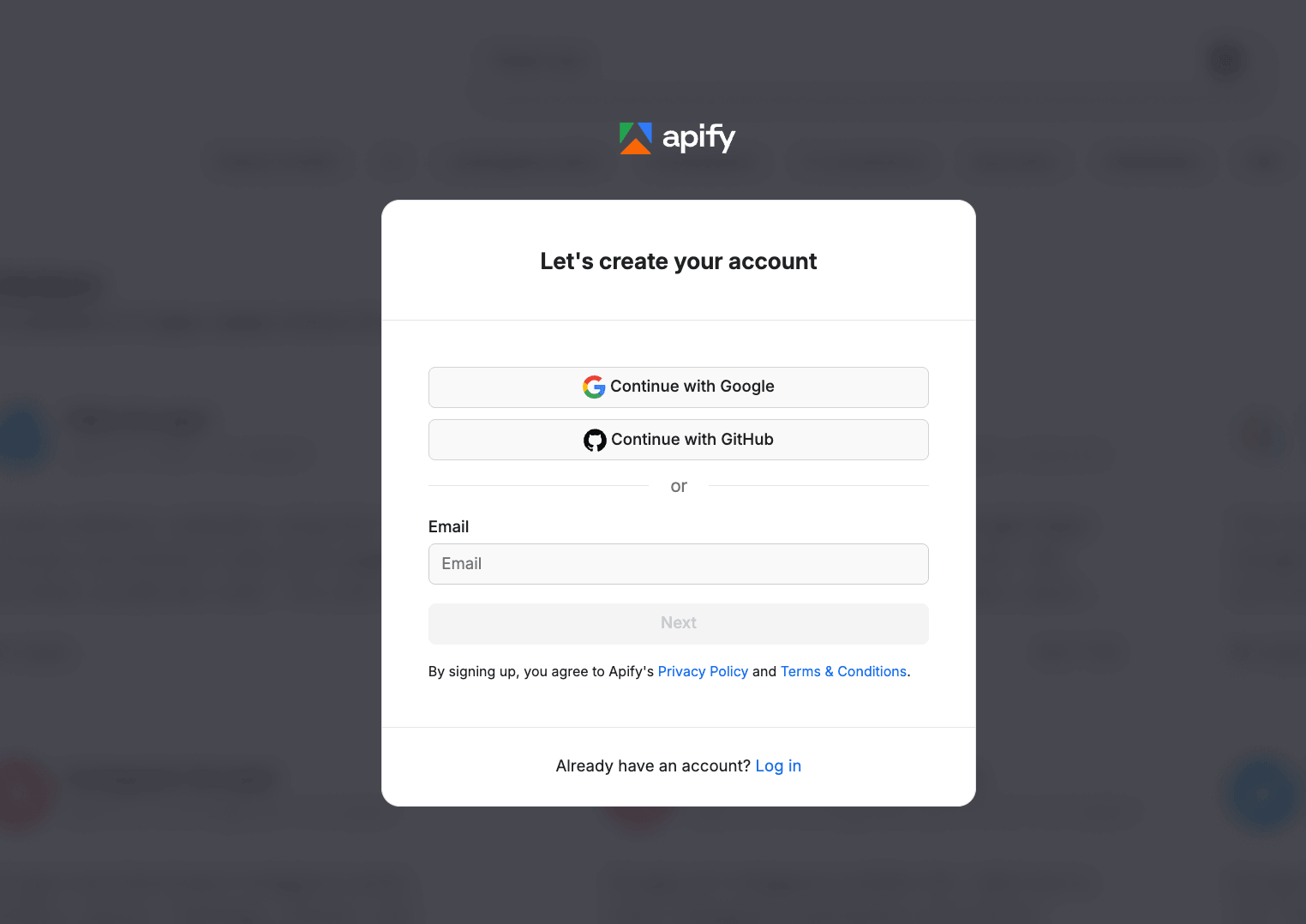
Step 1: Create a free Apify account
Go to apify.com and sign up.
Step 2: Find a TikTok video in your niche
The quality of your prospect list depends on the video you pick. Here is what to look for:
- Creator teaches or reviews in your vertical. If you sell CRMs, pick a video from a small business coach.
- Recent - posted in the last 1-14 days. Recent comments mean the commenters are still active.
- At least 100 comments, ideally 300+.
- Comments are in the language you plan to do outreach in.
- Skip hyper-viral videos (10M+ views). The signal-to-noise ratio drops sharply.
To find one, use TikTok search (type a problem your product solves and sort by date), look at known creators in your niche (GaryVee, Alex Hormozi, or niche-specific ones where the audience self-selects), or browse industry hashtags. For a broader overview of TikTok data extraction, see the TikTok scraping tutorial.
We used a GaryVee video about TikTok Live Shopping with 508 comments. The audience is small business owners debating whether to sell on TikTok, which overlaps with marketing tool buyers.
Step 3: Run the scraper
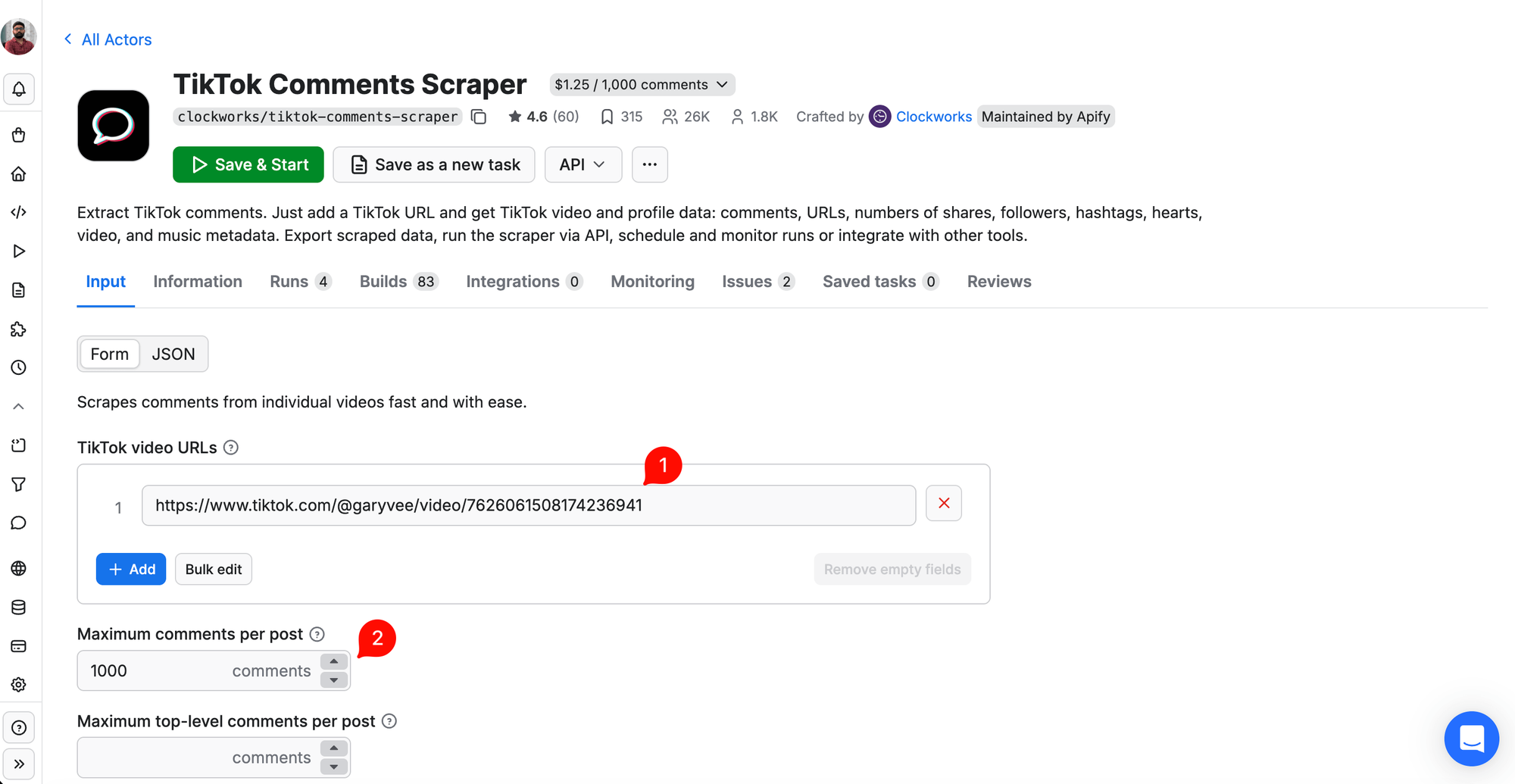
Copy the video URL from the browser address bar (desktop) or from the Share button (mobile). Head to TikTok Comments Scraper. Paste the URL in the TikTok video URLs field and set Maximum comments per post to a value above the total comments on the video. We used 1000 for a video with 508 comments. Leave the other fields empty and click Save & Start.
For our 508-comment video, the run finished in about 2 minutes. When it completes, you see a green Succeeded banner with the total comments scraped, cost, and duration.
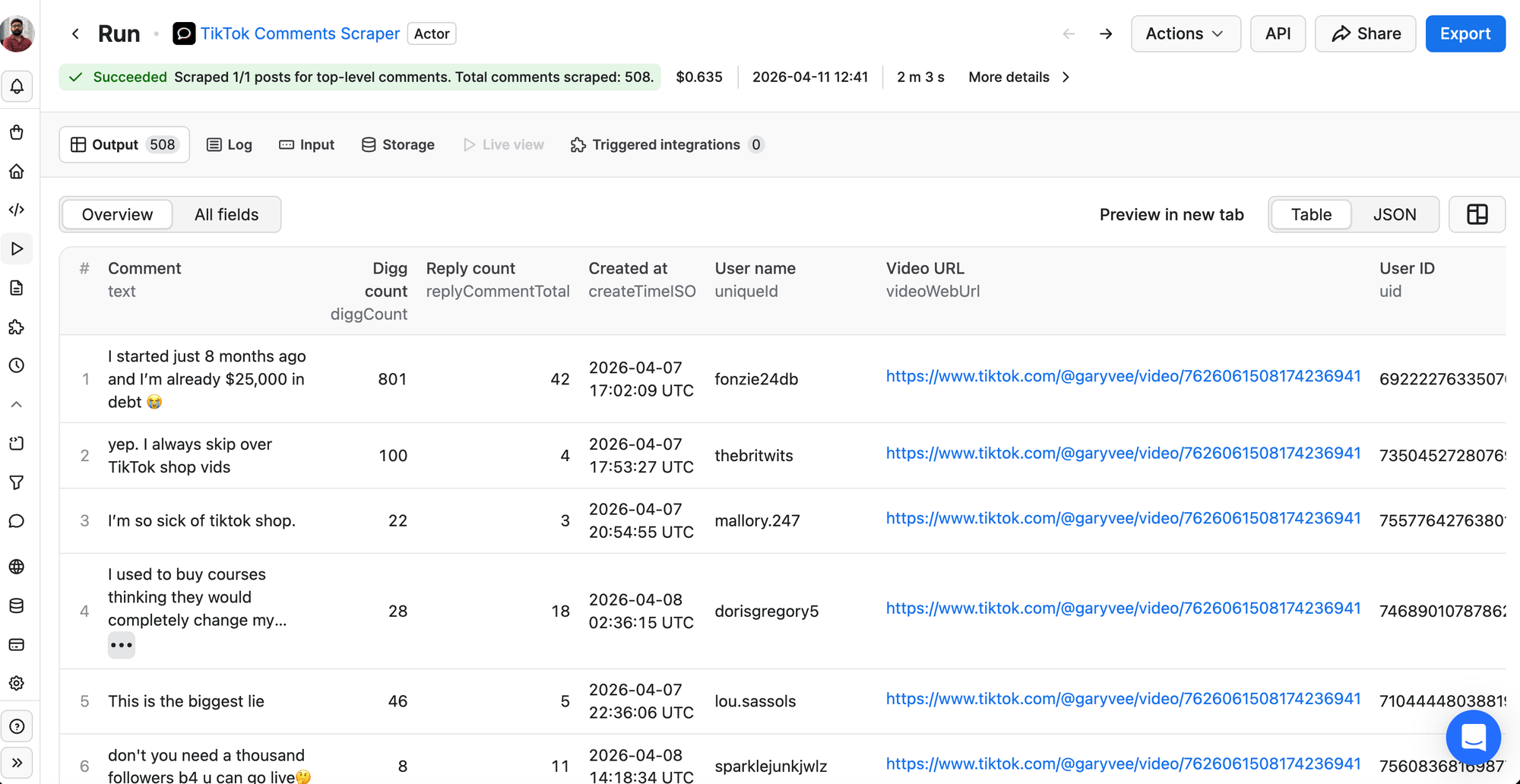
Each row contains the fields you will use to filter:
| Field | What it contains |
|---|---|
| uniqueId | Commenter's TikTok username |
| text | The comment text |
| diggCount | Likes on the comment |
| replyCommentTotal | Number of replies |
| createTimeISO | When the comment was posted |
Click Export in the top-right corner, select CSV, and click Download.
Step 4: Filter down to your best prospect candidates
Most comments will be noise. You have two ways to filter for prospects: manual for small lists, LLM-assisted for anything bigger.
Manual filter: Sort the CSV by diggCount descending and scan the top 100 comments. Flag usernames that reference a profession or business (@qualityprints_embroidery, @krystalclear_realtor), anyone who describes their own business in the comment, and anyone asking a substantive question about running or scaling a business.
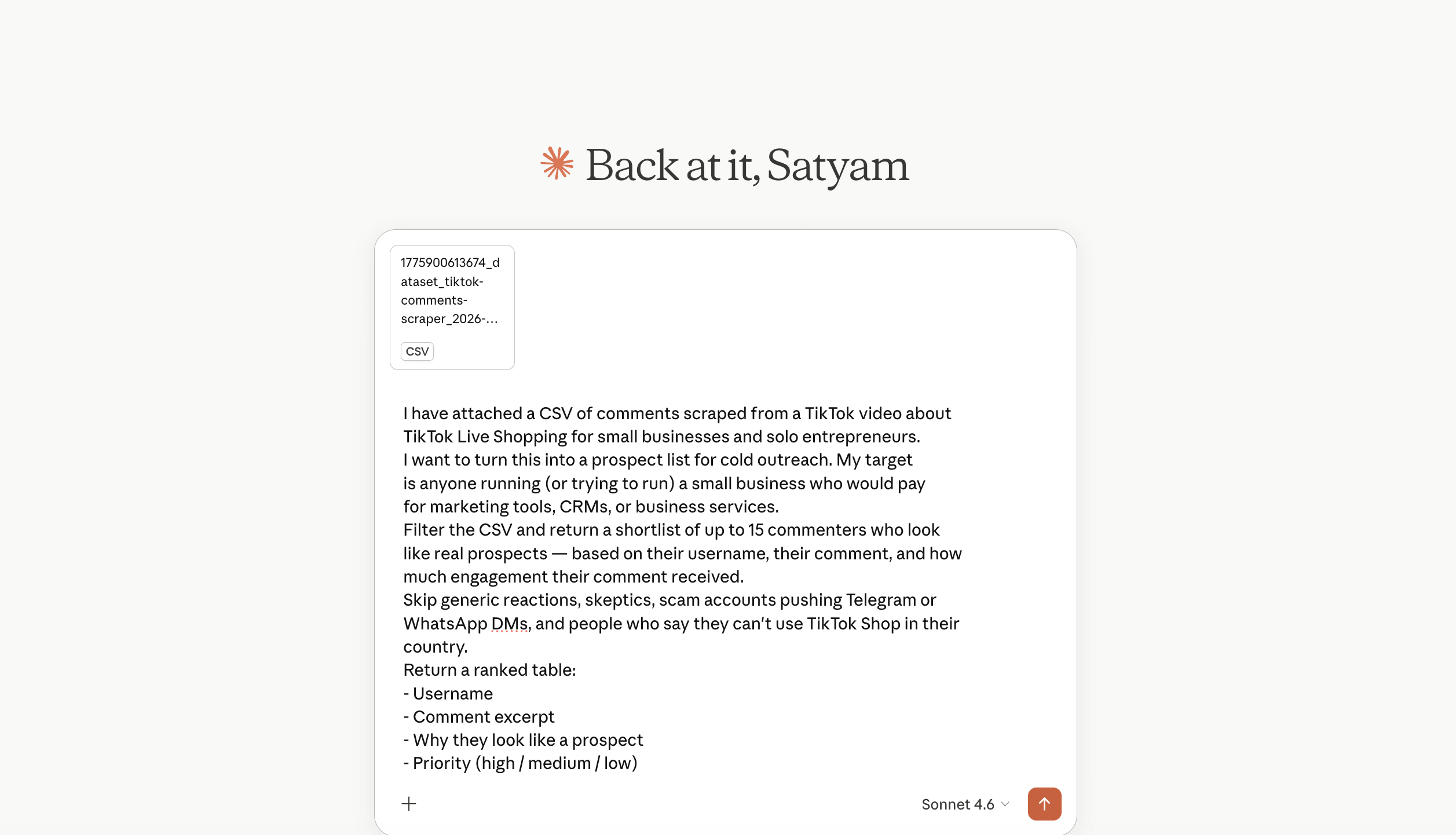
LLM-assisted filter: Upload the CSV to your preferred LLM (ChatGPT, Claude, or Gemini - free tiers work for files under a few hundred rows) and ask for a ranked shortlist. Here is a prompt that works well:
I have attached a CSV of comments scraped from a TikTok video about [topic]. I want to turn this into a prospect list for cold outreach. My target is [target audience].
Filter the CSV and return a shortlist of up to 15 commenters who look like real prospects, based on their username, comment, and engagement. Skip generic reactions, skeptics, and scam accounts.
Return a ranked table with: username, comment excerpt, why they look like a prospect, and priority (high / medium / low).
We uploaded the full 508-comment CSV to Claude using the prompt above:
The LLM returned a ranked prospect table in under a minute:
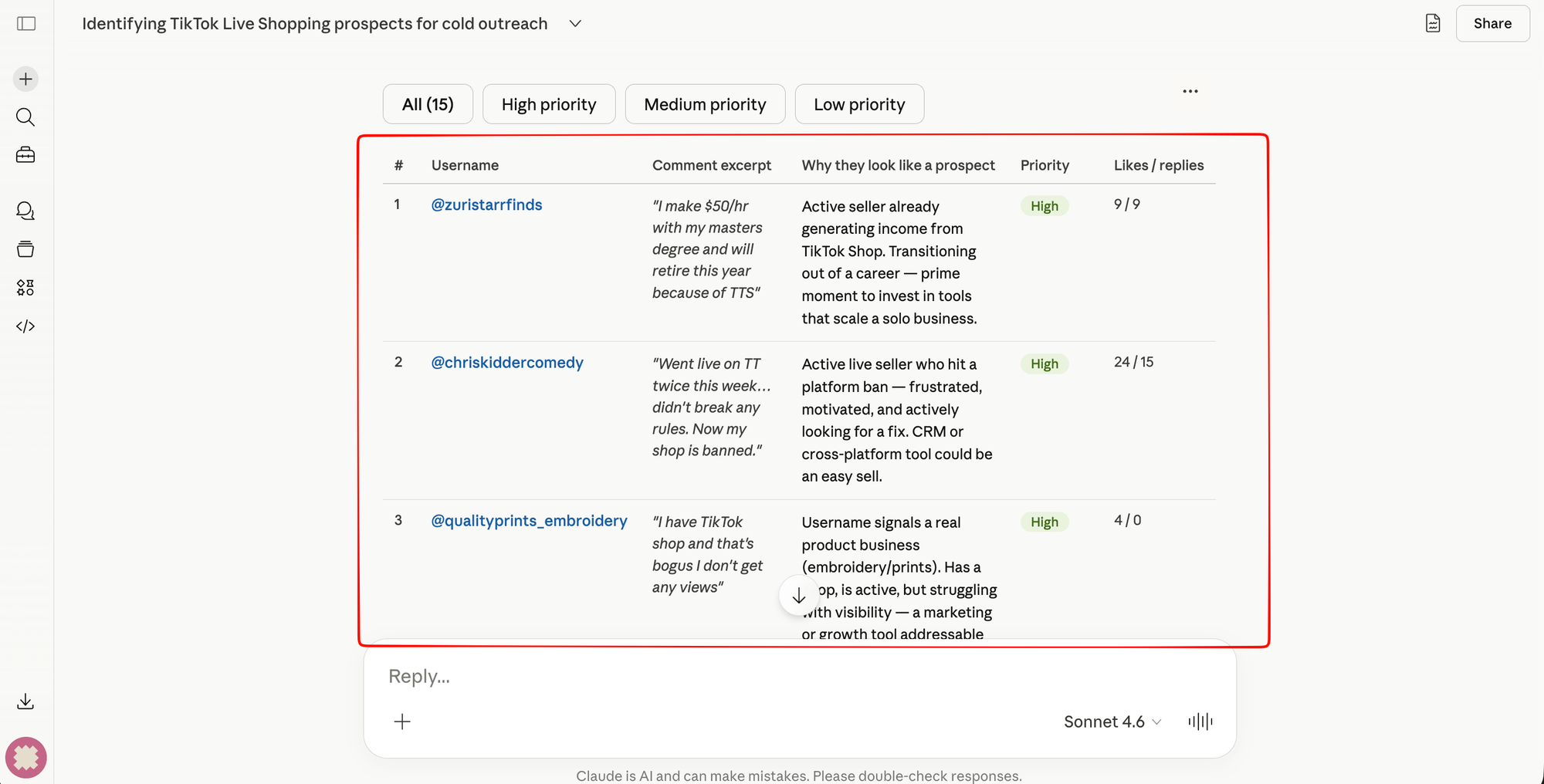
Customize the topic and target in the prompt. Before moving to Step 5, ask the LLM to return the final shortlist as a plain list of usernames, one per line, with no @ symbol - that pastes directly into the Profile Scraper's Profile(s) field.
Start with 10-50 strongest candidates, not the whole comment list. Once you have your shortlist, come back here for Step 5.
Step 5: Enrich data with TikTok Profile Scraper
Head to TikTok Profile Scraper. Paste your shortlisted usernames into the Profile(s) field without the @ symbol (entries prefixed with @ may fail). You can use the bulk option for multiple items.
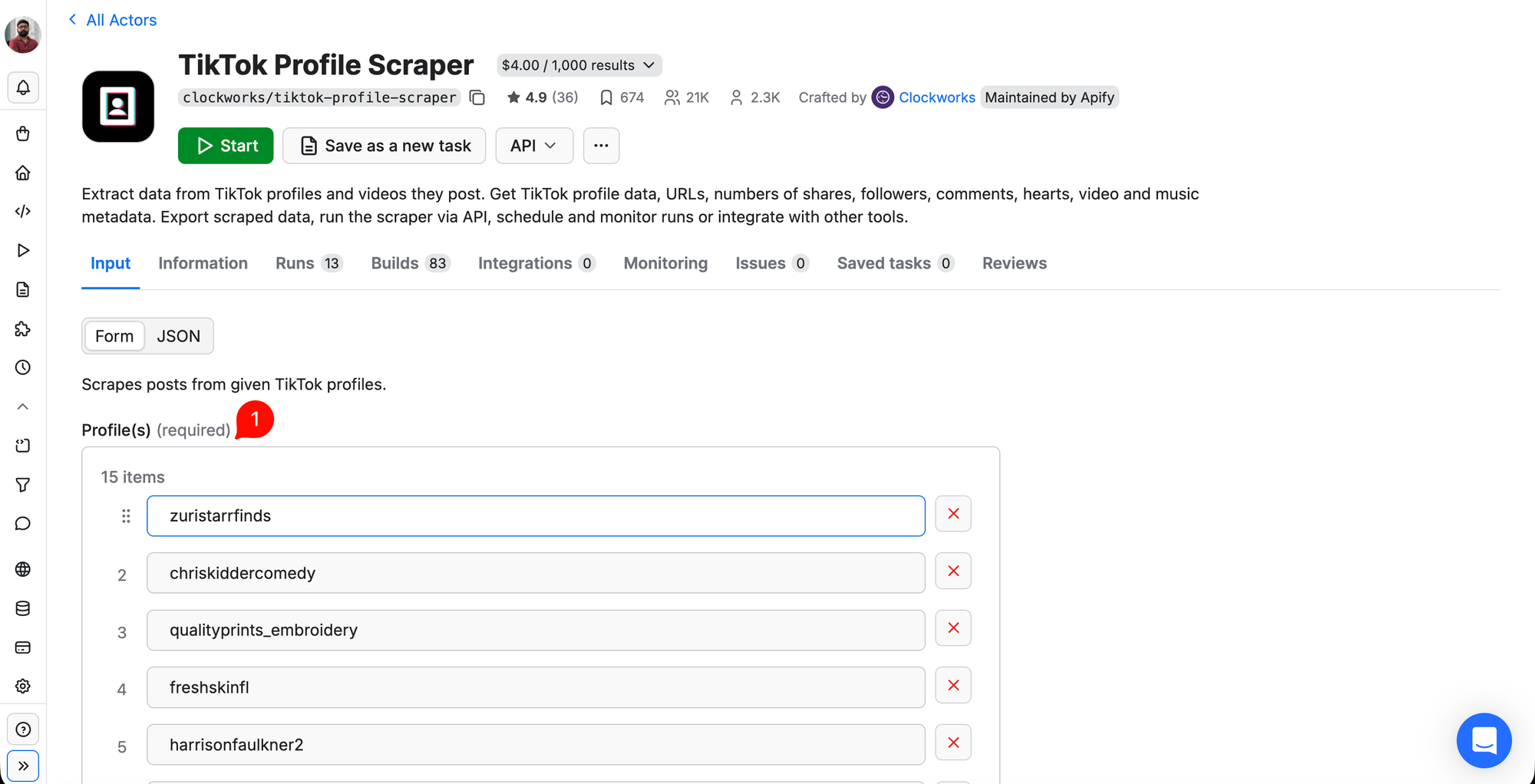
Scroll down and set Max posts per profile to 1 to avoid paying for video data you don't need.
Click Start. The scraper returned 15 out of 15 profiles in about 2 minutes.
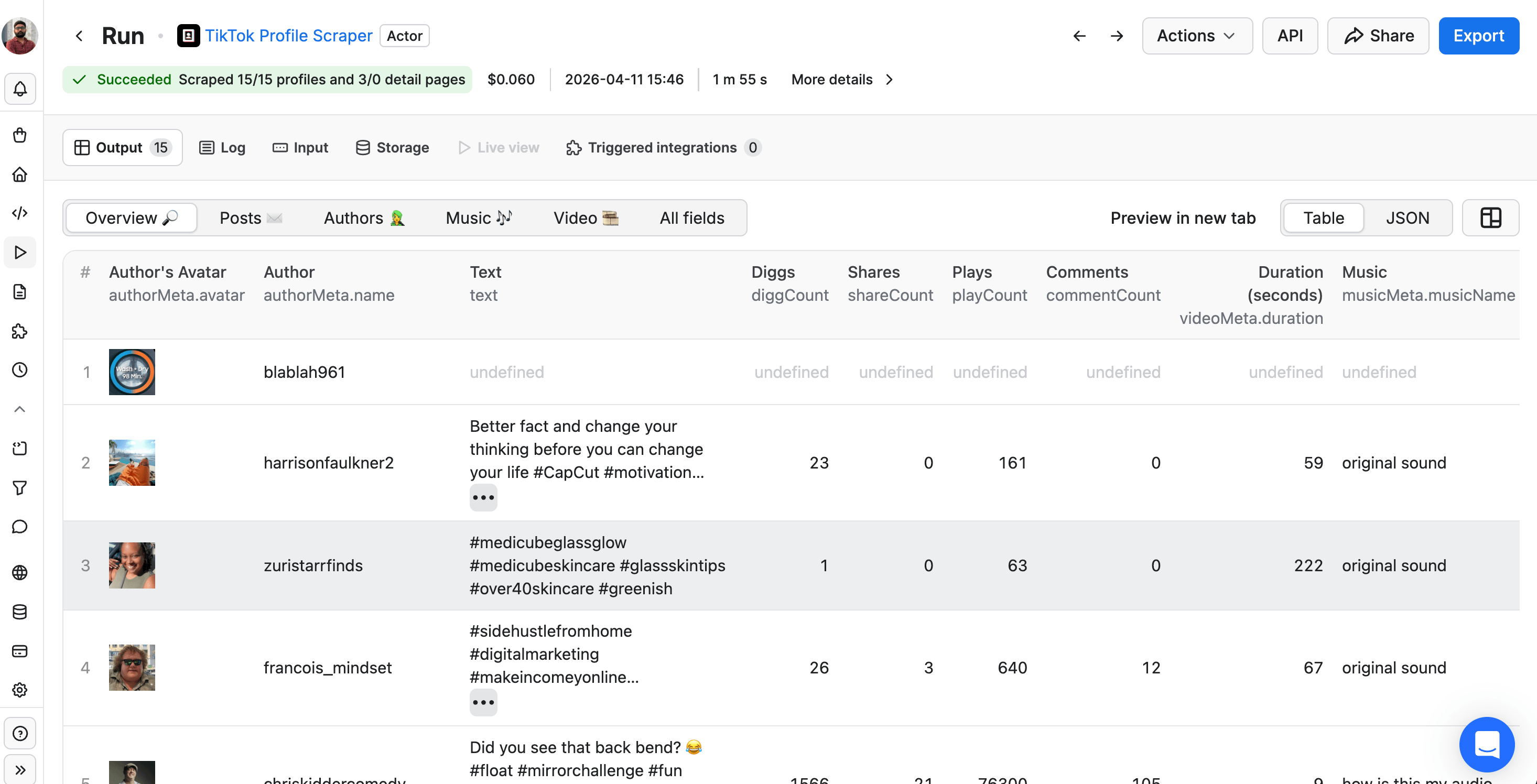
The fields you care about for outreach:
| Field | What it contains |
|---|---|
| authorMeta.signature | Bio text |
| authorMeta.bioLink | URL in their bio (website, Linktree, etc.) |
| authorMeta.fans | Follower count |
| authorMeta.verified | Verification status |
| authorMeta.ttSeller | Whether they are a TikTok seller |
The default Overview tab shows each profile's most recent video, so accounts with zero videos show as undefined. Switch to the Authors tab (above the table) or export as CSV/JSON to see the bio, follower, and seller fields. If a username has a private account, the scraper returns minimal data and sets authorMeta.privateAccount: true - filter those out before outreach.
Step 6: Export and review your prospect list
Download the Profile Scraper dataset as CSV or JSON. Here are our 15 prospects from the Claude Sonnet run. All data was publicly available on TikTok at the time of scraping and is shown for demonstration only.
| # | Username | Followers | Seller | Bio link / domain | Signal |
|---|---|---|---|---|---|
| 1 | @zuristarrfinds | 15,000 | - | twitch.tv/ZuriStarr + email in bio | "Sharing my TikTok Shop finds" |
| 2 | @chriskiddercomedy | 17,600 | - | suchakidder.com | Entrepreneur, speaking coach |
| 3 | @qualityprints_embroidery | 17,500 | ✅ | Shopify store in bio | TikTok-flagged seller, live store |
| 4 | @freshskinfl | 1,221 | - | - | Aesthetician, Florida |
| 5 | @harrisonfaulkner2 | 1,039 | - | - | Solo "entrepreneur" persona |
| 6 | @dinkytullycarnet | 2,626 | - | nicdartiles.co.uk | UK tile business owner |
| 7 | @blablah961 | 210 | - | - | 0 videos - fan account |
| 8 | @francois_mindset | 386 | - | - | Passive income coach |
| 9 | @crissiqco | 57 | - | - | Empty bio |
| 10 | @imandi_agency | 911 | - | - | Luxury transportation |
| 11 | @krystalclear_realtor | 9,721 | - | linktr.ee/KrystalClearAgent | LA Realtor + home builder |
| 12 | @techfonelmedia | 132 | - | - | Small tech creator |
| 13 | @owlsomekinders2.0 | 1,462 | - | - | Secondary account |
| 14 | @startsimple.biz | 138 | - | larryswan.com (in bio) | Early-stage |
| 15 | @sweetcreationsbynichelle | 47 | - | - | 0 videos |
5 of 15 are unusable - fan accounts, empty bios, or profiles with zero videos. You can filter out 50+ candidates down to 15 to account for unusable profiles. The 10 usable profiles yielded: 4 with real business websites, 1 TikTok-verified seller with a live Shopify store, 1 email printed directly in the bio, and 8 accounts in the 1k-20k follower range. You can try this on your own video.
Step 7: Join the comments with the profiles
You now have two files: the Comments CSV from Step 3 (text, diggCount, uniqueId) and the Profile JSON/CSV from Step 5 (authorMeta.name, fans, signature, bioLink, ttSeller). The common key is the username (uniqueId = authorMeta.name).
The fastest way to join them is in Google Sheets: open both files as sheets in the same workbook and use VLOOKUP in the Profile sheet to pull the matching comment. Alternatively, upload both files to your LLM and ask it to join by username. If you plan to run this workflow regularly, the n8n workflow in the next section handles the join automatically.
Here is an example outreach message based on one profile from our run:
Saw your comment about your TikTok Shop not getting views. Checked your Shopify store - you have the product and the seller status, so it's not a product problem. The views issue is usually fixable with 2-3 distribution changes. Want me to send the details?
Outreach channels ranked by effectiveness:
- Email (if in the bio) - highest response rate. Some creators put their email directly in the bio, and the scraper returns it.
- TikTok DM - reference the comment directly. Keep the message self-contained since DM links are not clickable.
- LinkedIn or Instagram - cross-reference by name or business name. Useful for B2B prospects.
None of the join methods above extract emails automatically. Visit each bio link to look for contact information. If you want to scale email extraction later, see Apify's list of email extractors for sales ops.
Automate the whole process with n8n
If you want to run this on a schedule instead of by hand, n8n (an open-source workflow automation platform) can wire the full pipeline into one automated workflow. Apify maintains official n8n community nodes (@apify/n8n-nodes-apify) that let n8n call any Apify Actor as a step in a workflow. See the Apify + n8n integration page for setup details and pre-built templates.
This workflow was tested on the same GaryVee video, and exported as a one-click-import JSON file:
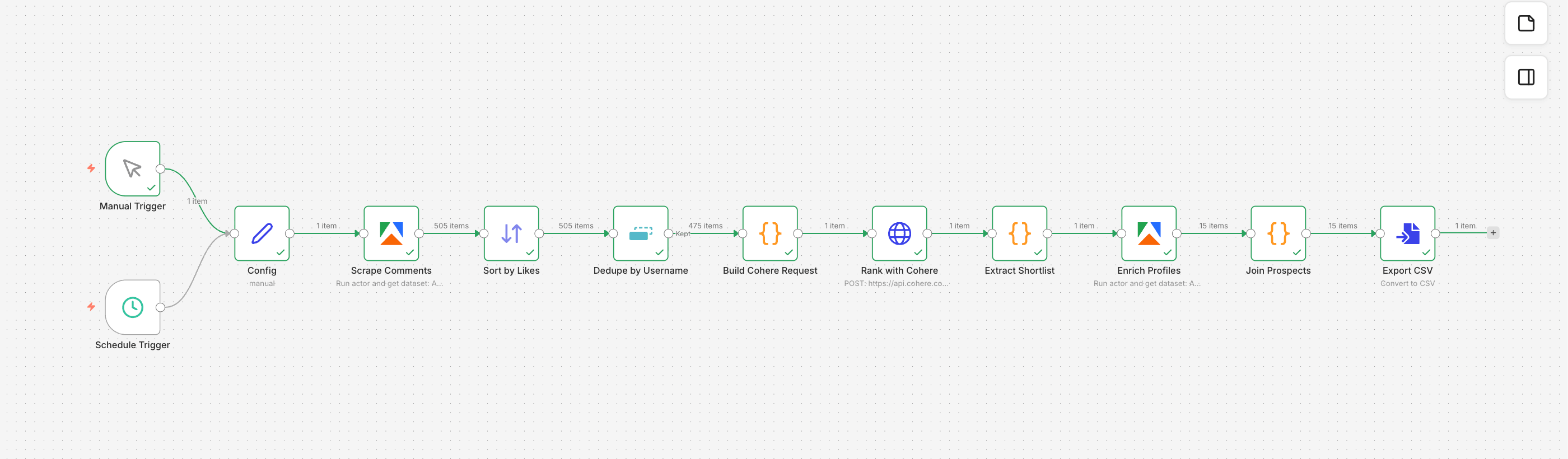
Workflow overview
The workflow uses Cohere (an LLM API with a free trial tier) for the ranking step. It has 12 functional nodes in a straight pipeline:
| # | Node | What it does |
|---|---|---|
| 1 | Manual Trigger | Click to run on demand for testing. |
| 2 | Schedule Trigger | Runs every Monday at 9 AM for ongoing prospecting. |
| 3 | Config | Holds editable inputs in one place: video_url, comments_limit, shortlist_size, topic, target, llm_model. |
| 4 | Scrape Comments | Runs the Comments Scraper with the video URL from Config. |
| 5 | Sort by Likes | Sorts comments by diggCount descending. |
| 6 | Dedupe by Username | Keeps the highest-engagement comment per user. |
| 7 | Build Cohere Request | Assembles the Cohere request with the system prompt, JSON schema, and deduped comments. Auto-detects topic and target from the first 15 comments if set to auto. |
| 8 | Rank with Cohere | Sends the request with a JSON schema in response_format so the output matches the expected structure. Returns the top 15 ranked prospects. |
| 9 | Extract Shortlist | Parses the Cohere response into the prospects array and a flat usernames list. |
| 10 | Enrich Profiles | Runs the Profile Scraper with the 15 shortlisted usernames. |
| 11 | Join Prospects | Joins the LLM rankings, deduped comments, and enriched profiles by username into one row per prospect. |
| 12 | Export CSV | Writes prospects.csv you can download from the execution output panel. |
Import and run
Prerequisites:
- n8n running locally or on n8n Cloud (installation guide)
- The
@apify/n8n-nodes-apifycommunity node installed - An Apify API token
- A Cohere API key
Import and set up credentials:
- Download
n8n-workflow.jsonfrom the GitHub Gist and import it in n8n (canvas menu → Import from File). - Click Scrape Comments and Enrich Profiles and pick your Apify API credential (or create one by pasting your Apify token).
- Click Rank with Cohere and create a Cohere API credential with your Cohere trial key.
Run the workflow:
Click Test workflow. Watch each node turn green as it completes. When the last node (Export CSV) turns green, click it and download prospects.csv.
The CSV has 15 rows and 14 columns. Filter to priority = high in Google Sheets and you have your outreach list. Set the Schedule Trigger to weekly and update the video URL in the Config node each time you want to target a new video.
What to do with your prospect list
Before reaching out, verify each prospect by visiting their bio link and checking for a contact method (email, website form, or social profile). Cross-reference the strongest prospects on LinkedIn by name or business name for B2B outreach.
If you are also running paid TikTok ads alongside scraping, connect your CRM to TikTok Ads Manager (Tools → Leads Center → Connect CRM) for real-time lead sync. Speed matters for ad-generated leads - research from the Lead Response Management Study shows contact rates drop 10x after the first 5 minutes.
Start scraping TikTok leads
Most lead generation starts with your own audience. This workflow lets you skip that - you can build a targeted prospect list from any public TikTok video in your niche without running a single ad. Pick a video, run the scraper, and you'll have a list of real business owners to reach out to today.

FAQs
How much does TikTok lead generation cost?
TikTok CPL ranges from $12 (education) to $180 (legal). The minimum test budget is $600 to $9,000 depending on your industry. A rebate program lets new advertisers start at $210 with ad credits back if targets are missed.
Can you generate leads on TikTok without ads?
Yes. TikTok Business Accounts can attach Instant Form lead capture to their profile, videos, and livestreams at no cost. You need 1,000 followers or Business Registration. The organic cap is 420 leads per week across all placements.
How do you build a TikTok prospect list with Apify?
Scrape comments from a TikTok video in your niche using the TikTok Comments Scraper, filter with an LLM, then enrich the top prospects with the TikTok Profile Scraper. The output is a CSV with each prospect's bio, follower count, and contact links.
Is TikTok better than Facebook for lead generation?
TikTok CPLs can be lower than Facebook's in some verticals (like education) but higher in others (like legal). TikTok's edge is the 18–34 audience that is harder to find on Facebook. TikTok works best as an additional channel alongside Facebook and Google, not a replacement.
Is it legal to scrape TikTok for lead generation?
Scraping public data is legal in most jurisdictions, but TikTok's Terms of Service prohibit it, and outreach with scraped data carries CAN-SPAM and GDPR risk. For a full breakdown, see Apify's guide on whether web scraping is legal.
How fast should you follow up on TikTok leads?
Within 5 minutes. TikTok Instant Forms auto-fill with two taps, so leads may not remember submitting. Automate the first-touch email or SMS to send on form submission.