


A post in your niche pulled 2,158 likes and 5,834 saves, and you never saw it. Native analytics only cover your own posts. Trending pages show you what has already peaked. By the time a format lands there, the people who caught it early have published their version.
Here’s how to track viral posts across X, TikTok, and Instagram with a Grok Bot that works while you sleep. It runs three Apify Actors through the Apify plugin: Tweet Scraper, TikTok Scraper, and Instagram Scraper. Then it puts all three platforms’ engagement numbers on one scale, ranks the posts by save rate, and sends the top three to Telegram before you wake up.

The full build is on video if you'd rather watch it:
Why rank by saves, not likes
Likes tell you a post was enjoyed. Saves tell you someone intends to come back and do the thing. If you're deciding what to make next, the second signal is worth more than the first.
The numbers from the run behind this article make the point. The top post had 2,158 likes and 5,834 saves, a save rate of 2.7 (saves divided by likes). A product launch post in the same batch had far more likes and a save rate under 1. Ranked by likes, the launch wins. Ranked by save rate, the post people are actually planning to copy wins.
What you'll need
- A Grok Bot account. Grok Bot is xAI's always-on agent app, and it keeps running after you close your laptop, which is the whole point here.
- An Apify account. Actors used here charge per result. The free plan is enough to test this.
- A Telegram account if you want the morning digest on your phone.
Step 1: Install the Apify plugin in Grok Bot
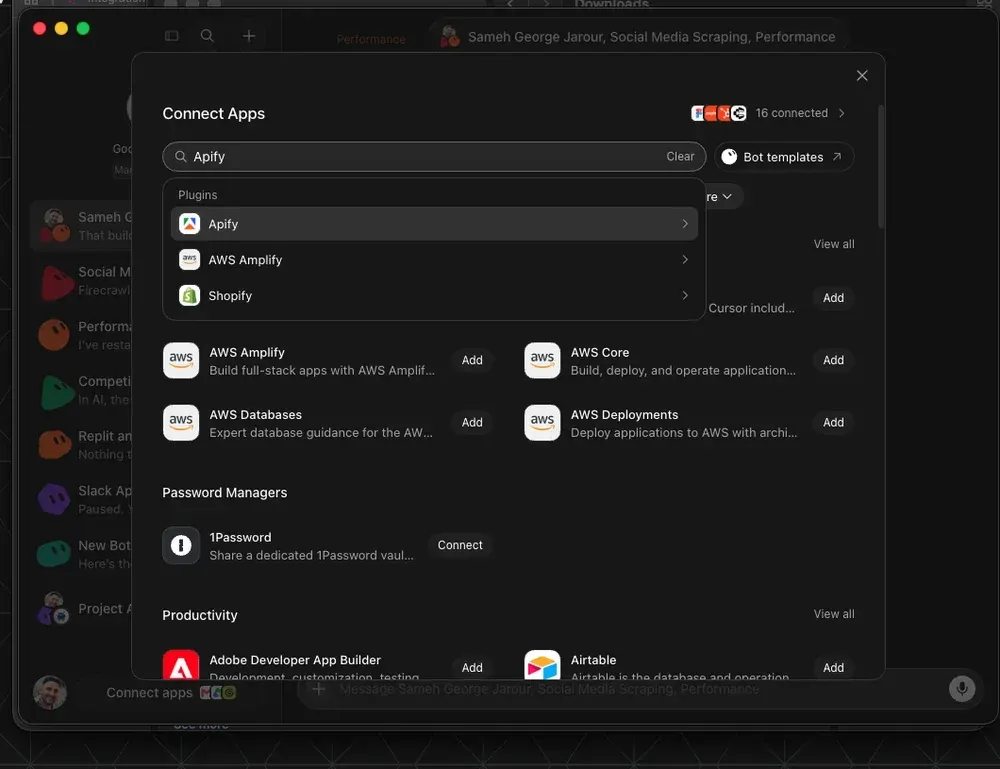
Open the marketplace in Grok Bot, install the Apify plugin, and sign in with your Apify account. You do this once.
The plugin brings Apify MCP Server and a set of scraping skills with it. That's what lets the bot run any Actor in Apify Store by asking rather than by writing code, and it's why the rest of this tutorial is just prompts. Installation commands for other agents, including Claude Code, Cursor, and Codex, are at apify.com/plugin.
Step 2: Test the scrapers and check the field names
Before you build anything, give the bot one instruction:
Run Tweet Scraper on my search terms sorted by Top, TikTok Scraper with my search queries against the video section, and Instagram Scraper on my tag page URLs. Before you normalize anything, show me which engagement fields each Actor returned.
That last sentence decides whether the bot is worth anything. You’re checking what each platform calls the number you care about.
| Platform | Actor | Likes | Saves | Views |
|---|---|---|---|---|
| X | Tweet Scraper | likeCount |
bookmarkCount |
viewCount |
| TikTok | TikTok Scraper | diggCount |
collectCount |
playCount |
| Instagram Scraper | likesCount |
none (public) | none on feed posts |
Same human action, three different names, and one platform missing the best signal entirely. If the field names are wrong, the board ranks the wrong numbers.
Instagram has no public save count, so this build substitutes comments divided by likes and labels that column separately, so nobody reads an Instagram row as a save. If shares matter more to you than comments, Instagram Reel Scraper can return a shares count for Reels.
Step 3: Build the ranking in one prompt
With the fields confirmed, let the bot build the board:
Normalize all three sources into one table of platform, likes, saves, and views, using bookmarkCount for X saves and collectCount for TikTok saves. Instagram has no public save count, so use commentsCount divided by likesCount there and label that column separately. Drop posts under 24 hours old. Rank by save rate and render one page where every row links to the original post.
Two filters in that prompt do most of the work.
The 24-hour filter exists because tag pages come back newest first. Some of what you scrape is minutes old with nothing on it yet. In this run, the bot dropped four posts for being under a day old. Without the filter, brand-new posts with no engagement end up in the ranking.
The second filter drops posts with no usable save rate. A post with no save count can't be ranked by save rate at all, and pretending otherwise puts it at the top or the bottom for no reason. This run dropped 18 more posts that way. Of 150 posts scraped, 128 made it onto the board.
Step 4: Read the board
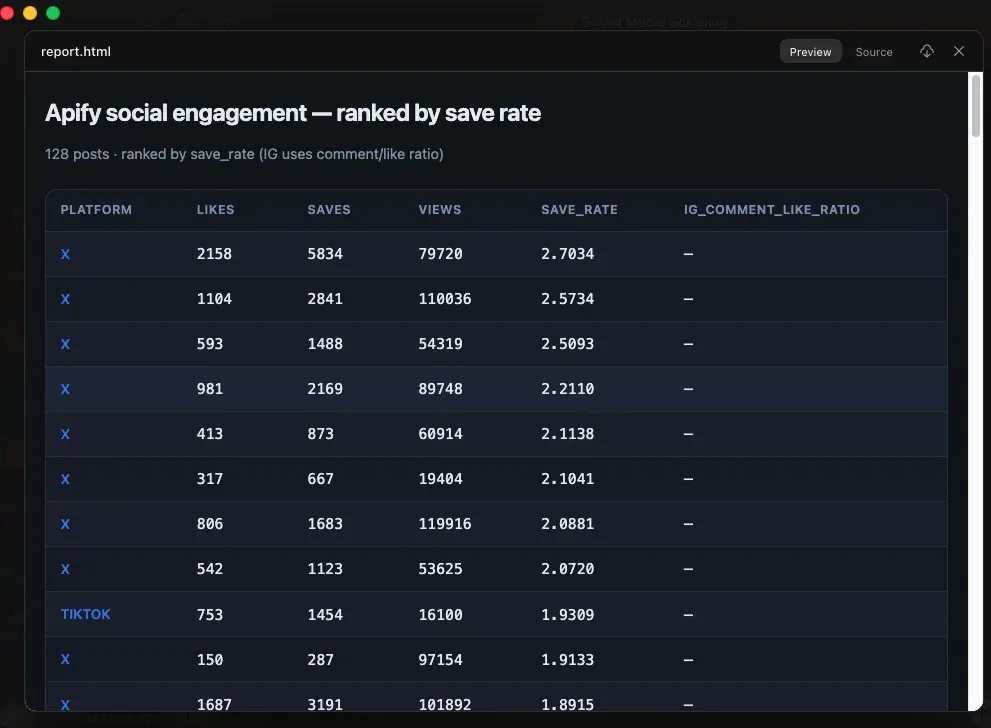
Here's the top of the board from the run behind this article:
| Rank | Platform | Likes | Saves | Save rate |
|---|---|---|---|---|
| 1 | X | 2,158 | 5,834 | 2.70 |
| 2 | X | 1,104 | 2,841 | 2.57 |
| 3 | X | 593 | 1,488 | 2.51 |
All three top rows are X posts. That isn't the ranking favoring X: X returned the highest volume of posts in this run, so it had the most candidates near the top. TikTok and Instagram posts sit further down the same board, and a different set of search terms can change the order.
Every row links back to the original post, so you can open it, see the format, and decide whether it's worth your version.
Step 5: Make it run every morning
A page you have to remember to open is still work. Set a weekday digest in Grok Bot, and the bot re-scrapes and re-ranks every morning on its own. Nothing else changes: same Actors, same prompt, same board, fresh rows.
Step 6: Send the top three to Telegram
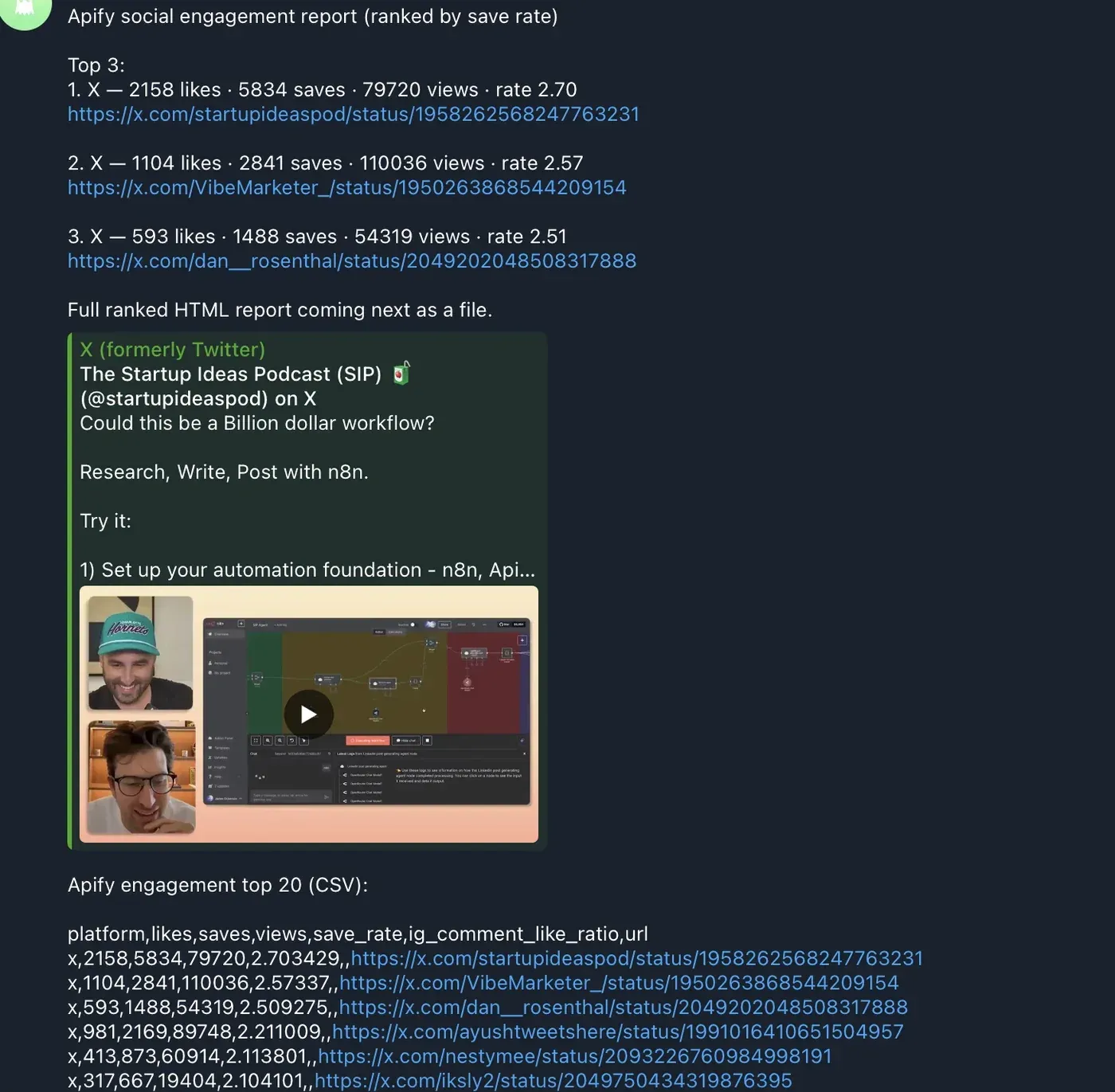
Create a Telegram bot with BotFather and copy the token. In Grok Bot, install the Composio plugin and connect Telegram with that token.
A Telegram bot can’t message you first, so send it any message once. Then tell Grok Bot what to send: the top three rows, with the save rate and the link, and nothing else. Three rows is enough to act on. Twenty is a list you’ll stop reading.
Run the same pipeline from any agent
Nothing here is specific to Grok. The Actors run through Apify MCP Server, which works with Claude, ChatGPT, VS Code, and any other MCP client. Connect mcp.apify.com or install the plugin for your agent from apify.com/plugin, paste the prompts above, and you get the same board. What changes is where the schedule and the digest live.
What you end up with
You're adding a teammate who is awake when a post starts moving and has it ranked by the time you sit down. The next time something in your niche pulls nearly three times more saves than likes, it's in your messages before you're awake, with the link.
To build yours, create an Apify account, install the Apify plugin in Grok Bot, and start with Tweet Scraper.

FAQ
Why not use each platform's own analytics?
Native analytics only cover your own posts. They tell you how your last video did, not which post in your niche is being saved three times more than it's liked right now. Trending pages cover other people's posts, but only after they've peaked.
Does Instagram Scraper return saves?
No. Instagram doesn't expose a public save count on feed posts, so the Actor can't return one. This build uses comments divided by likes for Instagram and labels the column separately. Instagram Reel Scraper can return shares for Reels if you want a closer signal.
Can I add other platforms?
Yes. Any Actor in Apify Store works the same way through the plugin. Add YouTube Scraper or a Reddit Actor to the first prompt, check the field names it returns, and map them into the same table.
Do I need to write code?
No. The plugin bundles Apify MCP Server and scraping skills, so the bot runs the Actors from plain-language instructions. If you'd rather script it, every Actor also has an API, and the Apify API clients cover the same calls.