Why the batch Actor model falls short
The batch Actor model can be efficient for data collection. But once real-time delivery becomes a requirement, a few core problems show up.
The first is the run-per-request model. Starting a new run every time a client wants data is slow and expensive for real-time use cases. Cold starts, run creation overhead, and request-dependent latency all hurt the user experience. In the systems I worked on, the delay itself was the minor part. The deeper issue was forcing a use case that expected a continuous live stream into a model built around short-lived runs.
The second is polling-based consumption. When the client pulls data at fixed intervals, you usually end up with one of two problems: either you send requests too often and create unnecessary load, or you poll less frequently and miss live updates. In systems that need near-real-time behavior, finding a good balance between those two is difficult.
The third is the need for stateful delivery. In some scenarios, you do not want to send the same data to every client. One client may want to monitor only specific users or specific tokens. That requires per-connection state management, a subscription model, and targeted delivery.
This was the point where things changed. The question was no longer, “How do I collect the data?” It became, “How do I deliver the data to connected clients accurately, quickly, and in a controlled way?”
Standby mode as a service layer
At first glance, Apify Standby mode looks like a long-lived HTTP service model. That is already useful on its own. The Actor can behave like an endpoint, stay warm, and avoid starting a new run for every request.
But I took it one step further. I stopped thinking about Standby mode as just “an Actor that returns HTTP responses” and started treating it as a service layer that can accept upgraded connections and manage long-lived client sessions. At that point, the Actor had taken on a second role: in addition to collecting data, it was now a server managing active connections.
That shift moved the Actor away from the classic “run and return a result” model and turned it into a layer that could serve live data to connected clients.
The simplified example below shows the core idea from the real implementation: the Actor runs only in Standby mode, and the same HTTP server handles both the readiness probe and the WebSocket upgrade flow.
import { Actor } from 'apify';
import http from 'http';
import {
    attachWebSocketServer,
    handleHttpRequest,
    shutdownWebSocketServer,
} from './ws-server';

async function main() {
    await Actor.init();

    const isStandby = Actor.config.get('metaOrigin') === 'STANDBY';
    if (!isStandby) {
        await Actor.setStatusMessage('This Actor is designed for Standby mode only.');
        await Actor.exit();
        return;
    }

    const port =
        Actor.config.get('standbyPort') ||
        process.env.ACTOR_WEB_SERVER_PORT ||
        8080;

    const server = http.createServer(async (req, res) => {
        if (req.headers['x-apify-container-server-readiness-probe']) {
            res.writeHead(200, { 'Content-Type': 'text/plain' });
            res.end('ready');
            return;
        }

        await handleHttpRequest(req, res);
    });

    attachWebSocketServer(server);

    server.listen(port, () => {
        console.log(`Standby server listening on port ${port}`);
    });

    process.on('SIGTERM', async () => {
        server.close();
        await shutdownWebSocketServer();
    });
}

main().catch((err) => {
    console.error('Fatal startup error:', err);
    process.exit(1);
});
For me, the key was to build WebSocket support directly into the Standby Actor lifecycle, rather than bolting it on as a separate service.
Why I chose WebSockets
At this point, the most natural question is: why WebSockets instead of SSE?
SSE can be a very good choice in some cases. On the browser side, its best-known form is the EventSource model described by MDN. It has a low setup cost and can be simpler to implement, especially for one-way event streams that only flow from the server to the client. If all you need is regular event pushing, SSE may be enough.
I seriously considered SSE at first. When I tested an SSE endpoint running on Apify Standby mode, it looked very close to what I wanted in theory: the client would connect, the server would stream events, and the system would stay simple.
But in practice, I ran into a critical problem. Even if the client closed the browser or lost network connectivity, I could not always see the connection close reliably on the Actor side. From what I observed, an intermediate layer on the Apify side could keep the connection open from the Actor’s point of view. As a result, the server could continue treating the connection as active and keep streaming data even though the real client was no longer there.
At first, this may sound like a small infrastructure detail. In production, it is not. If the connection is actually dead but the server still thinks it is alive, three things break at the same time: resource usage, active-user visibility, and the number of events that appear to have been delivered.
For me, this was not a theoretical concern. It was a direct operational problem. In that situation:
- Expected server-side signals such as close, error, or timeout did not always occur
- Dead connections could stay in memory
- Connection counts and active-user metrics stopped reflecting reality
- For systems with per-event pricing, there was a risk of treating events as delivered even when they never reached a real client
I tried several heuristics to soften the problem. For example, I treated connections with no successful writes for a certain period as suspicious, tracked pending writes, and ran periodic checks. These approaches helped to some extent, but they all relied on indirect signals.
At some point, I realized what was happening: instead of measuring whether the system had actually disconnected, I was trying to guess it. What finally made the architecture reliable was a clearer liveness model at the protocol level, not another timeout.
That was the key point for me: I could not rely on this behavior and assume, “I will notice when the connection closes somehow.” Instead of leaving the problem to the framework or infrastructure layer, I needed to handle the connection lifecycle explicitly at the application level. That pushed me toward a model where I could define liveness more clearly.
That is where WebSockets became the stronger option for me.
In the systems I worked on, these requirements mattered most:
- The client needed a clear way to specify which stream it wanted, either during the connection or after it was established
- That selection sometimes needed to be updated while the connection was still open
- I needed a more reliable way to determine whether the connection was actually alive
- I needed to avoid continuing to write data to dead clients on long-lived connections
- In some scenarios, I also needed bidirectional messaging
One important point here is that using WebSockets does not always mean sending a separate subscribe message after the connection is established. In some services, the client specifies the desired stream through the initial connection URL using the path or query parameters, and the data flow starts immediately. In others, a message-based protocol is used after the connection is established. I have used both approaches.
With WebSockets, the ping/pong heartbeat mechanism gave me much tighter control over whether a connection was actually alive. How that heartbeat is handled depends on the design and on the client library in use. In some cases, that protocol-level behavior is handled automatically. In others, it has to be managed in the application logic as well. What mattered was moving connection management away from heuristic guesses and into a more explicit liveness model.
In my experience, WebSockets were the better choice, especially for long-lived, filtered data streams where delivery accuracy matters.
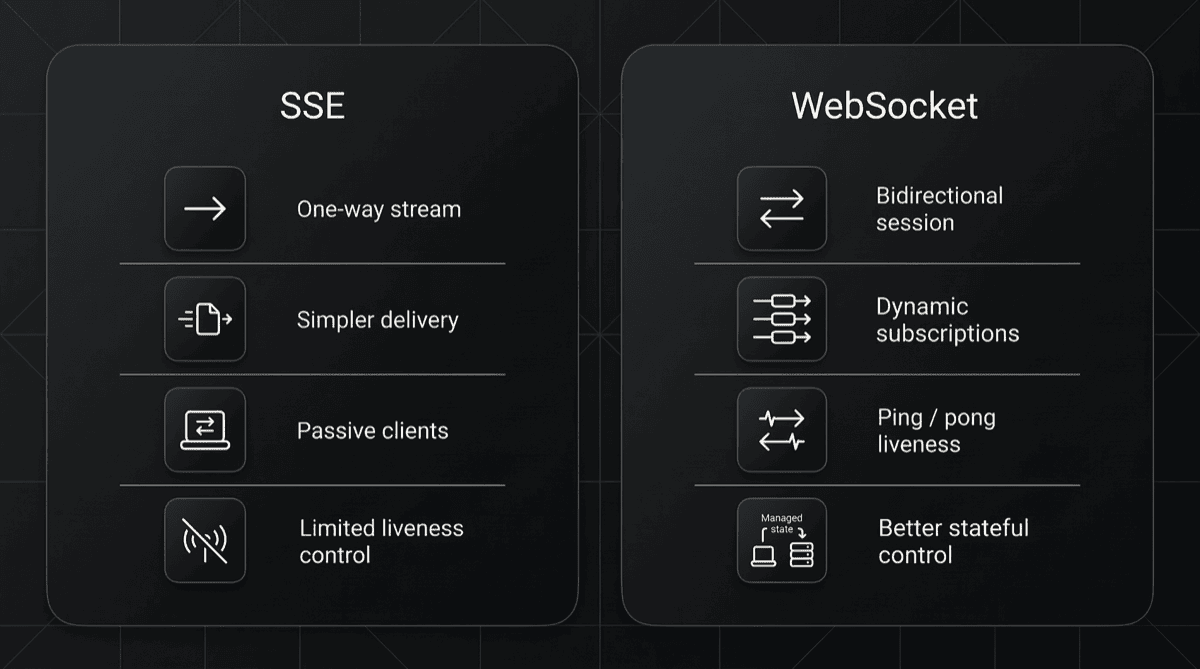
One reason this choice worked better for me was that it gave me more explicit control over liveness. The snippet below is not a verbatim copy of the production code, but it shows the simplified core of the heartbeat approach I used:
import { getOpenConnections, cleanupConnection } from './registry';

const PING_INTERVAL_MS = 30_000;
const PONG_TIMEOUT_MS = 60_000;

export function startHeartbeatLoop() {
    setInterval(() => {
        const now = Date.now();

        for (const conn of getOpenConnections()) {
            const isStale = now - conn.lastPongAt > PONG_TIMEOUT_MS;

            if (isStale) {
                conn.ws.terminate();
                cleanupConnection(conn.id);
                continue;
            }

            conn.ws.ping();
		}
	}, PING_INTERVAL_MS);
}
The point was not just to check whether a connection was open or closed, but to stop treating connections that could no longer carry healthy data as if they were still alive.
The real-time Standby Actor design pattern
Over time, this turned into a repeatable architectural pattern rather than something specific to a single Actor. The data source changed from project to project, but the core structure stayed largely the same.
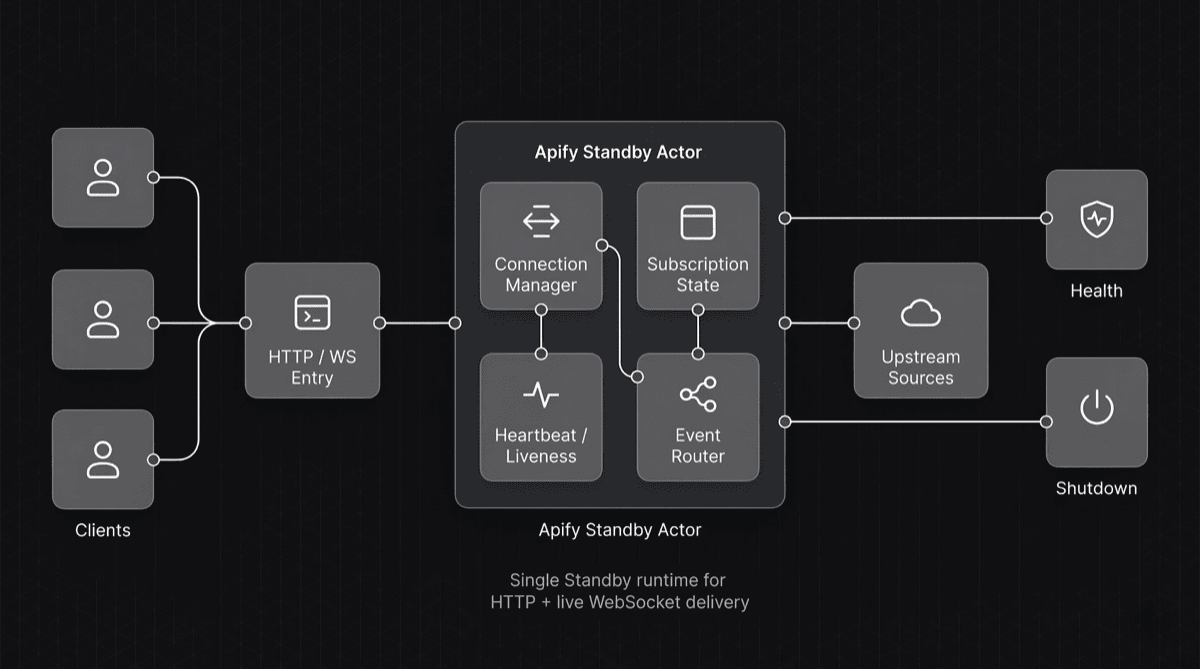
I think about this pattern in six layers.
1. Entry layer
The entry layer is where the Standby Actor becomes a service boundary instead of a background job with an attached endpoint. It starts an HTTP server that handles readiness checks, lightweight operational routes, and the WebSocket upgrade flow from the same place. While shaping this layer, the Apify documentation on the programming interface and the container web server was a useful reference because it maps directly to how Standby services are expected to behave.
That unified entry point made the system easier to operate. I could expose health information, active-connection visibility, and the WebSocket entry point without splitting those concerns across separate processes or services.
2. Connection management layer
The connection management layer owns the lifecycle of each client session, not just the socket handle. I keep state for each connection:
- When the client connected
- Which stream it requested
- The timestamp of the last heartbeat
- Buffer state
- Whether the connection is active or shutting down
In practice, many of the hardest failures show up here rather than in the upstream source. Because of the “disconnected but still looks open” issue I ran into with SSE, I treated shutdown and cleanup as first-class parts of the design instead of assuming the infrastructure would eventually clean them up for me.
3. Stream selection and filtering layer
The stream selection and filtering layer is where the service stops behaving like a broadcast feed and starts behaving like a delivery system. Each client states what it wants, either through a message after the connection is established or through parameters in the connection URL.
That choice affects scale as much as it affects usability. Sending only the matching stream reduces fan-out, lowers CPU and network cost, and keeps the client focused on data it actually asked for. In my projects, it also tied directly into the pricing model because per-event billing only makes sense when delivery is targeted instead of blind.
4. Upstream connection layer
The upstream connection layer is where the Actor acts as a normalization boundary rather than a thin proxy. In the systems I built, the Actor usually does not generate the data from scratch. It connects to an upstream source instead. That may be another WebSocket stream, a private data feed, or an external event source being monitored.
At this point, the Actor:
- Parses incoming data
- Decodes or transforms it when needed
- Maps it into a common schema
- Prepares it for distribution
I did not want to push all of the upstream source’s complexity onto the client. The client side should stay as simple as possible. Connecting to the source, reconnecting, decoding message formats, and normalizing the stream should stay inside the Actor.
5. Fan-out and backpressure layer
The fan-out and backpressure layer decides whether the service stays healthy under real traffic. Publishing to matching clients is only half of the job; the other half is verifying that those clients can keep up without dragging the system down.
Slow consumers, unstable networks, and intermittently stuck clients turn delivery into a resource-management problem very quickly. I found it safer to monitor buffer growth and write pressure, then close connections that were falling behind, instead of letting them degrade the service for everyone else. The example below shows a simplified version of that logic:
import { WebSocket } from 'ws';
import { getOpenConnections, cleanupConnection } from './registry';

const HIGH_WATER_MARK = 1_000_000;

export function broadcastEvent(event: unknown) {
    const payload = JSON.stringify({ op: 'event', data: event });

    for (const conn of getOpenConnections()) {
        if (conn.ws.readyState !== WebSocket.OPEN) {
            cleanupConnection(conn.id);
            continue;
        }

        if (conn.ws.bufferedAmount > HIGH_WATER_MARK) {
            conn.ws.send(JSON.stringify({
                op: 'error',
                code: 'BACKPRESSURE_LIMIT',
                message: 'Client fell behind and was disconnected.',
            }));
            conn.ws.close();
            cleanupConnection(conn.id);
            continue;
        }

        conn.ws.send(payload);
    }
}
This was not an aggressive optimization decision for me. It was a way to protect healthy clients from degraded ones.
6. Liveness and graceful shutdown layer
The liveness and graceful shutdown layer defines the client contract once a connection stays open for minutes or hours. Two mechanisms mattered most:
- Heartbeat
- Controlled shutdown
Heartbeat let me distinguish between clients that were actually still communicating and clients that had already dropped but still looked open inside the system. Cleaning up connections that stopped responding to pings instead of keeping them forever reduced both memory usage and unnecessary delivery load, so I stopped treating heartbeat as an optional extra and started treating it as the core mechanism for connection hygiene.
Graceful shutdown solved a different problem: making restarts and limits predictable for the client. When the Standby service restarts or shuts down, closing connections in a controlled way and sending a clear message to clients makes recovery easier than letting connections disappear silently.
The same pattern in two different projects
What convinced me that this architecture was strong was not that it worked in one project. It was that I could reuse it across very different scenarios.
Crypto Twitter Tracker
In the first example, the goal was to deliver a social content stream to clients with low latency. Instead of receiving the full stream, clients subscribed only to the accounts or users they cared about. The value of the system was not just that it delivered live data. It was that it could filter specific users and route only the relevant events to the right clients.
That is why I chose a message-based model for this Actor. Establishing the connection was not enough on its own. The client also needed a way to define which channel to monitor and, when necessary, which users to filter dynamically. In this case, user-level filtering, connection health, subscription management, and redistribution of upstream events became the core parts of the design.
Per-event pricing was also part of the picture here. As a result, the filtering logic was not just a technical optimization. It was also part of answering the question, “What did the user actually receive?”
DexScreener Realtime Monitor
In the second example, the goal was to deliver live market data to clients. On the DexScreener side, the requirement was to provide continuous updates for specific pages or pair views over a persistent connection.
In this case, I chose to handle stream selection via connection URL parameters rather than sending a message after the connection was established. The reason was that the usage pattern was more specific. In most cases, the client connected with a particular page_url and wanted to receive the stream for that page directly. In that situation, the query-based model was simpler to document and faster to integrate on the client side.
So even though the domain changed, the core pattern stayed the same: a long-lived service, connected clients, a live data stream, selective distribution, and explicit connection management.
These two examples showed me something important: if the same approach works for both social event streams and financial or market data, then what I have is not a one-off implementation. It is a reusable architectural pattern.
Key decisions I made when designing real-time Actors
While building this approach, the most important part was not the low-level implementation details. It was understanding which decisions I made and why I made them.
Not treating every connection as equal
One of my first insights was this: the number of connected clients is not a meaningful metric on its own. What actually matters is how many of those clients are truly active, healthy, and consuming the data they asked for.
Because of that, tracking only the connection count was not enough. It became much more useful to track active subscriptions and real consumption. My SSE experience showed why: a dead connection still counts until you notice it is gone.
Why I used a message-based model in Crypto Twitter Tracker
In Crypto Twitter Tracker, it was not enough for the client to simply connect. The client also needed a way to specify which channel to listen to and, when needed, which users to filter. That is why a message-based model after the connection was established made more sense.
This structure gave me three advantages:
- Supporting different usage patterns through the same endpoint
- Reducing unnecessary distribution with user-level filtering
- Creating a clearer relationship between delivered events and billed events
In short, the message-based model existed for the product logic and for pricing accuracy, not for protocol elegance.
A simplified version of the protocol I used for this kind of structure can be thought of like this:
import type { WebSocket } from 'ws';

type ClientMessage =
    | { op: 'ping' }
    | { op: 'subscribe'; topics: string[] }
    | { op: 'unsubscribe'; topics: string[] };

const subscriptions = new Map<string, Set<string>>();

export function handleClientMessage(connectionId: string, ws: WebSocket, raw: Buffer) {
    let message: ClientMessage;

    try {
        message = JSON.parse(raw.toString('utf-8'));
    } catch {
        ws.send(JSON.stringify({
            op: 'error',
            code: 'INVALID_JSON',
            message: 'Message must be valid JSON.',
        }));
        return;
    }

    if (message.op === 'subscribe') {
        const current = subscriptions.get(connectionId) ?? new Set<string>();
        for (const topic of message.topics) current.add(topic);
        subscriptions.set(connectionId, current);

        ws.send(JSON.stringify({
            op: 'subscribed',
            topics: [...current],
        }));
    }
}
What mattered here was not the message format itself. What mattered was giving the client a way to define the stream it wanted dynamically after the connection was established.
Why I used a query-based model in DexScreener Realtime Monitor
In DexScreener Realtime Monitor, the need was different. In most cases, the user wanted to connect to a specific DexScreener page or view. Because of that, selecting the stream through a parameter such as page_url at connection time felt more natural.
The advantage of this model was simple: data could start flowing as soon as the client connected, there was no need to wait for an extra subscription message, and integration became faster. In single-stream use cases especially, that simplicity was a real advantage.
How I thought about heartbeat and timing values
My goal here was not to find the theoretically perfect number. My goal was to choose a rhythm that was strict enough not to keep dead connections around for too long, but balanced enough not to drop healthy connections unnecessarily.
For example, I sent regular pings on the upstream data connection to check whether the source was still alive. On the client side, cleaning up connections that stopped returning pong responses became a core part of connection hygiene. I did not think about these values as “performance tuning.” I thought about them as service-quality tuning.
What drove my dead-connection cleanup logic
This was especially important to me. Dead connections went beyond memory: they also distorted active-user metrics, delivery accuracy, and, in some Actors, the pricing model itself.
Because of that, I did not want to rely on a single signal to clean up a connection. The deciding signals were:
- A missing expected heartbeat or pong signal
- A connection that still looked open but could no longer carry healthy data
- Write pressure or buffer growth showing that the connection was no longer sustainable
- In some flows, the client failing to complete the expected first protocol step on time
Connection cleanup turned from a passive “it will close eventually” assumption into an actively managed lifecycle.
Choosing targeted delivery over general broadcast
In real-time systems, the first instinct is often to send every incoming event to everyone. That is not where scale comes from. Scale comes from being able to publish only to the clients that actually care about that event.
That is why filtering and channel-based routing became core architectural elements in my design, not optional features. This decision improved both performance and the product at the same time.
Separating data collection from data delivery responsibilities
In some cases, it can be practical to keep the collection and delivery logic inside the same Actor. But as the system grew, I saw how important it was to separate them at least logically. The failure model for data collection is not the same as that for client connection management.
If one side of the system is struggling with upstream data while the other side is trying to keep hundreds of client connections healthy, the service design has to be much more deliberate.
When SSE is enough, and when WebSockets are the better fit
I do not want to give a single, universal answer to this question, because the use case determines it. For me, the issue was never “WebSockets are always better.” The real question was this: “How clearly do I need to measure connection liveness in this system, and how critical is delivery accuracy?”
In my experience, this distinction was more useful:
SSE may be enough if:
- You only need one-way event flow from server to client
- There is no complex subscription protocol on the client side
- The number of connections and the data volume are more limited
- Handling disconnects with heuristics is acceptable
- Small gaps between delivery metrics and real consumption can be tolerated
- You are not using a sensitive model, such as per-event pricing
- Simplicity matters more than bidirectional communication
SSE can still make sense for simple and lightweight broadcasting scenarios. If the main goal is just to push events from the server to the client, and you do not need to model the connection lifecycle very precisely, it can be the simpler solution.
WebSockets may be the better fit if:
- The client selects a channel or filter after connecting
- The client needs to send control messages to the server
- You want to measure long-lived connection liveness actively
- You want a clearer liveness model with ping/pong
- The system carries high-frequency data streams
- Dead-client cleanup has become critical
- Backpressure management matters
- Active-connection metrics need to stay closer to reality
- You use per-event pricing and do not want to count undelivered events as delivered
In my projects, the second group was dominant, so WebSockets made more sense.
The real turning point was not just the need for bidirectional communication. The more important issue was this: I did not want the system to keep treating data as delivered while I was still writing it to a dead connection. That distorted resource management, and in some Actors it also created a risk of incorrect billing under the pay-per-event model I was using. Because of that, transport choice was not just a protocol decision for me. It also became a decision about delivery accuracy and pricing accuracy.
Client experience is part of the design
There is another important difference here: choosing WebSockets does more than swap the transport; it changes how the client consumes the system.
In a traditional HTTP API, the client sends a request, receives a response, and the flow mostly ends there. With WebSockets, clients have to establish a connection, connect with the correct path or query if needed, send the correct message format when the design requires it, reconnect if the connection drops, and rebuild state depending on how the system works. In some services, rebuilding that state means sending another subscription message. In others, reconnecting with the correct URL is enough. At that point, it is no longer just the server code that matters. Client behavior becomes part of the system itself.
Over time, this made one thing much clearer to me: when building an Actor on top of WebSockets, it is not enough to ask only, “Is the server running?” You also need clear answers to these questions:
- How will the client establish the connection?
- Will stream selection happen through the URL, path, or query, or will it require a message after the connection is established?
- If there is a message-based protocol, what is the format of the first message?
- What kind of response will the client receive on error?
- How should the client reconnect if the connection drops?
- After reconnecting, what state does it need to rebuild?
As a result, documentation became a direct part of the system.
What needs to be documented?
In services built on WebSockets, it is not enough to provide only the endpoint. At a minimum, the following details need to be clear:
- The connection address
- The expected handshake flow
- Whether stream selection happens through the URL, path, or query, or through messages
- The supported message types if there is a message-based protocol
- The subscription format, if there is one
- Filter or channel parameters
- Whether heartbeat behavior is handled at the application level or by the client library in use
- How the client should reconnect if the connection closes
- Example error messages
- The boundaries of any speed, quota, or plan limits
In my experience, when these details are not written clearly, integration quality drops no matter how solid the server side is. That is because the user is no longer thinking like someone sending an HTTP request. They have to think like a client developer managing a long-lived connection.
Why example clients matter
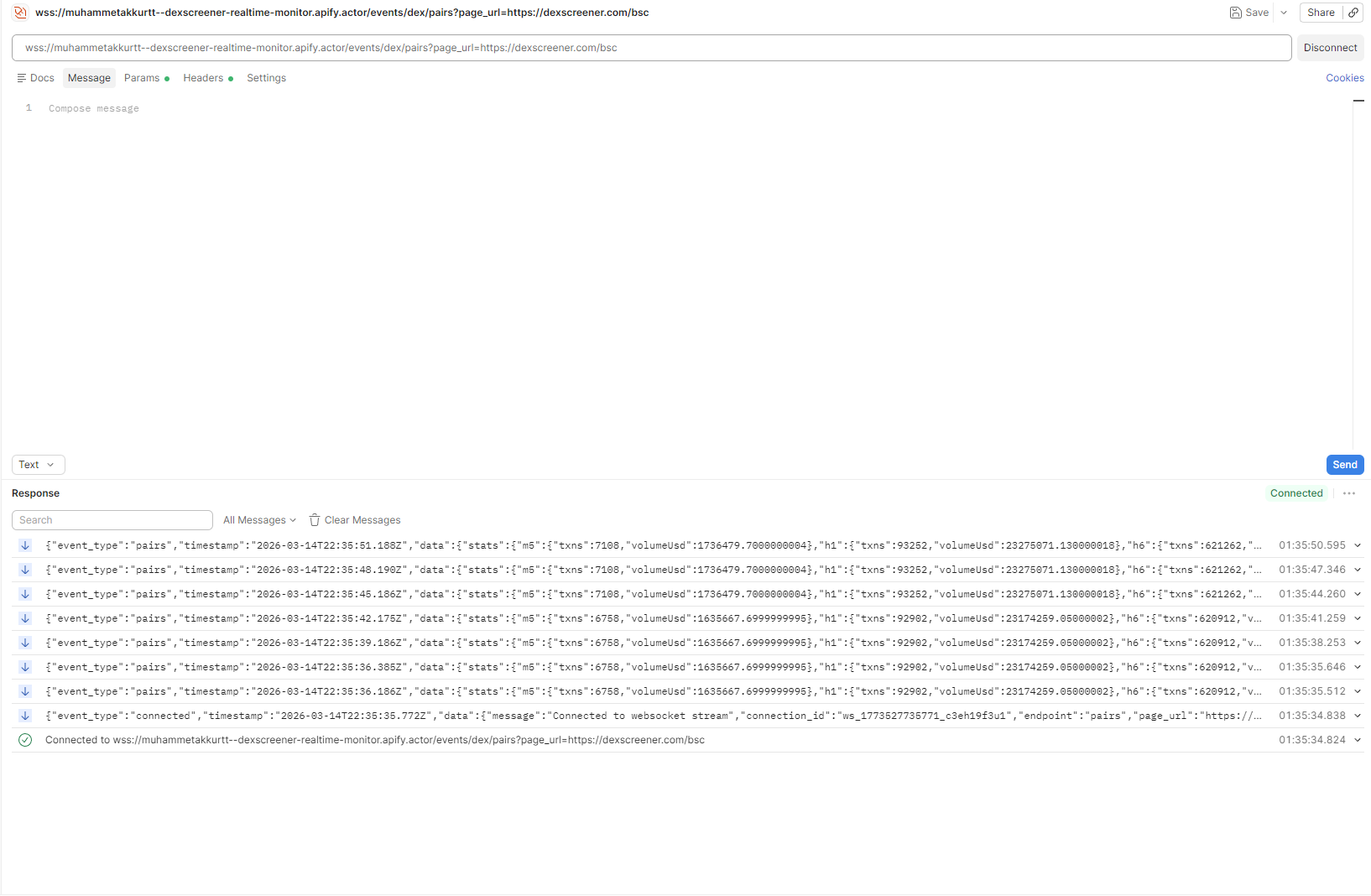
That is why example client code becomes so valuable. Small client examples that run in common environments, such as Node.js and Python, do not just show the user how to connect. They also show what to do when the connection drops.
I think good documentation for WebSockets should provide these three things together:
- The simplest possible connection example
- An example that matches the stream-selection model, whether it uses query or path parameters or starts through a message
- A slightly more realistic client example that shows reconnection and, when needed, state restoration
In production, most user problems are not about making the initial connection. They are about not knowing what to do after the connection is lost.
The server's role in client reconnection
In most cases, reconnection is the client’s responsibility. But that does not mean the server should completely ignore it.
On the contrary, server design and documentation should make reconnection easier for the client. For example:
- Returning meaningful close codes or messages when the connection closes
- Making it clear which state must be rebuilt after reconnecting
- Thinking about cursors, sequence numbers, or replay logic if event loss is critical
- Recommending exponential backoff behavior on the client side
For me, services built on WebSockets have to be designed not only at the protocol level, but also at the level of integration ergonomics.
In short, once you move to WebSockets, your product stops being just “an endpoint that returns data.” It becomes a living interface that the consumer connects to, manages, and sometimes has to recover. That is why good documentation, example clients, and reconnection guidance are not optional extras in this architecture. They are core parts of it.
In production, the hardest part was not writing the code
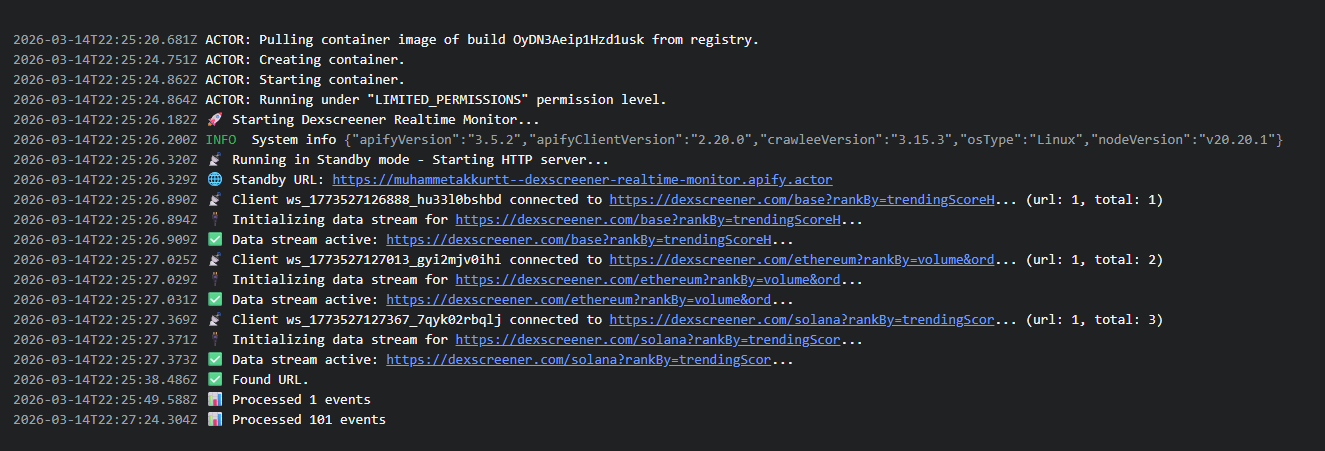
In systems like this, getting the first working version running is the easy part. The hard part is understanding when and how it will break. The same failure modes kept surfacing, almost always a few hours in rather than on day one:
- Dead connections lingering after the client had already gone away
- The active connection count drifting from reality, so the metrics no longer reflected real users
- Events still being written to connections with no consumer left, distorting delivery counts and billing
- Slow clients dragging the system down through buffer growth
- Reconnects, shutdowns, and upstream instability degrading the client experience
Each of these is invisible on day one and obvious by hour three. That is the real production test: how the system behaves once connections start degrading and clients come and go, not whether it runs cleanly the first time.
When I would not choose this model
I would not use a Standby Actor built around WebSockets for every real-time problem.
In these situations, simpler solutions may be the better choice:
- The data is genuinely low-frequency
- The client does not need a persistent open connection
- Simple polling works well enough
- The use case is based on one-off queries rather than event streams
- The operational complexity does not justify the benefit
The value of this model shows up when you truly need connection management, low latency, and continuous data delivery.
Conclusion
Standby Actors became much more useful to me once I stopped treating them as batch jobs with an HTTP wrapper. In the projects that pushed me beyond the batch model, the harder problem was not collection. It was delivery: keeping a long-lived service healthy, keeping connection state explicit, and sending the right stream to the right client.
That is why WebSockets turned out to be the better abstraction for my work. They gave me clearer liveness control, a cleaner model for selective delivery, and fewer blind spots around dead clients, user metrics, and delivery accuracy. If I were designing the same kind of system again, I would still start with the data delivery problem before the data-collection problem, because that decision shapes the architecture earlier than most collection details do.
Where I would take this next
In this article, I focused on designing real-time services built on WebSockets that leverage Standby mode. But this architecture can grow in other directions as well.
The areas I especially want to explore further in the future are:
- More standardized reconnect and backoff strategies on the client side
- Fan-in designs that merge multiple upstream sources into a single stream
- Observability: metrics, health signals, and better alerting structures
Each of these topics is important enough to become its own production lesson in real-time Actor design.
Those are the areas where I think this pattern can become easier to operate, easier to integrate, and more resilient under real production traffic.