OpenClaw has 270K+ GitHub stars and a fast-growing system of agents. And they all hit the same wall: structured data at scale.
OpenClaw has native web access. It has Brave Search, Perplexity, a Playwright browser, and Firecrawl as a fallback. But try to extract product prices from 1,000 Amazon listings, pull engagement metrics from 500 Instagram profiles, or monitor reviews across 50 cities, and it fails.
The most valuable data on the web doesn't come from search results. It sits behind complex, dynamic frontends designed to resist machine access. This guide covers how to fix it with the Apify plugin, with two examples of what your agent can do once you have a reliable data pipeline.
give your OpenClaw access to Apify
— David Ondrej (@DavidOndrej1) February 7, 2026
trust me
How OpenClaw web search works
OpenClaw ships with two native tools for getting data from the web. Here's what each one does and where they start to break.
The web_search tool
It sends your query to a configured search provider - Brave by default, with support for Perplexity, Gemini, Grok, Kimi, Exa, Tavily, and DuckDuckGo (the only key-free option). It returns a list of results: title, URL, and snippet, configurable up to ten, cached for 15 minutes by default.
Useful for discovery. Not useful for extracting content from the pages it finds.
The web_fetch tool
web_fetch makes a plain HTTP GET request and passes the response through Mozilla’s Readability library to extract readable content. It works well for static pages and article text.
There are two problems: it doesn’t execute JavaScript, so any page that renders content client-side returns empty or broken output. And it's single-instance - useful for one page, but not if you need data from hundreds of pages concurrently. Adding a Firecrawl API key gives you a real-browser fallback that addresses the JavaScript issue, but the scale ceiling remains.
Why the native pipeline breaks at scale
The three most common ways to get web data into an agent each have a specific failure mode:
- Browser-based fetch handles static HTML well but fails on dynamically loaded content - which is most of the web. Social platforms, job boards, e-commerce sites, and maps all render client-side.
- AI extraction adds another layer of probabilistic reasoning on top of an already fragile retrieval step. The LLM infers structure from raw HTML, which means it can invent fields, drop values, or return inconsistent output depending on how the pages are rendered. You’re also paying twice - once to fetch, and once to extract - which means token costs compound quickly when scaled.
- Custom scrapers are reliable when they work, but they require per-platform development, ongoing maintenance each time a site updates its structure, and separate authentication for each source. If you want data from LinkedIn, TikTok, Instagram, and Google Maps simultaneously, that’s four scrapers to build and maintain before writing a single line of agent logic.
Why specific data scrapers beat AI extraction
The case for purpose-built scrapers comes down to three things:
- Deterministic vs. probabilistic: A Cascading Style Sheet (CSS) selector returns the same data every time. A Large Language Model (LLM) doesn’t. “95% accuracy” sounds acceptable until you’re working at scale - at 10,000 rows, that’s 500 wrong records polluting your pipeline, your CRM, or your briefing. Apify Actors use structured, rule-based extraction: the same input produces the same output, every time
- No token tax: When an AI scraper extracts data from HTML, your agent pays token tax for the extraction step, then pays again to do something useful with the result. Apify Actors return structured JSON directly, so your agent spends tokens on analysis, not extraction.
- Infrastructure handled for you: JavaScript rendering, proxy rotation, browser fingerprinting, CAPTCHA bypass, and anti-bot detection are hard problems that sites actively invest in defeating. Apify has been building and maintaining solutions to all of them since 2015. A single install gives you that infrastructure without writing a line yourself.
The boring deterministic solution wins.
How to set up the Apify plugin for OpenClaw
The Apify plugin for OpenClaw installs as a single Command Line Interface (CLI) skill and gives your agent access to 20,000+ purpose-built Actors via Model Context Protocol (MCP).
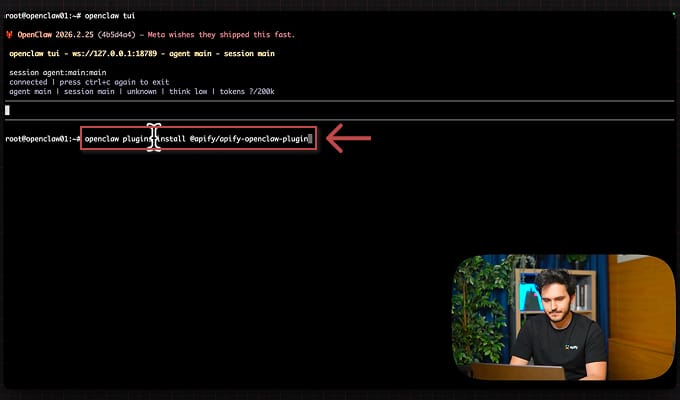
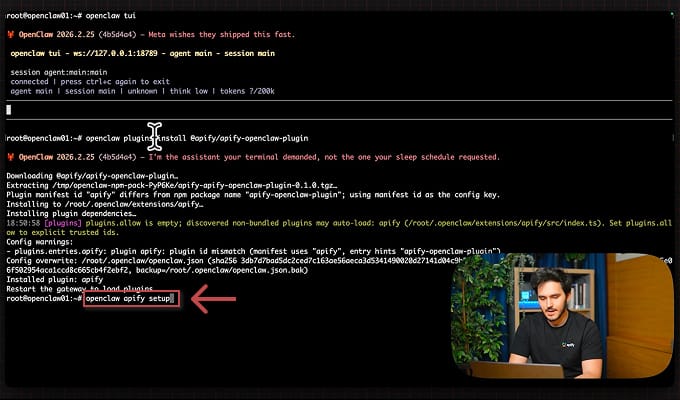
1. Install the plugin
openclaw plugins install @apify/apify-openclaw-plugin
For further details, you can refer to the OpenClaw integration documentation.
2. Run the setup wizard
openclaw apify setup
The wizard walks you through API key entry, verifies the connection, and writes the config automatically.
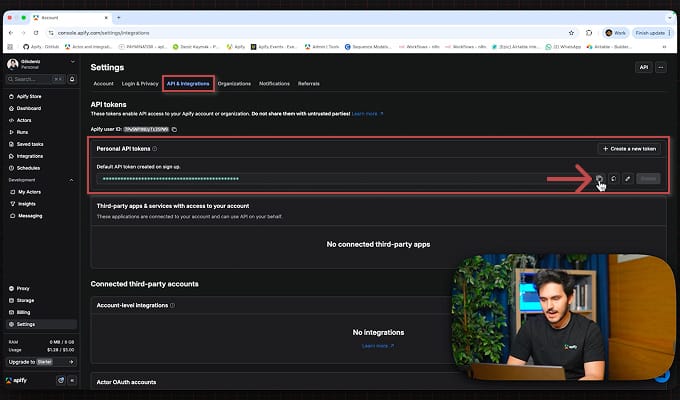
3. Get your Apify API token
Sign up at apify.com - the forever-free plan includes $5/month in platform usage.
4. Use Apify in your OpenClaw
Once installed, you have a single apify tool available inside OpenClaw. MCP-powered Actor discovery lets you describe what data you need in plain English - the plugin finds and runs the right Actor. Async concurrent jobs let you fire off multiple scraping tasks and collect results when they're ready. 20,000+ maintained Actors from Apify Store, all accessible through the same interface.
Each Actor is a deterministic, structured scraper for a specific platform - built and maintained by Apify or vetted community contributors. They return structured JSON every time, handling anti-bot detection, JavaScript rendering, rate limiting, and platform-specific quirks. You don't write extraction logic. You describe what data you need, and the agent finds the right tool at runtime.
What you can build with OpenClaw and Apify
1. Lead generation and enrichment
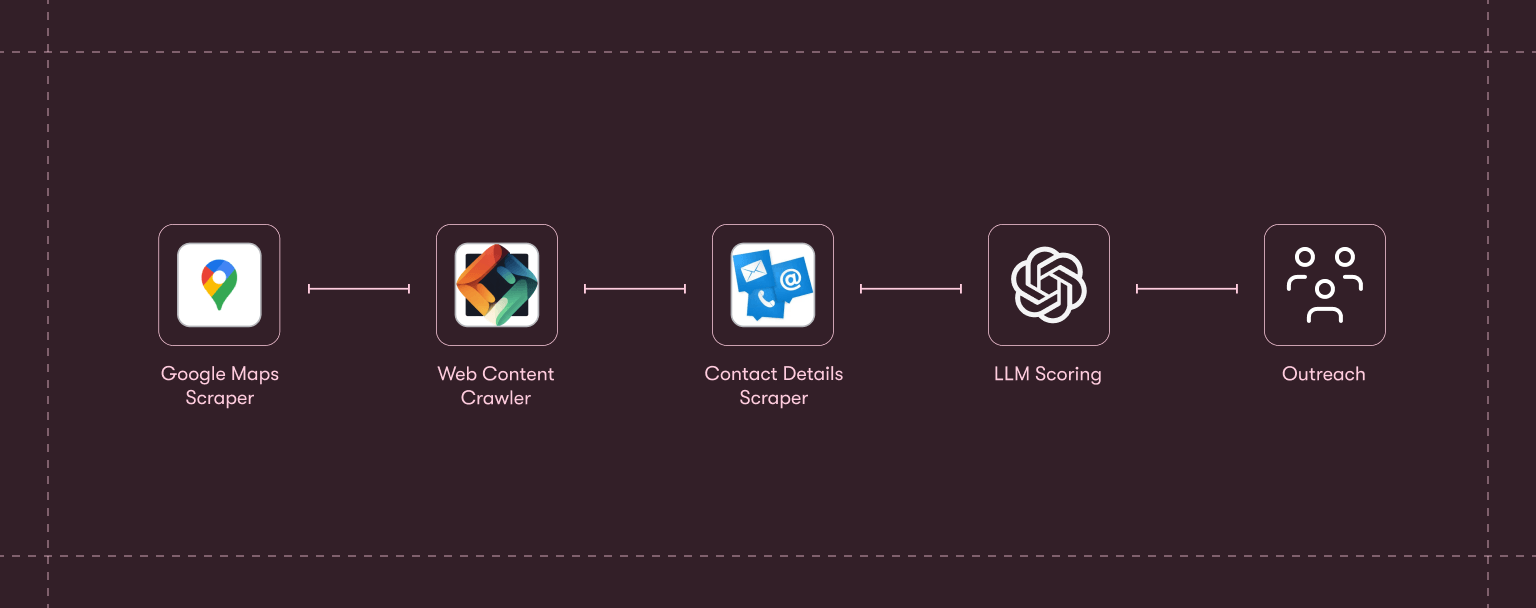
Define your Ideal Customer Profile (ICP), and the agent does the rest - pulling, enriching, scoring, and drafting outreach in a single workflow.
The full chain:
- Google Maps Scraper pulls matching businesses by category and location.
- Website Content Crawler crawls their sites to extract product and team information.
- Contact Details Scraper surfaces email addresses and social profiles.
- An LLM step scores each lead against your ICP and drafts personalized outreach.
Thousands of leads, from cold search to ready-to-send messages in minutes. The same logic also applies to other lead sources:
- Scrape Luma or Eventbrite attendee lists when you have a warm audience with shared context.
- Run LinkedIn Job Scraper against companies hiring for your target roles when you have budget-signaled prospects.
- Combine Google Maps with LinkedIn Profile Scraper for local business owner outreach.
Why reliability matters: wrong emails, hallucinated job titles, or duplicated contacts damage pipeline quality in ways that are difficult to trace. Deterministic scrapers eliminate that class of error entirely.
2. Competitive intelligence
Say you want a weekly intelligence briefing on your top three competitors: their LinkedIn posts, YouTube activity, and Twitter threads from the past seven days, summarized by product updates and community sentiment.
In OpenClaw, that's a single conversational instruction:
"Pull the latest LinkedIn posts, YouTube videos, and Twitter threads about Lovable, Bolt, and Replit from the past 7 days and summarize key product updates and community sentiment."
The agent resolves that to nine concurrent scraping jobs - LinkedIn Posts Scraper, YouTube Scraper, and Twitter/X Scraper across three targets - fires them in parallel, and assembles the results into a structured briefing.
From there, you can layer in additional signals:
- G2 and Trustpilot review scrapers can reveal sentiment shifts before they show up in public metrics.
- LinkedIn Job Scraper is worth adding too - what a competitor is actively hiring for often signals what they’re building next, months before any announcement.
Workflows like this are already appearing across the OpenClaw community - one popular LinkedIn post laid out three agent setups that can run a business overnight.
Why reliability matters: nine concurrent jobs across three platforms. If even one returns a hallucinated sentiment score or fabricated post metric, the briefing is compromised. The whole point is that you can trust the output without auditing it.
Apify plugin vs. doing it manually
| Without the plugin | With the plugin |
|---|---|
| Write custom scrapers for each platform | One install, access 20,000+ ready-made Actors |
| Context-switch between tools and terminals | Stay inside your AI assistant conversation |
| Sequential, blocking data collection | Async concurrent jobs, fire and collect |
| Manual Actor discovery through docs | MCP-powered natural language Actor discovery |
| Separate auth for each social API | Single Apify API key covers everything |
| Hours of setup per data source | Minutes from install to first data |
Get started
OpenClaw’s native web pipeline covers a lot of ground. web_search handles discovery, web_fetch handles static pages, and Firecrawl fills in the JavaScript gap. For many tasks, that’s enough.
But when your agent needs structured data at scale - from real platforms, without hallucinated fields, without paying a token tax on extraction, and without maintaining your own scraping infrastructure - that’s the gap the Apify plugin is built for.
Get started with one command:
openclaw plugins install @apify/apify-openclaw-plugin
The plugin is open source. Track releases and contribute at http://github.com/apify/apify-openclaw-plugin

Frequently asked questions
Why not just use OpenClaw's native web_fetch for scraping?
web_fetch does not execute JavaScript, so any modern site - which is most of them - returns broken or empty content. AI-native scrapers layer another probabilistic step on top, leading to hallucinated fields, inconsistent structure, and double token tax. Apify Actors return deterministic, structured JSON every time.
What's the difference between Apify and Firecrawl for OpenClaw?
Firecrawl gives your agent raw web access - it fetches HTML and handles JavaScript rendering on general websites. Apify gives you structured, platform-specific data at scale - purpose-built Actors for Instagram, Amazon, LinkedIn, Google Maps, and 20,000+ more. Both can run in the same OpenClaw setup.
How is Apify different from other OpenClaw plugins?
Most plugins extend what your agent can do - send emails, query databases, manage tasks. Apify extends what your agent can know - giving it reliable, real-time data from the live web. It's the only plugin that combines 20,000+ purpose-built scrapers with MCP-powered Actor discovery and async concurrent execution.
How does MCP-powered Actor discovery work?
Describe what data you need in plain English. The plugin maps your request to the most relevant Actor at runtime, so you don’t need to know Actor names in advance or browse Apify Store to find the right tool. The same natural-language discovery is also available directly in Apify Console through Apify AI.
Can OpenClaw run multiple Apify jobs at the same time?
Yes. The plugin is async by design. A competitive intelligence briefing that pulls from LinkedIn, YouTube, and Twitter in parallel runs all three concurrently, not sequentially.
How do I install the Apify plugin for OpenClaw?
Run one command: openclaw plugins install @apify/apify-openclaw-plugin. Then run openclaw apify setup to enter your API key. Total setup time is under five minutes.
How do I update the plugin?
Run the same install command again - OpenClaw pulls the latest version. The plugin is open source, so you can track releases on GitHub at github.com/apify/apify-openclaw-plugin.
Is Apify better than building my own scraper?
For most use cases, yes. Building a scraper means solving JavaScript rendering, proxy rotation, CAPTCHA bypass, and anti-bot measures yourself - then maintaining it as sites change. Apify Actors are maintained by Apify and the community, so when a platform changes its structure, the Actor gets updated.
What does the free Apify plan include?
The forever-free plan includes $5/month in platform usage - enough to experiment with any use case above.