You ask an AI agent to pull data from a website, search your company documentation, or check a database. Somehow, it knows which tool to use, sends it the right information, gets a result back, and continues with the task.
Model Context Protocol, or MCP, is one of the technologies making this possible.
MCP is an open standard for connecting AI applications to external tools and data. Instead of building a completely different integration every time you want an AI application to use a new tool, MCP gives them a common way to communicate.
That may sound more complicated than it really is. In this guide, we'll look at what MCP actually does, how MCP clients and servers work, how it differs from an API, and how you can try it with an AI agent and Apify.
What is MCP?
Model Context Protocol (MCP) lets AI applications connect to external tools, data sources, and services. Think of it as a common language between an AI application and the things you want it to use.
An LLM can generate an answer based on information available in its context, but it can't reach databases, websites, files, or software on its own. For that, it needs a way to interact with external systems, and an MCP server can expose capabilities to an AI application. For example, a server might give an AI agent tools for searching the web, working with GitHub repositories, or running an automation.
The important part is that the same protocol can be used across many different AI applications and tools.
The easiest way to think about MCP
Language models can reason about what they want to do, but they need tools to interact with the world outside the model. MCP gives AI applications a standard way to connect those tools. The MCP server says, in effect:
Here are the things I can do, here's the information I can provide, and here's how to ask me for them.
The AI application makes those capabilities available to the model. The model can then decide which ones are relevant to the task.
With Apify MCP, for example, those capabilities include web scraping and automation tools running as Actors on the Apify platform.
Why does MCP exist?
AI applications could use external tools long before MCP existed, but connecting them often meant writing custom integration code. Different tools exposed different APIs, and different AI applications had their own ways of handling those integrations.
Imagine you're building an AI coding assistant that needs access to GitHub, a database, a web scraper, and your internal documentation. Without a common standard, your application needs custom integration logic for each system. Another AI application that wants to use the same systems would need to build its own integrations.
MCP introduces a standardized interface between the two sides.
How does MCP work?
You don't need to know the MCP specification to use it, but there are a few terms worth understanding.
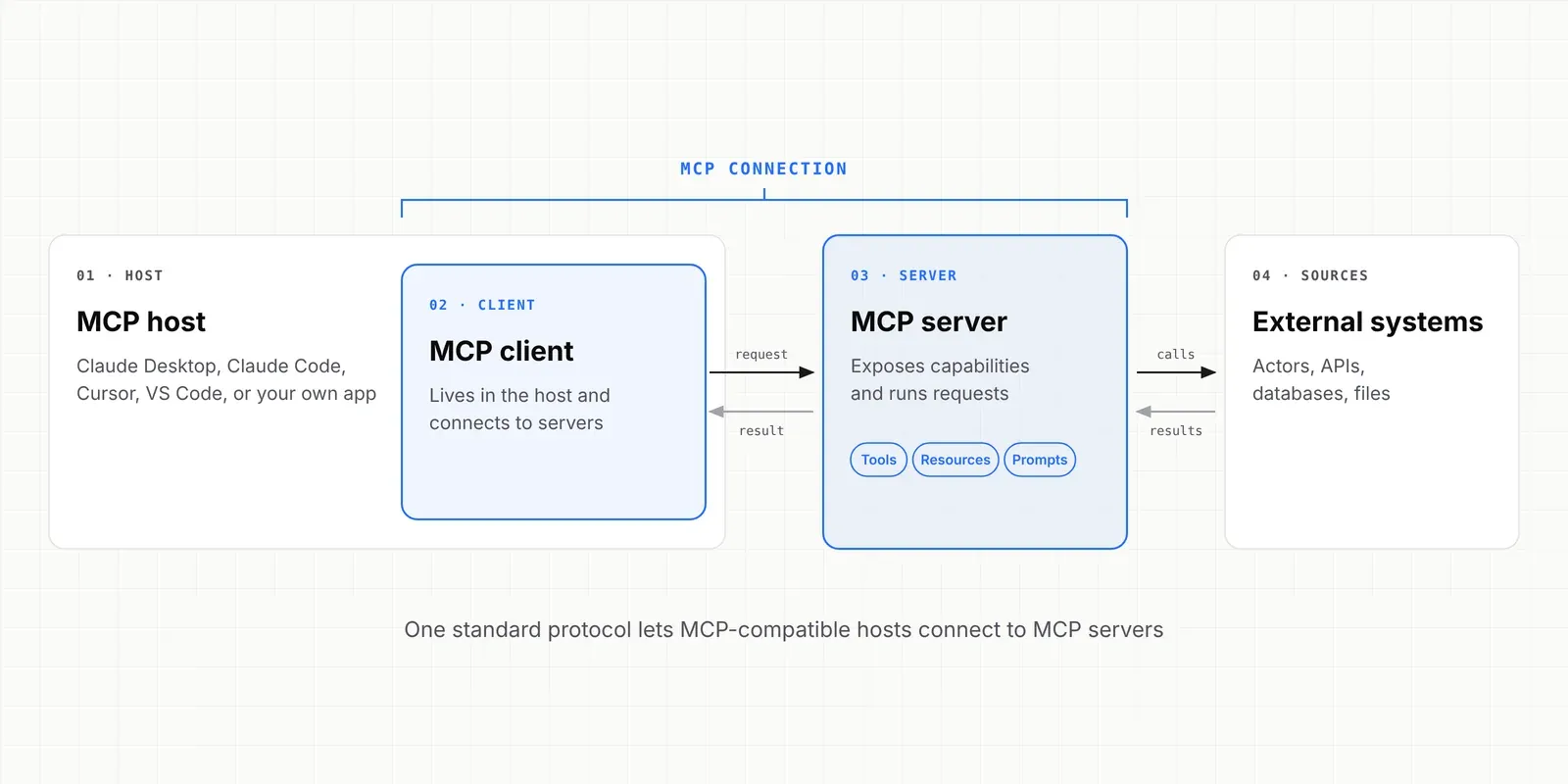
MCP host
The host is the AI application where the interaction happens. That could be an AI coding environment, desktop assistant, IDE, or an application you've built yourself. The host manages the overall interaction with the model and any MCP connections.
MCP client
Inside the host, an MCP client communicates with an MCP server. The client handles the MCP side of the connection: finding out what the server provides, sending requests, and receiving responses.
MCP server
An MCP server is a program or service that makes capabilities available through MCP. This doesn't necessarily mean a machine running in a data center. An MCP server can run remotely or locally on your computer.
What can an MCP server provide?
Three concepts you'll encounter frequently are tools, resources, and prompts.
Tools
Tools are functions that the AI model can call to perform an action or retrieve information. A tool normally describes what it does and what input it expects: search_web searches the internet, scrape_url gets the content of a specific web page. For example, if you ask: “Find the current prices of these five products,” the model can recognize that the scraping tool is relevant.
Resources
Resources provide information that an AI application can use as context. Depending on the server, that could include files, documentation, database records, repository content, and application data.
Prompts
MCP servers can also expose reusable prompts. These are predefined message templates designed for particular tasks. For example, a server could provide a prompt for reviewing code according to a company's development guidelines.
How MCP works with Apify
Apify is a marketplace of tools for AI, where agents find the Actors they need to work with live web data and automate tasks. Actors can scrape Google Maps, collect social media data, crawl websites, or monitor prices.
The Apify MCP server makes Apify capabilities available to MCP-compatible AI applications. That means an AI agent can use Apify Actors as tools. The server can let the agent search for Actors, inspect their details, run them, and access run and storage information.
You can tell an agent:
Find an Apify Actor that can get reviews from TripAdvisor, collect the latest results, and summarize the most common complaints.
With the appropriate tools and permissions, the agent can search for a suitable Actor, inspect its input requirements, run it, retrieve the data, and analyze the results. The language model handles the reasoning, the Actor handles the data collection, and MCP connects them.
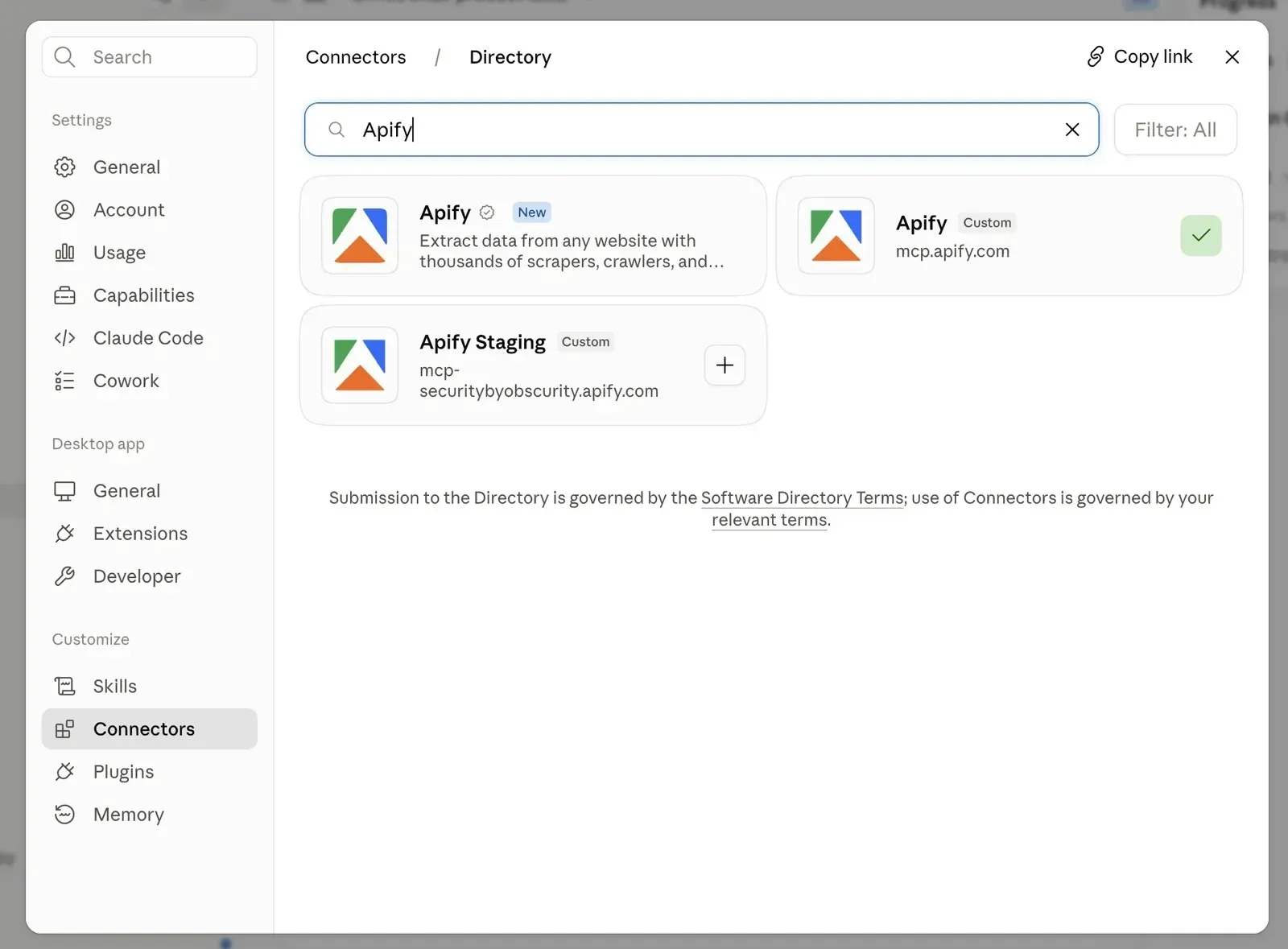
How to connect an AI application to Apify MCP
The easiest way to use Apify MCP today is through the hosted Apify MCP server.
You need:
- An Apify account
- An MCP-compatible AI application (such as Claude, ChatGPT, Cursor, or VS Code)
- Authorization to access Apify
The hosted server is available at: https://mcp.apify.com
You can authenticate using an Apify API token. When OAuth is supported, connecting to Apify opens a browser where you can sign in and authorize access, in which case you don't have to place an Apify API token directly in the client configuration.
For example, a basic MCP configuration can look like this:
{
  "mcpServers": {
    "apify": {
      "url": "https://mcp.apify.com"
    }
  }
}
The exact place where you add this configuration depends on your MCP client. Check Apify docs and connect your AI to Apify.
MCP server vs. API: what's the difference?
MCP doesn’t replace APIs. Many MCP servers use APIs behind the scenes. A weather service with an API would traditionally call an endpoint such as: GET /weather?city=Prague
Your code needs to know which endpoint to call, what parameters it accepts, how authentication works, and how to process the response. You could instead build an MCP server that exposes a tool such as: get_weather
The MCP server can then call the weather API internally.
An API defines how software communicates with a service. MCP standardizes how AI applications discover and use tools and context exposed by services.
Try your first Apify MCP task
Once the connection is configured, you don't need to start by writing code. Start with a straightforward request that clearly requires external data.
For example:
Find an Apify Actor that can scrape Google Maps. Use it to find 10 coworking spaces in Berlin and return their names, ratings, review counts, and websites.
Here's what happens behind the scenes:
- You send the request to the AI application.
- The model determines that it needs current information from the web.
- It looks at the tools available through the Apify MCP server.
- It uses the server's tools for searching Apify Store and retrieving Actor details.
- The MCP client sends a request to the MCP server to run that Actor with your search parameters.
- The Actor performs the actual web data extraction on the Apify platform.
- The agent retrieves the Actor's output through the MCP server.
- The model works with the output and presents the result in the format you requested.
The important thing is that your instruction describes the goal. You don't have to manually choose an API endpoint, construct an HTTP request, parse the response, and feed it back to the model.
The agent could use the capabilities available through MCP to work out the necessary steps.
MCP gives AI agents a standard way to act
A chatbot can be useful even when all it does is generate text, but agents need to interact with other systems. An agent can search for companies matching a set of criteria, extract contact information, analyze the companies, and save qualified leads.
Each step requires access to something outside the language model itself. MCP gives agent developers a standard way to provide that access.

FAQ
Is MCP only for developers?
No. You don't need to build an MCP server to use one. If an application lets you add an MCP server or connector, you usually only need to authorize the connection and then use its tools in ordinary language. Developers can go further by building their own servers and exposing their own tools.
When should you use MCP?
MCP is useful when you want an AI application to access external tools or information, such as current web data, business systems, files, databases, or automations, through a standardized interface. It isn't the only way to connect an AI application to external systems. If you're simply sending text to a language model and receiving text back, you don't need MCP.