If you’re deploying a shopping or support agent and ask it what a product costs, it answers confidently, drawing on its training data. The price is months old, the item may be discontinued, and there is no timestamp on the answer to warn anyone. Turn on native browsing, and the agent reads a rendered retail page into its context window, then hands back a paragraph of prose. No field names, no consistent shape, nothing to parse, and no way to compare 100 products at once.
This is a side-by-side test of the two paths. The same request, run twice: once with Claude on its own, once with Claude connected to Apify MCP and E-commerce Scraping Tool. Both runs happened on August 28, 2026, against live storefronts.
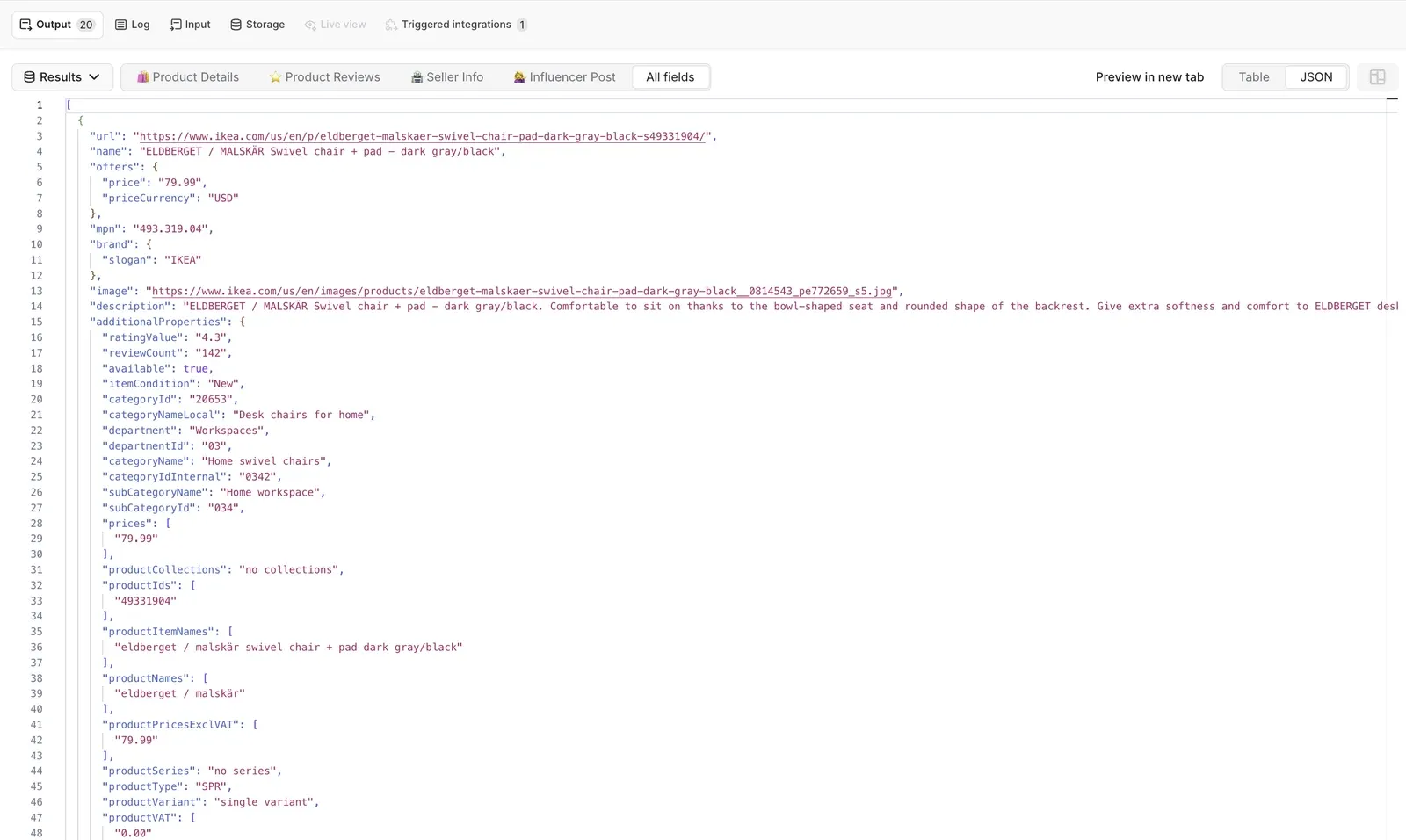
Collecting product data: side-by-side test.
The test
The task was to collect 100 office chair products from five stores, 20 per store, with name, price, availability, rating, and a working product URL for each.
The five stores are Amazon, Walmart, eBay, IKEA, and Costco. All five are real-world hard targets with active bot protection, and all five sell the same category.
Part 1: Claude on its own
We’ll use a detailed prompt in Claude with web search and fetch, with no MCP server connected.
Here’s the prompt used in this test:
I'm building a shopping assistant, and I need live product data to test it against.
Get me 100 office chairs, 20 from each of these five stores:
https://www.amazon.com/s?k=office+chair
https://www.walmart.com/search?q=office+chair
https://www.ebay.com/sch/i.html?_nkw=office+chair
https://www.ikea.com/us/en/search/?q=office+chair
https://www.costco.com/CatalogSearch?keyword=office+chair
For every product, return: name, brand, current price, currency, in-stock status, star rating, review count, and the full product URL.
Rules:
- Use only what you can read on those pages right now. Do not fill anything in from what you already know about these products.
- If a page will not load, say exactly why and move on to the next one.
- Put everything in one table with the same columns for all five stores.
- At the end, tell me how many of the 100 products you actually got.
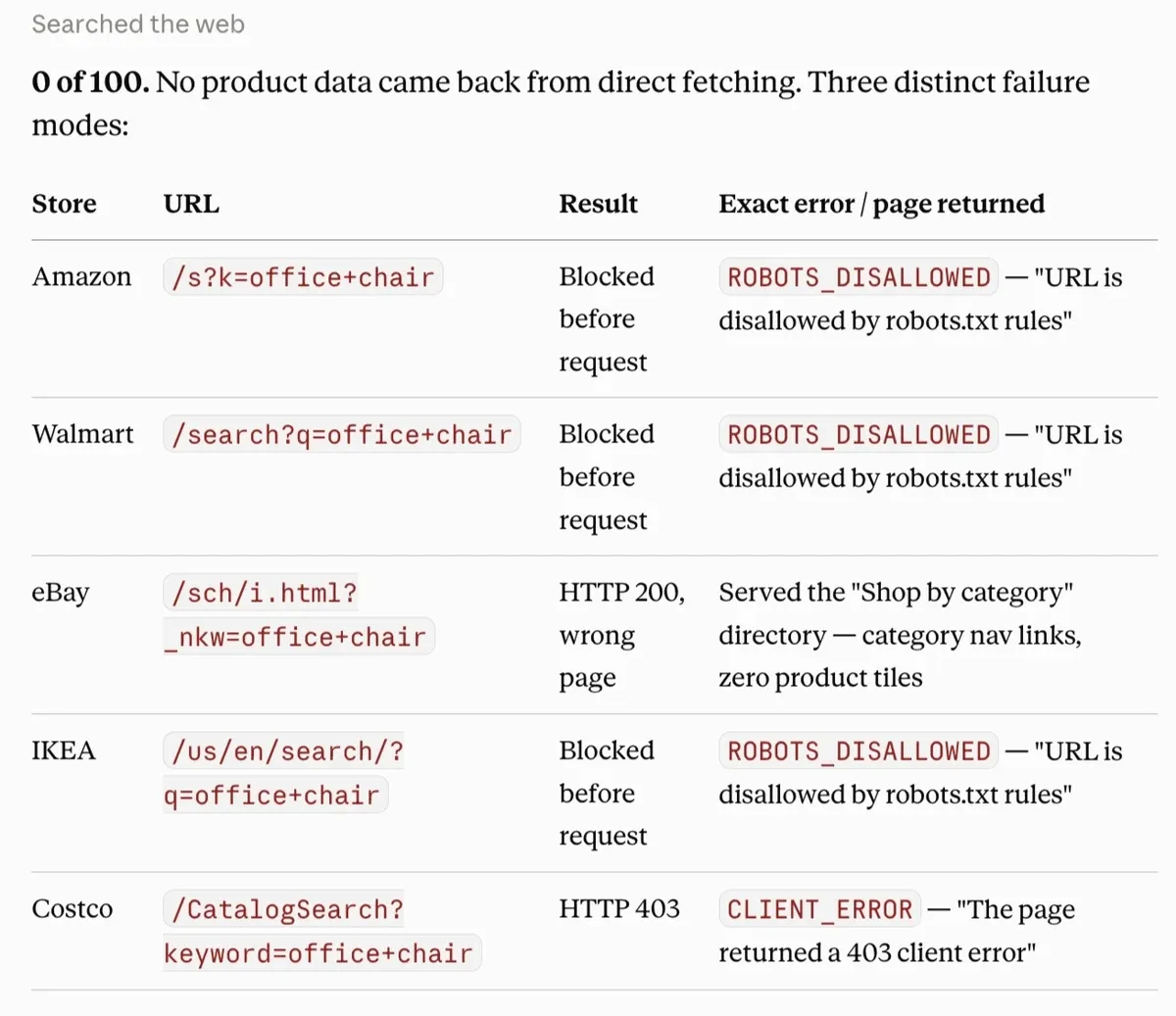
Five search URLs went in. Here's what came back:
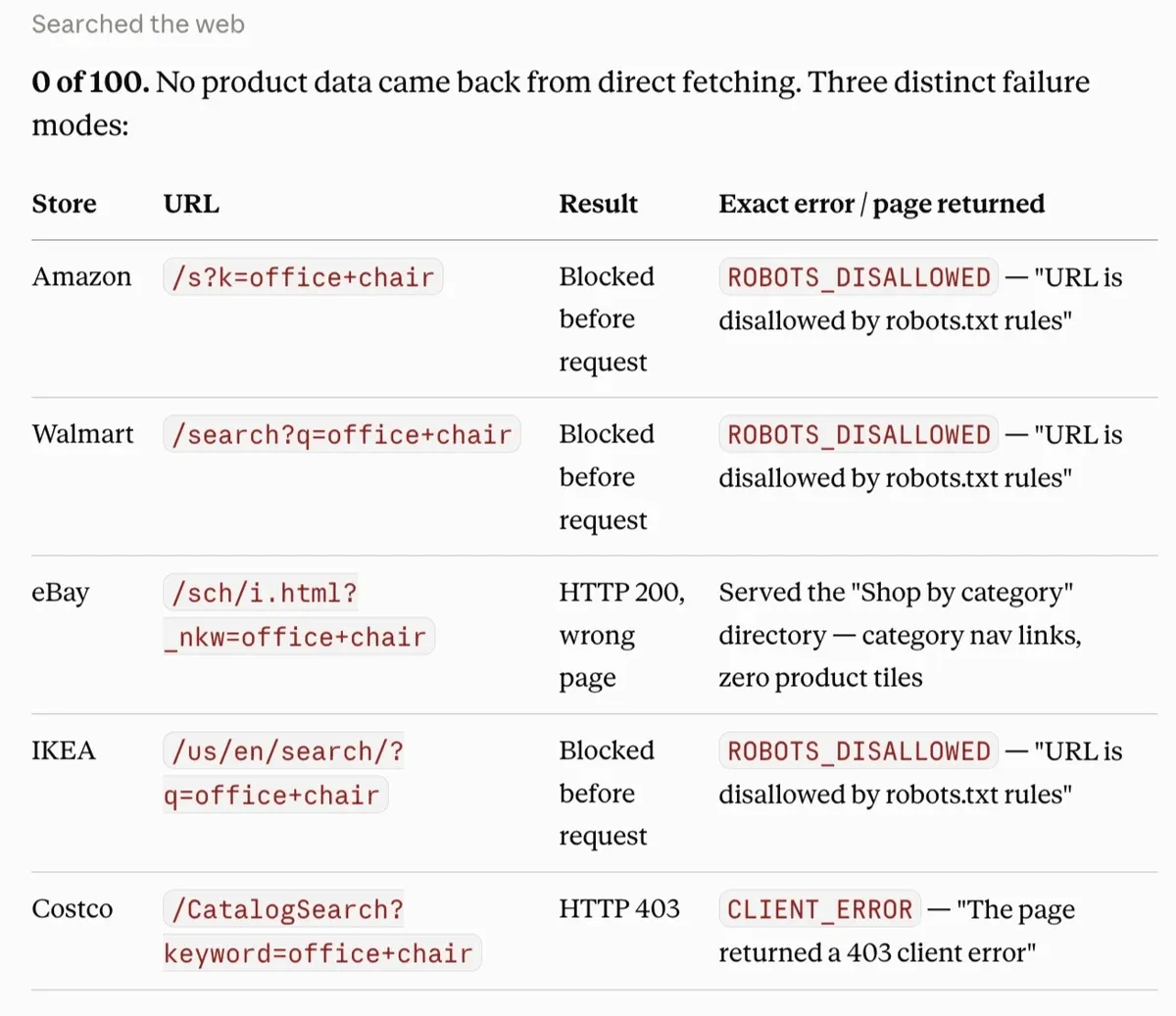
Zero products out of 100.
For Amazon, Walmart, and IKEA, no HTTP request is made at all. Claude's fetch tool respects robots.txt, and these retailers disallow crawling of their search paths. The fetcher reads robots.txt, sees the search path disallowed, and stops. There is no page, no status code, nothing to parse or retry.
Costco produced a server-level refusal. The request went out, and Costco returned 403 with no body worth reading.
eBay’s HTTP 200 response returns a category directory instead of search results. An agent that trusts the status code parses a real page and finds no products, and if it's less careful about the difference between "no results" and "wrong page," it reports "no office chairs found on eBay.”
A proof that a general-purpose browsing tool can’t be used as a data layer for a shopping agent.
Part 2: Claude with Apify MCP
In this method, we’re using the Apify MCP connector in Claude to access thousands of Apify Actors - tools delivering web data for AI agents.
Step 1. Connect Apify MCP to Claude
- Navigate to Customize > Connectors.
- Click the + button next to Connectors and select Add custom connector from the dropdown.
- Enter the connector's name and URL:
- Name:
Apify
- Name:
MCP Server URL:
https://mcp.apify.com/
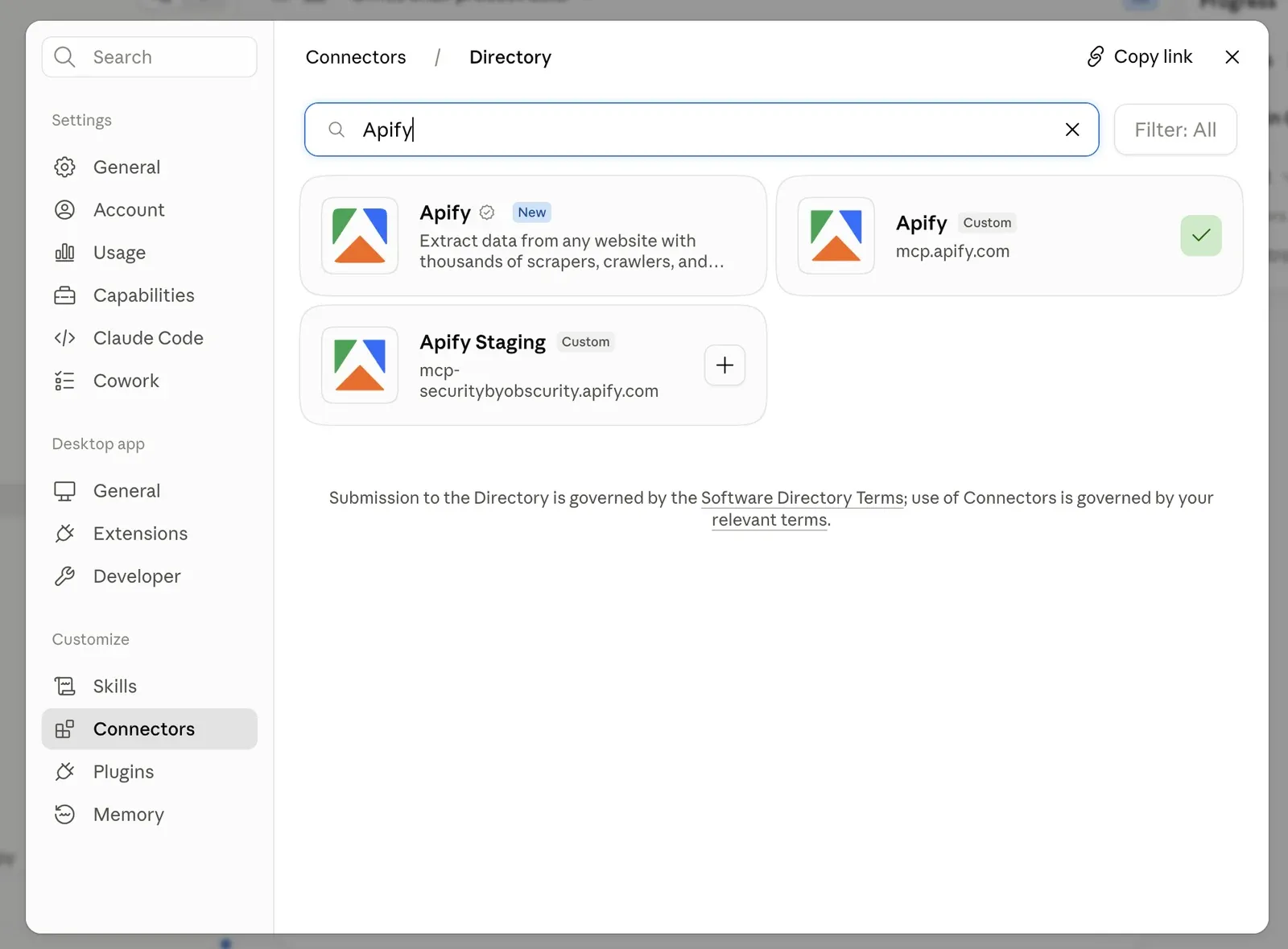
- Click Add, then open the newly added connector and click Connect to authorize via OAuth.
- To enable Apify MCP server in a conversation, click + in the chat, hover over Connectors, and toggle on Apify.
Apify MCP exposes thousands of Actors. If you want a lean, single-purpose connector, and you already know which Apify Actor you want to run, you can use a scoped URL in your custom connector - it loads just that one Actor as a direct tool. You skip the Actor discovery step and burn fewer tokens. Here’s a URL for E-commerce Scraping Tool:
https://mcp.apify.com?tools=apify/e-commerce-scraping-tool
Step 2: Get product data
With the connector live, the request goes in as plain language. Claude fills in the Actor input, starts the run, and reads the results back.
E-commerce Scraping Tool takes three kinds of input. The two URL-based ones work on any store with publicly accessible product pages. Only keyword search is limited to a fixed list of storefronts:
- Category listing URLs. Paste a search or category page from any supported store, and the Actor walks it and pulls the product pages behind it. This is what the test below uses.
- Direct product URLs. Any store, one product or many. For checking a single SKU right now, which is the most common thing a live agent needs.
- Keyword search scoped to marketplaces. Give it one keyword and pick the storefronts from a list of 225 across 79 retailer brands. Best run from Apify Console, where the marketplaces are a dropdown.
The same prompt was used - the same five stores, same 20 products each. The Actor ran on Apify Console via MCP, running 5 sessions to meet the 20-cap requirement:
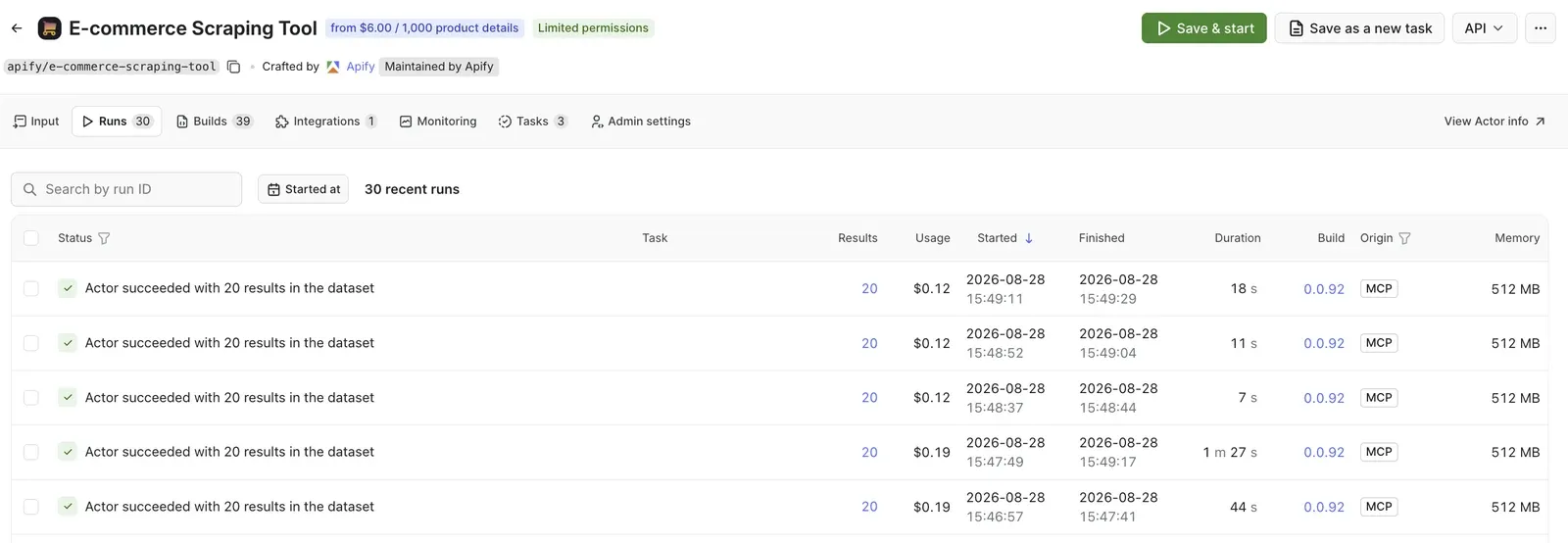
The results:
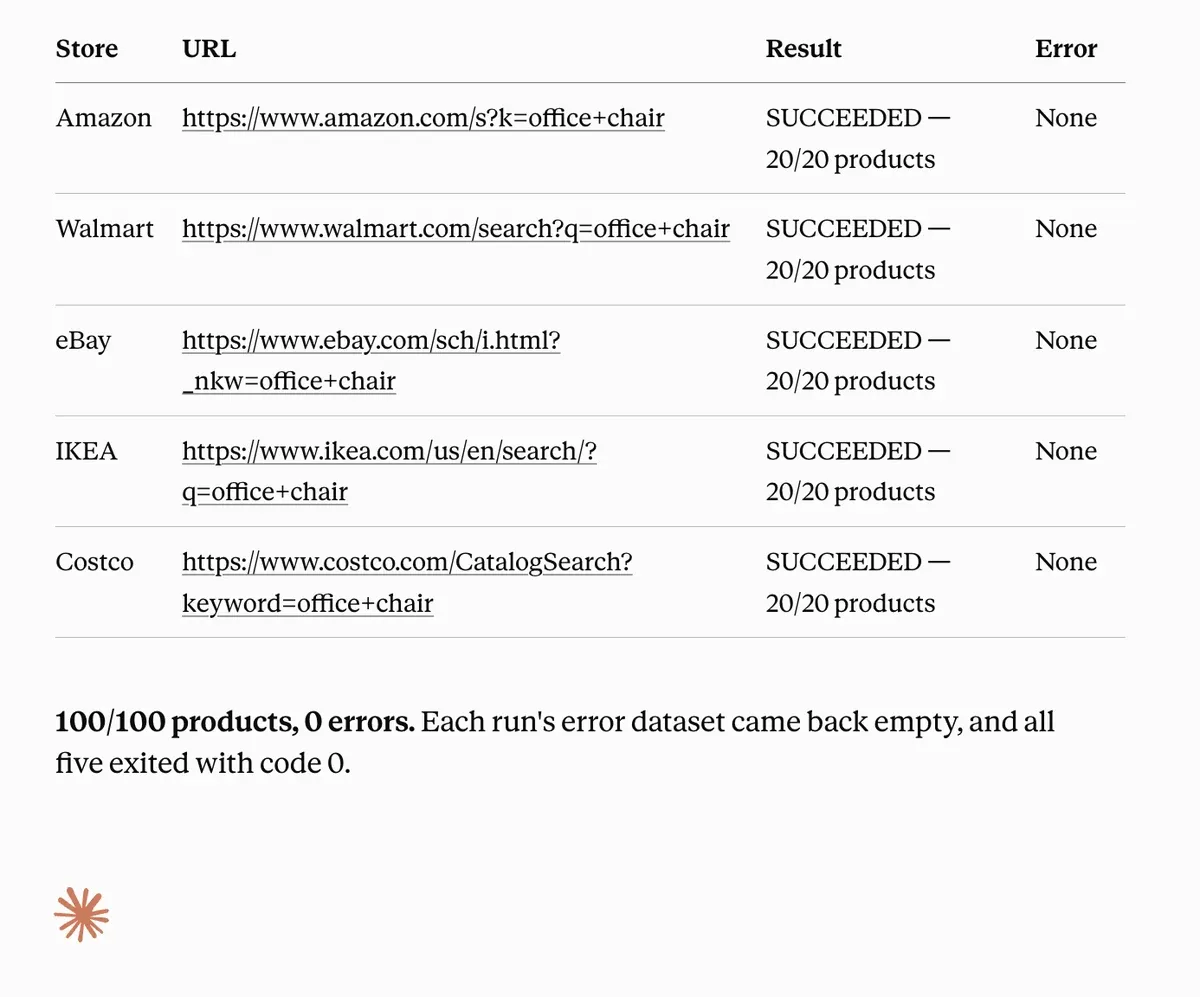
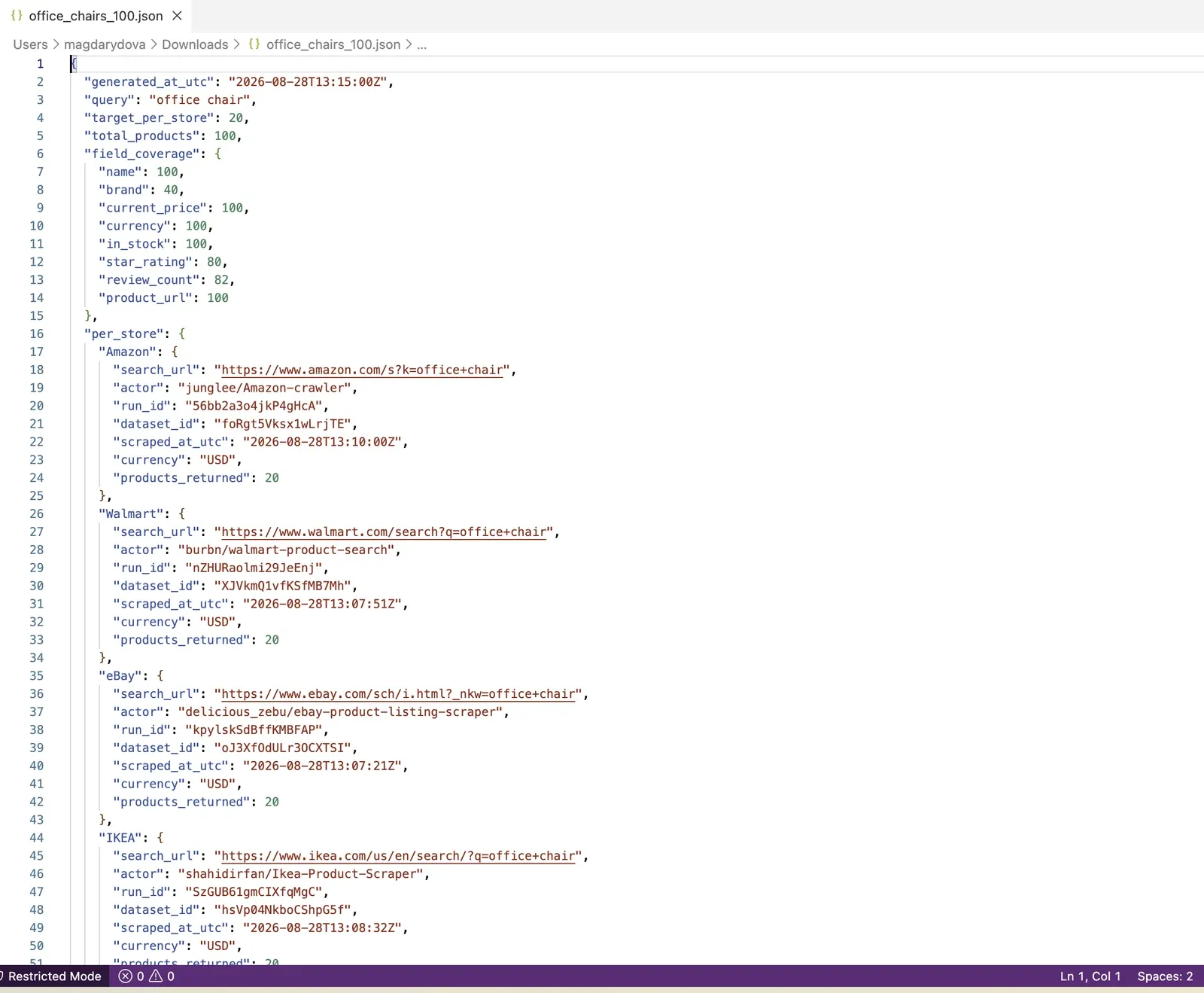
100 products out of 100. The five calls ran for about 3 minutes, with a total cost of $0.74.
Both methods compared
| Claude on its own | Claude with Apify MCP | |
|---|---|---|
| Products collected | 0 of 100 | 100 of 100 |
| Stores reached | 0 of 5 | 5 of 5 |
| Time to result | Refused in seconds | About 3 minutes for all five |
| Product URLs returned | None | Every record |
| Stable identifiers (ASIN, SKU, MPN) | None | Every record |
| Output shape | Prose, varies by page | Same fields on every store |
| Direct data cost | $0 | About $0.60 at free-tier rates |
Why this shape of data is what an agent needs
Apify’s data collection layer gives your agent something it can compute over, attribute, and afford to ask for often.
A single product record from a marketplace or an e-shop carries well over a hundred attributes, including marketing copy, image sets, return policies, and review text. That data can be sorted, filtered, and analyzed easily. You’ll know which product is the cheapest, best rated, priced under $150, or has more reviews than xyz.
Every row carries a working product URL, so the agent shows its source. Every row also carries the minute it was collected, which turns freshness into something measurable. The agent can say "as of 15:49 today," and it can decide for itself whether that is recent enough for the question being asked or whether to go and look again.
Plus, an empty field means that the page did not show it. That is information as well - it lets the agent say what it does not know instead of quietly filling in something plausible, which is the type of failure the data layer can prevent.
How agents use this data
Agents put this kind of data to work in two modes:
- On demand, the agent goes and looks the moment a question needs a current answer, then replies with something it can point back to.
- On a schedule, it collects the same sources at an interval and compares each collection against the last, so its job shifts from answering to noticing: find what moved, judge whether the movement matters, and route the few that do to a person, a dashboard, or the next step in a workflow.
Apify-delivered data suits both modes. It arrives already structured, attributed to a named source, and stamped with the time it was gathered, so an agent can compute over it and cite it.
Because every run collects the same way, anything that differs between two runs really did change: the number moved at the source, not in the tool that read it. And the coverage is already built. Apify Store is the largest marketplace of tools for AI, with Actors maintained for the sources agents actually get asked about, so a team reaches a new site by choosing one rather than building one. Sites change constantly, and that maintenance is absorbed by whoever publishes the Actor instead of landing on the team shipping the agent.
Start pulling live data
Add https://mcp.apify.com?tools=apify/e-commerce-scraping-tool as a connector, sign in, and ask your agent for a product. New Apify accounts include $5 of monthly usage, which covers a few hundred products.

FAQ
Does this work with clients other than Claude?
Yes. Apify MCP works with any MCP-compatible client, including Claude Code and Cursor. There is a hosted server with OAuth, plus a local stdio option for clients that do not support remote servers. For no-code, the Apify node for n8n plugs into n8n's AI Agent node as a tool, and also works as a plain trigger or action. The REST API and CLI cover code agents, and platform schedules handle recurring runs.
Which stores are supported?
E-commerce Scraping Tool covers virtually all e-commerce platforms, including Amazon, eBay, Alibaba, AliExpress, Etsy, Rakuten, Walmart, Target, Best Buy, Home Depot, Costco, Tesco, Argos, John Lewis, Flipkart, Zalando, Otto, Shopify stores, WooCommerce sites, Magento/Adobe Commerce, BigCommerce, PrestaShop, and more. It works with any online store with publicly accessible product pages.
Is scraping e-commerce data legal?
E-commerce Scraping Tool is legal as it only extracts publicly available data. It doesn't access or extract any hidden or private data, such as email addresses, gender, or location. It also doesn't extract data behind login. Product names, prices, and store information are all publicly available information. For more details, you can read our blog post on the legality of web scraping.
Can it get reviews and seller data too?
Yes, both are separate modes on the same Actor. There is also an optional AI summary that runs over selected fields with a custom prompt.