
LlamaIndex web scraping converts web pages into LlamaIndex documents, so a RAG app can answer from a website's content. A crawler fetches the pages, and an ingestion step embeds them into a vector store.
Websites change, so the crawl has to run again, and the next ingest can damage the index without an error. In our test on 30 docs pages, we stopped a crawl early on purpose, and it returned 15 pages. The setting that removes deleted pages then removed the other 15 from the index, although they still existed on the site.
This guide shows you how to crawl a site and load it into LlamaIndex, re-embed only the pages that changed, protect the index from wrong deletions after a partial crawl, and add live web search for newer facts.
How the pipeline keeps answers fresh
The pipeline has 3 parts. Website Content Crawler does the crawling, LlamaIndex's IngestionPipeline updates the index, and RAG Web Browser searches the live web. Website Content Crawler and RAG Web Browser are Apify Actors, ready-made cloud programs that you configure and run.
The parts work in 2 layers. The first layer runs on a schedule. Website Content Crawler crawls the site. IngestionPipeline compares a hash of each page with the hash from the last crawl, embeds only new and changed pages, and deletes the pages that the site removed, but only after a complete crawl. The second layer runs when a question arrives. An agent chooses a source for each question. It sends how-to questions to the index and sends questions about the latest versions or prices to RAG Web Browser.
Both layers use the same Chroma index:
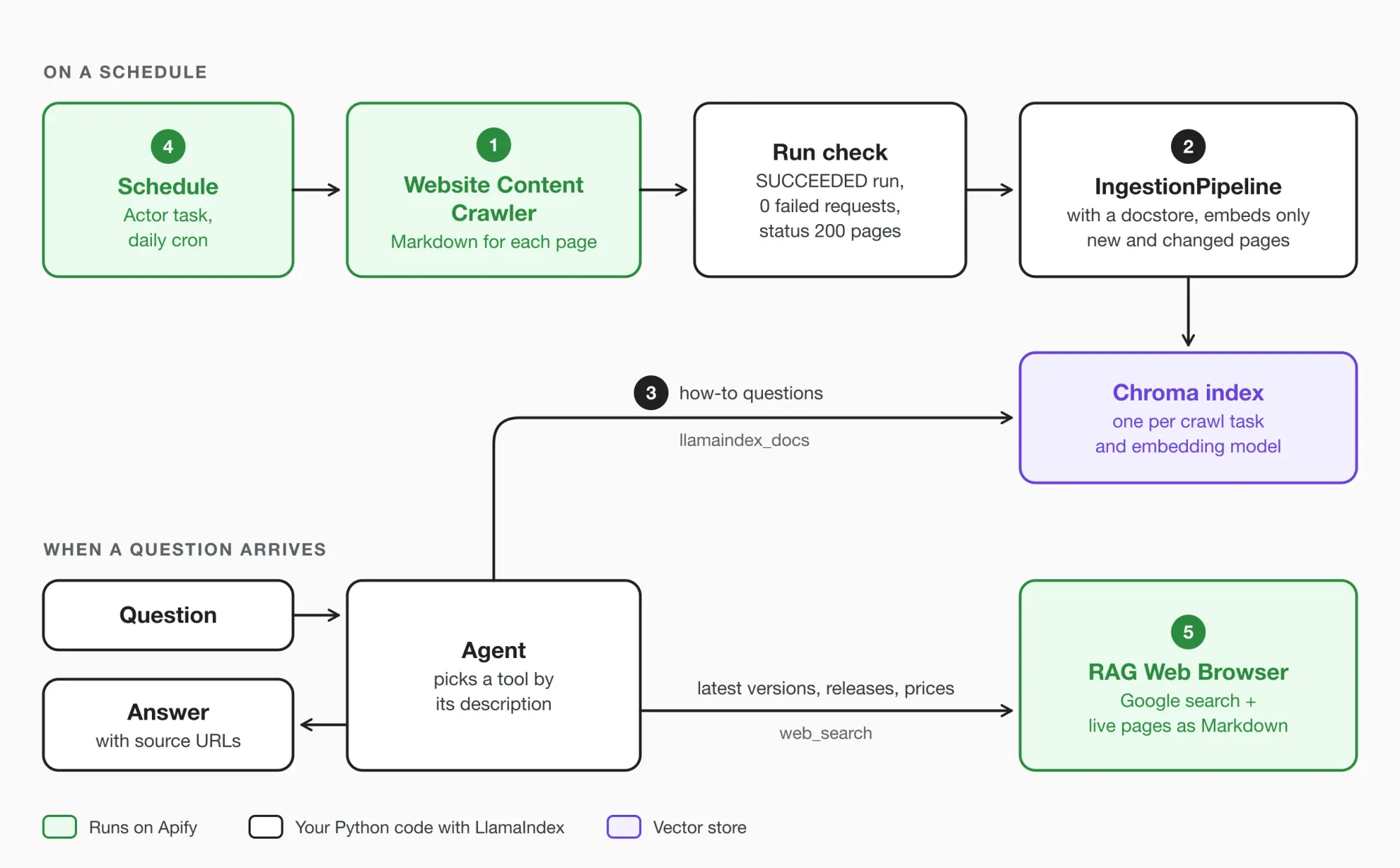
The demo crawls 3 sections of the LlamaIndex docs, 30 pages in total. The tests used llama-index-core 0.14.25 and llama-index-readers-apify 0.6.0.
Before you start
You need Python 3.10 or later, an Apify account and its API token, and an OpenAI API key. The Apify free plan includes $5 of usage per month, and one crawl of the demo site cost $0.005 to $0.010, so the free plan is enough for every run in the steps below.
Install the packages in a new virtual environment:
pip install "llama-index-core>=0.14.24" llama-index-readers-apify llama-index-embeddings-openai llama-index-llms-openai llama-index-vector-stores-chroma llama-index-tools-mcpllama-index-readers-apify 0.6.0 installs apify-client 1.x, which the scripts also import. A new virtual environment keeps these package versions separate from your other projects. The install line requires llama-index-core 0.14.24 or later, because that version fixed an upsert bug. In older versions, when the input was already split into nodes, the pipeline keeps only the last chunk of each document.
Save every script from the next steps in one folder, and run each script from that folder. The scripts import each other and save the index in a relative storage/ path. Set both keys as environment variables:
export APIFY_TOKEN="your-apify-token"
export OPENAI_API_KEY="your-openai-key"
Step 1: Scrape the site into LlamaIndex documents
LlamaIndex includes its own web reader, SimpleWebPageReader, so the comparison uses it as the baseline. On these docs pages, SimpleWebPageReader returned the whole page, including the sidebar. On the 30 demo pages, SimpleWebPageReader and Website Content Crawler returned this much text:
| Tool | Characters | Tokens |
|---|---|---|
| SimpleWebPageReader(html_to_text=True) | 1,479,302 | 362,849 |
| Website Content Crawler | 195,054 | 44,813 |
Website Content Crawler returned 8 times fewer tokens. In the SimpleWebPageReader output, 86% of the characters came from lines that repeat on most pages (60% or more of them). Most of these lines were the sidebar navigation, so the index would embed the sidebar again with every page.
Website Content Crawler crawls the site on Apify and saves every page as Markdown in a dataset. Create crawl.py, which runs the Actor, checks the run, and converts every page into a LlamaIndex Document:
import os

from apify_client import ApifyClient
from llama_index.core import Document
from llama_index.readers.apify import ApifyDataset

TOKEN = os.environ["APIFY_TOKEN"]
DOCS = "https://developers.llamaindex.ai/python/framework/module_guides"

RUN_INPUT = {
    "startUrls": [
        {"url": f"{DOCS}/loading/"},
        {"url": f"{DOCS}/indexing/"},
        {"url": f"{DOCS}/storing/"},
    ],
    "excludeUrlGlobs": [
        {"glob": "https://developers.llamaindex.ai/**/changelog/**"}
    ],
    "crawlerType": "cheerio",
    "maxCrawlPages": 100,
    "respectRobotsTxtFile": True,
}


def to_document(item: dict) -> Document:
    meta = item.get("metadata") or {}
    url = meta.get("canonicalUrl") or item["url"]
    return Document(
        id_=url,
        text=item.get("markdown") or "",
        metadata={
            "url": url,
            "title": meta.get("title"),
            "status": (item.get("crawl") or {}).get("httpStatusCode"),
        },
    )


def failed_requests(client: ApifyClient, run: dict) -> int | None:
    stats = client.key_value_store(run["defaultKeyValueStoreId"]).get_record(
        "SDK_CRAWLER_STATISTICS_website-content-crawler"
    )
    return stats["value"]["requestsFailed"] if stats else None


def load_run(client: ApifyClient, run: dict) -> tuple[dict, set, bool]:
    if run["status"] != "SUCCEEDED":
        raise RuntimeError(
            f"Crawl {run['id']} ended as {run['status']}, nothing ingested"
        )

    docs = ApifyDataset(TOKEN).load_data(
        run["defaultDatasetId"], dataset_mapping_function=to_document
    )
    pages, gone = {}, set()
    for doc in docs:
        status = doc.metadata.pop("status")
        if status == 200:
            pages[doc.id_] = doc
        elif status in (404, 410):
            gone.add(doc.id_)

    complete = failed_requests(client, run) == 0
    return pages, gone, complete


def crawl() -> tuple[dict, set, bool]:
    client = ApifyClient(TOKEN)
    run = client.actor("apify/website-content-crawler").call(
        run_input=RUN_INPUT, memory_mbytes=2048, timeout_secs=1800
    )
    return load_run(client, run)


if __name__ == "__main__":
    pages, gone, complete = crawl()
    print(f"{len(pages)} pages, {len(gone)} gone, complete crawl: {complete}")
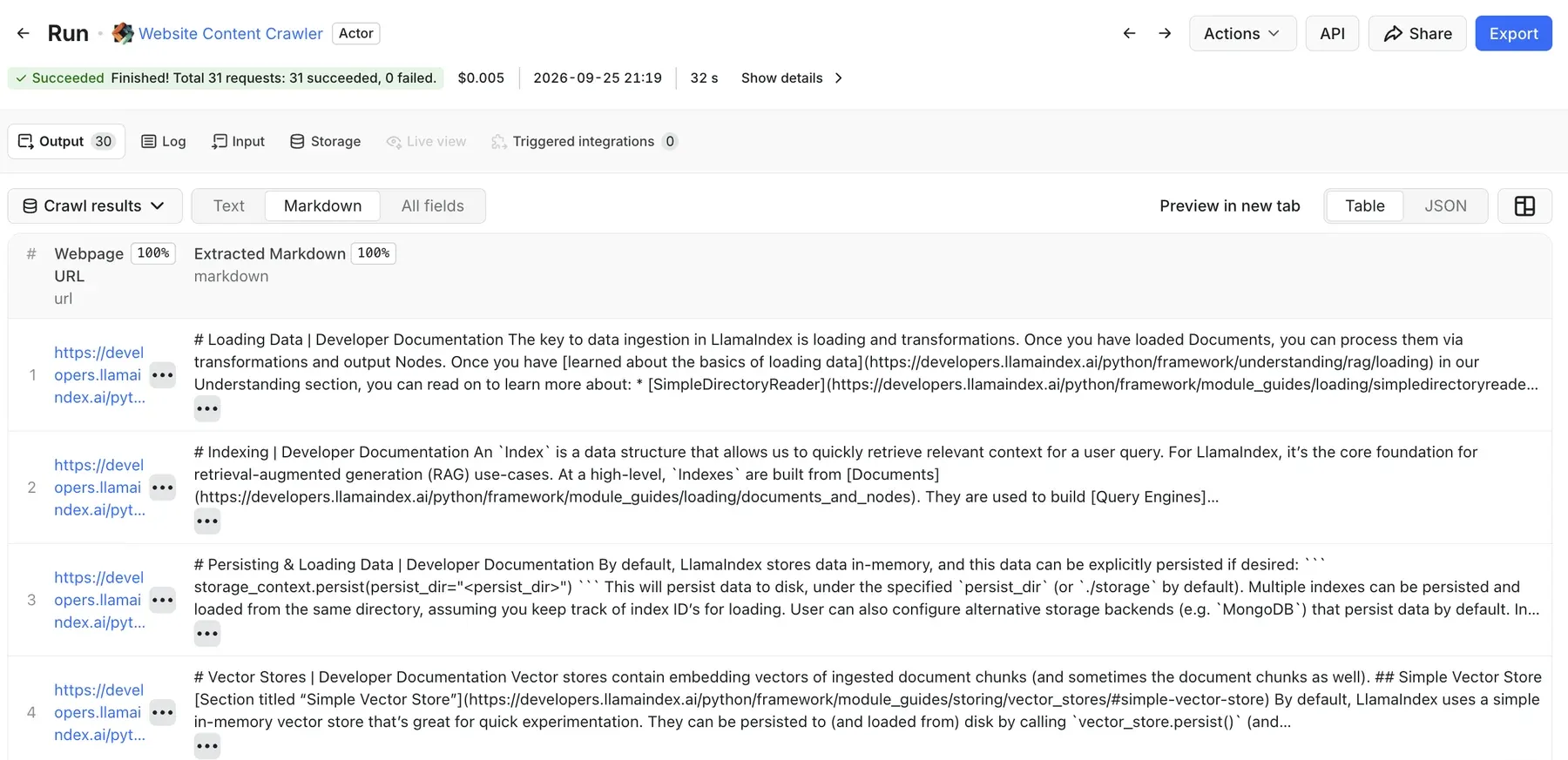
In 7 runs, the crawl collected all 30 pages with 0 failed requests. Each run took 32 to 75 seconds and cost $0.005 to $0.010. python crawl.py shows the Actor's log in the terminal and ends with this line:
30 pages, 0 gone, complete crawl: TrueIn Apify Console, the Markdown view of the run's Output tab lists every page with its URL and its Markdown:
Set the crawler input explicitly
Website Content Crawler works on a wide range of sites, and its input lets you match each run to one site. With only start URLs in the input, the crawler uses a headless browser, which also renders sites that need JavaScript. The docs pages render without JavaScript, so the raw HTTP client (cheerio) is enough. RUN_INPUT also sets a page limit and robots.txt handling, and crawl() sets the memory and the timeout. With these values set, each run crawls the pages you expect and costs what you expect. The n8n RAG pipeline guide compares the cost of each crawler type.
crawl() uses 2 GB of memory, which gave every run enough room for these pages. excludeUrlGlobs skips the changelog, because that single 4.9 MB page would make up most of the index and changes with every release.
Use the canonical URL as the document ID
LlamaIndex identifies each page by its document ID. Without an explicit ID, every Document gets a random ID, and a re-crawl can't match a page to its earlier version. The page URL looks like a good ID, but one page on this site has 2 URLs, because vector_store_guide redirects to vector_store_index/. Both URLs have the same canonical URL in the page metadata, so to_document() uses the canonical URL as the ID. The page keeps one ID, whichever URL a crawl reaches.
The metadata holds only the URL and the title. LlamaIndex hashes the text together with all of the metadata. A value that changes on every crawl, such as the crawl time, makes every page look changed.
Check the run before you load it
A run that ends early still keeps the pages that it collected, which helps with debugging, but the dataset is not a complete crawl. For this reason, load_run() stops unless the run SUCCEEDED. load_run() also reads the failed-request count from the statistics that the crawler saves in the run's key-value store, the run's storage for records and files. If that record is missing, complete is False, and the next ingest deletes no missing pages. load_run() keeps only the pages with HTTP status 200. The crawler also saves 404 pages with their HTTP status, so load_run() can identify the pages that the site removed. load_run() adds these 404 and 410 pages to a separate gone set.
llama-index-readers-apify also offers ApifyActor, which runs an Actor and loads its dataset in 1 call. This single call suits the live search in Step 5. A crawl that can delete pages needs the run check first, so crawl() starts the Actor with apify-client and loads the dataset with ApifyDataset after the check.
Step 2: Ingest so a re-crawl re-embeds only what changed
IngestionPipeline splits the pages into chunks, embeds each chunk, and writes the vectors to the vector store. With a docstore attached, the pipeline also stores a hash of each page under the page's document ID. On the next run, the pipeline compares the hashes and embeds only the pages with a new hash.
The docstore strategy decides what happens to changed pages and to pages that are missing from a new crawl:
UPSERTSadds new pages, replaces changed pages, and keeps the missing pages.DUPLICATES_ONLYskips pages whose hash is already in the docstore and adds all other pages. The old chunks of a changed page stay in the index.UPSERTS_AND_DELETEworks likeUPSERTSand also deletes every page that is missing from the new crawl.
The index method refresh_ref_docs() also skips unchanged pages, but it doesn't delete pages that are missing from the new crawl.
ingest.py builds the pipeline, loads the docstore from the last run, and picks the strategy for the new crawl:
import os

import chromadb
from llama_index.core.ingestion import DocstoreStrategy, IngestionPipeline
from llama_index.core.node_parser import SentenceSplitter
from llama_index.core.storage.docstore import SimpleDocumentStore
from llama_index.embeddings.openai import OpenAIEmbedding
from llama_index.vector_stores.chroma import ChromaVectorStore

EMBED_MODEL = "text-embedding-3-small"
# One folder per crawl task and per embedding model,
# because each one needs its own docstore
STORAGE = f"storage/llamaindex-docs/{EMBED_MODEL}"
MAX_DROP = 0.1


def vector_store() -> ChromaVectorStore:
    chroma = chromadb.PersistentClient(path=f"{STORAGE}/chroma")
    return ChromaVectorStore(
        chroma_collection=chroma.get_or_create_collection("docs")
    )


def build_pipeline() -> IngestionPipeline:
    pipeline = IngestionPipeline(
        transformations=[
            SentenceSplitter(chunk_size=1024, chunk_overlap=200),
            OpenAIEmbedding(model=EMBED_MODEL),
        ],
        docstore=SimpleDocumentStore(),
        vector_store=vector_store(),
    )
    if os.path.exists(f"{STORAGE}/pipeline"):
        pipeline.load(f"{STORAGE}/pipeline")
    return pipeline


def ingest(pages: dict, gone: set, complete: bool) -> None:
    pipeline = build_pipeline()
    known = len(pipeline.docstore.docs)
    safe_to_delete = complete and len(pages) >= known * (1 - MAX_DROP)
    pipeline.docstore_strategy = (
        DocstoreStrategy.UPSERTS_AND_DELETE
        if safe_to_delete
        else DocstoreStrategy.UPSERTS
    )

    nodes = pipeline.run(documents=list(pages.values()))
    for url in gone:
        pipeline.docstore.delete_document(url, raise_error=False)
        pipeline.vector_store.delete(url)
    pipeline.persist(f"{STORAGE}/pipeline")

    print(
        f"{pipeline.docstore_strategy.value}: "
        f"{len({n.ref_doc_id for n in nodes})} pages embedded, "
        f"index went from {known} to {len(pipeline.docstore.docs)} pages"
    )


if __name__ == "__main__":
    from crawl import crawl

    ingest(*crawl())
python ingest.py starts a new crawl and then ingests it. ingest() deletes missing pages only when the crawl had 0 failed requests and returned at least 90% of the pages that the docstore already has. Otherwise ingest() uses UPSERTS, which updates the changed pages and keeps the rest, so a partial crawl can't remove pages that still exist. With either strategy, ingest() deletes the pages in the gone set, because the site reported these pages as removed. If the site really removes more than 10% of its pages, raise MAX_DROP for that one run. OpenAIEmbedding defaults to text-embedding-ada-002, which costs more per token than text-embedding-3-small, so the script sets the model explicitly.
Two runs of python ingest.py, one after the other, crawled the site twice and ended with these lines:
upserts_and_delete: 30 pages embedded, index went from 0 to 30 pages
upserts_and_delete: 0 pages embedded, index went from 30 to 30 pages
All 3 runs below used the same 30 pages:
| Run | Pages embedded | Embedding tokens | Chunks in the index |
|---|---|---|---|
| First crawl | 30 | 52,525 | 67 |
| Same crawl again | 0 | 0 | 67 |
| 1 page edited, 1 page removed | 1 | 1,401 | 63 |
For the third row, we edited 1 page and removed 1 page in the crawl results, so one controlled run tests both cases. Embedding all 30 pages cost $0.001, and each crawl cost $0.005 to $0.010. At this size, the crawl costs more than the embeddings, so the main purpose of the docstore is to keep the index correct.
Protect the index from wrong deletions
We ran each case below on purpose, so you can see each risk before it affects your index. Every case ran to the end without an error. You can see the damage when you count the pages or chunks, or when a query gives a wrong answer:
| Case | What happened | Fix |
|---|---|---|
| The crawl reached a 20-second timeout that we set | The partial run returned 15 of 30 pages, and UPSERTS_AND_DELETE deleted the other 15 |
Load only SUCCEEDED runs |
| One URL returned a server error during a successful run | The crawler recorded 1 failed request, and the page was not in the dataset, so UPSERTS_AND_DELETE would delete it |
Delete only after a crawl with 0 failed requests |
| A crawl requested a page that the site had removed | The site returned a 404 page with 1,073 characters of error text, and the crawler recorded status 404 | Keep only status 200, and treat 404 and 410 as gone |
| Two crawl tasks wrote to one index | The second task's ingest deleted all 22 pages of the first task | One docstore per crawl task |
| The embedding model changed from text-embedding-ada-002 to text-embedding-3-small | 0 pages were re-embedded. The top result was the right page for 1 of 10 test questions, compared with 8 of 10 before the switch | One docstore and collection per embedding model |
| The docstore was lost, and the vectors stayed | Every page was embedded again, and the index grew from 67 to 134 chunks | Keep the docstore in remote storage |
| The documents had no explicit ID | After 1 page edit, all 30 pages were embedded again, and the index grew from 67 to 134 chunks | The canonical URL as the ID |
| The crawl time was in the metadata | All 30 pages were embedded again on the second crawl, for 53,612 tokens | Don't put values that change on every crawl in the metadata |
With UPSERTS instead of UPSERTS_AND_DELETE, the same partial crawl deleted nothing, and the index kept all 30 pages. load_run() and ingest() prevent the first 3 cases. The STORAGE path keeps two crawl tasks, or two embedding models, apart, because each one gets its own docstore and Chroma collection. The model switch raises no error, because both models return vectors with 1,536 dimensions. to_document() prevents the last 2 cases, and remote storage prevents a lost docstore.
Apify's vector database integration Actors such as Chroma Integration and Pinecone Integration, use a time limit for missing pages. These Actors delete a page only when no crawl has found the page for a set number of days, 30 by default.
Keep the docstore in remote storage
pipeline.persist() writes the docstore to a local folder, and the demo keeps the Chroma files in the same folder, which is simple for a local test. A hosted vector store keeps the vectors between runs, but a new continuous integration (CI) runner starts with an empty storage/ folder. With an empty docstore, the pipeline embeds every page again and adds a second copy of every chunk, as in the table row where the docstore was lost. Keep the docstore in Redis, Postgres, or MongoDB with the matching LlamaIndex docstore package. For Redis, install llama-index-storage-docstore-redis and pass RedisDocumentStore.from_host_and_port() to the pipeline instead of SimpleDocumentStore().
Split large pages
The docstore compares whole pages, so one small edit makes the pipeline embed the whole page again. When an earlier crawl included the changelog, one new line in that 651k-character page made the pipeline embed 262 chunks again, or 256,440 tokens. With one Document per release, a new release cost 2,919 tokens, about 1% of the tokens for the whole page.
Step 3: Query the index and show the sources
Without the index, a model answers from its training data. gpt-5.4-mini named a "replace" docstore strategy for deleting pages that were removed from the source, and LlamaIndex has no such strategy.
With query.py, every answer includes the URLs of its sources:
from llama_index.core import Settings, VectorStoreIndex
from llama_index.embeddings.openai import OpenAIEmbedding
from llama_index.llms.openai import OpenAI

from ingest import EMBED_MODEL, vector_store

Settings.llm = OpenAI(model="gpt-5.4-mini")
Settings.embed_model = OpenAIEmbedding(model=EMBED_MODEL)

index = VectorStoreIndex.from_vector_store(vector_store())
engine = index.as_query_engine(similarity_top_k=5)

if __name__ == "__main__":
    response = engine.query(
        "How do I skip re-embedding documents that did not change?"
    )
    print(response)
    for source in response.source_nodes:
        print(f"{source.score:.2f}  {source.node.metadata['url']}")
query.py sets the LLM explicitly, because LlamaIndex defaults to gpt-3.5-turbo. The question embedding uses EMBED_MODEL from ingest.py, so the question and the index use the same model. The answer recommended stable document IDs and refresh_ref_docs(), and the 5 sources came from 3 docs pages:
0.29  https://developers.llamaindex.ai/python/framework/module_guides/indexing/document_management/
0.28  https://developers.llamaindex.ai/python/framework/module_guides/loading/documents_and_nodes/usage_documents/
0.28  https://developers.llamaindex.ai/python/framework/module_guides/indexing/document_management/
0.27  https://developers.llamaindex.ai/python/framework/module_guides/loading/ingestion_pipeline/
0.27  https://developers.llamaindex.ai/python/framework/module_guides/loading/documents_and_nodes/usage_documents/
The index isn't the right source for the latest release. For the newest version of llama-index-core, the query engine replied that the pages don't include a version number, which is correct for these pages. We also tested 2 ways to get the version from an index. With the whole changelog in an earlier index, a similar question returned 0.14.0, while the changelog listed 0.14.24 as the newest release. Vector search ranks chunks by similarity, not by date. With the changelog split into one dated section per release and a FixedRecencyPostprocessor, which prefers newer sections, the answer changed only to 0.14.23. For the latest facts, the agent uses a live web search.
Step 4: Re-crawl on a schedule
So far, crawl.py starts each crawl from your machine. For a daily refresh, save the same input as an Actor task, so Apify starts the crawl and your machine doesn't need to run all the time. Open Website Content Crawler in Apify Console, click Save as a new task, and paste RUN_INPUT in the JSON view of the task's Input tab. In the task's Run options, set Memory to 2 GB and Timeout to 1,800 seconds, the same values that crawl() uses:
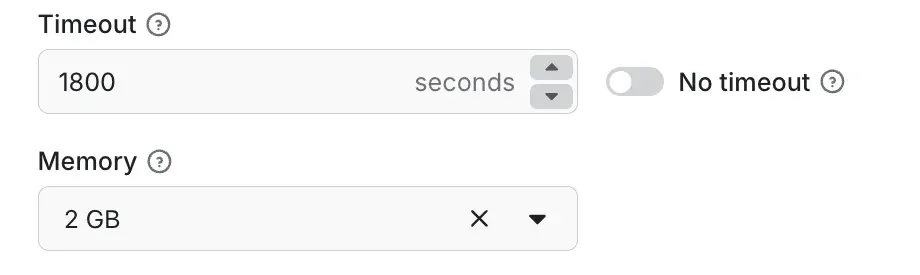
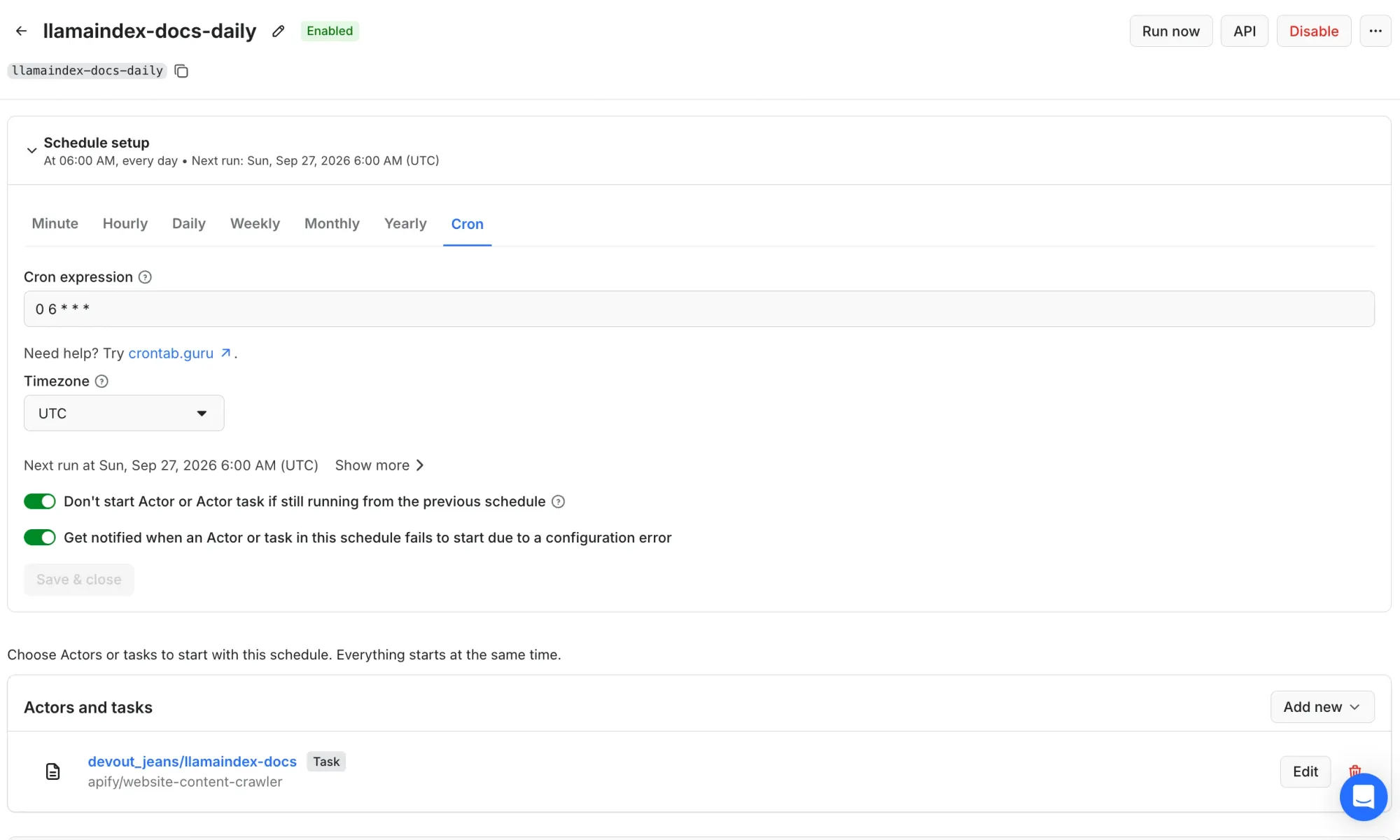
Click Start to run the task once, so the task has a successful run. Then open Schedules, click Create new, and set the Cron expression of the schedule to 0 6 * * * and the Timezone to UTC. Under Actors and tasks, add the task, and click Save & enable. The schedule in this example starts the task every day at 6 am UTC:
refresh.py ingests the last successful run of the task, so the script doesn't wait for a crawl:
import os

from apify_client import ApifyClient

from crawl import TOKEN, load_run
from ingest import ingest

client = ApifyClient(TOKEN)
run = client.task(os.environ["APIFY_TASK"]).last_run(status="SUCCEEDED").get()
if run is None:
    raise SystemExit("The task has no successful run yet")

ingest(*load_run(client, run))
Set APIFY_TASK to the task ID or to username~task-name, for example your-username~llamaindex-docs. The task page shows this name under the task title. After a new run of the task, the script printed:
upserts_and_delete: 0 pages embedded, index went from 30 to 30 pagesRun refresh.py from cron or GitHub Actions about 30 minutes after the scheduled time. The demo crawl finished in under 2 minutes, so 30 minutes gives enough extra time. On GitHub Actions or any other CI runner, move the docstore and the vectors to remote storage first (see Keep the docstore in remote storage), because each runner starts with an empty storage/ folder. You can also add a webhook in the task's Integrations tab, for the ACTOR.RUN.SUCCEEDED event. The webhook calls a URL on your own server, and that server runs the script, so the ingest starts right after the crawl without a fixed delay. The n8n RAG pipeline guide builds the same workflow without code, with Apify's Qdrant integration Actor.
Step 5: Search the live web when the index can't answer
The index contains only what the last crawl collected. For the latest version, release, or price, the agent needs live pages. RAG Web Browser runs a Google search, fetches the top pages, and returns the pages as Markdown. In agent.py, a FunctionTool wraps RAG Web Browser, and the agent gets the docs index and the web as 2 tools:
import asyncio

from llama_index.core import Document
from llama_index.core.agent.workflow import FunctionAgent
from llama_index.core.tools import FunctionTool, QueryEngineTool
from llama_index.readers.apify import ApifyActor

from crawl import TOKEN
from query import Settings, engine


def web_search(query: str) -> str:
    """Search Google and read the top pages. Use it for the latest or newest
    versions, releases, and prices, and for anything the docs may not cover.
    Search the official source with the exact name and no other words, for
    example `site:pypi.org llama-index-core` for a Python package version."""
    pages = ApifyActor(TOKEN).load_data(
        actor_id="apify/rag-web-browser",
        run_input={"query": query, "maxResults": 2},
        dataset_mapping_function=lambda item: Document(
            text=(item.get("markdown") or "")[:6000],
            metadata={"url": (item.get("metadata") or {}).get("url")},
        ),
        memory_mbytes=2048,
    )
    return "\n\n".join(
        f"Source: {page.metadata['url']}\n{page.text}" for page in pages
    )


docs_tool = QueryEngineTool.from_defaults(
    engine,
    name="llamaindex_docs",
    description=(
        "How-to answers from the LlamaIndex documentation, crawled on "
        "September 25, 2026. It does not know about releases after that date, "
        "and it cannot tell which release is the newest."
    ),
)

agent = FunctionAgent(
    tools=[docs_tool, FunctionTool.from_defaults(web_search)],
    llm=Settings.llm,
    system_prompt=(
        "Use llamaindex_docs for how-to questions. For the latest, newest, or "
        "current version, release, or price, use web_search. "
        "List the source URLs you used."
    ),
)


async def ask(question: str) -> None:
    print(await agent.run(question))


if __name__ == "__main__":
    asyncio.run(ask("What is the newest version of llama-index-core?"))
The tool descriptions tell the agent which source to use for each question.
The answer gives the version and the source that the agent read:
The newest version of `llama-index-core` is **0.14.25**.

Source URL used:
- https://pypi.org/project/llama-index-core/
A generic setup and the setup in agent.py each answered "What is the newest version of llama-index-core?" 4 times, while PyPI listed 0.14.25:
| Setup | Correct answers | Wrong answers |
|---|---|---|
| Generic tool descriptions, the prompt says to check the docs first | 2 of 4 | 0.12.34 and 0.13.0 |
| The descriptions in agent.py | 4 of 4 | none |
The 0.13.0 answer came from 2 third-party package pages that Google ranked above PyPI. Google ranks pages differently from one search to the next. When a search returned other pages, the agent searched again with a narrower query, so every answer of the final setup came from PyPI. Each answer took 1 to 3 searches. The agent uses live search only for questions that need the latest facts, and the index answers how-to questions.
From October 2, 2026, RAG Web Browser charges per event. On the free plan, one web_search() call costs $0.0085 for 1 search, 2 fetched pages, and the start fee for 2 GB of memory. A retrieval benchmark for RAG pipelines compares RAG Web Browser with a search API built for AI agents.
Configure the Apify MCP server instead
The Apify Model Context Protocol (MCP) server provides Actors as tools, and llama-index-tools-mcp makes these tools available to a LlamaIndex agent. The default configuration has 12 tools, including call-actor, which can run any Actor, and is useful for agents that choose among many Actors. Its tool schemas take about 6.5k tokens of the prompt. For a single use case, load only the tool you need. With ?tools=apify/rag-web-browser, the server returns only RAG Web Browser and 4 helper tools, which take about 2.2k tokens. The server names the RAG Web Browser tool apify--rag-web-browser. That tool returns a summary of the Actor run, which doesn't add large pages to the context until the agent asks for them. The agent reads the pages with the get-dataset-items helper. agent_mcp.py connects to the server and mentions get-dataset-items in the system prompt:
import asyncio

from llama_index.core.agent.workflow import FunctionAgent
from llama_index.tools.mcp import BasicMCPClient, McpToolSpec

from agent import Settings, docs_tool
from crawl import TOKEN


async def main() -> None:
    mcp = BasicMCPClient(
        "https://mcp.apify.com/?tools=apify/rag-web-browser",
        headers={"Authorization": f"Bearer {TOKEN}"},
    )
    web_tools = await McpToolSpec(client=mcp).to_tool_list_async()

    agent = FunctionAgent(
        tools=[docs_tool, *web_tools],
        llm=Settings.llm,
        system_prompt=(
            "Use llamaindex_docs for how-to questions. For the latest, "
            "newest, or current version, release, or price, call "
            "apify--rag-web-browser with maxResults 2. Search the official "
            "source with the exact name and no other words, for example "
            "site:pypi.org llama-index-core. Then read the pages with "
            "get-dataset-items and the fields metadata.url and markdown. "
            "If no URL is the page of the exact name, search again with "
            "the full path, such as site:pypi.org/project/llama-index-core. "
            "List the source URLs you used."
        ),
    )
    print(await agent.run("What is the newest version of llama-index-core?"))


if __name__ == "__main__":
    asyncio.run(main())
With this configuration, the agent answered 0.14.25 in 4 of 4 runs. The prompt asks for the official source, 2 results per search, and a new search when a page is not the right package, because Google's top result can be a different package on PyPI. Keep maxResults at 2. get-dataset-items returns the full text of each page, so a higher value adds more text to the context than the answer needs. The PyPI page alone had 144,126 characters, while web_search() trims each page to 6,000 characters.
Next steps
To test LlamaIndex web scraping on your own site, change the start URLs in RUN_INPUT to your site and run ingest.py twice. If the site didn't change between the runs, the second run embeds 0 pages and keeps the same page count.
Before you schedule the crawl, follow these 3 rules: use the canonical URL as the document ID, ingest only status 200 pages, and delete no missing pages after an incomplete crawl.
For production, move the docstore to Redis, Postgres, or MongoDB and the vectors to a hosted vector store, with one collection per crawl task and embedding model. The Maven AGI case study shows Website Content Crawler in production, where it keeps customer support agents on current, company-approved data. If your target site needs a site-specific scraper, search Apify Store for an Actor for that site and load that Actor's dataset with the same ApifyDataset call and a new mapping function. Start with Website Content Crawler on the free plan.
To put a chatbot on top of the index, see how to train an AI chatbot using automated scraping. For the basic ApifyActor and ApifyDataset calls, see the LlamaIndex integration docs.
FAQ
How do I update an index in LlamaIndex?
Attach a docstore to an IngestionPipeline, and give every document a stable ID, such as its canonical URL. On each run, the pipeline compares page hashes and embeds only new and changed pages. On 30 docs pages, a second crawl with no changes embedded 0 pages and used 0 embedding tokens.
How do you keep RAG up to date?
Re-crawl the source on a schedule, and ingest each crawl through a pipeline that updates changed pages and deletes removed pages. Delete pages only after a complete crawl with no failed requests. For the latest facts, add a live web search tool, because an index contains only what its last crawl collected.
RAG vs. web scraping: what's the difference?
Web scraping collects the text of web pages. RAG grounds the answers of an LLM in stored text. A RAG app over web pages needs both, because the scraper provides the index's text. On 30 docs pages, LlamaIndex's built-in reader returned 8 times more tokens than Website Content Crawler, most of it repeated navigation.
Does LlamaIndex support MCP?
Yes. The llama-index-tools-mcp package loads the tools of a Model Context Protocol (MCP) server into a LlamaIndex agent. With the Apify MCP server, an agent can call RAG Web Browser and read the pages with get-dataset-items. With that helper in the prompt, it answered a version question correctly in 4 of 4 tests.