A plain request to a Clutch.co category page returns an error instead of a payload, and the listings you collect are ranked partly by sponsorship, not only by quality.
Clutch.co is a B2B ratings and reviews directory. Each service provider gets a profile with a star rating, a mix of verified and unverified reviews, and a rate band. Those profiles sit inside category pages.
This guide shows you how to collect Clutch.co data and how to separate the sponsored rankings from the organic ones.
Does Clutch.co have an API?
Clutch runs two APIs, and neither one matches what most people actually want to do with it.
The first is a partner API, governed by its Terms of Use, last updated in October 2021. That agreement grants a license to display Clutch content on an approved partner website. It sets a 24-hour retention limit, it doesn't permit building your own database of business listings, and it doesn't permit merging Clutch content with other review content. Those restrictions rule out a prospect list, a monthly rating diff (the 24-hour limit means the earlier snapshot you'd need to compare against is already gone), or anything integrated with a CRM.
The second is newer. Clutch now runs an MCP server - an endpoint that AI assistants can query directly. 3 of Clutch's 4 tools need no authentication and no key.
An Apify Actor is a ready-made tool that does a job on the web, in this case, collecting Clutch listings. The MCP is the route to review text specifically. Actor-based extraction is the route to structured data you can store and reuse.
Point an MCP client at the endpoint with a 5-line configuration, which goes in whichever config file that client reads:
{
  "mcpServers": {
    "clutch": { "type": "http", "url": "https://bot.clutch.co/mcp" }
  }
}
The 4 tools appear once the endpoint is added. The client shown is the official MCP Inspector. Save the block above to a file and point the Inspector at it directly with npx @modelcontextprotocol/inspector --config clutch-mcp.json --server clutch:
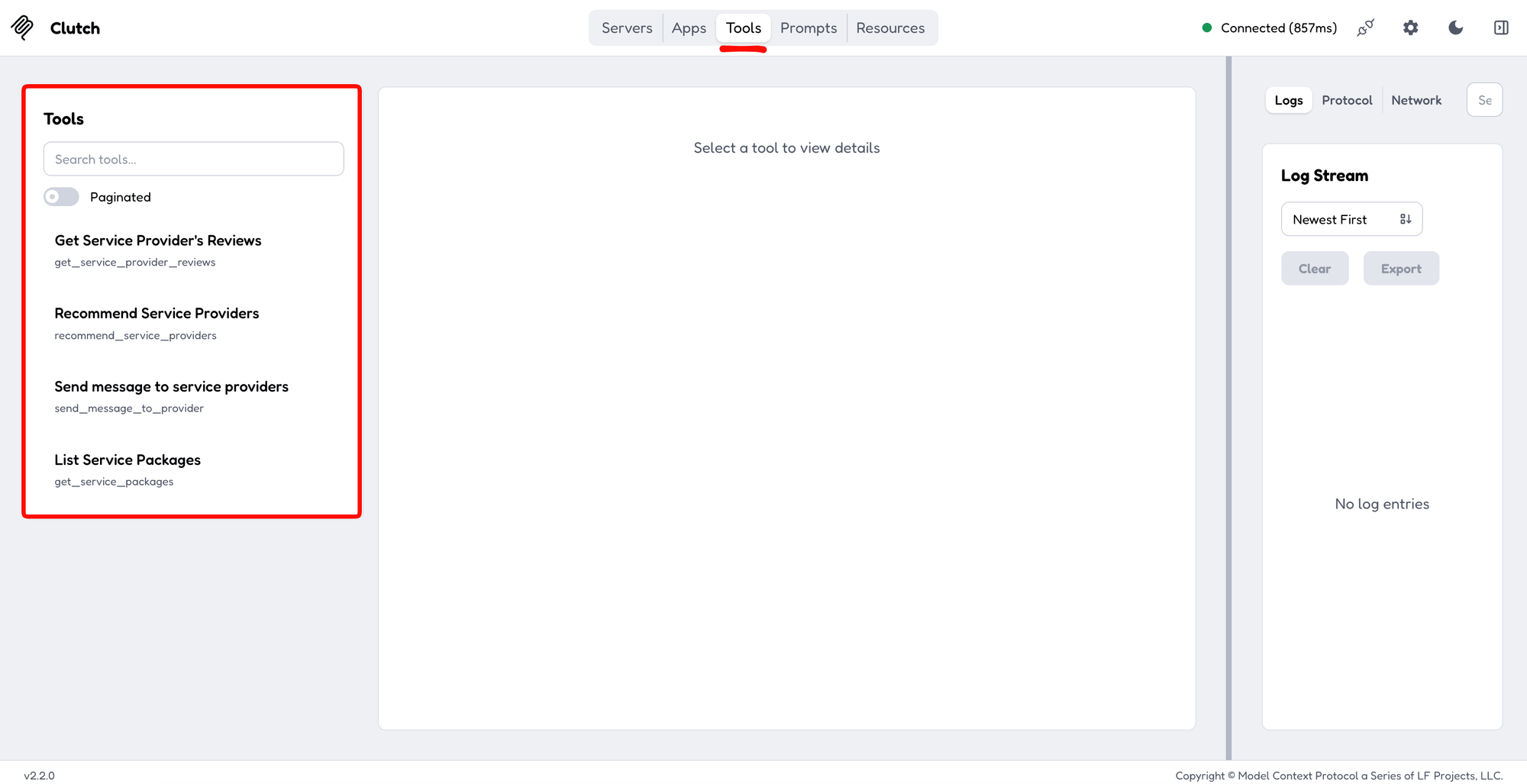
The handshake returns a server identifying itself as Clutch, running version 3.4.2, and it exposes 4 tools rather than the 3 its marketing page lists. 3 of them work like this: one recommends providers, one returns reviews for a named company, and one returns fixed-price service packages. The fourth sends a message to as many as 20 providers at once, and it's the only one of the 4 gated behind a Clutch login.
Ask it for reviews of a named company. The raw response is wrapped in a server-sent events (SSE) envelope, so pipe it through sed, then through jq, the command-line JSON processor, to unwrap it and pull out the review bodies:
curl -s -X POST https://bot.clutch.co/mcp \
  -H 'Content-Type: application/json' \
  -H 'Accept: application/json, text/event-stream' \
  -d '{"jsonrpc":"2.0","id":1,"method":"tools/call",
       "params":{"name":"get_service_provider_reviews",
                 "arguments":{"company_name":"Ignite Visibility","limit":2}}}' \
  | sed -n 's/^data: //p' \
  | jq '.result.structuredContent.result
        | {n_reviews, reviews_sample: [.reviews_sample[]
             | {overall_rating, project_size,
                background: (.background | gsub("<strong>.*?</strong>"; "") | gsub("<[^>]+>"; " ") | gsub("^\\s+"; "") | .[0:70] + "..."),
                challenge:  (.challenge  | gsub("<strong>.*?</strong>"; "") | gsub("<[^>]+>"; " ") | gsub("^\\s+"; "") | .[0:70] + "..."),
                results:    (.results    | gsub("<strong>.*?</strong>"; "") | gsub("<[^>]+>"; " ") | gsub("^\\s+"; "") | .[0:70] + "...")}]}'
The response reported 175 reviews for that provider and returned the review text with them:
{
  "n_reviews": 175,
  "reviews_sample": [
    {
      "overall_rating": 5.0,
      "project_size": "Confidential",
      "background": "I am the Senior Manager for Digital Marketing of Spherion Staffing & R...",
      "challenge": "Improve the discoverability of our website among individuals seeking i...",
      "results": "Ignite met all deliverable deadlines on time.  Our lead volume doubled..."
    },
    {
      "overall_rating": 5.0,
      "project_size": "Confidential",
      "background": "I'm the founder of iForAI, an AI solutions company. We help organizati...",
      "challenge": "We needed help with a hackathon. ...",
      "results": "Ignite Visibility's work helped us achieve our KPIs, which included so..."
    }
  ]
}
That fourth tool routes buyers toward contacting a provider directly on Clutch rather than returning data. The MCP as a whole works the same way, answering queries instead of handing you a dataset you own.
What Clutch.co sponsorship does to the listings
The first page of a category is not an organic ranking. Clutch.co Scraper with Emails & Reviews (fatihtahta/clutch-co-scraper) exposes the signal as a listing.is_sponsor flag for each row, and Clutch.co Scraper - B2B Agency Leads, Reviews & Rates (scrapesage/clutch-scraper) exposes the same thing as a differently named sponsored field.
By default, nothing on the page marks which specific listings are paid:
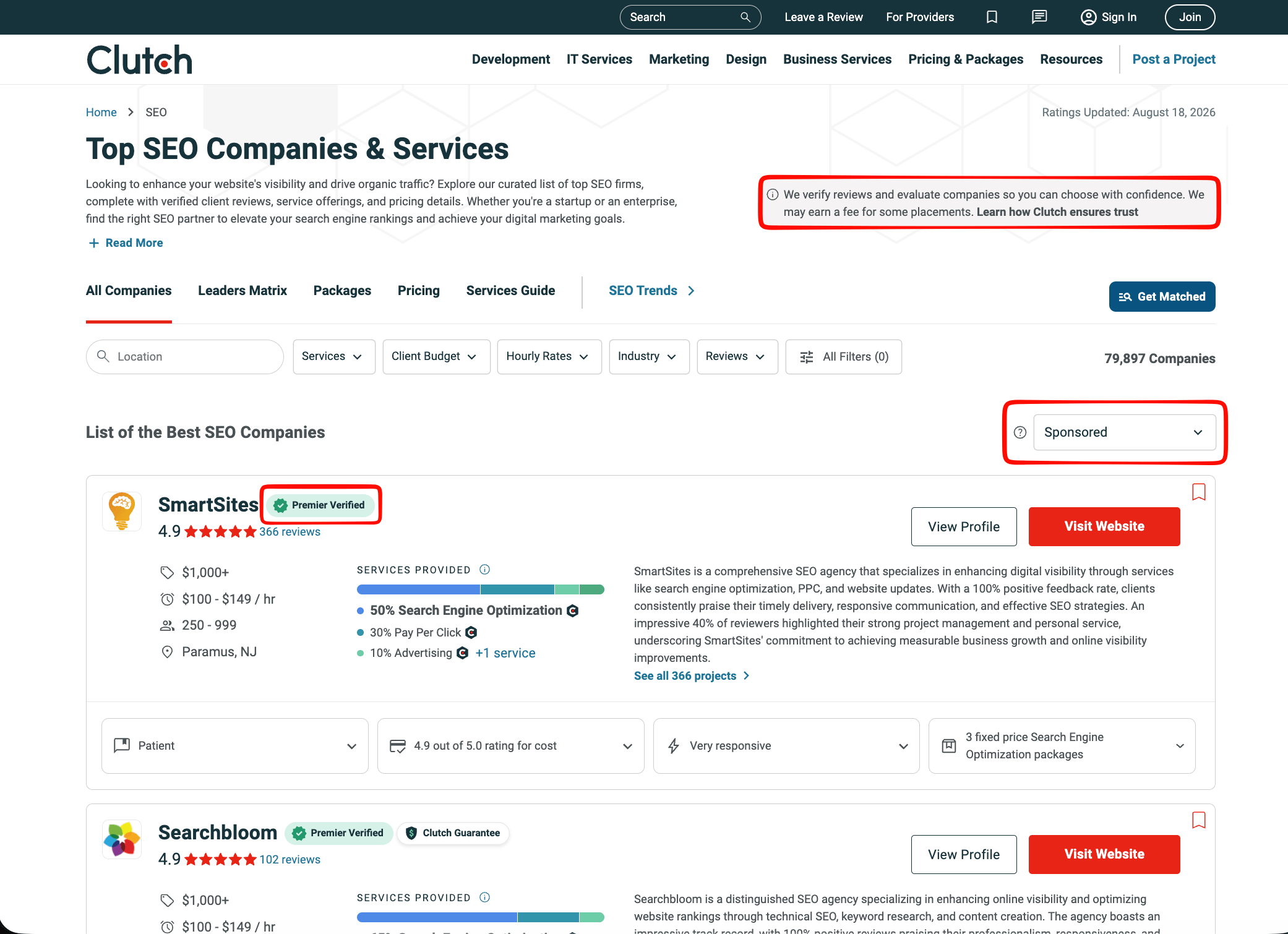
Clutch's own banner states: "We may earn a fee for some placements," but the word "Sponsored" appears only once on the page, as a sort control above the list, not as a badge on any listing. The cards themselves display badges, "Premier Verified" and "Clutch Guarantee," but no equivalent badge marks sponsorship.
The sponsored share of the first 25 rows varies sharply from one directory to the next:
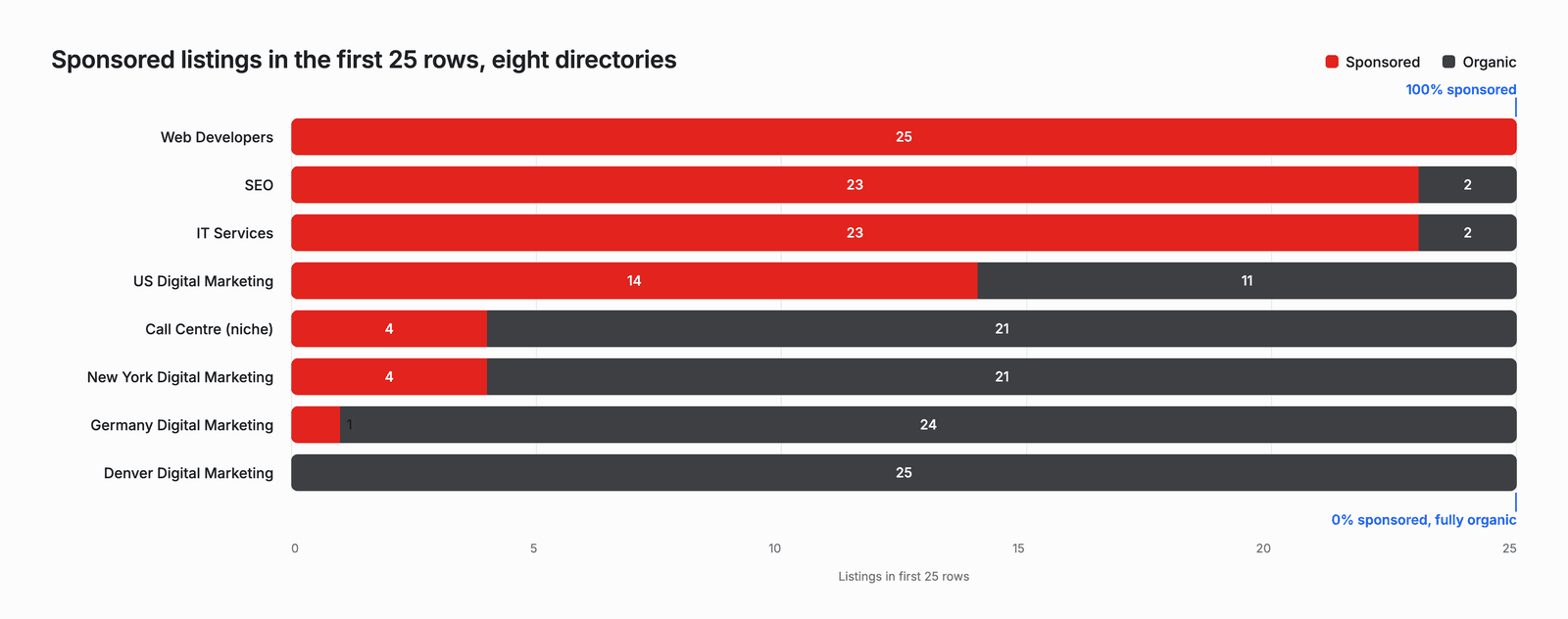
Asking the SEO directory for its first 25 listings returns 23 sponsored rows before a single organic result appears. A niche call center category returned 4 sponsored rows out of 25, the German digital marketing directory returned 1, and the Denver digital marketing directory returned none.
Clutch describes the mechanism on its own help pages. It sells 9 advertising tiers, from Level 1 Starter to Level 9 Quadruple Diamond, and its sponsorship tier page states that "Higher levels appear above lower levels." Clutch's page-ranking help page lists sponsoring companies among the factors that rank a directory page.
Sponsorship is not the only paid placement Clutch runs, and testing surfaced the second one: none of the tested Actors flag it as sponsored. A separate program called Featured Listings puts a company on category and location pages. These listings appear in groups of 3, after any sponsors on the page. Featured Listings, in Clutch's own words, lets you "reach additional buyers by positioning your company on numerous pages across the site that you wouldn't appear on organically.”
In a separate 60-row pull of the SEO directory, 10 of the 37 rows that the sponsorship flag called clean were this second listing type instead of the plain organic one (3 full groups of 3 plus 1 partial group cut off by the row limit), and they averaged 37 reviews against 63 for the rows that were genuinely organic.
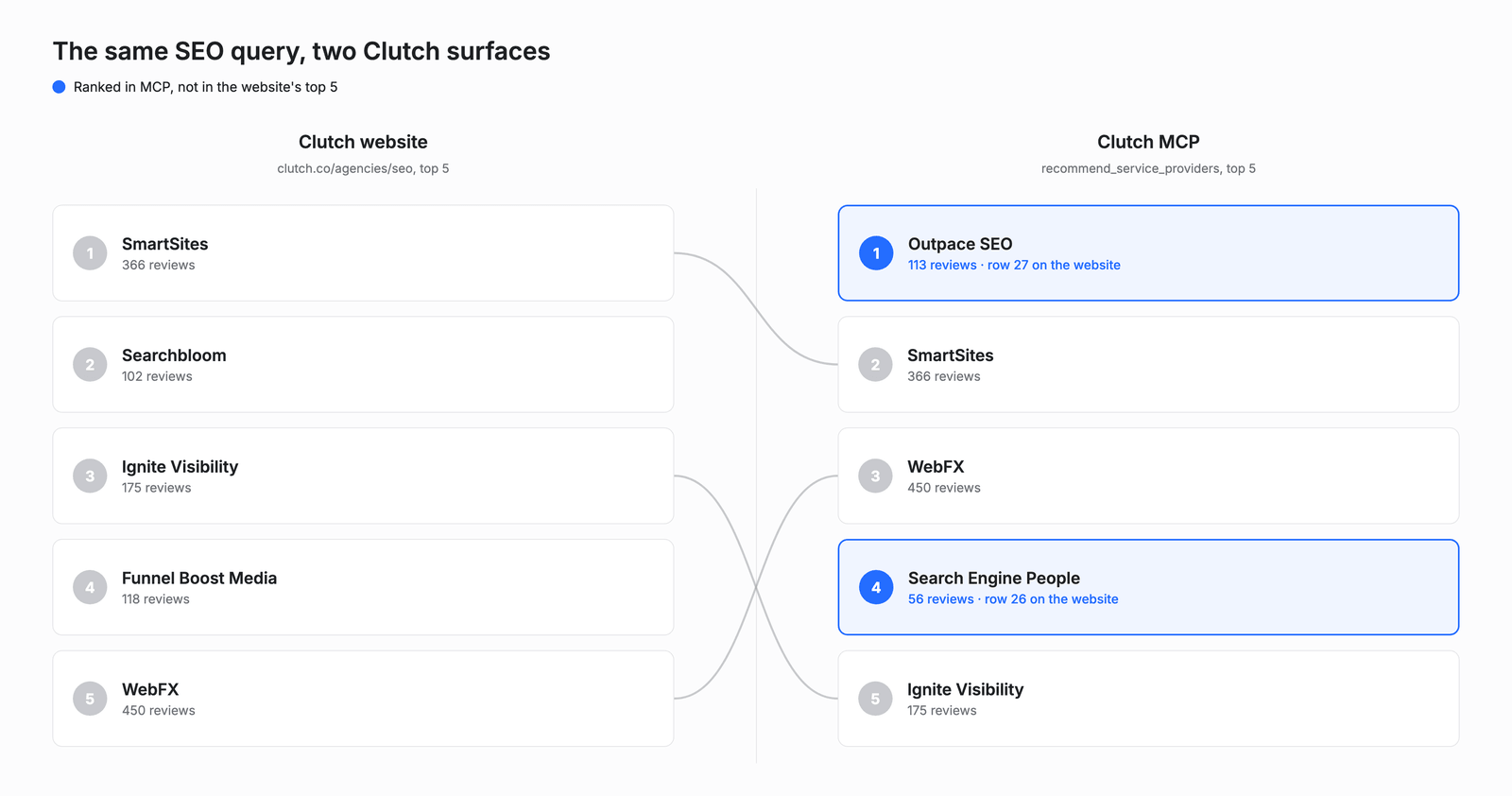
Clutch's own MCP ranks the same search differently from Clutch's own website. Queried through its recommend_service_providers tool, 3 of its top 5 recommendations are agencies also sponsored on the website, and the other 2 are ones the website ranks far lower, at rows 26 and 27, so for this query, even the site's newer AI-facing tool leaned majority-sponsored. 2 Actors built by different developers independently flag the same rows as sponsored, confirming that the flag reflects something real on the page rather than one scraper's guess. Outside the data, one agency owner on r/agency describes buying the placement directly, calling it a "smaller sponsorship to get into roughly the top 10 for our #1 category”.
Putting the 2 rankings next to each other shows the gap directly:
Sponsored and organic agencies are rated almost identically. Across 195 agencies pulled from 8 directories, sponsored agencies averaged 4.89 and organic agencies averaged 4.88, a gap too small to mean much on a scale this tight, and with ratings running from 4.2 to 5.0 and 90% at 4.8 or above, the star rating separates almost nobody.
Review counts tell a different story. Across a separate count of 254 listings with a review count, the sponsored ones came in at a median of 43 against 33.5 for the organic ones, and 28% of sponsored listings had 100 reviews or more against 14% of organic ones. The paid block favors established firms, so read the flag as a buying signal about visibility and not as a warning about quality.
The block ends at a different row each time, and testing pinned down exactly where that happens. Asking the SEO directory for 60 rows returns the same 23 sponsored listings and then nothing sponsored at all, so the sponsored share of what you collected falls from 92% to 38%. Running the identical request against the web developers directory returns 45 sponsored rows out of 60, with the block reaching row 45. The same request drops the web developers directory's sponsored share only to 75%.
The default view doesn't just favor paid agencies, it also leaves some of the best-reviewed ones off the first page entirely. Rank those 60 SEO rows by client review count and 3 of the 10 most-reviewed agencies are outside the first 25: Coalition Technologies at 164 reviews on row 41, Intero Digital at 147 on row 31, and WebSpero Solutions at 122 on row 42. Counted by reviews rather than agencies, 41% of the review volume in that pull falls after the first 25 rows.
Stop at the first 25 rows and you never see agencies with a track record like that. Ask for more rows than the page shows you, filter on the sponsorship flag, and filter out Featured Listings separately, because the row number changes with the directory.
How to collect Clutch.co data
The first blocker in collection has nothing to do with parsing: a plain HTTP request to a Clutch category page returns 403 behind a Cloudflare-managed challenge (an automated bot-detection check that blocks non-browser traffic), and that holds even for robots.txt. Datacenter IPs and plain HTTP clients typically fail that challenge, so collection usually needs residential proxies (traffic routed through the IP addresses of real home internet providers instead of a datacenter's) and a real browser.
The 403 shows up in the response headers:
curl -sD - -o /dev/null "https://clutch.co/agencies/seo"

HTTP/2 403
date: Wed, 19 Aug 2026 04:49:57 GMT
content-type: text/html; charset=UTF-8
server: cloudflare
cf-mitigated: challenge
cf-ray: a2d688deb800b2d8-DEL
Three Clutch Actors in Apify Store are the ones to try first, and which one you want depends on the job:
- Clutch.co Scraper - Agencies, Reviews, Emails + AI Insights (
memo23/apify-clutch-cheerio)returns the most fields per agency, and it can also extract buyer leads (the contact and project details of the client named in each review) from the reviews. - Clutch.co Scraper with Emails & Reviews (
fatihtahta/clutch-co-scraper) is the cheapest of the 3, and every example below uses it. - Clutch.co Scraper - B2B Agency Leads, Reviews & Rates (
scrapesage/clutch-scraper) includes a filter that returns only the organic subset.
If none of the 3 fits, building a custom Actor covers the gap. A guide on the Apify blog covers this exact blocker in more depth, and it recommends Crawlee, Apify’s open-source scraping framework, paired with Playwright (browser automation) and Camoufox (a browser build tuned to avoid automated-traffic signatures), set up with a residential proxy by default.
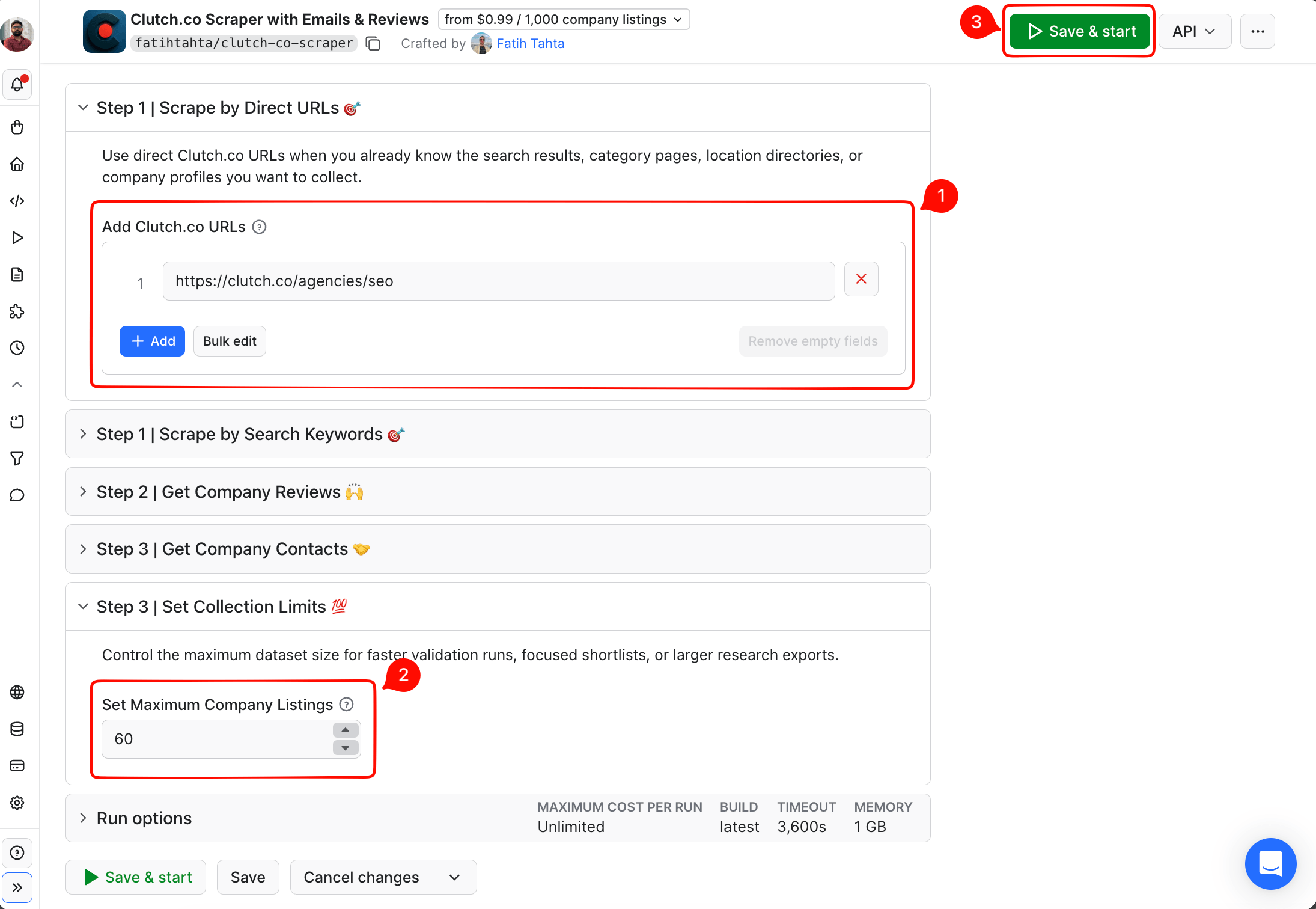
Start in Apify Console if you would rather not write anything:
- Sign up for a free Apify account.
- Open the Actor page for
fatihtahta/clutch-co-scraper. - Paste a category URL, such as
https://clutch.co/agencies/seounder Add Clutch.co URLs, enter 60 under Set Maximum Company Listings. - Click Save & start.
When the run finishes, the Export button offers the same rows in 7 formats, CSV and JSON among them:
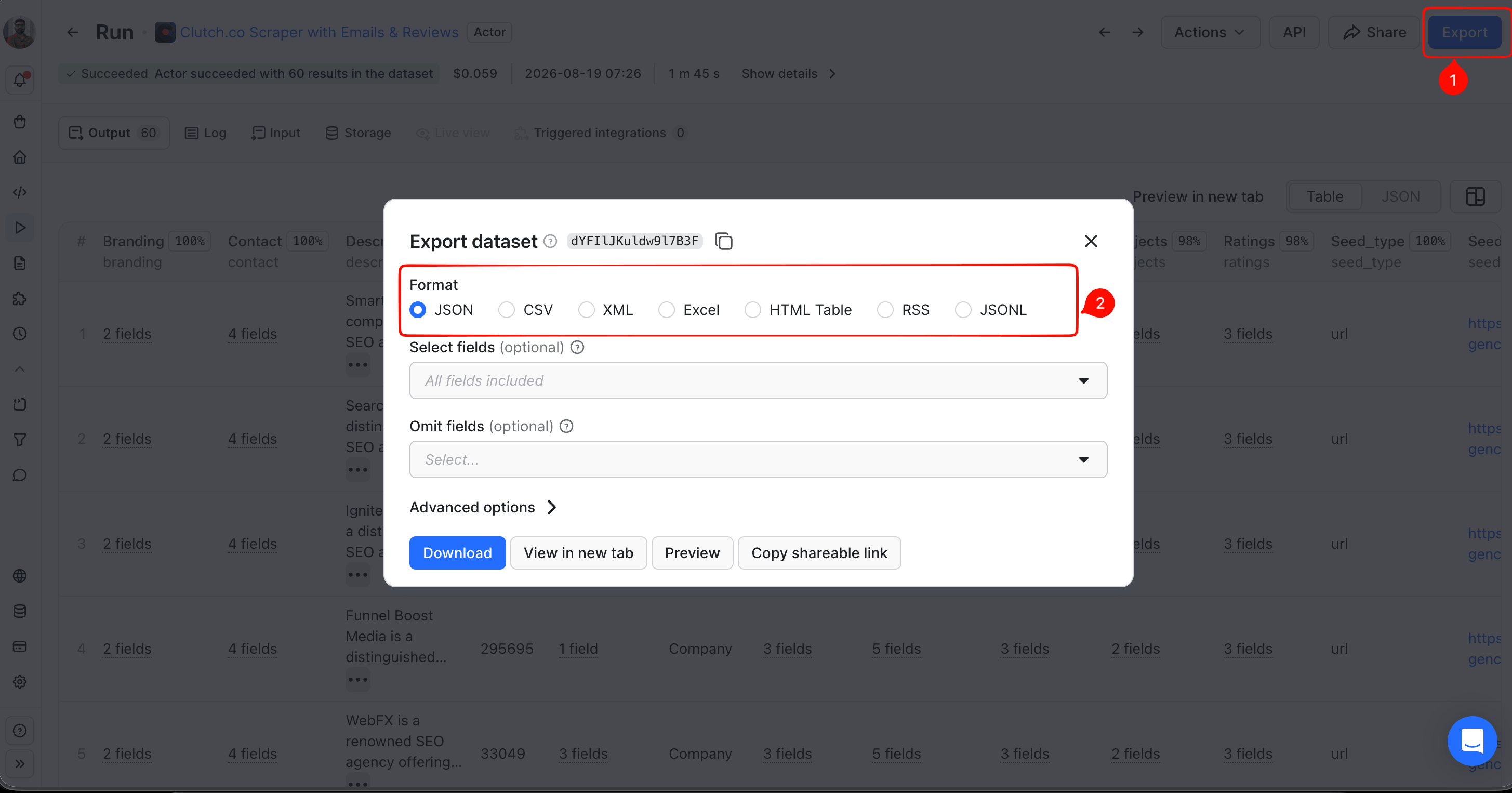
You get the sponsorship flag either way, so the choice between Apify Console and the API is about how you want the data delivered.
Run a small canary request before you scale to a large one. The API path needs an Apify API token (copy your Personal API token from Settings > API & Integrations in Apify Console), which every command below expects to be exported as APIFY_TOKEN in your shell (export APIFY_TOKEN="your-token-here"). 5 rows show you whether the Actor still pulls from your category, and they cost almost nothing:
curl "https://api.apify.com/v2/acts/fatihtahta~clutch-co-scraper/run-sync-get-dataset-items?token=$APIFY_TOKEN" \
  -H 'Content-Type: application/json' \
  -d '{"startUrls":["https://clutch.co/agencies/seo"],"limit":5}'
Read the returned array rather than the run status. A run can report success while its dataset is still empty, so a length of 5 is the check that matters.
Requesting 60 rows of the SEO directory and saving them to a file takes 1 call against the Apify API:
curl "https://api.apify.com/v2/acts/fatihtahta~clutch-co-scraper/run-sync-get-dataset-items?token=$APIFY_TOKEN" \
  -H 'Content-Type: application/json' \
  -d '{"startUrls":["https://clutch.co/agencies/seo"],"limit":60,"getReviews":false,"get_contact>":false}' \
  -o seo60.json
That call returned 60 rows, of which 23 had the sponsorship flag and 37 didn't. getReviews and get_contact are exactly how this Actor names those two fields, mixed casing included, so match them as written rather than normalizing either one. The first row shows the shape of the data:
{
  "kind": "Company",
  "id": "188351",
  "url": "https://clutch.co/profile/smartsites",
  "title": "SmartSites",
  "seed_type": "url",
  "seed_value": "https://clutch.co/agencies/seo",
  "listing": {
    "type": "Sponsor",
    "position": 1,
    "is_sponsor": true
  },
  "branding": {
    "logotype": "https://img.shgstatic.com/clutch-static-prod/image/scale/50x50/s3fs-public/logos/26f3b83afc3f1965a61c6cb6e144c29d_4397123236963fd0b3ccc8.svg",
    "verified": "Premier Verified"
  },
  "contact": {
    "phone": "2018706000",
    "location": "Paramus, NJ",
    "address": {
      "street": "45 Eisenhower Drive",
      "city": "Paramus",
      "region": "NJ",
      "postal_code": "07652",
      "country": "US",
      "phone": "2018706000"
    },
    "company_page_url": "https://clutch.co/profile/smartsites"
  }
}
Dropping the sponsored rows is one filter over the response. A second filter catches Featured Listings, since the sponsorship flag alone does not mark that type:
import json

rows = json.load(open("seo60.json"))
sponsored = [r for r in rows if r.get("listing", {}).get("is_sponsor")]
featured = [r for r in rows if r.get("listing", {}).get("type") == "featured"]
organic = [r for r in rows if not r.get("listing", {}).get("is_sponsor")
           and r.get("listing", {}).get("type") != "featured"]
last_paid = max((i for i, r in enumerate(rows, 1)
                 if r.get("listing", {}).get("is_sponsor")), default=0)

print(len(rows), len(sponsored), len(featured), len(organic), last_paid)
The filter printed 60, 23, 10, and 27, with the paid block stopping at row 23. The type field is case-sensitive: Clutch's own schema documents Sponsor, capitalized, and featured, lowercase, as genuinely different values, not a typo to normalize. That splits the 37 rows that the sponsorship flag alone would call organic into 10 Featured Listings and 27 rows that are genuinely organic. Run the same numbers on the web developers directory (https://clutch.co/web-developers). The last flagged row comes back as 45, the same script landing on a different stopping point.
Check each Actor's pricing model before you scale, and confirm it directly on the Actor's page since developer pricing shifts over time. A canary and a 60-row pull are both small enough to sit inside a free plan's monthly credits. A full category pull costs roughly $2.90 per 1,000 profiles on memo23/apify-clutch-cheerio, the Actor with the widest field set, and part of that cost is an Actor Start fee charged per run, whether or not you get rows back, so every canary and every scheduled refresh pays it separately rather than being included in the per-1,000-profiles estimate.
fatihtahta/clutch-co-scraper is cheaper, at $0.70 to $0.99 per 1,000 profiles depending on your plan tier, and scrapesage/clutch-scraper is higher, at $3.50 per 1,000 profiles, so price isn't the reason to pick it over the other 2. Both price purely per result, with no separate start fee, so a failed or empty run on either one costs close to nothing.
What a Clutch profile and review hold
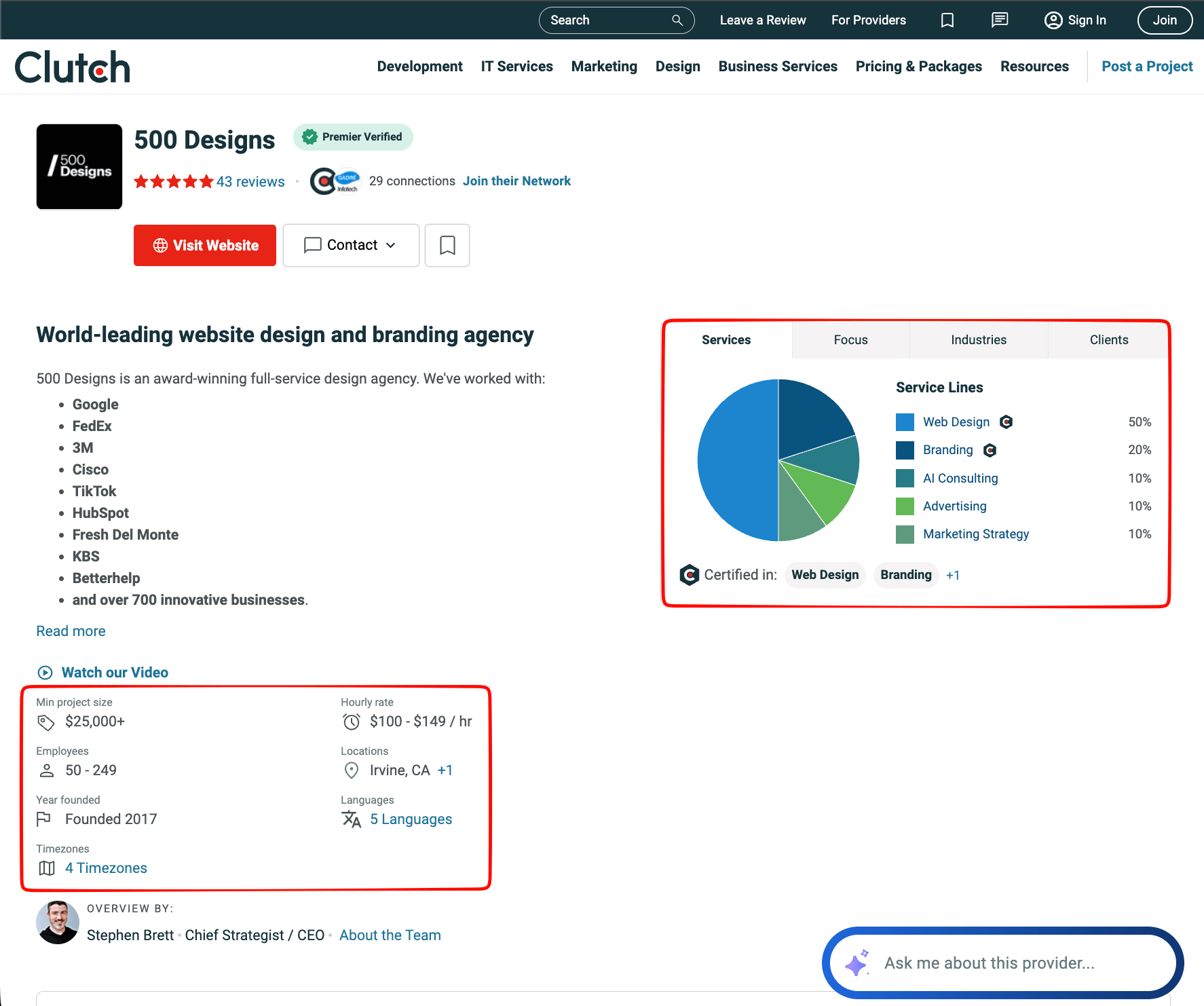
A Clutch profile holds more than a star rating. 1 pull of 5 digital marketing agencies returned company name, resolved website (the actual destination URL, not a Clutch redirect link), full postal address, phone number, locations, average hourly rate band, minimum project size, employee band, year founded, languages, timezones, and a service mix broken into percentages.
The stat grid and service mix from one record show part of what a single profile contains. The resolved website, full postal address, and phone number are contact fields that are located elsewhere on the same profile:
The reviews give you the most useful material, and they aren't shaped like consumer reviews. Each one records the buyer's company, job title, industry, company size, and location. It also records the project: a budget band, a start and end date, a scope description, and 5 separate scores for overall rating, quality, schedule, cost, and willingness to refer.
Clutch also highlights one review at the top of each profile's page, under a "Featured Review" label separate from the Featured Listings placement program, and it shows the shape of a review:
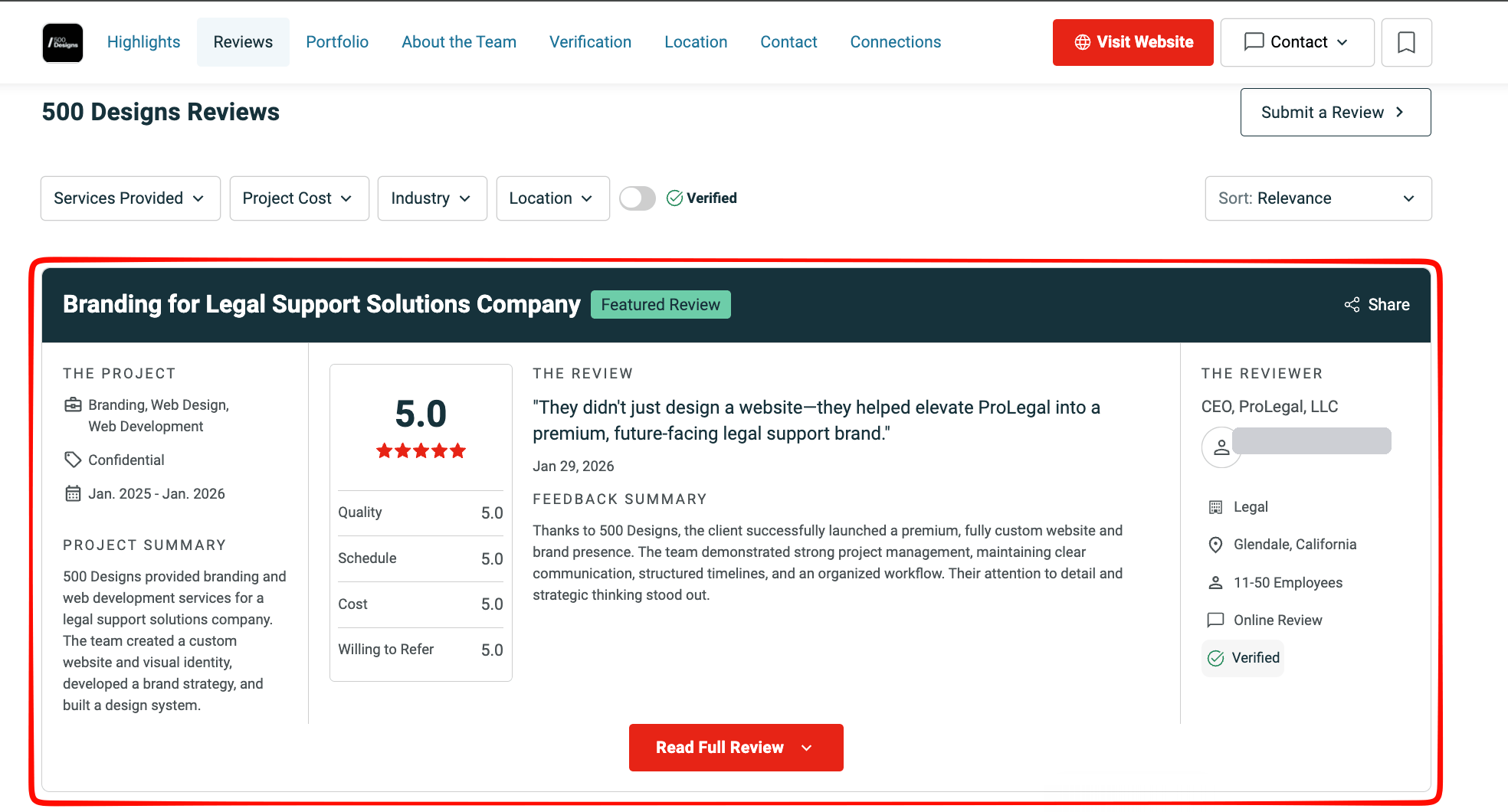
That structure changes what the data is for. A Clutch review is a record of a project, with its budget either disclosed or marked Confidential, so the same directory holds data on the buyers too, not just the providers being reviewed.
Putting Clutch.co data to work
Buyer-side signals are the least obvious material, so start there. Clutch reviews name the company that hired each agency and record a budget band for the project, which turns each review into a firmographic data point: what kind of company, at what size, at what budget, bought this kind of service. Turn on extractBuyerLeads on memo23/apify-clutch-cheerio to pull that project-level detail out of each review. The same field also carries the buyer contact's job title alongside the company and project data, a level of detail beyond what the profile fields show.
Its input shape also differs from the calls shown above: startUrls takes {url: ...} objects here instead of plain strings, and the row cap is maxItems instead of limit. extractBuyerLeads works on its own, and includeCompanyReviews is a separate flag that adds each review's full text alongside the records, so check an Actor's own input tab before reusing a call shape shown for a different one. Each agency's dataset row then includes those buyer records as a nested array:
curl "https://api.apify.com/v2/acts/memo23~apify-clutch-cheerio/run-sync-get-dataset-items?token=$APIFY_TOKEN" \
  -H 'Content-Type: application/json' \
  -d '{"startUrls":[{"url":"https://clutch.co/us/agencies/creative"}],"maxItems":3,"extractBuyerLeads":true,"includeCompanyReviews":true}'
That 3-agency pull returned 31 such records, each with a named company, a budget band, and a project scope, nested inside the 3 agencies' dataset rows. Pipe the first company's records through jq using .[0].buyerLeads[0:2]. 2 of them look like this, each including a project summary field distinct from the review's own body text:
[
  {
    "rowType": "buyer_lead",
    "buyerCompany": "Cookie Dough Snack Brand",
    "buyerRole": "Managing Director",
    "buyerIndustry": "Food & Beverage",
    "buyerSize": "11-50 Employees",
    "buyerLocation": "Los Angeles, California",
    "projectCategory": null,
    "projectBudget": "Confidential",
    "projectLength": "Jan. 2000 - Jan. 2010",
    "projectDescription": "A cookie dough snack brand hired Bobs Your Uncle for digital marketing support. The team developed and implemented strategy that involved launching ad campaigns to grow the client's brand.",
    "rating": 5,
    "reviewDate": "Apr 25, 2024",
    "verified": false,
    "hiredAgency": "Bob's Your Uncle",
    "agencyProfileUrl": "https://clutch.co/profile/bobs-your-uncle"
  },
  {
    "rowType": "buyer_lead",
    "buyerCompany": "Good Goddess",
    "buyerRole": "Department Director",
    "buyerIndustry": "Consumer products & services",
    "buyerSize": "11-50 Employees",
    "buyerLocation": "Toronto, Ontario",
    "projectCategory": null,
    "projectBudget": "$50,000 to $199,999",
    "projectLength": "Jan. - Dec. 2025",
    "projectDescription": "Bob's Your Uncle provided branding services for a beauty products company. The team created a new visual identity, website, packaging design, and go-to-market strategy for the client's product launches.",
    "rating": 5,
    "reviewDate": "Dec 19, 2025",
    "verified": false,
    "hiredAgency": "Bob's Your Uncle",
    "agencyProfileUrl": "https://clutch.co/profile/bobs-your-uncle"
  }
]
The buyerLeads objects never carry a personal-name field to begin with, only company, role, and project details, so nothing here identifies a real person, and that jq filter is only slicing the array down to the first 2 entries, not stripping any fields.
Marketing and partner lists come out of the firmographics: the profile's own company-level fields, like service mix, rate band, employee band, and location. The service mix arrives as percentages, so you can filter for agencies where SEO is 60% of the practice and not just a line on a capabilities page. You can filter the same way on rate band, employee band, minimum project size, and office location. That is how you build a partner list you can justify to whoever asked for the list.
The sponsorship flag matters most for competitive research. If you run an agency, you can read a competitor's rate band, minimum project size, and service mix from the same pull, and the flag adds one thing none of those fields show you: whether that competitor is paying for placement in the category into which you both sell. Turn the same pull on your own listing, and the 2 paid programs answer different questions for you. Sponsorship is concentrated on agencies with high review counts already, so it mostly amplifies a track record you already have. In the SEO directory pull, Featured Listings ran the other way, toward agencies still building that track record, so which program is worth matching depends on whether you're defending a track record or still building one.
Market analysis needs the organic subset and a second directory. Provider counts, rate band distribution, and budget band distribution all work on your filtered pull. Clutch ratings fall in a narrow band, so a rating alone won't rank a market for you, and a cross-check against another directory gives you more insight than another Clutch field would. For that second opinion, Apify Store also carries Actors covering the other big directories: Goodfirms Scraper, Designrush Agency Scraper, and The Manifest Agency Scraper.
For anything that needs to run again next month, the same pull runs on a schedule, and the Apify blog has a separate guide on monitoring reviews across several sites. Sponsorship changes as contracts expire and get renewed, so refresh a category you measured in August rather than treating that number as fixed.
Limits, terms, and what to check first
4 limits showed up in testing, and each one changes what you can claim:
- A default run on
memo23/apify-clutch-cheerioreturns roughly 11 reviews per company, confirmed against Ignite Visibility's 175 real reviews. The MCP's review tool is the route to the full history instead, reporting the true total alongside whatever sample you request. - The 5 numeric scores come through on all 3 Actors, and review body text doesn't. If you need sentiment analysis over that text, rule this route out before spending on it.
- Some Clutch pulls also return legal entity data, a field not covered in the profile rundown above. It's sourced from state registries, and the
lastUpdatedfield across the records that were pulled runs from December 2020 to March 2025, mostly clustered in 2022, so this data answers whether a business is registered and not whether it is currently in good standing. - Cross-checking 2 Actors against the same companies surfaced 2 different verification signals, a separate matter from the verified/unverified label on individual reviews.
memo23/apify-clutch-cheerioexposes averifiedboolean, returningfalsefor SmartSites and Ignite Visibility, whilefatihtahta/clutch-co-scraperexposes abranding.verifiedstring, returningPremier Verifiedfor both. Clutch publishes named verification tiers that certify business identity and review authenticity, a separate system from the paid advertising tiers above, so trust the specific string over the boolean, rather than relying on either flag alone.
The pattern across these limits points to one maintenance rule: schedule a small canary pull, because a directory that changes its markup breaks an Actor quietly, and a dataset that returns fewer rows than last month looks like a slow market rather than a broken selector.
Read the terms before anything gets stored. The partner API Terms of Use bind API partners, and they are strict about retention and redistribution. That's a narrower agreement than Clutch's general Terms of Service, which is what actually governs collecting from the public pages and explicitly prohibits scraping or other automated access outside what it authorizes, so weigh that against your specific use before relying on this method beyond testing. Clutch publishes no MCP-specific terms, so the retention position for the MCP is currently unstated.
The buyerLeads records carry no personal name, but a job title plus an employer can still point to one individual, so keep the analysis at company level and don't assemble a person-level database without a lawful basis for it.
Final thoughts
You can collect Clutch.co data. The ranking it hands you rewards advertising spend enough to push some of the best-reviewed agencies in a category past the rows you are likely to check. Sponsored and organic agencies are rated almost identically, which means the flag tells you about visibility and not about quality. The same collected fields also turn review text into buyer firmographics and tell you which competitors are paying for placement in your own category.
The main fields to bring into any Clutch pull are the sponsorship flag and the Featured Listings type field, because the depth of the paid block changes from one category to the next. Run one category through fatihtahta/clutch-co-scraper on a free Apify plan (a pull this size stays within the free monthly usage credits), filter out both the sponsored rows (the is_sponsor flag) and the Featured Listings (the type field), and compare what remains against the agencies the page never showed you.

FAQ
Is Clutch.co free?
Browsing Clutch and reading reviews costs nothing. Listing a company is free as well, but higher-ranked placement in a category directory is sold. Clutch's help center describes 9 advertising tiers and states that higher levels appear above lower ones, so the top of a category page reflects paid placement alongside other factors.
How does Clutch.co work?
Service providers create a profile, then their past clients submit reviews about specific projects. Clutch groups providers into categories by service, industry, and location, and orders each category with its own ranking algorithm. Buyers browse those category pages, shortlist from them, and contact providers through Clutch.
Are Clutch.co reviews reliable?
Each review is a detailed record of a real project, with a budget, a timeline, and 5 separate scores, and Clutch labels the ones it could not verify. The weak signal is the star rating, which sat between 4.2 and 5.0 across 195 agencies sampled, with 90% at 4.8 or above. Read review counts and dates.
Can you export Clutch.co data?
Yes. A finished run in Apify Console has an Export button with 7 download formats, CSV and JSON included. The API path skips the interface: one call runs the Actor and returns the dataset, so a category can go straight into a file. Clutch's own partner API is the restricted route, capping retention at 24 hours.