
Every AI model is trained on data, which comes in many forms. One of the largest and most diverse data sources for AI training is the web, but collecting it and making it usable for AI models comes with challenges.
In this blog post, we'll look at different ways to collect training datasets, the limitations of these methods, and the best way to gather web data for AI.
Sources of training data
We'll go through six common data collection methods:
- 1. Public datasets
- 2. Crowdsourcing
- 3. Internal data
- 4. Synthetic data
- 5. Web APIs
- 6. Web scraping
1. Public datasets
There are many public datasets available, from UCI to HuggingFace. HuggingFace datasets, in particular remain one of the best options as people continue to contribute to them, while most other datasets are becoming outdated.
However, even Hugging Face datasets have limitations. If you need fresh, up-to-date information on events, brands, or your company’s products and policies, retrieving it from the web is a better option. With retrieval-augmented generation (RAG), the model can use that information when it answers, without being retrained every time something changes.
2. Crowdsourcing
Crowdsourcing in the context of AI training data means outsourcing data collection, labeling, or validation to a large, distributed workforce via platforms like Outlier, Prolific, etc.
While effective, this approach can be expensive, and the resulting datasets often inherit human biases. A common example is the distinctly repetitive phrasing and overused vocabulary often found in AI-generated text. Alternatively, you can create a QR code for a URL to gather inputs directly from real-world interactions.
3. Internal data
Your business may already have useful training data in support conversations, product records, or examples your team has written. Support conversations, for example, show how customers describe their problems and how customer support agents respond.
You can turn a well-handled exchange into a training example that shows the model when to ask a follow-up question or hand the conversation over to a human support agent.
Be selective, though. A ticket marked “resolved” may still contain incorrect advice or an outdated policy. Ask a subject matter expert to review examples and check that they show the behavior you want the model to learn. Your own team can write examples for important situations your records don’t cover. Finally, before training, remove personal or sensitive information that doesn’t belong in the dataset.
4. Synthetic data
You can use an AI model to generate examples from data you already have, like different ways of asking the same question. If your dataset contains mostly neatly written questions, add variations with typos or informal wording to reflect how users actually ask for help. Include examples where important details are missing, with responses that ask for clarification. This can help the model recognize different ways of asking for the same thing and learn when it needs more information.
5. Web APIs
APIs are quite easy to program and provide a to-the-point interface. The issue with APIs is that they are sparse; most of them are behind a paywall and have uptime issues, too.
Here's a simple example of how you can retrieve web data via API.
We'll demonstrate with the Wikipedia API – it's quite uncomplicated without any authentication requirements.
Install the API using pip:
pip install wikipedia
For a basic example, we can fetch the summary and content of an article, say the Treaty of Versailles.
import wikipedia

wikipedia.set_lang("en")
topic = "Treaty of Versailles"

summary = wikipedia.summary(topic, sentences=5)
print(f"Summary for '{topic}':\n")
print(summary)
You can extend it further by using a proper dataset and storing the results in CSV (or another preferred format).
6. Web scraping
Using APIs is great, but limited. To start, many aren't available, and some of the available ones are behind a paywall. They can also have rate or pagination limits, and in some cases the API may return content that differs from the latest design.
Web scraping is a cost-effective method that addresses these challenges by returning web content in its original form. It has its share of issues, as you'll see shortly. But let's test it out with an example that downloads a Nature article page and prints the first seven paragraphs it finds.
This example uses two Python libraries: Requests to download the webpage’s HTML, which contains its content and structure, and Beautiful Soup to search that HTML for specific elements, such as paragraphs, and extract their text.
To begin, install Requests and Beautiful Soup:
pip install requests beautifulsoup4
Then run:
import requests
from bs4 import BeautifulSoup

url = "<https://www.nature.com/articles/171737a0>"
headers = {"User-Agent": "Mozilla/5.0"}

response = requests.get(url, headers=headers)
soup = BeautifulSoup(response.content, "html.parser")

paragraphs = soup.find_all("p")

for p in paragraphs[:7]:  # Print the first seven paragraphs for this demo.
    print(p.get_text(strip=True))
The result from the scrape:
Thank you for visiting nature.com. You are using a browser version with limited support for CSS. To obtain
            the best experience, we recommend you use a more up to date browser (or turn off compatibility mode in
            Internet Explorer). In the meantime, to ensure continued support, we are displaying the site without styles
            and JavaScript.
Advertisement
Naturevolume171,pages737–738 (1953)Cite this article
284kAccesses
11kCitations
2973Altmetric
Metricsdetails
The output above clearly isn’t ideal. Since find_all("p") searches for paragraphs across the whole page, the first seven include browser notices, an advertisement label, and article metrics. That’s unwanted clutter if you’re collecting scientific articles, and the article text itself is still missing.
You can handle much of this during scraping by selecting paragraphs from the article’s main content area. Once you have the article text, you can then preprocess it to remove any leftover clutter and tidy up spacing while keeping paragraph breaks.
The challenges of web scraping for AI training data
Data returned after basic scraping is quite raw (as we saw above). It doesn’t differentiate between the main content and headers/footers. So you need to be smart and apply additional checks.
But the challenges don’t stop there. Websites can also slow down or block your scraper using measures such as:
- CAPTCHAs and browser challenges that a basic scraping script may struggle to complete.
- IP blocking to reject requests from particular addresses or networks.
- Rate limits that restrict how many requests you can make within a given time.
- Browser fingerprinting and behavior checks that look at browser details and request patterns for signs of automation.
Apify Actors: efficient web scraping solutions
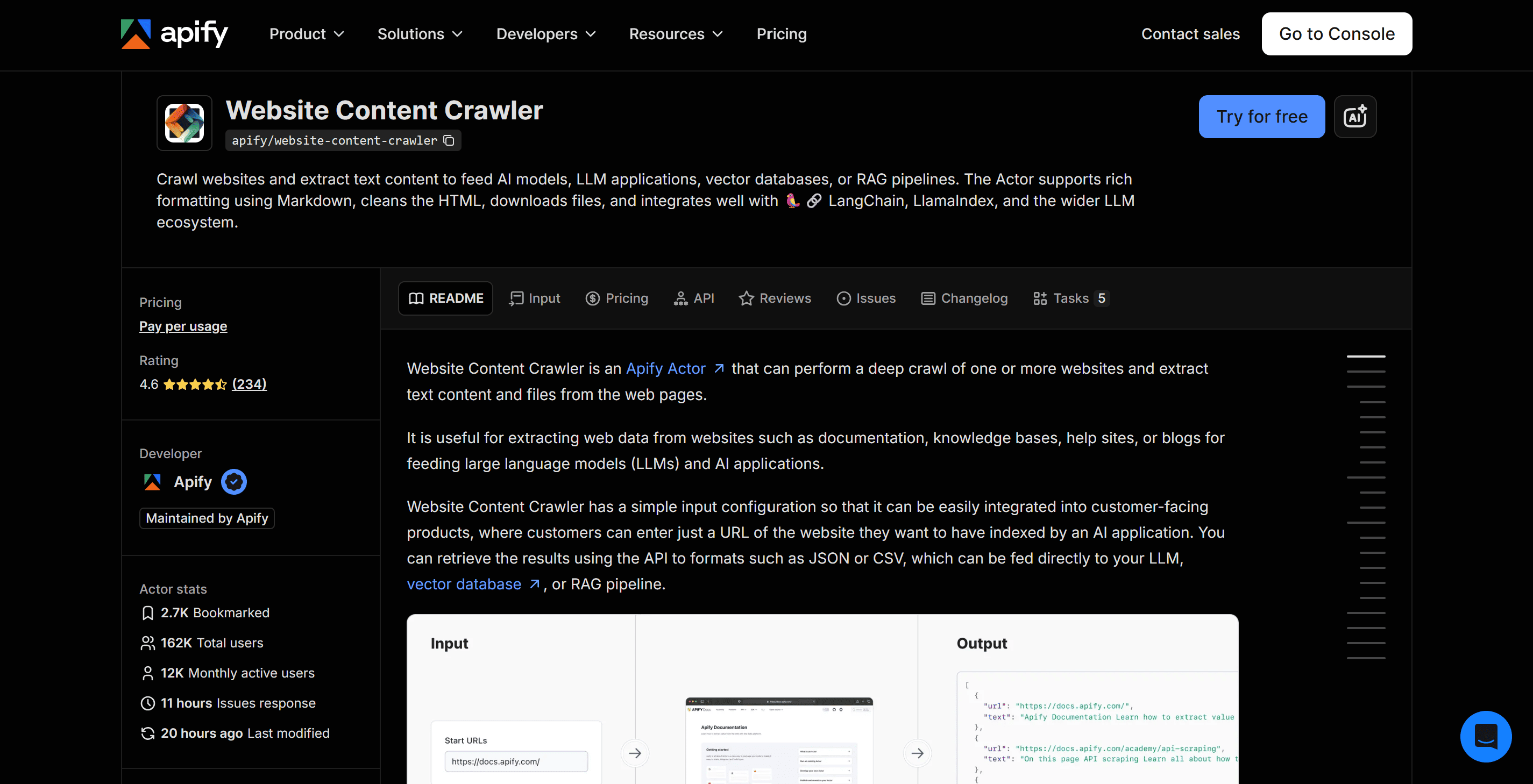
Actors are ready-to-run tools on the Apify marketplace that solve many of the problems of web data collection.
These serverless cloud programs take input (either in JSON or GUI fields) and return output in your preferred format (JSON, CSV, XML, and others). They use techniques like dynamic IP addresses and human-like browsing fingerprints to bypass CAPTCHAs.
For AI training, Website Content Crawler is a useful starting point. Some quick advantages over traditional web scraping are:
- Clean results – Excludes the header, footer, and other unnecessary data, and returns the web content in the form of clean markdown (HTML or plain text options are also available). You can adjust the extraction settings if it keeps too much or leaves something out. It can download hosted files in different formats like PDF, XLS, etc.
- Integrations – You can use the results with LangChain or LlamaIndex, or send them to vector databases such as Pinecone and Qdrant through Apify’s integration Actors. These connections are especially useful for RAG applications, where the model retrieves relevant information externally when answering questions (as of writing this, it has 12,000 active monthly users).
Example of Website Content Crawler in action
Working with the Actor is simple. Create a free account on Apify and go to the Settings tab to get your API token. Using your API token, you can run either the GUI or direct Python scripts.
A free Apify account doesn’t require a credit card and includes $5 in monthly credit, which is enough to run plenty of tasks.
Open your code editor and install Apify’s Python client, which lets your script run the Actor and retrieve its results:
pip install "apify-client>=3,<4"
Then execute the following script, replacing YOUR_APIFY_API_TOKEN with your token:
from apify_client import ApifyClient

client = ApifyClient("YOUR_APIFY_API_TOKEN")

# Configure the crawler.
run_input = {
    "startUrls": [
        {"url": "https://www.nature.com/articles/171737a0"}
    ],
    "crawlerType": "cheerio",
    "proxyConfiguration": {"useApifyProxy": True},
    "saveMarkdown": True,
    "maxCrawlPages": 1,
    "maxCrawlDepth": 0,
    "respectRobotsTxtFile": True,
    "maxRequestRetries": 1,
    "maxSessionRotations": 0,
}

# Run the Actor and wait for it to finish.
run = client.actor("apify/website-content-crawler").call(
    run_input=run_input
)

if run is None:
    raise RuntimeError(
        "No Actor run was returned. Check the Apify Console."
    )

# Retrieve the saved results.
dataset_items = client.dataset(run.default_dataset_id).list_items().items

if not dataset_items or not dataset_items[0].get("markdown"):
    raise RuntimeError(
        "No Markdown was returned. Check the Actor run."
    )

print(dataset_items[0]["markdown"][:750])
Here, the output is quite clear and focuses only on the main content, as you can see:
Molecular Structure of Nucleic Acids: A Structure for Deoxyribose Nucleic Acid
Article
Published: 25 April 1953
Nature volume 171, pages 737–738 (1953)Cite this article
235k Accesses
8598 Citations
2292 Altmetric
Metrics details
WE wish to suggest a structure for the salt of deoxyribose nucleic acid (D.N.A.). This structure has novel features which are of considerable biological interest.
A structure for nucleic acid has already been proposed by Pauling and Corey1. They kindly made their manuscript available to us in advance of publication. Their model consists of three intertwined chains, with the phosphates near the fibre axis, and the bases on the outside. In our opinion, this structure is unsatisfactory for two reasons : (1) We believe
And that's just the tip of the iceberg. Features like anti-blocking, CAPTCHA bypass, and integrations mean you can collect data even from the most complex websites and integrate it with your preferred AI frameworks and databases.
To summarize, here’s a table that’ll make it easier for you to compare across the available methods mentioned in this article:
| Method | Suitable when | Effort required | Cost |
|---|---|---|---|
| Public datasets | An existing dataset fits your task | Low to medium | Free or paid |
| Crowdsourcing | You need human examples, labels, or feedback | Medium to high | Contributor payments and review |
| Internal data | Your business already has relevant records | Medium | Preparation and review time |
| Synthetic data | You need more examples or variations | Medium | AI usage and review |
| APIs | A provider offers the data you need | Medium | Free or paid |
| Scraping | You need to collect specific website content | High | Development and running costs |
| Apify Actors | You want a ready-made scraping tool | Low | Free tier; paid usage |
Preparing a small dataset for AI training
The crawler gives you readable text, but how do you turn it into training data? Let’s work through a small example.
You’ll prepare a dataset for a Python code assistant that answers questions using a supplied passage. If the passage doesn’t contain the answer, the assistant should say so.
This dataset is for supervised fine-tuning, which means further training an existing model with examples of the responses you want. For this walkthrough. You’ll create 30 examples to practice the preparation process, then save them in separate training, validation, and test files.
To follow along, you’ll need Python 3.11 or later, a code editor, and an Apify account with available credits. Create a folder, name it python-training-data and open it in your editor. Run all the commands below from a terminal in this folder.
The scripts use Python’s built-in libraries, so you don’t need to install anything extra.
1. Collect your source pages
Your training examples need a reliable source for their answers. Start with six pages from the official Python documentation tutorials, and include the license page to keep its terms and notices with your dataset.
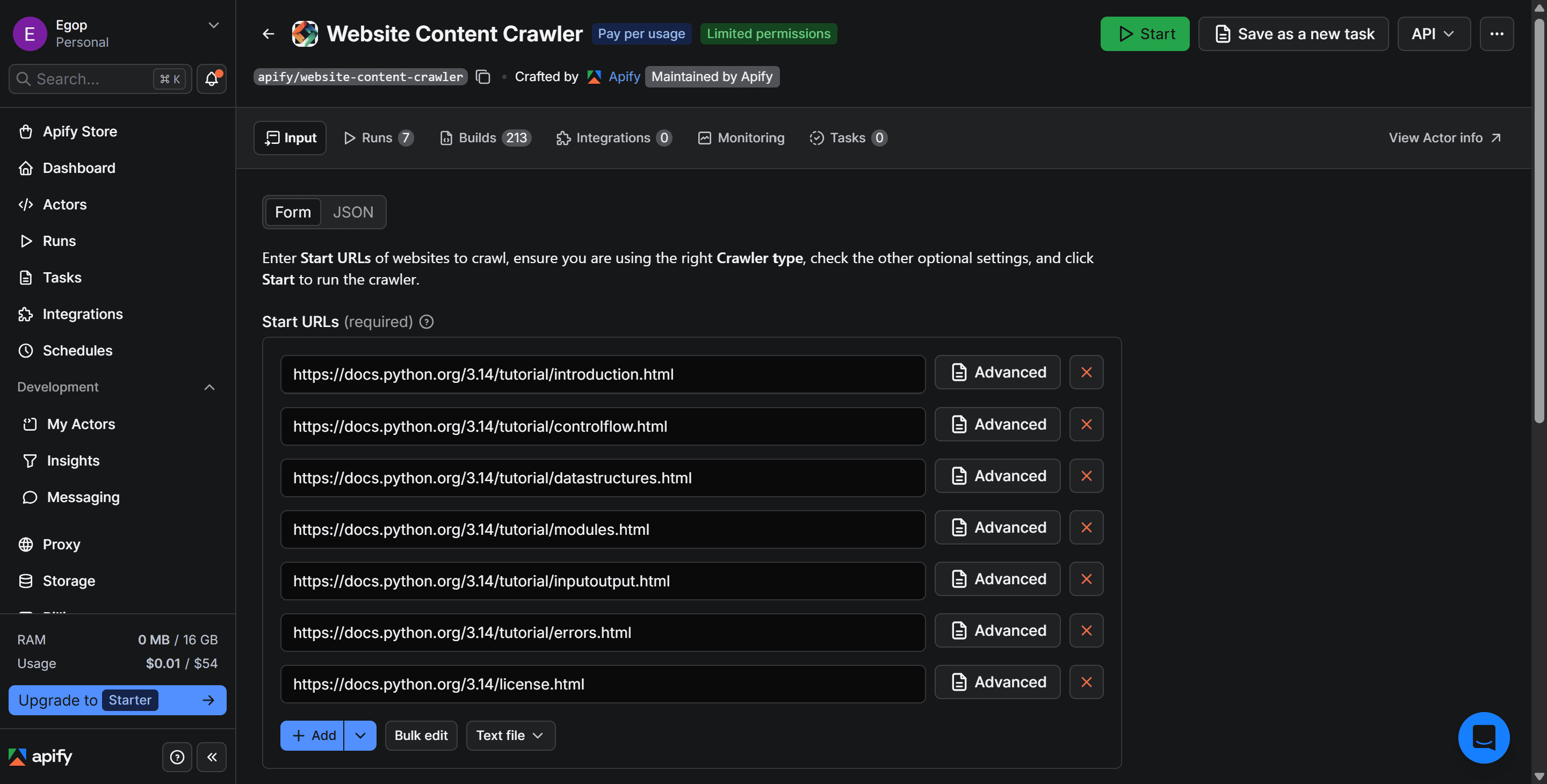
Open Website Content Crawler in Apify Console. Switch its input editor to JSON and enter:
{
  "startUrls": [
    {"url": "https://docs.python.org/3.14/tutorial/introduction.html"},
    {"url": "https://docs.python.org/3.14/tutorial/controlflow.html"},
    {"url": "https://docs.python.org/3.14/tutorial/datastructures.html"},
    {"url": "https://docs.python.org/3.14/tutorial/modules.html"},
    {"url": "https://docs.python.org/3.14/tutorial/inputoutput.html"},
    {"url": "https://docs.python.org/3.14/tutorial/errors.html"},
    {"url": "https://docs.python.org/3.14/license.html"}
  ],
  "maxCrawlPages": 7,
  "maxCrawlDepth": 0,
  "useSitemaps": false,
  "saveMarkdown": true,
  "proxyConfiguration": {
    "useApifyProxy": true
  }
}
The crawl depth of 0 keeps the crawler focused on the supplied URLs. The page limit caps the run at seven pages, and saveMarkdown includes the extracted Markdown in the results.
Click Save & start. When the run finishes successfully, export all results as JSON, keeping all fields. Save the download as raw-pages in your python-training-data folder.
2. Review and clean the text
Navigation links and repeated titles can end up in the passages you use for training. The next script removes common leftovers and saves each page as a separate Markdown file, preserving useful content, code examples, and indentation.
Create extract_pages.py within the project directory in your code editor and run:
import json
import re
from pathlib import Path
from urllib.parse import urlparse

BASE = Path(__file__).resolve().parent
LINK = re.compile(r"\[([^\]]+)\]\([^\n]*?\)")
NAV_LABELS = {"next", "previous", "index", "modules", "show source"}
PERMALINK = re.compile(r"[ \t]*(?:\[(?:¶|#)\]\([^()\r\n]*\)|¶)[ \t]*$")

def clean_markdown(markdown):
    output = []
    fence = None
    previous_title = None

    for line in markdown.splitlines(keepends=True):
        stripped = line.strip()
        text = line.rstrip("\r\n")

        # Leave code blocks alone, even if they contain headings or links.
        if fence:
            output.append(line)
            if re.fullmatch(rf" {{0,3}}{fence[0]}{{{len(fence)},}}[ \t]*", text):
                fence = None
            continue

        opening = re.match(r"^ {0,3}(`{3,}|~{3,})", line)
        if opening or line.expandtabs(4).startswith("    "):
            fence = opening.group(1) if opening else None
            previous_title = None
            output.append(line)
            continue

        # Drop navigation rows only when every link has a known menu label.
        labels = LINK.findall(stripped)
        remainder = LINK.sub("", stripped).strip(" \t*+-|·»«›‹")
        if labels and not remainder and all(
            label.strip().casefold() in NAV_LABELS for label in labels
        ):
            continue

        if re.match(r"^ {0,3}#{1,6}\s+", line):
            heading = PERMALINK.sub("", text)
            line = heading + line[len(text):]

            # Keep one copy if the page title appears twice in a row.
            title = heading.strip() if re.match(r"^ {0,3}#\s+", heading) else None
            if title and title == previous_title:
                continue
            previous_title = title
        elif stripped:
            previous_title = None

        output.append(line)

    return "".join(output)

def main():
    source = BASE / "raw-pages.json"
    if not source.is_file():
        raise FileNotFoundError(f"Place raw-pages.json beside this script: {BASE}")

    pages = json.loads(source.read_text(encoding="utf-8-sig"))
    destination = BASE / "pages"
    destination.mkdir(exist_ok=True)

    for page in pages:
        name = Path(urlparse(page["url"]).path).stem
        markdown = page.get("markdown")
        if not isinstance(markdown, str) or not markdown.strip():
            raise ValueError(f"No Markdown found for {page['url']}")

        path = destination / f"{name}.md"
        is_license = name == "license"
        # Save the license as received, and keep an existing copy on reruns.
        if not is_license or not path.exists():
            text = markdown if is_license else clean_markdown(markdown)
            path.write_text(text, encoding="utf-8", newline="")
        print(f"{'Preserved' if is_license else 'Cleaned'}: {path.name}")

if __name__ == "__main__":
    main()
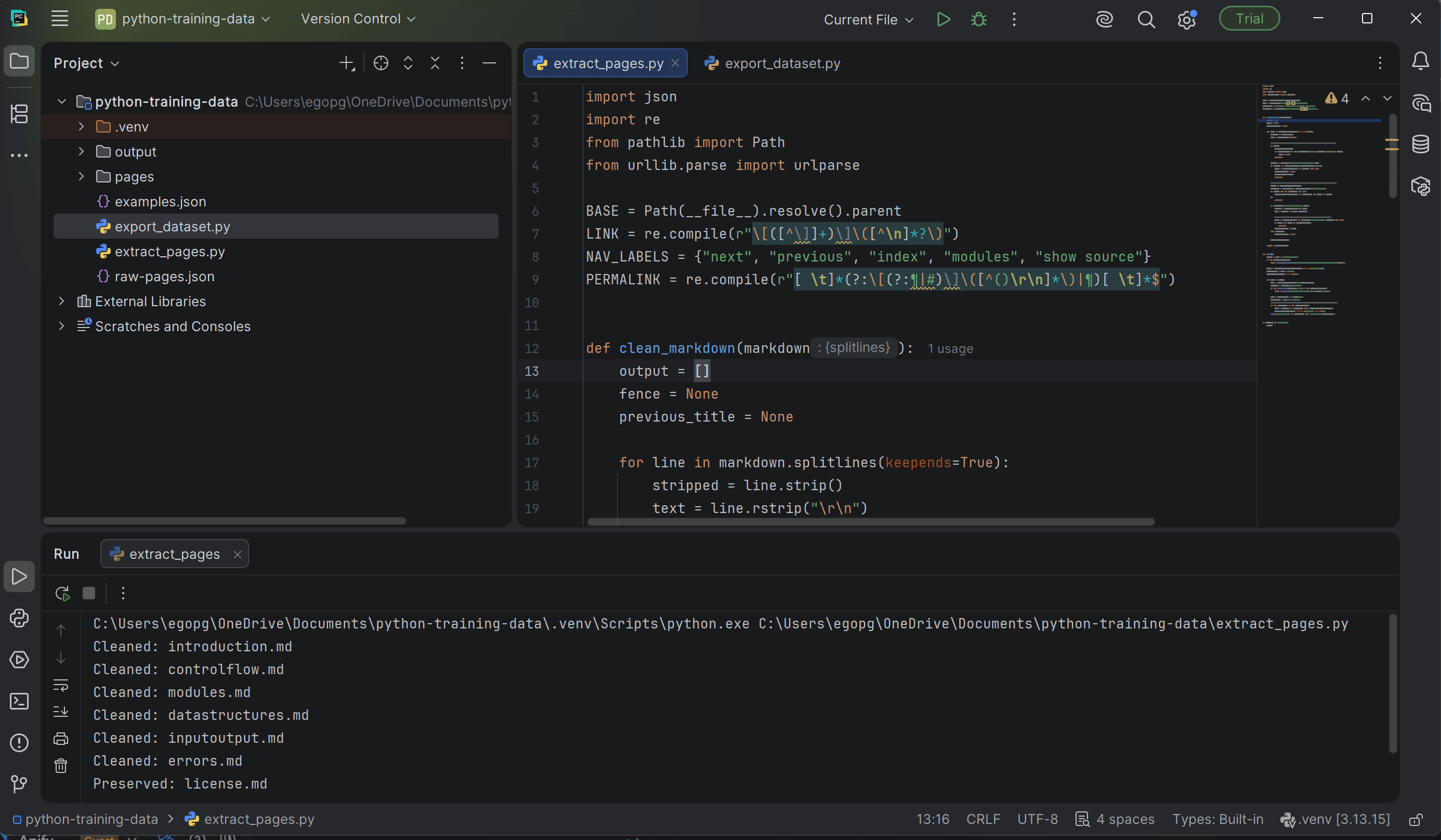
The script creates a pages folder with one Markdown file for each tutorial page, plus license.md. For example, errors.mdcontains the tutorial’s explanation of Python errors and exceptions. If the scraped text includes a separate row of “Next,” “Previous,” and “Show source” links, the script removes it. This leaves you with cleaner material to build questions and answers from, while preserving the explanations and code examples.
Your original download remains in raw-pages.json for reference. The script also saves the license text as it was collected and leaves that copy untouched on later runs.
3. Create your training examples
You now have six cleaned documentation files. The next step is to turn their explanations into examples that show the assistant how to answer a question using the text provided.
Start with pages/datastructures.md. This is the Markdown copy of the Python tutorial’s Data Structures page that the previous script saved. It explains different ways Python organizes data.
One of those is a set, a collection that keeps only unique items. For example, adding “apple” twice to a Python set still leaves you with just one “apple.” Here, “set” is a Python concept, separate from the training dataset you’re building.
You can turn its definition into a simple training example:
- Passage: The sentence explaining that sets contain no duplicate elements.
- Question: “Can a Python set contain duplicate elements?”
- Expected answer: “No. Each element in a set is unique.”
This shows the assistant how to answer from a passage. A second example will ask about memory usage, which the same passage doesn’t explain, to show when the assistant should say it lacks the information.
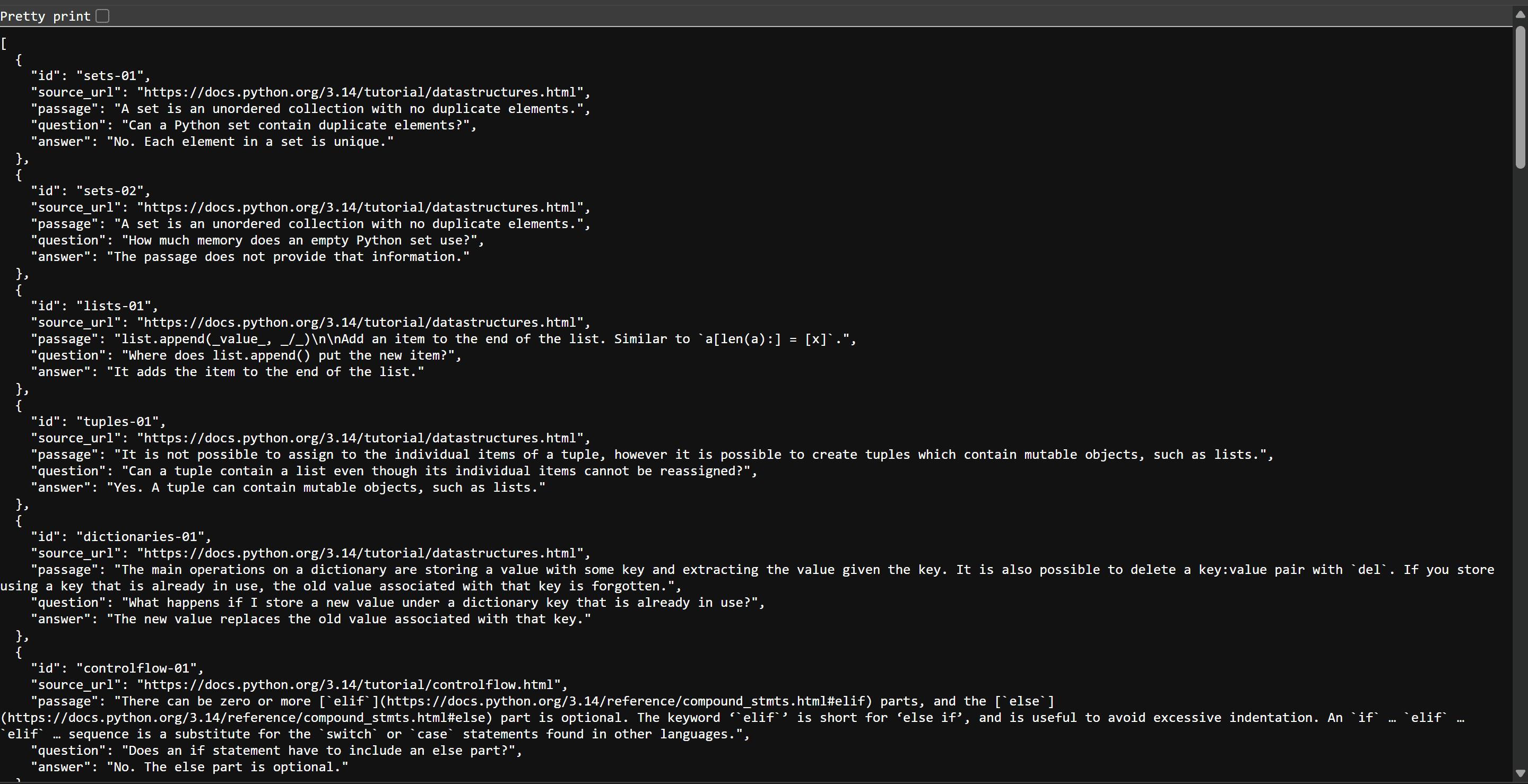
Open pages/datastructures.md and find the definition of a set. Then create examples.json in your project folder and add the following two examples:
[
  {
    "id": "sets-01",
    "source_url": "https://docs.python.org/3.14/tutorial/datastructures.html",
    "passage": "A set is an unordered collection with no duplicate elements.",
    "question": "Can a Python set contain duplicate elements?",
    "answer": "No. Each element in a set is unique."
  },
  {
    "id": "sets-02",
    "source_url": "https://docs.python.org/3.14/tutorial/datastructures.html",
    "passage": "A set is an unordered collection with no duplicate elements.",
    "question": "How much memory does an empty Python set use?",
    "answer": "The passage does not provide that information."
  }
]
The first example shows how to answer using the passage. The second shows when to say the passage doesn’t provide enough information.
To continue with a complete dataset, download the examples.json file below, and save it in your python-training-data folder, replacing the previous one you just created.
This one contains 30 examples from the six tutorial pages, including questions the passages can answer and questions they can’t. The passages, expected answers, and source URLs are already included.
Next, split and export these examples into training, validation, and test files.
4. Split and export the dataset
Some examples will teach the model what to do. Others will help you measure how well it learned.
For this exercise, use:
- Training: Examples from the control flow, data structures, input/output, and errors pages.
- Validation: Examples from the modules page, used to monitor performance during training.
- Testing: Examples from the introduction page, reserved for the final evaluation.
Keeping each source page in one group helps reduce overlap between training and evaluation data.
The next script handles this split and exports the examples as JSONL, which stores one complete JSON record per line. It also checks required fields, source URLs, passage matches, and exact duplicates before writing the files.
Create export_dataset.py in your project folder and paste:
import json
from pathlib import Path
from urllib.parse import urlparse

BASE = Path(__file__).resolve().parent
instruction = (
    "Answer using only the supplied passage. Keep the answer concise. "
    "If the passage does not answer the question, say: "
    "The passage does not provide that information."
)
split_by_page = {
    "controlflow": "train",
    "datastructures": "train",
    "inputoutput": "train",
    "errors": "train",
    "modules": "validation",
    "introduction": "test",
}

examples = json.loads((BASE / "examples.json").read_text(encoding="utf-8-sig"))
raw = json.loads((BASE / "raw-pages.json").read_text(encoding="utf-8-sig"))
sources = {page["url"] for page in raw}
pages = {
    name: (BASE / "pages" / f"{name}.md").read_text(encoding="utf-8")
    for name in split_by_page
}

required = ("id", "source_url", "passage", "question", "answer")
splits = {name: [] for name in ("train", "validation", "test")}
seen_ids, seen_prompts, passage_splits = set(), set(), {}

if not isinstance(examples, list):
    raise ValueError("examples.json must contain a list of examples.")

for number, example in enumerate(examples, 1):
    if not isinstance(example, dict) or any(
        not isinstance(example.get(key), str) or not example[key].strip()
        for key in required
    ):
        raise ValueError(f"Example {number}: fill in all required text fields.")

    label = example["id"]
    page = Path(urlparse(example["source_url"]).path).stem
    if example["source_url"] not in sources or page not in split_by_page:
        raise ValueError(f"{label}: use the URL of a collected tutorial page.")

    passage = example["passage"]
    if passage not in pages[page]:
        raise ValueError(f"{label}: copy the passage exactly from pages/{page}.md.")

    prompt = (passage, example["question"])
    if label in seen_ids or prompt in seen_prompts:
        raise ValueError(f"{label}: duplicate ID or passage-and-question pair.")

    split = split_by_page[page]
    if passage_splits.get(passage, split) != split:
        raise ValueError(f"{label}: this passage already appears in another split.")

    seen_ids.add(label)
    seen_prompts.add(prompt)
    passage_splits[passage] = split

    splits[split].append({
        "messages": [
            {"role": "system", "content": instruction},
            {
                "role": "user",
                "content": f"Passage:\n{passage}\n\nQuestion: {example['question']}",
            },
            {"role": "assistant", "content": example["answer"]},
        ]
    })

if any(not rows for rows in splits.values()):
    raise ValueError("Include examples for training, validation, and testing.")

# Write the files only after every example has passed the checks.
output = BASE / "output"
output.mkdir(exist_ok=True)
for name, rows in splits.items():
    content = "".join(json.dumps(row, ensure_ascii=False) + "\n" for row in rows)
    (output / f"{name}.jsonl").write_text(content, encoding="utf-8", newline="\n")
    print(f"{name}.jsonl: {len(rows)} examples")
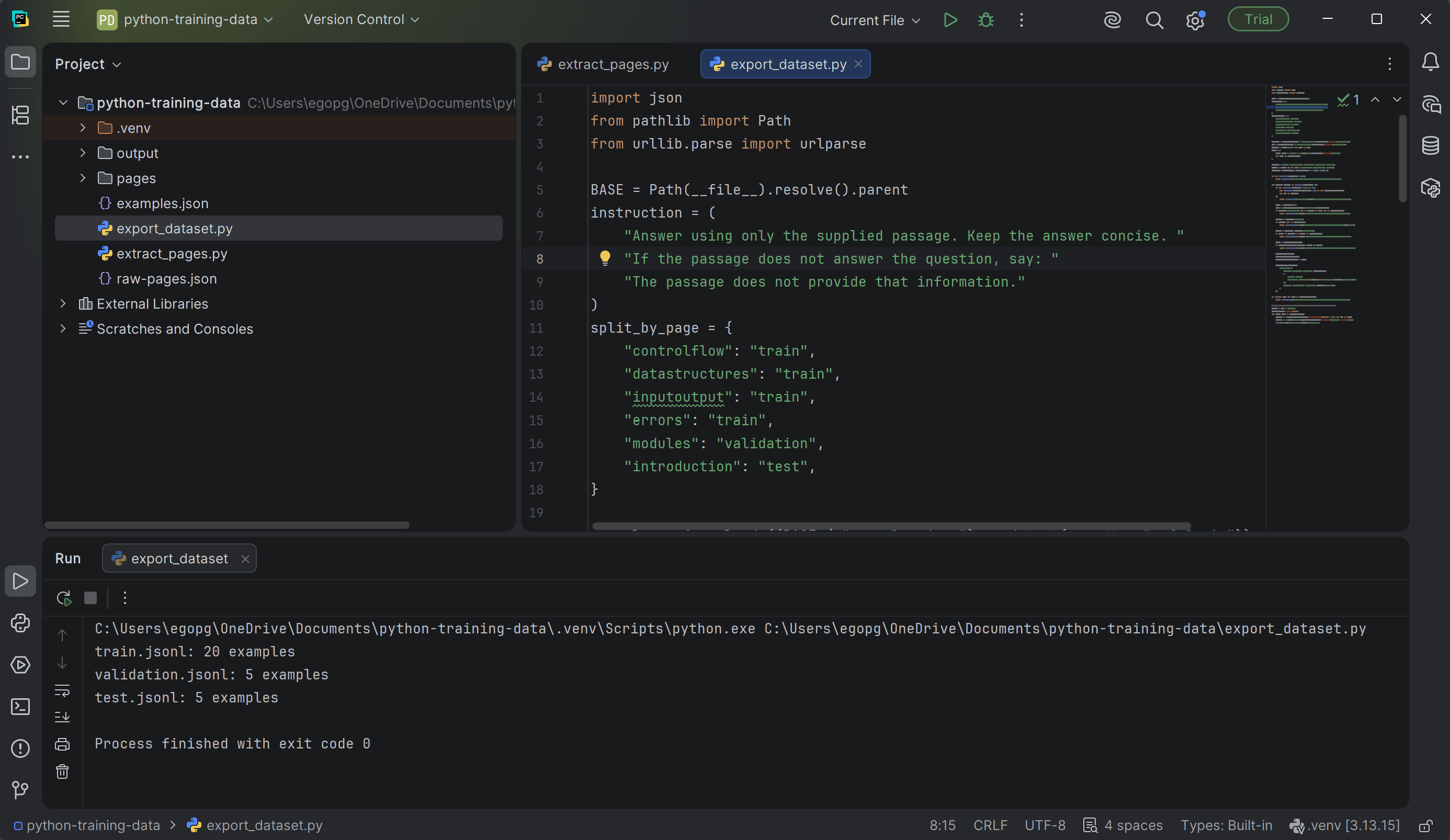
The run creates three separate files in an output folder and should print:
train.jsonl: 20 examples
validation.jsonl: 5 examples
test.jsonl: 5 examples
Each exported example contains the task instruction, a passage and question, and the expected answer, giving the model both the input it will receive and an example of how it should respond.
JSONL, as a data format, stores one example per line, allowing training tools to process the dataset without loading the whole file at once.
Keep examples.json, raw-pages.json, and pages/license.md alongside your exports to preserve the source details and license information.
Get better data for AI
Good training data gives a model useful examples to learn from. You’ve explored ways to collect that data, the tradeoffs of each approach, and how Apify Actors simplify web data collection. You’ve also turned scraped documentation into a small dataset for supervised fine-tuning.
To collect data for your own project, create an Apify account and try Website Content Crawler for free.