Maintaining a growing portfolio of Apify Actors comes with overhead that has nothing to do with scraping logic. Update a description here, fix a category there, regenerate schema files, check quality scores. At a certain scale - somewhere around the fifteenth Actor - the same clicks through Apify Console start adding up.
Websy is a CLI tool we built to manage Actors from the terminal using a single YAML spec file as the source of truth. No more tabbing through the UI for routine maintenance. No more hand-editing four separate JSON schema files every time a field changes.
We spoke with several other Actor builders while working on this. Nobody had built shared tooling for this workflow. Everyone was either doing it manually or relying on scattered personal scripts. That was surprising - it seemed like a significant gap.
Why "Websy" and who are we?
We are the team at OrbTop - led by your friendly neighborhood Raccoon. We build tools that give clients a top-down view of markets, customers, and opportunities. Market intelligence for your online business. Part of that means maintaining a growing portfolio of Actors. This is where Websy comes in.
We started early on with a spider theme for various tools for our Actors - they're crawling websites, after all. When we needed a name for the helper script that manages them all, Websy seemed right. An affectionate name for a small utility that handles the tedious work.
Two problems nobody was solving
When clicking through the UI adds up
Apify Console handles Actor metadata well. Click into settings, update the description, pick categories, set run options, save. It works.
At scale, the repetition adds up. Each Actor has a title, description, categories, default run options, etc. - all managed through the console UI. Steps get forgotten. Fields get missed.
Schema files by hand
This is a different problem, but they share a solution, so it seems appropriate to present both of them in one place. Every Apify Actor requires a set of JSON schema files inside the .actor/ directory:
actor.json- basic Actor metadata (name, version, build tag)input_schema.json- defines the input fields users see in the consoledataset_schema.json- describes the output data structure and display viewsoutput_schema.json- defines how results are presented
Currently, these files are written and maintained by hand. They are verbose JSON, repetitive across Actors, and they all need to stay consistent with each other. Adding a new field to a dataset means editing dataset_schema.json to define the field, potentially updating views in the same file, and making sure the field names match what the scraper actually outputs.
Renaming a field requires the same kind of multi-file coordination. This is mechanical work that lends itself to automation.
One YAML spec to rule them all
The core idea behind Websy is straightforward: define everything in one websy-spec.yml file and generate or push everything from there.
Here is what a sample spec file looks like:
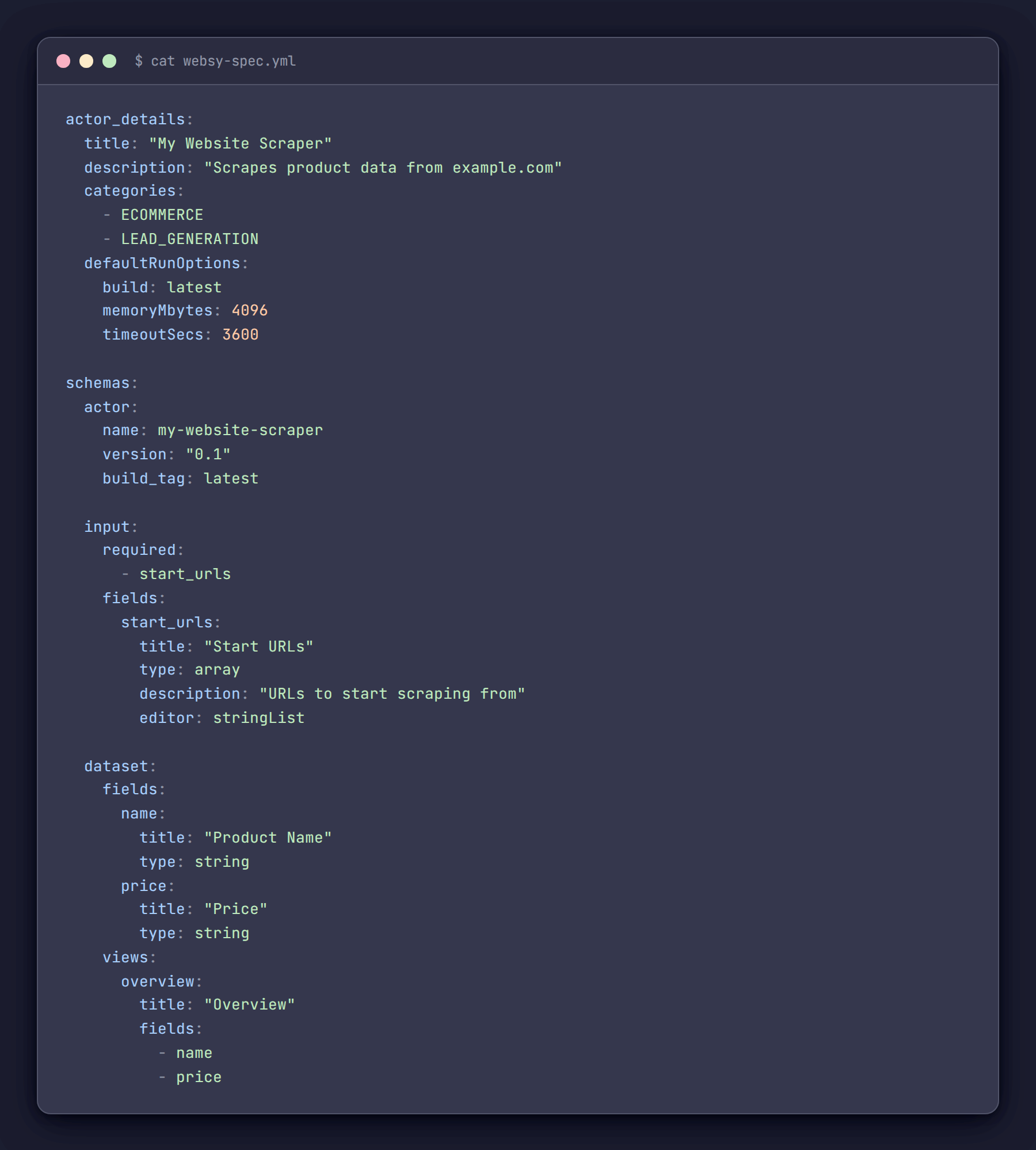
One file. Everything in one place. The actor_details section maps directly to what would otherwise be set through Apify Console. The schemas section defines all four JSON files. When adding a new Actor, we copy a spec, adjust the fields, and run two commands.
The spec lives in version control alongside the Actor code. Changes to descriptions, schemas, or categories are tracked in git history the same way code changes are.
Building the CLI
Websy is a Node.js CLI built with Commander.js. The Websy class is a thin wrapper around the Apify REST API using got for HTTP requests. The value is in the workflow, not the tech stack.
class Websy {
  constructor(config) {
    this.apiToken = process.env.API_TOKEN;
    this.baseUrl = 'https://api.apify.com/v2';
    this.client = got.extend({
      prefixUrl: this.baseUrl,
      headers: {
        'Authorization': `Bearer ${this.apiToken}`,
        'Content-Type': 'application/json'
      },
      responseType: 'json'
    });
  }
}
One practical detail that eliminates a lot of repetition: auto-resolving the Actor ID. Most of the time, Websy runs from inside an Actor's project directory, so it reads .actor/actor.json and derives the ID automatically. No need to pass --id on every command.
static resolveActorId(providedId, prefix) {
  if (providedId) return providedId;
  try {
    const actorJsonPath = join(process.cwd(), '.actor', 'actor.json');
    if (fs.existsSync(actorJsonPath)) {
      const actorJson = JSON.parse(fs.readFileSync(actorJsonPath, 'utf8'));
      const actorName = actorJson.name;
      if (actorName) {
        const derivedId = `${prefix}~${actorName}`;
        console.log(`Using actor ID: ${derivedId} (derived from .actor/actor.json)`);
        return derivedId;
      }
    }
  } catch (error) {
    console.error('Error reading actor.json:', error.message);
  }
  return null;
}
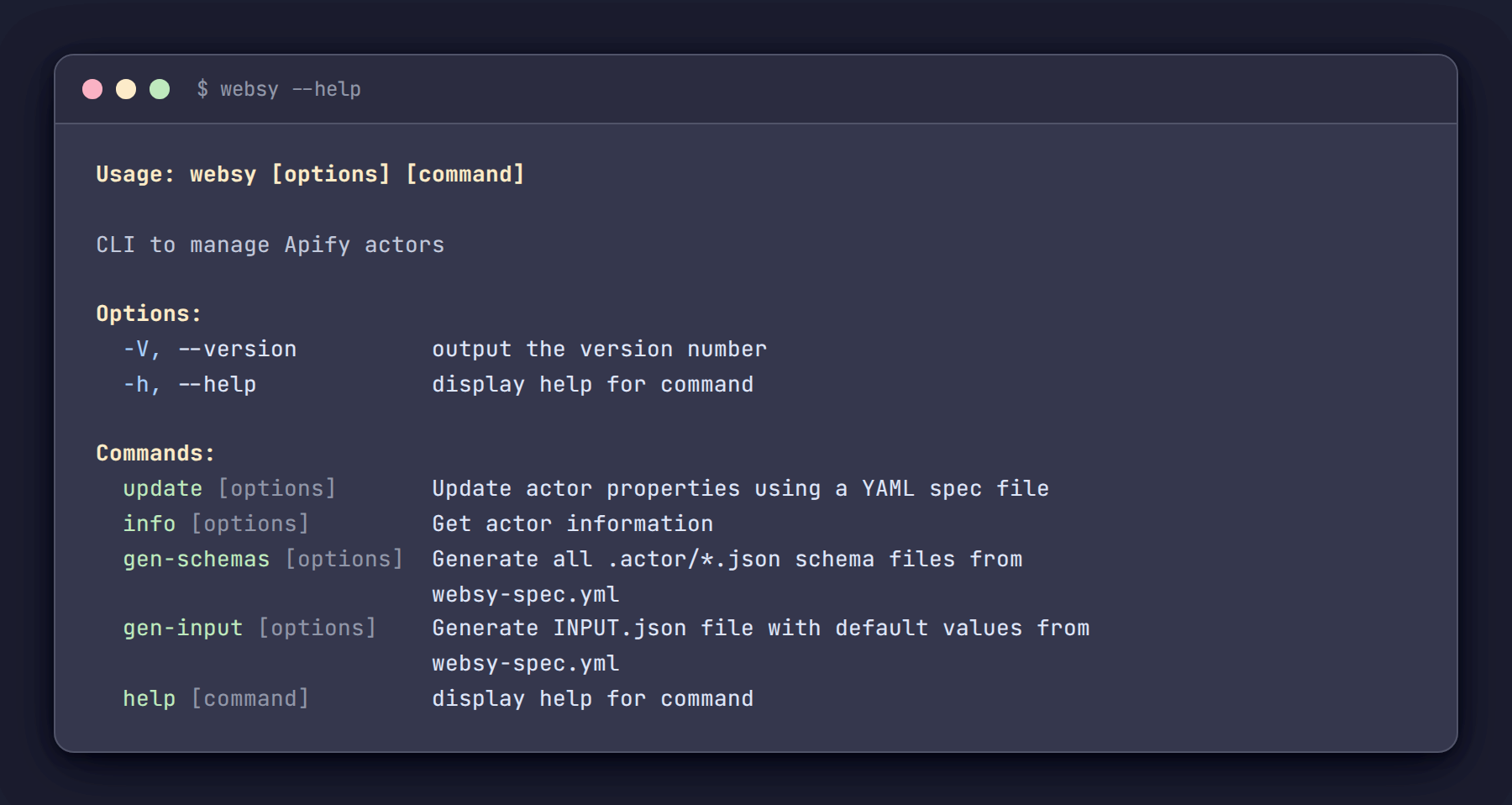
The main commands:
websy update- pushes Actor metadata (title, description, categories, run options) from the spec to the Apify APIwebsy info- pulls the current state of an Actor and displays it alongside quality scores, metrics, and a diff against the local specwebsy gen-schemas- generates all four.actor/*.jsonfiles from the schemas section of the specwebsy gen-input- generates anINPUT.jsonwith sensible defaults for local testing
Schema generation - the biggest time saver
This is where Websy provides the most value. The ActorSchemaManager class takes the schemas section of the spec and generates all four JSON files in one operation.
Running websy gen-schemas produces:
.actor/actor.jsonwith proper structure and version info.actor/input_schema.jsonwith all input fields, editors, types, and validation rules.actor/dataset_schema.jsonwith field definitions and display views.actor/output_schema.jsonwith the output template
The YAML-to-JSON mapping handles the repetitive parts automatically. Field names are converted to title case for display labels. Editor types are inferred from field types - integers get number editors, booleans get checkboxes, arrays get string list editors. Any of it can be overridden.
static inferEditor(fieldConfig) {
  if (fieldConfig.editor) return fieldConfig.editor;
  const type = fieldConfig.type || 'string';
  switch (type) {
    case 'integer':
    case 'number':
      return 'number';
    case 'boolean':
      return 'checkbox';
    case 'array':
      return 'stringList';
    default:
      return 'textfield';
  }
}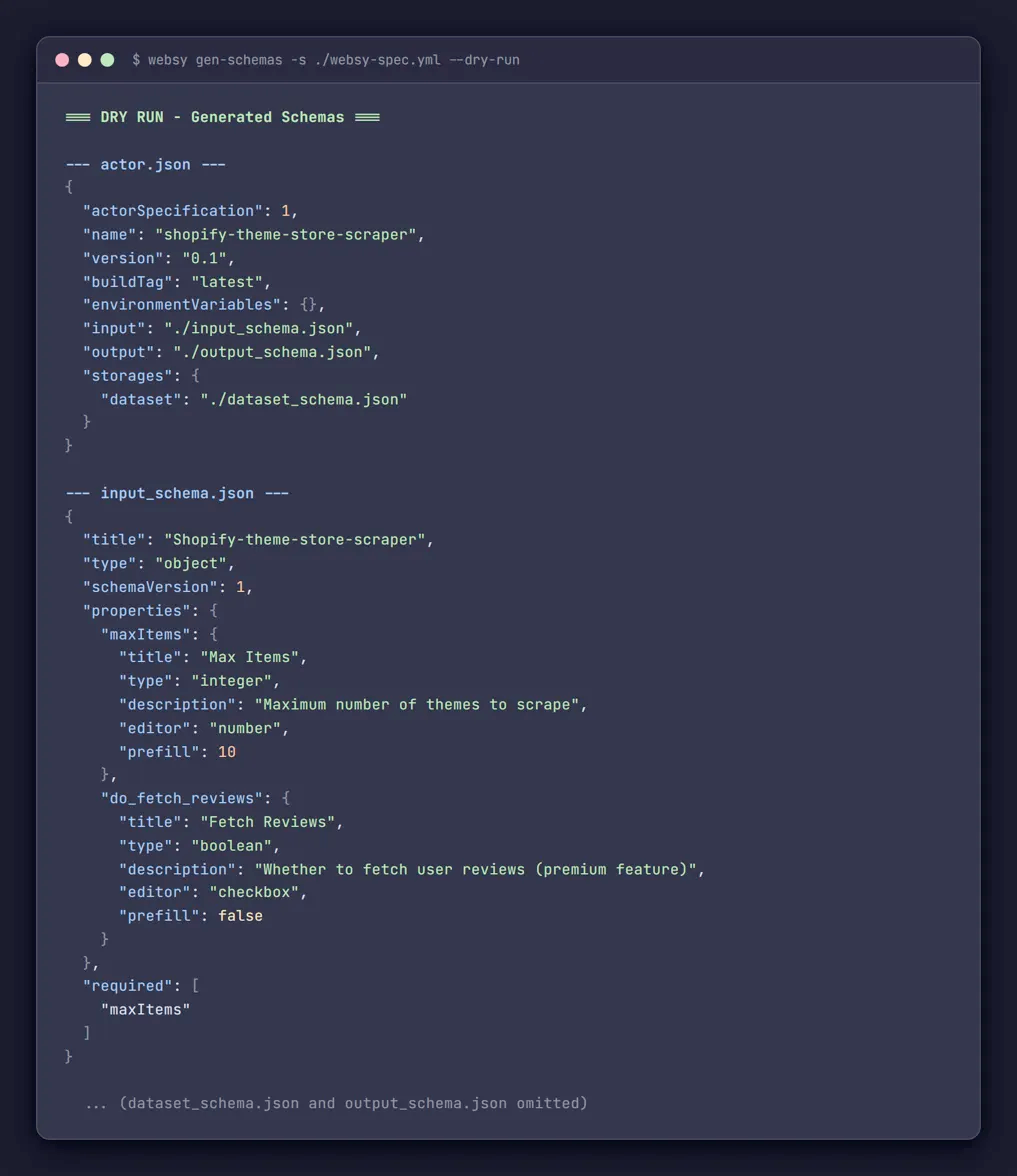
Before running for real, we always preview first:
websy gen-schemas --dry-runThis prints all four generated JSON files to the terminal without writing anything to disk. Review the output, verify the fields look correct, then run again without the flag.
The same workflow applies to input file generation:
websy gen-input --dry-runThis creates an INPUT.json populated with default values from the spec - prefills, sensible zeros for numbers, empty arrays for lists. Useful for quickly testing an Actor locally without assembling the input by hand every time. We made it a separate command from gen-schemas so that one can rerun it many times without having all the schema files generated every time.
Keeping local and remote in sync
This feature exists because of early mistakes. Before building the comparison logic, there was no reliable way to tell whether the latest spec had been pushed or not. Running websy update was a bit tricky - is this an intentional sync, or is it about to overwrite something that was set through the UI and never captured in the spec?
The websy info command now pulls the Actor's current state from the API and compares it field by field against the local spec. If anything differs, it shows exactly what:
=== Local vs Online Diffs ===
⚠️  The following fields differ between local spec and online:

  description:
    Local:  "Scrapes product data from example.com with full pagination support"
    Online: "Scrapes product data from example.com"

  categories:
    Local:  ["ECOMMERCE","LEAD_GENERATION"]
    Online: ["ECOMMERCE"]

💡 Run "websy update" to sync local spec to online.
If everything matches:
✅ Local spec is in sync with online actor.The info command also pulls quality scores, recommendations, public metrics (users, ratings, bookmarks as shown on Apify Store), run success rates, and issue response times - all in one terminal view. Before Websy, checking an Actor's health meant opening several screens every time.
=== Actor Information ===
ID:          abc123def456
Name:        my-website-scraper
Title:       My Website Scraper
Version:     0.1
Categories:  ECOMMERCE, LEAD_GENERATION
IsPublic:    true

✅ Pricing: PAY_PER_EVENT (1 events: result: $0.005)
✅ Icon: Set

=== Actor Metrics ===
Total Users:          1,234
Monthly Active Users: 456
Star Rating:          ⭐ 4.8 (23)
Bookmarks:            89
Runs Success Rate:    >99% succeeded (2,340 runs in 30d)
Issue Response Time:  2h 15m

=== Actor Quality ===
Quality Score:      87.50%
Quality Percentile: 92.00%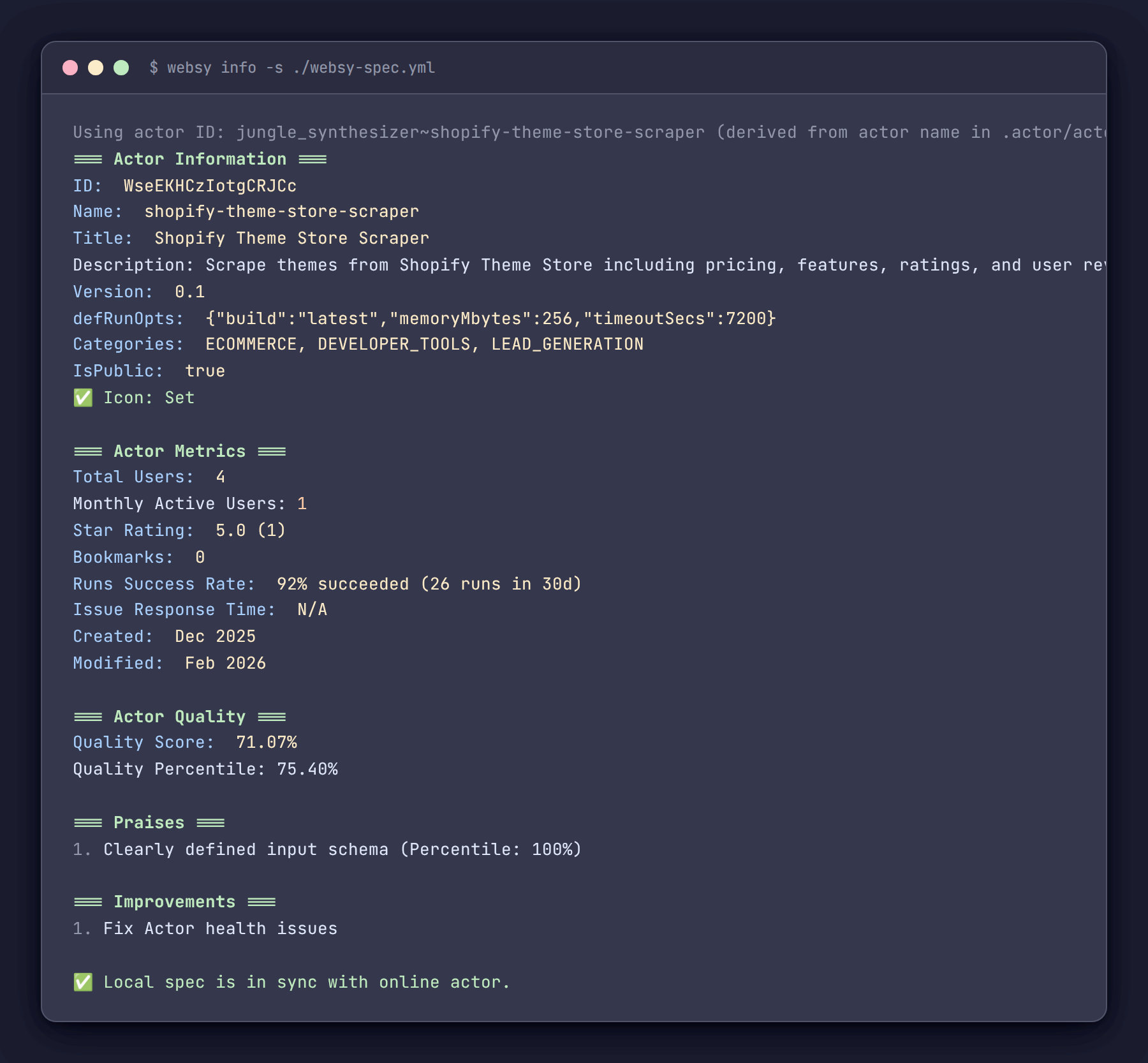
What didn't work
Not everything went as planned.
We originally intended to automate Actor icon uploads - read an image file, push it through the API. The image handling libraries turned out to be more complex to integrate than expected, and the API's icon upload is not as straightforward as setting a text field. We shelved it. Instead, Websy checks whether an icon is set and flags it in the info output if it is missing. A simpler solution that still catches the oversight.
The diffing feature was born out of accidentally overwriting live settings. Without a comparison view, there was no reliable way to tell whether a spec had already been pushed. The diff solved that problem, but it should have been built from the start rather than after losing changes.
The list of valid Actor categories - values like AI, ECOMMERCE, SEO_TOOLS - appears to change over time on the Apify side. We maintain it as a hardcoded array in the source. When Apify adds a new category, the validation rejects it until the list is updated manually. A public API endpoint for valid categories would make this easier to maintain, and we'd happily switch to it.
Getting started
The full source code is available on GitHub: https://github.com/OrbTop/websy
Setup is straightforward. Clone the repo, configure the Apify API token in the config file, and the tool is ready. The commands used most frequently:
# Generate all .actor/*.json schema files from the spec
websy gen-schemas -s ./websy-spec.yml

# Preview before writing (recommended as a first step)
websy gen-schemas -s ./websy-spec.yml --dry-run

# Push Actor metadata to the API
websy update -s ./websy-spec.yml

# Check Actor status, quality, and diff against local spec
websy info

# Generate INPUT.json for local testing
websy gen-input
Apify Console handles a lot that Websy doesn't touch. But for repetitive setup and upkeep tasks, having everything in a spec file and a terminal command has eliminated a significant amount of friction and a significant number of mistakes.
The repository is open. Feedback and suggestions from other builders dealing with similar challenges are welcome.
Stay tuned for future articles where we expand Websy with support for managing pricing info, generating Actor README files, and more.