There's a developer community I hang around in. A few consultants and BD folks were going back and forth about government contracts: how scattered everything was, how they'd miss deadlines because they didn't know an opportunity existed until it was too late. Manual searches, five different portals, no consistency. Classic problem nobody had bothered to solve properly.
Apify had a builder event running at the time. I had a weekend. So spun up a live Actor on Apify Store that monitors SAM.gov and the UK Contracts Finder simultaneously, normalizes everything into a single structured schema, scores each contract by relevance, and returns clean, actionable data on demand.
Here's what I learned building it: the architecture decisions, the parts that broke, and what anyone building on top of government data should know before they start.

The problem: contracts nobody's chasing
Governments in the US and UK publish hundreds of thousands of procurement contracts every year. Defense systems. Cloud infrastructure. Cybersecurity platforms. Digital transformation projects. And most of it just sits there.
What surprised me most when I first got the pipeline running wasn't how hard the data was to get. It was how much of it existed with nobody chasing it. So many contracts, just sitting. Businesses that would be a perfect fit for a £250,000 cloud migration tender had no idea it existed, because finding it required knowing to search the right portal, with the right keyword, every single day before the deadline closed.
That's the gap. Plenty of data, no usable pipeline on top of it.
Why official APIs over scraping
My first instinct was to scrape. Most devs would do the same.
But both SAM.gov and UK Contracts Finder have official APIs, and once I looked at them properly, the decision was obvious. Getting the API calls right was honestly the hardest part of this build: the raw HTTP requests I was testing early on just kept breaking. Not in obvious ways. Silently returning bad data, timing out on specific endpoints, pagination behaving differently depending on whether you had an API key or not. Not so simple.
Official APIs give you stability, structured JSON with explicitly named fields, and deep cursor-based pagination, meaning you can pull thousands of records without fighting rate limits or anti-bot measures. Government portals change their HTML without warning. A scraper breaks silently and you don't know until a user calls asking why the data stopped.
The SAM.gov API key is optional in the Actor. Without one you get public-tier access, which covers most use cases. Providing a free key from sam.gov unlocks the full official endpoint with higher throughput and richer data.
Input configuration
Here's what the Actor's input looks like in Apify Console:
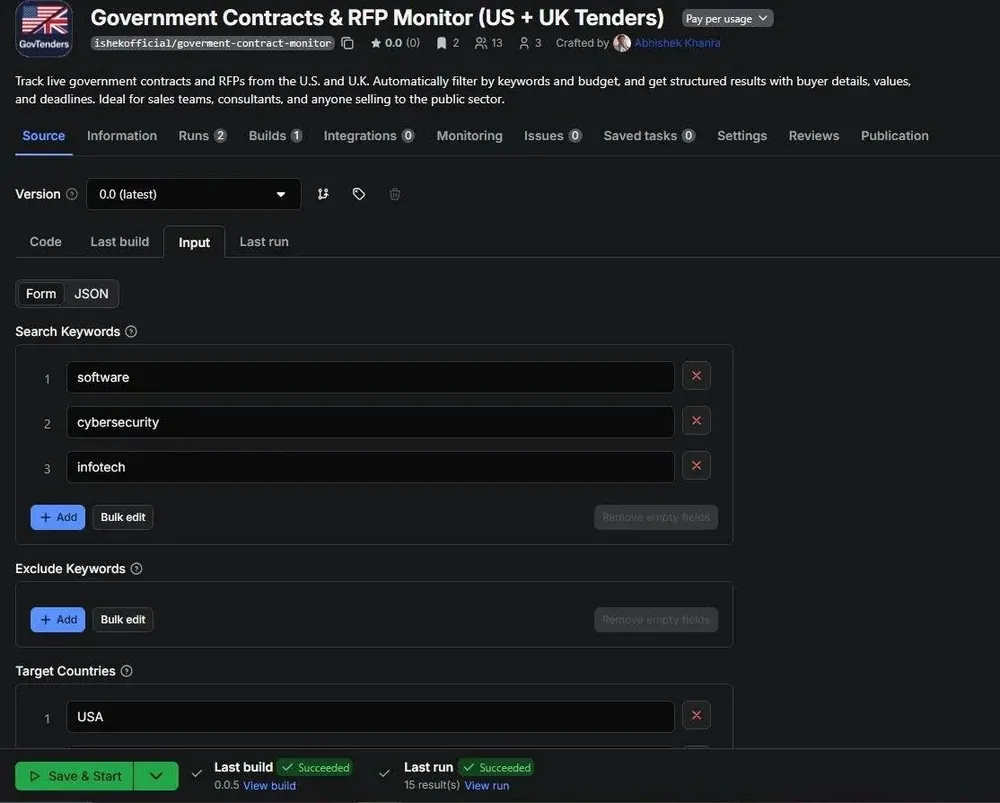
You configure keywords, exclude terms, target countries, a minimum budget floor in USD, and a deadline window. Simple. If you don't provide a SAM.gov API key the Actor skips US federal tenders and runs UK only.
The real challenge: two completely different data models
Pulling from two APIs sounds simple. It's not.
SAM.gov and Contracts Finder were built by different governments for different procurement systems. SAM.gov uses NAICS codes, a US-specific six-digit classification taxonomy. Contracts Finder uses CPV codes, a European standard. The buyer hierarchy is completely different: SAM.gov nests buyers as Department → Agency → Office. Contracts Finder has a flat buyer field. Currency, date formats, status terminology, notice types: all inconsistent.
The goal was a unified output schema where every contract object looks identical regardless of source. Both classification systems are preserved independently. The US buyer hierarchy gets flattened. All budget values get normalized to USD.
Here's the currency normalization function:
// helpers/normalize.js

const EXCHANGE_RATES = {
    USD: 1,
    EUR: 1.09,
    GBP: 1.27,
    CAD: 0.74,
    AUD: 0.67,
    INR: 0.012,
};

export function normalizeCurrencyToUsd(amount, currency) {
    if (!amount || isNaN(amount)) return null;
    if (!currency) return amount;

    const code = currency.toUpperCase().trim();
    const rate = EXCHANGE_RATES[code];

    if (rate) {
        return Math.round(amount * rate);
    }
    return null;
}
Static rates are a deliberate v1 tradeoff, good enough for budget filtering without adding a runtime dependency on a currency API. It's on the v2 list.
The budgetUsd field also feeds the minimum budget filter. One thing that bit me early: not all contracts publish explicit budget figures. Agencies often omit estimates or publish ranges. A filter that only checks one field drops high-value opportunities that just happen to store their value somewhere else. The fix:
// helpers/filters.js - budget check

if (minimumBudget > 0) {
    const value = tender.awardValue || tender.budgetUsd || tender.valueHigh || 0;
    if (value < minimumBudget) {
        continue;
    }
}
Small thing, but it's exactly the kind of edge case that only shows up when you're running against real government data at volume.
The confidence score: cutting through the noise
Raw government contract data is a firehose. Search SAM.gov for "software" and you'll get thousands of results. The Actor assigns every contract a confidenceScore between 0 and 100 using a weighted formula.
// helpers/filters.js

export function calculateConfidence(tender, keywords) {
    let score = 50; // Base score - every contract starts neutral
    const matches = new Set();

    const textToCheck = [
        tender.title,
        tender.description,
        tender.buyer,
        tender.naicsCode,
        tender.cpvCode,
        tender.classificationCode
    ].filter(Boolean).join(' ').toLowerCase();

    // 1. Keyword Matching (Max +40)
    // Title matches are worth 3x more than body matches
    let keywordPoints = 0;
    const safeKeywords = Array.isArray(keywords) ? keywords : [];

    for (const kw of safeKeywords) {
        const lowerKw = kw.toLowerCase();
        if ((tender.title || '').toLowerCase().includes(lowerKw)) {
            matches.add(kw);
            keywordPoints += 15; // High value for title match
        } else if (textToCheck.includes(lowerKw)) {
            matches.add(kw);
            keywordPoints += 5;
        }
    }
    score += Math.min(40, keywordPoints);

    // 2. Budget/Value Presence (+10)
    if ((tender.budgetUsd && tender.budgetUsd > 0) ||
        (tender.awardValue && tender.awardValue > 0)) {
        score += 10;
    }

    // 3. Completeness Bonus (+10)
    // Contact info or docs means you can actually act on this
    if (tender.buyerContactEmail ||
        (tender.documentUrls && tender.documentUrls.length > 0)) {
        score += 10;
    }

    // 4. Recency (+10, decays)
    if (tender.publishedDate) {
        const daysAgo = dayjs().diff(dayjs(tender.publishedDate), 'day');
        if (daysAgo <= 1) score += 10;
        else if (daysAgo <= 7) score += 5;
        else if (daysAgo <= 30) score += 2;
    }

    return {
        score: Math.min(100, score),
        matches: Array.from(matches)
    };
}
Base score of 50 means every contract starts neutral: it has to earn its ranking. Title keyword matches are worth 15 points versus 5 for body matches. In practice that separation is what makes the difference between a useful top-10 list and a noise dump.
What a production run looks like
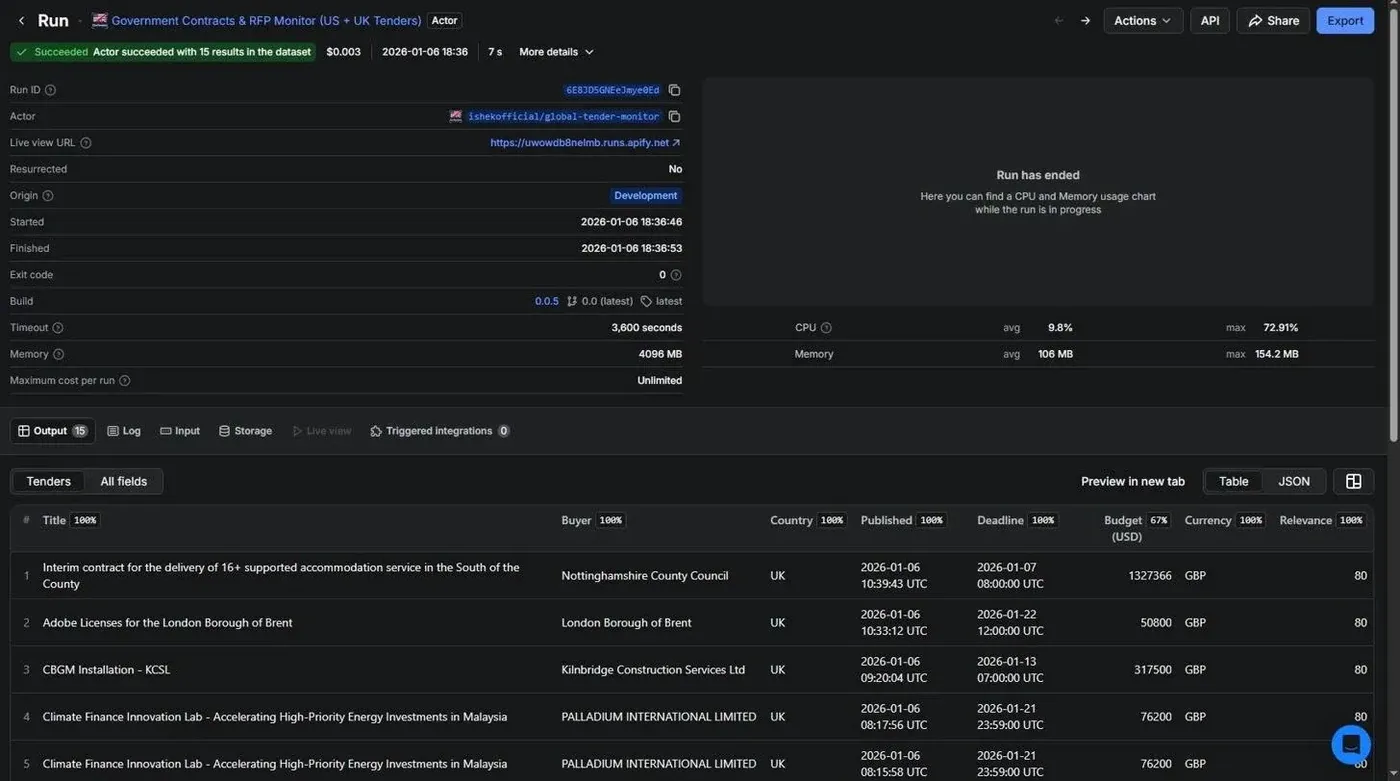
The Actor has been live since January 2026. Currently 13 users, over 99% run success rate. No run has ever needed manual recovery.
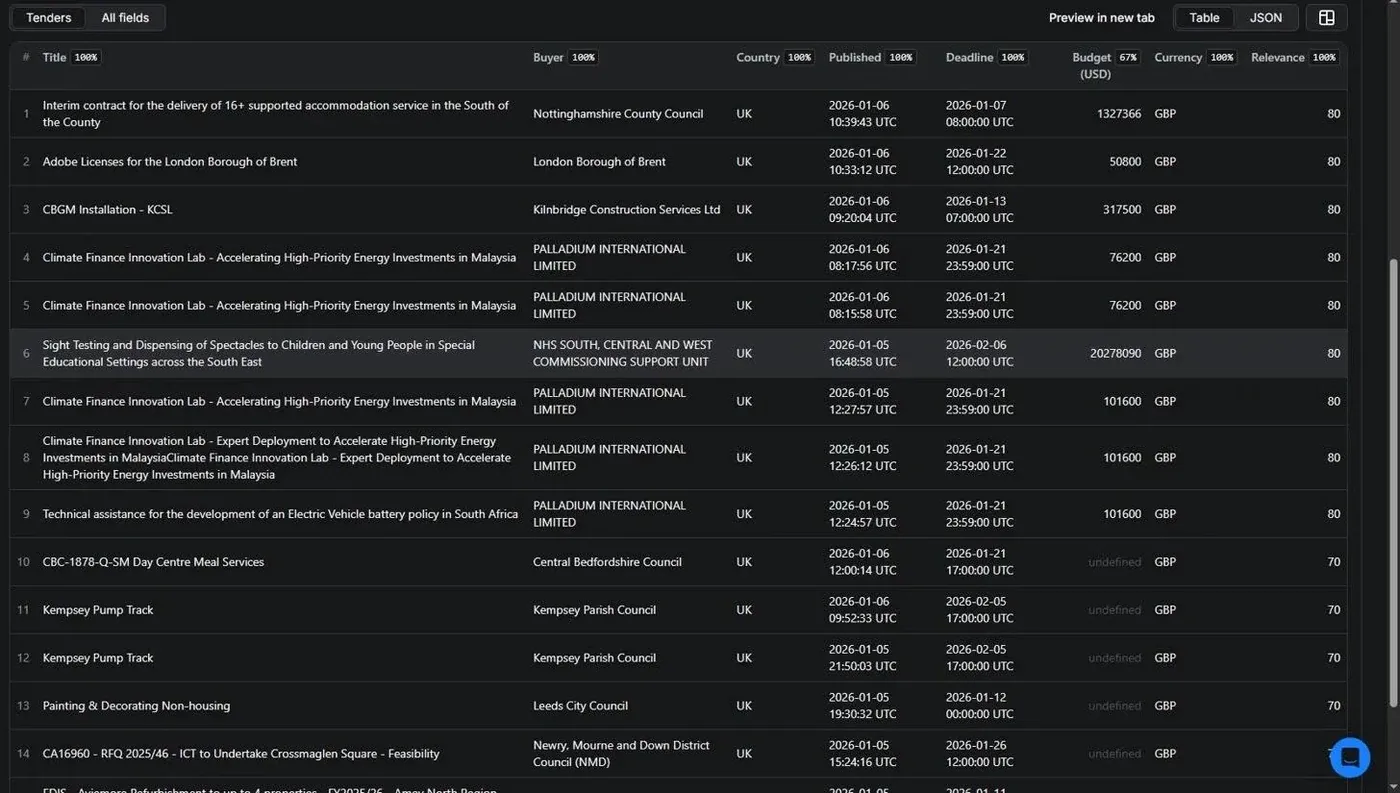
A typical run returns contracts sorted by confidence score. Each record is fully structured: title, buyer hierarchy, contact email and phone where available, document URLs, classification codes, deadline, and score. Everything a sales or BD team needs to qualify an opportunity without doing any additional lookup.
What I'd do differently
Currency rates should be dynamic. Static rates work fine for filtering but for serious financial analysis you'd want live FX rates fetched at runtime. On the v2 list.
Canada got cut from v1. MERX and CanadaBuys both have APIs, but mapping their procurement taxonomy to the unified schema added scope I couldn't justify at the time. It's the most-requested addition from current users.
The confidence score works but hasn't been validated at scale. The weights are based on reasonable assumptions, but they've never been tested against a labeled dataset. A future version should let users tune them: your business might care more about budget than recency, or vice versa.
The core insight hasn't changed since I built it: this data is just sitting there. Completely public, reasonably structured once you do the normalization work, and most of the businesses that should be finding it aren't. I watched a few people complain about that for long enough before doing something about it.
The Government Contracts & RFP Monitor is live on Apify Store at ishekofficial/goverment-contract-monitor. Pay-per-use, no subscription required.