Google Maps can help you find businesses, understand local markets, and conduct competitive analysis, but it wasn’t built for data collection at scale. The platform’s search results cap out at around 120 listings per query - to get more places, you’d need to repeatedly zoom into the map's subsections. Exporting data in bulk isn’t supported (which might have left you clicking through profiles manually to gather the details you need). Plus, if you’ve looked into the official Google Maps API, you already know it wasn’t designed for easy data extraction either:
- The API only returns 20 results per call, with a hard 60-result ceiling per query
- Free API calls are limited, requiring constant usage monitoring to avoid hitting caps or account blocks
- Google can change pricing or impose new restrictions at any time, disrupting your workflow without warning
Note that whether you use manual search or the API, neither method will give you emails, LinkedIn profiles, or other outreach-ready contact details.
Google Maps Scraper eliminates those obstacles by pulling complete business details such as names, websites, reviews, hours, or ratings, in structured, exportable formats. It can run thousands of queries automatically, so you get unlimited, clean data at scale without copy-paste work and rate-limits - just thousands of listings ready to analyze or plug into your workflows.
How to scrape data from Google Maps
We’re going to show you how to use the Apify platform and a ready-made tool called Google Maps Scraper to extract data from Google Maps. This scraper will enable you to extract the most recent Google Maps data directly from the website, including reviews, images, opening hours, and popular times.
To learn how to achieve this, you can follow a step-by-step guide or watch the YouTube tutorial below.
How to use Google Maps for business lead generation
Step 1. Go to Google Maps Scraper
First, go to the Google Maps Scraper page to try it for free.

You can create a free account using only your email address or GitHub account. Afterward, you will be redirected to Apify Console – your workspace for all things data extraction.
Step 2. Indicate the search term or URL to scrape
There are two ways to get your Google Maps data. Choose your starting point: search terms or URLs.
- How to scrape Google Maps by search term + location
Enter your search terms in the first field of the scraper, e.g., bagel and location: New York. That would be enough for a regular scrape. The scraper will find places in New York City that mention bagel.
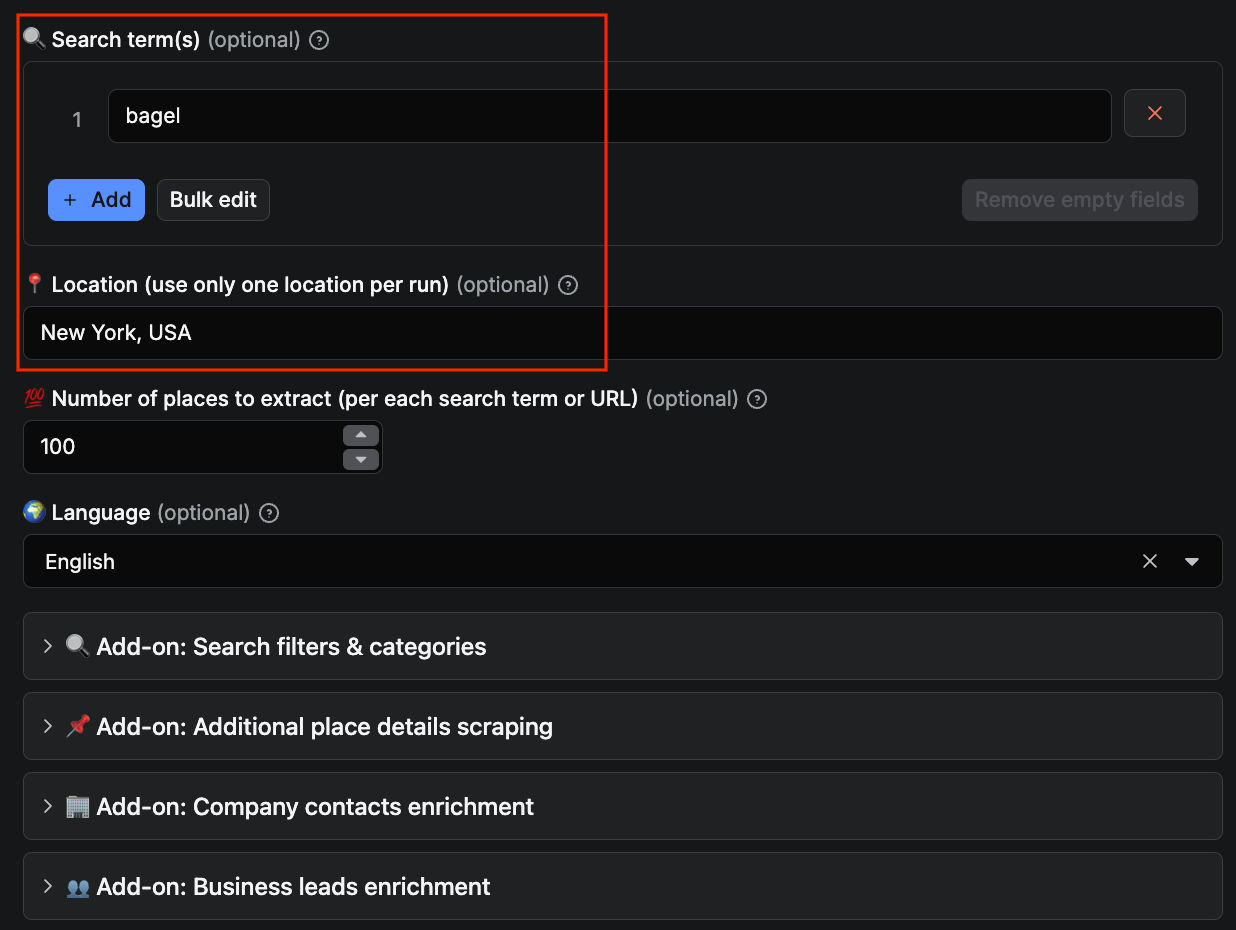
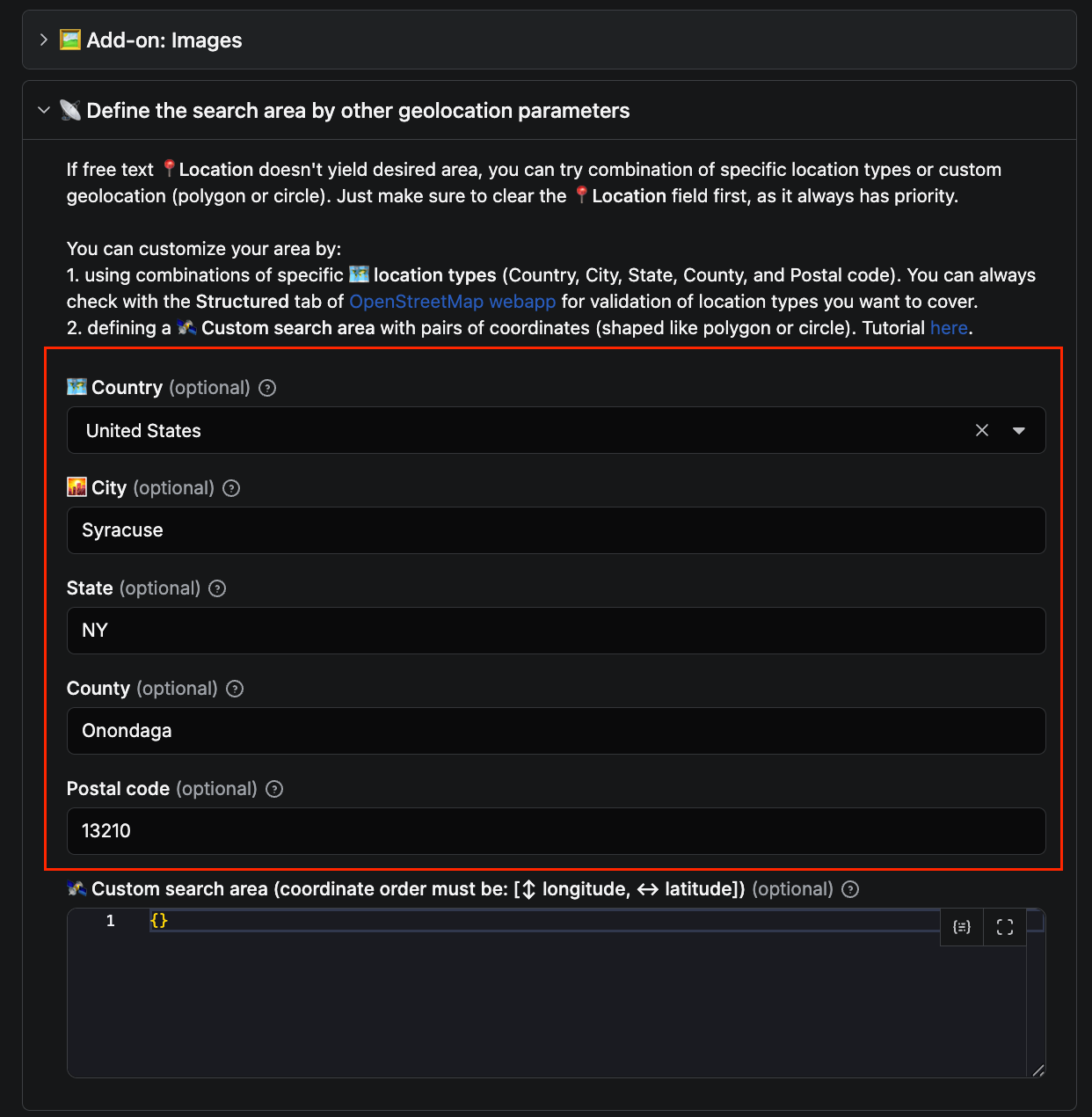
Alternatively, you can make your search even more granular in the Define the search area either by typing the rest of the address (state, US county, postal code) or by inserting the latitude and longitude coordinates of the area of your interest. Here's a more detailed guide on granular search in Google Maps.
- How to scrape Google Maps by URL
Open the Google Maps website in a separate tab, search for New York -> bagel and, once Google Maps provides you with results, copy the URL and paste it into the respective field.
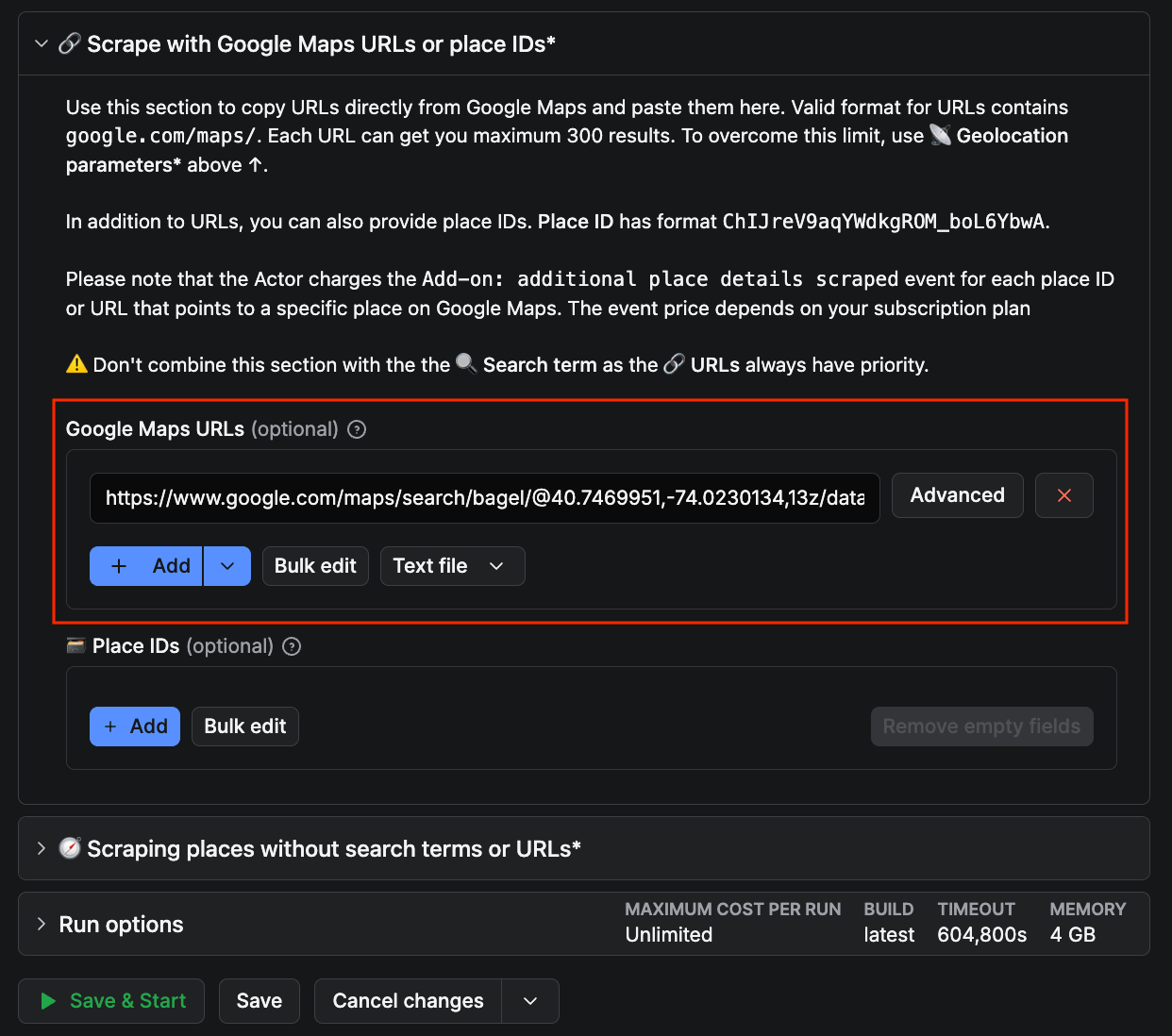
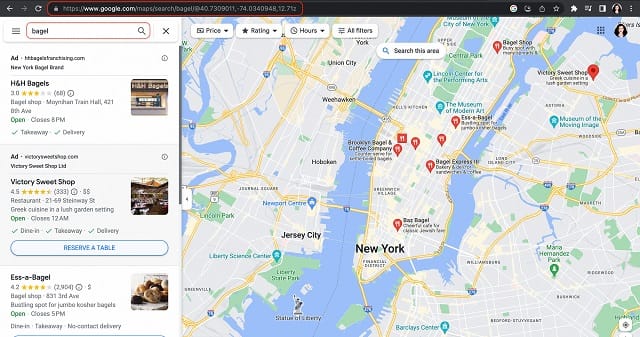
How to scrape Google Maps by URL
With this option, you can also adjust the zoom level of the area to scrape, before you copy-paste the URL. If you zoom in, you will get more detailed results, including smaller businesses. Otherwise, you will obtain what Google Maps will consider the most relevant places over a larger area. You can read more about scraping Google Maps by URL here.
- Add optional enrichment features
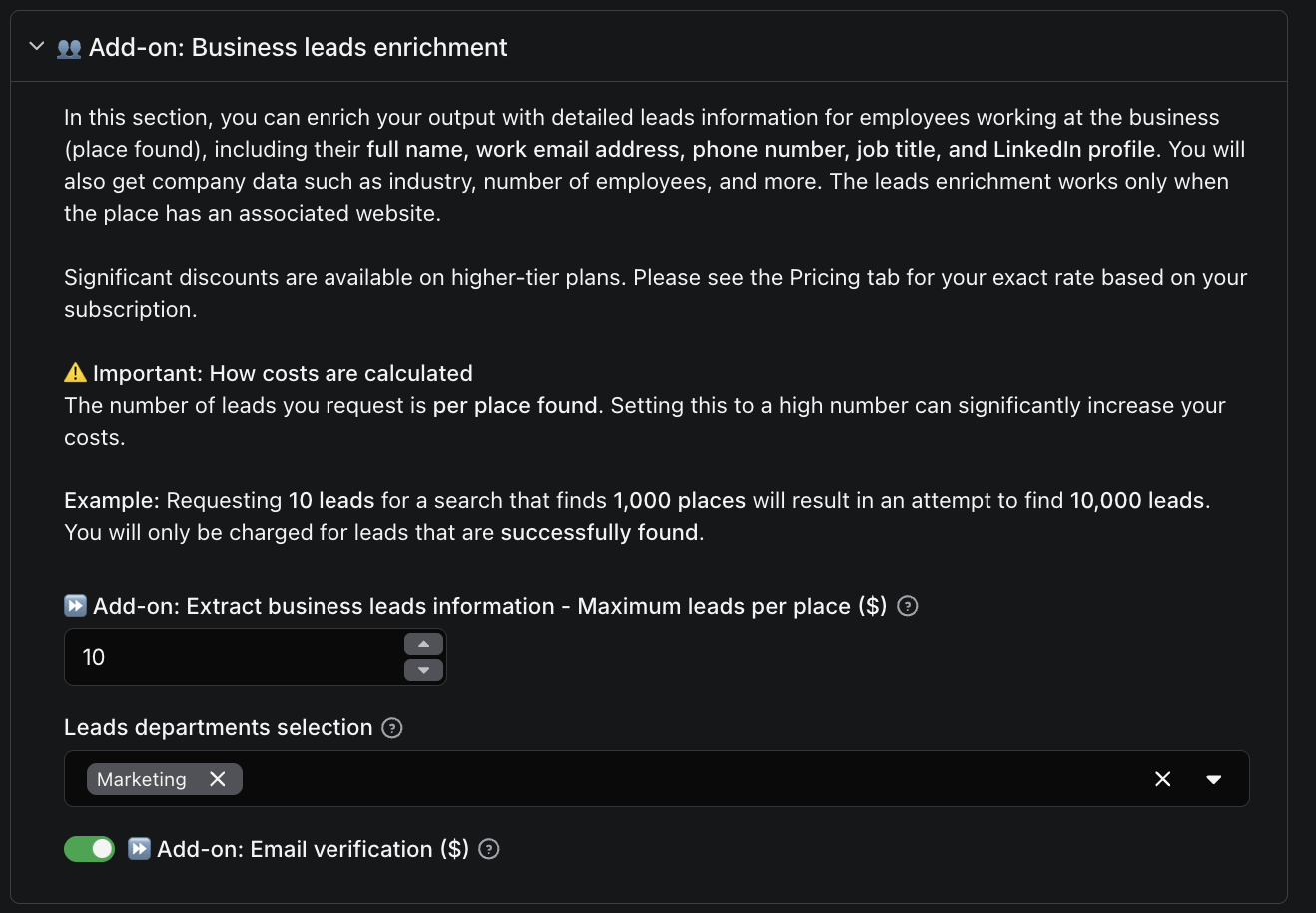
With the Company contacts enrichment add-on, the scraper doesn’t just pull business listings - it also uncovers contact details from the company’s website, including emails, phone numbers, and social profiles across Instagram, Facebook, LinkedIn, YouTube, TikTok, Twitter, and Pinterest.
On paid tiers, you can go even further with the Business leads enrichment feature, and tap into a broader database of employee data, providing insights such as headcount, staff names, and other business details. You can even filter by department, such as C-Suite, Marketing, or Product.
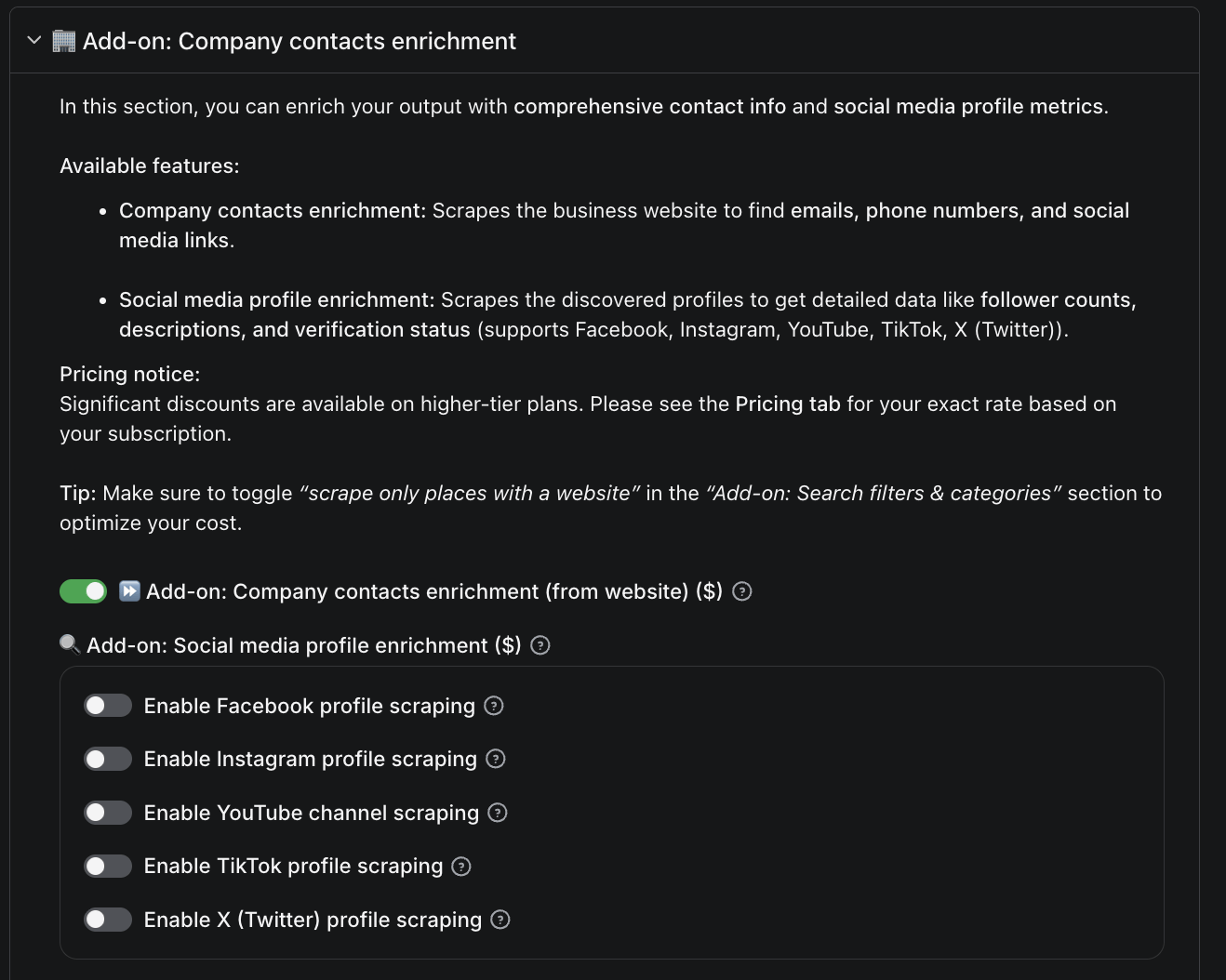
With business leads enrichment active, you can also switch on the Email verification add-on to validate every extracted email before it lands in your dataset. Each address comes back tagged as one of three things:
ok: resolves and accepts mail.invalid: doesn't exist or rejects mail.disposable: comes from a known throwaway domain.
Filter to valid on export, and you can skip running a third-party email verifier afterwards. Pricing is pay-per-event, so inconclusive checks don’t cost anything.
Step 3. Click Start
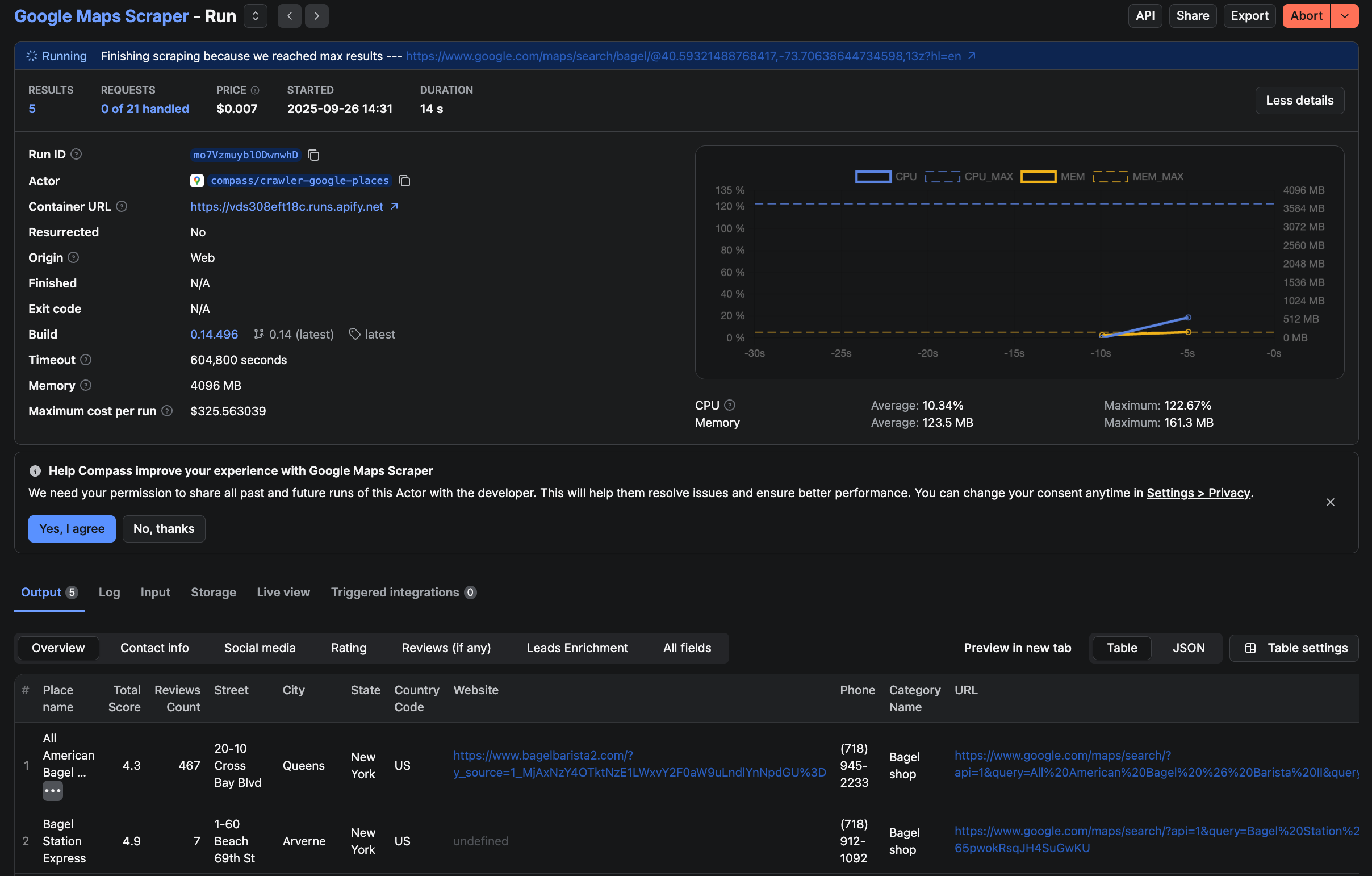
Once you are all set, click the Start button. Notice that your task will change its status to Running, so wait for the scraper to finish. It might take a few minutes before you see the status switch to Succeeded; this depends on the complexity of your search and how many places you've indicated.
Step 4. Download data from Google Maps
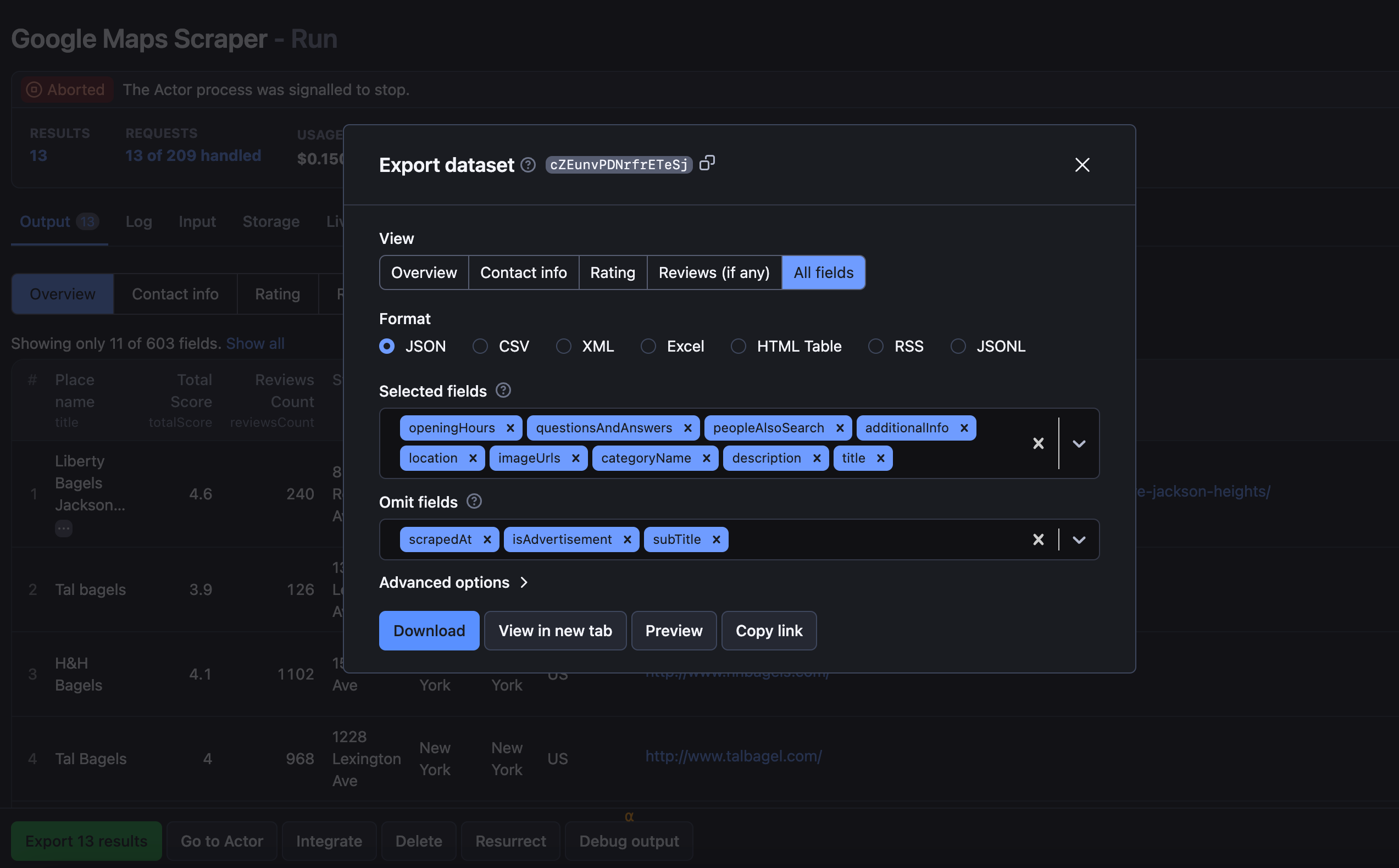
To preview and download the dataset, move over to the Storage tab or click on the Export button. It will contain your scraped data in various formats, including HTML table, JSON, CSV, Excel, XML, and RSS feed. Besides the format, you can also choose which part of the dataset you want to download: all data, rating, contact info or reviews, or even which specific fields to keep or get rid of.
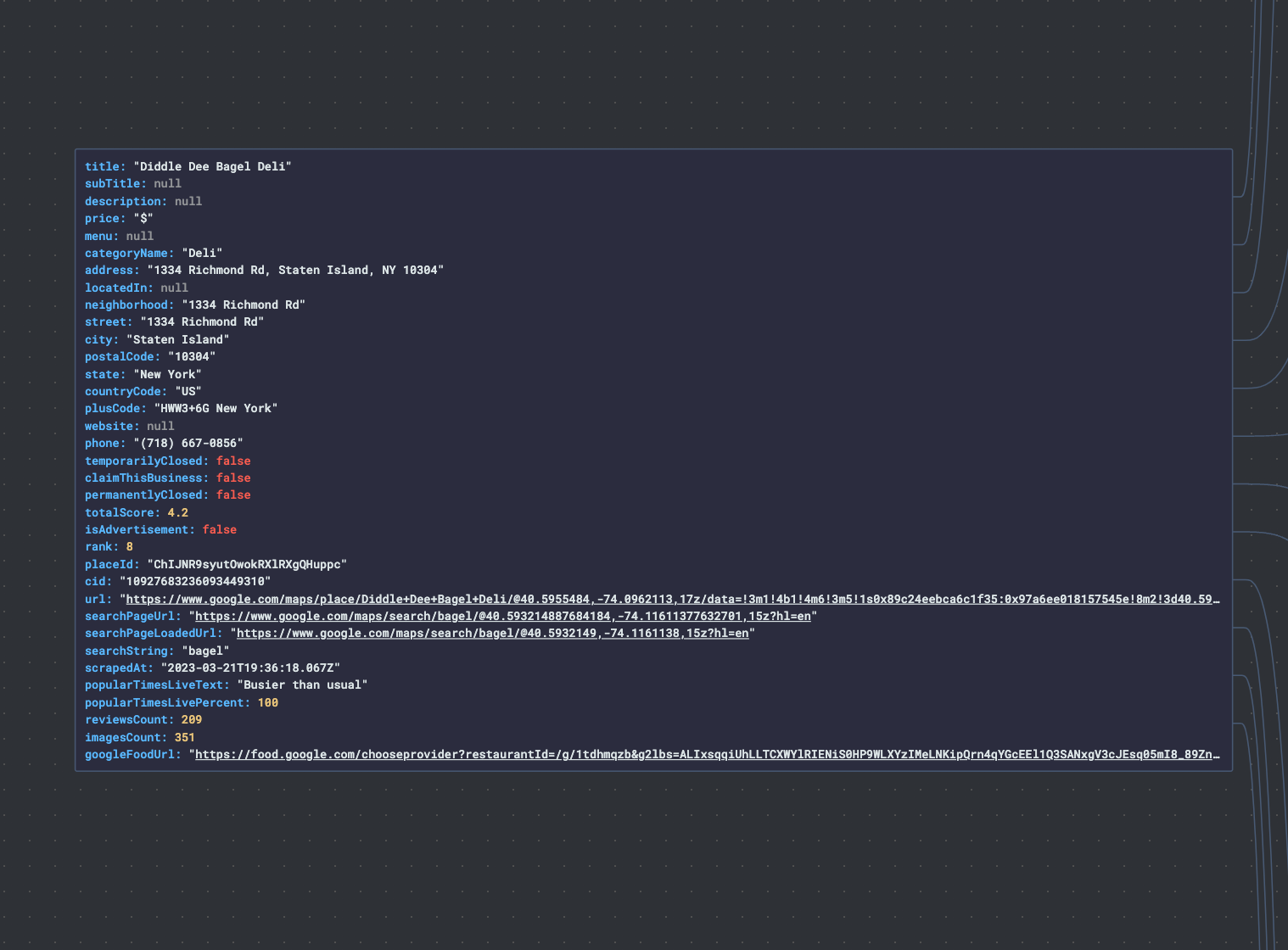
Part of the Google Maps dataset - basic info about the place
Finally, if this particular scraper seems too advanced for your needs, have no fear. There is also Google Maps Extractor. It has an easier interface and is great for quickly scraping Google Maps.
How to use data extracted from Google Maps
These days, without a digital presence on Google Maps, a local business can count itself as pretty much invisible. That's why Google Maps is a colossal free data repository for businesses and organizations, which makes it a goldmine for extracting all kinds of invaluable data: from reviews, geolocation, and gas prices to contact data such as emails, phone numbers, addresses, and websites of companies in the general vicinity. Here are just a few examples of how you can use this extracted data:
- Generate leads. By scraping Google Maps, you can build your own database of emails, phone numbers, reviews, ratings, and businesses for a targeted place, industry, or country.
- Monitor brand sentiment. You can analyze collected Google Maps reviews for positive/negative sentiment, quality of service, and specific phrases. Our Google Maps Reviews Scraper focuses specifically on Google Maps reviews, including reviewer name, reviewer ID & URL, reviewer number of reviews, and Is Local Guide parameter.
- Create a potential customer base. Websites and contact information are scattered all over the internet, but trying to find them takes a lot of time. Google Maps is one place where many of your prospects are gathered together.
- Search, monitor, and analyze the competitors' offers. Scraping Google Maps reviews about competitors can be a useful review framework for your business and can give you the capability to provide your clients with a better marketing service.
- Analyze geospatial data for scientific or engineering work. For instance, when working with satellite data and geolocation or analyzing territorial changes before and after an event, as has been thoroughly done in this Bellingcat study.
- Create mapping solutions. With that, your business will not just exist; it'll stand out on digital maps and provide tailored experiences for your customers.
- Carry out a product hunt. Find businesses offering the product you're searching for and choose the best option out of the pool of results.
- Benefit from big data, even if you're a small player. Find opportunities for expanding your business or organization and developing a working market strategy.
Whatever your use case, Google Maps Scraper gets you the data you need.
FAQ
Is it legal to extract data from Google Maps?
Anybody can get information from publicly available websites - web scraping is just a faster and more efficient way to get the job done. It is therefore legal, as long as you respect the personal data and copyright laws. To learn more about the legality of web scraping, read our blog post on the subject.
Is it legal to scrape Google Maps reviews?
Yes, but with caveats. Public reviews posted on Google Maps often contain personal information such as a name, profile image, review ID. All that information combined could be potentially used to identify the reviewer - which is protected by GDPR in the EU and by other laws around the world, and for a good reason.
You should only scrape personal data if you have a legitimate reason to do so, and you should also factor in Google's Terms of Use. We are aware of that and built our Google Reviews Scraper in a way to be able to avoid extracting personal data. You can read the basics of ethical web scraping in our expert piece on the legality of web scraping.
Can I scrape Google Place IDs?
Yes. Google Maps Scraper extracts Google Place IDs, among other things like place name, address, contact details like website and phone number, reviews, opening hours, popular times, open/closed status, menu, and prices.
How do I extract email from Google Maps?
You can use a web scraper tool created specifically to extract contact details from Google Business Profile (formerly Google My Business). Google Maps Email Extractor will get you G Maps business details such as place name, location, website, phone number. Besides, you can get info on rating, number of reviews, popular times, category, ads if available, opening hours and URLs. It can also include detailed reviews of every place as well as their translations.
Can I build my own Google Maps data scraper?
If you want to make a map scraper of your own, you can do it, but these days you don't have to start from scratch. Start off with a simple web scraping template in Python, JavaScript, and TypeScript. You can host your scraper on the Apify platform, which will cover the proxy, monitoring, and scheduling.
Do I need proxies to scrape Google Maps?
It's preferable to scrape such a huge website as Google Maps by using proxies, that way, it's faster and more efficient. Because of this, if you get serious about scraping Maps, it will eventually start costing you at least a little cash, but in the meantime, you can use the Apify Free plan, which includes $5 in monthly platform credits you can spend on proxies or Actor runs.
Can I use AI to scrape Google Maps?
Yes. In 2026 you have several options: Agentic browsers like Claude in Chrome and ChatGPT Atlas can drive a real browser and extract data directly from Google Maps. For programmatic use, Apify offers an MCP server plus SDKs for LangChain, LLamaIndex, and more.
Can I integrate data from Google Maps with my app?
Yes, though the data has to be in machine-readable format. Apify platform stores data in universal formats such as JSON, XML or CSV which makes it easy to plug in extracted Google Maps data into other apps. The platform also allows seamless data integration via Apify integrations, covering workflow automation (Make, n8n, Zapier), data pipelines (Airbyte, Keboola), AI frameworks (LangChain, LlamaIndex, OpenAI Agents), coding agents (Claude Code, Cursor), and dozens more.
How do I scrape my location on Google Maps?
You can get G Maps data from the exact location by indicating coordinates or postal address, including your current location. Here's how to do it in 4 steps with Google Maps Scraper:
- Head over to the 🛰 Define the search area section and indicate your postal details (country, state, city, zip code).
- Alternatively, indicate your exact coordinates (longitude and latitude).
- Begin data collection by clicking 'Start'.
- Download your Google Maps data in CSV format.
How to scrape data from Google Maps without getting blocked?
The best way is to use proxies. The vast majority of websites use anti-blocking protections of varying caliber to fend off bots. That's understandable – traffic that comes from real visitors is more valuable than the bots' traffic (even if the bot comes at the command of a real human). To avoid getting blocked while scraping Google Maps, or any other website for that matter, you should first try using data-center, residential, or Apify's Google SERP proxies, the last of which is purpose-built for Google services.
Can I scrape Google Maps by geolocation?
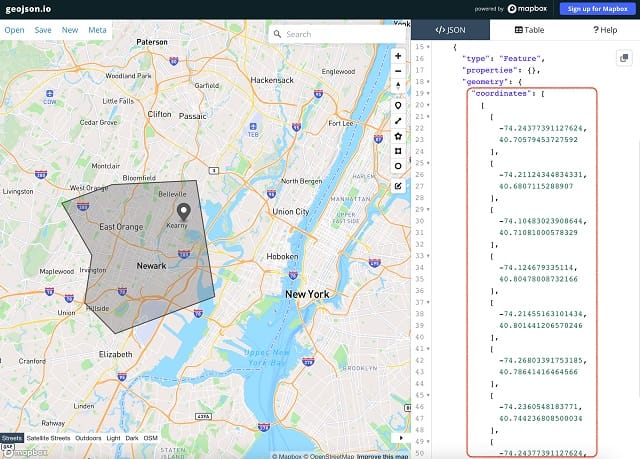
Yes. Extracting data by geolocation can be very handy because you can create various irregular shapes for specific areas on the map. We recommend using Geojson.io for an easy coordinates definition and following our guide to see how to apply those coordinates in Google Maps Scraper.