When people talk about production-grade scraping, they usually talk about anti-bot systems, proxies, browser automation, parsing logic, or extraction speed.
Those things matter.
But after analyzing 54 builds of our Vinted Smart Scraper on Apify, the biggest lesson was much less glamorous:
The scraper logic was not the main thing breaking the system.
The build system was.
The hardest part of turning a marketplace-monitoring idea into a production-grade Actor was not getting one successful scrape. It was stabilizing packaging, Docker layout, runtime entrypoints, schema wiring, and the operational structure around the Actor so the system would keep building and keep running.
That distinction matters because it changes how you design Actors.
This article is a reverse engineering of our own build history for a cross-country Vinted monitoring Actor on Apify. By looking back at 54 builds, 16 failures, and the changes that recovered stability, I want to show what actually made the difference between "an Actor that exists" and "an Actor you can operate in production."

The system we were trying to build
The target was not just "a Vinted scraper."
We were building a marketplace-monitoring Actor that had to support:
- Repeated runs instead of one-off checks
- Structured JSON output instead of screenshots and notes
- Cross-country comparison as a first-class workflow
- Reusable inputs through Apify Console and API
- A path toward monitoring, exports, and downstream automation
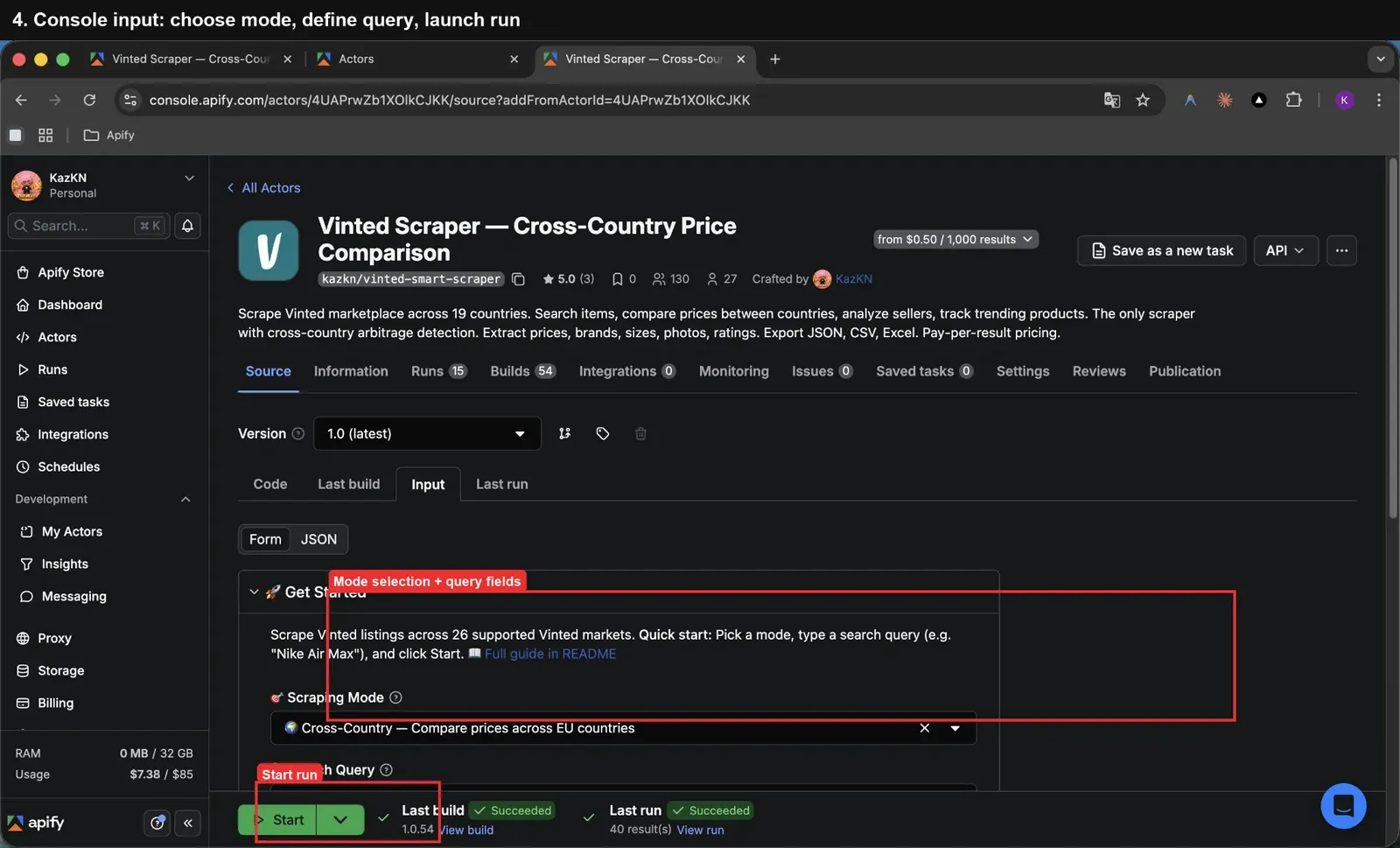
At the engineering level, the real challenge was not inventing the use case. The real challenge was making the Actor stable enough to build, package, and run repeatedly inside Apify.
The build history in one image
Across the 54 builds we analyzed, the story is not random at all.
There are clear clusters of failed builds, clear recovery points, and a strong pattern: failures usually happened when packaging, Docker layout, or runtime conventions changed too aggressively at once.
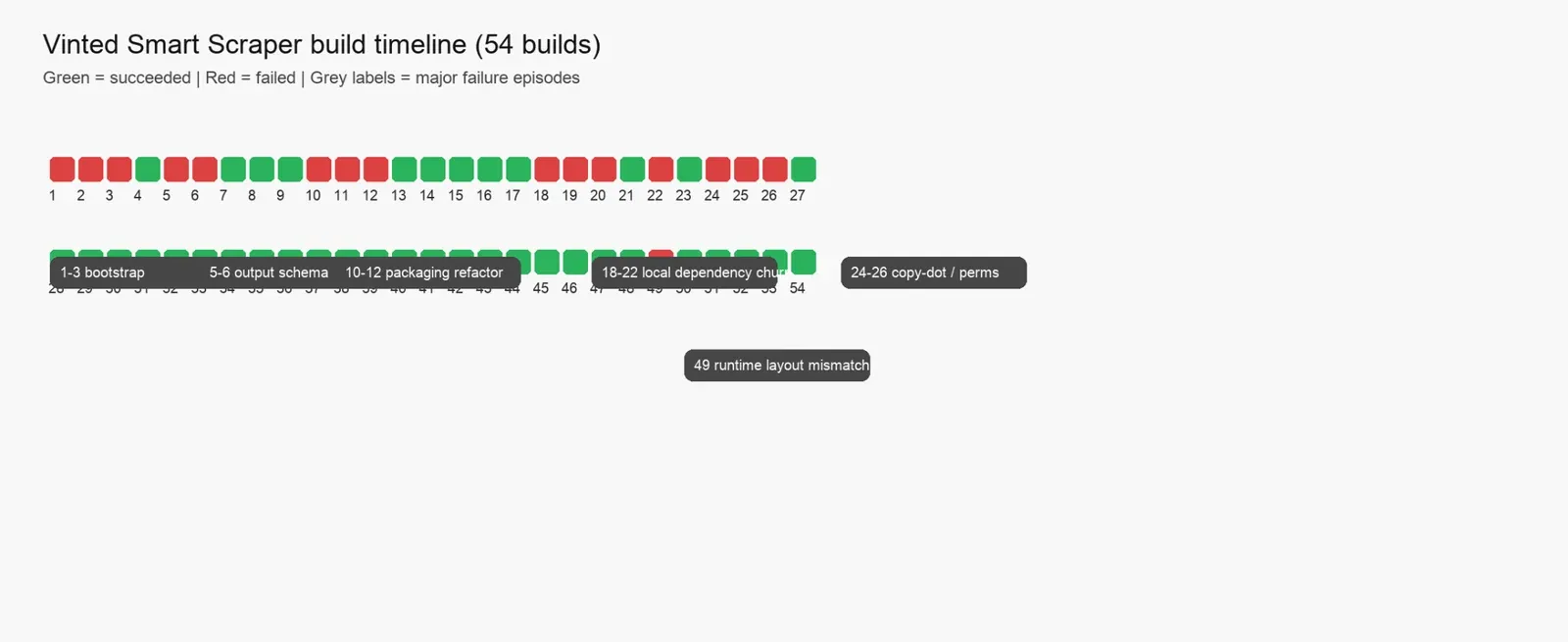
Summary of the history:
- Total builds analyzed: 54
- Successful builds: 38
- Failed builds: 16
The broad pattern is simple:
- Early failures came from bootstrap and schema instability
- Mid-history failures came from repeated monorepo and Docker experiments
- Late failures came from a runtime layout mismatch after a packaging refactor
That is not a scraping problem. That is an Actor engineering problem.
Failure episode 1: bootstrap metadata and schema instability
The first failed cluster happened immediately: builds 1.0.1 through 1.0.3.
The main issue was not business logic. There was instability in the Actor metadata and schema wiring during the initial bootstrap phase.
One of the earliest changes was a metadata shift inside actor.json, where environmentVariables changed shape before the rest of the setup stabilized.
A representative change looked like this:
"buildTag": "latest",
- "environmentVariables": [],
+ "environmentVariables": {},
At the same time, the input schema was still being adjusted. For example, fields in INPUT_SCHEMA.json were being rewritten to add UI editor types:
"description": "Target countries (19 Vinted markets supported)",
+ "editor": "select"
That sounds minor, but early bootstrap systems are fragile. Actor metadata, schema structure, and build expectations were all still shifting.
This cluster only stabilized when the focus moved away from metadata churn and toward making the input schema coherent enough to support a clean first successful build in 1.0.4.
Failure episode 2: output schema wiring broke the build
The next cluster appeared in builds 1.0.5 and 1.0.6.
This time, the trigger was explicit: output schema wiring.
The failing change added an output path into Actor metadata:
"input": "../vinted-actor/INPUT_SCHEMA.json",
+ "output": "../vinted-actor/.actor/output_schema.json",
"dockerfile": "../Dockerfile",
Again, the mistake was not that output schemas are bad. The mistake was adding a new structural dependency before the rest of the packaging chain had proven stable.
That cluster finally recovered in 1.0.7 after the output schema integration stopped fighting the rest of the build.
This is one of the first clear lessons from the history:
Schema changes are not "just metadata" when they change what the build expects to exist.
If you change schema structure and packaging assumptions together, you are taking a much bigger risk than it looks like in the diff.
Failure episode 3: the first major packaging refactor removed the working Dockerfile
This was the first truly expensive failure cluster: builds 1.0.10 through 1.0.12.
A known-good Dockerfile existed before this cluster. The layout had these steps:
- Copy core directory
- Install dependencies there
- Copy Actor directory
- Install dependencies there
- Run the Actor explicitly from the Actor directory
Then that working Dockerfile disappeared.
The diff that triggered the break is brutally clear:
-FROM apify/actor-node:20
-
-# Copy vinted-core
-COPY vinted-core /vinted-core
-WORKDIR /vinted-core
-RUN npm install --omit=dev
-
-# Copy vinted-actor
-COPY vinted-actor /actor
-WORKDIR /actor
-RUN npm install --omit=dev
-
-CMD ["npm", "start", "--prefix", "/actor"]
At the same time, the input schema path inside .actor/actor.json was being changed:
- "input": "./INPUT_SCHEMA.json",
+ "input": "../INPUT_SCHEMA.json",
That combination was toxic.
Instead of changing one system boundary at a time, the build changed Docker layout, schema pathing, and root vs. subdirectory assumptions simultaneously.
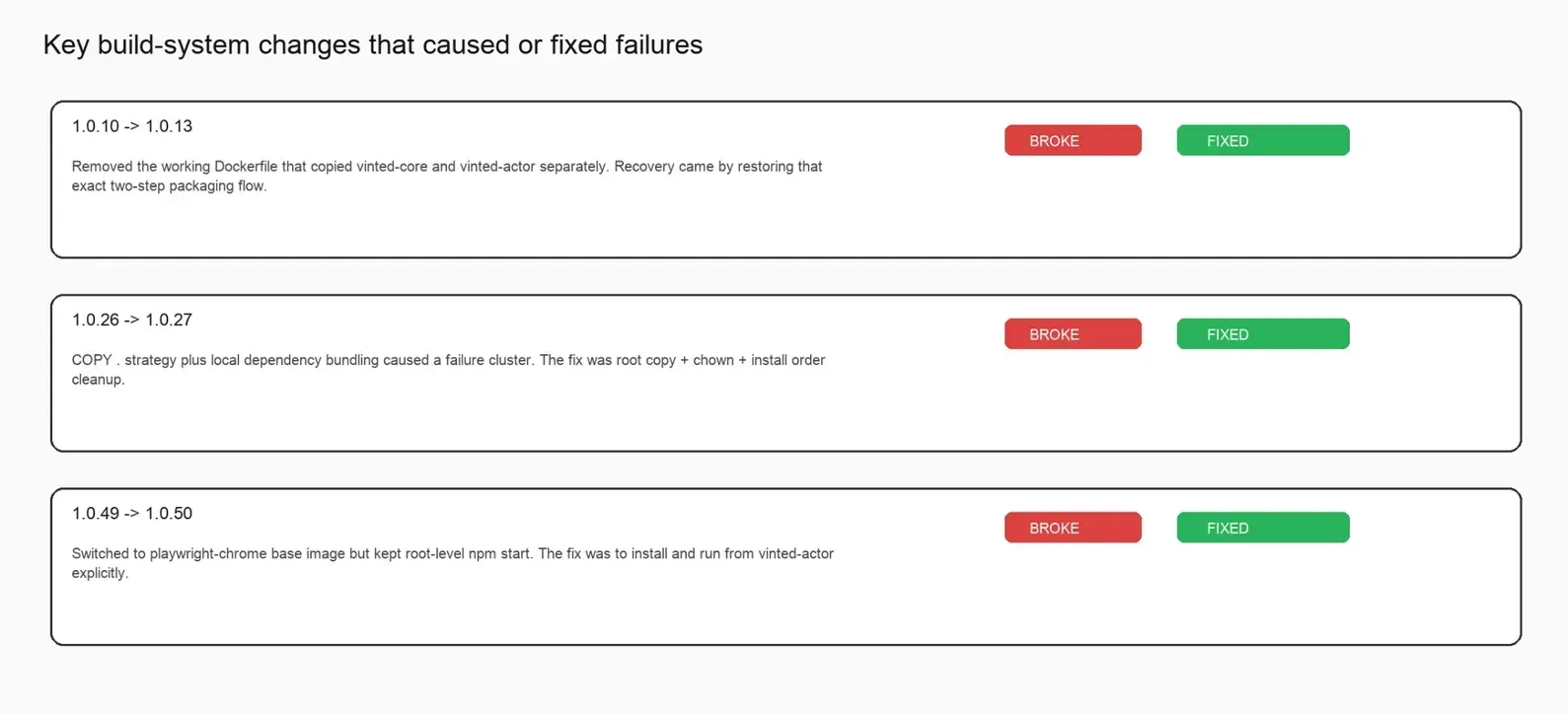
The recovery came in 1.0.13, and it was revealing: the known-good two-package Dockerfile was restored almost exactly.
When a major refactor fails and the fix is "restore the old known-good path," the problem is usually not a subtle edge case. The problem is architectural churn.
Failure episode 4: local dependency and monorepo packaging churn
The next cluster, builds 1.0.18 through 1.0.22, was another packaging war.
The Actor was oscillating between root-level packaging and subdirectory packaging while trying to preserve a local dependency relationship.
That instability shows up directly in the Dockerfile and package changes. One critical change was switching from:
- COPY vinted-actor /actor
+ COPY . /actor
At roughly the same time, package wiring changed to point the dependency explicitly at the local path:
- "vinted-core": "1.0.0"
+ "vinted-core": "file:/vinted-core"
This is the kind of change that can absolutely be correct in isolation. But in this build series, it was part of a wider structural oscillation.
What finally stabilized the series was a gradual return to consistency: first a partially successful local dependency fix in 1.0.21, then a stronger recovery in 1.0.23 when the packaging layout returned to a known-good convention.
Local dependency wiring is not just a package.json concern. It is a packaging, Docker, and runtime concern at the same time.
Failure episode 5: copy-dot strategy and permissions problems
Builds 1.0.24 through 1.0.26 produced another clear cluster.
This time, the Actor moved toward a root-level COPY . strategy combined with local bundling logic.
The failing Dockerfile direction looked like this:
-# Copy vinted-core
-COPY vinted-core /vinted-core
-WORKDIR /vinted-core
+WORKDIR /actor
+
+# Copy everything
+COPY . .
+
+# Install vinted-core first (local dep)
+RUN cd vinted-core && npm install --omit=dev && cd ..
+
+# Install actor deps
 RUN npm install --omit=dev

-COPY vinted-actor /actor
-WORKDIR /actor
-RUN npm install --omit=dev
-
-CMD ["npm", "start", "--prefix", "/actor"]
+CMD ["npm", "start"]
Then, build 1.0.26 failed with exit code 243.
That does not read like a business-logic problem. It reads like a packaging/runtime/permissions problem. And the next build, 1.0.27, confirms exactly that. The recovery patch explicitly introduced a root copy, ownership fix, and cleaner install order:
+USER root
+
 WORKDIR /actor
+COPY . .
+RUN chown -R myuser:myuser /actor

-# Copy everything
-COPY . .
+USER myuser

 # Install vinted-core first (local dep)
-RUN cd vinted-core && npm install --omit=dev && cd ..
+RUN cd vinted-core && npm install --omit=dev
That is one of the cleanest lessons in the whole build history:
If your Actor build depends on local packages and COPY ., filesystem ownership is not an implementation detail. It is part of the build design.
Failure episode 6: late runtime layout mismatch after switching base image
The last notable failed cluster is late in the history: build 1.0.49.
By that point, the Actor had already gone through many successful versions. The build switched to a new Playwright base image:
FROM apify/actor-node-playwright-chrome:20That change alone was not the real issue. The actual problem was the mismatch between the packaging level and runtime entrypoint. The root-level Docker setup assumed npm start from the project root, but the actual runnable application still lived in vinted-actor.
The fix in 1.0.50 made that explicit:
-RUN npm install --omit=dev
+RUN cd vinted-actor && npm install --omit=dev

-CMD ["npm", "start"]
+CMD ["bash", "-lc", "cd vinted-actor && npm start"]
It shows that even after long stable periods, runtime assumptions can still break if the physical project layout and the startup command stop matching.
Your runtime entrypoint is part of your architecture. If it points at the wrong level of the project tree, the build can succeed conceptually but fail operationally.
What other Actor builders can reuse from this
If I had to compress the full reverse engineering into a small checklist, it would be this:
- Don't refactor Dockerfile layout, schema pathing, and runtime entrypoint at the same time. Isolate schema changes whenever possible.
- Preserve known-good Dockerfiles aggressively. If you have a working multi-stage build, don't delete it just to make the file shorter.
- Local dependencies in a monorepo are a system-level concern. They are part of packaging design, not just a package.json edit.
- Think about permissions before the build forces you to. If you use
COPY ., confirm that the Apify runner user (myuser) actually owns the copied files. - Runtime entrypoints must reflect the actual location of the runnable app, not just the repository root by habit.
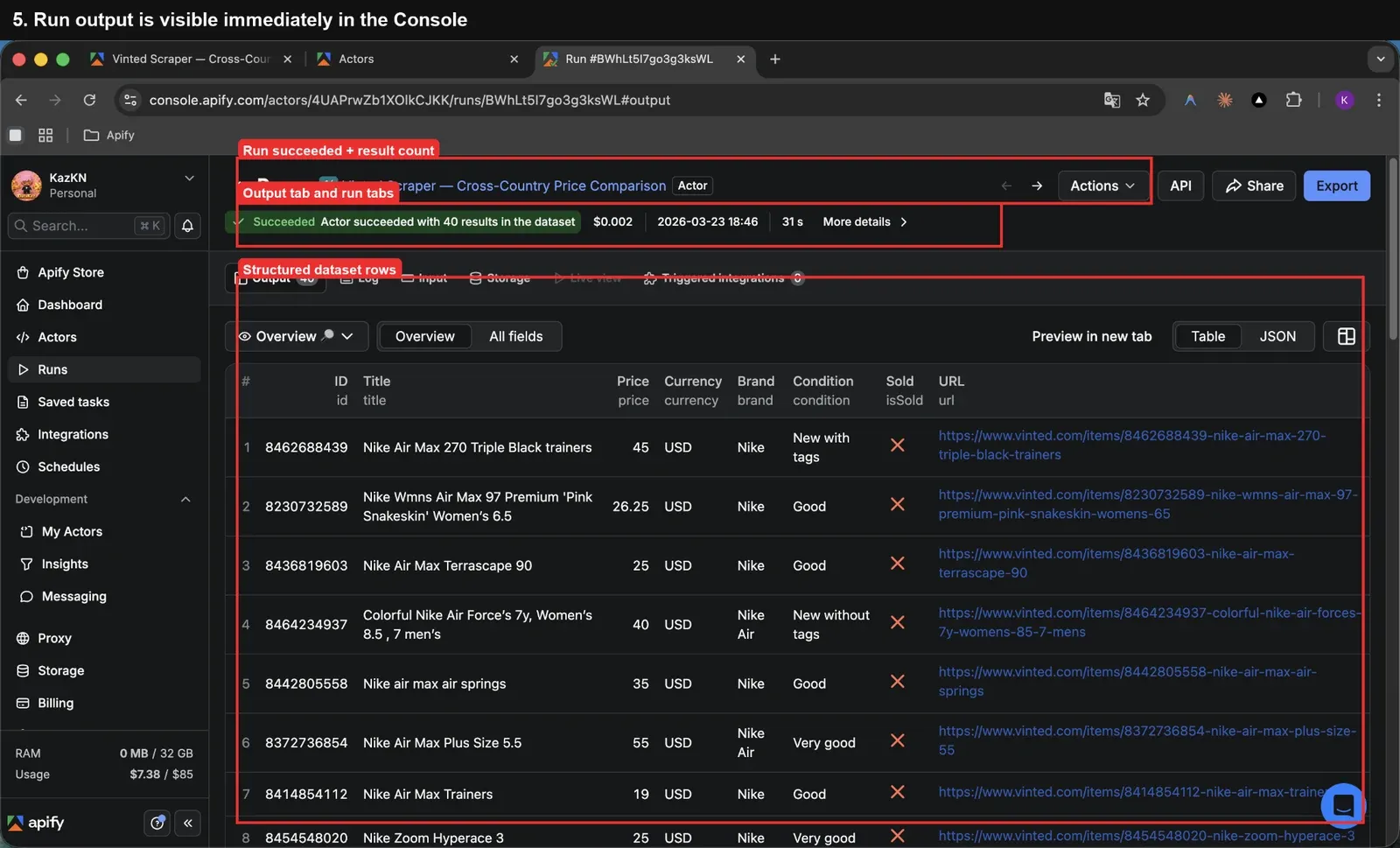
Final take
Before analyzing the build history, it would have been easy to say that building a production-grade marketplace-monitoring Actor is mostly about scraping logic.
After analyzing 54 builds, I don't think that is true anymore.
The harder problem was stabilizing the system around the Actor: how it is packaged, how it is built, how it is started, and how it evolves without breaking itself.
The Actor became production-grade not when it produced one good run, but when the surrounding build system stopped fighting the product. If you are building Actors on Apify, don't treat build architecture as an afterthought. It is one of the main things that determines whether the Actor can survive production at all.
FAQ
What was the most common source of failure across the 54 builds?
Packaging and build-system instability. The most repeated failure clusters were caused by Dockerfile changes, monorepo layout churn, dependency wiring, and runtime-entrypoint mismatch, not by the marketplace-monitoring logic itself.
What was the biggest turning point in the history?
The clearest turning points happened when the system returned to a known-good Docker and packaging convention after failed experiments. Restoring a stable two-package layout repeatedly brought the Actor back to life.