Why I built this
I built this Actor after getting frustrated with how unusable YouTube transcripts actually are. Every time I needed to revisit a complex data structure or algorithm concept or double-check a specific web development framework setup from a video, I found myself rewatching the entire thing just to find one line I had already heard.
The transcript existed - but it was buried behind clicks, broken into tiny fragments, and impossible to reuse once I closed the tab.
So instead of working around it, I decided to fix it.
What I built
I built a Python Actor on Apify that:
- Fetches transcripts directly using YouTube’s timedtext API (no API key)
- Extracts video metadata using yt-dlp
- Converts fragmented captions into readable paragraphs
- Generates a structured PDF with thumbnail and metadata
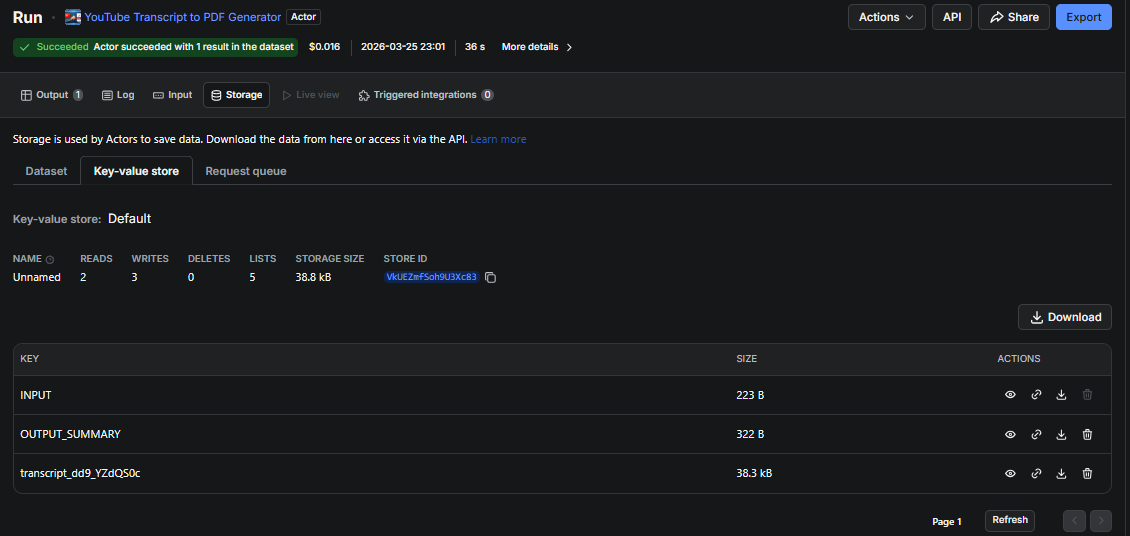
- Stores output in Apify’s key-value store
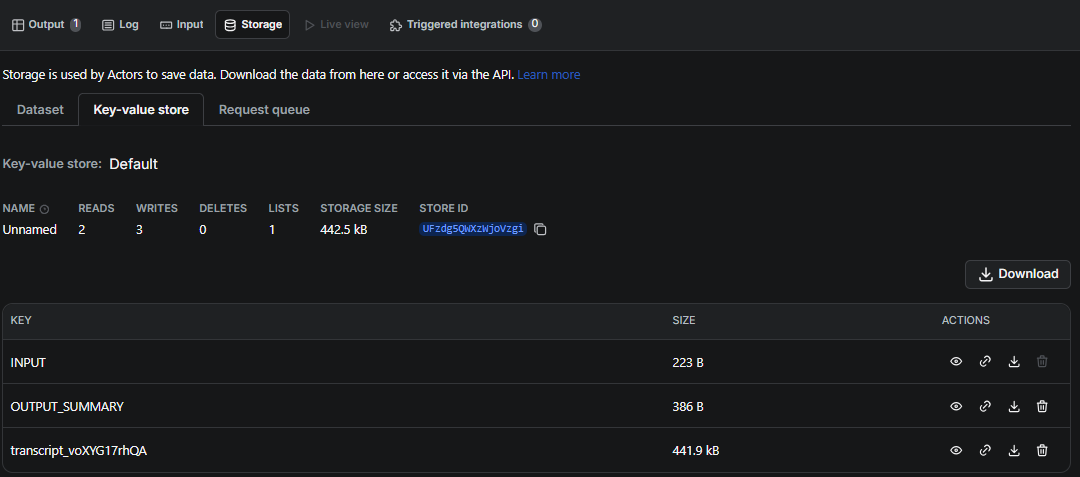
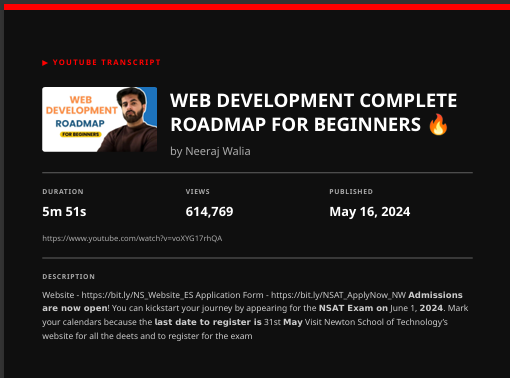
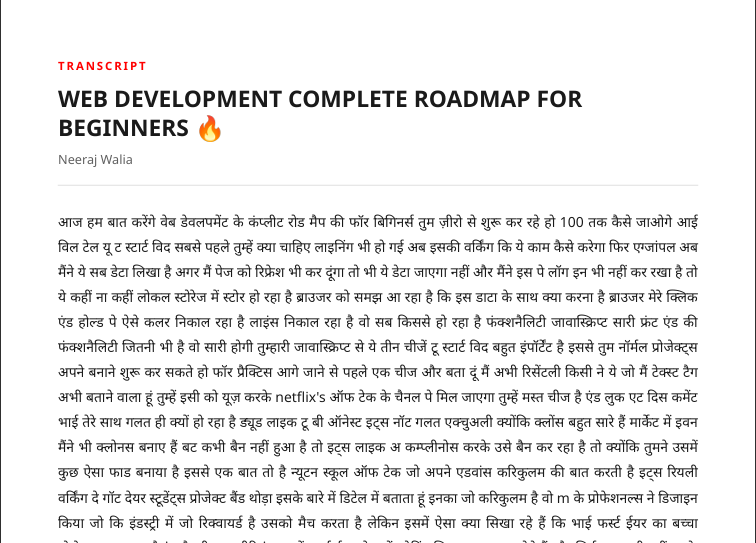
The goal wasn’t just extraction - it was making the output actually usable.
Challenges and fixes
Before going into implementation, here are the problems that shaped this project.
Getting blocked by YouTube
Everything worked locally - until I started scaling tests. After multiple runs, YouTube temporarily blocked my IP.
To fix this, I moved execution to Apify cloud and used residential proxies.
This solved the blocking issue, but it introduced another problem - the proxy started interfering with internal API calls. I address that separately in section 3.4.
YouTubeTranscriptApi API changed in v1.0.0.
My initial code used the old class-method pattern:
transcript = YouTubeTranscriptApi.get_transcript(video_id)
It worked locally, but in Apify Console, it failed with:
ERROR Failed: YouTubeTranscriptApi has no attribute 'get_transcript'
Fixing this didn’t take long because the error message was clear. After a quick search, I found that the function had changed to fetch(). The fix:
ytt = YouTubeTranscriptApi()
transcript = ytt.fetch(video_id)
ReportLab's ImageReader broke in newer versions
# Old code - crashed on Apify cloud
img_data = ImageReader(BytesIO(resp.content))
img = Image(img_data, width=120, height=68)
Everything worked smoothly as long as I was dealing with English transcripts. Things broke the moment I tried other languages.
The pipeline looked fine - no errors, no warnings. The logs showed success:
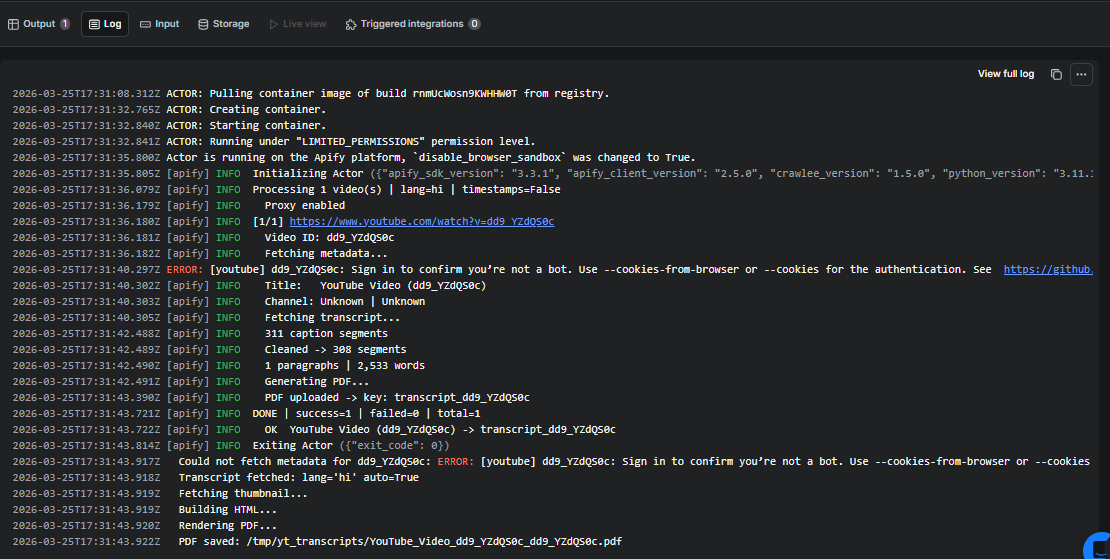
INFO  Transcript fetched: lang='hi' auto=True
INFO  243 segments | 1,847 words
INFO  PDF saved: /tmp/yt_transcripts/video.pdf
But every Hindi character in the PDF was a black square: ■■■■■ ■■ ■■■ ■■■■■■■. That made the bug harder to catch because nothing technically “failed.”
After tracing through the stack, I realized the issue was ReportLab itself. Its default font, Helvetica, doesn’t support Devanagari glyphs.
I even tried loading fonts from a GitHub CDN, but those requests were blocked in production.
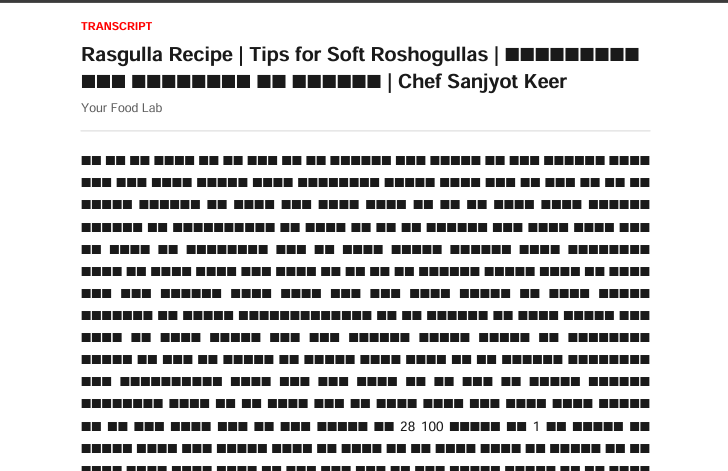
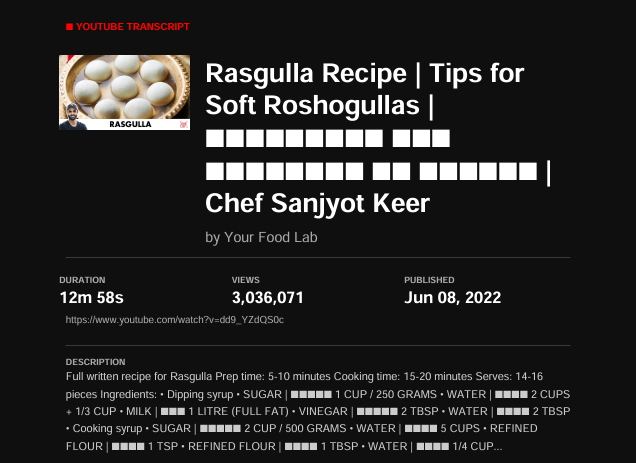
The fix was to stop patching ReportLab and switch to HTML + CSS rendering using WeasyPrint. Apify’s Docker image already includes Noto fonts (fonts-noto and fonts-noto-cjk), which cover every script YouTube has captions for, including Devanagari. This solved multilingual rendering cleanly.
FROM apify/actor-python:3.11
ENV PYTHONUTF8=1
ENV PYTHONIOENCODING=utf-8
RUN apt-get update && apt-get install -y \
    libpango-1.0-0 libpangoft2-1.0-0 libharfbuzz0b \
    libffi-dev libjpeg-dev libopenjp2-7 \
    fonts-noto fonts-noto-cjk \
    && rm -rf /var/lib/apt/lists/*
COPY requirements.txt ./
RUN pip install --no-cache-dir -r requirements.txt
COPY . ./
CMD ["python", "-m", "src"]
Proxy intercepting Apify's internal API
YouTube often blocks AWS IPs, so running this on the cloud required a residential proxy. And after adding the proxy globally:
os.environ["HTTP_PROXY"] = proxy_url
It causes Actor.push_data() to fail:
ApifyApiError: Access Denied
http://10.0.44.97:8010/v2/datasets/aFGIkamtzim5vybPX
It took some time to realize that the proxy was intercepting Apify’s internal API calls. Since I was running the Actor inside the Apify environment, I didn’t expect proxy-related issues at all. I had never faced proxy interception there before, which made this bug even more confusing.
The fix was simple but important: limit proxy usage only to external requests.
Instead of setting the proxy globally, I fixed this using a try/finally pattern in fetch_transcript() - proxy is unset before any SDK calls run.
For the published Actor - don't hardcode a proxy. Use "editor": "proxy" in input_schema.json. Each user selects their own residential proxy and pays for it independently:
"proxyConfiguration": {
  "title": "Proxy Configuration",
  "type": "object",
  "editor": "proxy",
  "sectionCaption": "Proxy Settings"
}
Analyzing YouTube and determining a scraping strategy
How YouTube serves transcript data
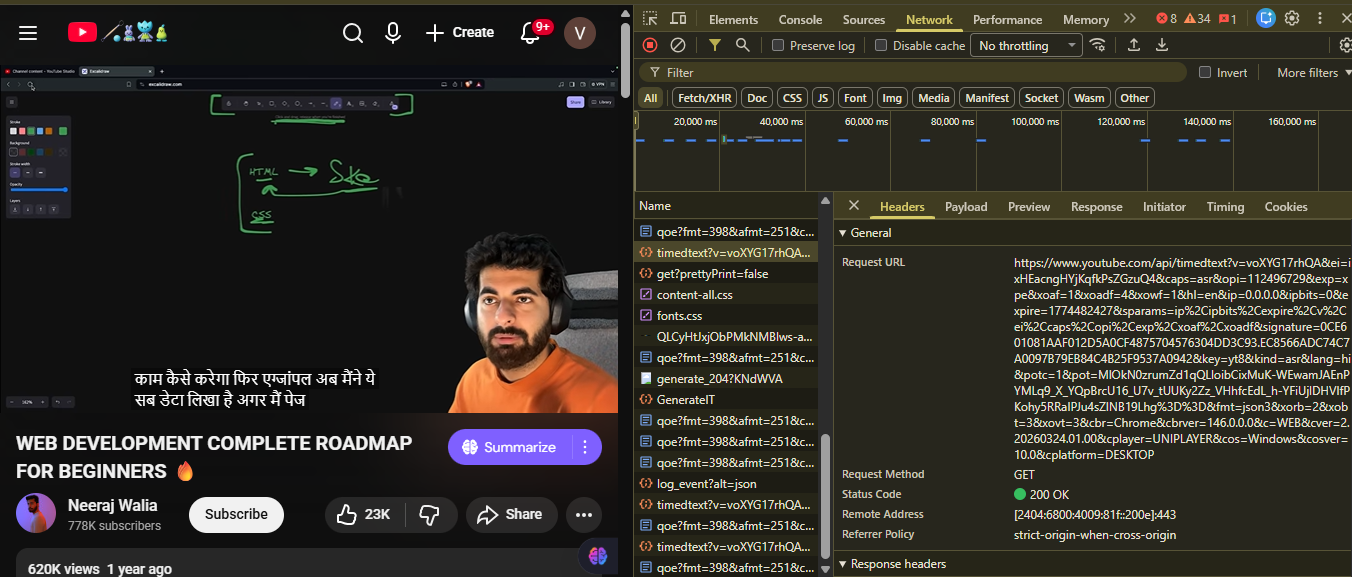
Watching the network traffic while clicking the subtitles button (CC) revealed a direct GET request to YouTube's timedtext API - no authentication, no browser rendering required:
https://www.youtube.com/api/timedtext?v=VIDEO_ID&lang=en
Removing the fmt=json3 parameter returns clean XML instead of complex JSON. This is exactly what youtube-transcript-api uses internally - a direct HTTP GET with no YouTube Data API key required.
How YouTube serves video metadata
For video metadata - title, channel, view count, duration - I used yt-dlp which scrapes the video page's embedded JSON:
import yt_dlp

with yt_dlp.YoutubeDL({'quiet': True, 'no_warnings': True}) as ydl:
    info = ydl.extract_info(
        f"https://youtube.com/watch?v={video_id}",
        download=False
    )

title      = info.get("title", "Untitled")
channel    = info.get("uploader", "Unknown")
view_count = int(info.get("view_count") or 0)  # or 0 handles None on live streams
duration   = info.get("duration", 0)
The scraping strategy
Based on this analysis, the Actor needs no Playwright or browser at all:
- Transcript - direct HTTP via youtube-transcript-api (timedtext API)
- Metadata - yt-dlp scraping the video page's embedded JSON
- Thumbnail - direct HTTP from i.ytimg.com (no auth required)
- No YouTube Data API key required for any of it
This makes the Actor fast (no browser launch), cheap (no Playwright memory overhead), and reliable.
How I actually built it: Project setup
Setting up the local environment
Start by installing the Apify CLI:
npm install -g apify-cliThen create the project:
apify create yt-transcript-pdfI selected the Python empty template. Navigate into the project and install dependencies:
cd yt-transcript-pdf

python -m venv .venv
.venv\Scripts\activate        # Windows
source .venv/bin/activate     # Mac/Linux

pip install -r requirements.txt
The final requirements.txt:
apify>=2.0.0
youtube-transcript-api>=1.0.0
yt-dlp>=2024.1.1
weasyprint>=61.0
requests>=2.31.0
Pillow>=10.0.0
The project structure
yt-transcript-pdf/
├── src/
│   ├── __init__.py
│   ├── __main__.py          # asyncio.run(main())
│   ├── main.py              # Actor orchestration
│   ├── transcript_fetcher.py
│   ├── metadata_fetcher.py
│   └── pdf_generator.py
├── .actor/
│   ├── actor.json
│   ├── input_schema.json
│   ├── output_schema.json
│   └── dataset_schema.json
├── storage/key_value_stores/default/INPUT.json
├── Dockerfile
└── requirements.txt
Everything lives under src/ so it runs with python -m src.
Running locally
Set your local INPUT.json at storage/key_value_stores/default/INPUT.json:
{
  "urls": ["https://www.youtube.com/watch?v=dQw4w9WgXcQ"],
  "language": "en",
  "includeTimestamps": false,
  "includeMetadata": true,
  "cleanTranscript": true
}
Then run (on Windows, prepend the UTF-8 env var):
$env:PYTHONUTF8 = "1";
apify run   # Windows
apify run   # Mac/Linux
Core implementation
After analyzing YouTube's network traffic, I realized everything I needed was available through direct HTTP requests. Here's what the final strategy looks like.
Transcripts come from YouTube's internal timedtext API, which youtube-transcript-api wraps cleanly. No browser needed - just a GET request:
https://www.youtube.com/api/timedtext?v=VIDEO_ID&lang=en
def fetch_transcript(video_id: str, language: str = "en", proxy_url: str = None) -> list[dict]:
    from youtube_transcript_api import YouTubeTranscriptApi


    if proxy_url:
        os.environ["HTTP_PROXY"] = proxy_url
        os.environ["HTTPS_PROXY"] = proxy_url


    try:
        ytt = YouTubeTranscriptApi()


        # Get ALL available transcripts — no language filter
        try:
            transcript_list = ytt.list(video_id)
        except Exception as e:
            raise RuntimeError(f"Could not list transcripts for '{video_id}'. Detail: {e}")


        all_transcripts = list(transcript_list)


        if not all_transcripts:
            raise RuntimeError(f"No captions found for video '{video_id}'.")


        # Score: manual > auto, requested language > english > anything
        best = None
        best_score = -1


        for t in all_transcripts:
            score = 0
            lang = (t.language_code or "").lower()
            is_manual = not getattr(t, 'is_generated', True)


            if lang == language.lower():
                score += 100
            elif lang.startswith("en"):
                score += 10
            if is_manual:
                score += 20


            # KEY CHANGE: also give score to ANY transcript
            # so even if no language match, we always pick something
            score += 1


            if score > best_score:
                best_score = score
                best = t


        fetched = best.fetch()
        lang_used = getattr(best, 'language_code', 'unknown')
        is_auto = getattr(best, 'is_generated', False)
        print(f"  Transcript fetched: lang='{lang_used}' auto={is_auto}")
        return [{"text": s.text, "start": s.start, "duration": s.duration} for s in fetched]


    finally:
        if proxy_url:
            os.environ.pop("HTTP_PROXY", None)
            os.environ.pop("HTTPS_PROXY", None)
Video metadata - title, channel name, view count, duration, publish date - comes from yt-dlp. It scrapes the ytInitialPlayerResponse JSON object that YouTube embeds directly in every video page's HTML. No API key, no authentication, no rate limits tied to a developer account.
# src/metadata_fetcher.py
# Fetches YouTube video metadata FREE using yt-dlp
import yt_dlp
from datetime import datetime
def fetch_video_metadata(video_id: str, proxy_url: str = None) -> dict:

    url = f"https://www.youtube.com/watch?v={video_id}"
    ydl_opts = {
        "quiet":         True,
        "no_warnings":   True,
        "skip_download": True,
        "extract_flat":  False,
        "encoding":      "utf-8",
    }
    # Add proxy if provided
    if proxy_url:
        ydl_opts["proxy"] = proxy_url
    try:
        with yt_dlp.YoutubeDL(ydl_opts) as ydl:
            info = ydl.extract_info(url, download=False)
        duration_s = int(info.get("duration") or 0)
        # Best thumbnail = last in list (highest resolution)
        thumbnails    = info.get("thumbnails") or []
        thumbnail_url = thumbnails[-1].get("url") if thumbnails else None
        # Safe int conversion — view/like count can be None
        view_count = int(info.get("view_count") or 0)
        like_count = int(info.get("like_count") or 0)
        return {
            "title":              info.get("title") or f"YouTube Video ({video_id})",
            "channel_name":       info.get("uploader") or info.get("channel") or "Unknown",
            "channel_url":        info.get("channel_url") or info.get("uploader_url") or "",
            "video_url":          url,
            "video_id":           video_id,
            "thumbnail_url":      thumbnail_url,
            "duration_seconds":   duration_s,
            "duration_formatted": _format_duration(duration_s),
            "view_count":         f"{view_count:,}",
            "like_count":         f"{like_count:,}",
            "upload_date":        _format_date(info.get("upload_date")),
            "description":        (info.get("description") or "")[:500],
            "tags":               (info.get("tags") or [])[:10],
        }
Thumbnails are served from YouTube's image CDN at i.ytimg.com. Public, no auth, direct GET request. I embed them as base64 data URIs so the PDF is fully self-contained.
def _fetch_thumbnail_base64(url: str) -> str | None:
    """Download thumbnail and return as base64 data URI for embedding in HTML."""
    if not url:
        return None
    try:
        resp = requests.get(
            url,
            timeout=10,
            proxies={"http": None, "https": None},
        )
        resp.raise_for_status()
        b64 = base64.b64encode(resp.content).decode("utf-8")
        return f"data:image/jpeg;base64,{b64}"
    except Exception as e:
        print(f"  Could not fetch thumbnail: {e}")
        return None
No YouTube Data API key required for any of it. This was actually the design goal from day one - the YouTube Data API gives you 10,000 units per day. That sounds like a lot until you realize a single search request costs 100 units, a video detail lookup costs 1-3 units, and the quota resets every 24 hours with no burst allowance. For a tool meant to process videos on demand without limit, building on the official API would have been the wrong foundation.
Deploying to Apify
Configuring actor.json
{
  "actorSpecification": 1,
  "name": "yt-transcript-pdf",
  "title": "YouTube Transcript to PDF Generator",
  "version": "0.0",
  "buildTag": "latest",
  "dockerfile": "../Dockerfile",
  "readme": "../README.md",
  "input": "./input_schema.json",
  "output": "./output_schema.json",
  "storages": { "dataset": "./dataset_schema.json" }
}Pushing to Apify
To push it live, it was just:
apify login
apify push
This builds the Docker image on Apify's infrastructure, installs all system dependencies that include the Noto fonts, and deploys the Actor.
Running a test on the cloud
In Apify Console → Input tab, fill in:
{
  "urls": ["https://www.youtube.com/watch?v=dd9_YZdQS0c"],
  "language": "en",
  "includeMetadata": true,
  "cleanTranscript": true,
  "proxyConfiguration": {
    "useApifyProxy": true,
    "apifyProxyGroups": ["RESIDENTIAL"]
  }
}
Publishing to Apify Store
Filling in the publication page
Go to Actor → Publication tab. Fill in:
- Actor name: YouTube Transcript to PDF Generator
- Description (300 chars): Turn any YouTube video into a clean, professional PDF instantly. Get cover page, thumbnail, metadata, and full transcript - no API key needed. Batch process multiple videos. Works in any language.
- Categories: Scraping, AI, Productivity
Output schema
The publication page requires output_schema.json in a specific format - not standard JSON Schema. The correct format:
{
  "actorOutputSchemaVersion": 1,
  "title": "YouTube Transcript to PDF Output",
  "properties": {
    "transcriptPDFs": {
      "type": "string",
      "title": "Transcript PDFs",
      "template": "{{links.apiDefaultKeyValueStoreUrl}}/records/transcript_"
    },
    "results": {
      "type": "string",
      "title": "Results Dataset",
      "template": "{{links.apiDefaultDatasetUrl}}/items"
    }
  }
}
Monetization
Under Monetization on the publication page: set Price. Apify handles payments, billing, and invoicing automatically.
Final thoughts on building this Actor
I now have a complete, production-grade YouTube Transcript to PDF Actor that handles any language, embeds thumbnails, generates clean PDFs, and runs in 8-15 seconds per video on Apify's cloud.
My biggest takeaway? Test on Apify's cloud early. Most of the major bugs - like IP blocking and system font rendering - only surfaced in production, not on my local machine.
- Try the Actor on Apify Store
- Full source code