I live in Windhoek, Namibia. Property24 is the biggest real estate portal in my country, and across most of Southern and East Africa. If you want to know what a three-bedroom house costs in Katutura right now, or how Gaborone property prices have shifted over the last year, Property24 has that data, but you can't get it out.
There is no API. No data export. No bulk download. The data sits behind a website that loads one listing at a time, paginated across hundreds of city pages, across seven countries. For a PropTech startup trying to build a valuation model, or a bank stress-testing its mortgage book, or a researcher tracking housing affordability across the continent, the data is effectively locked away.
I kept running into this problem. Every time I looked for structured African property data, I found either nothing, or expensive proprietary datasets gated behind enterprise contracts. The irony wasn't lost on me: the data was about my own region, collected from my own city, and I couldn't access it without manually copying it out of a browser.
So I built a scraper. Then I turned it into a production Apify Actor, published it on Apify Store, and now it pulls 46,000+ South African listings, 7,400 Namibian listings, and data from Kenya, Zimbabwe, Zambia, Botswana, and Nigeria, on demand, in minutes. The full source code is on GitHub, including the main scraper file main.py.
This is how I built it, what broke along the way, and what I'd do differently.
Prerequisites
Python 3.11+
httpx 0.27.0
beautifulsoup4 4.12.3
Apify Python SDK 2.x
An Apify account with residential proxies enabled
Choosing the right tool: why Apify over a raw Python script
My first instinct was to write a standalone Python script. A requests loop, BeautifulSoup for parsing, dump everything to a CSV. I've done it plenty of times. It works.
But then what? I'd have a script that runs on my laptop, on my schedule, producing a file I'd have to manually share with anyone who wanted the data. If someone in Johannesburg wanted fresh listings every Monday morning, I'd be the bottleneck. If my laptop was off, nothing runs. If I wanted to charge for access, I'd have to build billing infrastructure from scratch.
I came across Apify while looking for a way to run scrapers on a schedule without managing my own server. Once I saw that it handled proxy rotation, cloud execution, dataset storage, and had a built-in monetization layer, I didn't look further. For a solo developer trying to ship something real, that combination is hard to beat.
For the scraper itself, I used httpx for async HTTP requests and BeautifulSoup for HTML parsing - not Playwright, not a headless browser. Property24 renders its listing tiles server-side, which means the HTML you get back from a raw HTTP request already contains the data. No JavaScript execution needed. That’s a significant advantage: httpx is orders of magnitude faster and cheaper to run than browser automation, and on Apify it means lower memory usage and lower costs per run.
The only wrinkle was Cloudflare - but that’s a separate problem I'll get to shortly.
Architecting the crawl: a three-phase approach
The naive approach to scraping a site like Property24 is to start at the homepage, follow every link, and collect whatever you find. That works for simple sites. Property24 is not a simple site.
The data is organized hierarchically: countries contain provinces, provinces contain cities, cities contain paginated listing pages. To get every listing, you need to traverse that entire tree, and doing it efficiently means thinking carefully about which parts you can skip, cache, or parallelize.
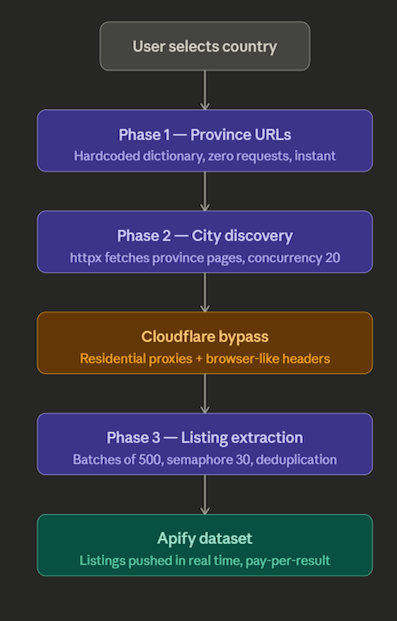
I ended up with a three-phase architecture:
Phase 1: Province URLs (hardcoded, zero requests)
The top level of the hierarchy, province and region URLs, is stable. Namibia has the same regions it had last year. South Africa's provinces aren't changing. So I hardcoded these as a dictionary in the Actor:
COUNTRY_URLS = {
    "south_africa": [
        "/for-sale/western-cape/",
        "/for-sale/gauteng/",
        # ...
    ],
    "namibia": [
        "/namibia/for-sale/khomas/",
        # ...
    ],
    # ...
}
No HTTP requests, no latency. Phase 1 is instant.
Phase 2: City discovery (httpx, concurrency 20)
Each province page contains links to every city within it. Phase 2 fetches all province pages concurrently and extracts those city links. With a concurrency limit of 20 this typically completes in 5-8 seconds regardless of country.
Phase 3: Listing extraction (batched, concurrency 30)
This is the heavy phase. For each city, I need to fetch every paginated listing page and extract the individual property tiles. South Africa alone has 194 cities. With up to 20 pages per city, that’s potentially 3,880 pages to fetch, all containing the actual listing data.
I'll cover the memory problem this caused in the next section. But the key architectural decision here was different for SA vs Namibia:
- SA-style URLs follow a predictable pattern (/for-sale/city-name/p2, /for-sale/city-name/p3), so I generate all page URLs upfront without needing to fetch page one first to discover the last page number.
- Namibia-style URLs require fetching page one first to read the pagination metadata, then generating the remaining page URLs.
This distinction cut SA's pre-scrape discovery time from more than four minutes to near zero.
The Cloudflare problem and how I solved it
Property24 runs behind Cloudflare. My first requests weren't returning listings, they were failing before they ever reached Property24's actual server.
I honestly don't remember the exact error. What I remember is that the response had nothing useful in it, no listing tiles, no HTML I could parse, just Cloudflare telling me to go away in one form or another. The scraping logic was fine. The problem was upstream.
I knew residential proxies were the fix because I'd seen it in another Actor's code while browsing Apify Store. Someone had the same problem on a different site and solved it the same way. That’s one of the underrated benefits of the Store being open: you can read how other developers solved problems before you encounter them yourself.
The reason residential proxies work where datacenter proxies don't comes down to what Cloudflare is actually checking. It's not just your IP, it's a combination of signals:
- IP reputation: datacenter IPs are flagged by default. Residential IPs, assigned to real ISPs and real households, look like real users.
- TLS fingerprint: the way your HTTP client negotiates a connection is identifiable. Python's requests library has a distinct fingerprint that differs from a real browser. httpx is better, but not invisible on its own.
- Request headers: a real browser sends a specific set of headers in a specific order. A scraper sending only User-Agent looks wrong immediately.
- Request cadence: hitting 500 pages in 10 seconds from the same IP is not human behavior.
Switching to Apify's residential proxy pool handled the IP reputation problem. I also added a full browser-like header set to every request to cover the fingerprinting angle:
HEADERS = {
    "User-Agent": "Mozilla/5.0 (Windows NT 10.0; Win64; x64) AppleWebKit/537.36 (KHTML, like Gecko) Chrome/120.0.0.0 Safari/537.36",
    "Accept": "text/html,application/xhtml+xml,application/xhtml;q=0.9,*/*;q=0.8",
    "Accept-Language": "en-US,en;q=0.5",
    "Accept-Encoding": "gzip, deflate, br",
    "Connection": "keep-alive",
}
Together these two changes got me through consistently across all countries, except Ghana, which I'll get to soon.
When requests fail on a modern site and your parsing logic looks correct, check whether you're even getting through Cloudflare before you touch anything else. And browse Apify Store before you start building, someone has probably solved your exact problem already.
The OOM crash that nearly broke South Africa
Namibia worked perfectly. Kenya worked. Zimbabwe, Zambia, Botswana - all fine. Then I tried South Africa.
The Actor ran for about 3 minutes, memory climbed steadily, and then the container died. No error message, no stack trace. Just a silent OOM kill.
The problem was scale. Namibia has a handful of cities. South Africa has 194. At up to 20 pages per city, Phase 3 was generating 3,880 page URLs and firing all of them as simultaneous asyncio tasks:
# The original code - looks fine, doesn't scale
tasks = [fetch_page(url) for url in all_urls]
results = await asyncio.gather(*tasks)
asyncio.gather with 3,880 tasks doesn't mean 3,880 tasks run one at a time. It means 3,880 tasks are all in flight simultaneously. Each holds an open HTTP connection, a response buffer, and parsed HTML in memory. At that scale, memory spikes fast and the container hits its limit before half the pages are processed.
The fix was batching, process URLs in groups of 500, await each batch fully before starting the next:
BATCH = 500

async def fetch_all(urls):
    results = []
    for i in range(0, len(urls), BATCH):
        batch = urls[i:i + BATCH]
    batch_results = await asyncio.gather(*[fetch_page(url) for url in batch])
    results.extend(batch_results)
    return results
I also added a semaphore to cap the number of truly concurrent connections at any moment:
sem = asyncio.Semaphore(30)

async def fetch_page(url):
	    async with sem:
      # fetch logic here
The semaphore and the batching work at different levels. The semaphore limits live connections at any instant. The batching limits how many tasks are held in memory at once. Together they keep memory flat across the entire SA run.
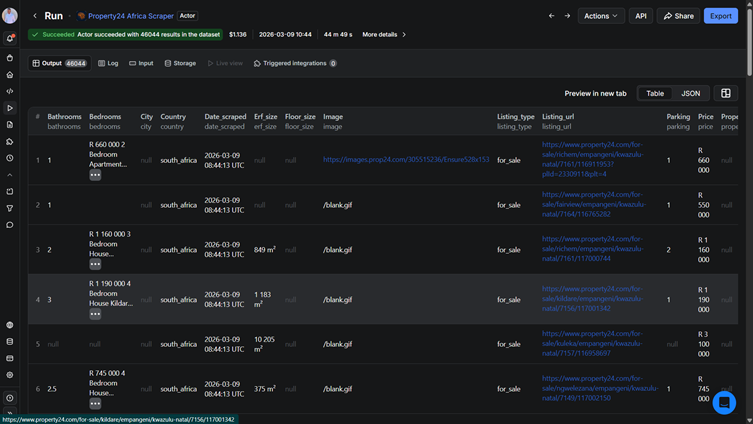
After the fix: 46,044 listings, ~44 minutes, no OOM. Memory stayed flat throughout.
- Async concurrency is not free concurrency.
asyncio.gatherwill happily hold 10,000 tasks in memory if you let it. On a memory-constrained cloud container, that will kill your Actor every time.
Multi-country complexity: every country has different URL patterns
Once South Africa was stable, expanding to other countries felt like it should be straightforward. Change the URLs, run the Actor, done. It wasn't.
Kenya was the first country that broke me. The Actor ran, completed without errors, and returned zero listings. My first thought wasn't "there's a bug", it was "maybe Property24 Kenya just doesn't have much on it." I almost moved on.
Something made me open Property24 Kenya in a browser instead. There were thousands of listings. The site was full of properties. The Actor just wasn't finding any of them.
I started comparing the URLs in my browser against what the Actor was actually extracting. That's when I saw it. Nairobi's URL didn't end at the city name, it had a suffix:
/property-for-sale-in-nairobi-c1890
Some cities used -c suffixes. Others used -p:
/property-for-sale-in-machakos-p66
My city detection regex only matched -cID. Every city using the -pID format was being silently skipped, no error, no warning, just quietly ignored. Kenya has cities split across both formats, which is why the Actor ran clean and returned nothing.
The fix was a one-line regex change:
# Before - missed p-type IDs
city_pattern = re.compile(r'href="(/[^"]*-c\d+)"')

# After - catches both formats
city_pattern = re.compile(r'href="(/[^"]*-(c|p)\d+)"')
One line. I'd been staring at this for the better part of a day thinking the problem was the market, not the code.
Every other country had its own version of this problem. Nigeria, Zambia, Zimbabwe, and Botswana each needed manual URL discovery. I had to browse Property24 for each country, find the correct province and city URL structures, verify they actually returned listings in a browser, and hardcode the starting points. There’s no way to programmatically discover this upfront. You just have to do the research.
Here is what the final results looked like across all countries:
| Country | Listings | Runtime | Notes |
|---|---|---|---|
| South Africa | 46,044 | ~44 min | Largest market |
| Namibia | ~7,400 | ~5 min | Home market |
| Kenya | 7,164 | ~7 min | Mixed c/p ID formats |
| Zimbabwe | 726 | ~2 min | Thin but working |
| Zambia | 608 | ~3 min | Thin but working |
| Botswana | 516 | ~2 min | Default QA country |
| Nigeria | 106 | ~2 min | Very thin market |
| Ghana | 0 | - | Blocked at proxy level |
Ghana: knowing when to stop
Ghana was the most frustrating because there was nothing to debug. Every request returned a 590 UPSTREAM502, not a Cloudflare challenge, not a rate limit, just a hard upstream block regardless of proxy configuration or headers. I tried different combinations. Nothing moved.
Sometimes a site blocks certain regions at the infrastructure level, and no amount of tuning changes that. The signal to stop isn't a clean error message; it's the same error on every attempt with no variation. When that happens, the right call is to document it and move on rather than spend days on a wall that won't budge.
Publishing and monetizing on Apify Store
Actor configuration
An Apify Actor is more than just a Python script. The Store listing is driven by a set of configuration files that define how the Actor behaves, what inputs it accepts, and how its output is displayed:
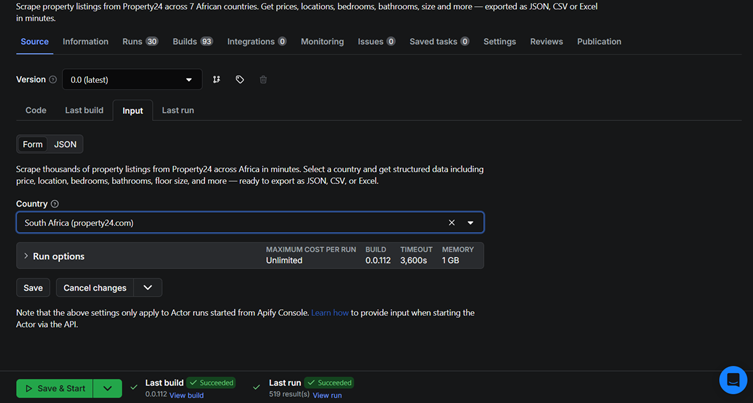
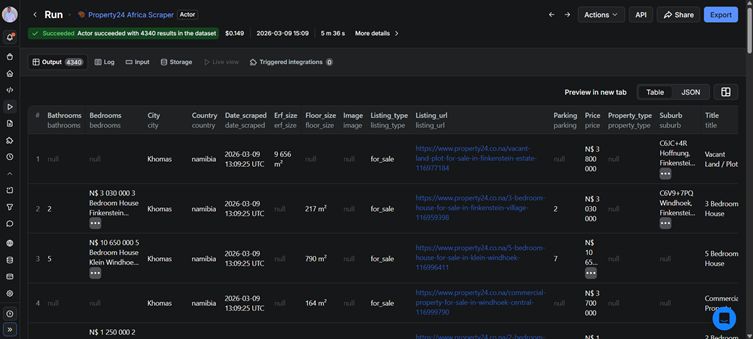
.actor/input_schema.json: defines the input form users see before running the Actor. I exposed two inputs: country selection (dropdown) and max results (number). Everything else is handled internally..actor/dataset_schema.json: defines the columns displayed in the dataset table view. I configured this to show image, title, price, suburb, city, province, property type, beds, baths, floor size, listing URL. Those are the fields a buyer wants at a glance..actor/output_schema.json: tells Apify what the Actor's output looks like for integrations and downstream automations.
The Actor only collects publicly listed property data - listing details, prices, and locations - and does not scrape or store any personally identifiable information about sellers, agents, or buyers.
Getting these files right is what separates a scraper that looks like a toy from one that looks like a product.
Pricing
I settled on $0.001 per result - $1.00 per 1,000 listings.
I worked backward from costs. A full South Africa run costs roughly $0.13 in Apify platform usage. At $1.00/1,000 results and 46,000 listings, a single SA run generates about $46 in revenue. After Apify's 20% platform cut, that's around $37 before proxy and compute costs.
The QA timeout trap
This one nearly got me. Apify runs automated quality checks on published Actors using the default inputs. If the Actor times out during that check, it gets flagged as "Under Maintenance", which tanks your Store visibility.
My default country was South Africa. A full SA run takes 44 minutes. Apify's QA timeout is 5 minutes. Every automated check was timing out and flagging the Actor as broken.
The fix was simple once I understood the problem: change the default country to Botswana, which completes in under 2 minutes. The Actor now passes QA every time, and users who want SA just select it manually. This isn't documented anywhere prominently; I only figured it out after seeing the "Under Maintenance" flag appear repeatedly.
Actor strength
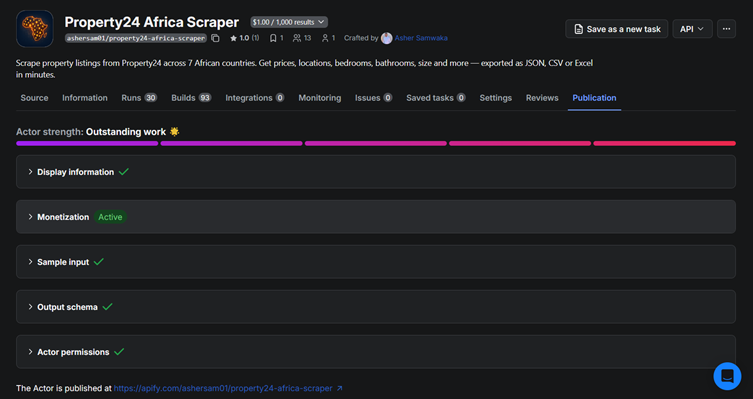
Apify scores each Actor on a 1-5 strength rating based on README quality, input schema completeness, dataset schema, output schema, and whether the Actor has been run successfully. I hit 5/5 by making sure every configuration file was complete and the README covered use cases, sample output, and how-it-works sections.
Sample output
Here is what a single listing looks like in the dataset:
{
  "title": "3 Bedroom House For Sale in Constantia",
  "price": 8500000,
  "suburb": "Constantia",
  "city": "Cape Town",
  "province": "Western Cape",
  "property_type": "House",
  "bedrooms": 3,
  "bathrooms": 2,
  "floor_size": "245 m²",
  "erf_size": "820 m²",
  "listing_url": "https://www.property24.com/for-sale/constantia/cape-town/...",
  "image_url": "https://images.property24.com/..."
}
Results and what I'd do differently
What worked
The 3-phase architecture held up across every country. Once I understood that each country needed individual URL research before writing any code, the expansion pattern became repeatable. Namibia to Kenya to Zimbabwe to Botswana followed the same playbook: find the province URLs, verify the city ID format, test a single city, then scale up.
The httpx + BeautifulSoup stack was the right call. Property24's server-side rendering meant I never needed a headless browser. A full South Africa run, 46,044 listings across 194 cities, costs around $0.13 in Apify platform usage. With Playwright, that number would be 10-20x higher, and the runtime would be far longer.
Apify removed problems I didn't want to solve. Proxy rotation, cloud scheduling, dataset storage, billing infrastructure, none of that is my code. That's the right trade-off when you’re shipping solo.
What I'd do differently
Start with URL research, not code. I wrote the core scraper against South Africa first, then discovered every other country had a different URL structure. That meant retrofitting the architecture to handle multiple patterns rather than designing for it from the start. Two hours of browser research before writing a single line of code would have saved days of debugging.
Build a URL validator before scaling. Silent 404s, pages that return empty results rather than an error, cost me days of debugging across Kenya, Nigeria, Zambia, and Zimbabwe. A simple validation step that checks each province URL before Phase 2 starts would surface broken URLs immediately rather than after a full run completes with zero results.
Test the QA timeout earlier. I discovered the Apify automated QA timeout issue after publishing. If you're building an Actor where the default input triggers a long run, set a lightweight default from day one.
What's next
The natural next step is Property24 Rentals. Same architecture, same countries, just swapping for-sale URLs for to-rent ones. Beyond that, there’s a broader gap in African e-commerce data that nobody has filled on Apify yet. That’s the next build.
You can try the Actor yourself on Apify Store, or fork the full source on GitHub.