My grandmother once took twice the recommended dose of a painkiller because she forgot the doctor's instructions, and the instructions were only in English, a language she cannot read. Thankfully, she recovered, but the incident stayed with me. It made me think about how often medication errors are caused not by negligence, but by language barriers and hard-to-read instructions.
Months later, when I started looking for a project to build on Apify, this was the first idea that came to mind: What if you could type any medicine name, in any language or script, and get back simple, plain-language safety instructions you can actually read?
That became the starting point for the Medicine Simplifier: an Apify Actor that does exactly that, returning patient-friendly safety instructions in the user’s target language.
I wanted the Actor interface to stay intentionally small:
{
  "medicine_name": "Advil",
  "target_lang": "ja"
}
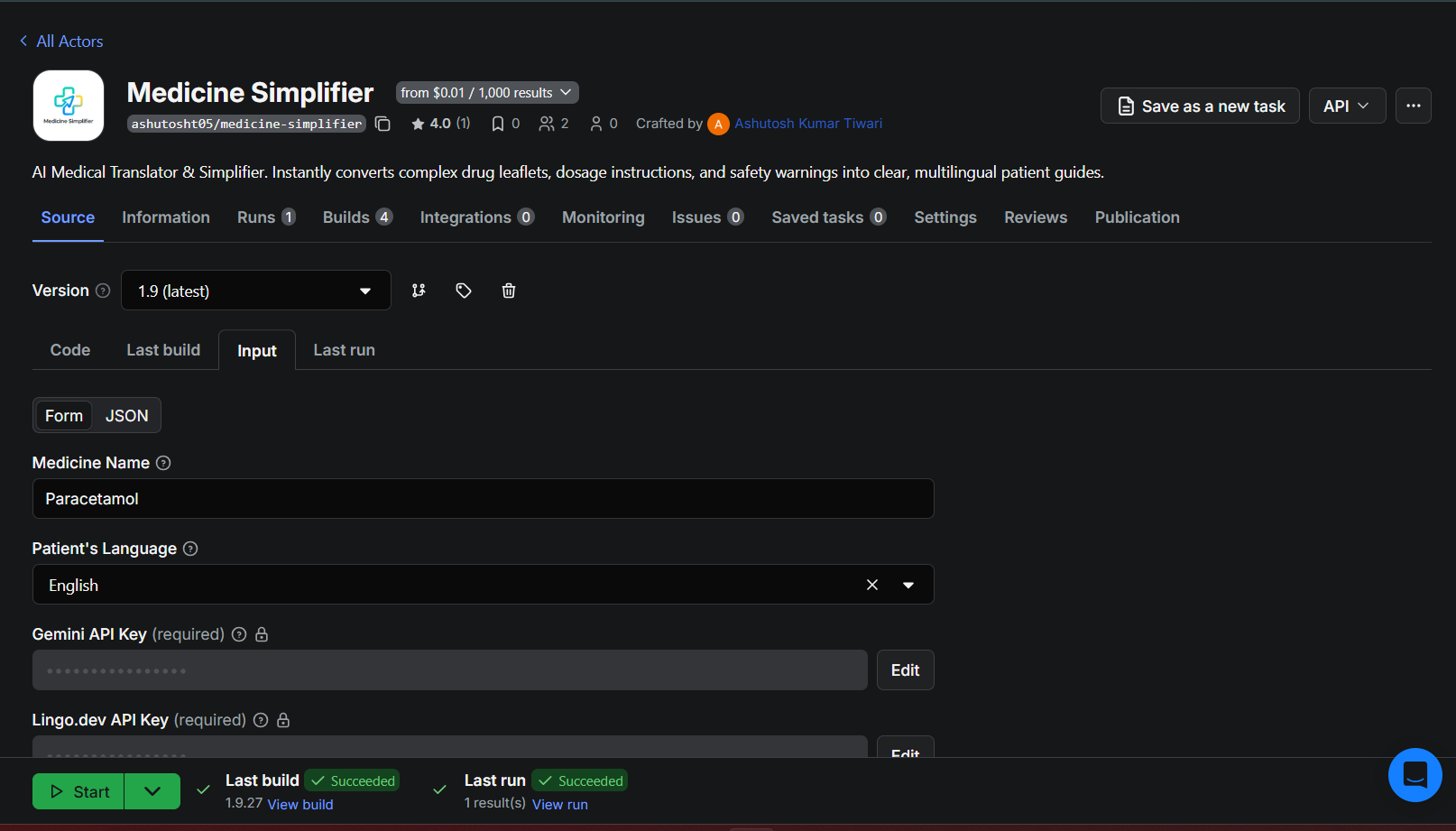
That was intentional. I didn’t want a giant medical form. The Actor should accept a medicine name and a target language, then handle the messy part internally.
Rather than returning a single, lengthy translated paragraph, I shaped the output for downstream apps. The Actor always returns structured JSON with translated instructions, machine-readable safety flags, a source URL for traceability, and an error_report field for partial failures.
My first version of this idea was just a local Python script. That worked for quick experiments, but it became awkward as soon as I wanted repeatable runs, predictable input/output, caching, and a clean way to reuse Google Search Scraper instead of rebuilding search myself. Turning it into an Apify Actor solved that. It gave me a stable input contract, Actor-to-Actor composition, built-in storage for caching, and structured output without needing extra backend infrastructure for the project.
This article isn't a beginner's walkthrough on creating an Actor from scratch. It’s a technical breakdown of how I built it: Actor-around-Actor composition, AI-assisted normalization, localization, and fault-tolerant output.
Architecture overview
Once I had the basic idea working, I shaped the Actor around the parts of Apify that were actually useful here: reusable inputs, Actor composition, structured output, and built-in storage for caching.
The pipeline ended up looking like this:
- Actor input:
medicine_namein any language andtarget_lang. - Normalization: Translate non-English names into a best-effort English search term; leave English input untouched. Lightweight by design, not full generic-name resolution.
- Actor-to-Actor search: Call apify/google-search-scraper to find relevant Drugs.com sources.
- Summarization: Use Gemini to extract dosage guidance and safety flags into JSON.
- Localization: Use Lingo.dev to translate instructions and transliterate medicine names when needed.
- Persistence: Cache repeated medicine/language pairs in Apify’s key-value store.
- Actor output: Push structured JSON to the dataset so downstream apps can consume it directly.
I originally tried to use one model for everything, but that broke down fast. Gemini 2.5 Flash ended up being the better fit for summarization and safety flag extraction, while Lingo.dev was much more reliable for localization and transliteration. Splitting those responsibilities made the overall pipeline more stable and easier to reason about.
Building the Actor
Step 1: Normalizing the drug name
The first real problem I hit was medicine name normalization.
My earliest version didn't use Lingo.dev for language detection. I was using Python’s langdetect module first because it was easy to use and I was already familiar with it. That worked fine in theory. In practice, it wasn't a good fit for this project because medicine names are usually very short, often just one word.
The obvious failure mode was that langdetect frequently tagged short medicine names as English even when they weren't, and French and Spanish inputs were the worst offenders. Once that happened, the Actor skipped translation entirely and treated the input as if it were already ready for English search. That meant the search stage started from the wrong assumption before the pipeline had really begun.
That was the point where I stopped treating language detection as a utility problem and started treating it as a medicine input problem. I didn't need generic name resolution in version one. I just needed a way to turn medicine names into a best-effort English search term without damaging inputs that were already clean. I just needed to get medicine names working.
So I dropped langdetect and switched to Lingo.dev for locale detection. I only used it in a very simple way:
- If the medicine name input is already English, leave it alone.
- If the medicine name isn't English, translate it to English before searching.
- If localization fails, fall back to the raw medicine name input instead of crashing the Actor.
It sounds minor, but it actually fixed a real bug in my earlier version. It also meant I could leave clean inputs like Advil and Dolo 650 alone while still getting a usable search term for inputs like バファリン (Bufferin).
This is the normalization logic that finally worked for me:
if lingo_key:
    try:
        async with LingoDotDevEngine({"api_key": lingo_key}) as engine:
            source_lang = "en"
            try:
                detected = await engine.recognize_locale(raw_input_name)
                if detected:
                    source_lang = detected
            except Exception:
                source_lang = "en"

            if source_lang != "en":
                search_term = await engine.localize_text(
                    raw_input_name,
                    {
                        "source_locale": source_lang,
                        "target_locale": "en"
                    }
                )
            else:
                search_term = raw_input_name
    except Exception:
        pass
This isn't completely figuring out the generic name, and I want to make that clear. It's a simple step that makes the search part a lot more trustworthy. If I don't have a Lingo.dev key, I just use the raw input instead. For this Actor it's much better to keep working even if things aren't perfect rather than stopping completely when something goes wrong.
Step 2: Reusing Google Search Scraper inside my Actor
Before I used Google Search Scraper, I tried to handle the search part myself with a custom Python script.
It worked okay at first, but soon became a hassle. My script kept getting blocked by anti-bot protections, and I spent more time dealing with search problems than working on the actual medicine project.
That was a red flag: search was supposed to be a small part of the project, not where most of my time went.
At that point I had two options:
- Keep trying to scrape search results.
- Use an Actor that already handled that problem better than my script did.
I switched to apify/google-search-scraper because it was more reliable than what I had built.
It handled anti-bot problems far better than my own script did, freeing me to focus on the actual goal: turning medicine information into structured, multilingual safety data.
I also made a deliberate trade-off. Rather than build a direct Drugs.com scraper for version one, I used Google Search to reach Drugs.com pages.
In simple terms, this version doesn't directly fetch structured drug data from Drugs.com. It retrieves Google results and snippets that usually point to Drugs.com pages, then passes those snippets on for summarization.
I did this on purpose to make sure the medicine project worked before spending time building a scraper for a single site.
For this version, getting a working Actor was more important than building the perfect way to get the data. That's when the project started feeling like an Apify project to me. Instead of one big script doing everything, I had the following:
- One Actor running the project.
- Another Actor handling the search part as a reusable piece.
Here's the search part I ended up using:
client = Actor.new_client()

run = await client.actor('apify/google-search-scraper').call(
    run_input={
        'queries': f'{search_term} dosage side effects drugs.com',
        'resultsPerPage': 3,
        'maxPagesPerQuery': 1,
    }
)

ds = await client.dataset(run['defaultDatasetId']).list_items()

fragments = []
for item in ds.items:
    for r in item.get('organicResults', []):
        fragments.append(r.get('description', ''))
        if source_url == 'N/A':
            source_url = r.get('url', source_url)

raw_text = '\n'.join(fragments)[:8000]
I cap the retrieved snippet text at 8,000 characters before sending it to Gemini. In practice, I rarely hit that limit, but I still wanted predictable token usage and fewer surprise costs during repeated runs.
I also intentionally capture the first result URL as source_url. Even though this stage is snippet-based, I wanted every output to carry something traceable. In a medical-adjacent workflow, even a prototype should make it obvious where the retrieval layer points.
Step 3: Summarizing with Gemini
Once I had search working reliably, the next problem was turning messy search snippets into something a real person could actually understand.
My first Gemini prompt was honestly pretty lazy. It was basically a generic “summarize and fetch instructions for this medicine” prompt. It looked fine at first because the output sounded polished, but after a few test runs, I realized it wasn't trustworthy enough for this use case.
The bad outputs weren't always obviously broken, which made them more dangerous. In some runs, Gemini would confuse a medicine with another variant or related form that had a similar name. In other cases, it would misinterpret the composition of the medicine from incomplete snippet context. And sometimes it would just hallucinate details that sounded medically plausible but weren't clearly grounded in the retrieved text. For a medical-adjacent Actor, that was unacceptable.
I decided to tighten the prompt. Instead of asking for a loose summary, I reframed the model as a cautious pharmacist assistant and made the rules explicit:
- Use only the scraped text.
- Don't use outside knowledge.
- Be conservative when information is missing.
- Return strict JSON only.
That change made a noticeable difference. The output became much more traceable, and the safety flags became more consistent.
Here’s the prompt shape I ended up using:
response = ai_client.models.generate_content(
    model="gemini-2.5-flash",
    contents=f"""
You are a cautious pharmacist assistant.
Use ONLY the following scraped text from Drugs.com-related search results.
Do NOT use outside knowledge.
If information is missing, be conservative and do not invent facts.

Medicine: {search_term}

SCRAPED_TEXT:
{raw_text}

TASK:
Create exactly 5 short but detailed patient-friendly English instructions for safe use.

ALSO extract safety flags:
- take_with_food
- avoid_alcohol
- may_cause_drowsiness
- pregnancy_warning

OUTPUT JSON ONLY:
{{
  "english_summary": [
    "instruction 1",
    "instruction 2",
    "instruction 3",
    "instruction 4",
    "instruction 5"
  ],
  "display_name": "{search_term}",
  "safety_flags": {{
    "take_with_food": true,
    "avoid_alcohol": true,
    "may_cause_drowsiness": false,
    "pregnancy_warning": true
  }}
}}
""",
    config=types.GenerateContentConfig(
        response_mime_type="application/json"
    ),
)

data = extract_json_safely(response.text)
Three implementation details mattered for testing:
- The pharmacist framing helped: The vague prompt produced outputs that were too loose and sometimes confused related medicines. The “cautious pharmacist assistant” framing gave Gemini a much more appropriate tone and made it less likely to overreach.
response_mime_type="application/json"wasn't optional for me. Without it, Gemini would sometimes wrap JSON in Markdown code fences, which immediately created extra parsing problems.- I still kept
extract_json_safely()as a fallback. Even with JSON mode enabled, I still saw slightly malformed JSON occasionally during repeated runs. I didn’t want the whole Actor to fail because one model response was imperfect.
Gemini now handles the first-pass extraction of both the English safety instructions and the machine-readable flags. When the snippets are incomplete, I still do a conservative post-processing pass so the final output stays more defensive than confident.
Step 4: Localization with Lingo.dev
This is where the project got messy. My initial plan was to just use Gemini for translation. Why not? It handles multiple languages, and I was already using it for everything else. I thought that would be enough.
But the problem showed up when I tested Hindi and Japanese outputs. Gemini would render the medicine name inconsistently, sometimes translating it literally and sometimes phonetically, occasionally landing on a script that was technically correct but read unnaturally to a native speaker. Lingo.dev, which is purpose-built for localization, handled this much more accurately.
The medicine name translation logic ended up being the most complex and difficult part for me while building this Actor, because it needs to handle the following scenarios:
- Latin-script languages (ES, FR, DE): Add phonetic pronunciation since the medicine name stays in English
- Non-Latin languages (HI, ZH, JA): Transliterate to the appropriate script
Here's how the medicine name translation is structured:
async def translate_medicine_name(engine, original_name, target_lang, ai_client=None):
    name_only, suffix = split_name_and_suffix(original_name)

    # Try multiple prompting strategies with Lingo
    candidates = [
        clean_candidate(await t(f'London\nParis\n{name_only}')),
        clean_candidate(await t(f'Transliterate only:\n{name_only}')),
        clean_candidate(await t(f'"{name_only}"')),
        clean_candidate(await t(f'Phonetic spelling only:\n{name_only}')),
    ]

    # Fall back to Gemini for CJK/Devanagari if Lingo fails
    transliteration = next(
        (c for c in candidates if valid_transliteration(c, name_only, target_lang)),
        None
    )

    if not transliteration and ai_client:
        transliteration = await gemini_transliterate(ai_client, name_only, target_lang)
The multiple-candidate prompting approach (such as the London\nParis\n{name} trick) is something I stumbled upon after a lot of frustration. By giving Lingo context words, it knows how to transliterate; the model produces better results for the actual medicine name. It's a bit hacky, but it works. I wish I could say this was deliberate engineering. It was mostly an educated guess that somehow worked.
One annoying failure mode was getting prompt labels echoed back, so instead of a clean transliteration, I’d sometimes get something like Phonetic spelling only: イブプロフェン (Ibuprofen).
The valid_transliteration() validator then checks that the result actually contains the expected script characters (CJK range, Devanagari block, etc.) and isn't just an echo of the prompt. I lost a day to that validator alone.
Step 5: Caching repeated requests with Apify’s key-value store
Once I started testing seriously, I kept rerunning the same medicine/language pairs while tweaking prompts and transliteration logic. That made Apify’s key-value store the obvious fit.
I didn’t need a separate Redis instance or a custom persistence layer. I just needed a simple way to memoize expensive runs inside the Actor itself.
Apify's built-in key-value store was a natural fit:
store = await Actor.open_key_value_store()
cache_key = get_cache_key(raw_input_name, target_lang)

cached = await store.get_value(cache_key)
if cached and not cached.get('error_report'):
    await Actor.push_data(cached)
    return

# ... do all the heavy work ...

await store.set_value(cache_key, final_output)
This turned out to be one of the most practical Apify features in the whole build. It dramatically reduced repeated runs and made iteration much cheaper while I was debugging.
The cache key is an MD5 hash of the lowercase medicine name plus the language code. I skip cache hits that have a non-empty error_report, so if a previous run partially failed, the next run gets a fresh attempt rather than returning cached errors.
In my testing, cached runs were usually under 10 seconds because the Actor could skip both the search and localization stages.
Fault tolerance: returning partial results
Medical data is sensitive. An Actor that silently fails and returns nothing is worse than one that returns partial results with an honest error report.
So rather than terminating on the first exception, I created the Actor to accumulate failures in an error_report list:
error_report = []

# Each stage appends to error_report on failure but continues
try:
    run = await client.actor('apify/google-search-scraper').call(...)
except Exception as e:
    error_report.append(f'Search error: {e}')

# ... same pattern for Gemini and Lingo stages ...

final_output = {
    ...,
    'error_report': error_report  # always present in output
}
This means that rather than crashing the entire run, partial failures are preserved in error_report. In practice, even when translation failed I usually still had usable English output, though I’d tighten the fallback behavior in the next iteration. The caller can debug API keys, try again, or determine how to handle partial results downstream by knowing exactly what went wrong, thanks to the error_report field.
In practice, the most common failure I saw during testing was the translation stage timing out for non-Latin languages when the Lingo.dev free tier was under load. In those cases, the Actor still returned usable English instructions with the translation failure noted in error_report.
Sample output walkthrough
Here’s a real output from the Actor (an English-speaking user looking up Paracetamol):
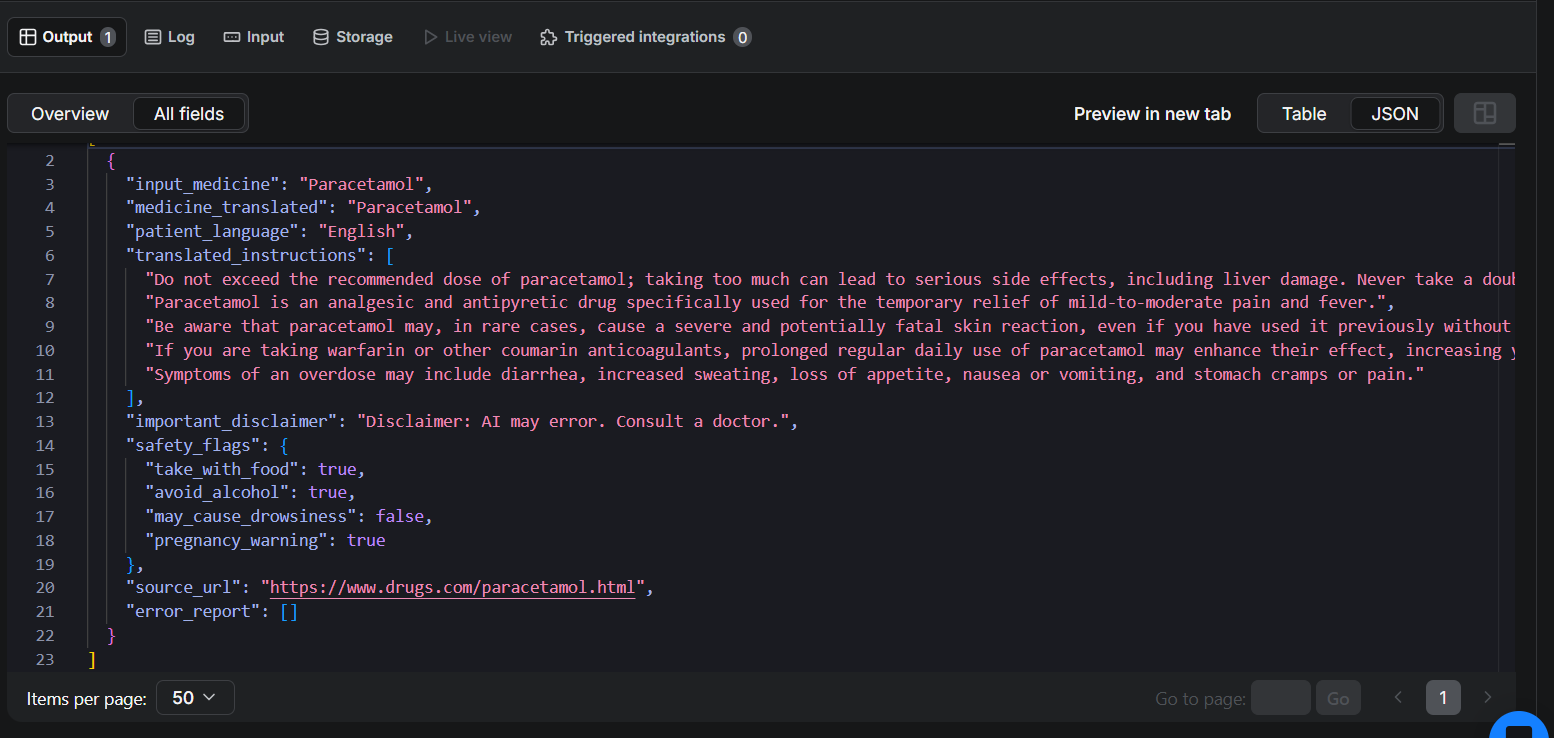
error_report for a successful run.{
"input_medicine": "Paracetamol",
"medicine_translated": "Paracetamol",
"patient_language": "English",
"translated_instructions": [
"Use Paracetamol for temporary relief of mild-to-moderate pain, fever, and minor aches and pains only. Take it exactly as directed at the right dosage to help prevent side effects.",
"Be alert for signs of overdose such as loss of appetite, nausea, vomiting, stomach pain, sweating, confusion, weakness, dark urine, or breathing difficulties. Seek medical help immediately if you suspect an overdose."
],
"important_disclaimer": "Disclaimer: AI may error. Consult a doctor.",
"safety_flags": {
"take_with_food": true,
"avoid_alcohol": true,
"may_cause_drowsiness": false,
"pregnancy_warning": false
},
"source_url": "https://www.drugs.com/paracetamol.html",
"error_report": []
}
In this output:
input_medicine: The name of the medicine provided by the user.medicine_translated: Contains the medicine transliteration, not a literal translation of medicine.patient_language: The language selected by the user.translated_instructions: Instructions derived from the Drugs.com snippets, then localized for the target language.important_disclaimer: Hardcoded disclaimers, as AI may hallucinate.safety_flags: Structured booleans. Designed for developers to consume directly in apps.source_url: Lets the user (or developer) verify the information source.error_report: Empty here, meaning all four stages were completed successfully.
Who is this actually for?
I built this with a few specific people in mind:
- Travelers who pick up medication abroad and can't read the label.
- Elderly patients who need simple, plain-language instructions rather than dense clinical text.
- Developers building telemedicine apps, pharmacy chatbots, or digital health tools who need structured, translated drug data via API.
- Caregivers managing medications for family members who speak a different language.
I also designed the output like an API-facing developer tool, not just a script result. The goal was to return something another app could trigger, wait for, and consume directly from the dataset.
I shaped the output so a mobile app could render warnings directly, rather than trying to parse a paragraph. The safety flags are machine-readable. I always return the source_url because in a medical workflow, users need a way to verify what the model summarized. The error_report makes debugging straightforward.
What it looked like in testing
In my tests across 7 languages (EN, ES, FR, DE, JA, ZH, HI), uncached runs usually took around 30–40 seconds, depending mostly on search and translation latency.
Cached runs were usually under 10 seconds because the Actor could skip both the search and localization stages.
The most common failure I saw was Hindi translation timing out when the Lingo.dev free tier was under load.
My most useful test cases were inputs like Advil, Dolo 650, and バファリン because they exposed three different failure modes: brand-name ambiguity, strength-suffix handling, and non-Latin normalization.
Limitations and trade-offs
I want to be honest about what this Actor can't do:
- There's an inconsistency in brand names. Generic names are the main way that Drugs.com indexes. Results may still be lacking if a regional brand name doesn't normalize cleanly. I currently use a single search query in conjunction with best-effort normalization, which still leaves gaps for brands that are specific to a given region.
- Seven languages, not all languages. I support English (EN), Spanish (ES), French (FR), German (DE), Japanese (JA), Chinese (ZH), and Hindi (HI). Adding more is straightforward; it's mostly adding entries to the
DISCLAIMERSandLANG_NATIVE_NAMESdicts, but each new language needs testing for transliteration quality. - Not personalized medical advice. The dosage instructions are general. They don't account for the patient's weight, age, other medications, or conditions. The disclaimer is baked into every output in the patient's language.
- Drugs.com availability. The Actor relies on Drugs.com being crawlable. If they change their structure or rate-limit aggressively, the search stage will fail (and the
error_reportwill tell you).
What I'd do differently
If I rebuilt this tomorrow, I’d change three things:
- Start with caching from day one. I added it late, and refactoring around the key-value store cost me time. Apify's store API is so simple that there's no reason not to have it from the start.
- Test transliteration edge cases earlier. The
valid_transliteration()validator went through five rewrites. I kept discovering new failure modes, prompts being echoed back, phonetic labels appearing in the results, and digit suffixes getting mangled. More systematic testing up front would have saved me hours. - Consider a direct Drugs.com scraper. Using Google Search Scraper to find Drugs.com pages works, but adds a degree of indirection. A purpose-built Drugs.com Actor would be more reliable and would let me extract structured data (dosage tables, interaction lists) rather than snippet text.
Conclusion
Building the Medicine Simplifier taught me a lot about prompt engineering and the difference between translation and localization, but the biggest takeaway was how well this kind of project fits the Actor model.
What made this project actually usable wasn’t just Gemini or Lingo.dev. It was the Actor model itself: one Actor for orchestration, one Actor reused for search, a key-value store for cheap caching, and structured output so the result was already usable by downstream apps.
If I iterate on this again, the next version will probably replace the Google Search step with a dedicated Drugs.com scraper Actor so I can extract more structured dosage and interaction data directly.
If you’re building something on top of it, a health chatbot, a pharmacy integration, or another multilingual health tool, I’d genuinely love to hear about it.