


A small business without a developer can now hand its phone calls, lead lists, and bookkeeping to AI, often for less than $100 a month. The hard part is choosing tools without paying twice for the same job.
The best AI tools for small business are the few that cover your everyday jobs, and some of them are already inside the software you pay for.
A shop owner, for example, may pay for a writing app while their store platform already writes product descriptions.
This guide shows you how to turn on the AI you already have, then add one affordable tool for each remaining job.
Best AI tools for small business compared
The tools are grouped by job, not ranked.
| Tool | Job | Why pick it | Free plan | Entry price |
|---|---|---|---|---|
| ChatGPT or Claude | Writing and finding answers | Connects to QuickBooks, HubSpot, and Canva inside the chat | Yes | $20 a month |
| Smith.ai AI Receptionist | Answering calls | 25 free calls a month | Yes | $150 a month (Pro) |
| Tidio Lyro | Answering website chat | 50 free AI conversations to start, then usage-based plans | Yes | $32.50 a month, billed yearly |
| Apify AI | Finding leads and monitoring competitors | Plain-English requests. You approve each run before you pay. | Yes | $19 a month (Starter) |
| HubSpot Starter | Managing leads | Free customer relationship management (CRM) tool with AI, and agents on Starter | Yes | $20 per user a month |
| Canva | Creating marketing materials | 20 AI uses a month on the free plan | Yes | $18 a month (Pro) |
| QuickBooks Online | Bookkeeping | ChatGPT and Claude can read and update your QuickBooks data | Yes (without AI) | $38 a month |
| n8n | Connecting your tools | Connects your apps, including Apify, and charges per workflow run | Only on your own server | EUR 24 a month (Cloud) |
How the tools were chosen
Each tool was checked against 6 criteria.
- No developer needed. You set up the tool in your browser, without code.
- A free plan, or under $40 per user a month. You can try it before you spend much.
- Useful AI in the free plan or the cheapest paid plan. The AI does a full task, such as answering a call, finding data, or drafting an invoice.
- Published prices. You can sign up online and start using it immediately.
- It solves one everyday job. Each tool has a clear role, such as answering calls or sending invoices.
- It works inside ChatGPT or Claude. This is a plus, not a must, because you can then use the tool from the AI assistant you already have.
Step 1: Turn on the AI in the tools you already use
Before you buy a new tool, check the tools you already use. A lot of AI for small business is built into these tools at no extra cost.
| If you use | AI you can turn on | Cost |
|---|---|---|
| Google Workspace | Gemini in Gmail on every Business plan. Business Standard adds Gemini in Docs and Sheets, and meeting notes in Meet. | Included |
| Microsoft 365 | Copilot Chat | Free with eligible business plans |
| Zoom | Meeting summaries and transcripts | Included in eligible paid plans |
| Shopify | Sidekick, which edits products, writes content, and shows changes before it applies them | Included |
| Square | Managerbot for sales and labor reports, inventory alerts, and draft staff schedules | Free for US sellers |
| WhatsApp, Instagram, Messenger | Meta Business Agent, which answers customers and books appointments | Free to start, from $14.99 a month for more use |
| Google Business Profile | Gemini for Business Profile, which drafts review replies and updates your opening hours | No price listed. Not available in the EU or UK. |
If one of these tools already does a job, you don’t need a new subscription for it. Check each AI reply before you send it. For reviews, edit AI drafts so every reply sounds personal.
Jobs such as answering phone calls, finding new leads, and bookkeeping usually need their own tool.
Step 2: Add tools for the remaining jobs
Each of the next 6 sections covers one job and the tools for it. The numbers follow the order of the jobs, not a ranking.
Writing and finding answers
Start here, because one AI assistant handles many of your everyday jobs.
1. ChatGPT or Claude
ChatGPT, from OpenAI, and Claude, from Anthropic, are general AI assistants that write, answer questions, and work with your files and business apps. Both have a free plan, and most small businesses need only one of them.
Best for: emails, price quotes, policies, social media posts, and questions about your business data.
Why pick it: both ChatGPT and Claude connect to QuickBooks, HubSpot, and Canva inside the chat. ChatGPT calls these connected apps plugins, and Claude calls them connectors. On Claude, every plan can use connectors from Claude's connector directory. On ChatGPT, some plugins work on the free plan, and others need a paid plan. If your business works mostly in Google apps, Gemini is a third option that works inside Gmail, Docs, and Sheets.
AI features:
- Plugins and connectors link Gmail, Google Drive, Slack, and other apps, so the assistant can read and update your data.
- Projects keep the chats, files, and instructions for each client or topic in one place.
- Memory remembers details about your business across chats, so you don't have to repeat them.
- Deep research, called Research in Claude, searches the web in several steps and writes a report with sources. On Claude, it needs the Pro plan.
- File and data analysis reads your spreadsheets and PDFs, and creates charts, documents, and spreadsheets.
- Multi-step tasks finish longer jobs across your apps, such as a weekly sales summary. Full access needs a paid plan.
Integrations: Gmail, Google Drive, Google Calendar, Slack, QuickBooks, HubSpot, Canva, Stripe, and more in Claude's connector directory and ChatGPT's plugins page.
Example: "List my unpaid QuickBooks invoices and draft a friendly reminder for each one."
Good to know: on the free and $20 plans, your chats can help train the AI models unless you turn this off. In ChatGPT, go to Settings > Data controls. In Claude, go to Settings > Privacy. ChatGPT Business and Claude Team don't use your data for training by default.
Price: free. ChatGPT Plus and Claude Pro cost $20 a month. ChatGPT Business and Claude Team cost $25 per user a month, for at least 2 users.
Answering customers
In Invoca's study of home-service businesses, 48% of inbound calls weren't answered by a person. An AI receptionist can answer those calls for you.
An AI that answers customers uses the information you give it. Before you turn it on, add your prices, opening hours, service area, and frequently asked questions (FAQ), and connect your calendar. Then test it with 20 real customer questions.
For an AI receptionist, call it yourself. Say a phone number and an address, and check that the AI saved both correctly. This test shows early if the AI misses digits or parts of long addresses. Make one test booking and check that it appears in your calendar. Also set the AI to say at the start of each call that it's an AI assistant.
2. Smith.ai AI Receptionist
Smith.ai AI Receptionist answers your phone 24/7, asks callers your screening questions, and books appointments. It's built for small businesses that can't always pick up the phone, such as home-service companies, agencies, and law firms.
Best for: missed calls, after-hours calls, and calls when your team is busy.
Why pick it: the Smith.ai free plan includes 25 calls a month, so you can try it on real calls before you pay. If you already use Jobber, an app for managing a home-service business, consider its AI Receptionist. It's included in the Jobber Plus plan and a paid add-on on other Jobber plans.
AI features:
- 24/7 call answering picks up every call, day or night, and records and transcribes it.
- AI scheduling books appointments in your calendar or in a scheduling tool such as Calendly.
- Lead qualification asks your screening questions and routes your most important callers first.
- Warm transfers pass a caller to a person on your team, together with the call details.
- Call summaries send a short written summary of each call to the right people on your team.
Integrations: Calendly, Acuity Scheduling, HubSpot, Salesforce, ServiceTitan, Clio, Slack, Microsoft Teams, Zapier, and more on the Smith.ai integrations page.
Example: a heating, ventilation, and air conditioning (HVAC) technician is busy at a customer's home, and the AI answers the "my air conditioner stopped working" call.
Good to know: every answered call counts toward your monthly calls, including spam calls that get past Smith.ai's spam filter. You can mark up to 10% of the calls in each billing cycle as spam to remove them from your bill. On the free plan, extra calls at $3 each stay off until you turn them on.
To compare options, calculate the cost for the number of calls you expect each month. At 100 calls a month, here are the costs.
| Option | How it charges | 100 calls a month |
|---|---|---|
| Smith.ai Free | 25 calls included, then $3 per call | $225 |
| Smith.ai Pro | $150 for 75 calls, then $2.50 per call | $212.50 |
| Jobber AI Receptionist (add-on on plans other than Plus) | $29 for 30 conversations, then $0.79 each | $84.30, plus a Jobber plan |
| RingCentral AI Receptionist | $49 for 100 minutes, then $0.50 per minute | About $99 if calls take 2 minutes on average |
Price: free (25 calls a month), or Pro at $150 a month for 75 calls.
3. Tidio Lyro
Lyro is the AI agent in Tidio, a live chat and help desk tool. It answers customer questions on your website and other channels, using only the information you give it, which suits online shops and service businesses.
Best for: common questions on your website, such as opening hours, prices, delivery, and returns.
Why pick it: every Tidio account gets 50 free Lyro conversations to start, and the price then depends on your number of conversations. Intercom Fin, a similar AI chatbot, has no free plan.
AI features:
- Data sources teach Lyro from your website pages, your own questions and answers, and PDF or CSV files.
- Handoff passes a chat to your team, or creates a ticket when no one is online.
- Channels let Lyro answer on Messenger, Instagram, WhatsApp, and email, as well as on your website.
- Lyro Guidance sets Lyro's tone and tells it when to pass a chat to a person, with instructions in plain English.
- Lyro Actions handle tasks such as order status updates. Your first Action is free, and more Actions need a paid Lyro plan.
Integrations: Shopify, WooCommerce, WordPress, Wix, WhatsApp, Instagram, Messenger, HubSpot, Mailchimp, Zapier, and more on the Tidio integrations page.
Example: an online shop answers "Where is my order?" questions at night.
Good to know: unless you're on a Plus or Premium plan, Lyro doesn't update itself when your website changes. After you change prices or opening hours, sync the website data source in Lyro again. Monthly plans also move up to the next conversation tier at 95% of your limit, and you can turn this off next to the Upgrade button.
Price: free (50 conversations to start), or from $32.50 a month, billed yearly.
Finding leads and monitoring competitors
Apify AI builds lists of potential business customers and collects competitors' prices and reviews. HubSpot manages the leads you find.
4. Apify AI
Apify AI is the AI assistant in Apify, a marketplace of ready-to-run tools, called Actors, that find leads, track competitor prices, and collect reviews for you. It turns a plain-English request into a finished run, which suits owners who want lists of leads or competitor data without writing code.
Best for: finding business customers on Google Maps, competitor prices, and competitors' reviews.
Why pick it: you describe the job in plain English, and Apify AI handles the setup. You type the request in Apify Console, in the Ask Apify AI box on your Dashboard or in the search bar of Apify Store. Apify AI then picks an Actor, which is one of thousands of pre-built tools in this marketplace. Apify AI fills in the settings, shows you the input, and runs the Actor after you click Run Actor.
Instead of copying businesses from Google Maps one by one, Apify AI can build the list in one request. The Apify Free plan includes $5 of usage every month, enough for hundreds of local businesses with contact details.
AI features:
- Finds the right Actor in Apify Store for the job you describe in plain English.
- Fills in the settings from your request and shows you the input to check.
- Runs the Actor after you approve it, with one click on Run Actor.
- Shows the progress and cost as the run goes, and previews the results as they arrive.
- Answers questions about your results and summarizes them in the chat.
Integrations: the Anthropic-verified Apify connector in Claude, as well as ChatGPT, n8n, Make, Zapier, Google Drive, Slack, HubSpot, and more on the Apify integrations page. With the Claude connector, you can use the same tools from your AI assistant, for example to run a Shopify competitor analysis with Apify and Claude.
Example: a bookkeeper looking for new clients types this request. "Find 20 HVAC contractors in Austin, Texas, with their phone numbers, websites, and emails so I can pitch my bookkeeping service." Apify AI picks Google Maps Scraper and turns on its Company contacts enrichment add-on, which adds contact details from each business website. The input is filled in for you, and one click on Run Actor starts the run.
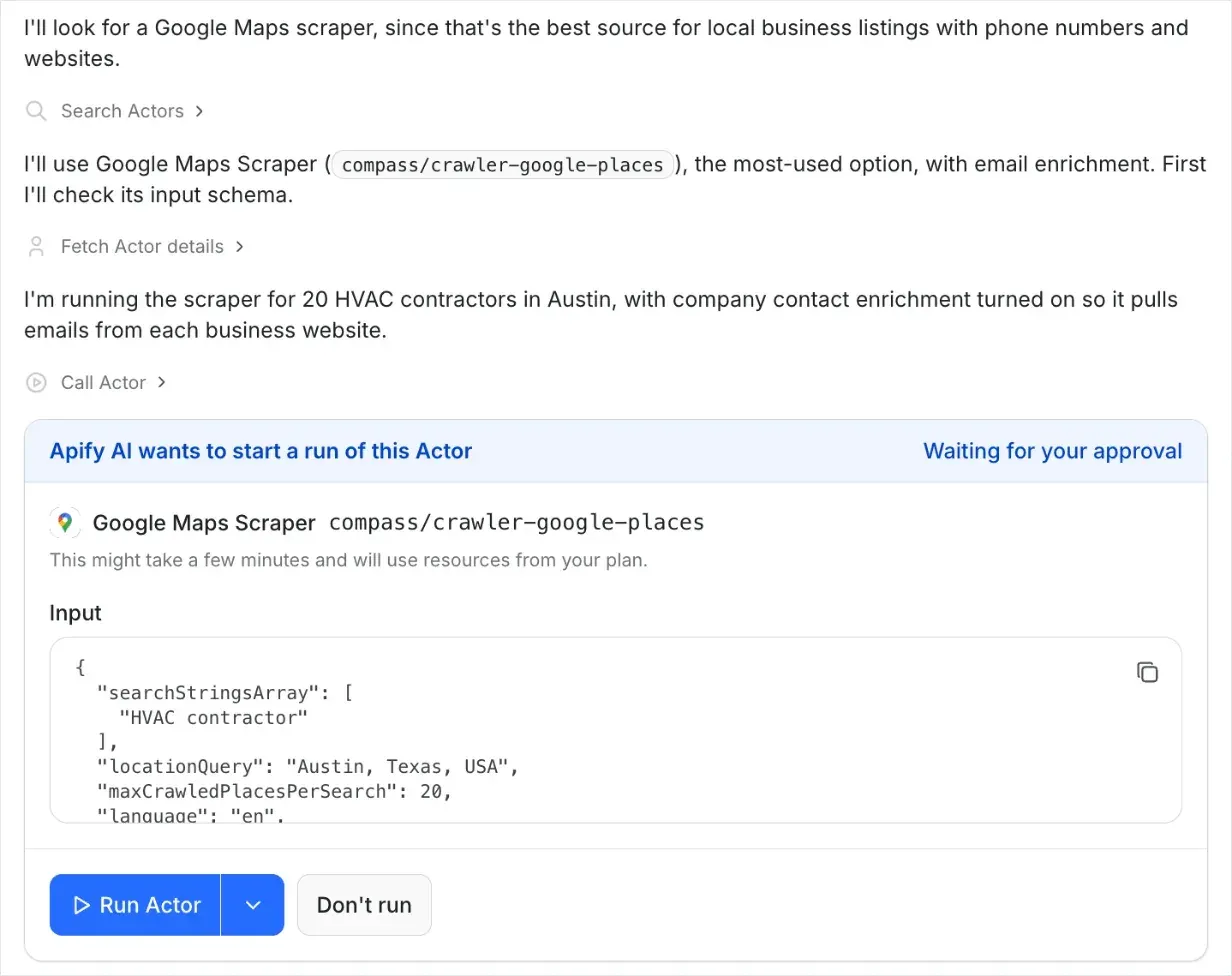
In a real run of this request, it returned 20 businesses in a couple of minutes, for a few cents in total. The list included phone numbers, websites, and the emails that businesses publish on their websites. To use the list in a CRM, open the results, click Export, and download them as CSV or Excel.
You can also name an Actor in your request. For example, "Use E-commerce Scraping Tool to get the prices of the top 10 whole bean coffee products on Amazon US" gives a shop owner a price comparison. To track prices over time, read about price monitoring. For more ideas, read how to extract contact details from Google Maps and enrich them in one run. For a real example, see how a 2-person team built a call list of French bakeries in Pricing every baguette in France with Apify.
Good to know: when Apify AI finds the right Actor, click Save as a new task on that Actor to keep the same settings. Then add a schedule in Apify Console to run the task every day or every week. For a ready-made example, the review alert workflow in n8n (tool 8) emails you your competitors' new reviews.
Price: the chat is free, and you pay only for the runs you approve. You can start on the Apify Free plan without a credit card, and the Starter plan adds more credit for $19 a month.
5. HubSpot Starter
HubSpot is a CRM platform for sales, marketing, and customer service. Its Starter plan is built for startups and small businesses that want to find and win more customers.
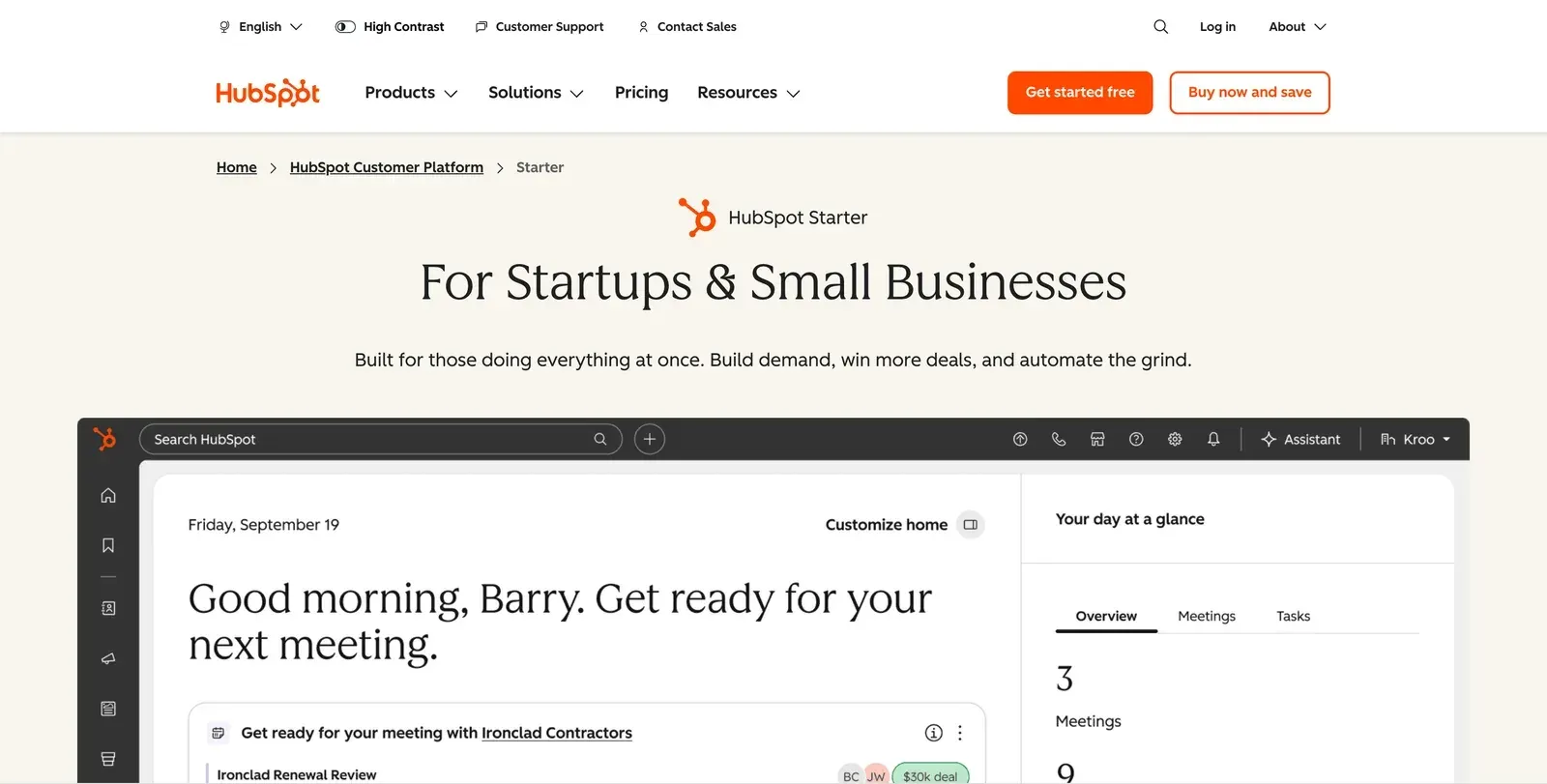
Best for: following up on new leads, with contacts, emails, and deals in one place.
Why pick it: HubSpot's free CRM already includes Breeze Assistant, and the Starter plan adds AI agents, powered by 500 HubSpot Credits a month. HubSpot also works inside ChatGPT and Claude. Among other CRM tools, Salesforce Starter costs $25 per user a month, and most Zoho CRM AI features need the $35 Professional plan.
AI features:
- Breeze Assistant drafts emails, summarizes records and conversations, and researches companies, on every plan.
- Prospecting Agent watches companies for buying signals, finds contacts, and drafts personal outreach.
- Data Agent answers questions about your customers from your calls, emails, and deal history.
- Meeting prep and notes prepare you for each call, then save the notes, transcript, and next steps.
- ChatGPT and Claude connectors let you look up and update your CRM from inside those assistants.
Integrations: Gmail, Outlook, Shopify, QuickBooks Online, Slack, Zoom, ChatGPT, Claude, and more in the HubSpot App Marketplace.
Example: you import the Apify AI list as a CSV file, and HubSpot drafts the first email to each lead.
Good to know: the Prospecting Agent uses 100 HubSpot Credits for each lead it prepares outreach for, so Starter's 500 monthly credits cover about 5 leads. For everyday email drafts, use Breeze Assistant instead. You can check your balance under Account & Billing > Usage & Limits.
Price: free CRM, or Starter at $20 per user a month.
Creating marketing materials
For social media posts, flyers, and short videos, one design tool can handle all three.
6. Canva
Canva is an online design tool with ready-made templates and built-in AI. It suits owners who make their own marketing materials.
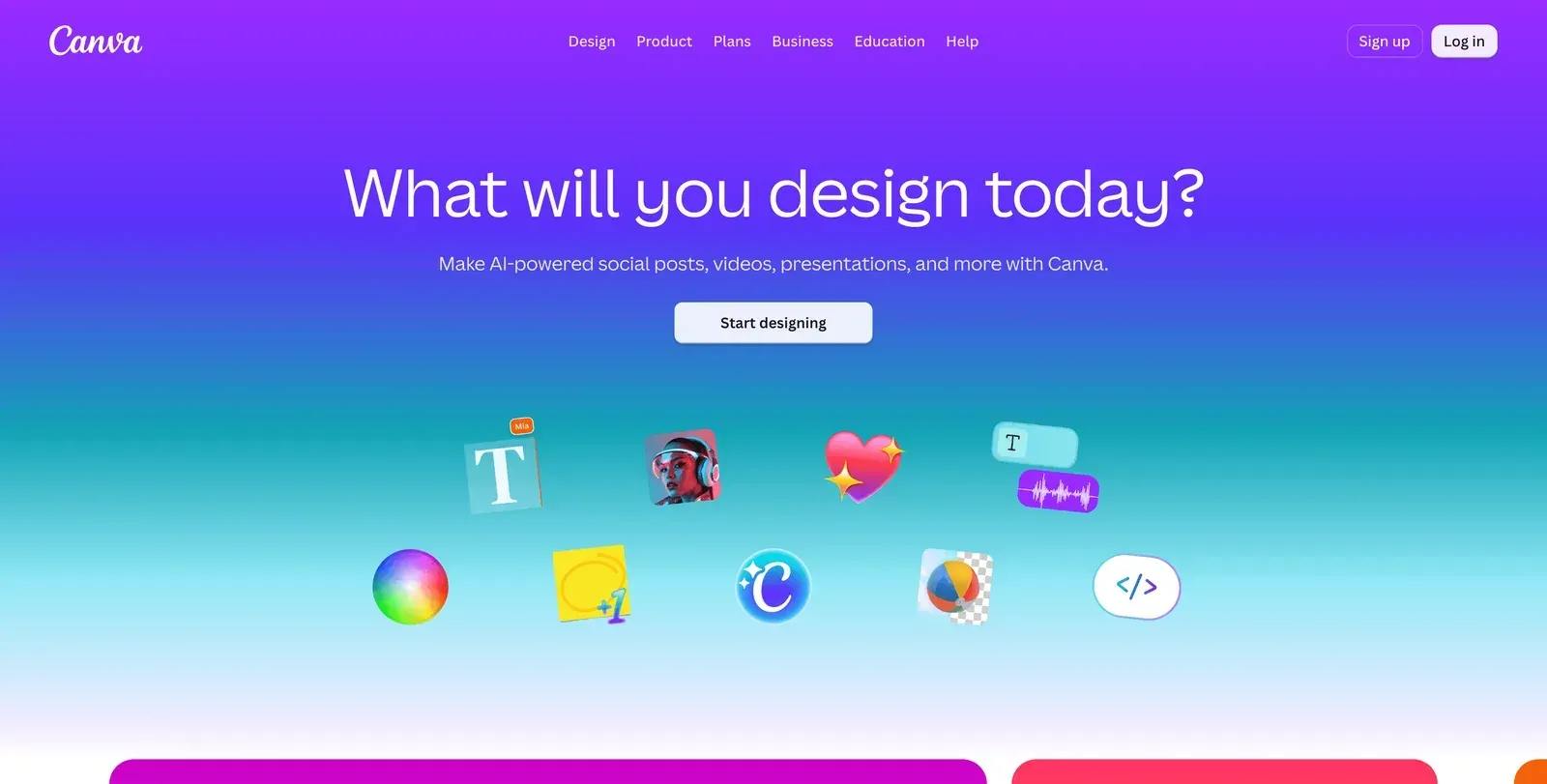
Best for: social media posts, flyers, and short videos without a designer.
Why pick it: the Canva free plan includes 20 AI uses a month, and Canva works inside ChatGPT and Claude. Among other design tools, Adobe Express Premium ($9.99 a month) is a cheaper paid option.
AI features:
- Canva AI creates a design, presentation, or image from a single prompt.
- Magic Write writes and rewrites text for posts, captions, and flyers.
- Magic Layers splits a flat image into separate layers that you can move and edit.
- Canva AI chat (Pro) builds and refines a design while you talk with Canva AI by text or voice.
- Background Remover (Pro) removes the background from photos and videos.
- Video generation (Pro) creates a short video from a text description.
Integrations: Google Workspace, Microsoft Teams, Slack, Meta, ChatGPT, Claude, Gemini, Make, and more in the Canva apps marketplace.
Example: a bakery makes Instagram posts for a whole week from one product photo.
Good to know: your AI uses reset every month, and all AI tools share the same allowance, so a large task uses more of it than a short caption. Pro includes 10 times as many AI uses as the free plan.
Price: free, or Pro at $18 a month.
Managing admin work
For bookkeeping, use accounting software with built-in AI. For meeting notes, use Google Meet or Zoom from Step 1.
7. QuickBooks Online
QuickBooks Online is cloud accounting software for small businesses. Its AI, called Intuit Intelligence, handles routine bookkeeping, which suits owners who keep their own books.
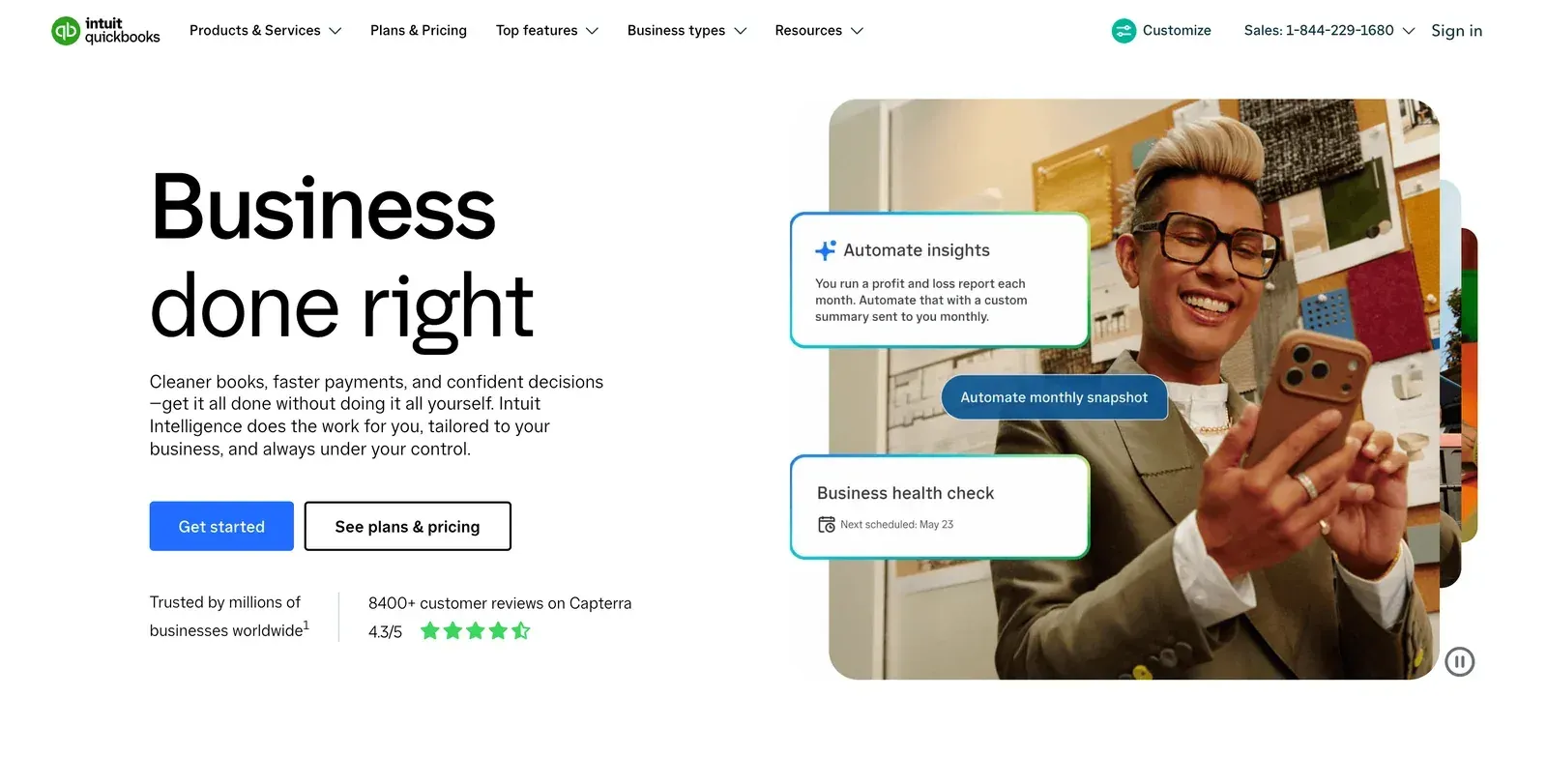
Best for: invoices, bills, and expenses.
Why pick it: in the US, ChatGPT and Claude can both read and update your QuickBooks data. In Claude, you can create and send invoices and reminders from the chat after you check a draft. Among other accounting tools, Xero costs less at $27 a month, and its Claude connector can read your data.
AI features:
- AI chat answers questions about your business data, such as how much you spent last month.
- Automatic expense categories sort each bank transaction into the right category.
- Handles the busywork by learning your patterns and completing routine bookkeeping tasks for you.
- Payments AI (Essentials) suggests invoice reminders and ways to get paid faster.
- Accounting AI (Essentials) cleans up your books and cuts manual transaction work.
Integrations: PayPal, Square, Shopify, Amazon, Etsy, Gusto, ChatGPT, Claude, and more on the QuickBooks apps page.
Example: a contractor asks the AI chat, "How much did I spend on materials last month?"
Good to know: the free plan has no AI and no app integrations, and it sends 2 invoices a month unless you turn on QuickBooks Payments. For the AI and the connections to ChatGPT and Claude, start with Simple Start.
Price: a free plan without AI, Simple Start at $38 a month for 1 user, with AI, or Essentials at $85 a month for up to 3 users.
Connecting your tools
When a job repeats every day, an automation tool can run it for you.
8. n8n
n8n is a workflow automation tool that connects your apps and runs repeat jobs for you, with AI steps where you need them. You can use it on n8n Cloud or run it on your own server, and it suits owners who are happy to build a workflow on a visual canvas.
Best for: jobs that repeat across several tools, such as a daily check that sends you a message.
Why pick it: n8n has a verified Apify node (n8n calls each step a node), so you can run Apify Actors inside your automations. On n8n Cloud, you sign in to your Apify account with one click. n8n charges per full workflow run, so a long workflow costs the same as a short one. The Community Edition is free if you run it on your own server, a computer that stays on all the time. If you prefer another automation tool, Make and Zapier also have free plans.
AI features:
- AI Agent node adds an AI agent that can make decisions and use tools inside a workflow.
- AI steps summarize, sort, or draft text at any point in a workflow.
- Model Context Protocol (MCP) support lets AI assistants such as Claude run your n8n workflows.
- Assistant builds and edits workflows for you from a chat.
- Evaluations test an AI step on sample inputs before you rely on it.
Integrations: Gmail, Google Sheets, Google Drive, Slack, Notion, Airtable, Telegram, OpenAI, Apify, and more on the n8n integrations page.
Example: a daily alert for new low-star Google reviews that still need a reply. The alert repeats each morning for up to 7 days, until you reply. A copy of the workflow can check your competitors' listings too.
Every morning at 8 am, the workflow reads the links in the Your Google Maps links step and runs Google Maps Reviews Scraper in the Get new Google reviews step, for the last 7 days of reviews. The Keep low-star reviews with no reply step keeps the 1- to 3-star reviews that have no owner reply. The Email me the review step then emails each one to you, with a link to the listing.
In a test on a busy business and 1 competitor, with 3 days of reviews instead of 7, the Get new Google reviews step collected 34 reviews for a few cents. The Keep low-star reviews with no reply step then kept the 2 low-star reviews that had no reply yet. In the screenshot below, the number on each line shows how many items went to the next step.
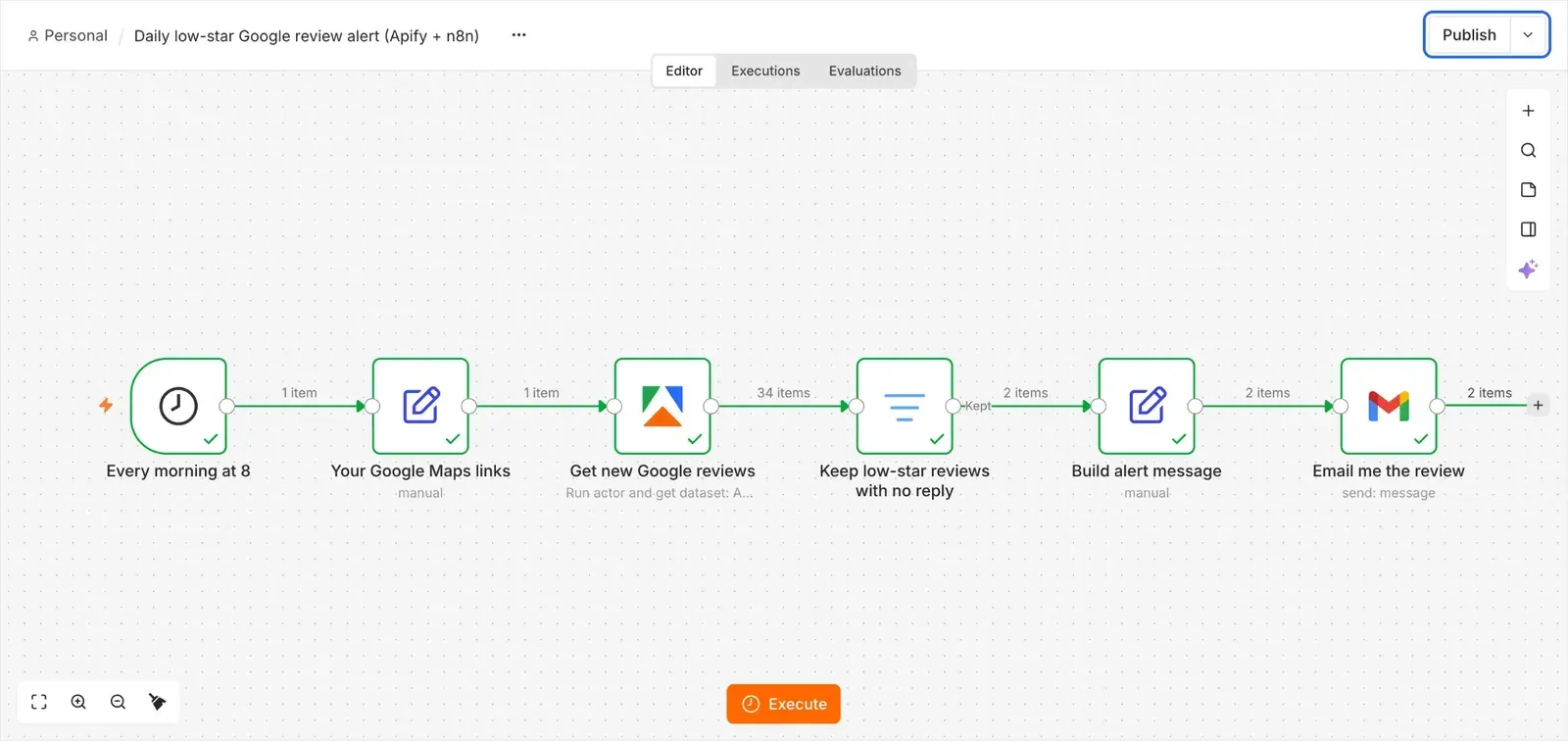
Each of those 2 reviews arrived as a short email like this one.
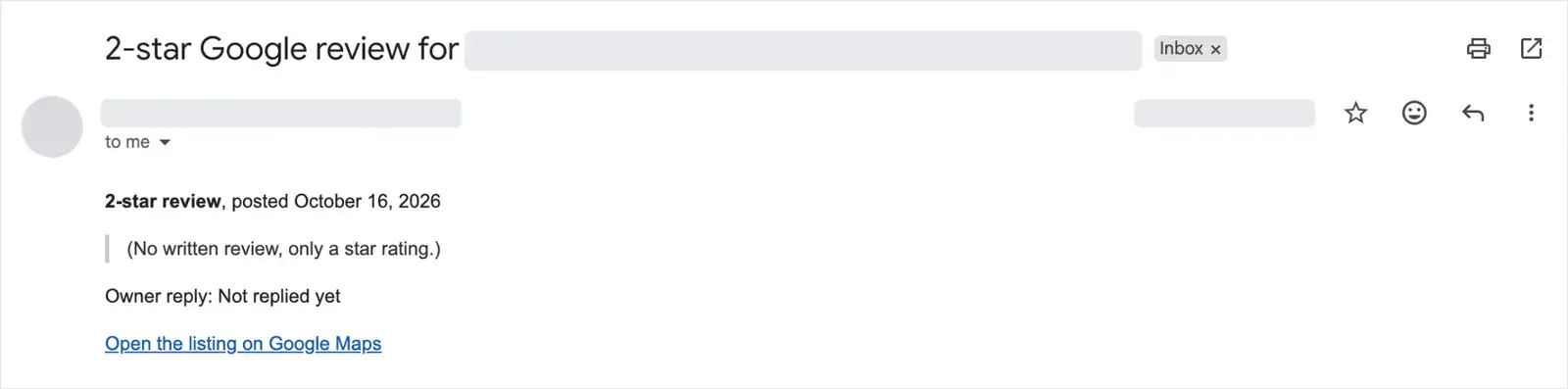
The steps below use n8n Cloud. On the Community Edition, set up your Gmail credentials first, as n8n's Google credentials guide explains.
To set it up:
- Right-click this workflow link and copy the link address.
- In n8n, open a new workflow, click the ... menu next to its name, choose Import > From URL, and paste the link.
- Open your business on Google Maps, copy its link from your browser's address bar, and paste it into the Your Google Maps links step.
- In the Email me the review step, add your email address and connect your Gmail account. In the Get new Google reviews step, connect your Apify account.
- Click Execute to test it, and click Publish so it runs every morning.
The workflow checks 7 days of reviews, so it also includes reviews that Google shows a few days late.
To monitor competitors too, copy the workflow and paste their links one per line. In the Keep low-star reviews with no reply step, delete the condition that checks for an owner reply. In the Get new Google reviews step, change 7 days to 1 day in the Input JSON field, so each review arrives once. You then get each of their new low-star reviews, which shows where their customers are unhappy and where you can do better. For a bigger setup, see this review monitoring pipeline with Apify and n8n.
Good to know: n8n counts 1 execution each time the whole workflow runs, however many steps it has, and test runs you start with Execute don't count. The Executions tab shows every run.
Price: Community Edition is free, or Cloud Starter at EUR 24 a month for 2.5k workflow runs.
Starter stacks of AI tools for under $100 a month
Here are 3 example stacks, or sets of AI tools, for small business owners who work alone. The totals use each vendor's published prices.
| Business | Stack | Per month |
|---|---|---|
| Local service business | ChatGPT Plus, Google Workspace Business Standard ($14, 1-year plan), QuickBooks Simple Start, Smith.ai free plan (25 calls a month), Apify Free plan for commercial leads such as property managers | $72 |
| Online shop on Shopify | ChatGPT Plus, Shopify Sidekick, Tidio Lyro (billed yearly), QuickBooks Simple Start, Canva free plan, Apify Free plan for competitor prices | $90.50, plus your Shopify plan |
| Small agency | ChatGPT Plus, Canva Pro, HubSpot Starter, QuickBooks Simple Start, Apify Free plan for new leads | $96 |
Your real total depends on your number of users and how much you use each tool. Start with a few tools, and add more as your business grows. For an online shop, see the best AI tools for e-commerce.
Before you contact new leads
This checklist helps keep your outreach safe and your emails out of spam folders, for leads from any source.
- Send emails to new leads from a separate domain, a second web address you use only for this, so your main business email stays safe from spam reports. On that domain, set up the email authentication records in Gmail's sender guidelines, called SPF, DKIM, and DMARC. Your email provider has the setup steps.
- Follow the US CAN-SPAM Act. It also applies to business-to-business email. Say that the email is an ad, add your postal address, include a way to opt out, and handle opt-outs within 10 business days.
- Outside the US, check local rules first. Some countries, such as Germany, require consent before you send advertising email, even to businesses.
- Make sales calls yourself. Calls with an AI or recorded voice need the person's consent first. For sales calls, that consent must be in writing, according to the Federal Communications Commission (FCC).
- Use public business listings, and treat personal names and cell phone numbers as personal data.
- Verify the email addresses before you send, so more of your emails reach real inboxes.
How to pick your first AI tool
Add tools one job at a time, and check that each one is accurate and saves you more than it costs.
- Start with the job that takes the most hours each week. Keep a tool when the hours it saves are worth more than its monthly fee.
- Calculate the cost for the amount you expect to use, and check what one billable unit is, such as a call, a conversation, or a credit.
- Test each tool on real work during its free plan or free trial. Check its numbers against the source, such as the invoice in QuickBooks or the prices on your website.
Next steps
Turn on the AI in the tools you already pay for, then add a tool for each remaining job.
If finding business customers or monitoring competitors is one of those jobs, try Apify AI on the Free plan. You can start without a credit card. Type a plain-English request in the Ask Apify AI box, such as "Find 20 plumbers in Denver with their phone numbers and websites."

FAQ
What is the best AI tool for a small business?
For most small businesses, a general AI assistant such as ChatGPT or Claude handles many everyday jobs. It writes emails and price quotes, answers questions, and can connect to apps like QuickBooks and HubSpot. Then add one tool for your biggest remaining job.
What are the best free AI tools for small business?
Start with the free plans of ChatGPT or Claude for writing, Smith.ai for phone calls, Tidio for website chat, Apify AI for finding leads, and Canva for marketing materials. Also turn on the AI in the tools you already use, such as Gemini in Gmail, Copilot Chat, Shopify Sidekick, and Meta Business Agent.
Can AI find leads for my small business?
Yes. With Apify AI, you describe the leads you want in plain English, such as "plumbers in Denver with phone numbers and websites." Apify AI runs one of thousands of ready-made tools from Apify Store and gives you a list you can download as a spreadsheet. You can start free, without a credit card.
How much do small businesses spend on AI?
In a US Chamber of Commerce survey, businesses that pay for AI tools spent a median of $250 a month. Example stacks of AI tools for 1 person cost $72 to $96 a month at published prices, well under that median. Some of those prices are for yearly billing. A stack for a Shopify shop also needs a Shopify plan.
Is it safe to use AI tools with customer data?
It can be, on business plans that keep your data out of AI training by default, such as ChatGPT Business or Claude Team. For US patient health data, use only a plan whose vendor signs a Business Associate Agreement (BAA) under HIPAA, the US health privacy law. Check each AI answer before you send it to a customer.