If you’re a small business owner, recruiter, or freelancer looking to speed up your day-to-day operations, you’re probably looking for a data scraping tool that:
- Requires minimal upfront investment
- Consistently delivers accurate, reliable data
- Offers a practical, intuitive user interface
- Integrates directly into your existing workflows
We’ve tested and compared some of the most popular instant data scrapers in 2026 to see how they measure up. This guide will cover each tool's use case, limitations, and a quick setup walkthrough, so you can confidently select the best tool for your specific requirements.
Three types of instant data scraper
Instant data scrapers can be broken down into three categories based on your technical needs and budget:
- Browser extensions: The fastest way to get started, but are limited to visible page data without automation or scheduling.
- Desktop apps: Offer you more configuration options through the visual interface at the cost of longer setup times and higher pricing.
- Cloud platforms: Deliver maximum scalability, handling high-volume jobs, scheduling, and automation.
Quick comparison
| Tool | Type | Free tier | Entry paid plan | Export formats | Best for |
|---|---|---|---|---|---|
| Apify (Instant Web Data Scraper) | Cloud | $5 credits/month | $10/month | CSV, JSON, Excel, GSheets, XML | Flexible scraping & easy integration |
| Instant Data Scraper Extension | Extension | Unlimited | N/A | CSV, XLSX | One-off scrapes |
| Thunderbit | Extension + cloud | 6 pages free | Credit-based | CSV, XLSX, JSON | AI-assisted extraction, non-standard layouts |
| WebScraper.io | Extension + cloud | Local only | $50/month (cloud) | CSV, XLSX, JSON | Free option for multi-page scraping |
| Octoparse | Desktop + cloud | 10 tasks | $69/month | CSV, XLSX, JSON, API | Visual point-and-click desktop scraping |
What makes a good instant data scraper?
Selecting the right scraper depends heavily on your specific use case. To make meaningful distinctions between each tool, we have evaluated them against four criteria that matter the most for non-technical users:
- Setup speed: Can you go from installation to data in under five minutes?
- Data usability: Are the export options immediately usable, or do they require manual cleaning?
- Scalability: Can the scraper scale to handle larger jobs?
- Affordability: Is the free tier genuinely useful, or just a trial?
Apify - Instant Web Data Scraper

Instant web data scraper is a cloud-based Actor that can extract structured data from almost any webpage. Provide it with a URL, tell it what data you want, and it returns a clean dataset ready to export. Everything is handled in the cloud, so there’s no need to worry about proxy rotation.
Pros
- Versatility: extract data from any website without needing much configuration.
- Ease of use: User-friendly interface.
- Integration capabilities: 20+ integrations, including Make, Slack, Zapier, and Google Drive.
- Data storage: The platform includes data storage, allowing for reuse without starting again from scratch.
- Support: Access to dedicated support, detailed documentation, and an array of tutorials and guides.
The free plan includes $5 in credits per month - enough for hundreds of lightweight scraping jobs - while the paid plan starts at $10 per month.
How to get started
- Create a free account at Apify.com and navigate to Apify Store.
- Search for Instant web data scraper and click the Try for free button.
- Enter the URL of the webpage you want to scrape and select the Find tables action to identify the tabular data.
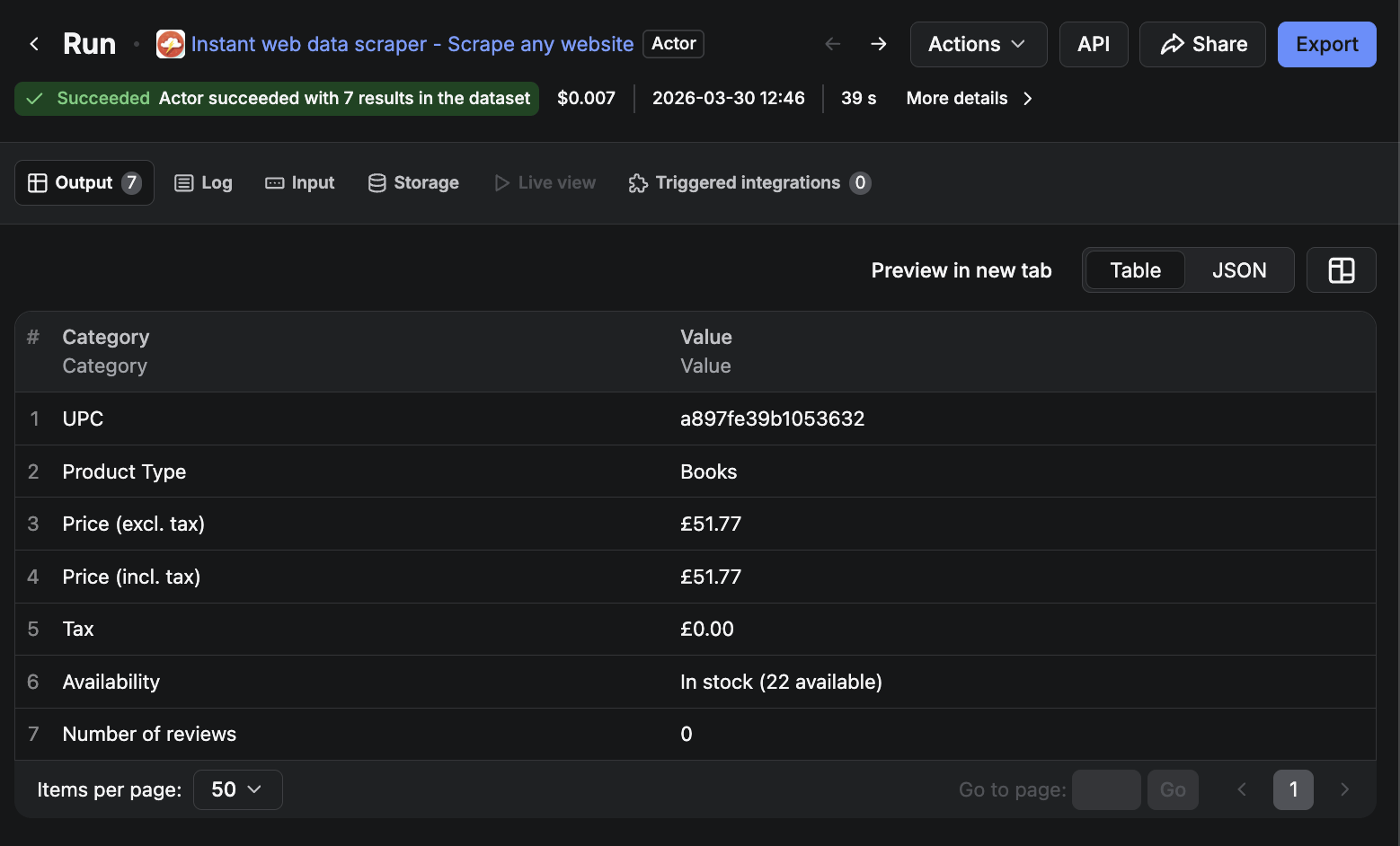
- Run the Actor and review the output dataset.
- Note the table number and column numbers of the desired data points.
- Define your data extraction preferences in the Column mappings section.
- Enter the noted table number from the previous run.
- Choose the scrape data action and run the Actor again.
- Once the run is complete, preview your results and export as CSV, Excel, JSON, or directly to Google Sheets.
Key limitations
This scraper works great on clean pages, but deeply nested or dynamically loaded content may need a more specialized Actor.
Should you use Apify?
Beyond the generic scraper, Apify Store gives you access to thousands of purpose-built Actors for specific platforms. If you need to pull data from LinkedIn, Google Maps, Amazon, or Instagram, there’s a dedicated Actor already built for that job - often more reliable than trying to scrape those platforms with a general-purpose tool.
Instant Data Scraper

Instant Data Scraper is a completely free Chrome extension that uses AI to automatically detect and highlight tables and lists on whichever webpage you’re viewing. It requires no account, no setup, and no configuration. It’s the original tool that inspired the Apify Actor above, and for simple, one-off extractions from pages with visible structured data, nothing on this list is faster.
Pros
- Cost: Completely free, with no account required.
- Ease of use: Zero setup. AI-powered detection automatically highlights the most relevant data on the page.
How to get started
- Install Instant Data Scraper from the Chrome Web Store.
- Navigate to the webpage containing the data you want to extract.
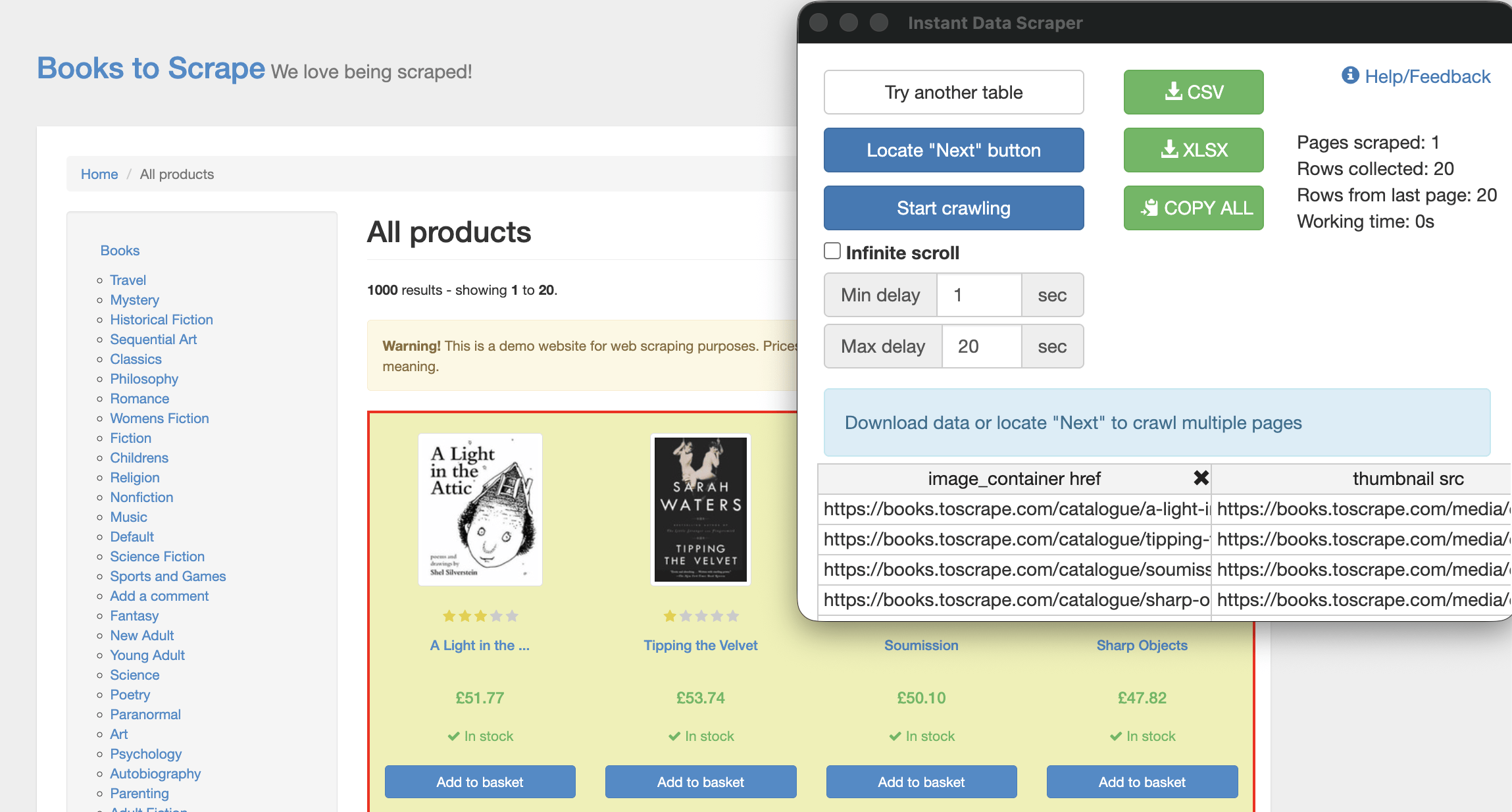
- Click the extension icon in your browser toolbar. The tool will automatically detect and highlight the most relevant data on the page.
- If the page has multiple pages of results, use **Locate “Next” button to configure pagination, then click Start crawling to collect data across all pages.
- Click the CSV or XLSX button to save your dataset.
Key limitations
This extension is limited to the contents of the currently open page, and the scraped data will often need some manual cleaning. It also struggles with pages that load content dynamically via JavaScript, and does not offer the same scheduling or integration features as the Apify variant.
Thunderbit
Thunderbit is a Chrome extension and cloud hybrid that lets you describe what you want to extract in plain English. Much like conversing with a typical large language model (LLM), you simply tell the tool which fields you want to scrape - for example, “product descriptions” - and it figures out the rest. This approach is quite unique and makes it particularly useful for pages where the data isn’t neatly arranged.
Pros
- Natural language input: describe what you want to scrape, no need to configure selectors.
- Handles non-standard layouts: works on pages where data isn’t in a tidy table or list.
The free tier limits you to six pages (with a maximum of 30 credits per page), while the paid plans range from $15 to $38 per month.
How to get started
- Install the Thunderbit extension from the Chrome Web Store and make an account.
- Navigate to the page you want to scrape.
- Click the Thunderbit icon, select the data source, then type the plain-English description of the fields you want to extract.
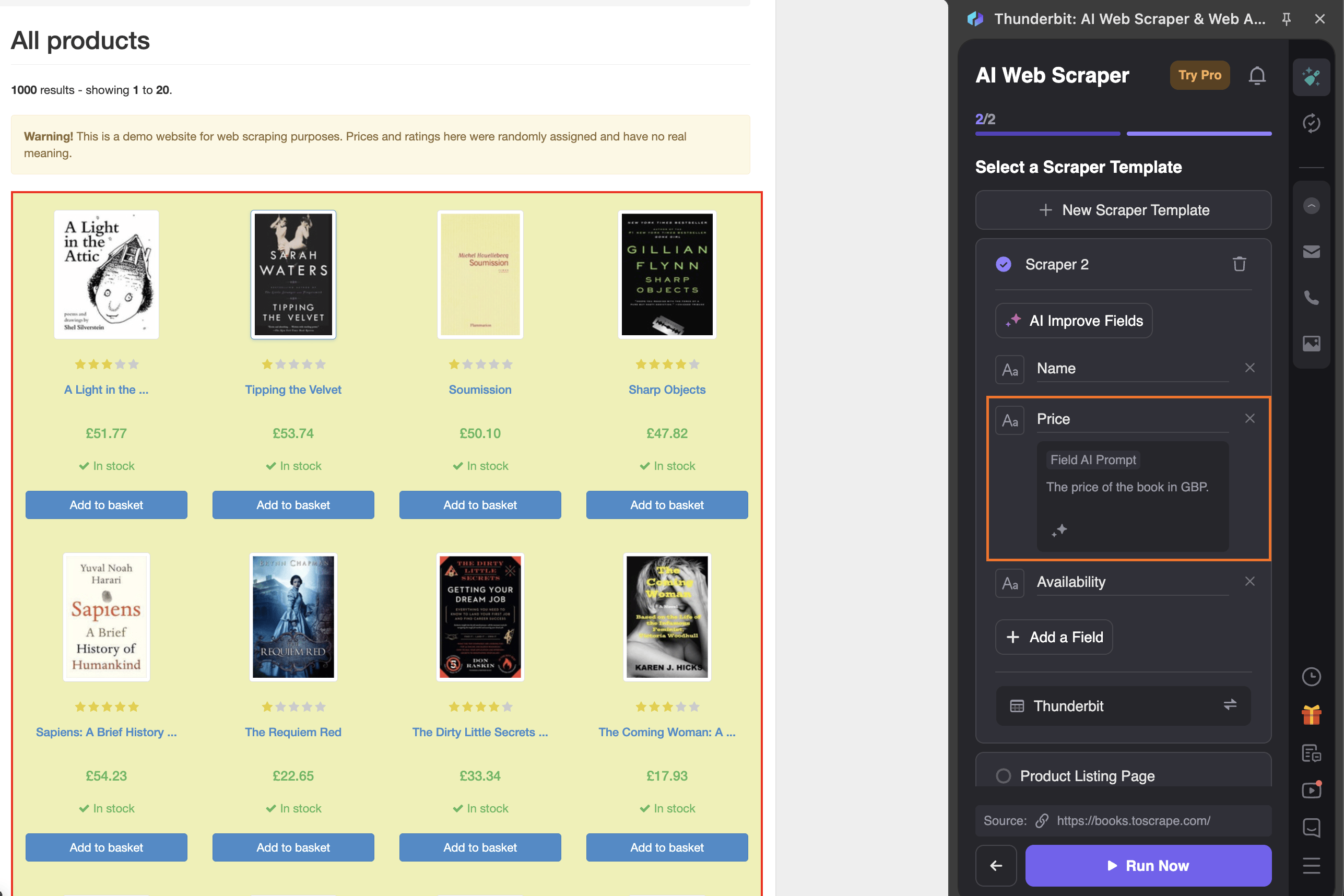
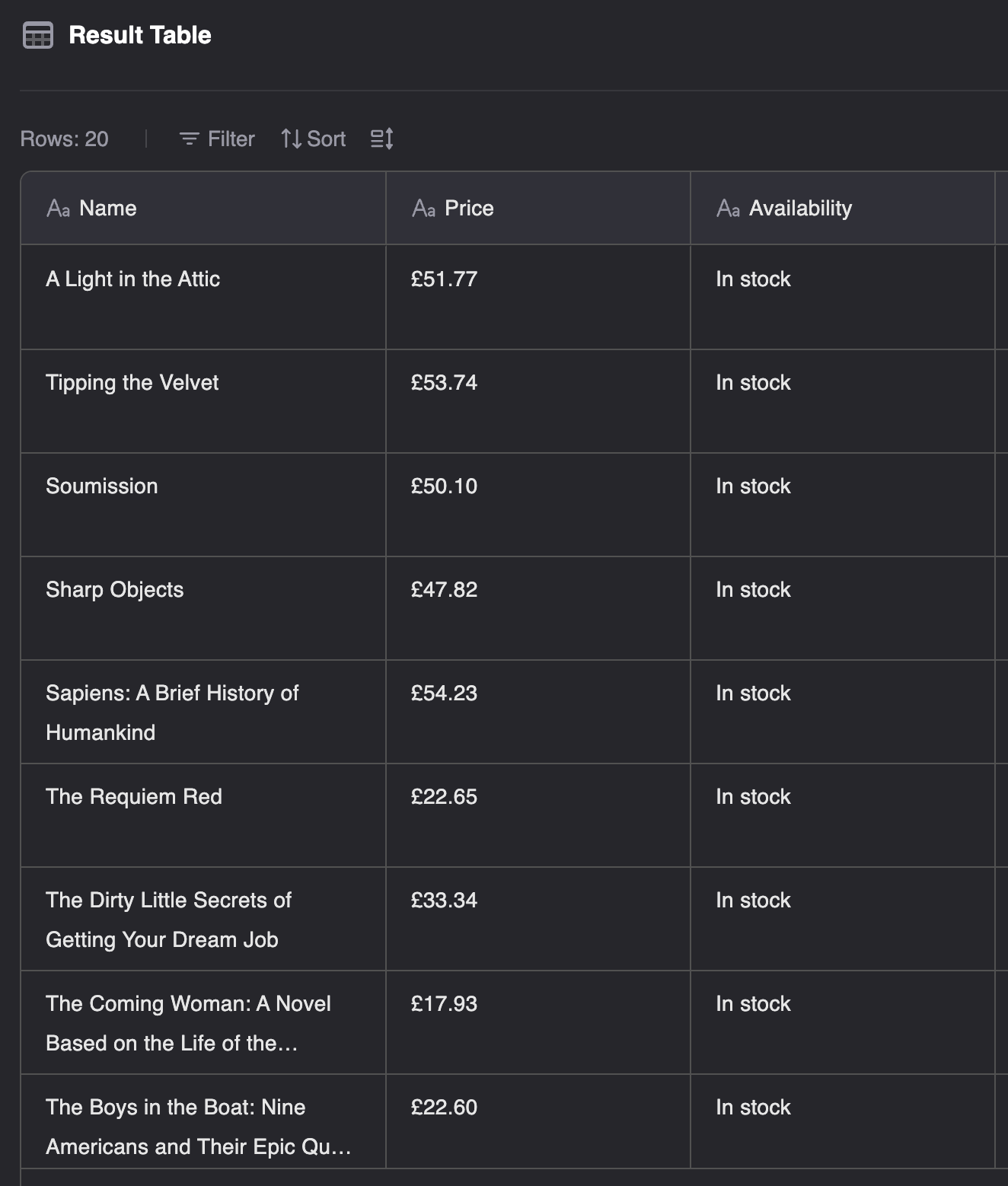
- Click Run Now. Once Thunderbit has scraped the page, you can open the results table and download as Excel, CSV, or JSON.
Key limitations
The free tier is very limited - six pages per month won’t get you very far if you have a real task in front of you. The credit costs can add up quickly for recurring use, and the tool is not well-suited to high-volume jobs.
WebScraper.io
WebScraper.io is a Chrome extension and cloud platform built around a point-and-click style “sitemap” system that lets you configure multi-page scrapes without writing code. You build your own scraping template, run it through Chrome, and download the results.
It’s worth being upfront about something that the name slightly obscures: this tool is not necessarily instant. Building a sitemap requires defining the page structure, selecting the elements you want to extract, and configuring how the scraper should navigate between pages. For a non-technical user, this process can take upwards of 30 minutes, with users reporting that it requires multiple rounds of trial and error to produce clean results. If speed matters, this isn’t the right starting point for you.
Pros
- Customization: The point-and-click sitemap can be extremely effective at scraping complex sites when used correctly.
- Integrations: Paid plans allow integrations with Dropbox, Google Sheets, Amazon S3, and more.
- Completely free for local usage.
The free tier runs locally on your machine, while the cloud tier costs $50-$200+ per month and includes scheduling, parallel tasks, and integrations with Google Sheets, Dropbox, and Amazon S3. Paid plans offer a seven-day free trial.
How to get started
- Install the Web Scraper extension from the Chrome Web Store.
- Navigate to the page you want to scrape and click the Web Scraper extension icon.
- Configure the pagination and link following logic using the point-and-click interface to build your sitemap.
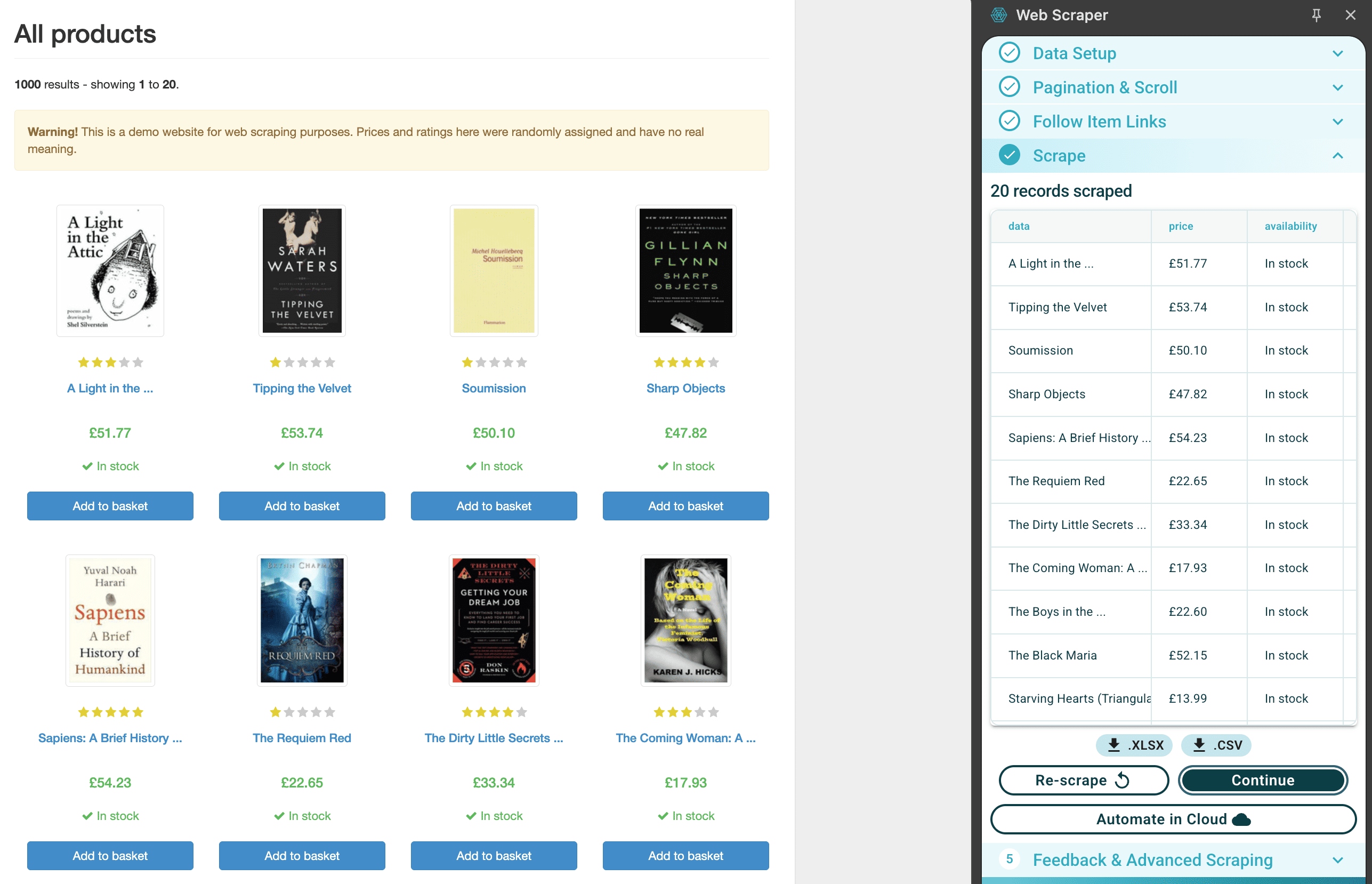
- Once configured, click Scrape the page to run the job locally, then export your data as CSV or XLSX.
- If you want to run the scrape in the cloud, import your sitemap into Web Scraper Cloud and configure it from there.
Key limitations
Though not necessarily technically demanding, the setup process can be genuinely time-consuming and not beginner-friendly. The free plan is local-only with no option for scheduling. The jump to $50 per month for these features is steep compared to Apify’s $10 per month entry plan.
Octoparse
Octoparse is a standalone desktop application with a visual, point-and-click scraper builder. Unlike WebScraper.io, it doesn’t require DevTools or browser configuration. It can handle pagination and multi-page scraping well, making it a reasonable option for users who prefer a desktop environment.
Pros
- Customization: the point-and-click interface offers customizable scraping without selectors or code.
- Durability: Can handle pagination and multi-page scraping.
- Scheduling: available through the cloud tier.
The free plan includes 10 scraping tasks with limited data export options. Paid plans start at $69 per month for 100 tasks, and will be necessary if you require CAPTCHA solving, IP rotation, proxy support, or scheduling.
How to get started
- Download and install the Octoparse desktop app, then create an account and log in.
- Click new task and enter the URL of the target website. Octoparse will load a preview of the page inside the app.
- Use the point-and-click interface to select the elements you want to extract. Fields will be auto-suggested based on what you click.
- Configure pagination if the data spans multiple pages.
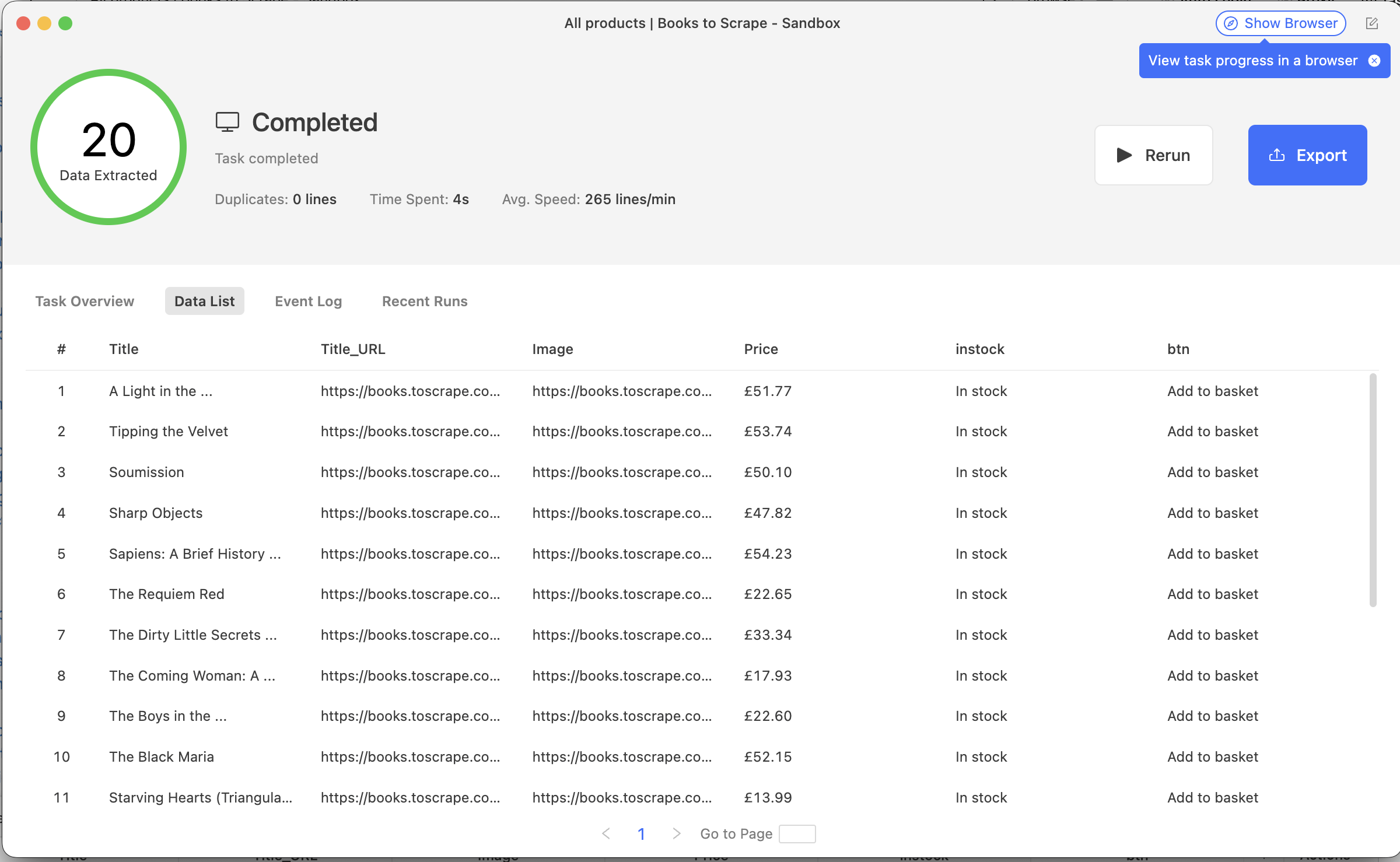
- Click Run and choose local or cloud mode. Export your dataset as CSV, Excel or JSON once the run is complete.
Key limitations
Much like WebScraper.io, Octoparse may require 20 to 30 minutes before you see your first clean result, and be aware that the free plan is limited enough that it’s effectively a trial rather than a working solution. The base paid plan is significantly higher than any other tool in this list, and setup time is significant, so if speed and affordability are the priorities, look elsewhere.
Which instant data scraper should you use?
The right tool will vary from user to user. Here’s a quick way to find yours.
- One-off scrape and you’re on a tight budget → Instant Data Scraper (extension).
- Flexible scraping with easy integration → Apify's Instant web data scraper.
- Scraping a specific platform (LinkedIn, Google Maps, Amazon) → Apify Store Actor.
- AI-assisted extraction from messy or non-standard pages → Thunderbit.
- Free local solution, willing to invest setup time → WebScraper.io.
- Visual desktop app with more configuration options → Octoparse.
Note: This evaluation is based on our understanding of information available to us as of April 2026. Readers should conduct their own research for detailed comparisons. Product names, logos, and brands are used for identification only and remain the property of their respective owners. Their use does not imply affiliation or endorsement.
FAQs
What is data scraping?
Data scraping - more commonly known as web scraping - is an automated process of extracting data from websites. A scraper visits web pages and collects data, then delivers it in a structured format like a spreadsheet or a JSON file.
Is it legal to scrape data?
Yes, provided you follow the rules and don’t violate a site’s terms of service. The US Ninth Circuit Court of Appeals ruled that scraping publicly accessible data is legal. That said, scraping personal data or private content can create legal exposure, so it’s worth checking the rules before you start.
Do I need coding skills to use a data scraper?
Not necessarily. Many modern scrapers - including some of Apify’s ready-made Actors - are designed for non-technical users, with simple input forms and no code required. For sites with anti-bot measures, some configuration may be needed, but low-code options have lowered the barrier.
What kinds of data can you scrape?
Almost any publicly available data on the web can be scraped. Common use cases include customer reviews, job listings, social media profiles, search engine results, and product information. If it’s visible in a browser and publicly accessible, it can probably be scraped.
How do I avoid getting blocked while scraping?
Websites block scrapers that send too many requests or that exhibit suspicious behavior. Effective countermeasures include rotating proxies, respecting rate limits, and using a browser-based scraper that renders JavaScript the way a real user would. Tools like Apify Proxy can handle much of this automatically.