
Oxylabs and Bright Data are primarily known for their proxy services. However, they've recently been making significant investments and improvements to their scraping APIs.
But how exactly do their services work, and does their similar background shape their approach?
That’s what we're going to explore in this article.
Oxylabs vs. Bright Data comparison table and summary
| Features | Oxylabs | Bright Data |
|---|---|---|
| Free Trial | ✅ Up to 2,000 results | ✅ 1,000 results |
| Library of ready-to-use APIs | ✅ | ✅ |
| Web IDE | ❌ | ✅ |
| Available data export formats | JSON, HTML | JSON, CSV |
| JavaScript rendering | ✅ | ✅ |
| General Scraper API (for any web page) | ✅ | ❌ |
| High-scale enterprise plans | ✅ | ✅ |
| Cloud Integration (AWS S3, Google Cloud) | ✅ | ✅ |
| Proxy rotation, browser emulation, CAPTCHA bypass | ✅ | ✅ |
| Dataset Marketplace | ❌ | ✅ (Starting at $2.50 per 1K records with a minimum order of $250) |
| Scheduling | ✅ | ✅ |
| Scraping API Playground | ✅ (Live preview, code snippets included) | ❌ |
| Pricing | Feature-based billing with success-only charges; plans from $49/month ($0.50-$1.35 per 1K) | Pay-as-you-go ($1.50 per 1K), volume discounts from $499/month ($1.30 per 1K) |
As the feature comparison table above illustrates, both companies are fairly similar in their offerings, but they still vary significantly in key aspects such as the size of their API marketplace, their approaches to giving users control over the web scraping process, and their pricing structures.
To kick things off, let’s start with an overview of each service and take a quick look at some of their most distinctive features.
Bright Data
Bright Data, a well-known proxy provider, has carved a place for itself in the web scraping world with its API marketplace, which focuses on providing specialized APIs for popular websites such as Amazon, YouTube, LinkedIn, and Instagram.
Despite it's diverse marketplace, Bright Data lacks a “general scraper API” adaptable to any webpage. However, it makes up for this with its Web IDE, a unique feature that allows developers to tweak existing templates or build custom scrapers from scratch.
Another standout feature of Bright Data is its Dataset Marketplace, where users can purchase custom datasets from specific websites, eliminating the need to engage in the scraping process altogether.
Let’s take a closer look at each of these features and see how they work from a user’s perspective.
API Marketplace
Bright Data offers a collection of 600+ ready-made scrapers for popular categories (e.g. e-commerce, social media, financial).
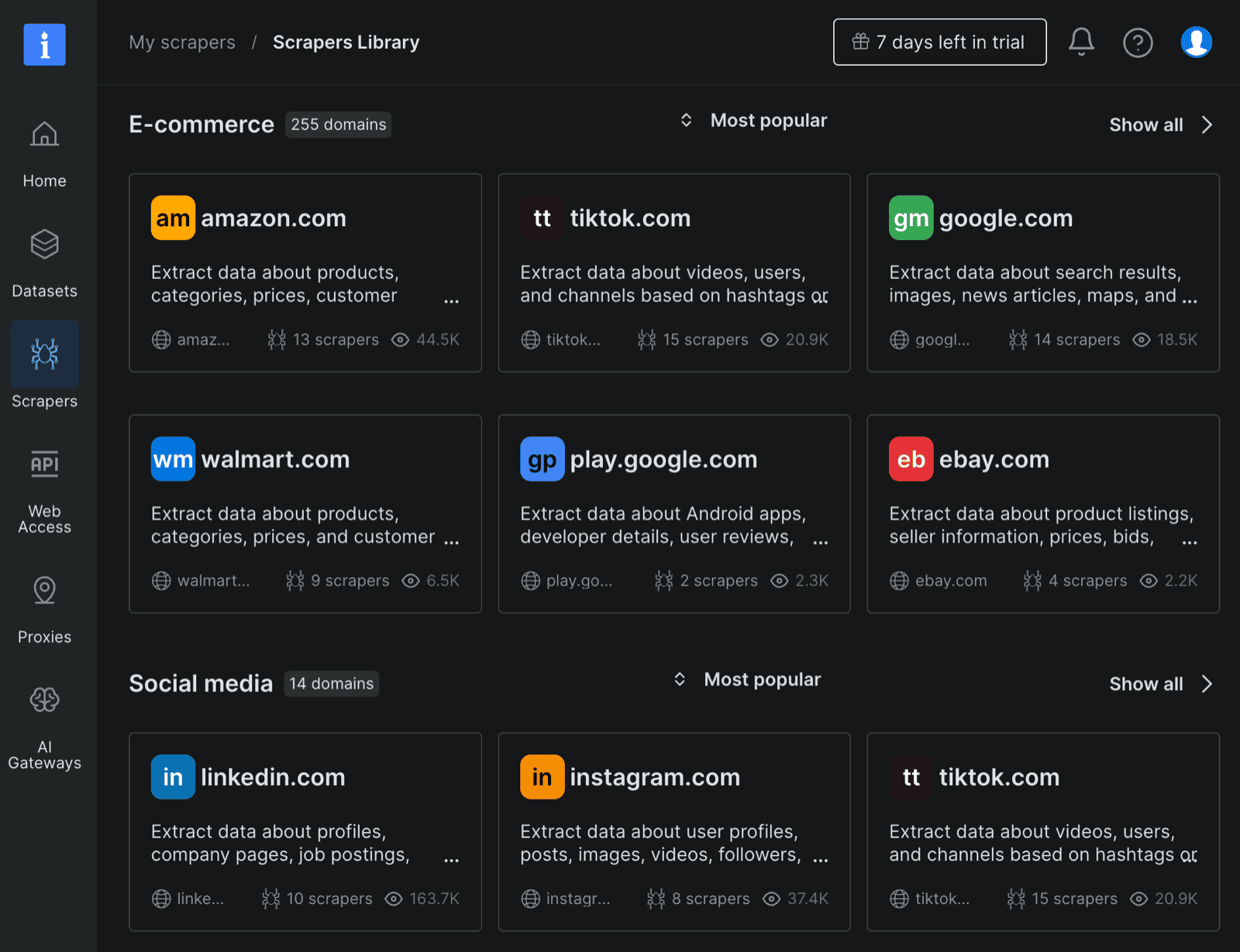
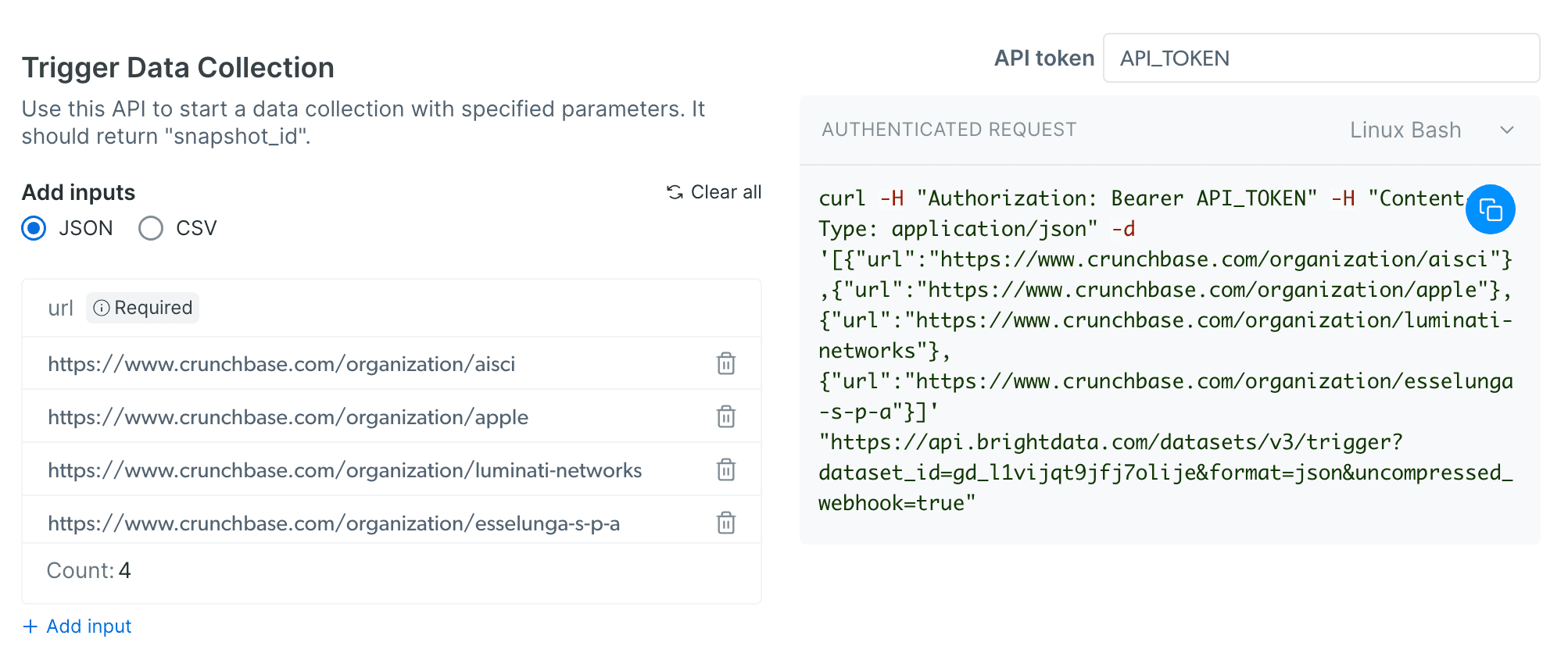
Using the API endpoints is fairly simple, thanks to the visual API request builder that helps you configure curl requests for Bash, PowerShell, and Windows CMD.
However, one downside is the lack of code examples in popular languages such as Node.js and Python.
While you can figure out the implementation from the documentation, having ready-made examples would be a convenient touch and is an expected feature across the majority API scraping services.
It wouldn’t hurt for Bright Data to add more code examples to their request builder and documentation.
Web Scraping IDE
Bright Data's IDE offers a great contrast to their specialized API marketplace, giving developers the freedom to either build their own scrapers directly on the platform or tweak the code from existing templates to fit their needs.
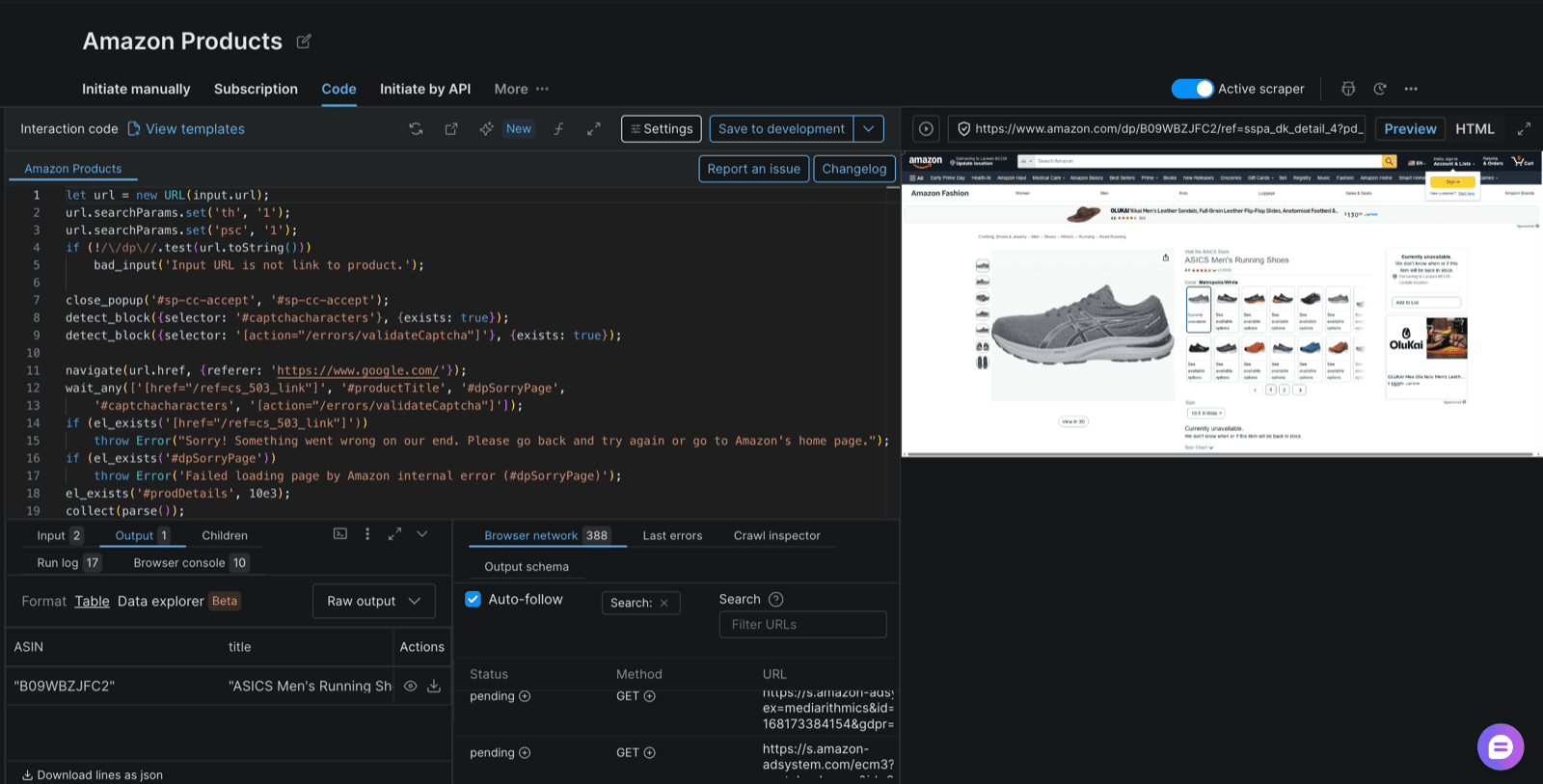
After you're done building, you can click on Save to development and access and edit your configuration settings in the My scrapers tab.
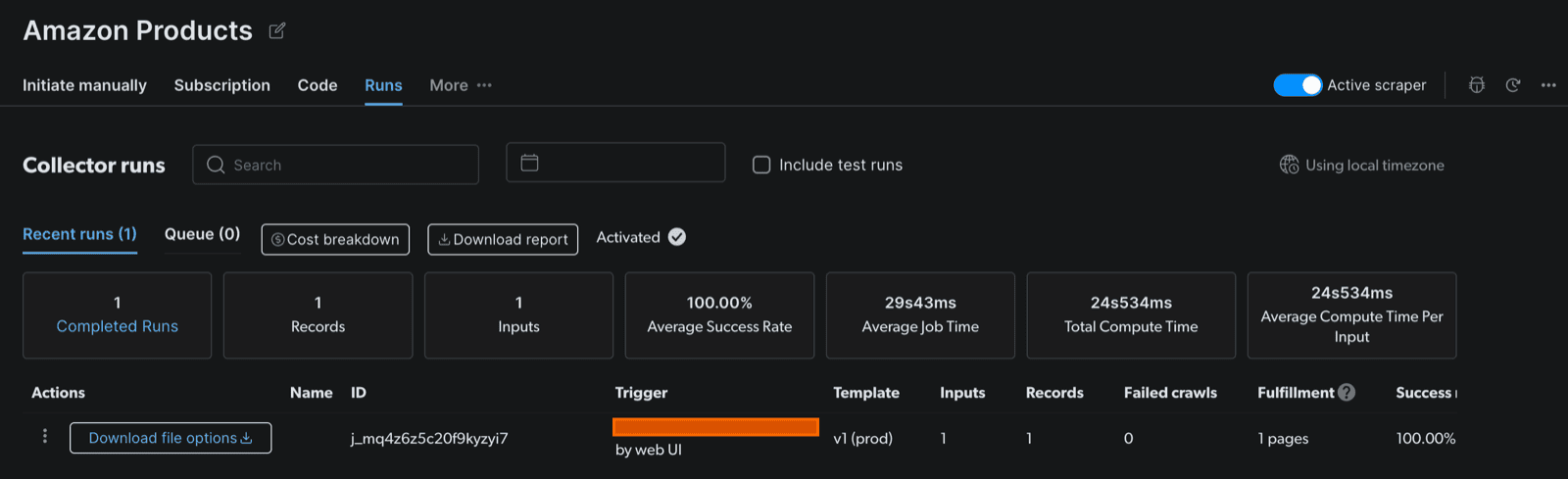
While the idea behind the IDE is appealing, the UI isn’t very intuitive, and the whole process can feel a bit clunky at times.
One notable gap is the lack of an option to work on the template locally and then deploy the code to Bright Data for the final configuration, a feature that's common on other platforms such as Apify.
Having this option would make for a much better developer experience, but unfortunately, there is no obvious way to do that.
Regarding the UI, it's often not clear for a new user where the information about their scraper and its runs is stored. A better onboarding process and a less monochromatic color scheme might help users find their way around at a glance.
Dataset Marketplace
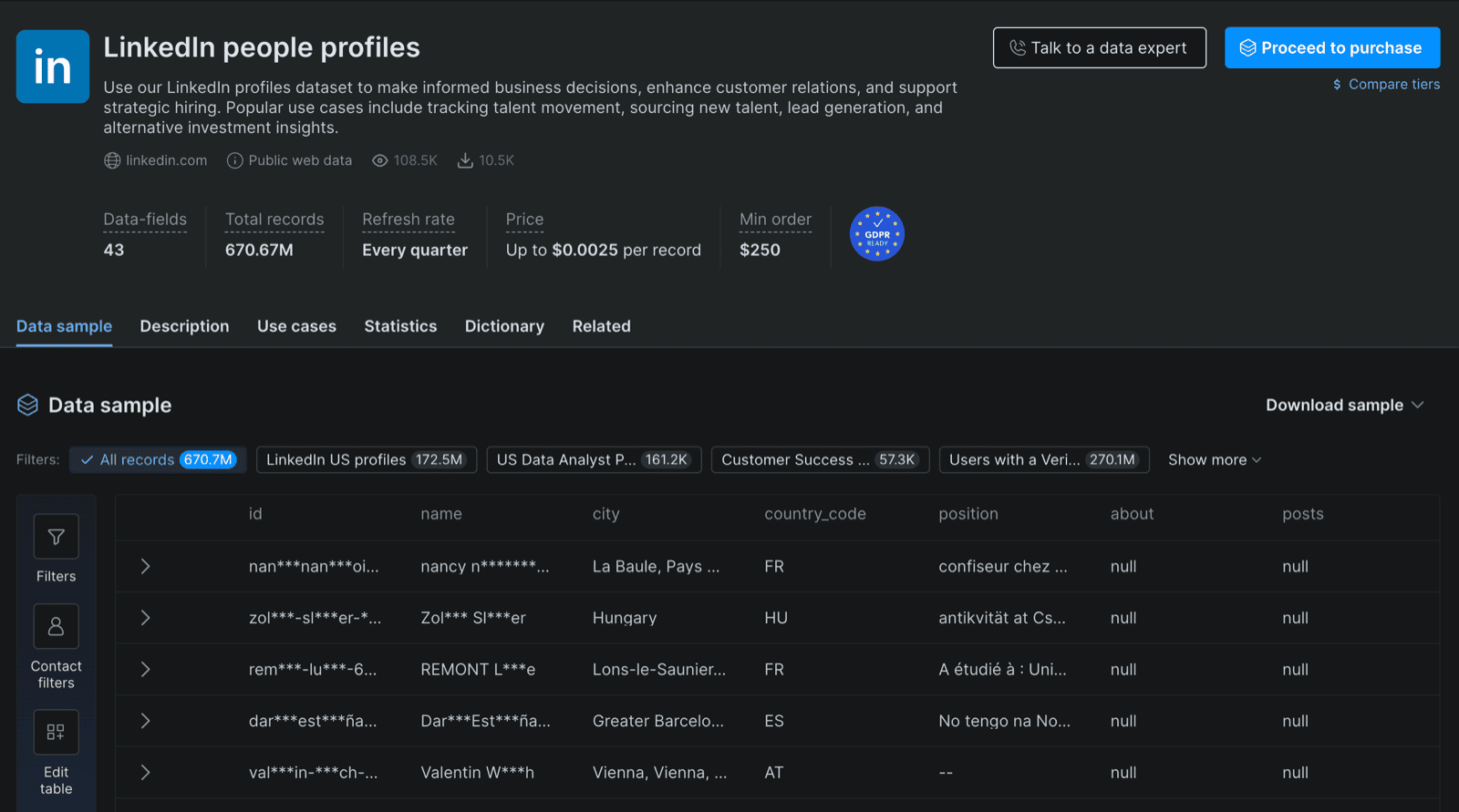
Bright Data’s Dataset Marketplace is pretty straightforward. You choose the target website from the available list and buy the tailored dataset either through a recurring subscription or a one-time purchase.
Oxylabs
Like Bright Data, Oxylabs made its name in proxies before expanding into web scraping.
Oxylabs has a smaller library of specialized scraping APIs than Bright Data, but it compensates for this with a general scraper API that can be adjusted to target virtually any website.
Additionally, Oxylabs provides an excellent Scraper APIs Playground that makes testing and building your API requests simple.
API Marketplace
The Oxylabs API marketplace spans 41 categories, ranging from universal source to dedicated scrapers built for specific sites.
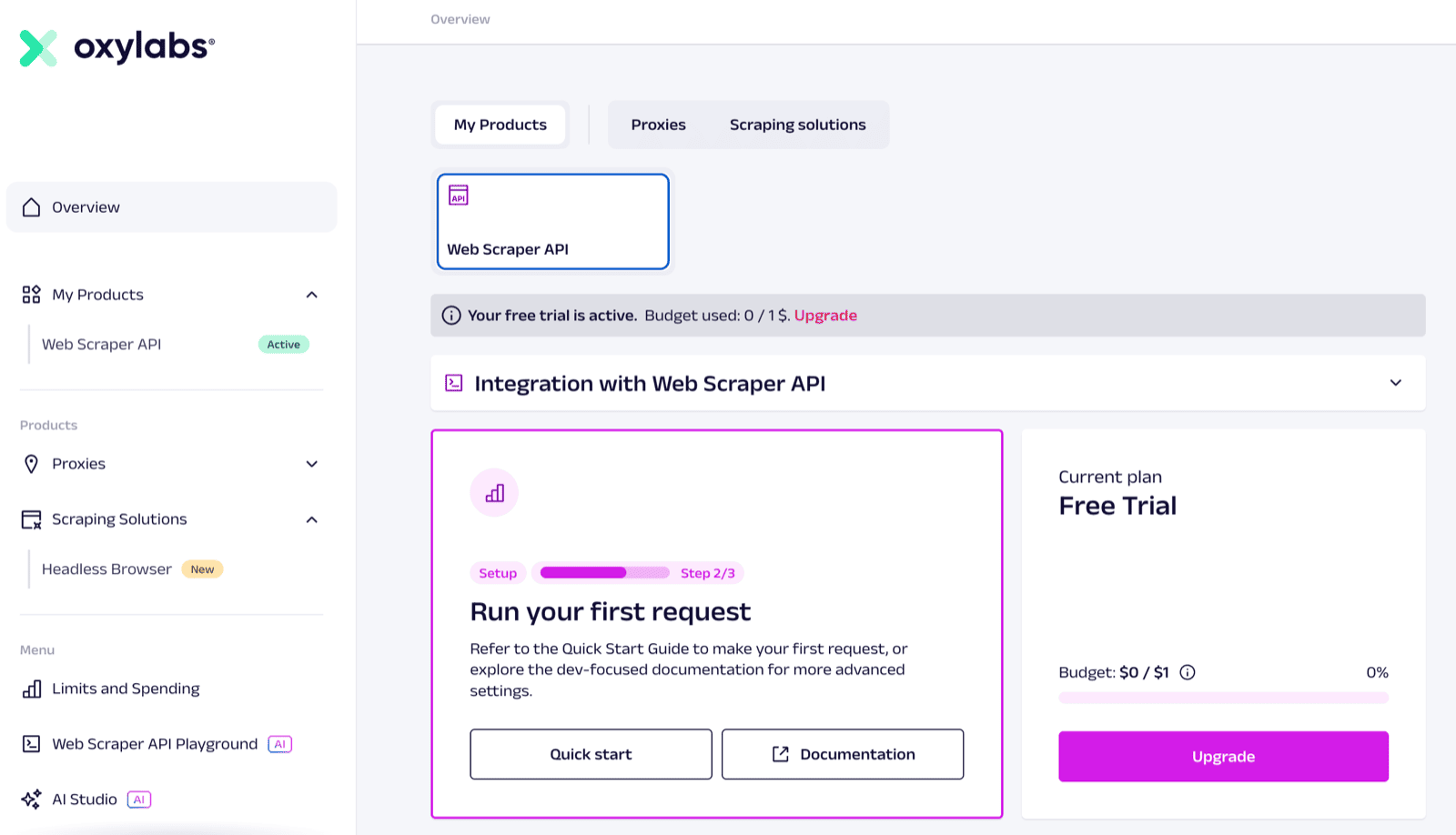
Overall, the pricing model and value proposition of the APIs are very clear and easy to understand.
Sending your first request is as simple as hitting the Quick Start button and copying the curl request it provides.
But where Oxylabs really shines is with their Scraper APIs Playground, which we'll explore next.
Scraper APIs Playground
This is Oxylabs's most distinctive feature.
While API playgrounds are not hard to come by, and similar features can be found in products like ScraperAPI, it is rare to see one with both a clean, intuitive UI, and a live preview of the actual scraped page.
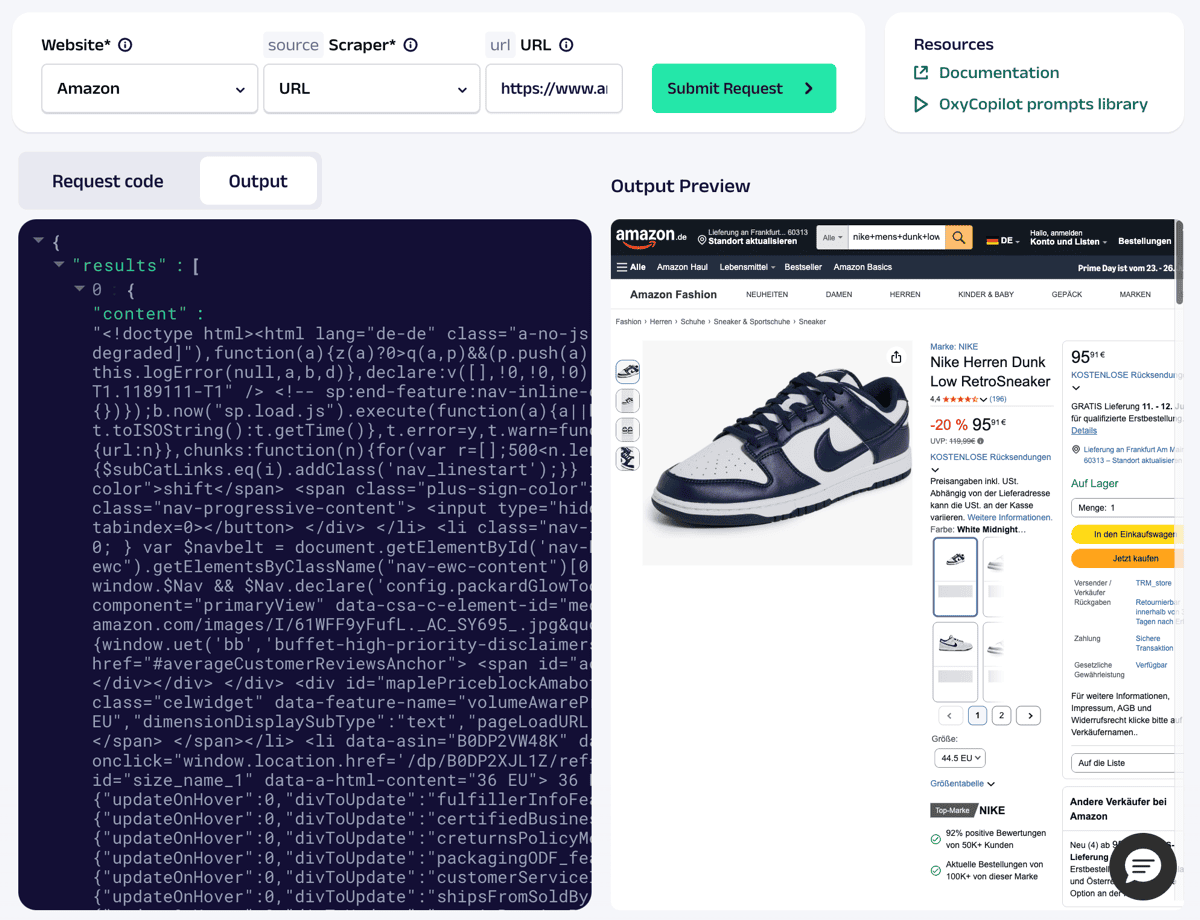
Oxylabs’s Scraper APIs Playground is a great example of what Bright Data should emulate to improve the user experience on its platform.
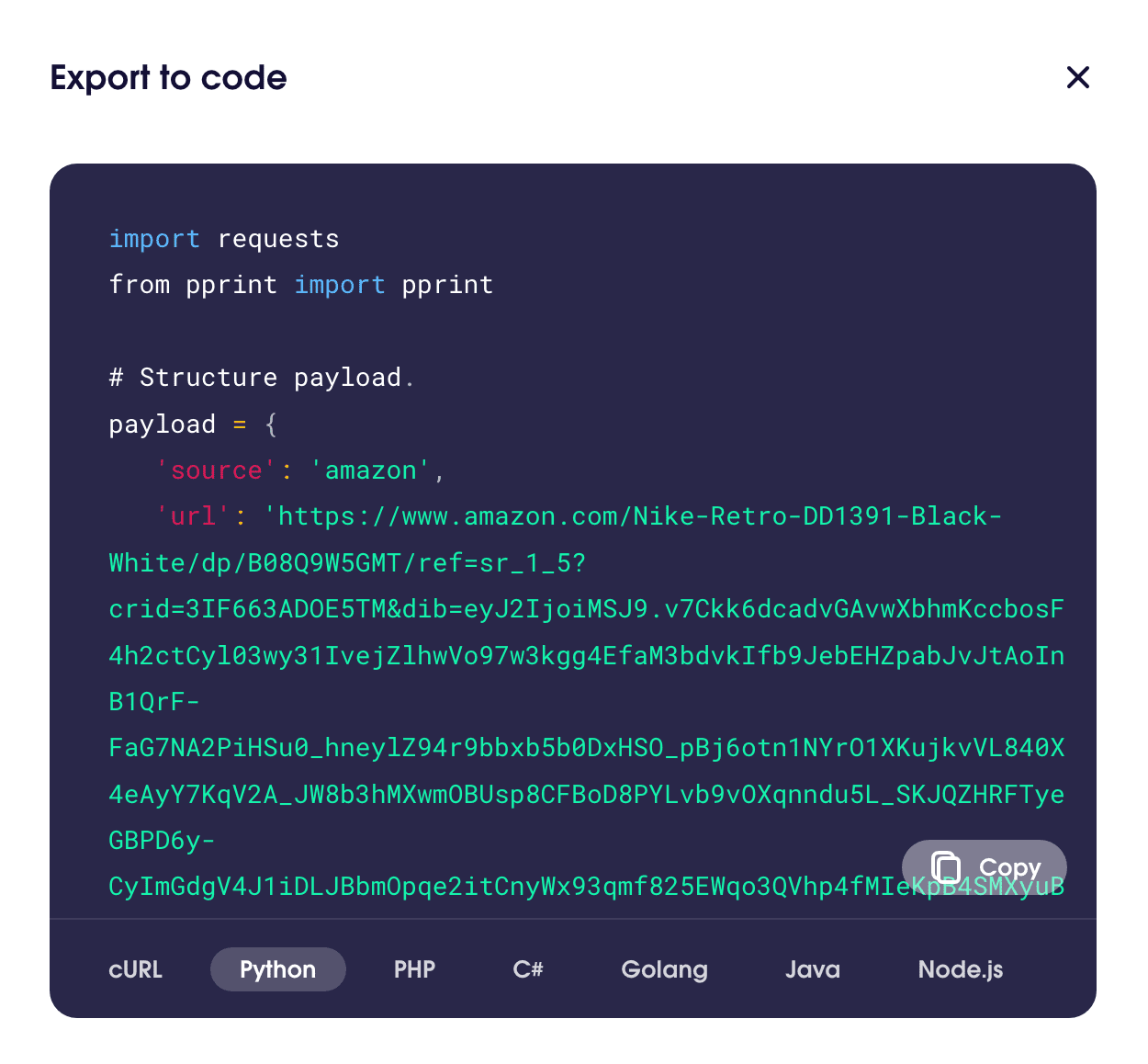
Oxylabs addresses Bright Data's two most common criticisms: its lackluster UI and the absence of code examples for calling the API in popular languages like Node.js and Python.
Oxylabs’s playground delivers on both of these features, as illustrated below.
Pricing
Oxylabs
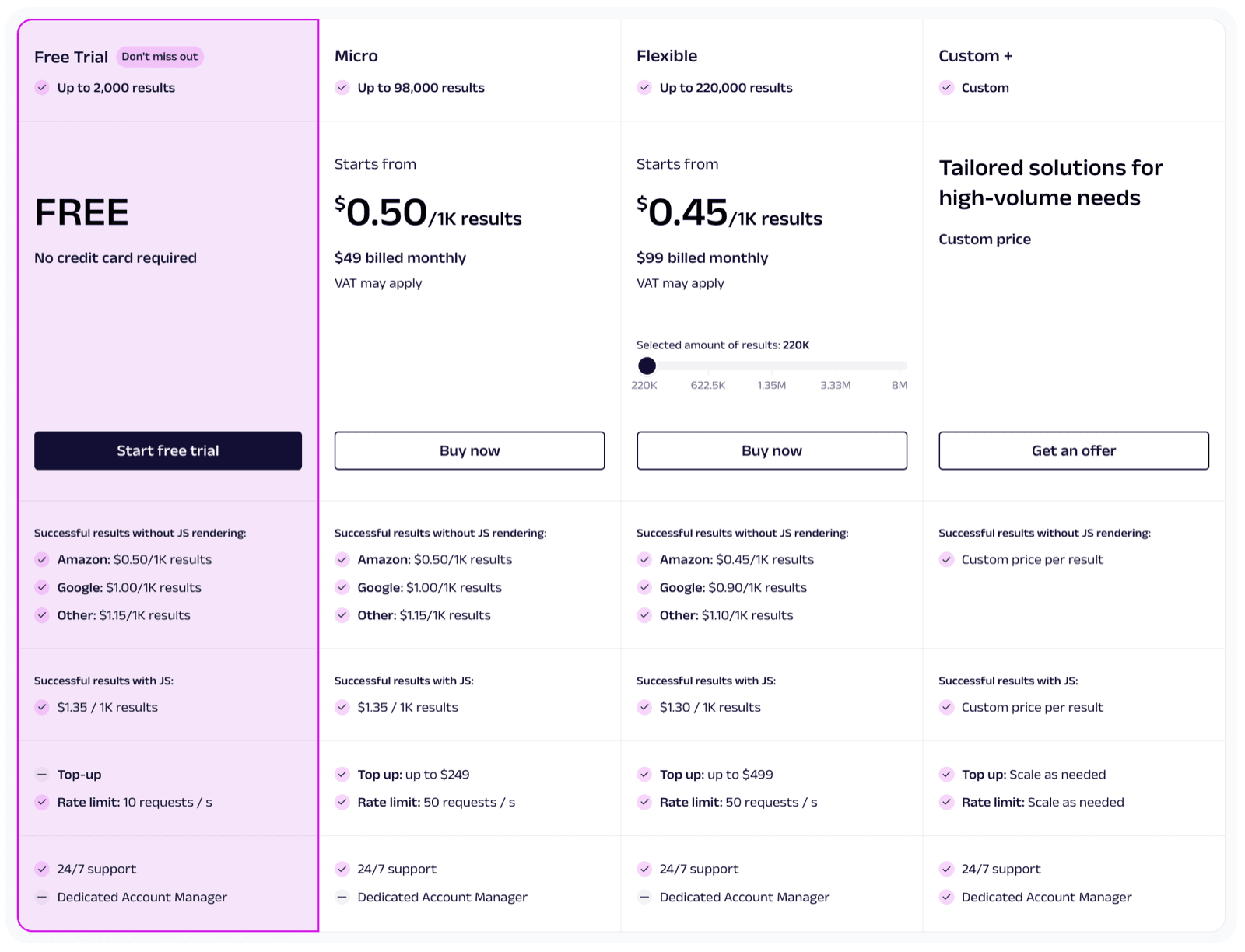
Oxylabs seems to have a more streamlined and productized pricing structure, similar to other services in the industry.
Its pricing depends on target site complexity, JavaScript rendering, and result type. Per 1,000 results, Oxylabs charges $0.50 for Amazon, $1.00 for Google, and $1.15 for other non-dynamic sites. For sites that require JS rendering, the rate increases to $1.35.
Plans start at $49/month.
Bright Data
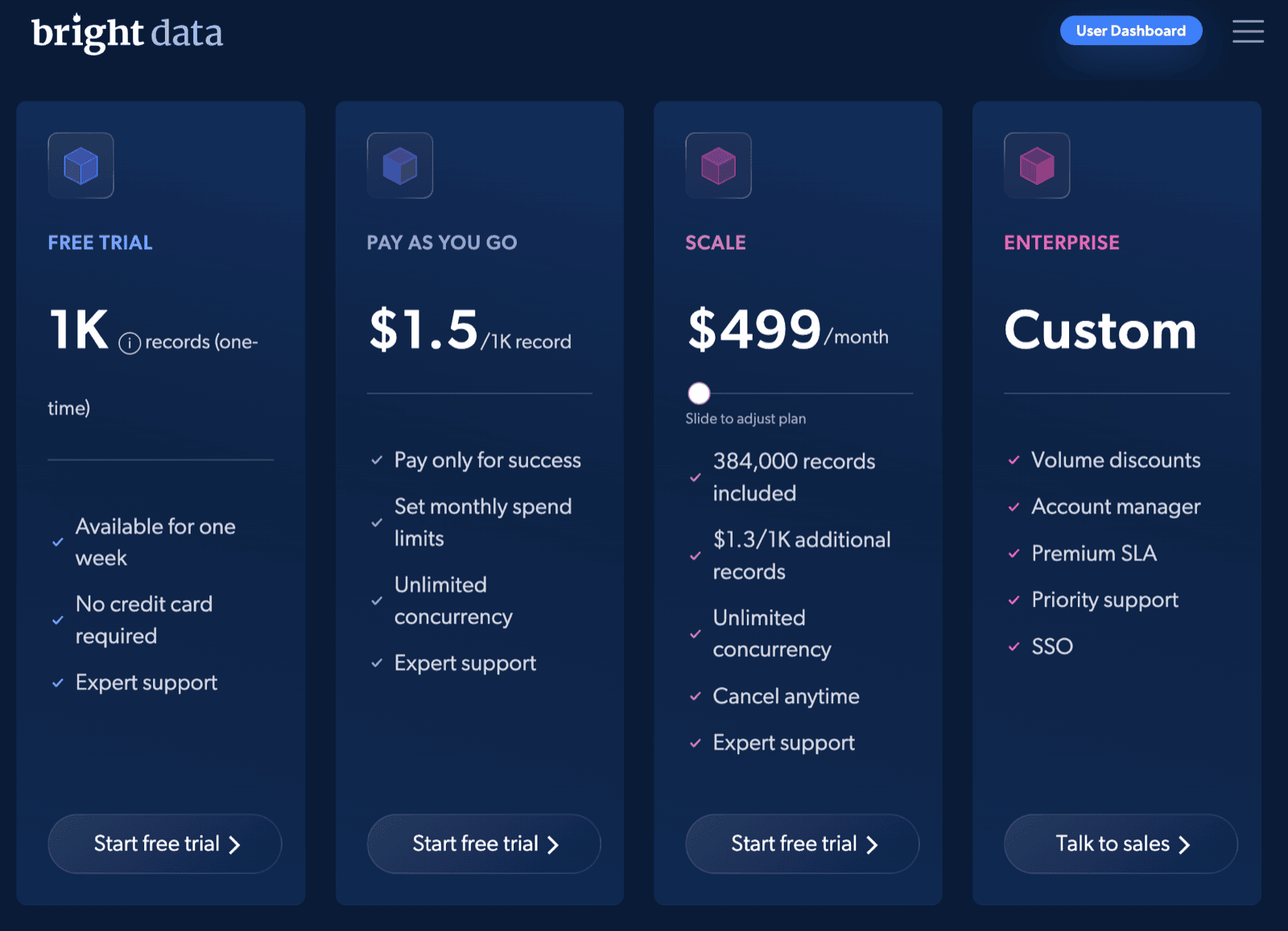
Bright Data now offers limited self-service plans for scraping APIs, but enterprise plans still involve sales interaction.
This lengthy process can be a major turn-off for users who want to manage everything themselves and start using the product right away without needing specific quotes.
On the lower end, costs are $1.50 per 1,000 records on the pay‑as‑you‑go plan and $1.3 per 1,000 on volume plans starting at $499/mo.
Free plans
Oxylabs's free trial offers up to 2,000 results. There's no time limit, but it is limited in volume and rendering type.
Bright Data currently offers a 7-day time-limited trial, but it is more restrictive and lacks full feature availability (e.g., proxy access).
Despite being quite limited, neither service requires you to provide your payment information beforehand, so you can jump right into the free trial without worrying about your card being charged.
Apify: a flexible alternative to Oxylabs and Bright Data
Apify is particularly compelling when you need a unified platform for web scraping and browser automation, especially if you want to leverage a pre-built toolset and local development capability. Here's how Apify compares with Bright Data and Oxylabs:
| Features | Oxylabs | Bright Data | Apify |
|---|---|---|---|
| Ready-to-use scraping templates | ❌ (Limited to specific APIs) | ✅ (Scraper marketplace, 600+ templates) | ✅ (50,000+ Actors in Apify Store) |
| Web IDE for custom scrapers | ❌ | ✅ | ✅ (Code locally, deploy via CLI or GitHub) |
| Workflow automation (scheduling, retries, integrations) | ✅ (Basic scheduling) | ✅ (Limited to scraper runs) | ✅ (Full Actor workflow, integrations, error handling) |
| Browser automation + scraping combined | ❌ | ❌ | ✅ (Via Puppeteer, Playwright, Crawlee) |
| Local development support (SDKs, CLI) | ❌ | ❌ | ✅ (Crawlee SDKs, Apify CLI, versioning) |
| Built-in proxy management | ✅ | ✅ | ✅ (Apify Proxy: auto-rotation, CAPTCHA bypass) |
| Pricing model | Feature-based billing, from $49/month | Pay-as-you-go ($1.50/1K), high-volume discounts | Hybrid: Subscription + CU usage (Free, $19, $199, $999) |
| Free tier / trial | ✅ (Up to 2,000 results) | ✅ 1,000 results | ✅ (Free plan with $5 CU credits) |
| Best suited for | Developers needing flexible, high-performance APIs | Enterprises wanting managed data pipelines & proxy control | Users building full scraping + automation flows with scale |
Conclusion: which tool should you choose?
Both Oxylabs and Bright Data offer reliable scraping, so the decision comes down to scale and how hands-on you want to be.
Bright Data has the larger API marketplace, so it's more likely to have a ready-made API for your target. Its pricing structure, the need to contact an account manager for a quote and the higher entry cost make it a better fit for high-volume users. It pays off most for large-scale, enterprise operations, where prices get more attractive at volume and hands-on account management becomes an asset rather than an overhead.
Oxylabs offers more accessible pricing and a more intuitive UI. It has fewer ready-made APIs, but its general web scraper APIs can cover most other sites. For most self-service users scraping low to moderate volumes, Oxylabs is the easier starting point.
If you'd rather not choose between a proxy-first vendor and a fixed set of APIs, Apify offers both approaches on a single platform.

Read more reviews
If you want more comparisons like this, check out:
- Zyte vs. Apify vs. Crawlbase
- ScraperAPI vs. Apify
- ScrapingBee review: is it worth it?
- Best ScrapingBee alternatives