Your applicant tracking system (ATS) tells you who's applying. But it says nothing about who your competitors are hiring, where they're hiring, what salaries they're paying, or what skills they need. That outside view - talent market intelligence - has historically been a vendor product, but it doesn't have to be. The underlying data is public, and you can collect it yourself for roughly $9 to $17 a month at a 10-competitor weekly watchlist.
What you get:
- a spreadsheet of competitor hiring on your laptop, refreshed weekly
- early visibility into competitor roles on their ATS career page (often before LinkedIn, sometimes never cross-posted)
- the same dataset queryable in plain English from an AI assistant like Claude Desktop
No code is required for the two walk-throughs in this guide. That's because the walk-throughs use Apify Actors. Actors are pre-built scrapers from Apify Store. You don't write the scraping code. You fill in a form (which company, which country, what fields you want returned), click run, and download the result as CSV. When LinkedIn changes its markup, the Actor maintainer updates it. You rerun the Actor.
The data sources
This article walks through the two public sources that answer the core hiring question: LinkedIn Jobs (headline competitor activity) and the company's own ATS career page, where roles first appear, often before LinkedIn. Here's what each gives you and how fresh the data is:
| Source | What it gives you | Latency vs. the role being open |
|---|---|---|
| LinkedIn Jobs | Headline competitor activity. Function, location, seniority, posted-date. | Hours to days behind ATS. |
| ATS career pages | Roles published the moment the company opens them. Sometimes never crossposted. | Zero at source, but the indexed API adds a short cache delay. |
- Indeed (best for salary data, especially outside the US)
- Glassdoor (employer ratings, interview difficulty, salary percentiles from employees).
Each has its own guide: Indeed scraping guide, Glassdoor scraping guide.
The ATS source is the bigger payoff of the two. A role appears on a company's ATS career page when the hiring manager opens it for external applications. It then spreads to LinkedIn and aggregators within hours to days, or never at all if the role gets filled internally first.
Walk-through 1: competitor hiring map (LinkedIn)
We use Linkedin Jobs Scraper, an Apify Store Actor. It costs $1 per 1k results, pay-per-result.
The no-code path
This takes 7 Apify Console steps, then a Sheets pivot:
- Open
https://www.linkedin.com/jobs/searchin an incognito window so you see the public version (no login). - Search for the competitor you want to track. Set the location filter to the country you care about (pick the country-level entry from LinkedIn's dropdown, not a city).
- Copy the full URL from the address bar.
- Go to LinkedIn Jobs Scraper and click Try for free.
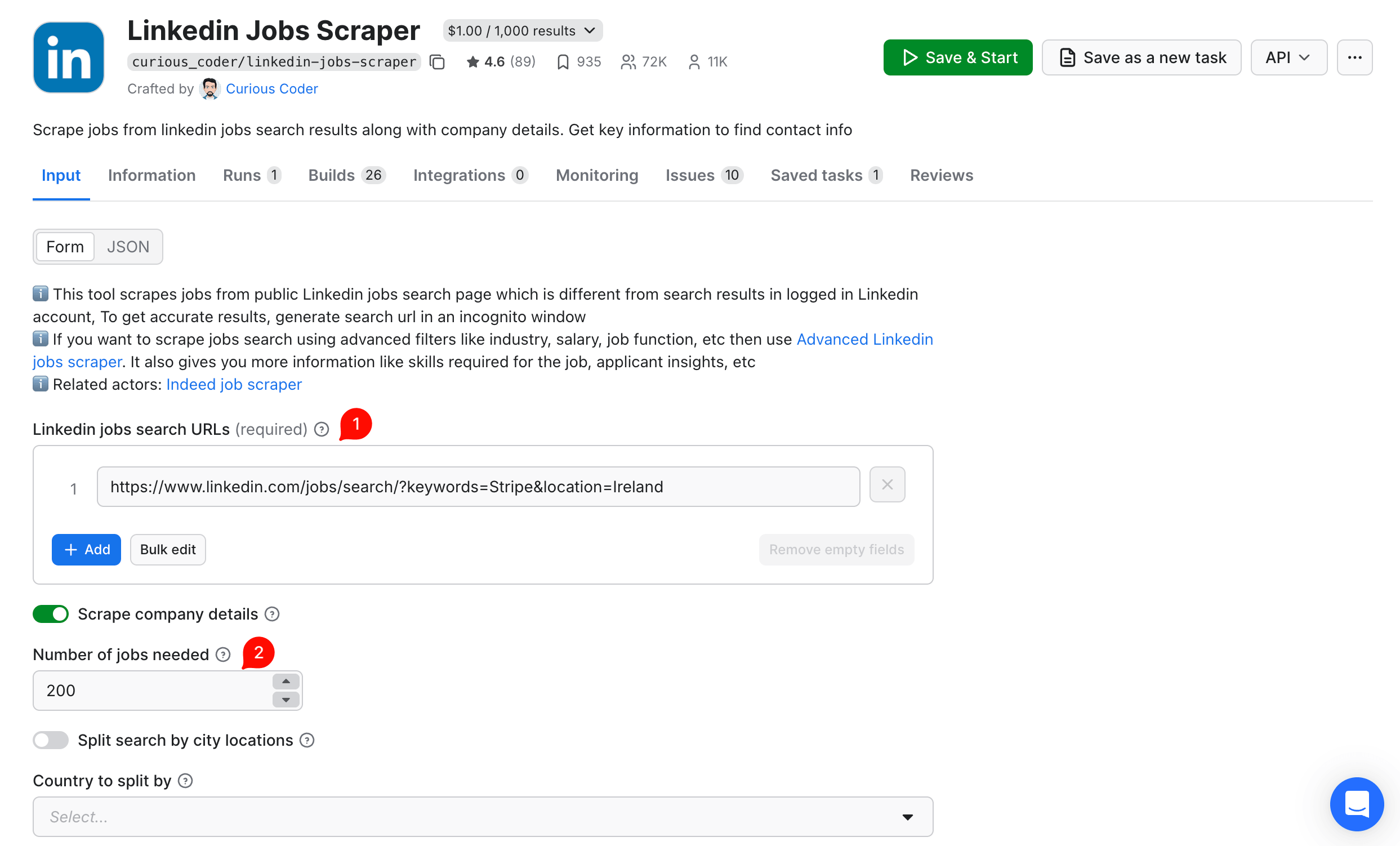
- Paste the LinkedIn URL into the LinkedIn jobs search URLs field. Set Number of jobs needed to 200 (a reasonable starting size, since LinkedIn caps each search at 1k). Leave Split search by city locations off for the single-country run. We'll turn it on below for the multi-country case.
- Click Save & Start. The run takes a few minutes (our 200-result test took about 3 minutes).
- Click Export results and choose CSV.
The configured Console input looks like this (Stripe in Ireland):
With that configured and exported, open the CSV in Google Sheets (File → Import → Upload, choose Replace spreadsheet). Select all data, then Insert → Pivot table. Set Rows = location, Columns = jobFunction, Values = COUNTA of id (the unique row identifier).
Real data: Stripe in EMEA
We ran walk-through 1 three times (Ireland, Germany, then the UK) at the time of writing, same setup as the screenshot above, with a different country-level URL each time. Across the three runs, 200 LinkedIn results came back in total (each country's search returned well under the count: 200 cap).
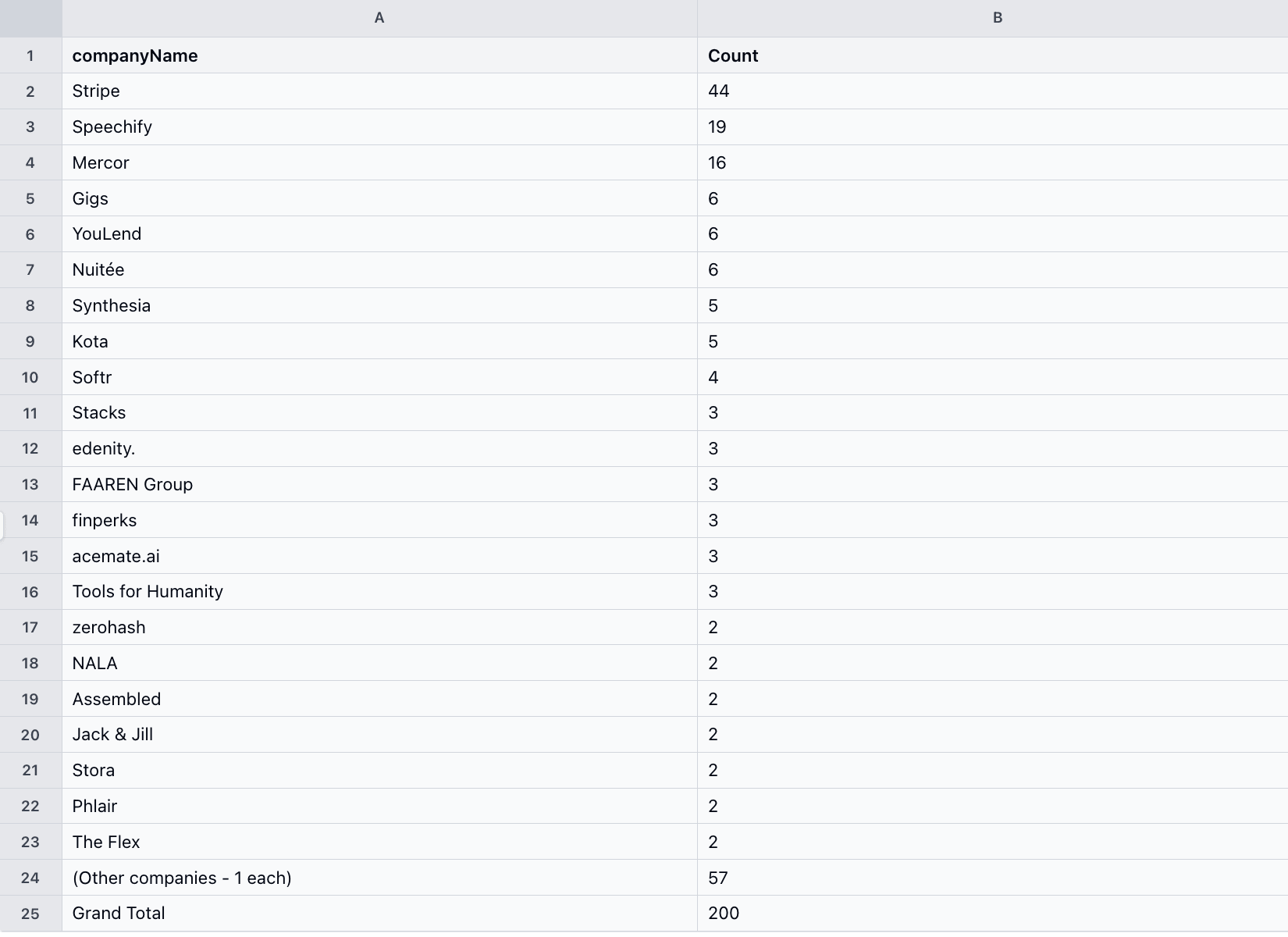
First gotcha: of those 200 results, only 44 were at Stripe. The rest came from companies whose job descriptions mention Stripe: companies that integrate Stripe Payments into their own products (Speechify, Mercor, Gigs, YouLend, Nuitée, Synthesia), recruitment agencies, and unrelated jobs. LinkedIn keyword search returns mentions, not just employer matches, so filter the spreadsheet to companyName = "Stripe" before you pivot.
Here's the distribution before that filter, sorted by count:
Filtering to the 44 Stripe-only rows and pivoting by city and function gives the EMEA breakdown:
| Engineering / IT | Sales / BD | Finance | Marketing | Operations | Other | Total | |
|---|---|---|---|---|---|---|---|
| Dublin | 8 | 11 | 3 | 0 | 1 | 0 | 23 |
| London | 2 | 6 | 0 | 1 | 1 | 3 | 13 |
| Berlin | 2 | 1 | 0 | 0 | 0 | 1 | 4 |
| Germany (no city) | 2 | 1 | 0 | 0 | 0 | 0 | 3 |
| Ireland (no city) | 1 | 0 | 0 | 0 | 0 | 0 | 1 |
Same data as a heatmap:
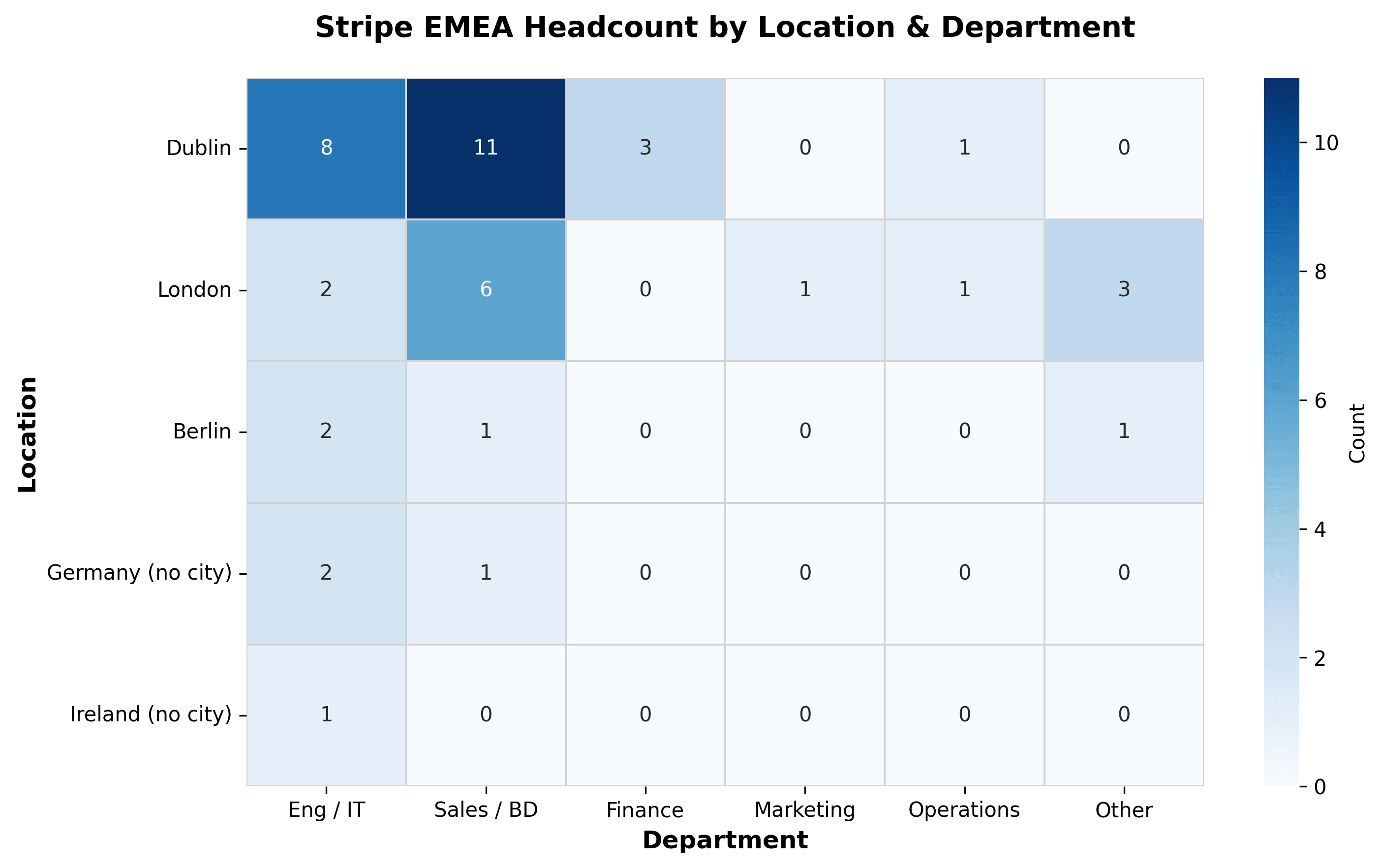
Stripe Dublin is weighted heavily toward Sales / BD: 11 of 23 roles. London is more balanced. Berlin is the smallest of the three.
Second gotcha: LinkedIn's jobFunction field is free text and the labels can be inconsistent. In our Stripe sample, the same function appeared under different word orders (for example, "Sales and Business Development" vs. "Business Development and Sales"). This hit 15 of 44 rows, fragmenting the first pivot across 11 columns. Here's just the duplicate pair:
| City | Business Development and Sales | Sales and Business Development |
|---|---|---|
| Dublin | 2 | 7 |
| London | 2 | 2 |
| Berlin | 0 | 1 |
| Germany | 0 | 1 |
| Ireland | 0 | 0 |
| Total | 4 | 11 |
Two ways to normalize before pivoting:
Sheets-only path: use Find & Replace on the jobFunction column to swap one variant into the other (for example, "Business Development and Sales" → "Sales and Business Development"), then re-pivot. Works for the 5-10 known variants in your dataset, but doesn't scale to hundreds.
Or, in Python:
import pandas as pd
import re

df = pd.read_csv("stripe_linkedin.csv")

def canon_function(f):
    if not isinstance(f, str): return "Unspecified"
    parts = sorted(set(p.strip() for p in re.split(r'\\s+and\\s+|,\\s*', f) if p.strip()))
    return " + ".join(parts)

df["function_canonical"] = df["jobFunction"].apply(canon_function)
Pivot on function_canonical (the new column) instead of jobFunction. The result collapses to a consistent set of buckets. Rename them in your sheet to match the 6 displayed in the heatmap. One limit: this splits on "and", so functions like Research and Development will fragment. Add a passthrough for those if you hit them.
Going wider: full EMEA
LinkedIn caps each search at 1k results. To cover all of EMEA, turn on Split search by city locations and set Country to split by to Ireland. The Actor splits one search into multiple sub-searches, one per city in a country, and merges the results. Run once per country in your target list (e.g. Ireland, UK, Germany, France, Netherlands, Spain, Italy, Poland), then concatenate the CSVs in your Sheet before pivoting. For weekly automation, see Make it automatic below.
Cost at this scale is $5 to $15 for an initial full-EMEA backfill across a 5-10 competitor watchlist, since most companies have at most a few hundred EMEA postings combined. After that, recurring weekly costs are lower. The full monthly breakdown is in Make it automatic below. For a Python-coded alternative to the no-code path, see How to scrape LinkedIn jobs with Python.
Walk-through 2: scrape competitor ATSs directly
This walk-through goes one step closer to the source, into the company's own ATS, where the role first appears. In our Stripe scrape, more than half the open roles had no LinkedIn match yet.
The upstream source for any job board is the company's own careers page, usually served by an ATS (Greenhouse, Lever, Ashby, Workday, Rippling, SmartRecruiters, and iCIMS). To scrape it directly, use Career Site Job Listing API, which indexes 175k+ company careers pages across 54 ATS platforms (per the Actor's listing, at the time of writing). Each query returns one company's open roles, so a 10-competitor watchlist runs 10 queries. Before adding a competitor to your watchlist, run a single-org query with timeRange: 1m against their name. A non-zero result confirms the company is indexed. Pricing varies by plan: $4 to $12 per 1k jobs depending on tier (full breakdown in Make it automatic below).
Comparing LinkedIn and ATS results
We ran the same Stripe query (Ireland, Germany, the UK) against the ATS:
| LinkedIn (filtered to Stripe) | ATS (Greenhouse) | |
|---|---|---|
| Roles returned | 44 | 84 |
| Roles posted in the last 7 days | 8 | 11 |
The ATS returned 84 roles vs. 44 from LinkedIn. 53 of the ATS roles do not match a LinkedIn post on title and city. This is from one scrape against one employer in one region. Your delta will vary by competitor, region, and week. Examples of what was on Stripe's ATS but missing from LinkedIn at scrape time:
- UK Public Policy & Government Relations Lead (London, posted 2 days before scrape)
- Sales Compensation Design Lead (Dublin, posted 13 days before scrape)
- Technical Partner Manager, EMEA Payment Methods (Dublin, posted 12 days before scrape)
If you compete with Stripe for the same kind of talent (sales comp designers in Dublin), the ATS surfaces the opening days before LinkedIn does. Here it is side-by-side: live on Stripe's ATS, invisible on LinkedIn search.
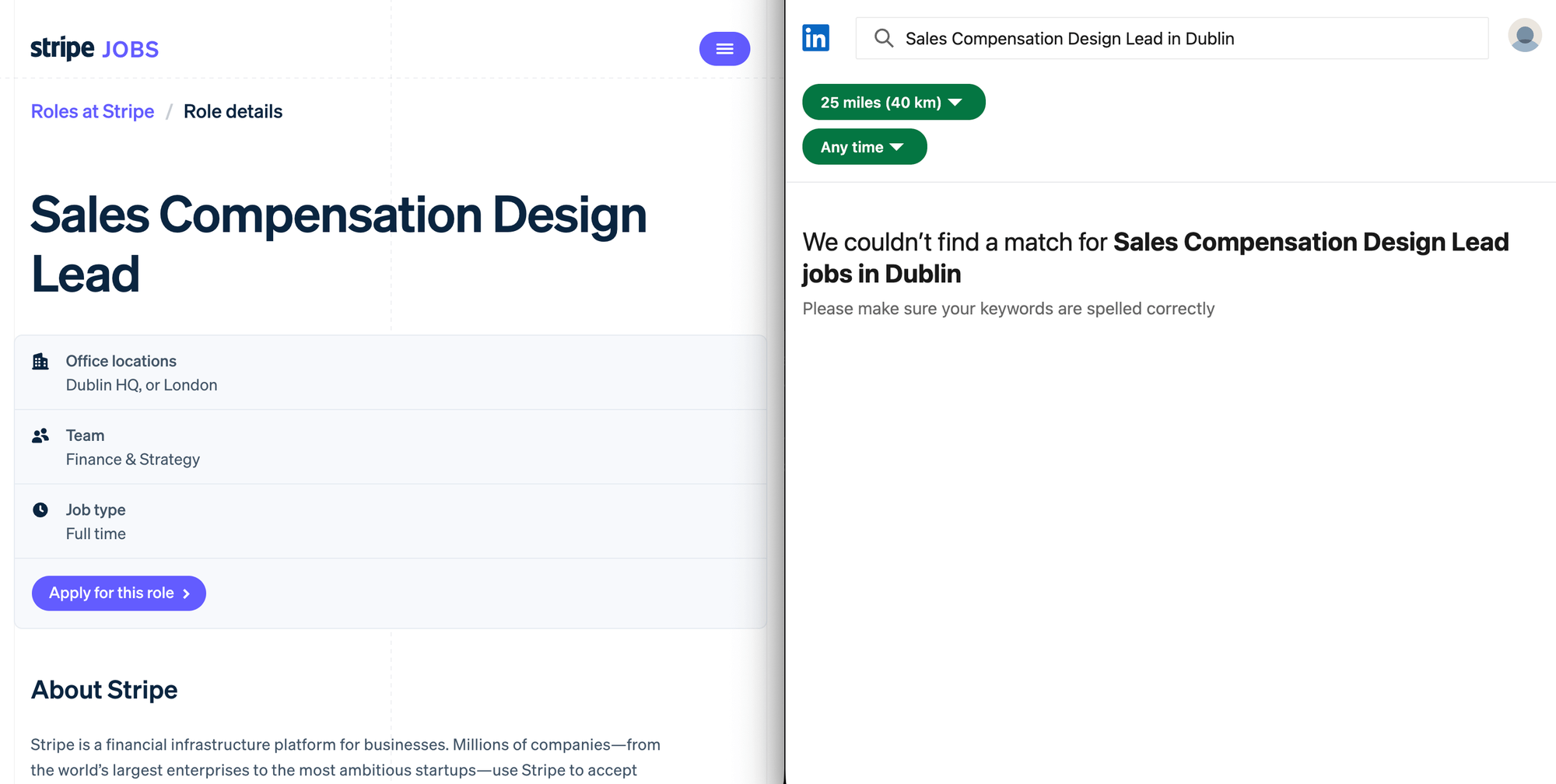
In our scrape, the 53 ATS-only roles had been live for 1 to 13 days before scrape (median 11), and still weren't on LinkedIn.
How to run it
This takes 4 Console steps, similar to walk-through 1's no-code path but with different inputs:
- Go to Career Site Job Listing API and click Try for free.
- Fill in the input form:
organizationSearch:["Stripe"](an array of company names)locationSearch:["Ireland", "Germany", "United Kingdom"]. Use full English names. The API silently returns zero results if you pass abbreviations like "UK" or "USA".timeRange:6mfor a first backfill, then switch to7dfor weekly trackinglimit:500(covers most single-company scrapes, but raise it if a competitor has more than 500 open roles)
- Click Save & Start. The run usually finishes in seconds because it's an indexed API, not a live scrape.
- Export as CSV. The output already has clean fields:
cities_derived,countries_derived,date_posted, andurl(a direct link to the careers page).
The configured Console input for the Stripe scrape in JSON:
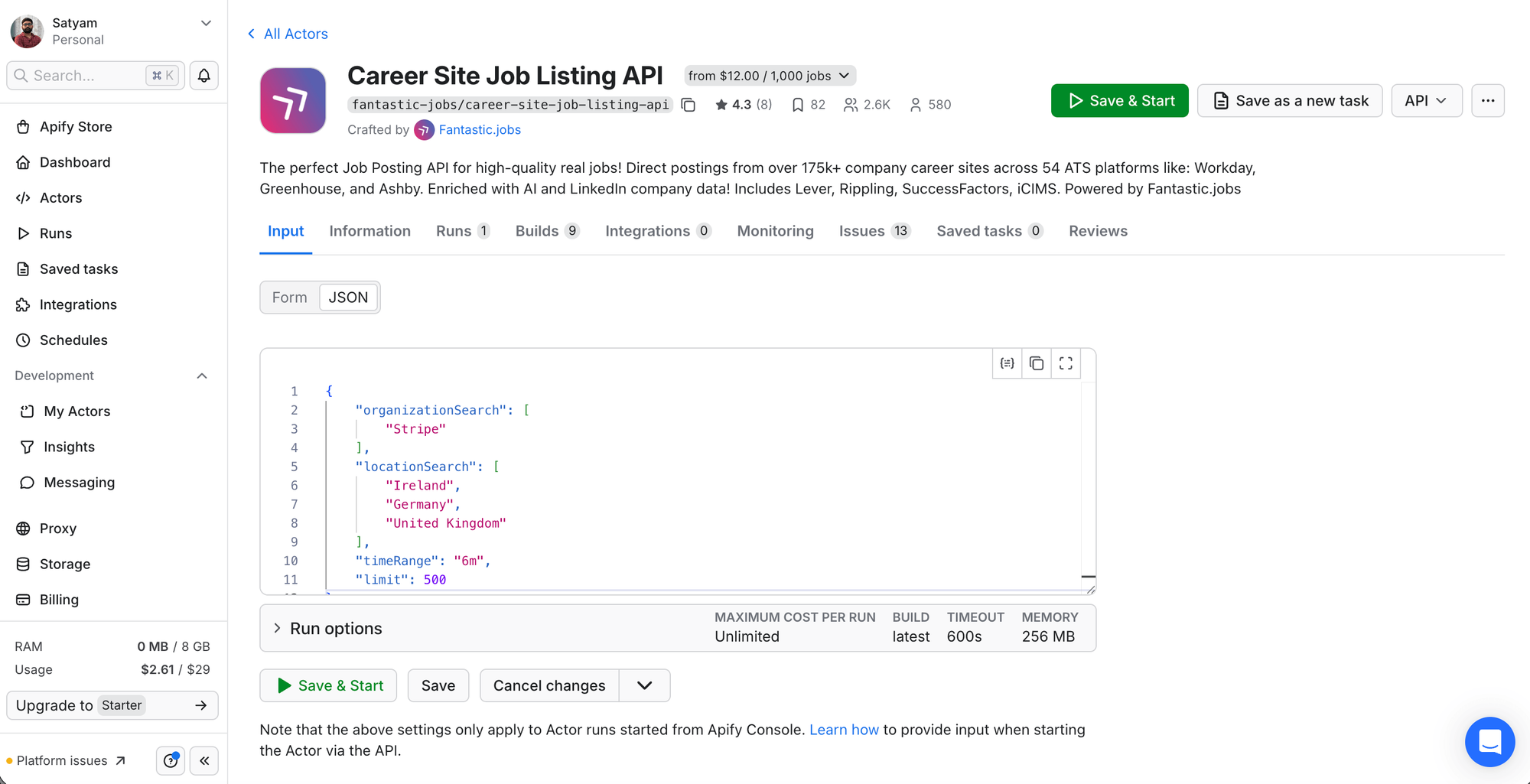
With the CSV exported: which of those roles aren't on LinkedIn yet?
Find ATS-only roles
To produce the 53 ATS-only roles count above, compare the two CSVs by (title, city). Two ways to do this:
Sheets-only path: paste both datasets into one workbook on separate tabs. On each tab, build a key column that joins title and city (e.g. =A2&"|"&B2). For ATS, first extract the city from cities_derived (a list-as-string like ['Dublin', 'London']) with =REGEXEXTRACT(<cell>, "'([^']+)'"). On the ATS tab, add a =COUNTIF(LinkedIn!keys, ats_key) column. Rows where the count is 0 are ATS-only.
Or, in Python (handy if you want to script it for repeat runs). cities_derived is a list of cities stored as a string (like ['Dublin', 'London']), so the code uses ast.literal_eval to parse it:
import ast
import pandas as pd
import re

# Rename your Apify-downloaded CSVs to these filenames first
li = pd.read_csv("stripe_linkedin.csv")
ats = pd.read_csv("stripe_ats.csv")

# Filter LinkedIn keyword search down to actual Stripe employer
li = li[li["companyName"].str.lower() == "stripe"]

def norm(s):
    return re.sub(r"\\s+", " ", str(s).lower().strip())

li_keys = {(norm(r["title"]), norm(str(r["location"]).split(",")[0]))
           for _, r in li.iterrows()}

def first_city(c):
    if pd.isna(c): return ""
    if isinstance(c, str) and c.startswith("["):
        parsed = ast.literal_eval(c)
        c = parsed[0] if parsed else ""
    return c

ats_only = ats[~ats.apply(
    lambda r: (norm(r["title"]), norm(first_city(r["cities_derived"]))) in li_keys,
    axis=1
)]

print(f"ATS-only roles: {len(ats_only)}")
ats_only[["title", "cities_derived", "date_posted"]].head(15).to_csv("ats_only.csv")
Two caveats apply to both paths. First, the match uses each role's first listed city only, so multi-region postings can be slightly over-counted as ATS-only. Second, the title match is exact, so "Security Engineer - Threat Detection" won't join "Security Engineer, Threat Detection". Spot-check the top of the list before acting on it.
Add this ATS-only list as a new tab in your Sheet (we'll wire it to a weekly schedule in the next section).
Make it automatic
The walk-throughs above produce one-shot CSVs. To turn them into a recurring workflow:
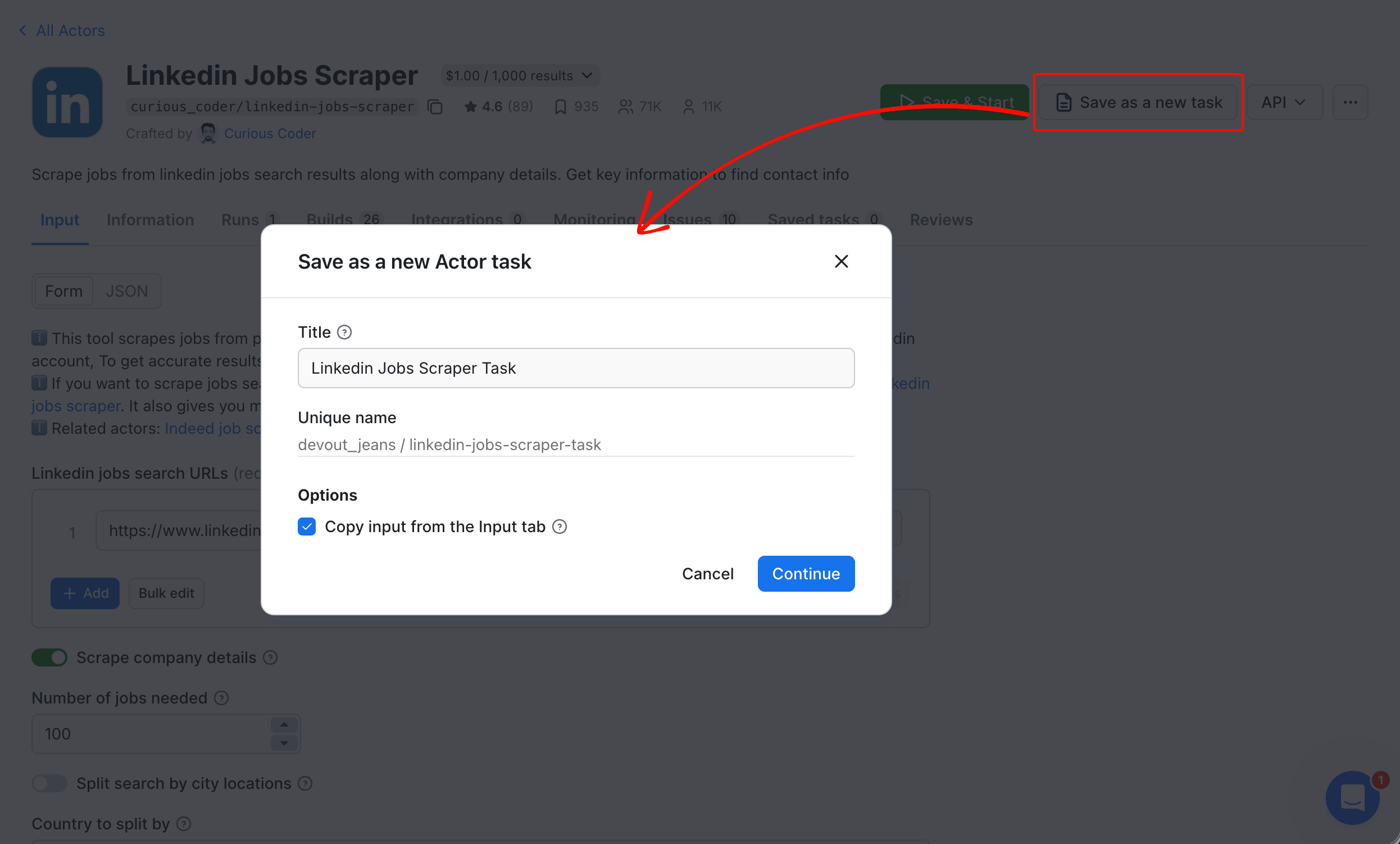
1. Save each configured run as a task. On the run page, click Save as a new task (top right). A dialog opens to confirm the task name and copy the input from the current run. The task stores your input fields. Now re-running takes one click.
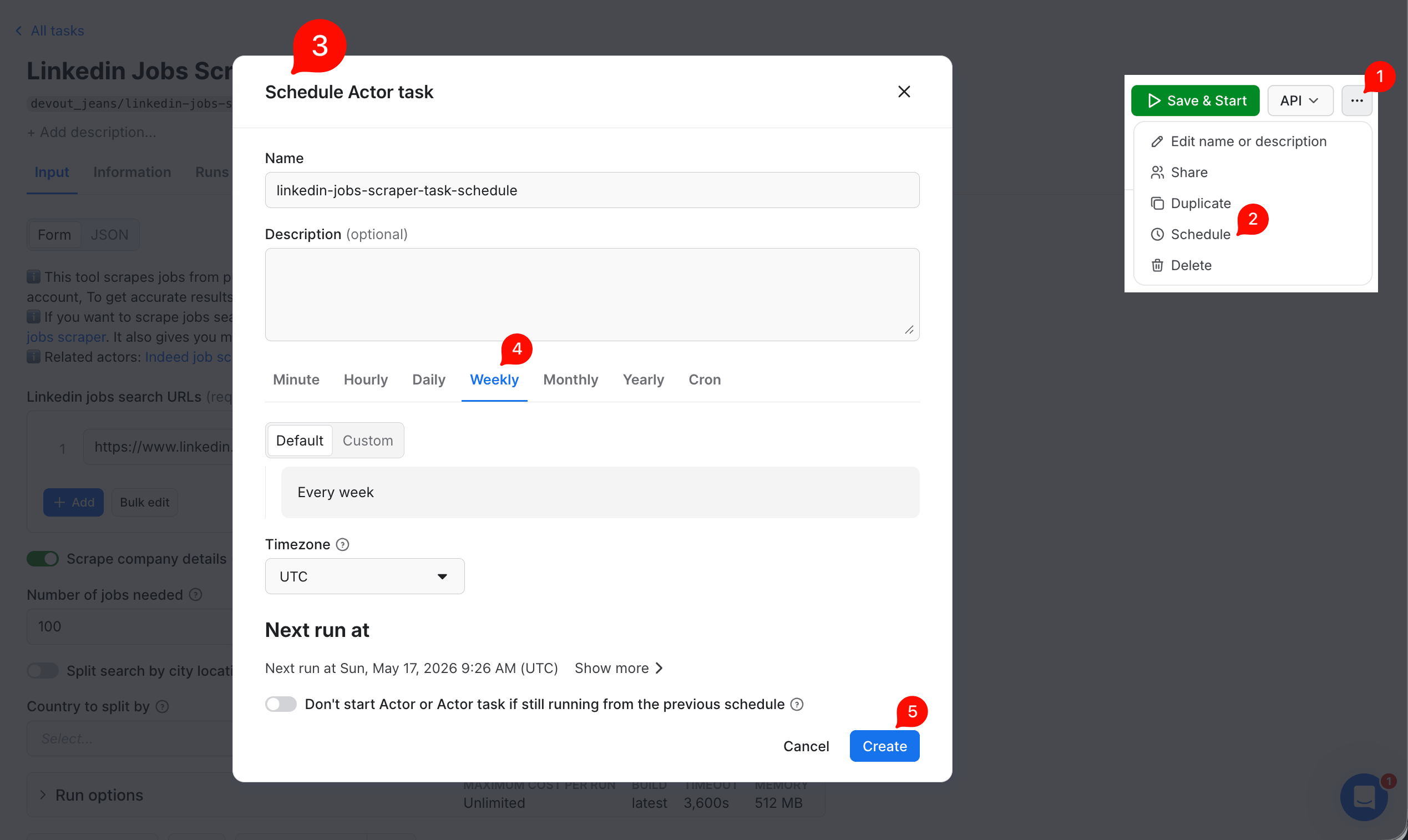
2. Schedule. From the task page, open the ... menu (top right) and click Schedule. In the dialog, pick Weekly and click Create. The schedule runs without any cron syntax.
3. Push results to a sheet you'll actually look at. Apify integrates natively with Airtable, Slack, and 3 automation platforms (Zapier, Make, and n8n). For Google Sheets specifically:
- Create the target Sheet in Google Drive first.
- On the Actor's Integrations tab, click Add integration.
- Search for
google-sheetsand pick Google Sheets Import & Export (lukaskrivka/google-sheets). - Leave Start when as
Run succeeded. Click Connect with Google to authorize, then use Select file from Google Drive to pick your Sheet. - Set Mode to
appendand click Save. - Each subsequent run appends its dataset to that Sheet.
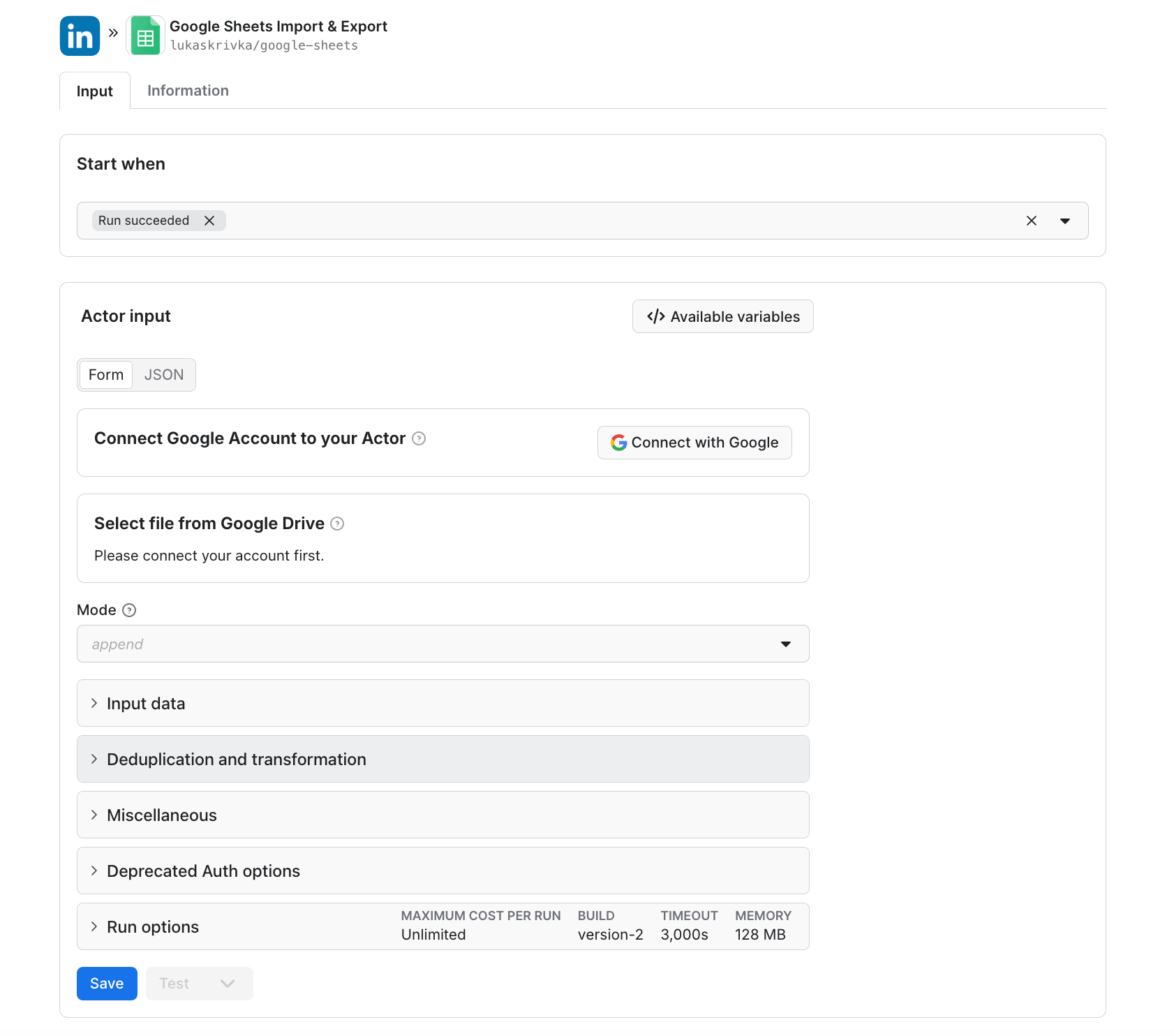
4. Notify when something interesting happens. Add a Slack integration on the task. You get a Slack message when a new dataset is ready. To make it a useful weekly digest (new roles only, not just a "scrape finished" ping), keep last week's data on a separate tab, build a (title, city) key column on the current tab, and add a =IF(COUNTIF(LastWeek!keys, current_key)=0, "new", "") flag. In Zapier or Make, add a Filter step that only triggers on rows where the flag column equals "new", then format your Slack message body from the matching rows.
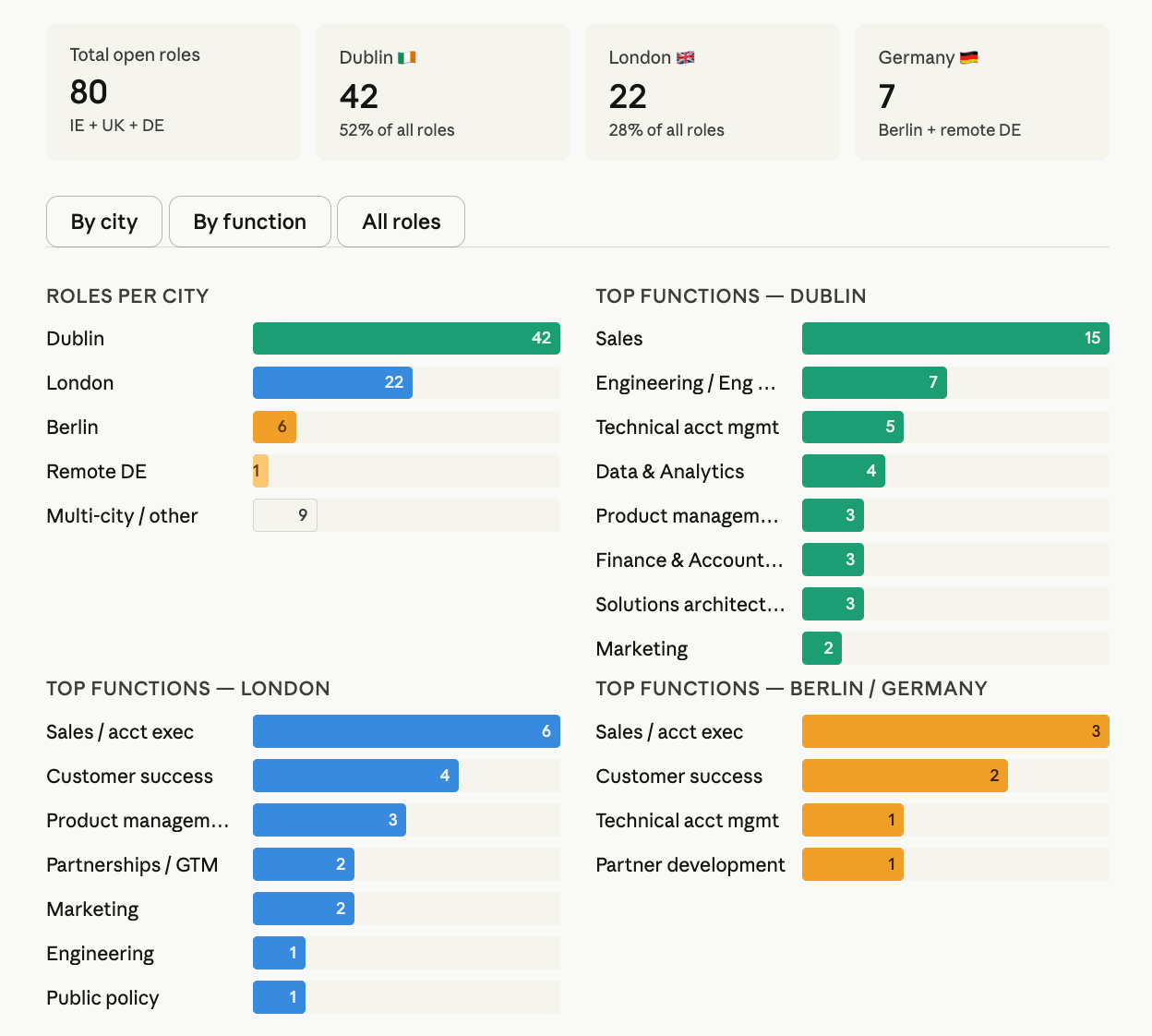
5. Query the dataset in plain English. Your datasets and Actors are available through Apify MCP Server (Model Context Protocol, the AI-agent tool-calling standard). In Claude Desktop, go to Settings → Connectors → Add custom connector and paste https://mcp.apify.com. Sign in to Apify when prompted, then ask:
Claude usually builds an interactive dashboard from the live data:
A weekly run of this whole setup at realistic volume (10 competitors, weekly cadence) breaks down by Apify plan as follows. LinkedIn pricing is flat for everyone. But the ATS Actor costs less per 1k as you upgrade your plan.
| Plan | LinkedIn (~5k results) | ATS (~1k jobs) | Monthly total |
|---|---|---|---|
| FREE / Starter | ~$5 | ~$12 | ~$17 |
| Scale | ~$5 | ~$6 | ~$11 |
| Business and above | ~$5 | ~$4 | ~$9 |
Check the Apify pricing page for your exact rate. The FREE plan includes a $5 monthly platform credit, and paid plans include larger allowances that usually absorb the costs above.
Common pitfalls
When you run the walk-throughs at production volume, look out for the following issues:
- Snapshot vs. trend. A scrape captures the postings live at that moment. But two scrapes a month apart can show a trend. A single scrape is not a hiring trend.
- Duplicate postings across boards. A single role can appear on LinkedIn, the ATS, and a third-party aggregator. Deduplicate before any count.
(title, city)works for a single-employer join like ours, but addcompanyfor multi-employer datasets. In our Stripe verification, 31 of the 84 ATS rows matched a LinkedIn row on(title, city), 53 ATS rows had no LinkedIn match, and 13 LinkedIn rows had no ATS match (usually title-string mismatches, or roles archived from the ATS but still cached on LinkedIn). - Inconsistent labels on LinkedIn.
jobFunctionis free-form text, so the same function appears under different labels. Normalize before you pivot. Walk-through 1's second gotcha shows the recipe. - Keyword-search false positives. A keyword search for a company name returns roles that mention the company in title or description, not just roles at that employer. Always filter on
companyNameafter the scrape, or use a LinkedIn URL with the company filter applied (f_C=parameter).companyNameis free-text, so use case-insensitive contains-match if a competitor has multiple legal entity names (e.g. "Stripe" vs. "Stripe Inc."). - Posts vs. hires. A posted role is not a filled role. Companies post to build a candidate pipeline, test market response, or backfill a role before the current employee leaves. So treat hiring posts as a leading indicator, not a record of actual hires, and feed that signal into your AI recruiting software so sourcing follows where the market is moving.
- Silent zero-match failures. If LinkedIn or a career page returns zero matches for an unrecognized location or company string, the dataset comes back empty, and there's no upstream error for the Actor to surface. Common with non-tech employers and custom career pages. Test one company before adding it to your watchlist, and add a row-count tripwire to your Sheet so a sudden drop to zero pages you instead of going silent.
- Dataset expiry and schema drift. Unnamed datasets expire after 7 days by default, so name the dataset if you want it retained, or push results to your Sheet. Actor input fields and output schemas also update occasionally, so bookmark the canonical schema doc at
<actor-url>.md(for example,https://apify.com/fantastic-jobs/career-site-job-listing-api.md) as your reference.
Conclusion
Talent market intelligence used to be a vendor product. The underlying data is public. With two ready-made Apify Actors, a Google Sheet, and an hour of setup, you can build the external view that your ATS does not provide.
If you'd rather build it yourself, the methodology here is portable. The pivots, the (title, city) join, the free-text label normalization, and the weekly diff all transfer to any scraping stack.
Sign up for a free Apify account, pick your top 3 competitors (Apify's Free plan covers it), and run walk-through 1 to get your first competitor hiring map in under an hour.

FAQ
Is scraping job boards legal?
Yes, for public data, with caveats regarding US terms of service and EU/UK personal data law. Anything behind a login (recruiter messages, candidate profiles, applications) is off-limits. The 2022 Ninth Circuit decision in hiQ Labs v. LinkedIn covers the US side. Outside the US, the EU General Data Protection Regulation (GDPR) and UK Data Protection Act apply to any personal data you collect, even from public pages, so identify and minimize personal fields (recruiter names, for example) before storing. Two practical rules in any country: read each site's terms of service (robots.txt is advisory, not law), and don't republish raw scraped data in full (aggregate it into counts/distributions before sharing). This is general guidance, not legal advice. For depth, see Is web scraping legal? and What is ethical web scraping?.
Will LinkedIn detect and block me?
Much less likely than building your own scraper. LinkedIn Jobs Scraper handles proxy rotation internally, and Career Site Job Listing API serves a pre-indexed cache, so handling blocks isn't your problem. That said, no scraping service can promise zero blocks.
Can I do this without writing code?
Yes. Both walk-throughs have a no-code path: fill in the form, click Save & Start, export CSV, pivot in Google Sheets. The Python code is optional, and the same comparison works in Sheets with a (title, city) key column and COUNTIF.
What does this cost per month at realistic volume?
A 3-competitor watchlist fits inside the Free plan's $5 monthly platform credit. For 10 competitors weekly, see the pricing table above (~$17 on Free/Starter, ~$9 on Business and above).