If you’re tracking stock sentiment manually, you’re probably stuck in one of two modes. You’re either checking social media and finance sites yourself, searching for ticker mentions and reading posts one by one, or you’re using a closed sentiment platform that gives you prebuilt dashboards, but little control over the data sources, search terms, or how often the data is collected.
There’s a third option, though: build your own stock sentiment analysis pipeline. By combining Apify Actors for web data extraction with n8n for workflow automation, you can collect social media chatter, enrich it with financial market data, and store clean JSON files in Google Drive on schedule.
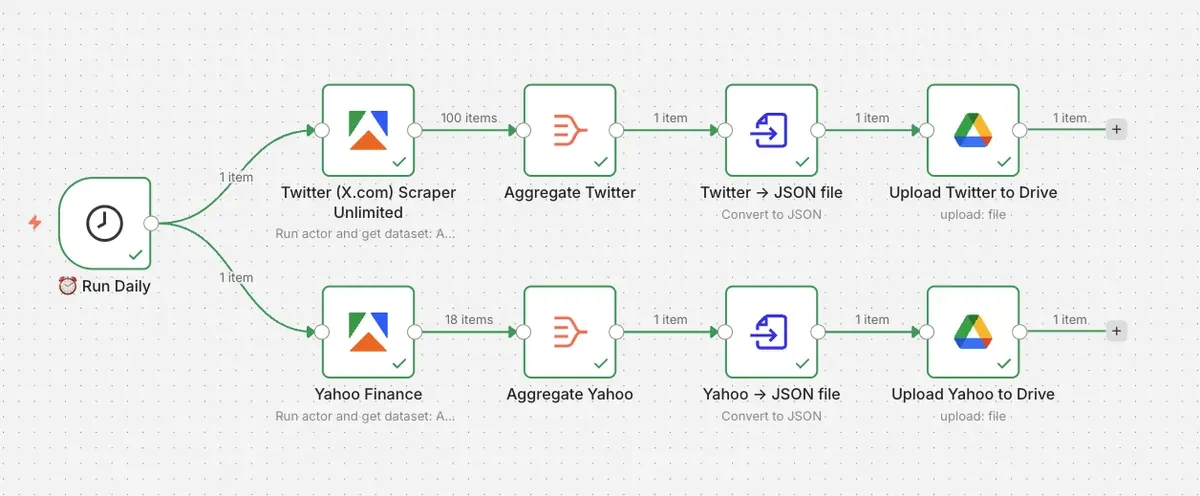
In this tutorial, we’ll build a stock sentiment data pipeline for the freight and logistics sector. The workflow will collect X/Twitter posts about freight, trucking, rail, logistics, and transportation stocks, as well as Yahoo Finance data for relevant freight and logistics tickers. JSON files will be saved automatically to Google Drive on a daily basis.
By the end of this tutorial, you’ll have a reusable workflow you can adapt to any stock, ETF, sector, or market theme.
How to build a stock sentiment pipeline with Apify and n8n
We’ll create a workflow using two Apify Actors:
- Twitter (X.com) Scraper Unlimited to collect recent posts about freight and transportation stocks
- Yahoo Finance - Full stock info, news, cheapest, real-time to collect stock data for selected logistics, rail, trucking, shipping, and transport tickers
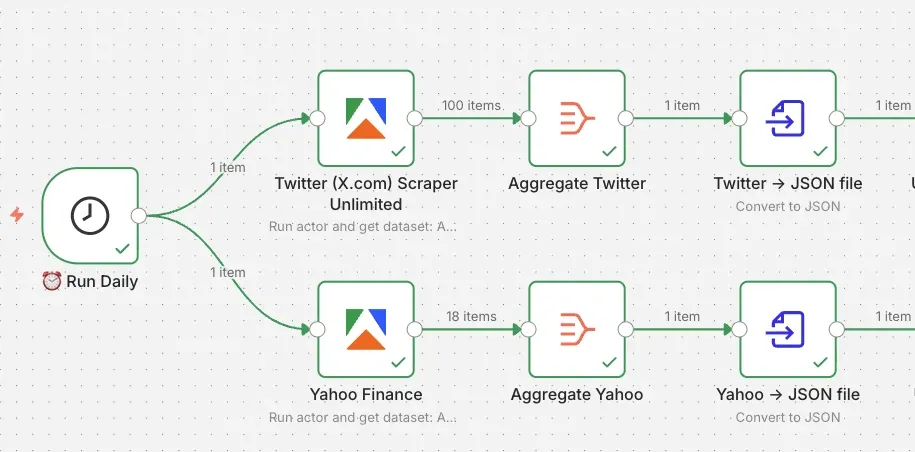
Our n8n workflow will contain the following steps:
- Daily trigger
- Running the X/Twitter scraper with freight-related search terms
- Running the Yahoo Finance scraper with logistics-related tickers
- Aggregating both datasets
- Converting the results to JSON files
- Uploading the files to Google Drive
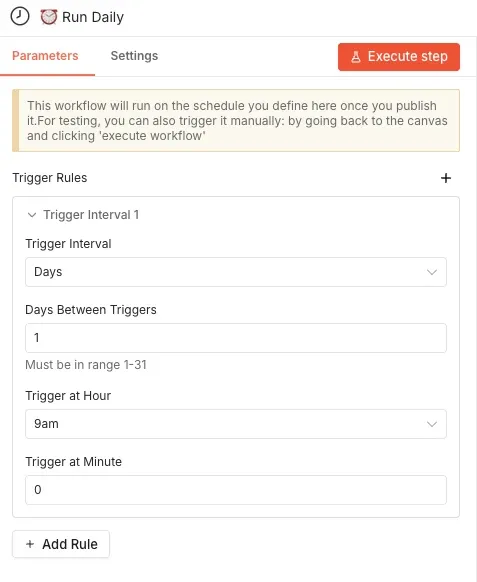
Step 1: Create a daily trigger in n8n
Open n8n and create a new workflow. Add a Schedule Trigger node as the first step. In this example, the workflow runs once per day at 9 AM, but you can adjust it to your needs - once per day for long-term sentiment tracking or every few hours during earnings season.
Step 2: Add the X/Twitter scraper
Next, add an Apify node to the workflow. Search for the Apify node in your canvas (and install it if you haven’t already). Select the Run an Actor and get dataset operation.
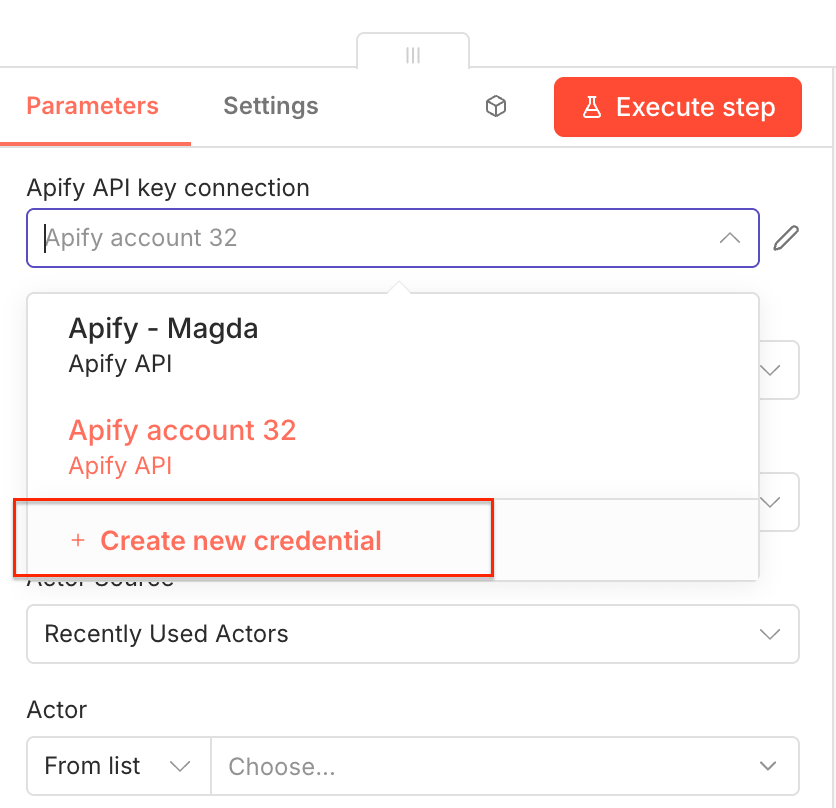
Once you open the node, you can connect n8n to your Apify account. Click on Create new credential to get started.
Next, you’ll be asked for your Apify API key. You can find it in Apify Console under Settings → API & Integrations, where you can copy your API token.
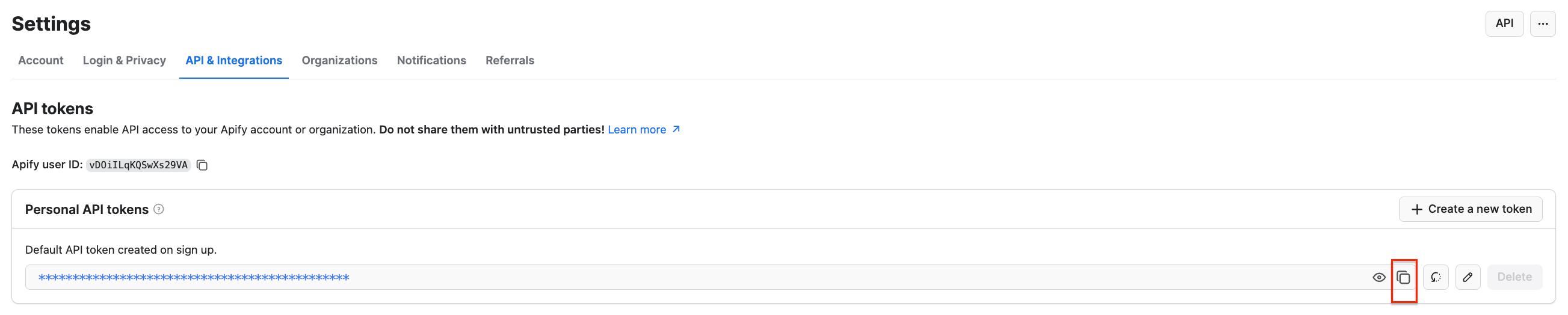
Paste the token into n8n and save the credential. Your Apify connection is ready to use.
Next, you’ll select the Actor you want to run from Apify Store and grab its JSON input so n8n can run it. Go to Twitter (X.com) Scraper Unlimited and adjust the scraping session to your needs using the UI. This Actor will collect recent X/Twitter posts matching the search terms you provide. For this workflow, we’re tracking freight and logistics stock sentiment, so the search terms include a mix of ETFs, sector keywords, and industry signals.
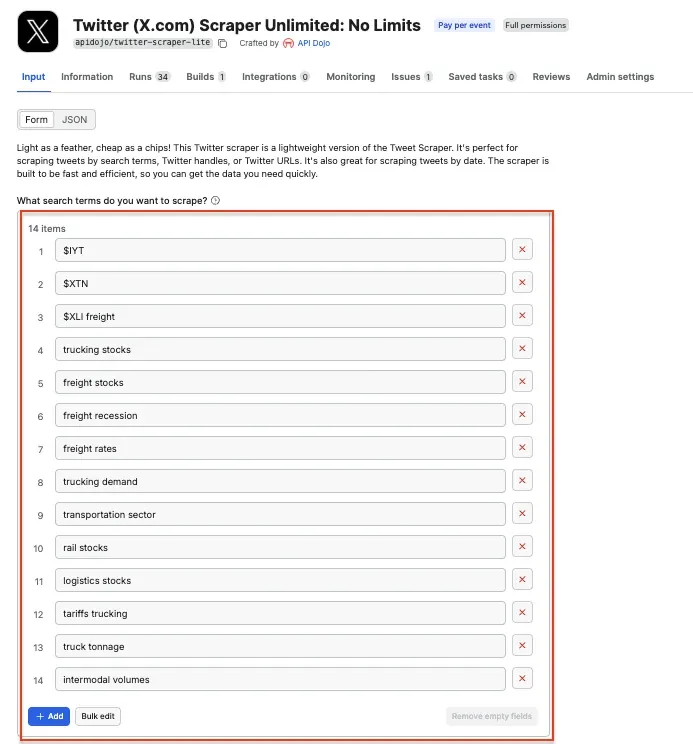
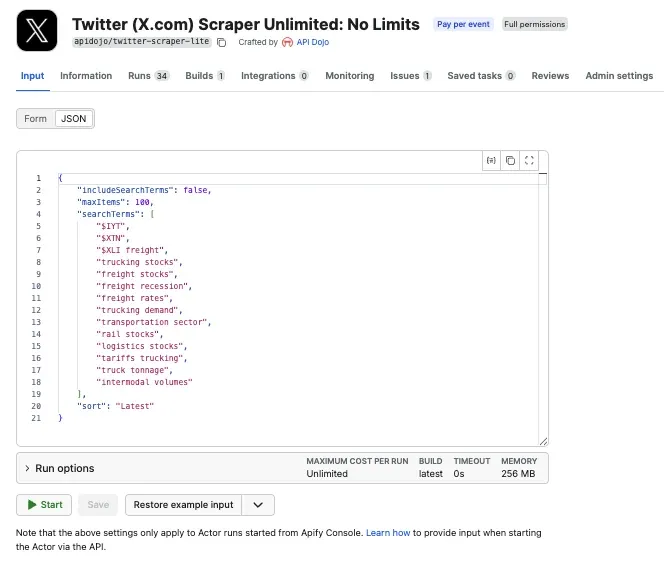
This gives us a useful mix of data - ticker-based searches like $IYT and $XTN, sector searches like freight stocks, and industry condition searches like freight recession.
$TSLA, $NVDA, $AAPL, $FDX. They work the same way hashtags do on social media: clickable links that aggregate every post tagged with the same symbol. X/Twitter and a few other platforms render them as searchable links.Go back to the n8n node, and paste the JSON input into the input field:
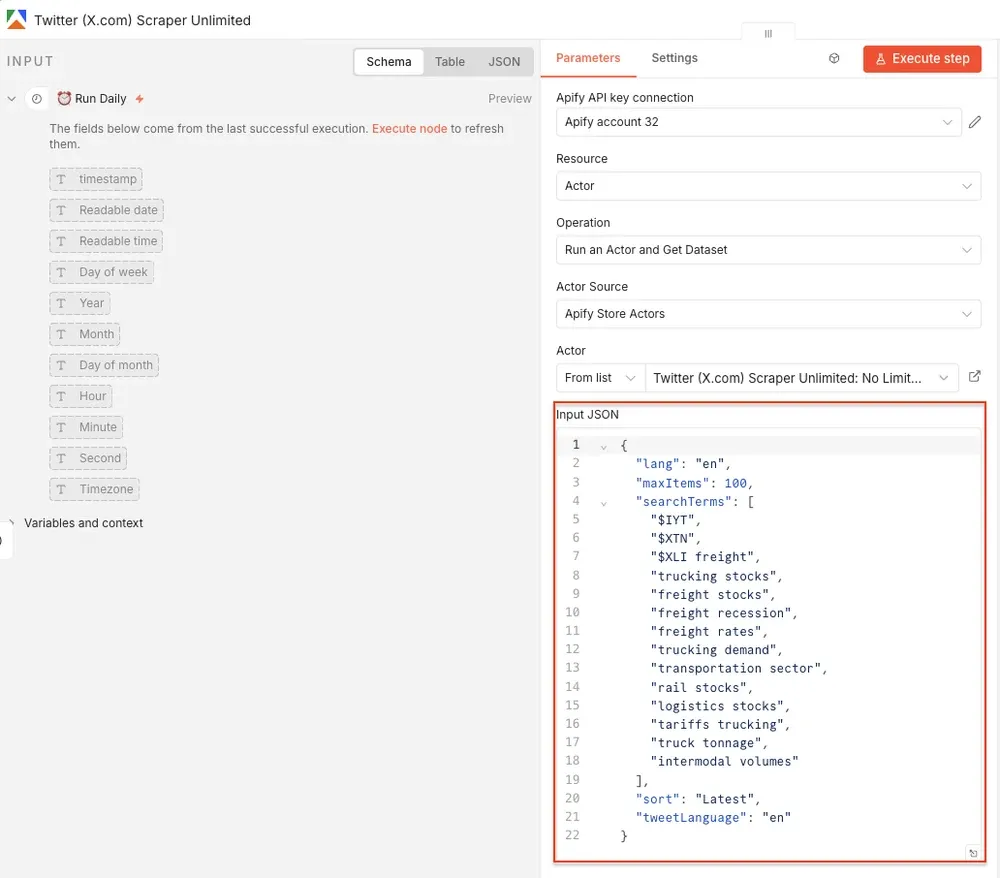
Once the node runs, you’ll get structured tweet data back from Apify. Now you can test it by clicking Execute step at the top. Once the Actor finishes running, you’ll see its output displayed as JSON next to the node:
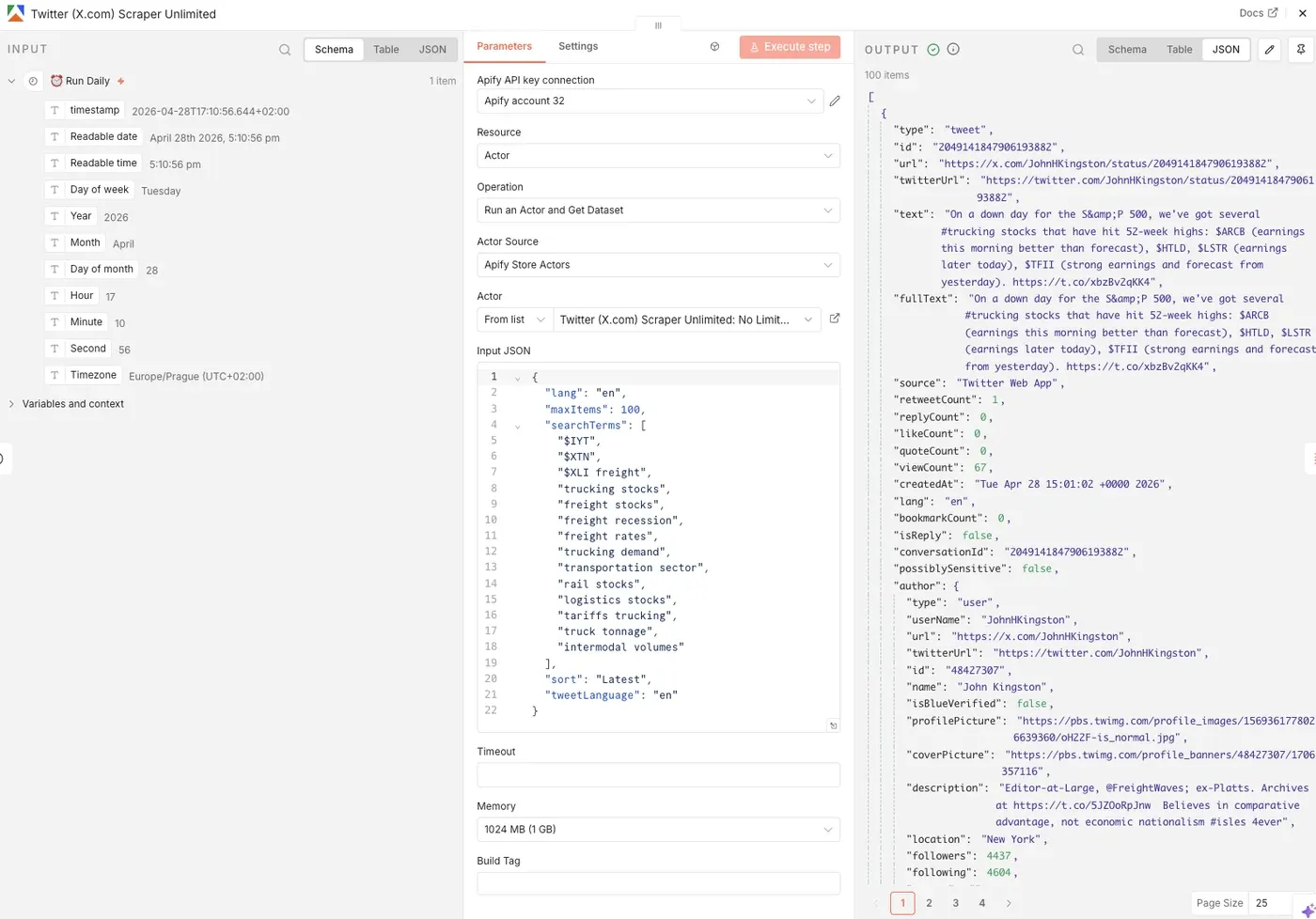
Step 3: Scrape Yahoo Finance
While social media tells you what people are saying, Yahoo Finance gives you market context. Add a second Apify node to the workflow and choose the same operation: Run an Actor and get dataset . Connect it to the same trigger. This way, both Actors run every time the workflow starts: one collects X/Twitter posts, and the other collects Yahoo Finance data.
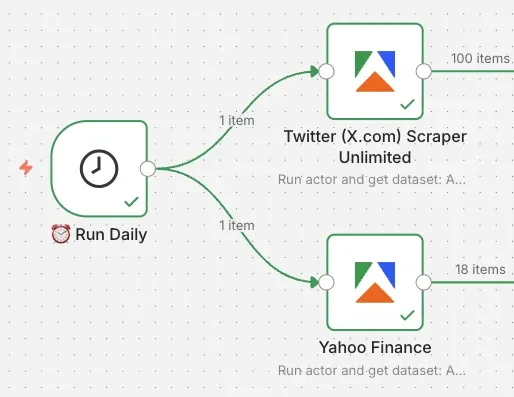
Select Yahoo Finance - Full stock info, news, cheapest, real-time from the list and configure the run in Apify Console, as before. In this workflow, we’re collecting stock data for freight, logistics, rail, trucking, delivery, and related transport tickers. Paste the JSON input into the n8n node.
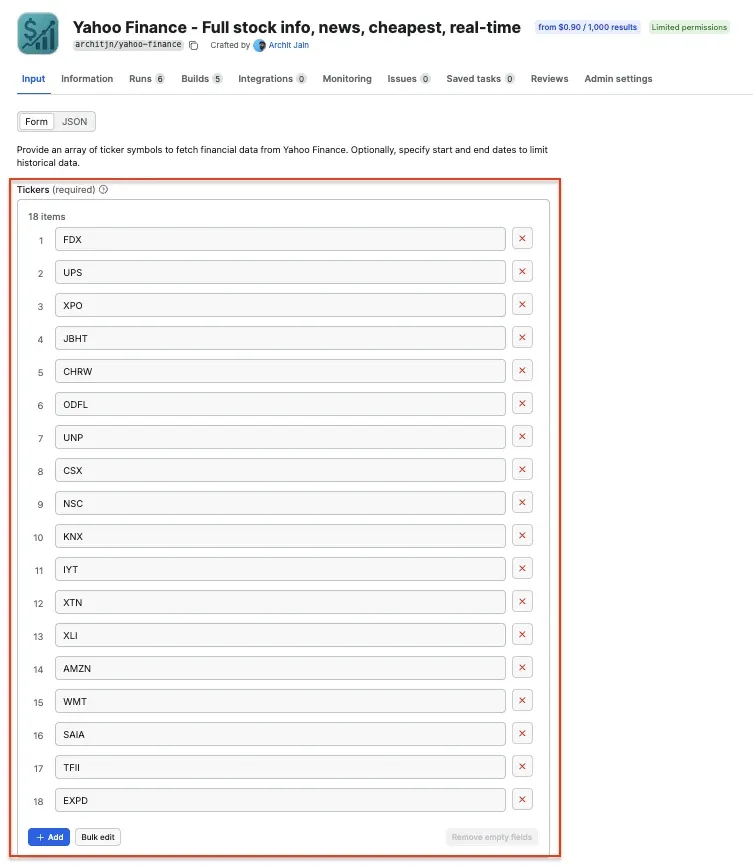
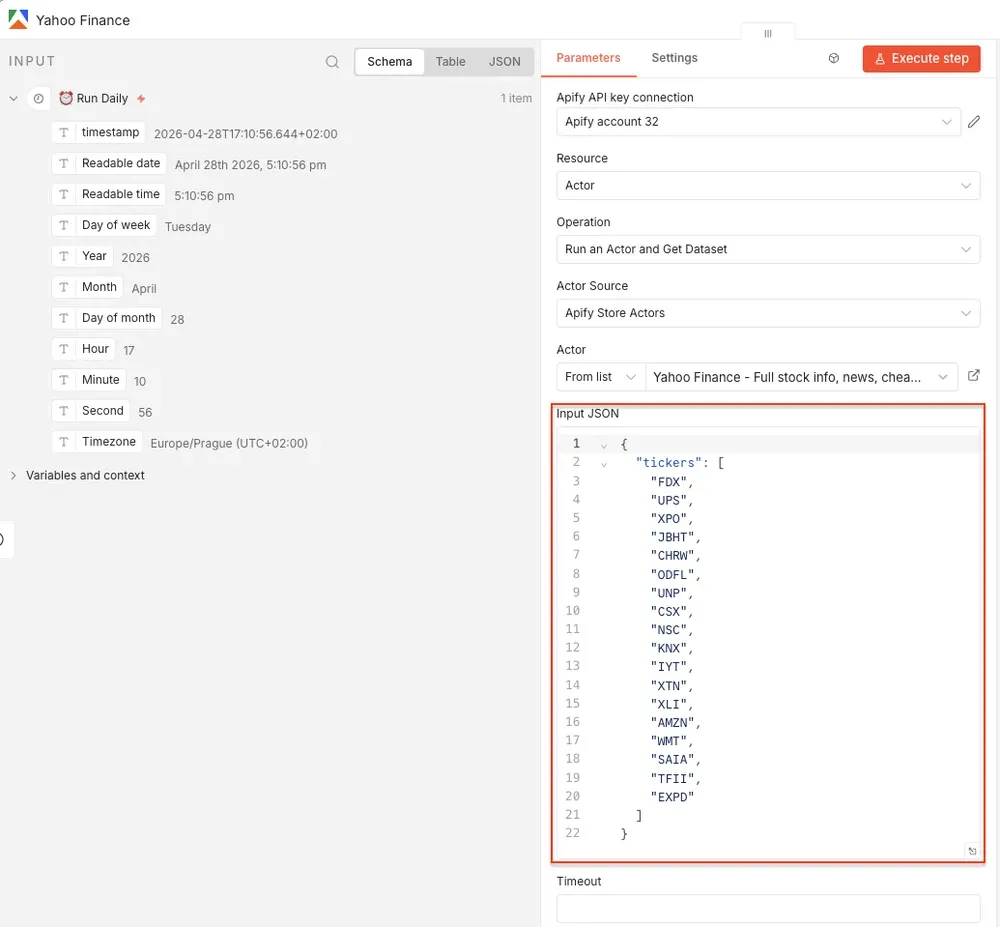
Again, you can test the node by executing this step.
Step 4: Aggregate the Twitter and Yahoo Finance results
After each Apify Actor runs, add an Aggregate node - one for Twitter and one for Yahoo Finance. In this workflow, both Aggregate nodes use Aggregate All Item Data (Into a Single List) option. Aggregating the items first makes it easier to create one clean file per source:
- One JSON file for Twitter/X data
- One JSON file for Yahoo Finance data
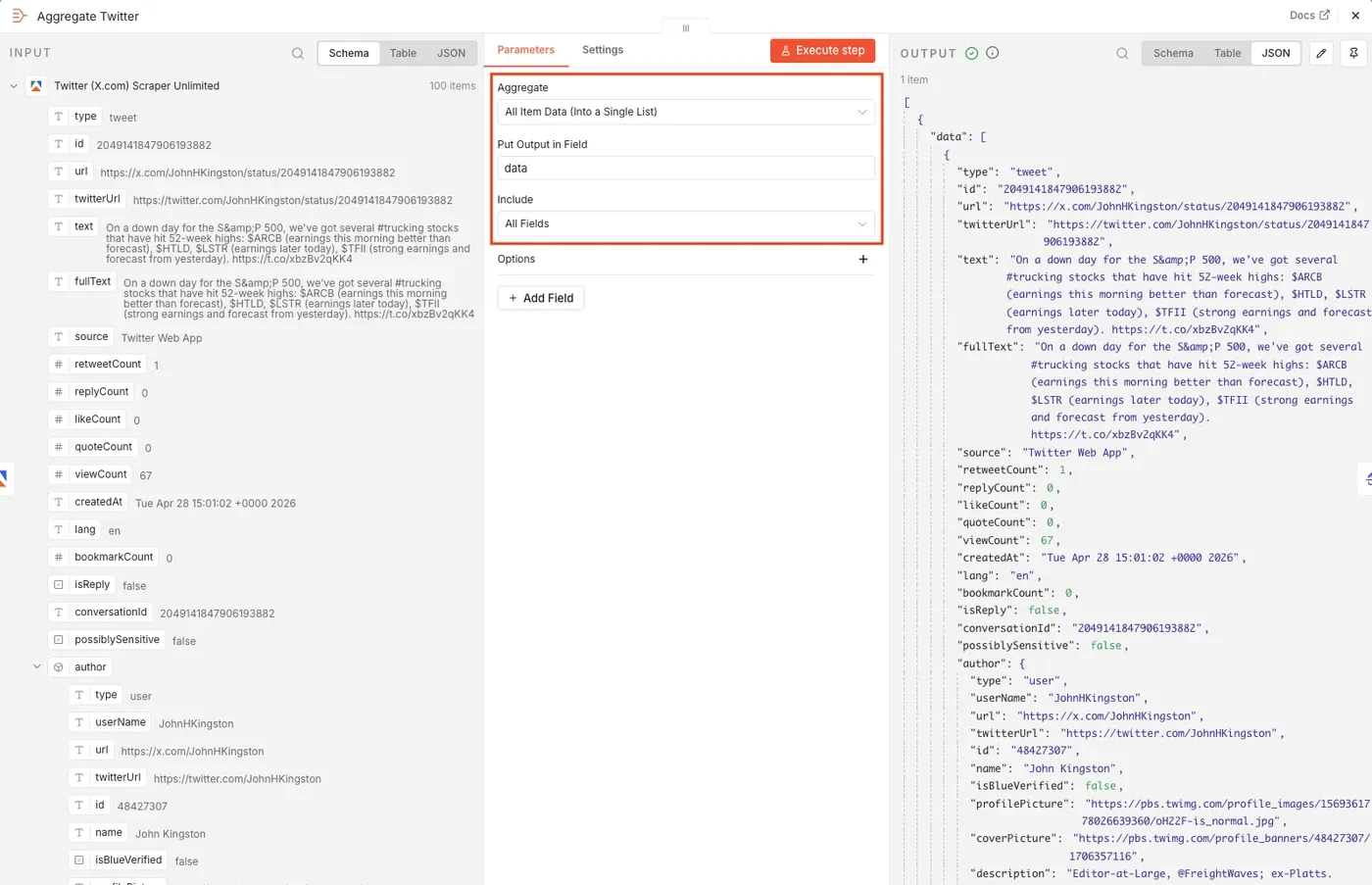
Step 5: Convert each dataset to a JSON file
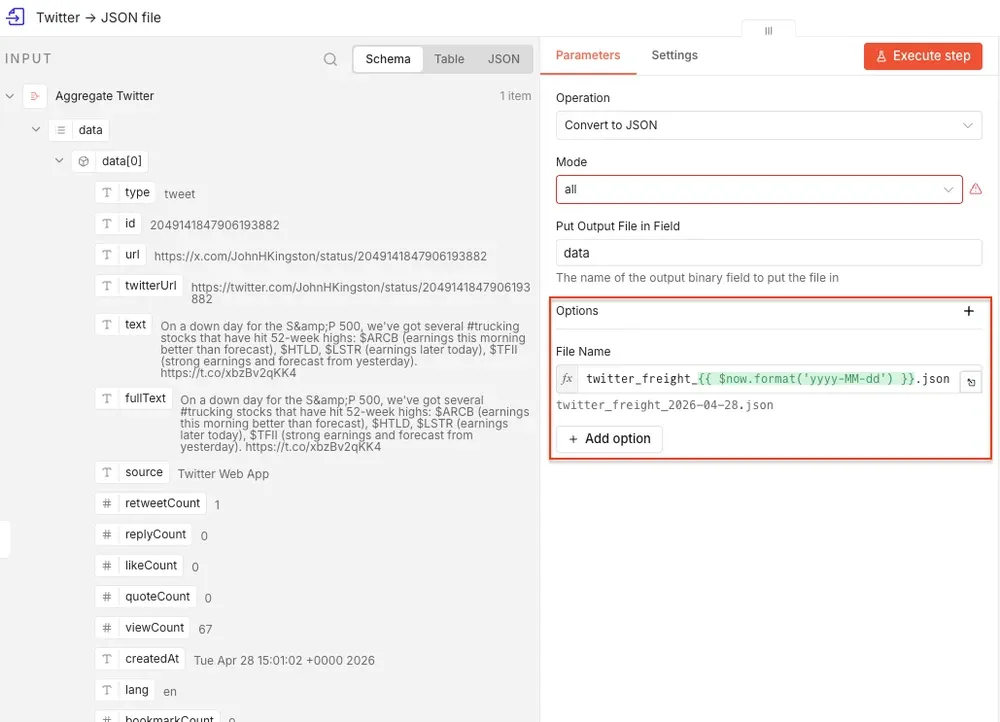
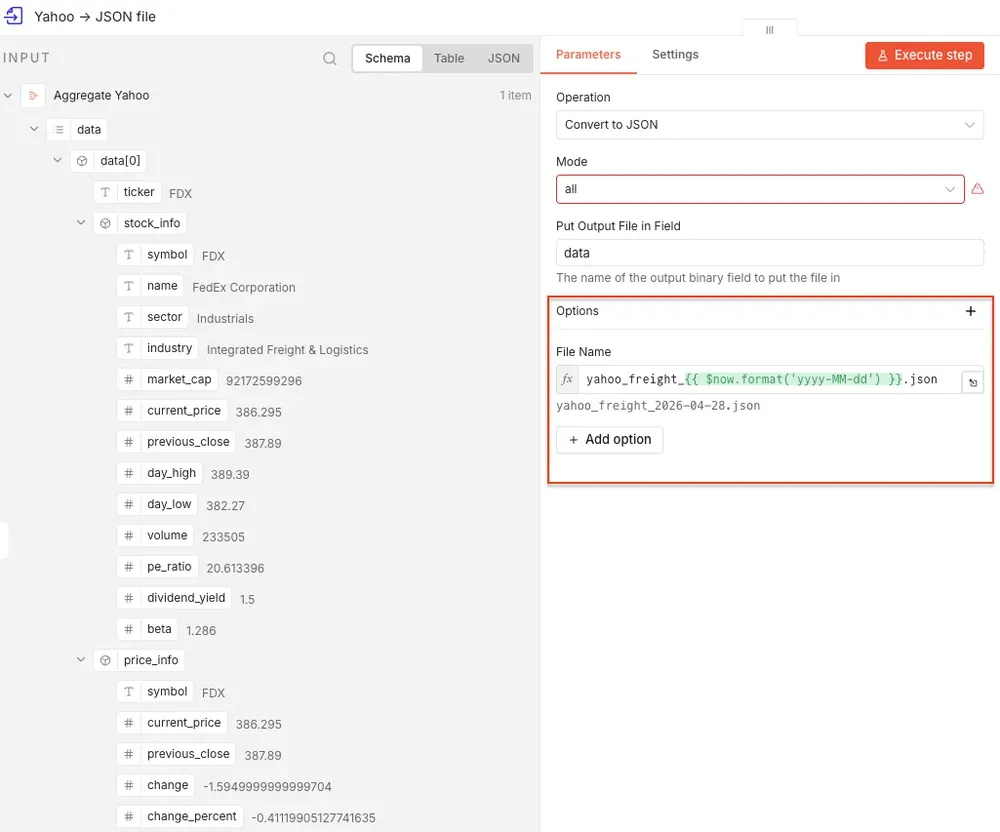
Next, add a Convert to File node after each Aggregate node. The date in the filename makes the workflow easier to manage over time. Instead of overwriting the same file every day, n8n creates a dated snapshot:
For the Twitter branch, name the file twitter_freight_{{ $now.format('yyyy-MM-dd') }}.json
For the Yahoo Finance branch, name the file yahoo_freight_{{ $now.format('yyyy-MM-dd') }}.json.
Over time, your Google Drive folder becomes a daily archive of stock sentiment inputs.
Your workflow up to this point has one trigger and two branches, three nodes in each branch:
Step 6: Upload the files to Google Drive
The final step is to upload both JSON files to Google Drive. Add a Google Drive node after each Convert to File node. Connect your Google account and select a folder for your files. Set the file name to twitter_freight_{{ $now.format('yyyy-MM-dd') }}.json for Twitter and yahoo_freight_{{ $now.format('yyyy-MM-dd') }}.json for Yahoo Finance.
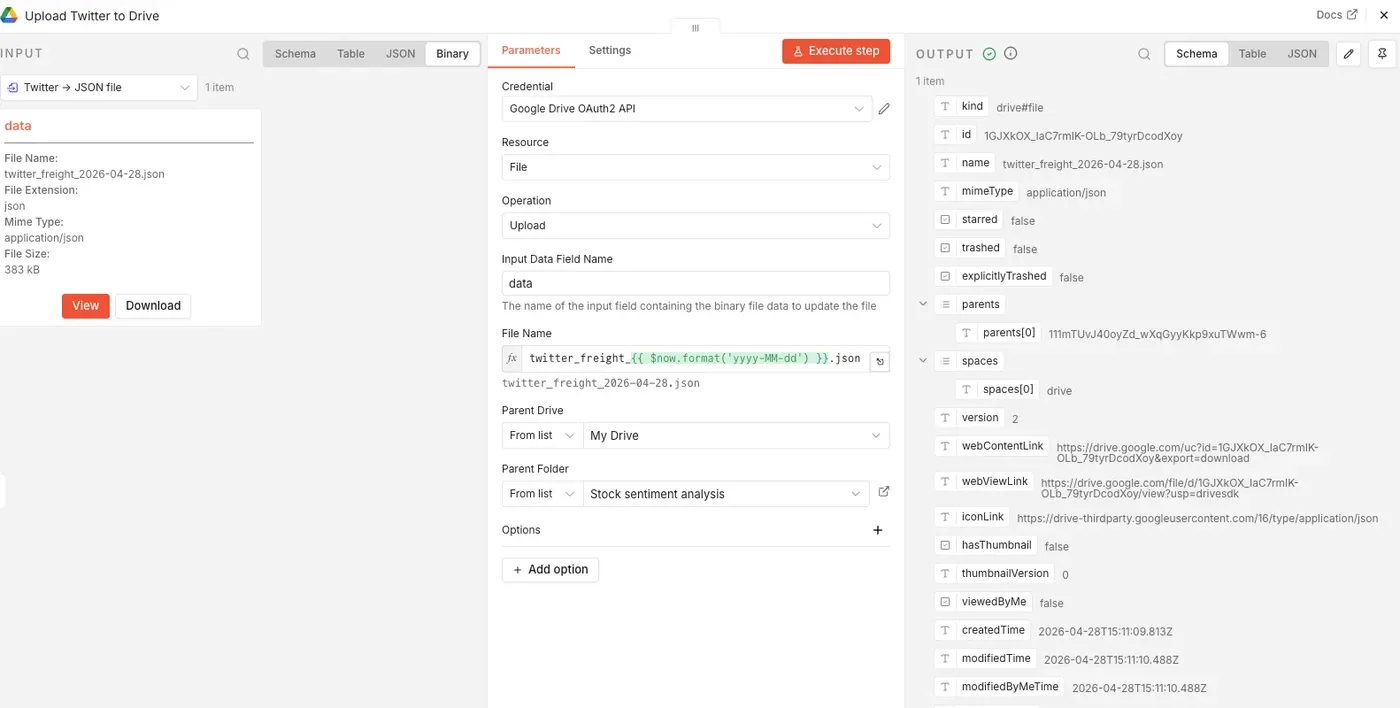
Execute the whole workflow to test it out.
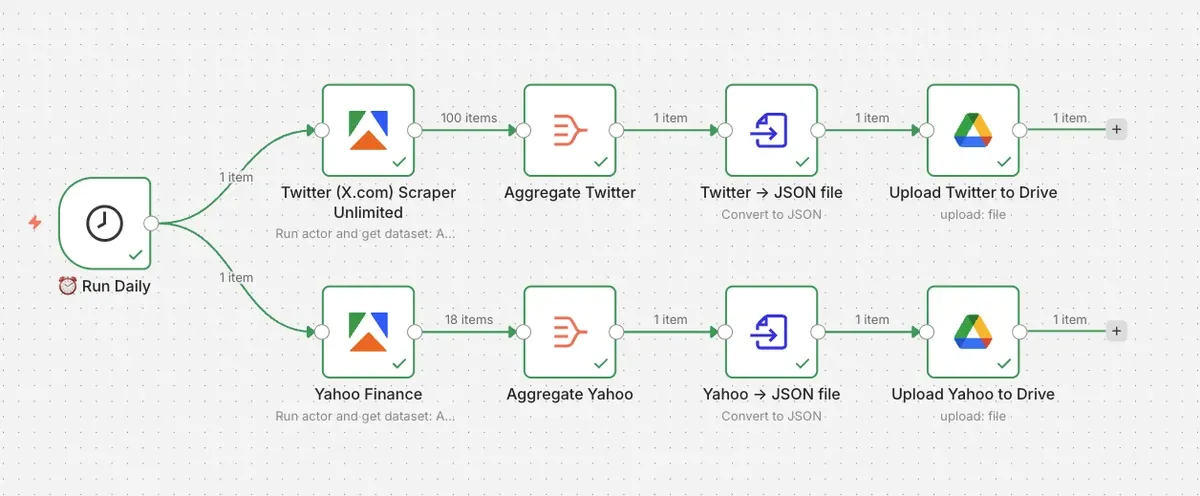
Check Google Drive for your new datasets. You now have a daily stock sentiment data pipeline running with Apify and n8n.
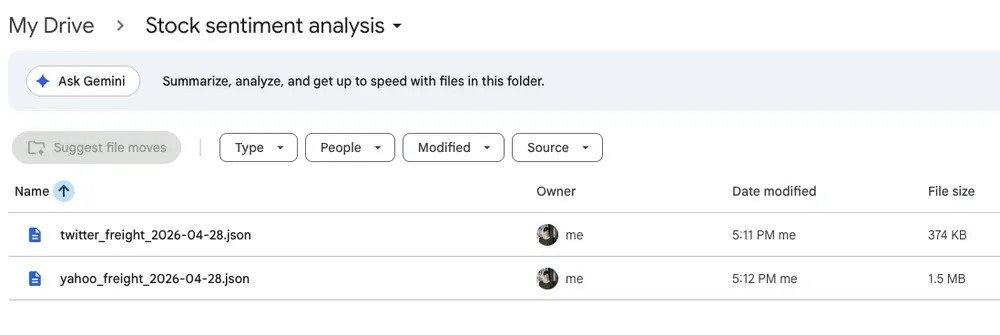
Files created automatically in Google Drive
Step 7: AI analysis
The n8n workflow gives you the raw material for stock sentiment analysis, ready to be processed by AI tools.
The Twitter/X dataset can be used to analyze positive or negative language around the sector, as well as the discussion volume around demand, stocks, or tariffs. You can scrape posts mentioning ETFs or monitor sudden changes in market chatter. The Yahoo Finance dataset adds the market context with the current stock data and company comparisons.
Feed both JSON files to your AI tool to classify tweets, compare sentiment scores against daily market data, and track most-discussed tickers or phrases.
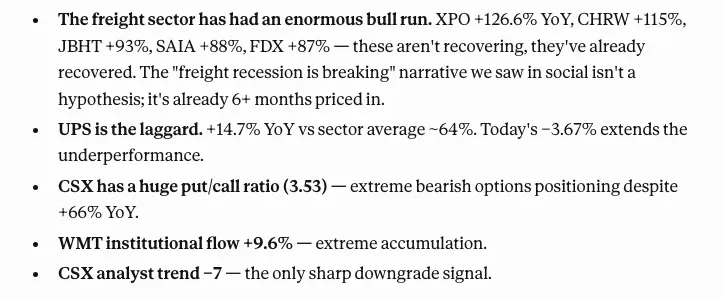
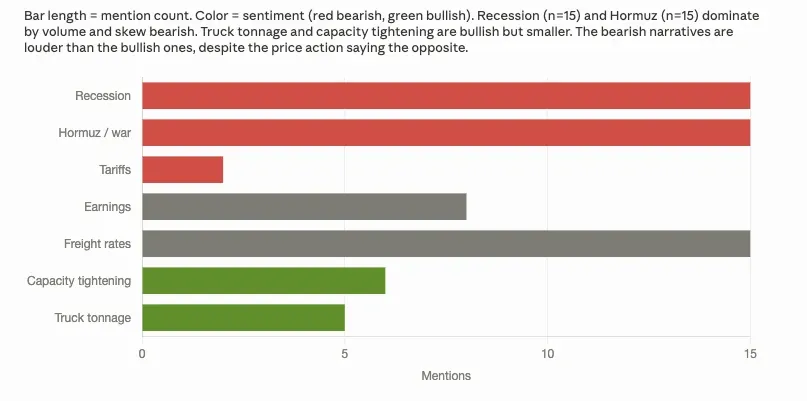
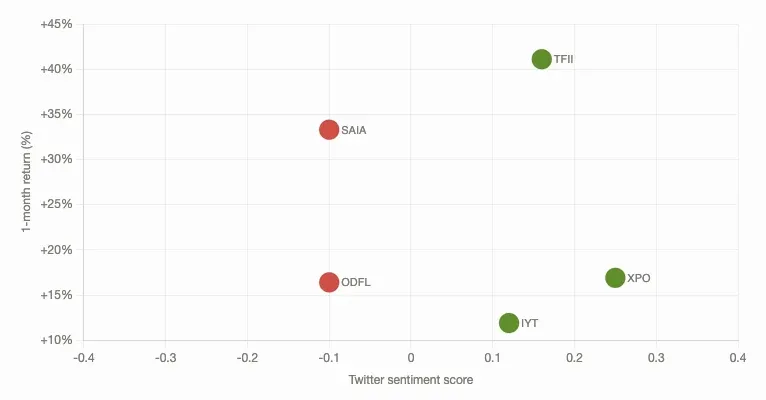
Your stock sentiment analysis can look like this (created by Claude):

How to adapt this workflow
The easiest way to adapt this workflow is to change the search terms and tickers. For example, to monitor banking stocks, you could replace the Twitter freight search terms with bank stocks, credit risk, $KBE, and $KRE. Your Yahoo Finance tickers would be JPM, BAC, WFC, or GS. For AI stocks, you could use $NVDA, $MSFT, and AI stocks.
You’re not locked into a predefined dataset or dashboard - change the market theme whenever you want.
Start tracking stock sentiment
This workflow turns stock sentiment monitoring from a manual research task into a structured data pipeline. Because the workflow lives in n8n, it's easy to extend. Today it ends at Google Drive, but you can add an AI sentiment-scoring node, a database write, or a Slack alert as separate steps - the data collection layer stays the same.