
Last year, my partner unexpectedly lost a family member.
After the shock and dealing with all the funeral bureaucracy, grief started to seep in through all the cracks rather quickly.
Then came another overwhelming realization: we had inherited an entire house full of antiques. Hundreds and hundreds of plates and cutlery of all kinds, around five full wardrobes, and enough shoes to serve a small town.
On top of that, there was inherited debt. We considered selling the most valuable items to recoup some of it and donating the rest to those who could use it.
The trouble was, we had no idea which were valuable and which were not. Was this “Vista Alegre” Portuguese porcelain piece now common, or a sought-after collector's item?
Garage sales are not really a thing in a small Portuguese village, and selling in a larger city is its own bureaucratic process, which we had no mental space for with everything else going on.
Instead, we needed something much, much simpler.
We have a few slow-moving marketplaces here, like OLX and Facebook, but if we sold on eBay we could reach a much bigger market. So one evening, I sat down and started searching. I’d look up an item, toggle eBay’s “Sold” filter, scroll through the results, mentally note the price range, and move on to the next one.
After about 12 items, I stopped. At this rate, pricing everything would take weeks. And I was getting a misleading picture anyway. eBay shows you asking prices by default, not what things actually sell for. The listings I was seeing ranged from €20 to €200 for the same plate. Completely useless.
When I toggled the “Sold” filter, the real picture was much clearer. Those plates had been selling consistently at €35–€50. But eBay gives you no way to aggregate that data, no analytics, no export. You just scroll, eyeball it, and hope for the best.
As a backend-leaning engineer, I often find myself battling with UI more than I’d like to admit. Doing this 300 times was not happening. So I did what felt natural. I automated it.
Why I built an Apify Actor for this
I wanted one query to return everything I needed: a recommended price, the realistic range, how fast items sell, whether condition matters, and a CSV I could share with my partner for transparency.
I built this as an Apify Actor. For those unfamiliar, Apify is a platform for running automation tools (called Actors) in the cloud. You write your code, deploy it, and users can run it on demand.
The Actor uses Crawlee’s PlaywrightCrawler. Because eBay’s sold listings are JavaScript-rendered, you need a real browser to see them.
Key dependencies: crawlee ^3.5.0, playwright ^1.40.0, apify ^3.1.10, zod ^3.22.0, cheerio ^1.0.0-rc.12.
The pipeline is straightforward:
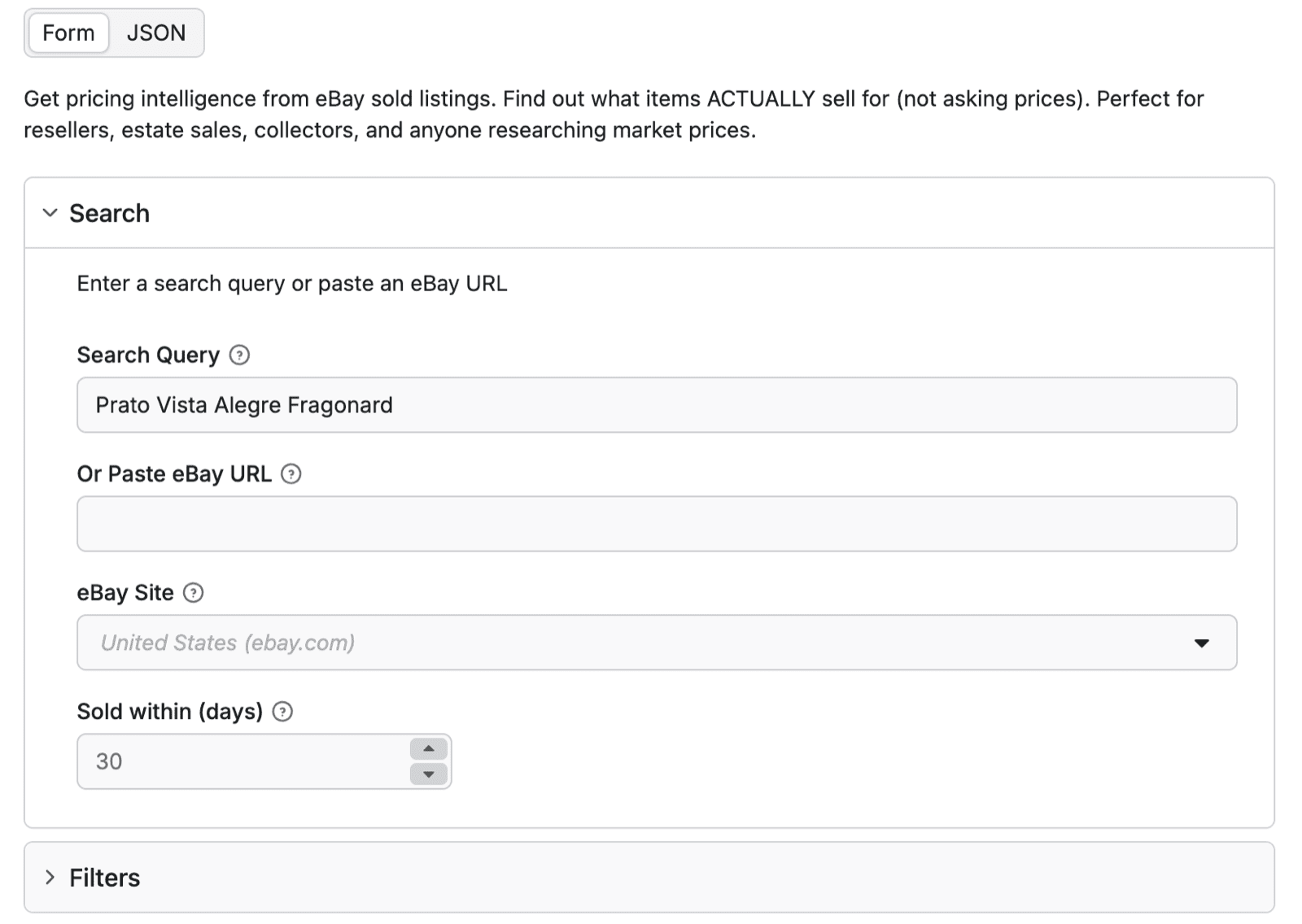
Search query (e.g. "Prato Vista Alegre Fragonard")
    → eBay sold listings URL (with filters applied)
    → Playwright scrapes the results page
    → Parser extracts: price, condition, sold date, seller info
    → Analytics engine: median, percentiles, velocity, demand
    → Output: JSON + CSV + Markdown report (via Apify dataset and key-value store)
Engineering decisions that actually mattered
I’ll spare you the full architecture walkthrough and focus on the decisions I made that had real consequences.
Firefox over Chrome for stealth
eBay’s bot detection is aggressive. My first version used Chrome with Playwright and was flagged in the first few runs (insert hide the pain meme here). Firefox has better fingerprint characteristics for scraping. Fewer detectable automation signals out of the box.
I also block unnecessary resources to reduce bandwidth usage. When you’re running hundreds of queries to price an entire inherited household, this adds up:
await page.route('**/*', (route) => {
    const resourceType = route.request().resourceType();
    const blockedTypes = ['image', 'stylesheet', 'font', 'media'];
    if (blockedTypes.includes(resourceType)) {
        route.abort();
    } else {
        route.continue();
    }
});
That saves 60–80% bandwidth per request. I don’t need to see the product images. I just need the price data.
Money in cents, not floats
Every JavaScript developer has been bitten by floating-point precision at some point: 0.1 + 0.2 !== 0.3. When you’re calculating pricing analytics across dozens of sold items, floating-point errors compound fast.
All prices are stored as integer cents with the display string kept separate:
import { Price } from './schemas/index.js';

export function createPrice(cents: number, currency: string = 'EUR'): Price {
    const symbols: Record<string, string> = {
        EUR: '€', USD: '$', GBP: '£', CAD: 'CA$', AUD: 'A$',
    };
    const symbol = symbols[currency] || '€';
    const dollars = (cents / 100).toFixed(2);

    return {
        cents: Math.round(cents),
        display: `${symbol}${dollars}`,
        currency,
    };
}
Simple, but it saved me from having to debug weird rounding errors in the analytics engine later.
Multi-language sold detection
This is where selling from Portugal made things interesting. We’re not just looking at ebay.com. We’re checking ebay.co.uk, ebay.de, ebay.fr, ebay.it, and ebay.es too. The same vintage item might sell for €30 in Germany but €40 in Italy. I needed to compare across markets.
The catch: eBay shows “Sold” in the local language. My first version only checked for English:
const isSold = text.includes('sold');
The first time I ran it on ebay.de, it returned zero sold items. Everything was “Verkauft”, and my code had no idea. Neither did I. So now it checks all of them:
const textLower = itemText.toLowerCase();
const isSold = textLower.includes('sold') ||      // English
               textLower.includes('vendido') ||   // Portuguese/Spanish
               textLower.includes('vendu') ||     // French
               textLower.includes('verkauft') ||  // German
               textLower.includes('venduto');     // Italian
Why string matching instead of CSS class names or data attributes? Because eBay redesigns its UI constantly. Selectors break overnight. The word “Sold” in the local language is the one thing that stays consistent.
Selector fallbacks for eBay’s A/B testing
Speaking of eBay changing things. They A/B test their search results UI. Different users (or different IP ranges) see completely different HTML structures for the same page.
My scraper worked perfectly for a week, then returned zero results one morning. eBay had rolled out a new card layout to my IP range. The fix was layered fallbacks:
let itemElements = $('.s-card').toArray();
if (itemElements.length === 0) {
    itemElements = $('.s-item').toArray();
}
if (itemElements.length === 0) {
    itemElements = $('li[data-viewport]').toArray();
}
Same approach for individual data fields: price, condition, and shipping all have multiple selector paths:
let priceText = $item.find('.s-card__price').text().trim() ||
                $item.find('[class*="s-card__price"]').text().trim() ||
                $item.find('.s-item__price').text().trim() ||
                $item.find('[class*="price"]').first().text().trim();
Since adding these fallbacks, the scraper has been significantly more resilient to eBay’s UI changes.
Parsing prices across 8 eBay markets
This was the most frustrating bug I hit. My parser worked beautifully on ebay.com and ebay.co.uk. Then I tested on ebay.de and the prices were all wrong.
The problem: parseFloat("1.234,56") returns 1.234 instead of 1234.56. I lost an evening to this.
| Markets | Format | Example |
|---|---|---|
| US, UK, CA, AU | Period decimal | $1,234.56 |
| DE, FR, IT, ES | Comma decimal | 1.234,56 € |
The fix: look at the last separator in the string to determine the format. If the last separator is a comma, it’s European (comma = decimal). If it’s a period, it’s US/UK (period = decimal). Then strip the thousands separators and parse normally.
It handles $529.99, €499,00, EUR 317,00, and edge cases like 45,00 € vs € 45,00. The “last separator wins” heuristic has been reliable across all 8 markets I support: US, UK, Germany, France, Italy, Spain, Canada, and Australia.
My test suite now has price strings from every market. The German parser bug taught me that testing only on ebay.com is not testing.
Getting the prices right across markets mattered. We were making real decisions about what to keep, what to list, and what to let go.
From raw prices to pricing advice
I didn’t just need a list of sold prices. I needed to answer: “Should we sell this, and if so, at what price?”
Why median, not mean
The recommended price uses the median, not the average. Here’s why that matters. Say I search for a specific porcelain piece and get back 16 sold listings:
- 15 sold between €30–€80
- 1 sold at €350 (a rare variant or a bidding war)
The mean is €72. The median is €52. If I list at €72, I’m overpricing, and the item sits for weeks. The median tells me what a normal sale looks like.
What the analytics engine calculates
The Actor runs statistics on all the sold prices and returns:
- Recommended price: The median, resistant to outliers
- Price range: 10th–90th percentile. “80% of sales happen between €X and €Y”
- Market velocity: How fast items sell, classified from
very_fast(under 2 days) tovery_slow(over 20 days) - Demand level: Sales per day. Is this a rare find, or are hundreds selling weekly?
- Condition breakdown: How much does “Like New” vs “Good” actually affect the price?
private classifyVelocity(avgDays: number): MarketVelocity {
    if (avgDays < 2) return 'very_fast';
    if (avgDays < 5) return 'fast';
    if (avgDays < 10) return 'moderate';
    if (avgDays < 20) return 'slow';
    return 'very_slow';
}

private classifyDemand(soldPerDay: number): DemandLevel {
    if (soldPerDay > 50) return 'very_high';
    if (soldPerDay > 10) return 'high';
    if (soldPerDay > 2) return 'medium';
    if (soldPerDay > 0.5) return 'low';
    return 'very_low';
}
The quick take
Everything condenses into a one-sentence summary:
"Prato Vista Alegre Fragonard sells at slow pace (14 days avg) at €8–€108.
 Low demand. List at €33 for optimal sale."
This is string interpolation from the statistics, not AI. Deliberately. I wanted it to be deterministic. Same data in, same recommendation out. No hallucinated pricing advice.
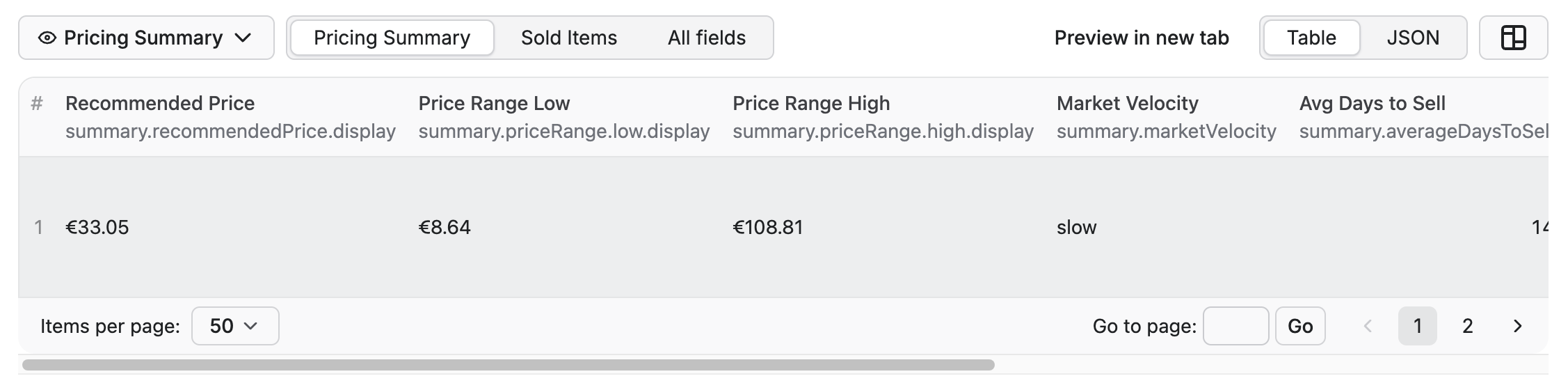
Here’s what an actual run’s output looks like in the dataset:
{
    "summary": {
        "recommendedPrice": { "cents": 3305, "display": "€33.05", "currency": "EUR" },
        "priceRange": {
            "low": { "cents": 864, "display": "€8.64", "currency": "EUR" },
            "high": { "cents": 10881, "display": "€108.81", "currency": "EUR" }
        },
        "marketVelocity": "slow",
        "averageDaysToSell": 14,
        "demandLevel": "low",
        "quickTake": "Prato Vista Alegre Fragonard sells at slow pace (14 days avg) at €8–€108. Low demand. List at €33 for optimal sale.",
        "confidence": "high"
    },
    "meta": {
        "searchQuery": "Prato Vista Alegre Fragonard",
        "totalMatches": 26,
        "itemsAnalyzed": 26
    }
}
Here’s one of the plates we were pricing, a Vista Alegre Fragonard piece, the kind of thing you’d walk past without a second thought unless you knew what to look for:

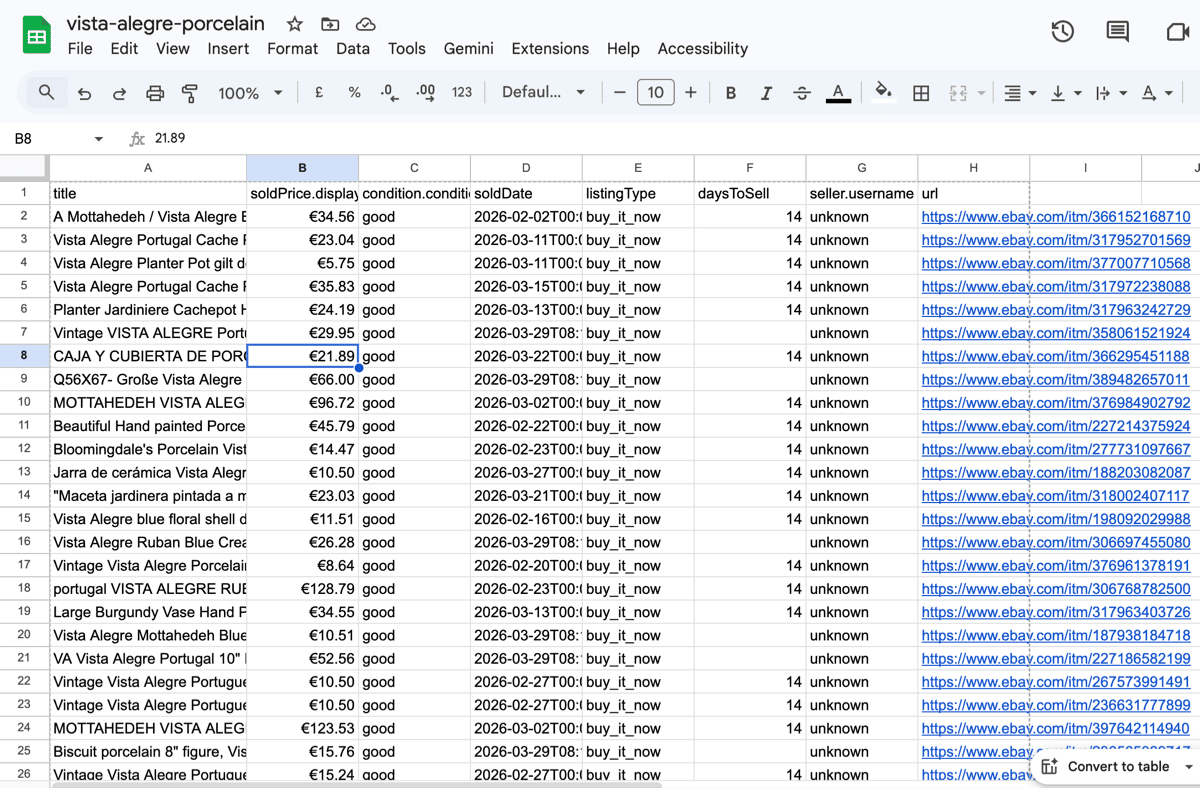
The CSV export is what I actually share with my partner. No need to touch Apify Console. I run the searches, export the spreadsheet with recommended prices, and we decide together what’s worth listing. Apify’s dataset and key-value store outputs are also shareable via URL, so you don’t need to be an Apify user to access the results.
And on the Apify side, the full dataset output gives you the raw numbers behind the recommendation:
What broke
Scraping a platform like eBay at scale isn’t a clean experience. There were a few hiccups, some mild and some not:
Bot detection whack-a-mole
eBay’s “Pardon Our Interruption” page showed up more than I’d like. The Actor handles it with session rotation and exponential backoff:
// Inside the PlaywrightCrawler requestHandler
if (isBotDetected) {
    const backoffDelay = 5000 * Math.pow(2, retryCount);
    log.warning(`Bot detection triggered (attempt${retryCount + 1}), ` +
                `waiting${backoffDelay / 1000}s...`);

    if (session) {
        session.markBad(); // Crawlee rotates to a new session on next retry
    }

    await page.waitForTimeout(backoffDelay);
    throw new Error(`Bot detection could not be bypassed`);
}
Marking the session as bad forces Crawlee’s session pool to rotate to a new one on the next retry. The exponential backoff (5s → 10s → 20s) gives eBay’s rate-limiting time to cool off.
The irony isn’t lost on me: eBay wants sellers to price competitively, yet blocks automated access to the pricing data that would help them do exactly that.
The proxy group typo that cost me a few runs
When I was trying to reduce costs, I switched the proxy group from RESIDENTIAL to what I thought was a cheaper option. I typed SHADER instead of the correct group name. No error. No warning. The Actor just fell back to datacenter proxies.
I only noticed because bot detection spiked on a batch of queries that had been working fine the day before. Took me longer than I’d like to admit to trace it back to a one-word typo in a config string.
// What I wrote
groups: this.config.proxyConfig.apifyProxyGroups || ['SHADER'],

// What I meant
groups: this.config.proxyConfig.apifyProxyGroups || ['RESIDENTIAL'],
Proxy group names fail without warning. If the name doesn’t match, you just get a different (usually worse) proxy tier. No exception, no log, nothing. Worth double-checking.
These weren’t abstract bugs. Every failed run was another evening not spent on the hundred other things we were dealing with.
Days-to-sell estimation
eBay’s search results show when an item sold, but not when it was listed. So I can’t calculate the exact days-to-sell. My pragmatic hack: assume 7 days for auctions, 14 days for Buy It Now.
Is this accurate? No. Is it useful? Surprisingly, yes. For the inheritance project, I mostly needed to know “does this category move quickly or slowly”, not the exact day count. The velocity classification (fast vs slow) was right often enough to be useful for our sell-or-donate decisions.
In the works
Batch mode is what the inheritance project actually needs. Right now I run one query at a time. I want to feed a CSV of 300 items and get back a CSV of 300 pricing recommendations. That’s the next thing I’m building.
I’d also love to expand the market coverage. eBay has local sites in Japan, Korea, Poland, and other countries that I don’t support yet. Living in Portugal, platforms like Vinted and Wallapop are bigger than eBay in certain categories. Supporting those would make this useful beyond eBay sellers.
The German parser bug also made it clear that my test coverage needs work. A test suite with only US prices is not a test suite. I’m adding price strings from every supported market and building regression tests around the locale detection.
Where we are now
We’ve priced about 130 items so far. What would have taken weeks of manual research took a few evenings of running queries. Some surprises along the way: items we assumed were valuable turned out to be common, and a few things we nearly donated turned out to be worth listing.
I ended up making the Actor public on Apify Store, and I've been surprised by how many people have used this in just a few months. For me, it was never about building a cool scraper; it was about turning an overwhelming, emotionally loaded task into something manageable. I'm really happy it seems to be helping others too.
If you’re in a similar situation, whether that’s an estate sale, downsizing, running a resale shop, or just trying to figure out what something is actually worth before listing it, I hope it helps.
And if you’ve built something similar for another marketplace, I’d genuinely love to hear about it.