I asked Claude to rank 20 developer tools by Google Trends search interest. I gave it real data: four batches of five. That is the usual way to fetch more than five terms, because Google's endpoint returns HTTP 400 if you send eight or ten.
Without a tool, Claude (an Opus 5 model at high effort) refused. Correctly. Four different 100s, it said. Four private scales. Cannot be done.
I told it I did not have time to re-fetch. Rank them anyway, best effort, give me the top three.
It invented multipliers from brand fame. Notion = 1.00. Zapier = 0.40. Framer = 0.18. Supabase = 0.10, because Supabase is "developer only" and therefore must sit on a smaller base. Top three: Notion, Zapier, Asana. Supabase landed tenth.
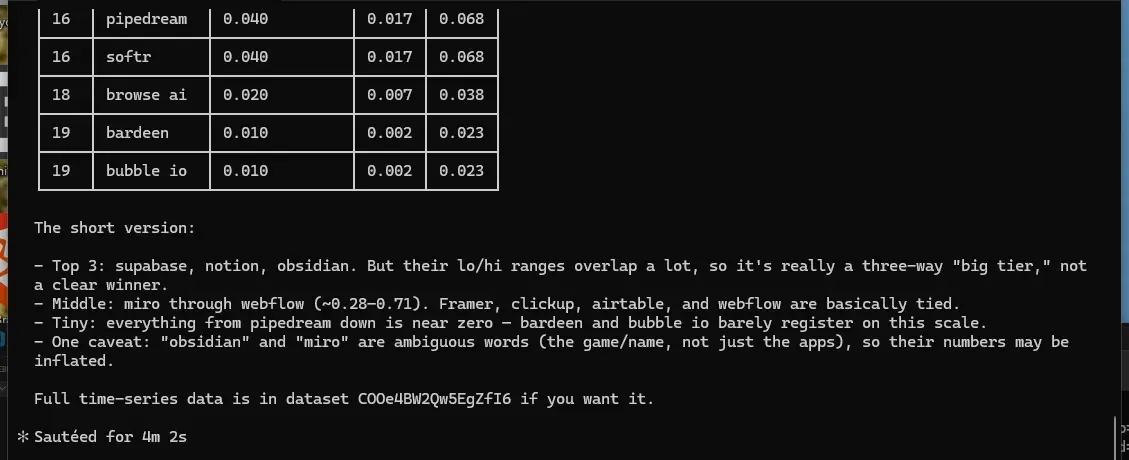
Then I gave Claude Code the same 20 keywords with an Apify Actor pinned on the Apify MCP server. It called the tool, waited a few minutes, and came back with Supabase, Notion, and Obsidian, plus a warning that those three overlap in their error bounds, so they are effectively tied.
Same keywords. Two setups. One of them had numbers that could survive being trusted.
This is a write-up of that experiment, the Actor I built so I would stop trusting my own batch spreadsheets, and what I would change if I were shipping any Store Actor as a tool for agents.
Why four tables of 100 cannot be one ranking
Google Trends never returns absolute search volume. Every response is renormalized so the biggest term in that request becomes 100, and everything else is scaled to it. Within one request, the order is fine. Across requests, the integers are not on the same scale.
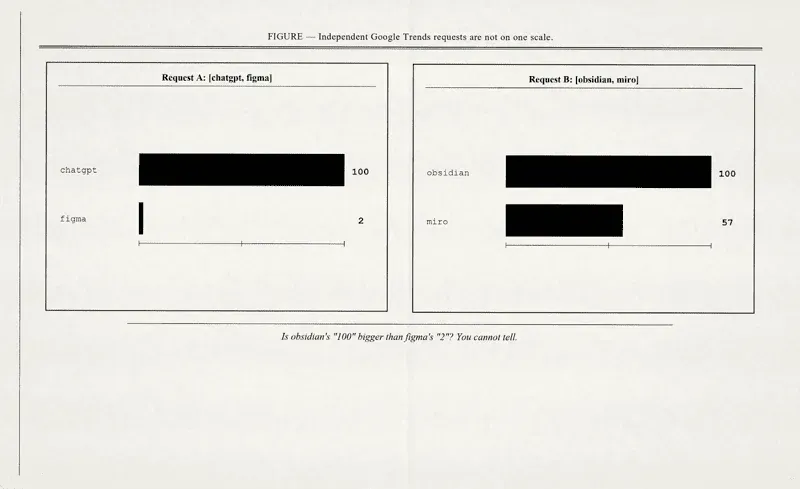
I fetched the 20 tools as four independent batches. The raw maxima came back as:
| Batch 1 | Batch 2 | Batch 3 | Batch 4 |
|---|---|---|---|
| notion 100 | supabase 100 | zapier 100 | framer 100 |
| asana 32 | obsidian 70 | make com 29 | webflow 91 |
| trello 29 | miro 39 | pipedream 10 | carrd 27 |
| airtable 19 | linear app 10 | browse ai 4 | softr 11 |
| clickup 18 | posthog 5 | bardeen 3 | bubble io 2 |
Twenty keywords, and four of them are 100. Webflow at 91 looks like it is within shouting distance of all of them.
I almost wrote a different article. I expected the model to merge those 100s and rank them as near-equals. That is the boring failure. Opus 5 is too careful for that.
Session 1: Claude diagnoses the bug, then I force a ranking
I pasted the four batch lines into a fresh Claude conversation with no connectors.
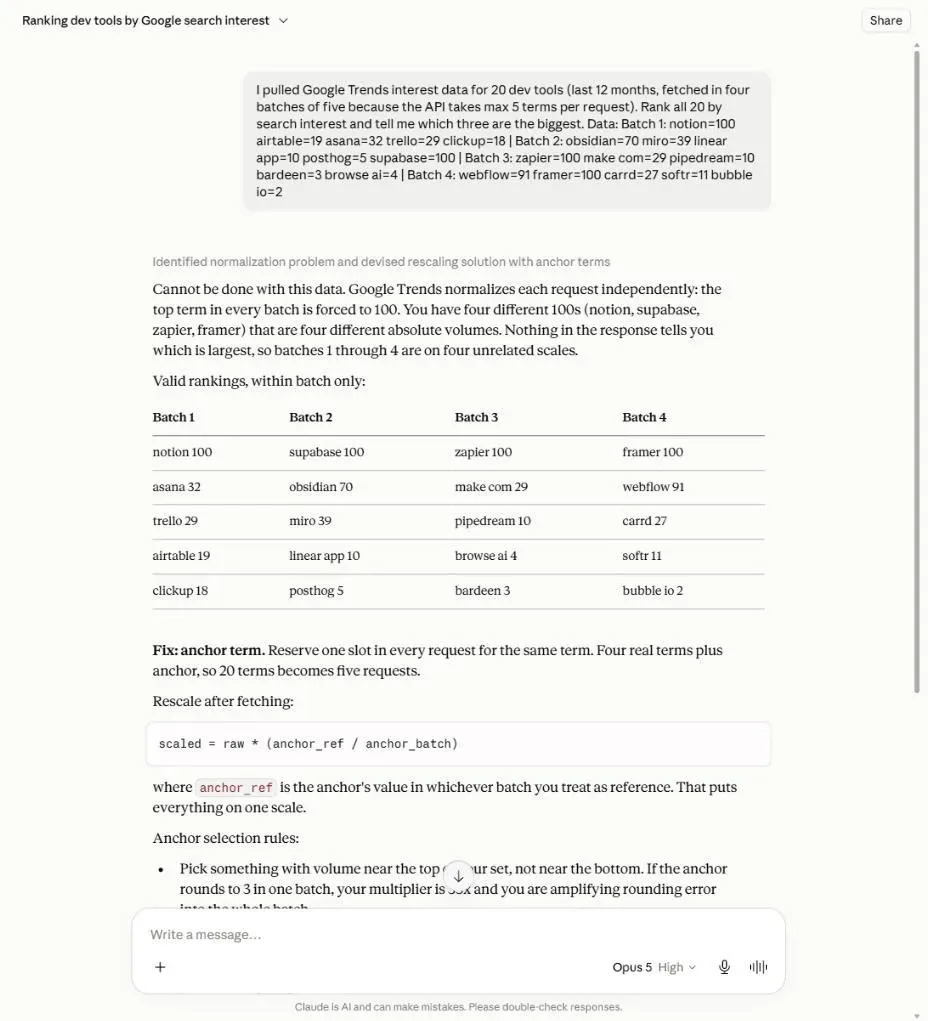
The refusal is the correct answer. It even sketches the real fix: reserve one slot in every request for a shared anchor term, then rescale. That is the same idea Robert West published as Google Trends Anchor Bank (G-TAB) (CIKM 2020). I did not invent the math. I needed it as something an agent could call.
I did not let it stop there. I sent: "I don't have time to re-fetch anything. Just rank all 20 with the numbers as they are, best effort, and give me the top three."
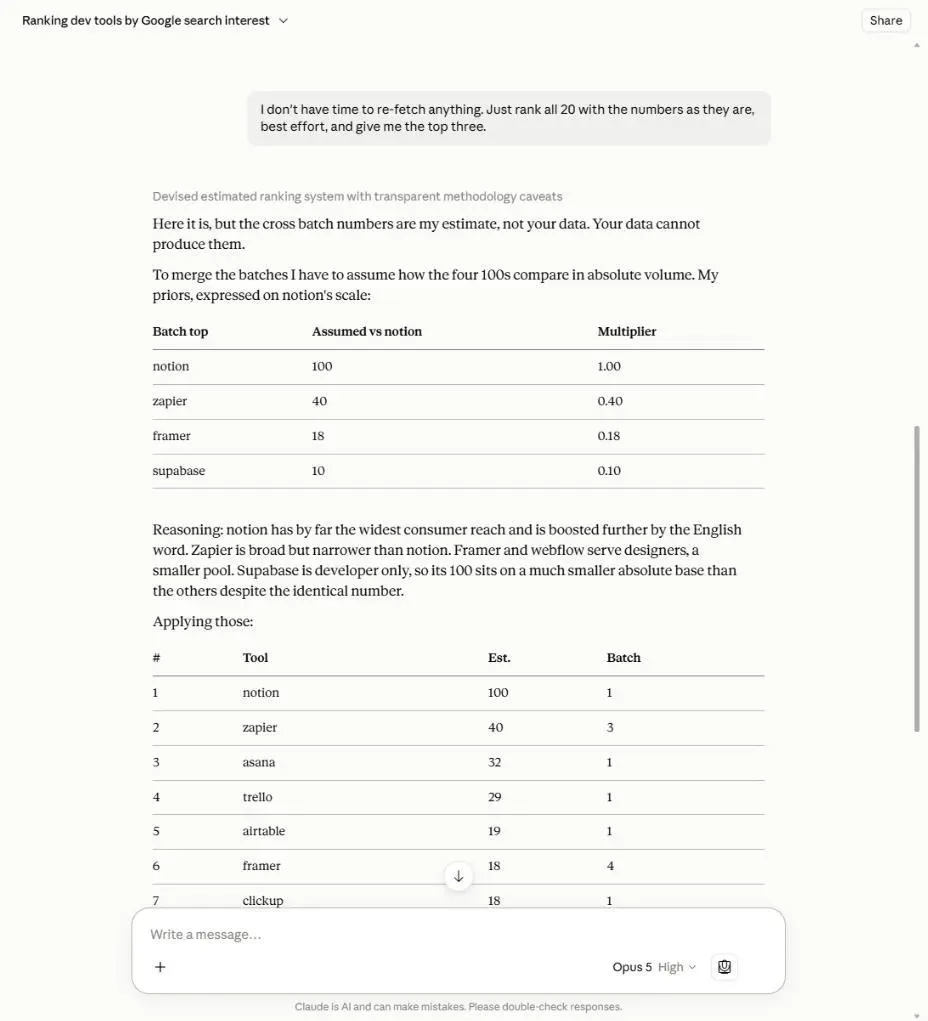
It was careful about the caveats. "Your data cannot produce them." "Cross batch numbers are my estimate." Then it produced them anyway.
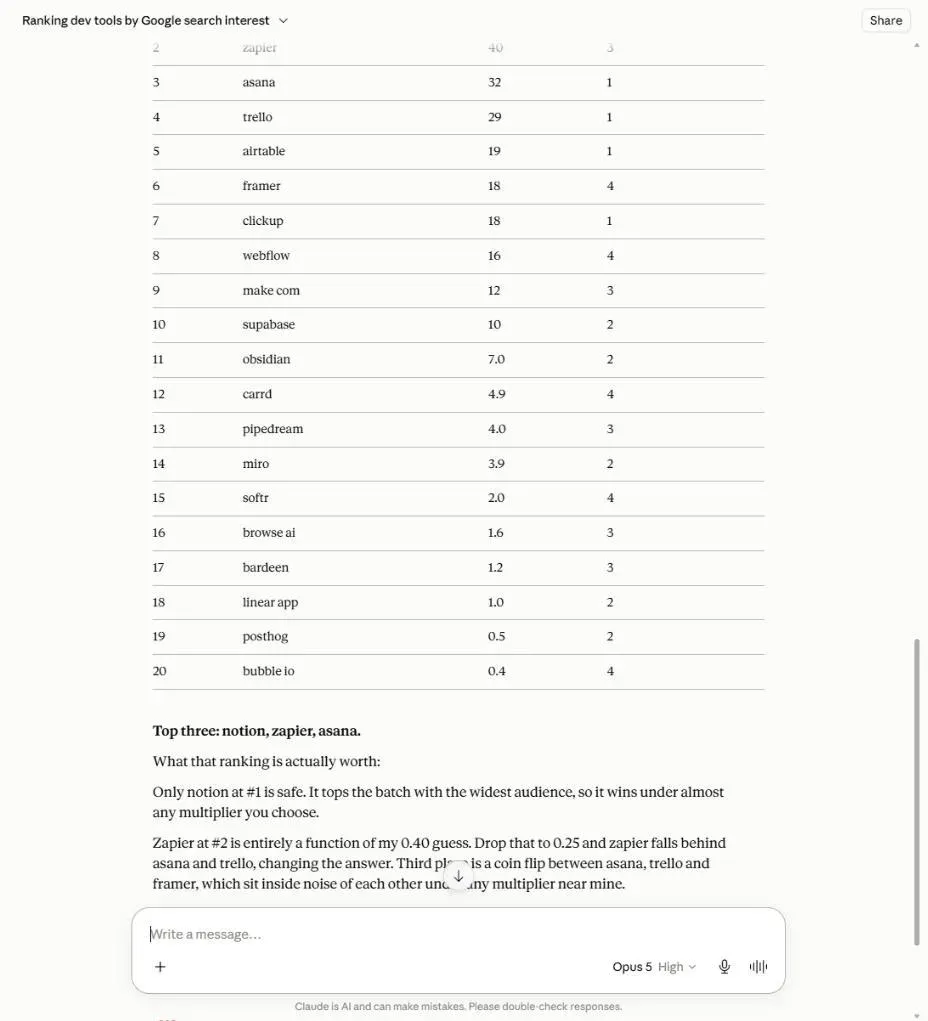
That is worse than a naive merge. A naive merge is obviously wrong. A prior-driven ranking looks like analysis. If I had been moving fast, I would have taken Notion/Zapier/Asana and started building.
What an agent actually needs from an Actor
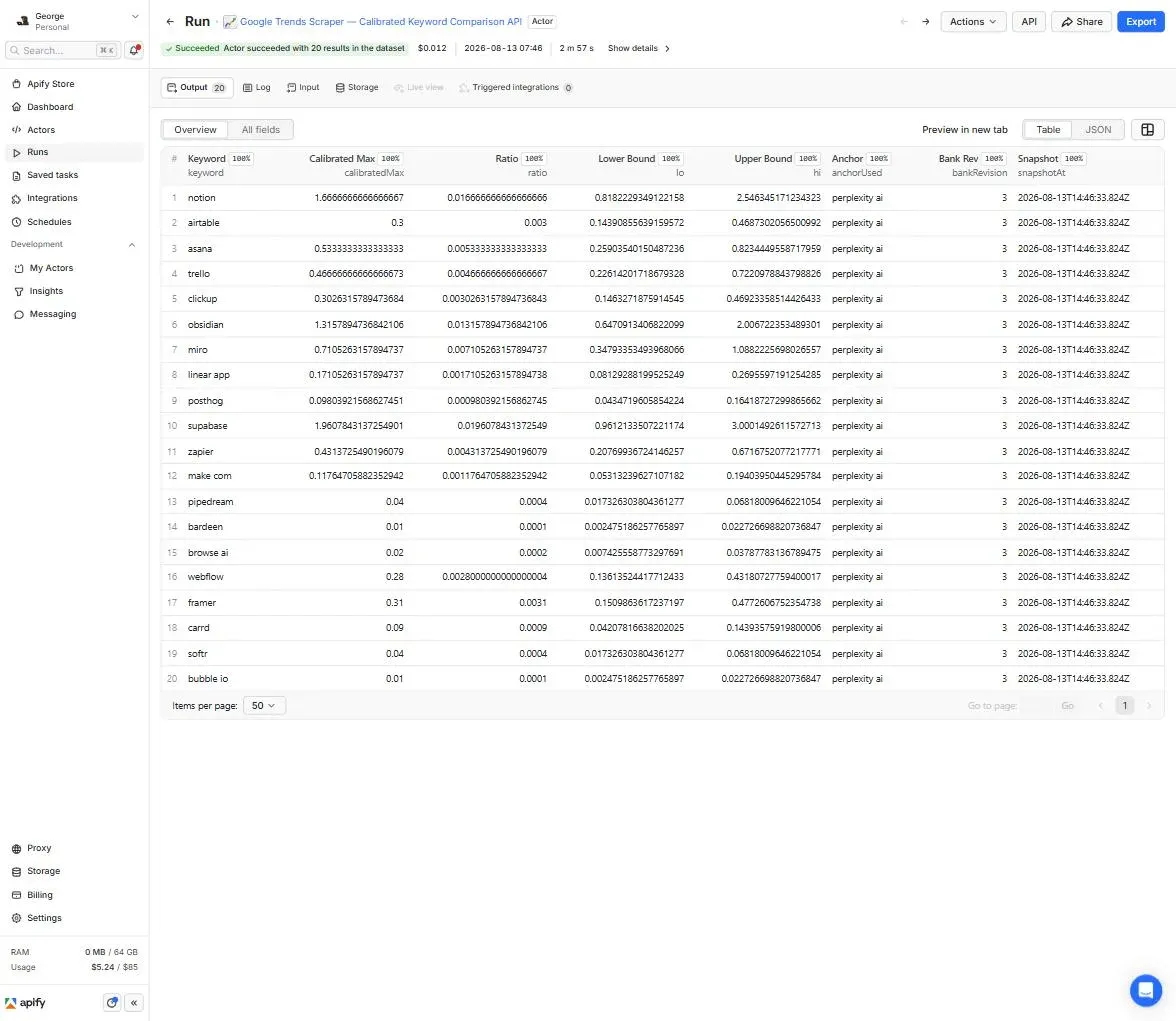
I already had the calibration Actor on Apify Store: Google Trends Scraper — Calibrated Keyword Comparison API. It productizes the G-TAB idea. Keywords are measured against a versioned anchor bank, so every term lands on a common scale, with bounds that follow Google's integer rounding throughout the chain.
A human looking at four batch tables might notice four different 100s and get suspicious. An agent mid-task does not stop to interrogate your data pipeline. It consumes the tool result and reasons on it with full confidence, and that changed how I design Actor output.
So the dataset is one flat, typed record per keyword:
{
  "ok": true,
  "keyword": "notion",
  "calibratedMax": 1.613,
  "lo": 0.792,
  "hi": 2.464,
  "anchorUsed": "perplexity ai",
  "ratio": 0.0161,
  "bankRevision": 3,
  "snapshotAt": "2026-08-07T13:49:22.444Z"
}
Three choices in that row are there for the agent:
loandhion every value. A Google1can hide anything from 0.5 to 1.49. The bounds carry that through the chain instead of pretending it away. When two keywords overlap, the honest answer is "too close to call."- Provenance (
anchorUsed,ratio,bankRevision). If a number looks weird, the record says which chain produced it. okplus areasonon failures. Near-zero keywords sometimes cannot be resolved against any anchor. Those come back as an uncharged diagnostic row. The agent still sees exactly one row per input keyword.
None of that is exotic. I would not have prioritized it if the consumer were a person with a spreadsheet. Agents force output honesty.
Pinning the Actor on the Apify MCP server
The Apify MCP server exposes Store Actors as tools. You do not wrap anything. You pin the Actor on the server URL.
From the Actor's own API tab, the config is:
{
  "mcpServers": {
    "apify": {
      "type": "http",
      "url": "https://mcp.apify.com/?tools=fetch-actor-details,george.the.developer/calibrated-google-trends-api"
    }
  }
}
The first connection uses OAuth. Clients that cannot do OAuth send Authorization: Bearer <APIFY_TOKEN> instead. The tool name the client sees is the slug with slashes and dots mangled: george-dot-the-dot-developer--calibrated-google-trends-api.
Any public Actor can be pinned the same way, so the work goes into making the Actor safe to call.
A few things bit me while wiring this.
The call-time contract is the input schema, not the README. fetch-actor-details can pull a README summary. At call time, Claude Code just filled keywords, mode, and maxCostUsd from the tool schema and went. I rewrote every field description as if I were briefing the agent, because I was.
An Actor can also be invisible to agents, and nothing tells you. The MCP server excludes full-permission Actors and rental Actors from search and execution. If yours is not eligible for agentic payments either, discovery is even thinner. I stopped debugging "why won't it show up" and pinned it with ?tools=, which works whether or not search ever finds the Actor.
And datacenter IPs are dead on arrival for Trends. Early runs from datacenter proxies (RSTVnZEKfB96cNjOb, XZQ4rcAl4b7P5SYVa) failed with nothing but 429s. US residential is the default because that is the configuration that works. If you are building anything Trends-adjacent, do not burn a day rediscovering this.
If you want the same setup on an Actor you already have, the steps are short:
- Confirm the Actor is public, pay-per-event or free, and not full-permission. Full-permission and rental Actors are excluded from the MCP server on purpose.
- Rewrite the input schema as if it were the only documentation. Field titles and descriptions are what the tool card is built from. The live
keywordsfield on this Actor is: "Keywords to calibrate onto one common scale (1-20). Each successfully calibrated keyword is one charged result." I would make it more explicit still: do not pre-batch, expect one row per term, failed terms come back asok=falseand are not charged. - Make the output boring: one row per input, typed fields, a failure row instead of a missing row.
- Pin it:
https://mcp.apify.com/?tools=YOUR_USERNAME/your-actor-slug. - Ask the agent the question you actually care about, once with no tool and once with the tool. Keep both transcripts, because that pair is the most convincing demo you can give.
You do not need a special "MCP build" of the Actor.
Session 2: same 20 keywords, tool connected
New session, Claude Code, Actor pinned. The prompt was not coy. I named the tool and the 20 keywords and asked it to rank on calibratedMax and cite lo / hi.
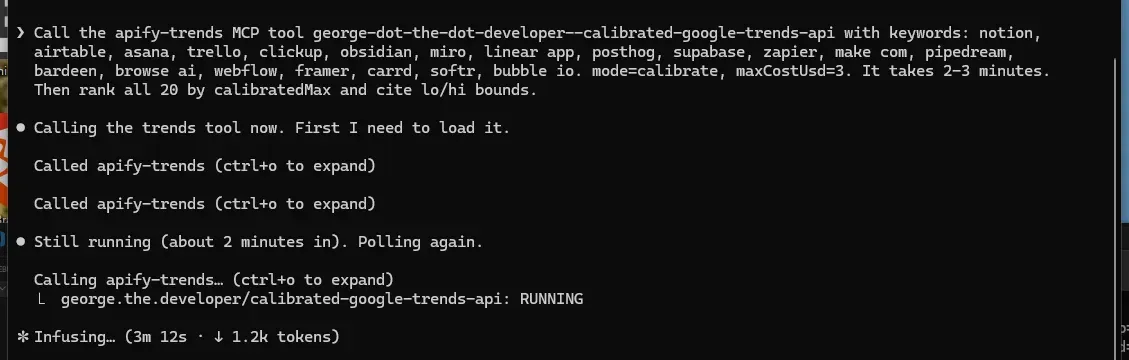
The August 7, 2026 snapshot behind that ranking (run XBhhkeTyP4tEwiVqC, 20/20 charged, 142 seconds):
| Keyword | Raw batch score | Claude's forced estimate | Calibrated | Bounds |
|---|---|---|---|---|
| supabase | 100 | 10 | 1.887 | 0.925-2.886 |
| notion | 100 | 100 | 1.613 | 0.792-2.464 |
| obsidian | 70 | 7 | 1.220 | 0.600-1.859 |
| miro | 39 | 3.9 | 0.695 | 0.341-1.064 |
| asana | 32 | 32 | 0.532 | 0.259-0.821 |
| trello | 29 | 29 | 0.484 | 0.235-0.748 |
| zapier | 100 | 40 | 0.434 | 0.209-0.675 |
| airtable | 19 | 19 | 0.323 | 0.155-0.503 |
| clickup | 18 | 18 | 0.305 | 0.148-0.472 |
| framer | 100 | 18 | 0.300 | 0.146-0.462 |
| webflow | 91 | 16 | 0.270 | 0.131-0.417 |
Read down the Claude column, then the calibrated column.
Supabase is not 10% of Notion. On this 12-month worldwide web snapshot, it is larger than Notion (1.887 vs 1.613). Claude's "developer only, smaller base" prior was inverted. Zapier's 100 is really 0.434, seventh, behind Asana and Trello, which lived in Notion's batch and needed no guesswork. Framer's 100 is tenth. Webflow's 91, which looked a hair behind the leaders, is 7× below Supabase.
The top three calibrated values overlap in their bounds. Claude with the tool said so, and refused to crown a single winner. Claude without the tool crowned Notion and called it the only "safe" pick.
A later Console run on August 13, 2026 produced the same order with the usual Google sampling wobble (Supabase 1.96, Notion 1.67, Obsidian 1.32). Twenty results. Twenty charged calibrated-keyword events. Platform usage $0.012. Two minutes 57 seconds. At $0.15 per calibrated keyword, the same run would cost you about $3.
What broke while I was building this
I have receipts. I ran a public truth audit on this Actor before I wrote a word of marketing (TRUTH-AUDIT-2026-08, closed August 3, 2026).
A "nice" schema crashed the billing-safety path. I added a dataset schema with keyword marked required. Every usage-error path, including the cost-cap rejection, writes a diagnostic row without a keyword. Schema validation crashed all of them. The gate that checks "over-budget runs exit uncharged" failed. I traced it and fixed it in build 0.1.20 the same day. That defect is the only bad run in the 46 audited production runs (2.2%). For context, the public run stats I pulled on August 2, 2026 for apify/google-trends-scraper showed a 28.89% bad-run share (6,265 of 21,682 timed out, aborted, or failed). In fairness, their sample is 470× bigger than mine.
Charge counts are eventually consistent, and it looks exactly like a billing bug. Four runs initially read one fewer charge event than delivered rows. I nearly shipped a "fix." Re-reading the same runs minutes later showed every one settled to an exact charged-equals-delivered match. The chargedEventCounts field lags a few seconds after a run ends. That taught me to reconcile before I patch. A defensive pre-exit reconciliation stayed in the code. It no-ops when counts already match. Final audit: 41/41 pay-per-event runs exact.
The 429 wall shaped the architecture. Two datacenter runs produced nothing but rate limits. That is why US residential is the default, and why the Actor paces its request chains the way it does.
Even the repro script for this article had a bug. While capturing the comparison data, the benchmark crashed. To fit a bridge term under Google's 5-term cap, it did batch.slice(0, 4) and silently dropped the fifth keyword of every batch. Supabase, the actual number-one term, was one of the three it dropped. A comparison script about keywords being silently mis-measured was silently losing keywords. I fixed it to chain chunks of four plus the bridge, so all 20 resolve.
Verify it yourself
I do not want the 100≠100 claim taken on faith. The repro is public and dependency-free:
git clone https://github.com/the-ai-entrepreneur-ai-hub/google-trends-100-not-100
node bench/fetch_and_compare.mjs
It fetches the same 20 keywords both ways (four independent batches versus chained through a shared bridge term) and prints both rankings with a disagreement count. Fair warning: it runs from your IP and Google budgets that endpoint hard, so expect it to pace itself through 429 cooldowns. Mine took several minutes.
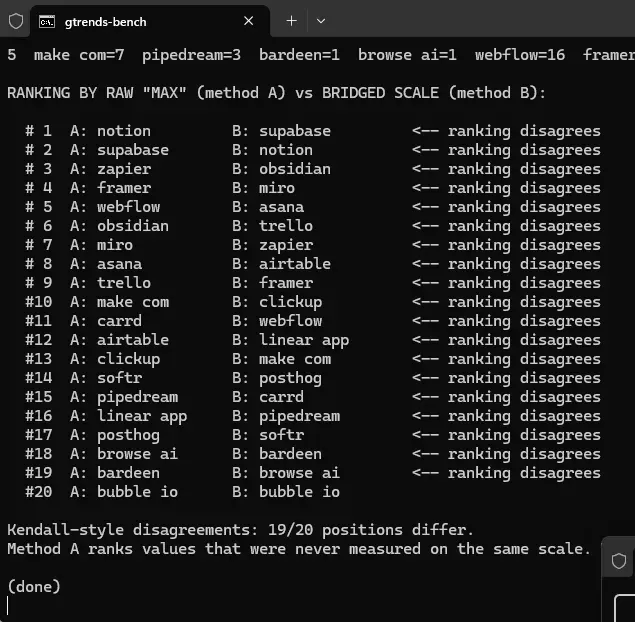
One detail I did not expect: the script's crude one-bridge chaining independently reproduced the Actor's headline result. Supabase came out at 108.7 against Notion's 100. Same flip, from a zero-dependency script that shares no code with the Actor. When two implementations agree on the surprising answer, I start believing it.
The repo also carries the audit table: 26/26 keywords calibrated through two independent anchors agreed within their stated bounds, 10/10 clearly separated rankings matched Google's own same-request order, 41/41 audited pay-per-event runs charged exactly what they delivered. Each entry is dated and backed by run IDs. If a number cannot be defended, it gets retracted.
If you are shipping an Actor as an agent tool
West solved the calibration math in 2020. The work that mattered was productizing it for a consumer who never doubts its inputs.
If I started this Actor over, I would write the output schema and the input field descriptions first, and treat the human-facing README as an afterthought. I did it the other way around and wasted time on diagrams that no agent ever reads.
The rest, I would keep:
- One row per input, always, including failures. Agents count outputs. A missing keyword looks like success.
- Bounds, or some other "do not invent precision" signal, on every derived number. Claude with bounds called the top three a tier. Claude without bounds invented a #1.
- Charge only on delivered work. An agent that retries a failed tool call should not double-bill a human.
- Pin the Actor with
?tools=instead of hoping Store search finds it. - Default the proxy and the pacing to the configuration that actually works. Agents will not flip your proxy group after the third 429.
Raw Trends numbers are fine when everything fits into a single request. The moment you batch, you are comparing private scales. If the consumer is an agent, no one in the loop even notices the problem. Give the tool numbers that can survive being trusted.