Every creator wants to know what's trending in their niche on YouTube, but the usual tools don't help much. Discovery feeds push mainstream content, keyword trackers give you search volume without any video-level detail, and listicles go stale the week they're published. None of them answers the real question: what's actually gaining traction right now in my specific niche?
Answering that takes video-level data (titles, view counts, likes, comments, channel sizes, upload dates) pulled across dozens of search terms and hundreds of videos. Way too much to track by hand.
This tutorial shows how to collect that data automatically and let AI do the analysis. You'll see which subtopics are rising, what formats drive engagement, and where the gaps are that nobody's filling yet.
We'll cover 3 approaches: a manual method using Apify's YouTube Scraper, a Python script that automates the full pipeline, and a no-code n8n workflow. The workflow delivers AI-generated trend reports to your inbox on a schedule.
Quick ways to check YouTube trending topics
Before building a full data pipeline, here are a few common methods for checking what's trending.
- YouTube Explore and Charts. YouTube's Explore feed shows content by topic (tech, wellness, fashion, etc.), while YouTube Charts tracks top music videos, podcasts, and movie trailers. Useful for seeing what's popular broadly, but neither shows niche-level trends.
- Google Trends (YouTube Search filter). Google Trends lets you filter by YouTube Search to compare keyword interest over time. Good for validating whether a topic is rising or falling, but no video-level data.
- YouTube search with filters. Search YouTube for your topic, then filter by Upload date > This week and prioritize by Popularity. The filtered results give a rough picture, but you're limited to browsing them one at a time.
- vidIQ and TubeBuddy. Both are solid browser extensions for keyword research and channel analytics. They're designed for optimizing your own channel, though - not for analyzing trends across an entire niche at scale.
These methods work for a general check. But if you want to analyze large volumes of videos across multiple keywords and find real patterns, you need a different approach.
How to find YouTube trending topics with data
Apify's YouTube Scraper handles the data collection. You give it search terms and filters, it returns structured video metadata: titles, view counts, likes, comments, channel names, subscriber counts, upload dates, duration, and subtitles. No API quotas apply, and results can be exported as CSV, JSON, or Excel.
The workflow has 3 steps:
- Run YouTube Scraper with your niche keywords
- Export and organize the results
- Send the data to an AI model to spot trends
Step 1. Set up and run YouTube Scraper
Go to YouTube Scraper on Apify Store. If you don't have an Apify account yet, you'll be prompted to create one for free. The free tier includes $5 in monthly usage credits, no credit card required - enough to follow this tutorial and run several small analyses. Larger runs (50-100 videos per search term across 10+ keywords) cost more; check the pricing details on the Actor page for current rates.
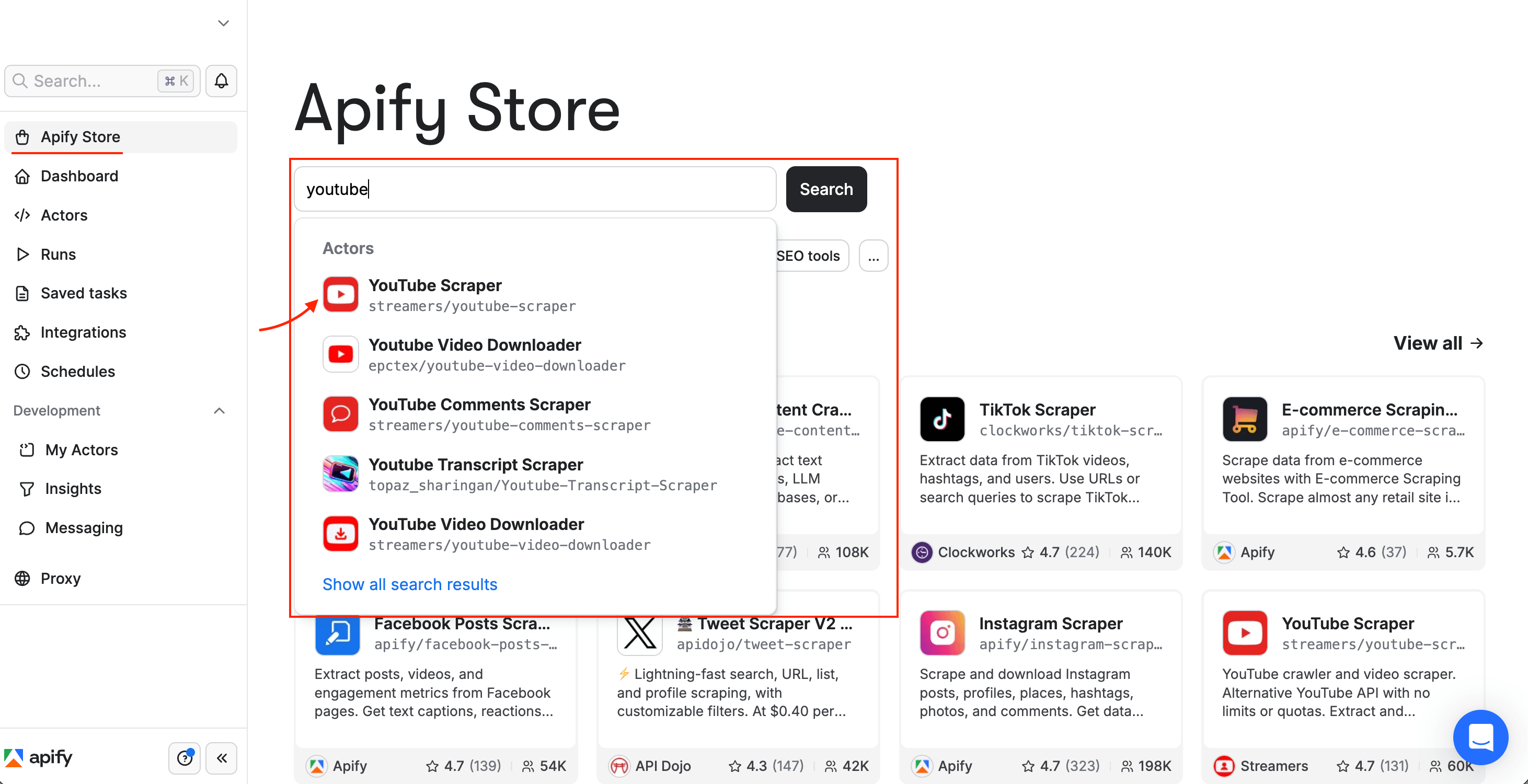
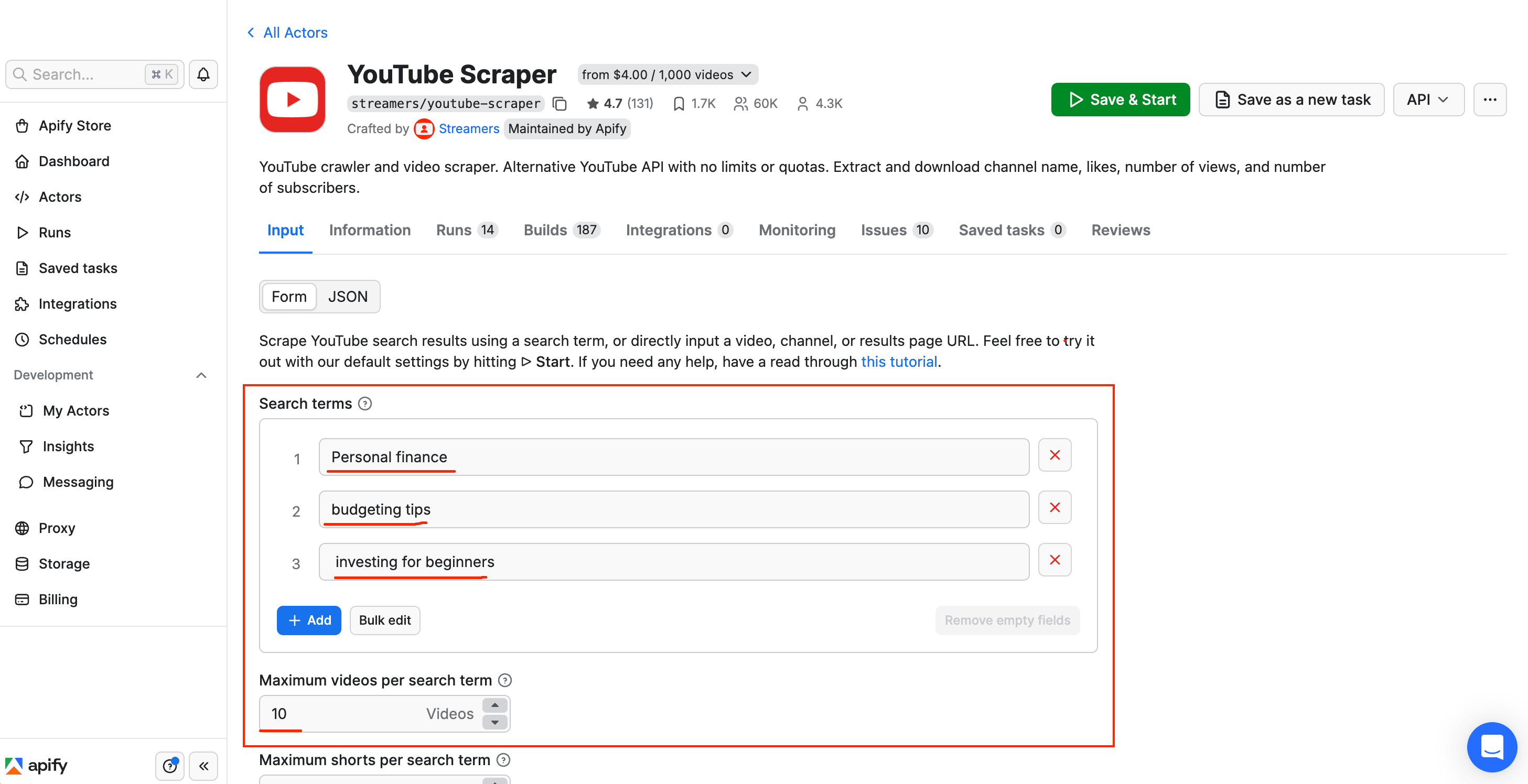
Configure the scraper:
- Search terms - Enter keywords or hashtags for your niche. For example, if you're researching personal finance content, you might use "personal finance", "budgeting tips", "investing for beginners", or hashtags like "#personalfinance".
- Maximum videos per search term - We're using 10 here for a brief demo, but for real trend analysis, set this to 50 or 100. More data gives the AI more patterns to work with.
- Maximum Shorts / Streams - Unless you specifically want Shorts or live streams, set both to 0.
Scroll down to the Add filters section. Leave Sorting order on Relevance (the default) and set the Date filter to This month (or This week for faster-moving niches). You'll also see a Subtitles/CC toggle under Features. If you want the AI to analyze what creators are saying in their videos, not only the metadata, enable it.
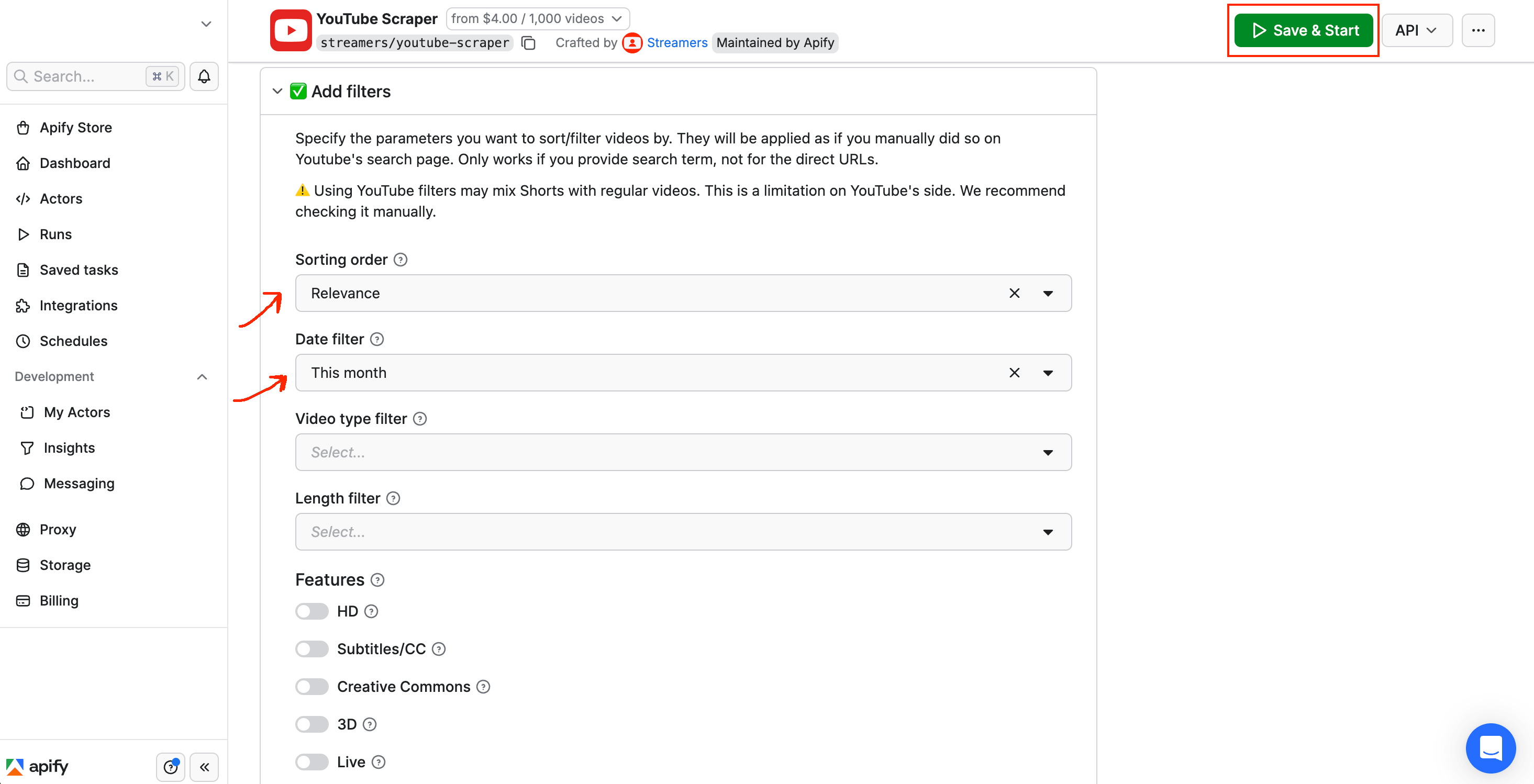
Select Save & Start. Run time varies with the number of search terms and videos you configured.
Once the status changes to Succeeded, you'll see a table of results with columns for title, view count, likes, channel name, upload date, and more.
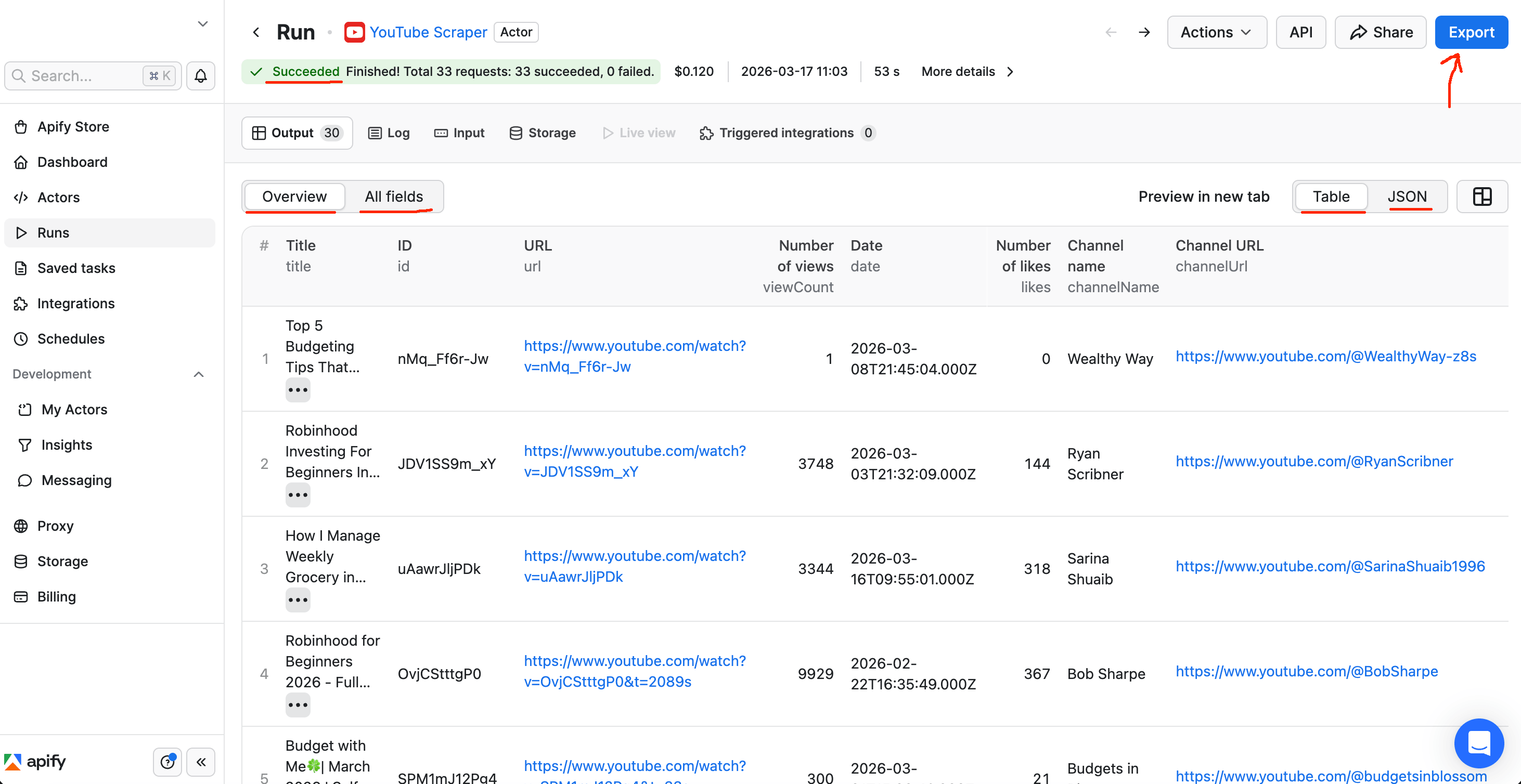
Scraper output showing Succeeded status with 30 results, displaying video titles, view counts, likes, dates, and channel names
Step 2. Export and organize the data
Select Export at the top of the results page. Download the dataset as JSON, CSV, Excel, or several other formats.
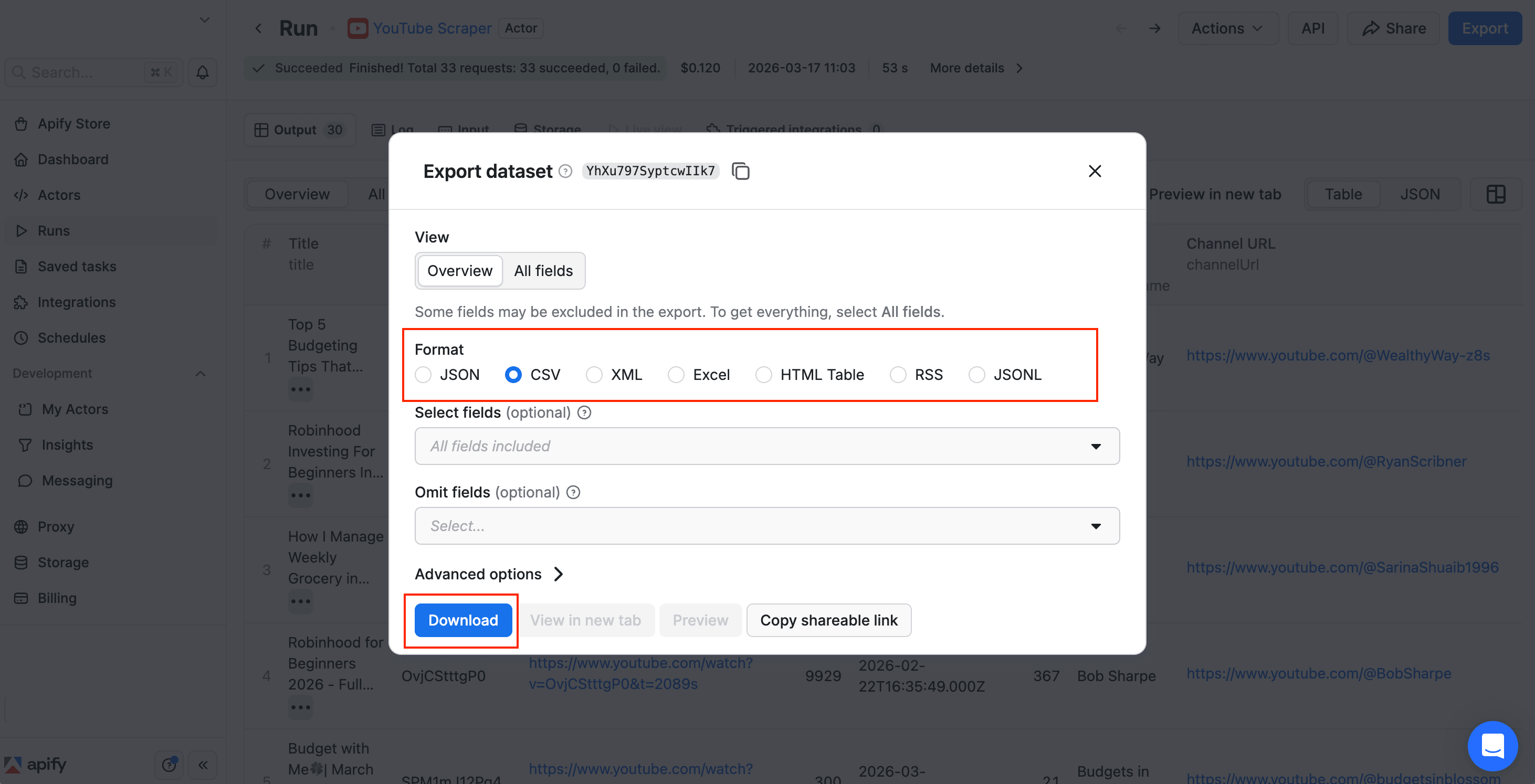
Export dataset dialog with format options - JSON, CSV, XML, Excel, HTML Table, RSS, JSONL - and Download button
CSV works best if you plan to open the data in Google Sheets or Excel. JSON is better if you're sending it to a script or API.
For ongoing trend research, set up scheduled runs so the scraper collects new data daily or weekly. Apify also offers a Google Drive integration that auto-exports results to a Drive folder after each run.
Step 3. Analyze the data with AI
For small datasets (under 100 videos), paste the full CSV directly into an AI chatbot without any trimming.
For larger datasets (500+ videos), trim the CSV first. Drop columns you don't need for trend analysis (video URLs, thumbnails, full descriptions). Keep the ones that matter: title, viewCount, likes, commentsCount, channelName, numberOfSubscribers, duration, date, and input (the search term that matched each video). Trimming keeps the data within most AI models' context limits.
Open the CSV in Google Sheets or Excel, delete the columns you don't need, then select all remaining data and copy it. Paste it into any AI chatbot - ChatGPT, Claude, Gemini, or whichever you prefer. A trimmed dataset of 100 videos fits comfortably within the free tier of most AI chatbots. Add this prompt before the data (replace [NUMBER] with your actual video count):
You are a YouTube trend analyst. I'm giving you data from [NUMBER]
YouTube videos scraped from the past month.

The data has these columns: title, viewCount, likes, commentsCount,
channelName, numberOfSubscribers, duration, date, input (the search
term that matched this video).

Analyze this data and give me a detailed trend report covering:

1. Top Trending Topics - What specific topics/themes are getting the
   most views and engagement? Break it down into subtopics. Rank them
   by traction.

2. Recurring Title Patterns & Hooks - What title formats or phrases
   keep appearing in the highest-performing videos?

3. Dominant Creators - Which channels appear most often and have the
   highest total views/engagement?

4. Cross-Channel Themes - What themes show up across MULTIPLE
   different channels?

5. Opportunity Gaps - Topics where a few videos are getting massive
   views but very few creators are covering them.

6. Engagement Signals - Videos or topics with unusually high
   likes-to-views or comments-to-views ratios.

7. Video Ideas - Based on the opportunity gaps and trending topics
   above, suggest 5 specific video ideas (with working titles) that
   a creator could make right now to capitalize on these trends.

Be specific. Use actual numbers from the data.

Here's the data:
The AI returns a structured trend report with specific topics, video examples, and engagement numbers. Here's a sample report from the personal finance niche:
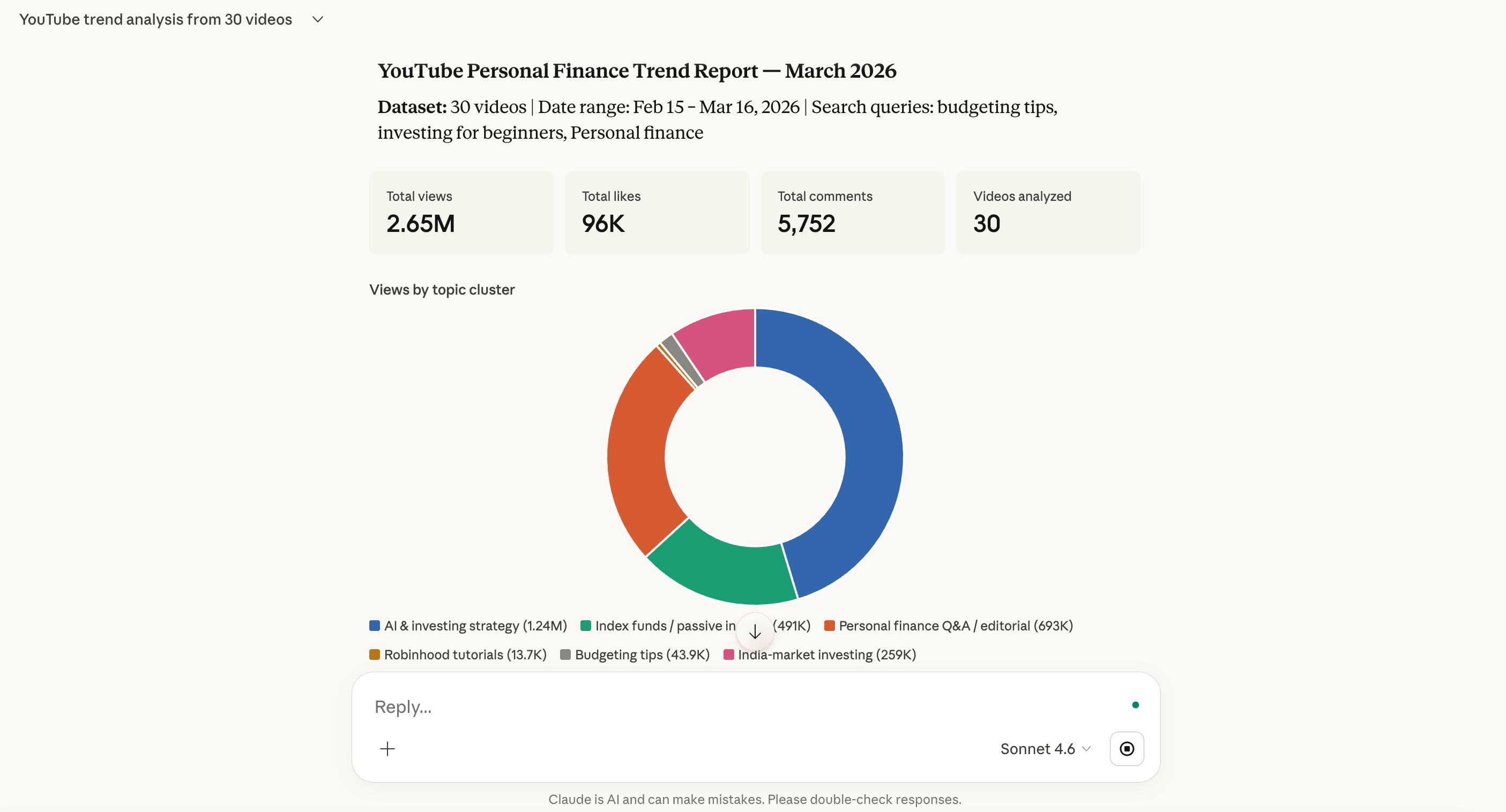
From 30 scraped videos in the personal finance niche, the AI identified investing strategy as the dominant topic. Mark Tilbury's "I'm Changing How I Invest My Money Because of AI" pulled 1.24M views with 36k likes. WIRED's Vivian Tu Q&A hit 628k views. Index funds and passive income emerged as a fast-growing subtopic, with Josh Invests' "$25/week into Fidelity" reaching 132k views. The report also flagged budgeting tips as an opportunity gap - 9 videos but only 4.9k average views, signaling room for a breakout creator.
The first report is a starting point. Ask the AI follow-up questions to dig deeper:
- Expand on opportunity gap #3 - what specific video angles could I cover?
- Which of the 5 video ideas has the least competition right now?
- What title patterns from the top-performing videos could I adapt for [my niche]?
Rerun the process next week with new data, and you'll see how quickly trends shift. For a full walkthrough on turning these insights into a content strategy, see this guide to AI-driven YouTube growth strategy.
Automate the full workflow with Python
For technical readers who'd rather script this than use the UI, a single Python script automates the entire pipeline from scraping to AI analysis.
Install 2 packages:
pip install apify-client google-genai
Here's the complete script. It runs YouTube Scraper with your search terms, trims the results to key columns, and sends the data to Google Gemini for trend analysis:
"""
YouTube Trending Topics - Scrape & Analyze
Scrapes YouTube videos using Apify, then analyzes trends with Google Gemini.
"""

import os
from apify_client import ApifyClient
from google import genai
from google.genai import types

# ── Config ──────────────────────────────────────────────
APIFY_TOKEN = "YOUR_APIFY_TOKEN"
GEMINI_API_KEY = "YOUR_GEMINI_API_KEY"

# Search terms for your niche (change these to whatever you want)
SEARCH_TERMS = [
    "AI automation",
    "AI tools",
    "use cases for AI",
    "AI agents",
    "AI for business",
    "AI workflows",
    "best AI tools 2026",
    "AI tutorial",
    "AI productivity",
    "how to use AI",
]

MAX_RESULTS = 100        # Videos per search term
DATE_FILTER = "month"    # hour, today, week, month, year
# ────────────────────────────────────────────────────────

ANALYSIS_PROMPT = """You are a YouTube trend analyst. I'm giving you \\
data from {video_count} YouTube videos scraped from the past month.

The data has these columns: title, viewCount, likes, commentsCount, \\
channelName, numberOfSubscribers, duration, date, input (the search \\
term that matched this video).

Analyze this data and give me a detailed trend report covering:

1. **Top Trending Topics** - What specific topics/themes are getting \\
the most views and engagement? Break it down into subtopics. Rank \\
them by traction.

2. **Recurring Title Patterns & Hooks** - What title formats, hooks, \\
or phrases keep appearing in the highest-performing videos?

3. **Dominant Creators** - Which channels appear most often and have \\
the highest total views/engagement?

4. **Cross-Channel Themes** - What themes show up across MULTIPLE \\
different channels?

5. **Opportunity Gaps** - Topics where a few videos are getting \\
massive views but very few creators are covering them.

6. **Engagement Signals** - Videos or topics with unusually high \\
likes-to-views or comments-to-views ratios.

7. **Video Ideas** - Based on the opportunity gaps and trending topics \\
above, suggest 5 specific video ideas (with working titles) that a \\
creator could make right now to capitalize on these trends.

Be specific. Use actual numbers from the data. This report should be \\
actionable for a YouTube creator deciding what to make next.

Here's the data:

{csv_data}
"""

def scrape_youtube(search_terms, max_results, date_filter):
    """Scrape YouTube videos using Apify."""
    client = ApifyClient(APIFY_TOKEN)

    print(f"Scraping YouTube for {len(search_terms)} search terms...")

    actor_run = client.actor("streamers/youtube-scraper").call(
        run_input={
            "searchQueries": search_terms,
            "maxResults": max_results,
            "maxResultsShorts": 0,
            "maxResultStreams": 0,
            "dateFilter": date_filter,
            "sortingOrder": "relevance",
        }
    )

    if not actor_run:
        return []

    dataset_id = actor_run.get("defaultDatasetId", "")
    items = list(client.dataset(dataset_id).iterate_items())
    print(f"Scraped {len(items)} videos.")
    return items

def build_csv_for_ai(items):
    """Trim scraped data to key columns as a CSV string."""
    columns = [
        "title", "viewCount", "likes", "commentsCount",
        "channelName", "numberOfSubscribers", "duration",
        "date", "input",
    ]
    lines = [",".join(columns)]
    for item in items:
        values = []
        for col in columns:
            val = str(item.get(col, "")).replace(",", " ").replace('"', "")
            values.append(val)
        lines.append(",".join(values))
    return "\n".join(lines)

def analyze_with_gemini(csv_data, video_count):
    """Feed data into Gemini for trend analysis."""
    client = genai.Client(api_key=GEMINI_API_KEY)

    prompt = ANALYSIS_PROMPT.format(
        csv_data=csv_data, video_count=video_count
    )
    print(f"Analyzing {video_count} videos with Gemini...")

    response = client.models.generate_content(
        model="gemini-2.5-flash-lite",
        contents=prompt,
        config=types.GenerateContentConfig(
            temperature=0.7,
            max_output_tokens=16384,
        ),
    )
    return response.text or ""

def main():
    items = scrape_youtube(SEARCH_TERMS, MAX_RESULTS, DATE_FILTER)
    if not items:
        print("No results. Check your search terms and API token.")
        return

    csv_data = build_csv_for_ai(items)
    report = analyze_with_gemini(csv_data, len(items))
    print(report)

    os.makedirs("output", exist_ok=True)
    with open("output/trend_report.md", "w", encoding="utf-8") as f:
        f.write(report)
    print("\\nSaved to output/trend_report.md")

if __name__ == "__main__":
    main()
Swap in your Apify API token and Gemini API key (free tier covers this use case). Update the SEARCH_TERMS list to match your niche, then run it:
python youtube_trending_topics.py
The script scrapes videos, analyzes them, and saves a trend report to output/trend_report.md.
Replace Gemini with any LLM (OpenAI, Anthropic, etc.) by changing the analyze_with_gemini function.
To run this on a schedule, set up a cron job or use Apify's scheduling feature. Want the report emailed to you? Add a smtplib call to the script, or use the n8n workflow in the next section, which handles delivery with no extra code.
Automate the full workflow with n8n (no code needed)
The manual workflow leaves the AI analysis as a copy-paste step. The Python script automates scraping and analysis but requires coding. If you want the entire workflow handled without writing code, n8n fills that gap.
Apify has an official n8n integration that lets you run Actors, retrieve datasets, and chain them with AI models - all through a visual interface.
Here's what the workflow looks like in n8n:

Every Monday at 9 AM, the workflow:
- Runs the YouTube Scraper on Apify with your search terms
- Trims the results to the columns that matter for trend analysis
- Sends the data to Gemini for analysis
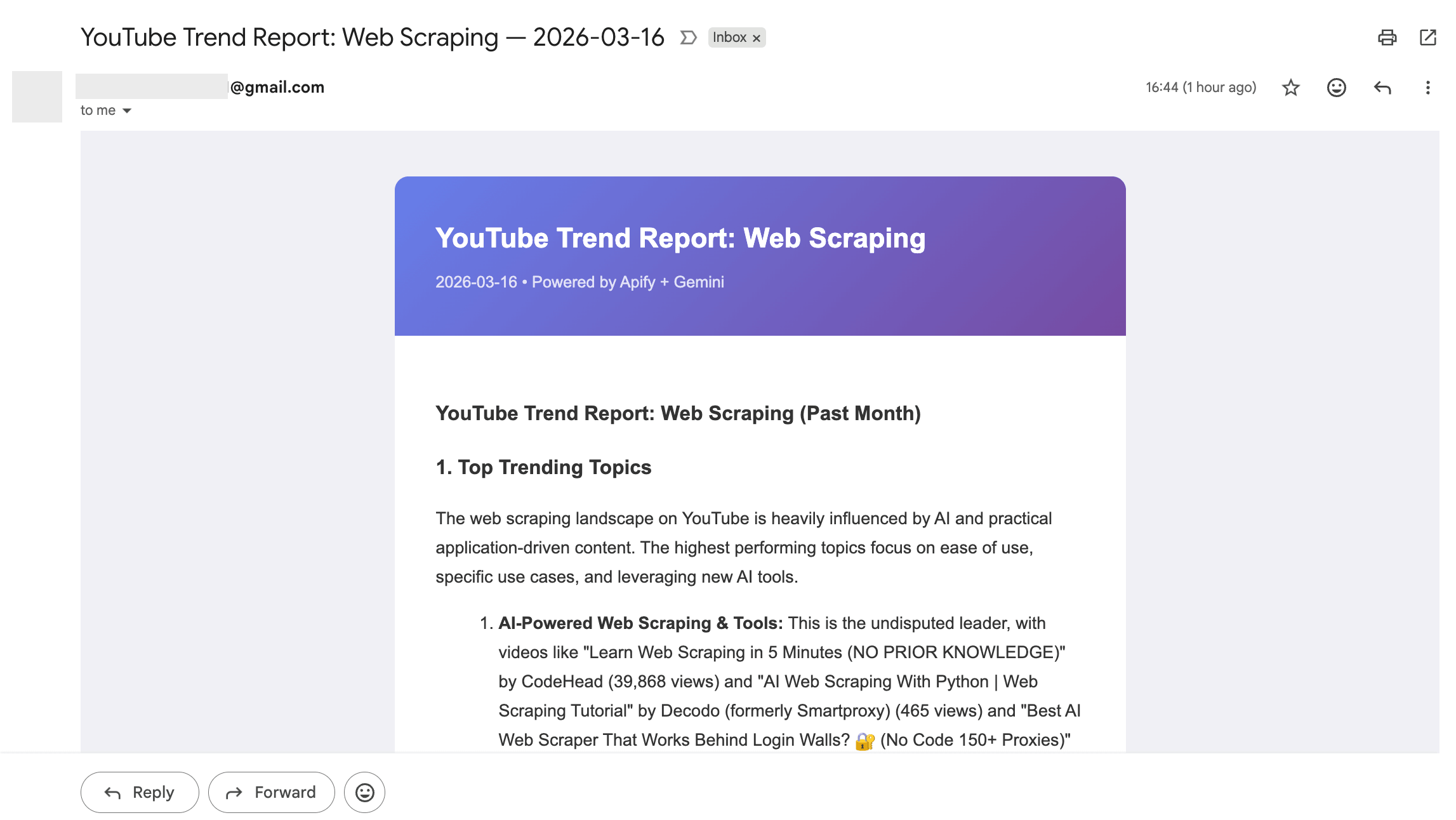
- Formats the response into a styled HTML report
- Emails the report to your inbox
The result is a trend report landing in your inbox every week:
To set this up, sign up for n8n Cloud or install n8n locally. Then install the Apify community node: go to Settings > Community Nodes > Install, and enter @apify/n8n-nodes-apify. Download the workflow JSON template, import it via the ⋮ menu > Import from File, and configure 3 credentials:
- Run YouTube Scraper - add your Apify API token (setup guide)
- Analyze with Gemini AI - create a Query Auth credential with parameter name
keyand your Gemini API key as the value - Email Trend Report - connect your Gmail account via OAuth2
Update the search terms in the YouTube Scraper node and the recipient email in the Email Trend Report node. To verify everything works, select Execute Workflow in n8n - it runs the full pipeline immediately without waiting for the schedule.
Prefer Slack or Google Sheets over email? Swap the Gmail node for any n8n integration - the rest of the workflow stays the same.
Tips for better YouTube trend research
Once your pipeline is running, these practices sharpen the results.
- Use 10+ search terms across related subtopics. A single keyword gives you a narrow view. For a niche like personal finance, combine broad terms ("personal finance") with specific ones ("budgeting tips", "investing for beginners", "side hustle ideas"). The variety shows trends you'd miss with a single search.
- Look at engagement ratios, not just view counts. A video with 50k views and 5k likes often signals stronger audience interest than one with 200k views and 2k likes. Unusually high comments-to-views ratios are especially telling - they suggest the topic sparks discussion.
- Watch smaller channels with unusually high engagement. Newer creators often pick up on trends before the big channels do. A channel with 10k subscribers pulling 100k views on a topic is a strong signal that the topic has momentum.
- Compare data week over week. A single snapshot tells you what's popular now. Running the analysis weekly lets you spot what's rising versus what's already peaked.
- Don't ignore Shorts. YouTube Scraper has a dedicated Shorts filter. Trending Shorts can reveal topics that haven't hit long-form content yet, giving you an early advantage.
- Cross-check with Google Trends. Once you identify topics from the video data, validate them on Google Trends to check if they have broader search momentum beyond YouTube.
- Go deeper with comments. Video metadata tells you what's popular, but comments tell you why. Apify's YouTube Comments Scraper extracts full comment threads from any video - text, author, votes, and replies. Paste those comments into the same AI chatbot you used for trend analysis. You'll see whether a topic generates genuine enthusiasm or clickbait backlash before investing time in a video.
One honest caveat: this approach shows you what's been popular recently, not a prediction of what will trend next. But that's far more useful than a one-time snapshot, because the data is always current and specific to your niche.
For more on turning trend data into a content plan, see the AI-driven YouTube growth strategy guide.
Start finding YouTube trending topics that matter for your niche
You don't need to scroll the Explore tab or trust someone else's top-10 list. Collecting real video data and letting AI analyze it gives you a clear picture of what's trending, backed by actual numbers.
Whether you use the manual approach, a Python script, or an n8n workflow, the method is the same: let the data tell you what's trending.

Frequently asked questions
Is it legal to scrape YouTube?
Scraping publicly available data from YouTube is generally permitted for personal research and analysis. YouTube Scraper accesses only public video metadata - the same information visible on the YouTube website - and doesn't bypass login walls or access private data. Learn more in this guide to the legality of web scraping. For a more detailed walkthrough of YouTube data collection, see how to scrape YouTube.
How often should I check for YouTube trending topics?
Weekly works well for most niches. Fast-moving topics like AI or tech news may benefit from more frequent runs. The key is consistency - comparing data over time is how you distinguish real trends from one-off viral moments.
Can I use this for any YouTube niche?
Yes. The workflow is keyword-driven, so it adapts to any topic. Whether you're researching fitness, cooking, gaming, real estate, or software - change the search terms and run the same process.
What AI model works best for analyzing the data?
Any modern LLM handles this well. The analysis prompt is model-agnostic - ChatGPT, Claude, Gemini, and similar models can all process CSV data and produce structured trend reports. Use whichever you have access to.