
If you've connected an AI agent like Cursor or Claude Code to the Apify MCP server, you've probably watched it do something expensive: run an Actor just to find out what the output looks like. That exploratory run costs credits and time, and often turns out to be a dead end. The agent discovers the output doesn't have the fields it needs, picks a different Actor, and tries again.
We fixed that. The Apify MCP server now tells your agent exactly what each Actor returns - field names, types, nested structures - before it runs anything. And it works for every Actor in Apify Store, automatically.
The problem: a blind spot across thousands of tools
The Apify MCP server exposes thousands of Actors (serverless cloud programs for web scraping and automation) as tools that AI agents can call. Each tool comes with an inputSchema, so the agent knows exactly what parameters to provide. But the outputSchema? It used to look like this:
// What an AI agent saw for Google Maps Scraper (compass/crawler-google-places)
{
  "name": "compass-crawler-google-places",
  "inputSchema": {
    "searchStringsArray": { "type": "array", "items": { "type": "string" } },
    "locationQuery": { "type": "string" },
    "maxCrawledPlacesPerSearch": { "type": "integer" }
    // ... well-defined input fields
  },
  "outputSchema": {
    "properties": {
      "items": {
        "type": "array",
        "items": { "type": "object" }  // That's it. "object."
      }
    }
  }
}
The agent knows it needs to send a search query and a location. But what comes back? object. Could be anything. The only way to find out was to run the Actor - spending credits, waiting for results, and hoping the output had the right fields.
Multiply that across thousands of Actors, and every tool selection becomes a gamble.
The fix: inferred output schemas from real run data
Every time an Actor finishes a run on the Apify platform, the dataset it produces records a fieldSchema - metadata capturing every field name and its type. This data already existed across millions of successful runs.
The MCP server now takes the last 10 successful runs of each Actor, merges their field schemas into a single unified type definition, and serves that as the outputSchema when agents list their tools.
No Actor code changes. No developer action required. Every Actor in Apify Store with run history gets enriched output schemas, automatically.
What the agent sees now
When an agent requests tools/list, each Actor tool now comes with field-level output detail:
{
  "name": "compass-crawler-google-places",
  "outputSchema": {
    "properties": {
      "items": {
        "type": "array",
        "items": {
          "type": "object",
          "properties": {
            "title": { "type": "string" },
            "categoryName": { "type": "string" },
            "street": { "type": "string" },
            "city": { "type": "string" },
            "state": { "type": "string" },
            "countryCode": { "type": "string" },
            "website": { "type": "string" },
            "phone": { "type": "string" },
            "reviewsCount": { "type": "number" },
            "totalScore": { "type": "number" },
            "url": { "type": "string" }
          }
        }
      },
      "datasetId": { "type": "string" },
      "itemCount": { "type": "number" }
    }
  }
}
Before spending a single credit, the agent now knows that Google Maps Scraper returns title, phone, website, reviewsCount, totalScore, and more. It can decide whether this tool has what it needs - or pick a different Actor without wasting a run.
If you're building Actors and want explicit control over your output definitions, you can also define output schemas directly in your Actor's configuration. The inferred schemas work out of the box, but manual definitions let you curate exactly what your users and their agents see.
Where this really shines: multi-step pipelines
Output schemas don't just help with tool selection. They let the agent plan a multi-step pipeline before executing anything, because it knows the exact shape of data flowing between steps.
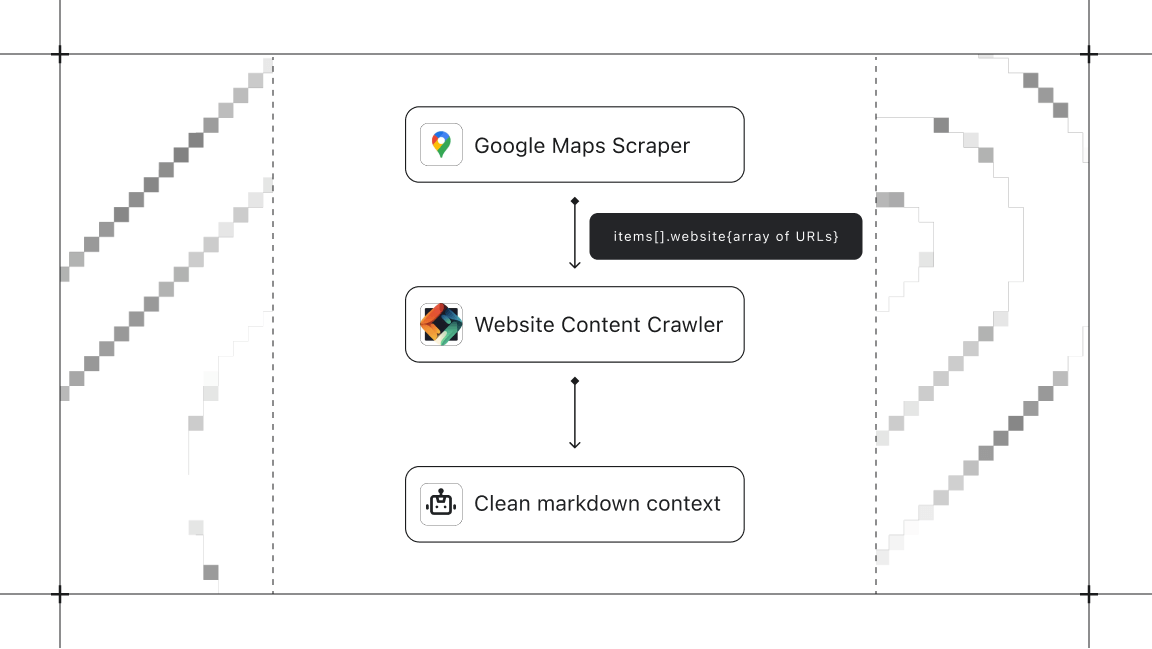
Take a practical example. An agent is tasked with: "Find pizza restaurants in Brooklyn and crawl their websites for menu information."
Without output schemas, this requires multiple round trips. The agent runs Google Maps Scraper, waits, inspects the output, discovers there's a website field, and only then can plan the second step. Credits and time spent just on discovery.
With output schemas, the agent reads the schema, sees that items[].website returns a string URL for each place, and immediately knows it can pipe those URLs into Website Content Crawler. The full pipeline is planned before a single Actor runs.
How the schema inference works
For each Actor tool, the MCP server:
- Resolves the Actor name to its ID and latest build via the Apify API.
- Queries the database for
fieldSchemametadata from the last 10 successful runs. - Merges them - fields that appear with different types across runs become union types (e.g.,
string | null). - Converts the merged schema to JSON Schema and attaches it to the tool definition.
- Caches the result for 30 minutes so subsequent requests are instant.
The whole process is invisible. Your agent gets rich type information with zero setup, and the schemas stay current as Actors evolve. Actors without run history won't have inferred schemas yet, but they'll be enriched automatically as soon as they accumulate successful runs.
Try it out
Output schema enrichment is live now. Connect any MCP client - Claude Desktop, Cursor, mcpc, or your own - and check tools/list. Every Actor with run history now returns detailed output schemas.