Why Spanish tender data is hard to search
I run a small company that bids for Spanish public contracts. For months, my morning started the same way: scrolling a government portal, hunting for the handful of tenders worth bidding on. It was slow, and I missed deadlines more than once.
All Spanish public tenders live on one platform: PLACSP (Plataforma de Contratación del Sector Público). It covers around 15,000 contracting authorities. It publishes everything through an Atom XML feed. Sounds usable until you try it.
The feed is paginated. It's wrapped in the dense CODICE XML schema. It mixes open and closed tenders. And it gives you no way to filter by what a business actually cares about: my sector, my type of contract, or whether it's still open for bidding.
So I built an Apify Actor to do the filtering for me. That solved my morning problem. But then I wanted something better: to just ask, in plain language, "find open solar-energy tenders in Spain" and get an answer. That meant turning my Actor into a tool an AI agent could call on its own.
This article is how I did that. I'll show the filtering logic, the parsing gotchas that cost me hours, the code that makes it charge per event, and two real runs where Claude Desktop calls the Actor as a tool through the Apify MCP server.

What you'll need to follow along
- Basic Python. The Actor uses the Apify Python SDK.
- A free Apify account.
- An MCP client for the agent part. I used Claude Desktop; Cursor or Windsurf work too.
- Some patience with XML namespaces. I had none, and it showed.
The real problem: PLACSP is a firehose, not a search engine
My first attempt was naive. I parsed the raw Atom feed and dumped everything into a dataset. The result was useless.
I got awarded contracts, canceled ones, modifications, and tiny sub-threshold contracts, all mixed together with no ranking. For a human, it's tedious. For an AI agent, it's noise it can't act on.
To give you a sense of the volume: a single run reads three pages of the feed, and in one recent run that came to 245 published, in-bidding tenders after deduplication, before any sector filter. Dump that raw and it's useless. The whole job is cutting it down to the handful that matter.
The lesson hit me fast: fetching the XML was the easy 20%. The real work was the search logic that turns a firehose into a targeted feed. That took three decisions.
Decision 1: a priority-based filter and a hard "no"
The Actor takes three filters: a keyword, a contract type, and a CPV code (the EU procurement classification). My first version treated them as equal. That was wrong. A keyword is far more precise than a broad CPV family.
So I made them strictly ordered. Keyword wins. Contract type is next. CPV is a last resort.
The bigger fix came from watching my own bad queries. If you pass no real filter, PLACSP returns thousands of irrelevant rows. So the Actor now refuses to run on an under-specified query. This matters even more for an agent. It stops the agent from wasting a paid run on noise.
def validar_input(estado, keyword, tipo_contrato, cpv):
    estado        = normalizar(estado) or "Publicado"
    keyword       = normalizar(keyword)
    tipo_contrato = normalizar(tipo_contrato)
    cpv           = normalizar_cpv(cpv)

    if estado not in VALID_ESTADOS:
        return {"error": True, "mensaje": "Estado no válido. Usa Publicado o Activo."}
    if tipo_contrato and tipo_contrato not in VALID_TIPOS:
        return {"error": True, "mensaje": "Tipo de contrato no válido."}
    if not keyword and not tipo_contrato and not cpv:
        return {
            "error": True,
            "mensaje": "Si no escribes una palabra clave, debes seleccionar "
                       "Tipo de contrato o Código CPV."
        }
    return {"error": False, "estado": estado, "keyword": keyword,
            "tipo_contrato": tipo_contrato, "cpv": cpv}
Call the Actor with only a status set, and it stops with a clear error. That's intentional.
Decision 2: a sector dictionary, because government titles don't use plain words
This decision is the one I'm proudest of. Early on, I searched for "infraestructura" and got three results. I knew there were dozens of relevant tenders. The problem: official tender titles rarely use the umbrella term. They say "obra civil", "vial", "carretera", "ferroviario".
So I built a dictionary that expands a plain business term into the vocabulary that actually appears in titles. It also carries negative terms to strip false positives.
DICCIONARIO: dict[str, dict] = {
    "infraestructura": {
        "semilla":      ["infraestructura", "obra", "obras"],
        "variantes":    ["obra civil", "vial", "carretera", "ferroviario", "puerto"],
        "cpv_prefijos": ["4523", "4521", "6311"],
        "negativas":    ["mantenimiento", "redacción", "consultoría"],
    },
    "solar": {
        "semilla":      ["solar", "fotovoltaico", "paneles"],
        "variantes":    ["panel solar", "instalación solar", "energía solar",
                         "placa solar", "autoconsumo"],
        "cpv_prefijos": ["0933", "3140", "4521"],
        "negativas":    ["mantenimiento", "limpieza", "estudio"],
    },
    # 14 sectors total: obras, energía, sanidad, defensa,
    # ciberseguridad, transporte, medio ambiente, and more
}
That went from three results to the forty I actually needed. And for an AI agent it's the whole trick: the agent passes a plain word, and the tool translates it into procurement language.
Note: these are CPV class/division prefixes, not full 8-digit codes. PLACSP publishes full CPVs; I keep the leading digits and match them with a startswith, so one prefix (e.g., 4521) captures a whole family of building-works tenders.
Decision 3: defaults that make the first call useful
I hardcoded a few things on purpose. I wanted the very first call, with no tuning, to return something useful. Only published, in-bidding tenders. Above a minimum budget. No awarded or canceled ones.
MAX_RESULTS     = 200
MAX_PAGES       = 3
PRESUPUESTO_MIN = 15000.0
VALID_CODE      = "PUB"          # only published & open for bidding

PALABRAS_EXCLUIR = [
    "adjudicada", "desierta", "modificación", "prórroga",
    "anulada", "contrato menor", "contratos menores",
]
Parsing PLACSP: the namespaces that cost me an afternoon
Here's where I lost the most time. PLACSP uses the CODICE schema, which means several XML namespaces. Miss one, and your XPath returns nothing, silently. No error, no data, no clue why.
After too long staring at empty results, this is the namespace map that finally worked:
NS = {
    "atom":          "http://www.w3.org/2005/Atom",
    "cbc":           "urn:dgpe:names:draft:codice:schema:xsd:CommonBasicComponents-2",
    "cac":           "urn:dgpe:names:draft:codice:schema:xsd:CommonAggregateComponents-2",
    "cac-place-ext": "urn:dgpe:names:draft:codice-place-ext:schema:xsd:CommonAggregateComponents-2",
    "cbc-place-ext": "urn:dgpe:names:draft:codice-place-ext:schema:xsd:CommonBasicComponents-2",
}
Pagination follows the Atom rel="next" links. It stops on no next link, zero entries, or MAX_PAGES, whichever comes first. Each run pushes clean records with five fields: the contract object, the contracting body, the tender URL, the status, and the submission deadline.
Making it a tool for AI agents
This is the part the theme is about, and honestly, the part that surprised me most. My Actor didn't need a rewrite to become an agent tool. It needed the right pricing model and a connection.
Through the Apify MCP server, any MCP client discovers the Actor and calls it. It passes the same inputs I use by hand (keyword, contract type, CPV) as tool arguments. The agent knows nothing about PLACSP or CODICE. It just asks for what it wants.
For an agent to call it and pay automatically, the Actor uses the pay-per-event model with limited permissions. I charge each event explicitly in the code:
async with Actor:
        input_data = await Actor.get_input() or {}
        await Actor.charge(event_name="apify-actor-start")    # once, at start
        # ... run ...
        for record in resultados:
            await Actor.push_data(clean_output(record))
            await Actor.charge(event_name="apify-default-dataset-item")  # per tender
One mistake I made here, in case it saves you time: my event names in the code didn't match the event IDs registered in the Actor's monetization settings. Every run logged Attempting to charge for an unknown event, and I was silently giving away every result. The fix was matching the code to the exact IDs (apify-actor-start, apify-default-dataset-item). Check yours if you see that warning.
Setup: connecting the Actor to Claude Desktop
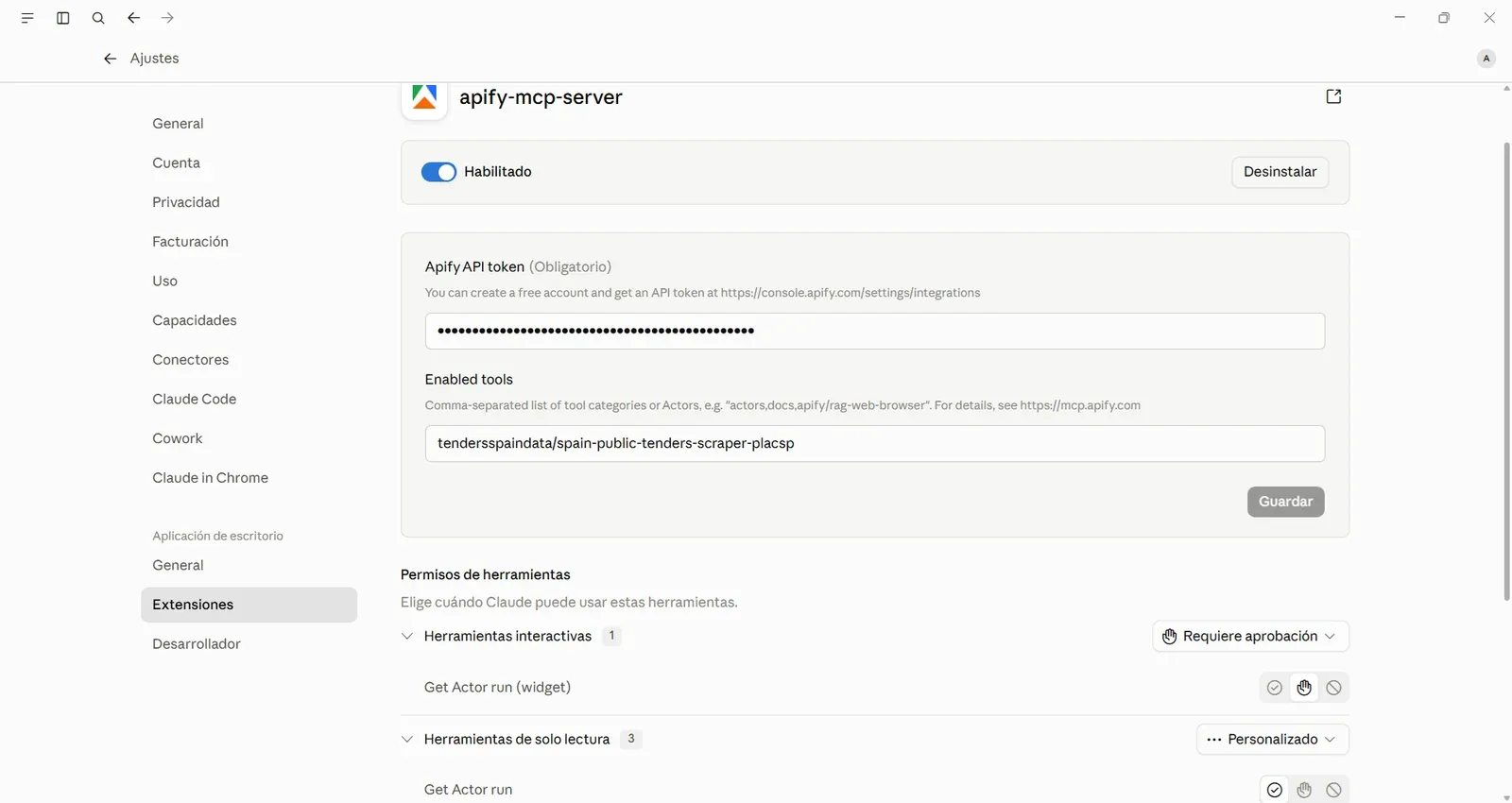
I used the Apify MCP server extension in Claude Desktop. Two things to set:
- Paste your Apify API token.
- In "Enabled tools", put your Actor's full name so the agent can find it:
tendersspaindata/spain-public-tenders-scraper-placspRestart the extension, and the tool shows up in the agent's toolset.
Example 1: a sector search, and the agent filtering a false positive
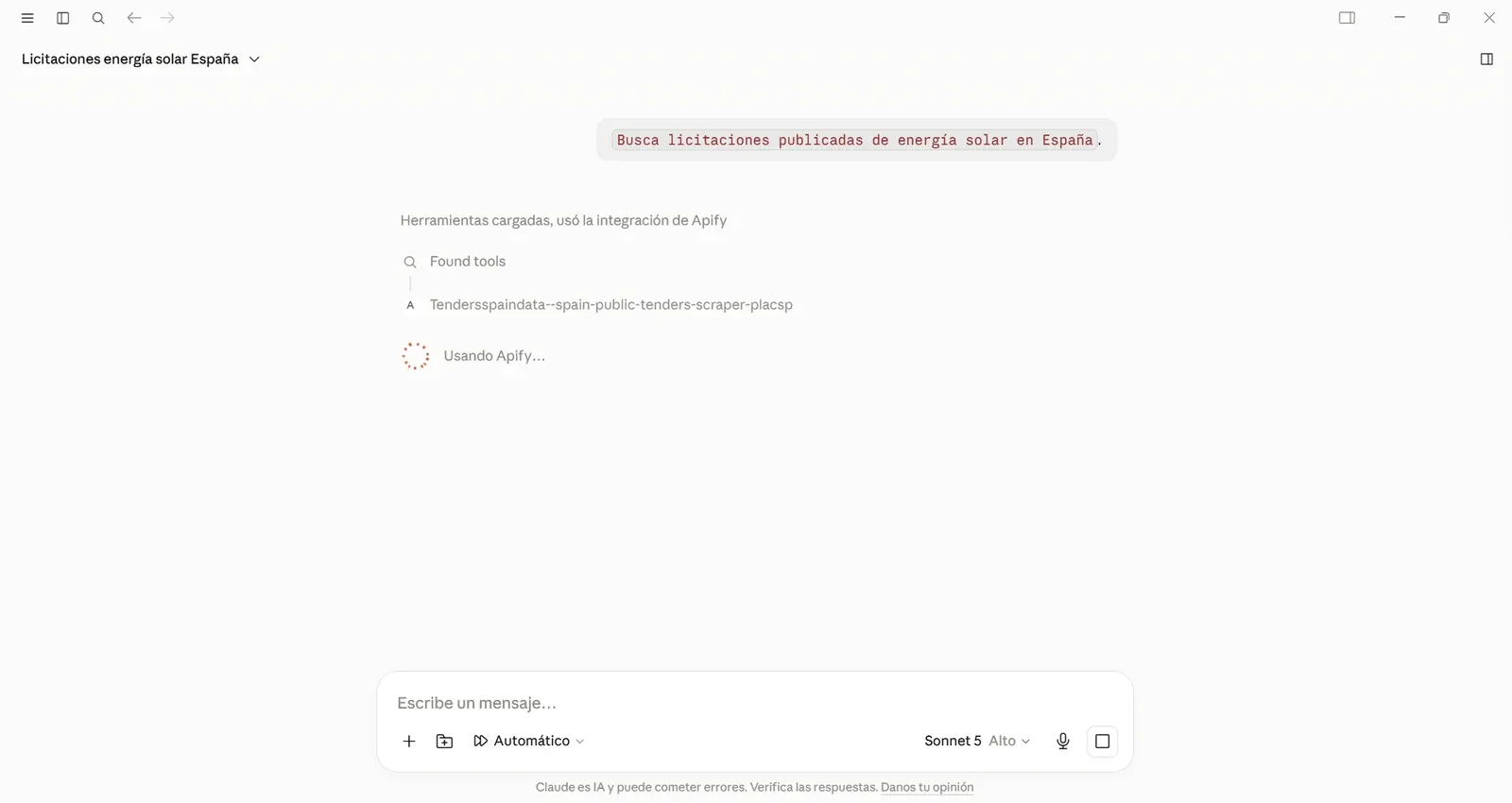
I asked, in plain Spanish: "Find published tenders in Spain about solar or photovoltaic energy."
Claude called the Actor with the right arguments on its own:
{ "keyword": "fotovoltaica", "estado": "Publicado" }It returned three real tenders. A photovoltaic self-consumption installation at a school in Cuenca (deadline August 10, 2026). A solar hot-water adaptation for the Canary Islands Air Command (deadline August 20, 2026). And a third from Gijón that only matched because the word "solar" appeared in the text.
The agent flagged that third one as irrelevant and discarded it. That's the part I like: my dictionary returns candidates, and the model reasons over relevance. Neither alone gets there.
Example 2: chaining the search into a region filter and a spreadsheet
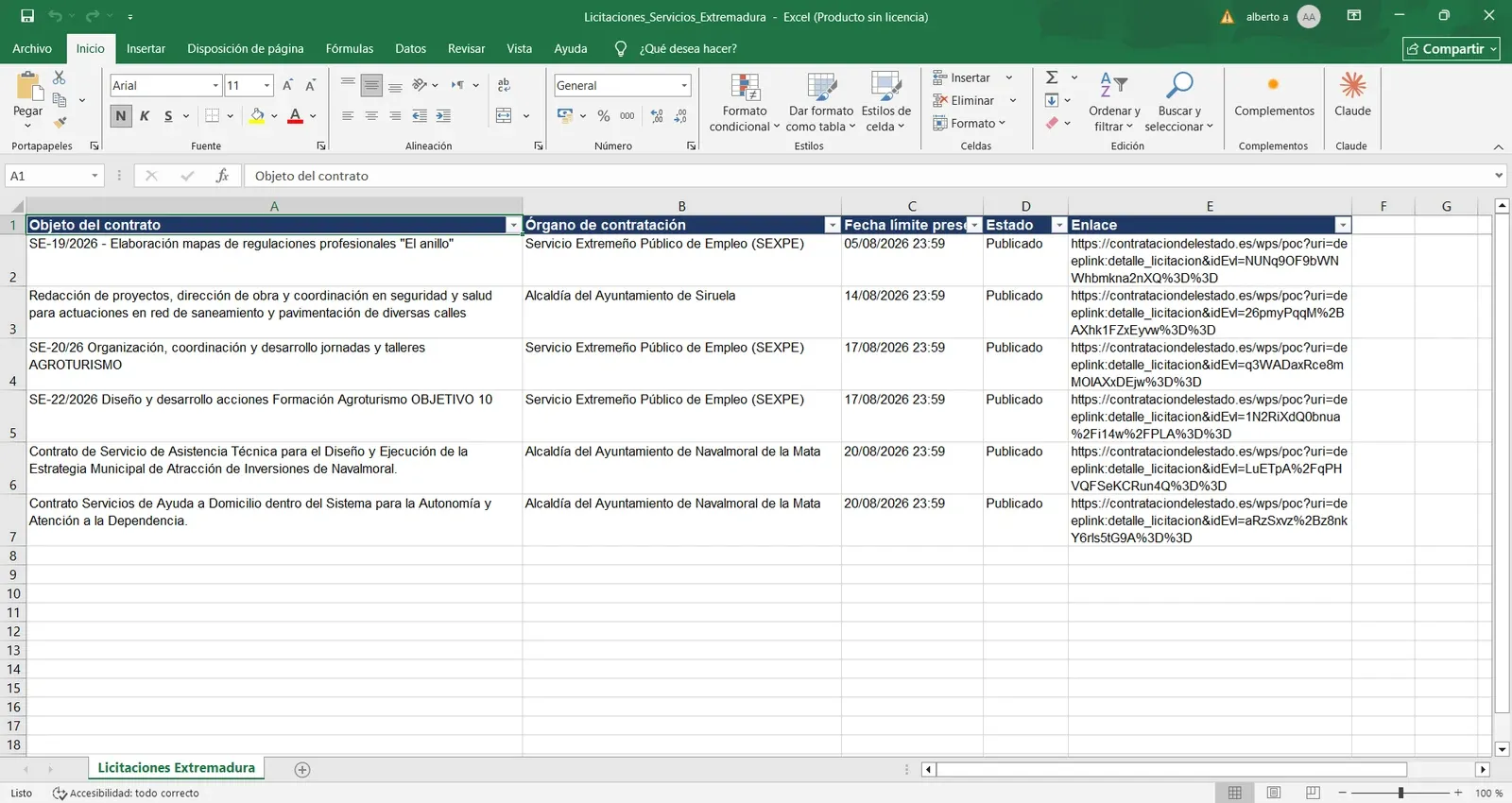
Because it's an agent tool, my Actor composes with everything else the agent can do. In one turn, I asked it to search all published Services-type tenders, then give me a single region with five or six of them, as an example.
The agent called the Actor (84 Services tenders came back), filtered to Extremadura (six tenders: one from Ayuntamiento de Siruela, three from SEXPE, two from Navalmoral de la Mata, deadlines August 17-21), and wrote them to an XLSX file.
I didn't write any glue code for that. The scraper was one step in a pipeline the agent built on its own. That's the shift: the Actor stops being something I run and becomes something an agent reaches for.
Cost and latency
Because it's pay-per-event, an agent pays only for what it triggers: one start event, plus one event per tender returned. There's no monthly quota and no always-on scraper burning money between queries.
An agent that runs three targeted searches a day pays for those three runs and their results, nothing more. For an on-demand tool, that's the right shape.
A system prompt for the assistant
If you want to reproduce the assistant, this is the system prompt I put in Claude Desktop:
You are a senior consultant in Spanish public procurement. You have a tool
that queries live tenders from the official PLACSP platform.

When the user describes a business need, extract the best Spanish keyword and
call the tool with estado="Publicado". Prefer one strong keyword over contract
type or CPV. Never invent tenders; report only what the tool returns. For each
result, give the object, the contracting body, and the deadline, and offer to
fetch the tender documents. If the tool returns nothing, say so and suggest a
broader keyword.
Lessons learned
- The scraping was the easy 20%. The value lived in the filtering: the priority engine and the sector dictionary. Anyone can fetch a feed; making it queryable by a non-expert or an agent is the product.
- Refusing to run is a feature. Blocking under-specified queries protects the user, saves compute, and stops an agent burning a run on noise.
- Designing for agents made the tool better for humans. Strong defaults, input validation, and keyword expansion helped me too, every time I clicked Run.
- Check your event names. That silent "unknown event" warning cost me real money before I caught it.
Wrapping up and next steps
Spanish procurement data is technically public but practically inaccessible. That's exactly the kind of source where an Actor, exposed as an agent tool through the Apify MCP server, earns its place.
If you want to try it, the Actor is on Apify Store, and the full code is in the GitHub repo linked below. To build your own agent tool, the Apify MCP docs are the place to start. My next step is to add award data (who won and how many bidders) so an agent can analyze competition, not just find open tenders.
- Actor: Spain Public Tenders Scraper: PLACSP Official Feed
- Code: GitHub repo
- Apify MCP server
- Apify MCP documentation
- Monetize your Actors