Model Context Protocol (MCP) is easy to get started with, but it becomes harder to manage as soon as it's used beyond a single agent or demo. Repeating the same configuration across tools, juggling OAuth logins, and paying for unused tool schemas are common friction points once MCP becomes part of a real workflow.
mcpc was built to address these problems by providing a single, reusable MCP client that works across AI coding agents and environments.
The problem with MCP today
MCP has become the standard way for AI agents to connect to external tools and data sources. But there's a growing friction in how MCP clients work:
1. Every agent has its own MCP configuration
You set up your MCP servers in Cursor. Then you configure them again for Claude Code. And again for Codex CLI. Each tool has a different way to configure MCP servers, its own credential storage, and its own quirks. You end up managing the same OAuth logins and server configs in multiple places.
2. Static tool loading wastes tokens
Most MCP integrations load all tool schemas upfront. With 6 servers and 60 tools, you can easily burn tens of thousands of tokens just on tool definitions, before your agent does any actual work. That's a third of your context window gone.
3. Uneven feature support
Some MCP clients support OAuth. Some don't. Some handle resources. Some only do tools. You never quite know what will work until you try it.
mcpc solves all three of these issues and adds a few more extras.
What is mcpc?
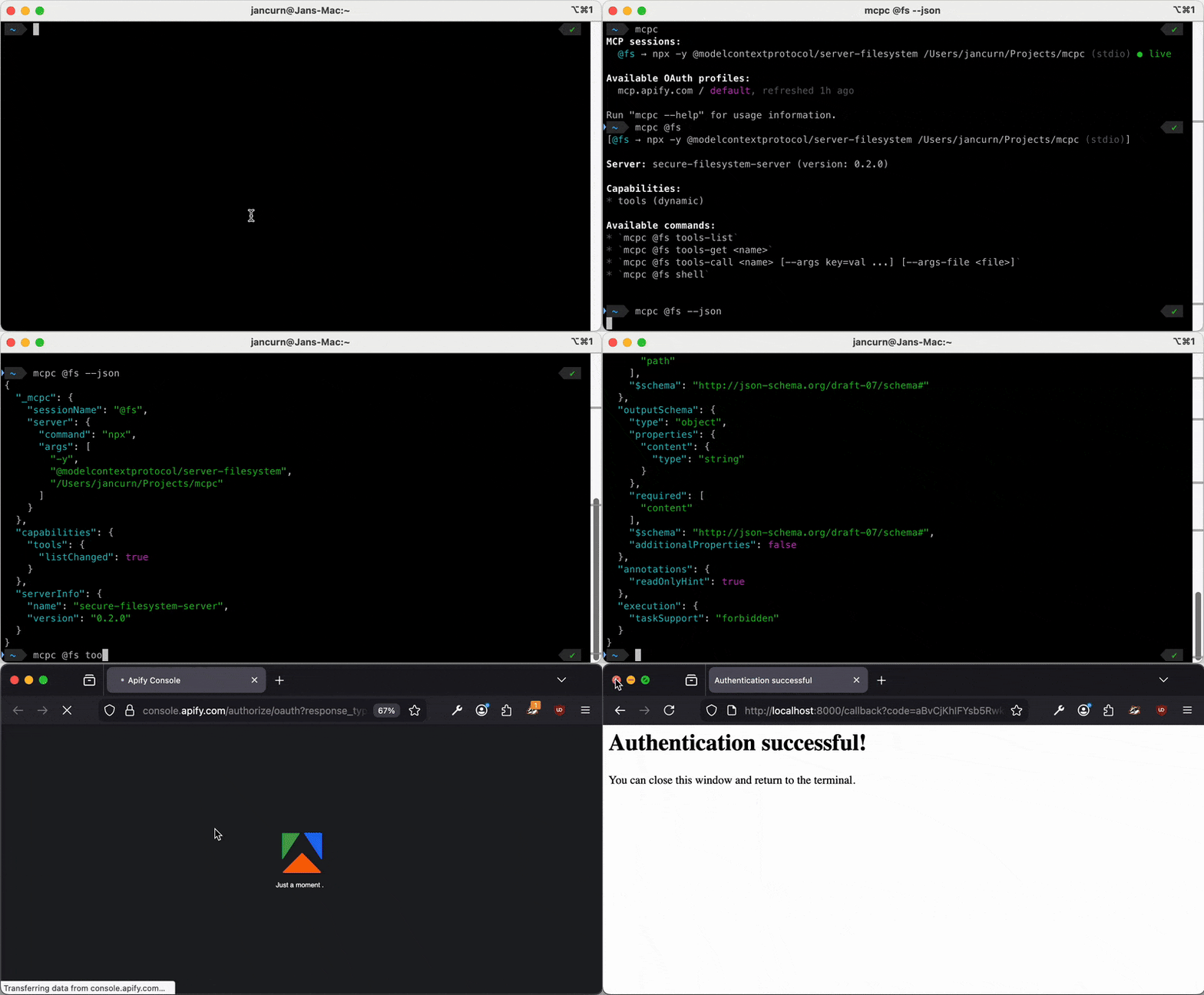
mcpc is a universal command-line client for MCP. It maps MCP operations to intuitive shell commands:
# Connect to any MCP server
mcpc mcp.apify.com tools-list

# Create a persistent session
mcpc mcp.apify.com connect @apify

# Call tools with typed arguments
mcpc @apify tools-call search-actors keywords:="web scraper"

# Open interactive shell
mcpc @apify shell
It works with any MCP server over stdio or Streamable HTTP, supports full OAuth 2.1, and provides persistent sessions that survive across commands.
Why mcpc matters
1. Configure once, use everywhere
With mcpc, your MCP server configuration lives in one place. Any AI coding agent that can run shell commands can use it:
# Works same in Claude Code, Cursor, Codex CLI, or OpenCode
mcpc @apify tools-call search-actors keywords:="web scraper"
You authenticate once with mcpc mcp.apify.com login, and the OAuth tokens are stored securely in your OS keychain. Every agent uses the same credentials through the same CLI. No more copying tokens between config files.
This decouples your MCP setup from any specific AI tool. You control your OAuth connections, not the agents.
2. Dynamic discovery saves tokens
Instead of loading all tool schemas upfront, AI agents can discover tools dynamically:
# Step 1: List available tools (minimal tokens)
mcpc @apify tools-list

# Step 2: Get schema for specific tool only when needed
mcpc @apify tools-get search-actors

# Step 3: Call the tool
mcpc @apify tools-call search-actors keywords:="web scraper"
This is exactly what Cloudflare recommends as code mode - agents write code that interacts with tools rather than using function calling for everything. According to Anthropic, the result is a dramatic decrease in tokens spent on tool definitions.
With --json output, agents can write shell scripts that chain multiple MCP operations:
# AI-generated script: find an actor, then get its details
mcpc --json @apify tools-call search-actors keywords:="scraper" \
  | jq '.content[0].text | fromjson | .items[0].id' \
  | xargs -I {} mcpc @apify tools-call get-actor actorId:="{}"
3. Full MCP feature support
mcpc supports more MCP features than most clients:
| MCP feature | mcpc | Typical MCP clients |
|---|---|---|
| Tools | Yes | Yes |
| Resources | Yes | Sometimes |
| Prompts | Yes | Sometimes |
| OAuth 2.1 + PKCE | Yes | Often |
| Persistent sessions | Yes | Rarely |
| Dynamic notifications | Yes | Rarely |
| Proxy for sandboxing | Yes | No |
| Schema validation | Yes | No |
The proxy feature is particularly useful for AI sandboxes. You authenticate once, then expose a local proxy server. AI-generated code talks to the proxy without ever seeing your OAuth tokens:
# Human authenticates
mcpc mcp.apify.com login
mcpc mcp.apify.com connect @sandbox --proxy 8080

# AI code in sandbox only sees localhost:8080
mcpc localhost:8080 tools-call search-actors keywords:="test"
Quick start guide
Step 1: Install mcpc
npm install -g @apify/mcpcStep 2: Connect to an MCP server
For a public server (no auth required):
# One-shot command
mcpc mcp.apify.com tools-list

# Create persistent session for faster subsequent commands
mcpc mcp.apify.com connect @myserver
mcpc @myserver tools-list
For a server with OAuth:
# Authenticate (opens browser)
mcpc mcp.apify.com login

# Create session using saved credentials
mcpc mcp.apify.com connect @apify
mcpc @apify tools-list
For a local server from config file:
mcpc --config .vscode/mcp.json filesystem tools-listStep 3: Explore and call tools
# List all tools
mcpc @apify tools-list

# Get tool schema
mcpc @apify tools-get search-actors

# Call a tool
mcpc @apify tools-call search-actors keywords:="web scraper" limit:=5

# Interactive shell for exploration
mcpc @apify shell
Step 4: Use with AI agents
Add mcpc to your AI agent's toolset. For Claude Code, add to your system prompt or CLAUDE.md:
- List tools: mcpc @<session> tools-list
- Get tool schema: mcpc @<session> tools-get <tool-name>
- Call tool: mcpc @<session> tools-call <tool-name> arg1:=value1 arg2:=value2
- Use --json flag for structured output in scripts
The agent can then dynamically discover and use tools without you embedding all schemas in the prompt.
Advanced features
JSON mode for scripting
# Output raw MCP response as JSON
mcpc --json @apify tools-list

# Chain with jq for processing
mcpc --json @apify tools-call search-actors keywords:="scraper" \
  | jq '.content[0].text | fromjson | .items[:3]'
Schema validation
Validate tool schemas before calling to detect breaking changes:
# Save expected schema
mcpc --json @apify tools-get search-actors > expected.json

# Validate before calling
mcpc @apify tools-call search-actors --schema expected.json keywords:="test"
Proxy for AI sandboxes
# Authenticate and create proxied session
mcpc mcp.apify.com login
mcpc mcp.apify.com connect @sandbox --proxy 8080

# AI code only accesses localhost:8080
# Never sees OAuth tokens
Session management
# List all sessions
mcpc

# Restart a session
mcpc @apify restart

# Close and remove a session
mcpc @apify close
Try it now
npm install -g @apify/mcpc

# Try with Apify's public MCP server
mcpc mcp.apify.com tools-list
mcpc mcp.apify.com tools-call search-actors keywords:="web scraper"
If you're building MCP servers, debugging integrations, or running AI agents that use tools, mcpc gives you a single, universal interface that works everywhere.