Most AI coding IDEs help you write code. Google Antigravity lets you wire up external tools through MCP and execute live data pipelines from your editor. That means your IDE isn't just writing scripts, but running lead generation workflows autonomously.
In this guide, you'll learn how to connect Apify MCP Server to Antigravity IDE and use it for data enrichment: finding local businesses, LinkedIn profiles, emails, and phone numbers from a single prompt.
What you'll build:
- Connect the Apify MCP server to Google Antigravity
- Configure scrapers for Google Maps leads and contact detail extraction
- Run enrichment queries directly from the IDE
- Scale validated workflows with cron jobs
What is Google Antigravity, and why use it?
Google Antigravity is an IDE developed by Google, announced in November 2025 alongside the Gemini 3 model launch. It's built on a fork of VS Code (with DNA from the $2.4B Windsurf acquisition) but redesigned from the ground up as an agent-first platform.
What makes it different from Cursor, Copilot, or traditional IDEs:
- Agent-first architecture - AI agents don't just suggest code, they plan entire features, execute across editor, terminal, and browser, and verify their own work
- Manager view - a control center for orchestrating multiple agents working in parallel across workspaces. No other IDE has this.
- Browser subagents - built-in Chrome automation that agents can control directly for testing and verification
- Artifacts - agents produce verifiable deliverables (task lists, implementation plans, screenshots, browser recordings) instead of raw tool calls
- Multi-model - supports Gemini 3 Pro, Claude Sonnet 4.6, and GPT-OSS out of the box
- MCP support - native Model Context Protocol integration, which is what makes this guide possible
- Free - 100% free during public preview with generous rate limits on Gemini 3 Pro
Antigravity scored 76.2% on SWE-bench Verified and 54.2% on Terminal-Bench 2.0, making it the strongest agent for multi-step tool-chaining workflows. Sergey Brin reportedly went into "Founder Mode" for the launch, working late nights with engineers to push Google from "Search" to "Action."
For this guide, the key feature is MCP support. You can connect external tools and invoke them through natural language prompts in the editor. Type "find marketing leads in Berlin" and Antigravity calls Apify Actors to scrape Google Maps, extract contact details, and return structured data without leaving your code editor.
How to set up the Apify MCP Server
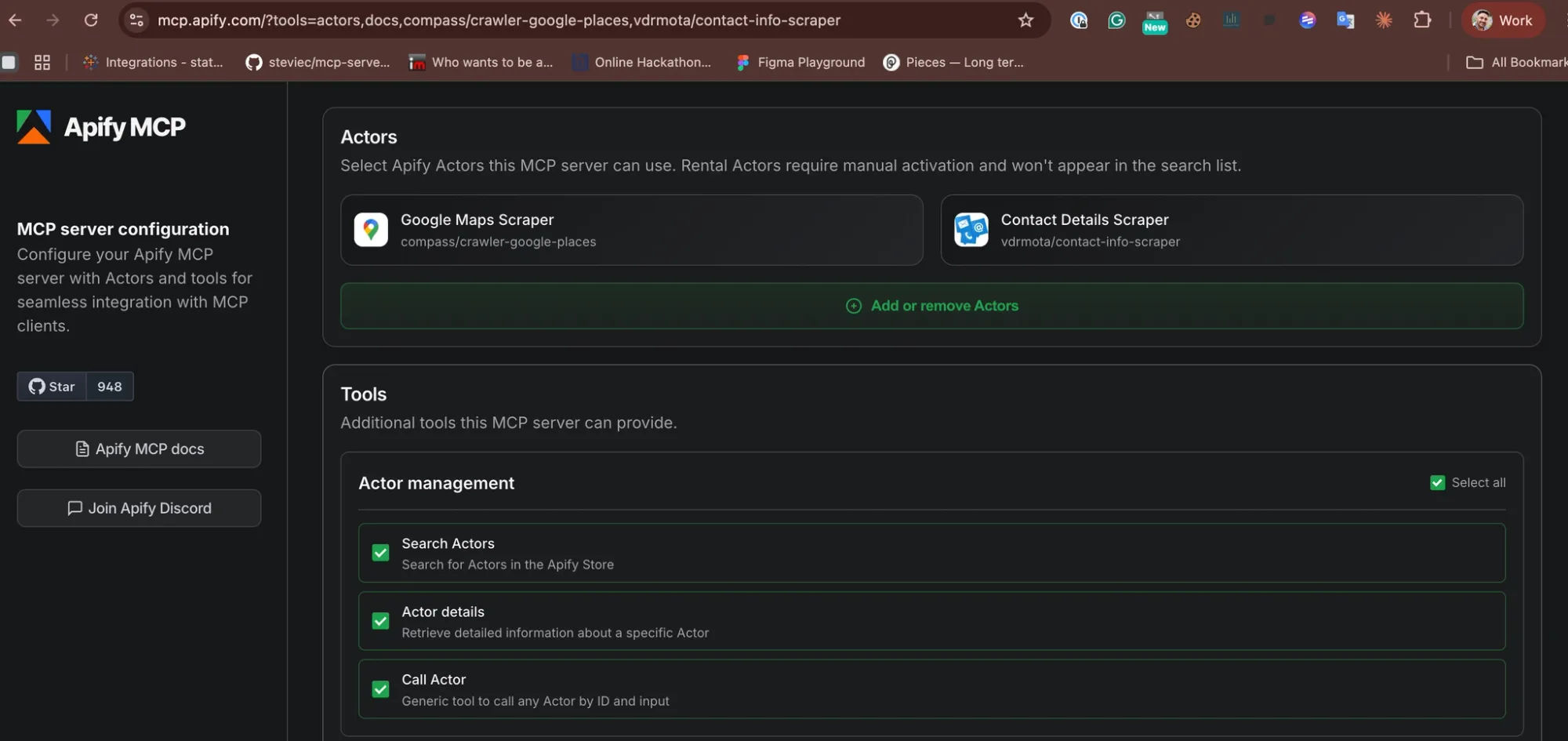
The Apify MCP server at mcp.apify.com lets you configure which Actors your IDE can access. You pick the tools you need, and it generates the JSON configuration.
Step 1: Configure your MCP server
- #1. Go to mcp.apify.com
- #2. Select the Actors you want available in your IDE. For lead generation, the key ones are:
- Google Maps Scraper - finds local businesses by search term and location with ratings, reviews, contact info, and website data
- Contact Details Scraper - extracts emails, phone numbers, LinkedIn, Facebook, Twitter, Instagram, and Telegram profiles from any list of website URLs
- #3. Save your configuration
Step 2: Add the config to Antigravity
- #1. Open Google Antigravity
- #2. Go to Settings > Customizations
- #3. Open the MCP configuration file
- #4. Paste the JSON configuration from the Apify portal
Here is the actual JSON configuration for these two Actors:
{
  "mcpServers": {
    "apify": {
      "command": "npx",
      "args": [
        "-y",
        "@apify/actors-mcp-server",
        "--actors",
        "compass/crawler-google-places,vdrmota/contact-info-scraper"
      ],
      "env": {
        "APIFY_TOKEN": "your-apify-api-token-here"
      }
    }
  }
}
To add more Actors later (e.g. LinkedIn scrapers, Amazon product scrapers), append them to the --actors comma-separated list.
Step 3: Generate and add your API token
If you don't already have an Apify API token:
- #1. Go to Apify Console under Settings > Integrations
- #2. Create a new API token
- #3. Replace
your-apify-api-token-herein the JSON config with your actual token - #4. Save the file.
The MCP server is now connected to Antigravity.
Run your first lead generation query
With the server configured, test it with a query in Antigravity's agent chat:
"Find marketing agencies in Prague with their contact details"
Antigravity will call the appropriate Apify Actor (Google Maps Scraper for location-based discovery or Contact Details Scraper for enrichment), process the input, and return structured results.
Monitor the run in real time by checking Apify Console.
What Google Maps Scraper accepts
Key input parameters the agent will use:The scrapeContacts flag enriches each result with emails and social media profiles from the business website. Set maximumLeadsEnrichmentRecords to a number greater than 0 to pull employee names, job titles, emails, phone numbers, and LinkedIn profiles per business.
What Contact Details Scraper returns
For a list of website URLs, the Contact Details Scraper extracts:
| Data point | Details |
|---|---|
| Email addresses | All emails found on the domain |
| Phone numbers | Local and international formats |
| LinkedIn profiles | Company and employee pages |
| Facebook pages | Business pages |
| Twitter/X profiles | Company handles |
| Instagram profiles | Business accounts |
| Telegram links | If present |
Input example:
{
  "startUrls": [
    {"url": "https://example-agency.cz"},
    {"url": "https://another-agency.de"}
  ],
  "maxDepth": 2
}
Results come back as structured JSON, ready to pipe into your CRM, spreadsheet, or downstream workflow.
Scaling up with cron jobs
Once you have validated a query works for your use case, automate it:
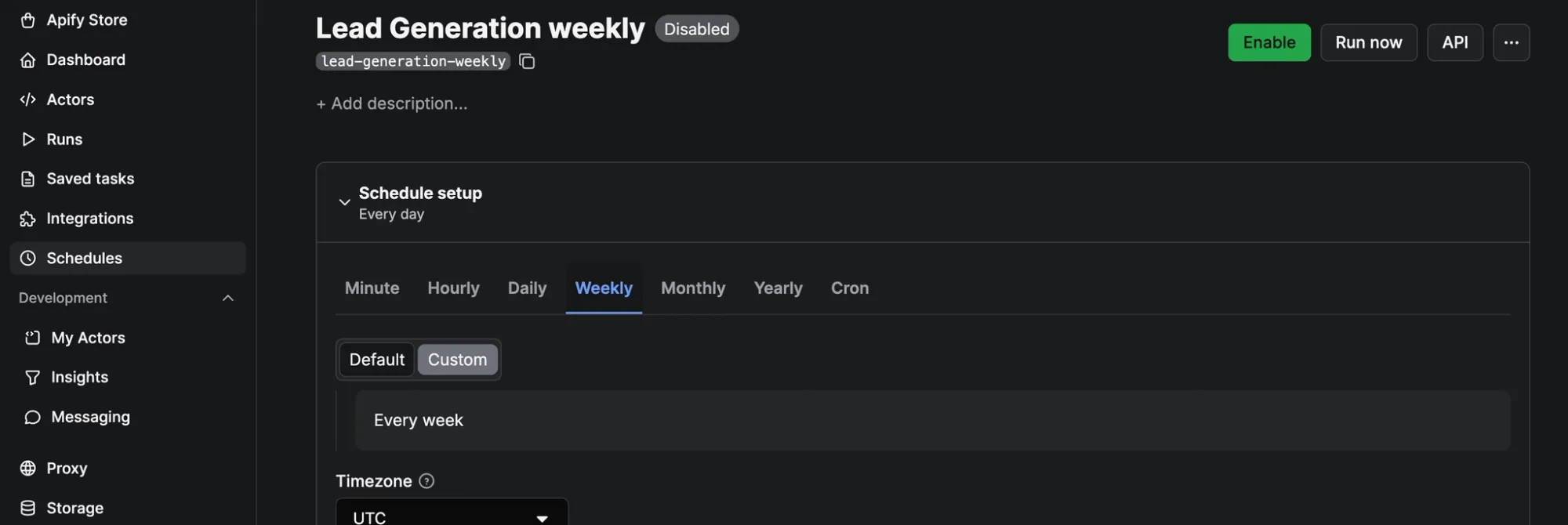
- Use Apify Schedules to trigger the same Actor configuration repeatedly.
- Export results to Google Sheets, a webhook, or directly to your CRM via Apify integrations.
- Chain multiple Actors in sequence - first discover businesses on Google Maps, then enrich each one with Contact Details Scraper.
Use cases beyond basic leads
The same MCP setup works for other enrichment workflows:
- Recruiting: Find companies in a specific industry via Google Maps, then extract HR and hiring manager contact details.
- Sales prospecting: Scrape businesses by category and location, enrich with LinkedIn profiles and work emails.
- Market research: Pull all businesses in a category across multiple cities, compare ratings, review volumes, and social media presence.
- Competitor mapping: Find all players in a niche by location and extract their full digital footprint.
Get started
- Download Google Antigravity (free during public preview).
- Configure your Apify MCP server with the Actors you need.
- Get your Apify API token (free tier available).
- Add the JSON config to Antigravity under Settings > Customizations > MCP configuration.
- Run a test query and monitor results in Apify Console.