Running AI agents locally works fine for testing, but it falls apart fast. Your laptop goes to sleep, the agent stops. You restart, something breaks. And you're burning compute on a machine you actually need for other things.
When you want an agent that runs 24/7 - monitoring social media, discovering influencers, and sending you a daily digest on Telegram - you need it in the cloud.
In this guide, you'll learn how to:
- Deploy OpenClaw on Hostinger with a one-click install
- Install Apify skills that give your agent access to social media scraping Actors
- Set up influencer discovery across Instagram, TikTok, YouTube, and Facebook
- Schedule a daily morning digest with cron jobs
- Connect Telegram so your agent messages you directly
What's OpenClaw?
OpenClaw is an open-source autonomous AI agent that's been all over X, Instagram, and TikTok lately. People are building personal assistants with it, and for good reason.
Here's what makes it different from traditional agent frameworks:
- Runs 24/7 - once deployed, it doesn't sleep
- Initiates conversations - it messages you, not just the other way around
- Multi-channel - connect it to Telegram, WhatsApp, Slack, or Discord out of the box
- Skill system - extend it with installable skills from ClawdHub
- Multi-model - works with Claude, GPT, DeepSeek, Gemini, or local models
Think of it as a personal AI assistant that lives in the cloud and can actually do things on the web. The skill system is the interesting part for you - that's how you plug in Apify's scraping Actors.
Check out our video deploying OpenClaw.
One-click deploy on Hostinger
Hostinger offers a one-click OpenClaw install on their VPS service. No Docker setup, no YAML files, no SSH key juggling. You pick a plan, paste your LLM API key, and you're live.
If you're just getting started, this is the easiest path. Running OpenClaw on your own machine carries real security risks (people are buying dedicated Mac Minis just for this). A VPS keeps it isolated and always-on.
Use coupon code APIFY15 for 15% off Hostinger VPS. Get the deal here.
Step 1: Create the VPS instance
Head to Hostinger and select the OpenClaw one-click install. A 2 GB RAM VPS works fine for personal use.
Step 2: Configure your LLM provider
During setup, you'll be asked to choose an LLM provider and paste your API key. You can use Anthropic, OpenAI, Gemini, or any other supported provider.
Hostinger also lets you enter your WhatsApp or Telegram number directly during setup - something that's much harder to configure on other platforms.
Step 3: Access your instance
Once deployed (takes about 30 seconds), go to your Hostinger home screen. You'll see your new OpenClaw instance running in Docker.
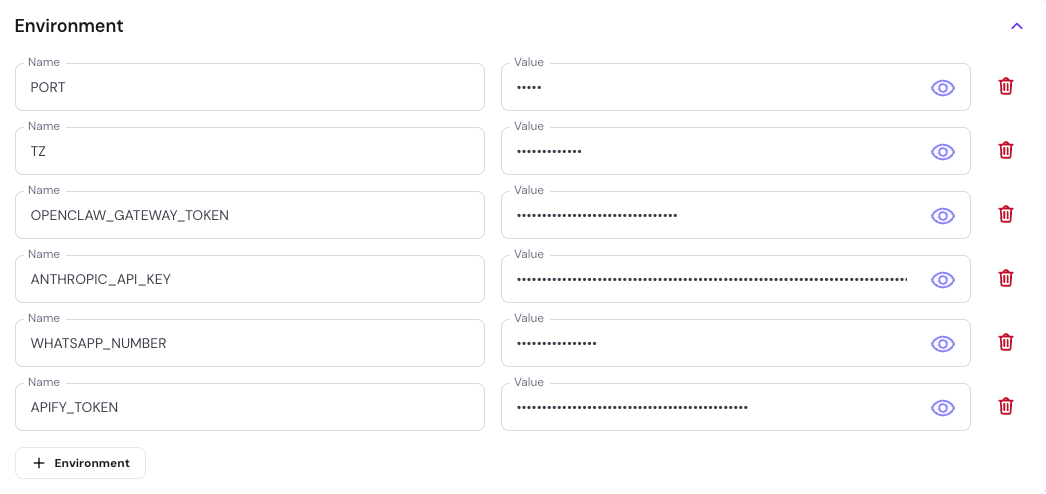
You'll need the gateway token that was generated during setup. If you didn't copy it, go to Docker Manager > Projects, find your OpenClaw project, and the token is right there.
Changing environment variables
If you need to update your LLM API key or any other config:
- Go to Docker Manager > Projects
- Click on your OpenClaw instance
- Click Manage
- Edit your environment variables
- Click Save and Deploy
That's it. Your agent is live in the cloud.
Installing Apify skills
Now that OpenClaw is running, give it a personality and tell it what you need. In the chat, just describe your use case:
"You are my social media assistant. Please install the Apify skills from ClawdHub. I want you to give me my morning brief on social media trends using hashtags, and what my influencers are up to on Instagram and TikTok."
OpenClaw will search ClawdHub and install the relevant Apify skills automatically. It handles the whole installation - no manual npm commands needed.
Configure your Apify token
All Apify skills need your API token. Here's how to add it:
- Go to Apify Console under Settings > Integrations
- Copy your API token
- In Hostinger, go to Docker Manager > Projects > OpenClaw > Manage
- Add a new environment variable: name it
APIFY_TOKENand paste your token as the value - Click Save and Deploy
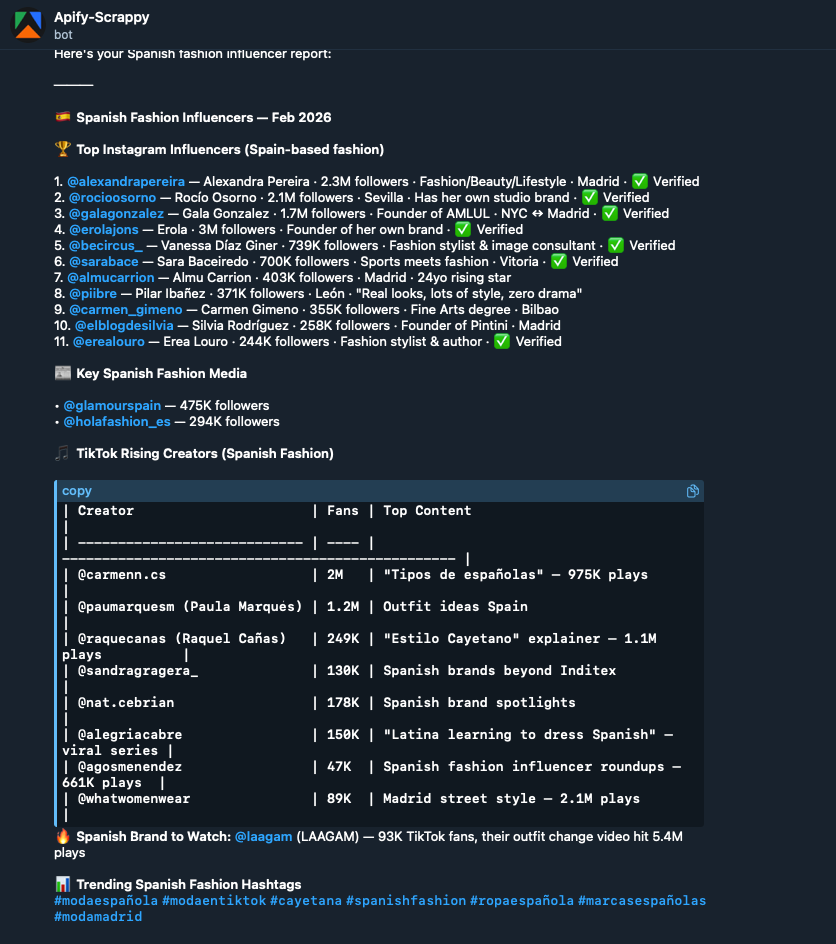
Once the token is set, OpenClaw starts pulling Actors from Apify Store - hashtag scrapers, TikTok trending scrapers, profile scrapers, and more. It goes through Apify Store, finds the right Actors for your prompt, and starts testing them.
Influencer discovery in action
With the Apify skills installed, OpenClaw taps into social media scraping Actors across multiple platforms:
| Platform | What it scrapes |
|---|---|
| Hashtag posts, profile data, follower counts, engagement metrics | |
| TikTok | Trending content, creator profiles, video engagement |
| YouTube | Channel stats, subscriber counts, video performance |
| Page metrics, post reach |
The agent handles Actor selection automatically based on your prompt. You can refine results at any time by specifying a country, niche, or follower range.
Scheduling a daily morning digest
Rather than asking your agent manually every morning, set up a cron job so it runs on its own.
In OpenClaw, go to the cron job settings and create a new job:
- Name: Something descriptive, e.g. "Social media morning digest - top skincare influencers"
- Schedule: Once a day
- Session: Use an isolated session (not your main one) to save tokens
- Prompt: "Every morning, use the Apify skill to extract social media posts for TikTok and Instagram influencers in Europe and the Middle East"
You can also set this up on the Apify side using Apify Schedules and send a webhook to your OpenClaw instance.
Connecting Telegram
To get your morning digest delivered straight to Telegram:
- Open Telegram and go to @BotFather
- Type
/newbotand follow the prompts to create your bot - Copy the bot token that BotFather gives you
- In your OpenClaw settings, add the bot name and token
- That's it - your agent will now message you on Telegram
What you've built
At this point, you have a cloud-hosted AI agent on Hostinger that discovers influencers across Instagram, TikTok, YouTube, and Facebook, runs on a daily schedule, and delivers results to your Telegram. All for under $5/month on infrastructure, plus your LLM and Apify API costs.
The full set of Apify OpenClaw skills goes well beyond influencer discovery - you can use them for lead generation, brand monitoring, competitor intelligence, market research, and access to 55+ web scraping Actors.
To get started:
- Deploy OpenClaw on Hostinger (use code APIFY15 for 15% off)
- Get your Apify API token (free tier available)
- Browse the skills repo and start building