When you need to gather structured data from the web, there are things that can take a lot of time or skill. Things like figuring out CSS selectors, handling pagination logic, rotating proxies to avoid blocks, and updating code whenever a site’s layout changes.
Some AI web scrapers now handle some of these issues to save developers' time. They've also levelled the playing field somewhat, as even the less technical can scrape web data thanks to AI.
We tried out a few AI-powered data extractors to see how useful they are for web scraping and if they're indeed worthy of the AI moniker. These four satisfied both criteria:
- AI Web Scraper
- Parsera
- BrowseAI
- Kadoa
Each addresses at least some of the pain points of web scraping in its own way. You’ll see how they automatically infer selectors, provide intuitive interfaces, and keep technical barriers to a minimum.
1. AI Web Scraper
AI Web Scraper is an Actor available on Apify Store. It combines web scraping with large language model (LLM) technologies to extract structured data from any website using plain-language prompts. You can start without any programming knowledge.
The Actor visits the URLs you provide and uses a prompt to pull out exactly the data you need from each page. It adapts automatically when a website's layout changes - unlike traditional scrapers that rely on hard-coded logic and break whenever a page is redesigned. AI tokens are included in the Actor cost.
To get started, click Try for free. Provide the Start URLs (one or more) and an optional Page extraction prompt written in plain English. For example, to extract blog information across several URLs, you can use the following input:
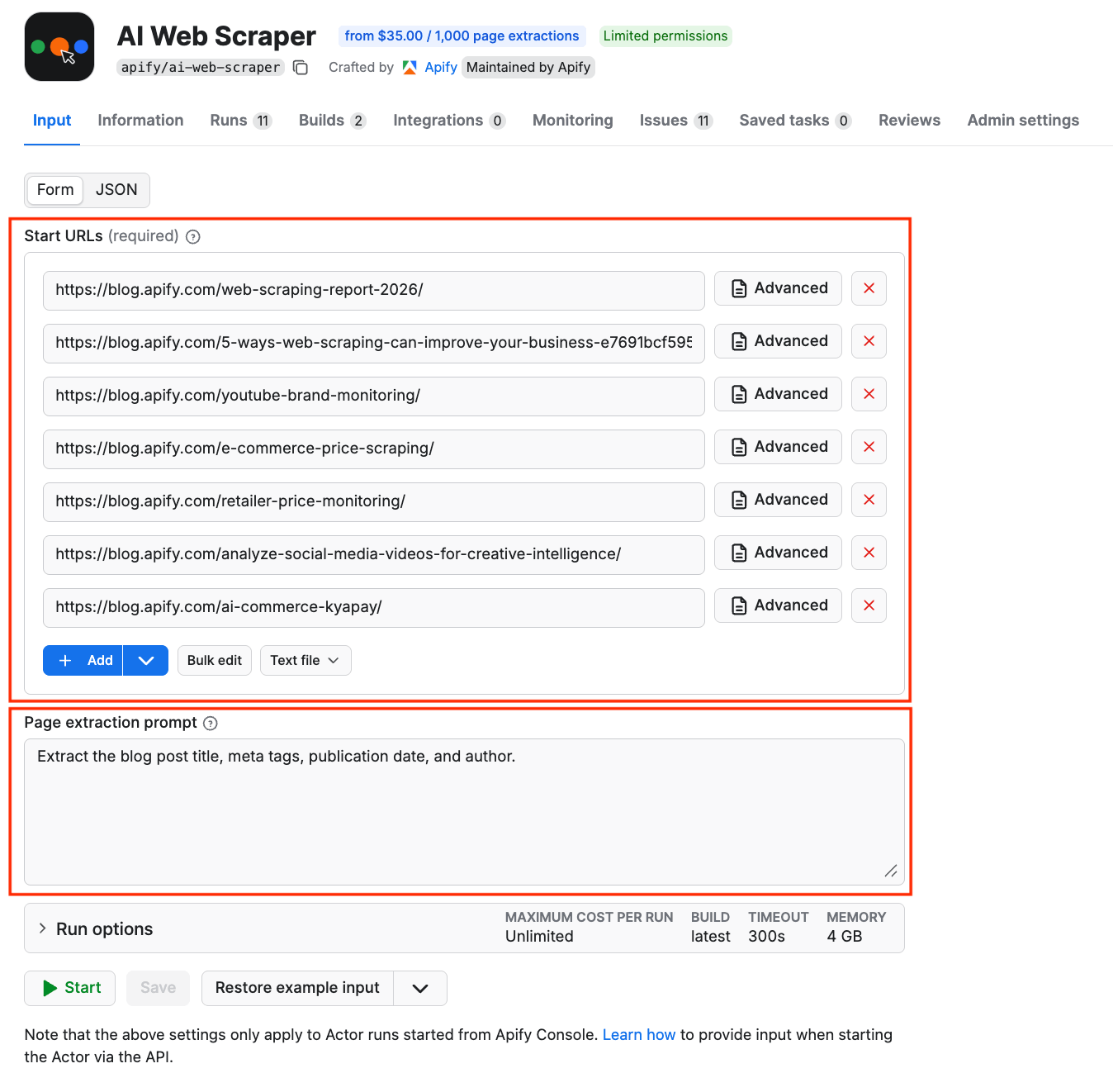
The same input in JSON:
{
    "prompt": "Extract the blog post title, publication date, and author. ",
    "startUrls": [
        {
            "url": "<https://blog.apify.com/web-scraping-report-2026/>"
        },
        {
            "url": "<https://blog.apify.com/5-ways-web-scraping-can-improve-your-business-e7691bcf5955/>"
        },
        {
            "url": "<https://blog.apify.com/youtube-brand-monitoring/>"
        },
        {
            "url": "<https://blog.apify.com/e-commerce-price-scraping/>"
        },
        {
            "url": "<https://blog.apify.com/retailer-price-monitoring/>"
        },
        {
            "url": "<https://blog.apify.com/analyze-social-media-videos-for-creative-intelligence/>"
        },
        {
            "url": "<https://blog.apify.com/ai-commerce-kyapay/>"
        }
    ]
}
Click Start to run the scraper. After a few seconds, your structured data will be ready in the Output tab. You can export the datasets as JSON, XML, CSV, or Excel.
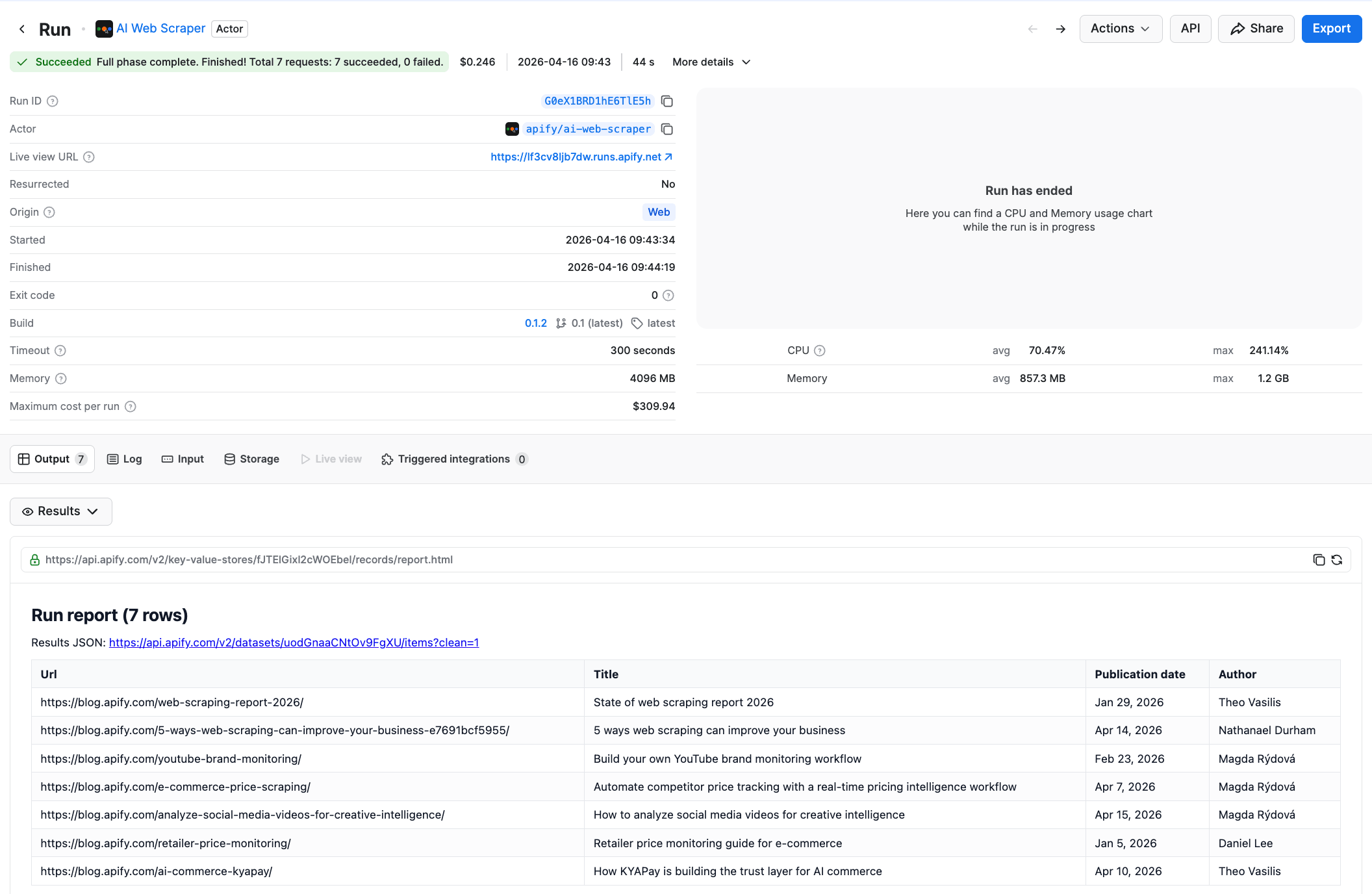
If you don't provide a prompt at all, the Actor returns the full content of each page as Markdown - useful for feeding pages into other LLM pipelines.
You can embed this Actor in your automation workflow using low-code tools like n8n. The Apify platform integrates with Zapier, Make, n8n, Google Sheets, Google Drive, and many others.
Pros
- Extracts structured data from any website using a plain-language prompt
- Adapts automatically to website layout changes, reducing maintenance overhead
- Handles dynamic, JavaScript-heavy websites via full browser emulation
- Built-in proxy pools and browser fingerprinting to access any website
- AI tokens are included in the Actor cost - no external LLM subscription needed
Cons
- Doesn't currently support pagination logic
Pricing
- Free tier (no credit card required)
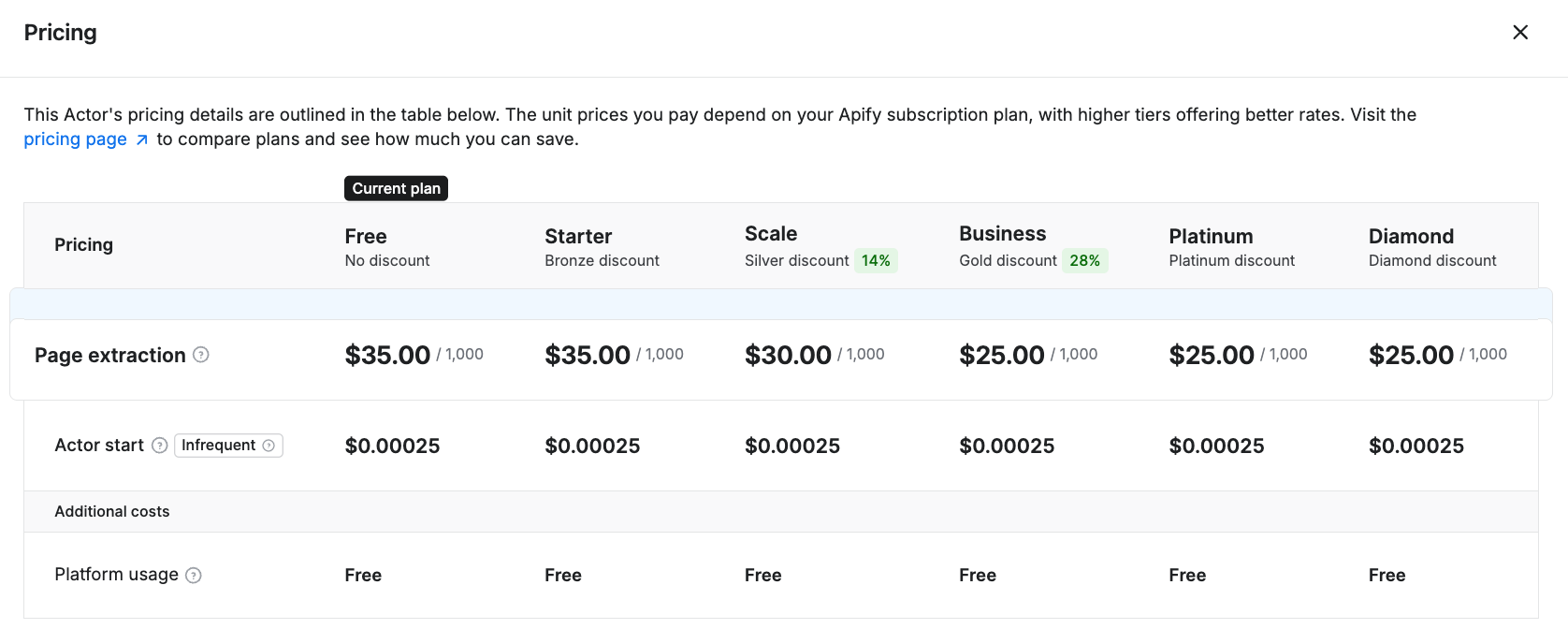
- $35.00 per 1,000 pages
In summary
AI Web Scraper is a strong choice if you want to skip the technical setup entirely and just describe what data you need in plain English. It's particularly useful for websites with varied or frequently changing page structures such as blogs, e-commerce sites, job boards, and real estate listings.
2. Parsera (+ Parsera Actor on Apify Store)
Parsera lets you scrape websites with just a link and extracts JSON data from any HTML. It provides an AI agent that looks at the target page, figures out the selector automatically, and then parses the website as needed.
Parsera also has a cloud program (Actor) available on Apify Store. That means you can use Parsera via Apify's web automation platform to schedule and monitor tasks and runs and store datasets without any extra work.
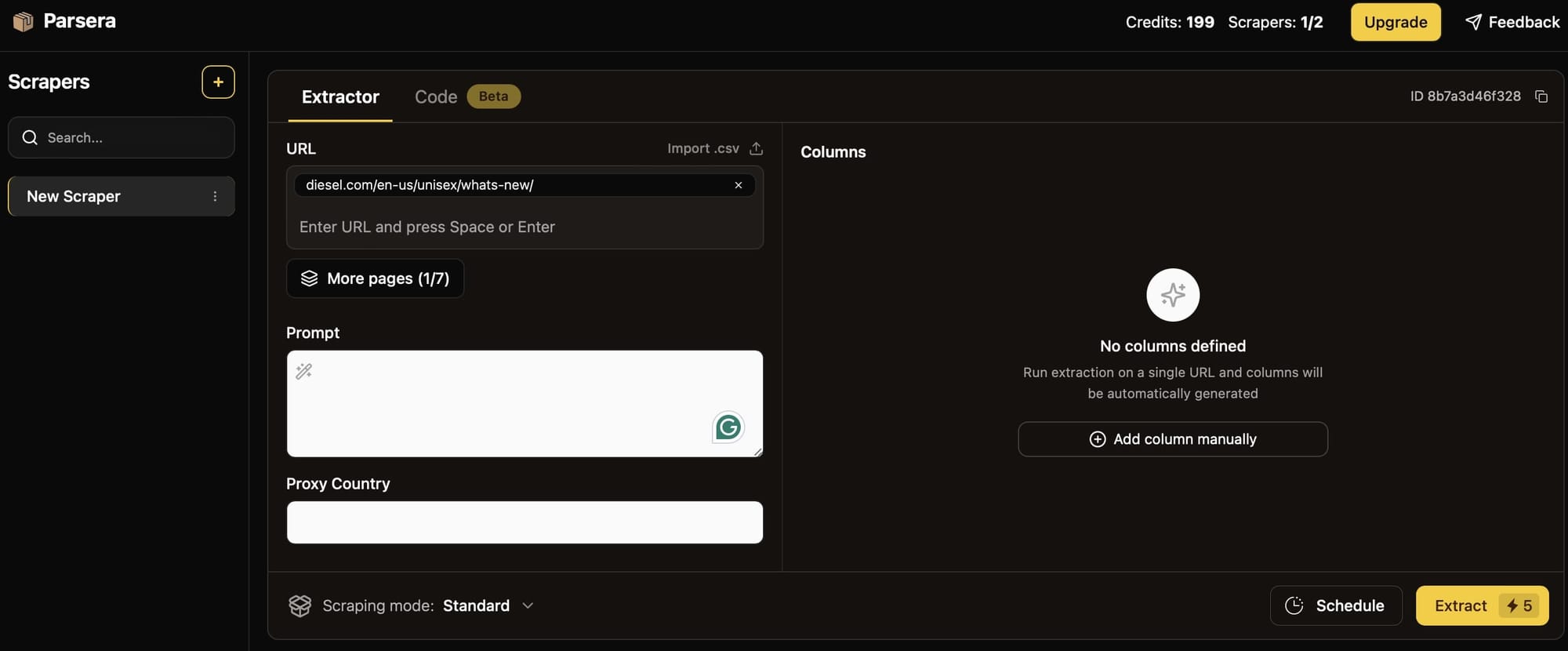
To use Parsera directly, you just need to insert a URL. A prompt - to describe what data you want to extract - is optional.
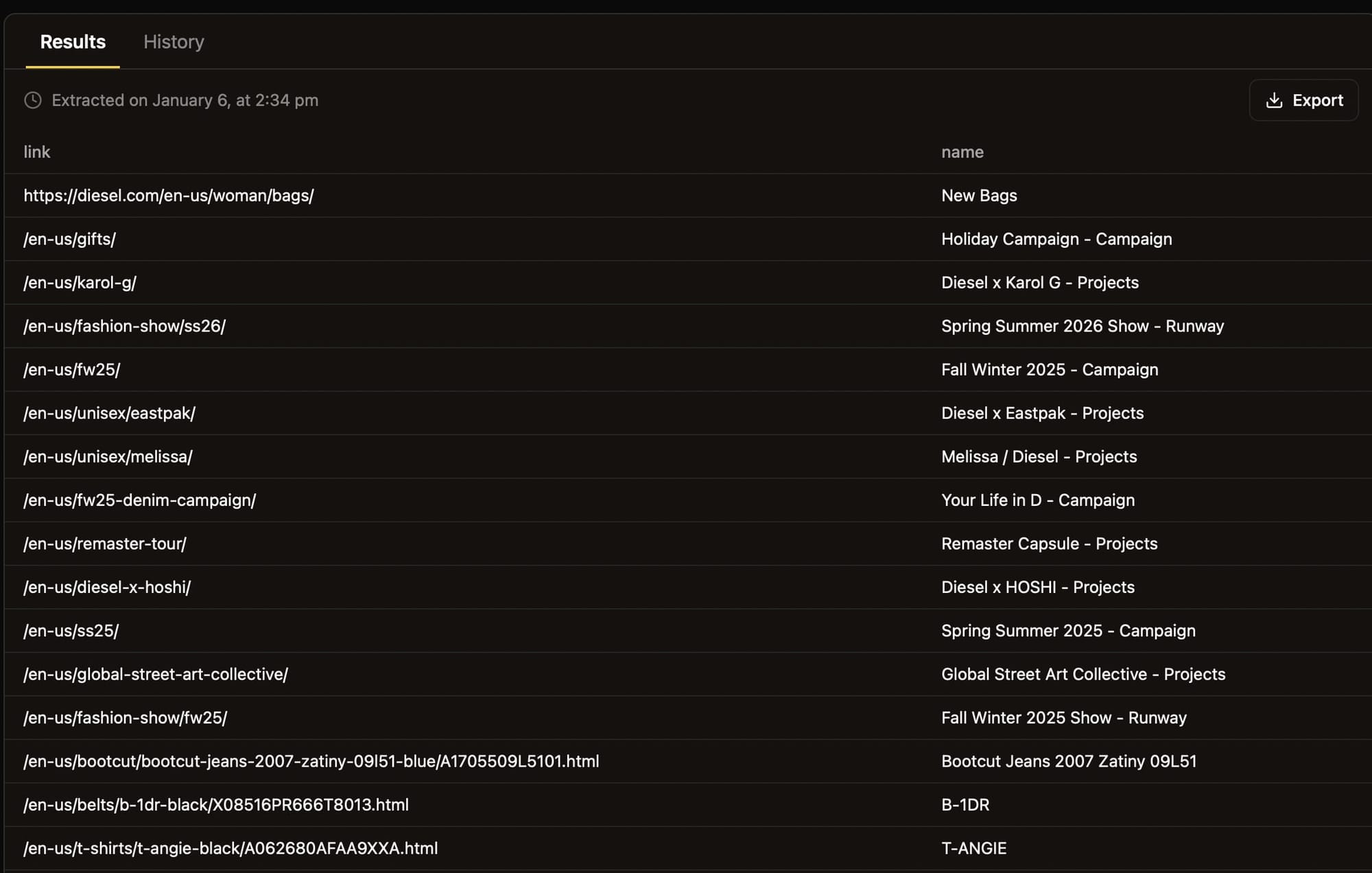
When the run is finished, you'll get an output like this:
If you want to enjoy the benefits of running Parsera in the cloud (storage, automation, monitoring), you can do so on any Apify plan, including the free tier. Just click Try for free on the Parsera Actor, complete a quick sign-up (no credit card required), and run the scraper via API or in the UI, which looks like this:
When you hit Save & Start, the Actor will run, and you'll get an output that you can save in a wide range of formats.
What's more, you can configure Apify's Actors MCP Server with Parsera. You can do this in three ways:
- Use
mcp.apify.comviamcp-remotefrom your local machine to connect and authenticate using OAuth or an API token:
{
    "mcpServers": {
        "apify": {
            "command": "npx",
            "args": [
                "mcp-remote",
                "https://mcp.apify.com/?actors=parsera-labs/parsera",
                "--header",
                "Authorization: Bearer <YOUR_API_TOKEN>"
            ]
        }
    }
}- Set up the connection directly in your MCP client UI by providing the URL
https://mcp.apify.com/?actors=parsera-labs/parseraalong with an API token or with OAuth. - Connect to
mcp.apify.comvia remote MCP endpoint:
{
    "mcpServers": {
        "apify": {
            "type": "http",
            "url": "https://mcp.apify.com/?actors=parsera-labs/parsera",
            "headers": {
                "Authorization": "Bearer <YOUR_API_TOKEN>"
            }
        }
    }
}
Pros
- Makes parsing structured data simpler for non-developers
- Includes 128 proxy locations and stealth mode for anti-blocking
- Provides self-healing agents to speed up debugging and reduce maintenance overhead.
- Integrated with the Apify cloud platform and its Actors MCP Server to scrape any website and parse data automatically.
Cons
- As of the time of writing, it still can't handle pagination.
Pricing
- Free tier (no credit card required)
- Paid services start from $25 per month
In summary
Parsera saves developer time and makes parsing data accessible to non-developers. Combining it with Apify by using the Parsera Actor and Apify's Actors MCP Server lets you automate web scraping without maintenance overhead.
3. BrowseAI
BrowseAI is basically an Apify-like SaaS platform, plus a recorder. It provides pre-built “Robots” (which are essentially what Apify Actors are) and a platform to run the bots on (just like the Apify platform). The Chrome extension/web app allows you to record user actions in the browser, and you can upload the recording on the platform and run it there.
When you choose the Extract Structured Data option:
You provide the URL of a page you want to scrape. Naturally, we chose Apify Blog for the URL because the content is awesome!
The page will open in your web browser:
You can then extract data with point-and-click tools that automatically recognize repeating components:
Now you can pick parts of those repeating components (things like title, tags, author):
Select them by clicking, and name the columns in the resulting table:
As you can see from the screenshot above, you can also set it up to scrape paginated websites.
Pros
- The recorder has intuitive controls and a smart UI for selecting data to scrape.
- It’s a no-code solution, so it’s easy for those who are not developers to use it.
Cons
- The performance dips when recording.
- Because it’s a no-code solution, there’s little space for customization.
Pricing
- Free tier (no credit card required)
- Paid plans begin from $19 per month
In summary
BrowseAI is a pretty neat no-code web scraping tool, but if you want more customization, anti-blocking features, proxies, datasets, and other important things for serious data extraction projects, Apify is an alternative solution you should consider.
4. Kadoa.com
Kadoa is an online service that uses generative AI models for automated data extraction. With Kadoa Playground, you input a URL, and the service will analyze the page using AI models to extract data automatically.
You can then select which data you want to scrape, making the process quick and efficient.
This can be especially useful for those who need to collect large amounts of data from websites for research or business purposes.
We'll choose Crawl a Website from Kadoa Workflows:
For the URL, we'll target Apify Blog again. Did we mention how awesome it is?
We can then choose what data to extract (images, categories, titles, etc.)
After a while, the service gave us a neatly-formatted output plus the option to get the data in CSV or JSON, or copy the API endpoint.
Pros
- No CSS / XPath selectors or syntax required.
Cons
- Not quite as easy as it looks. It can take a while to figure out how to use the Workflows and configure the tool to get the data you need.
- It lacks the necessary features for scraping complex websites, e.g. sites with scraping preventions or that require click automation.
Pricing
- Free tier (no credit card required)
- Paid services start from $39 per month.
In summary
Kadoa is a nice no-code scraping tool that genuinely uses AI to make scraping possible with natural language without worrying about page layout changes. But for large-scale scraping and complex projects, Apify is an alternative solution you should consider.
Conclusion
Across these four platforms, the goal is the same: eliminate the repetitive work of manual scraping and deliver structured data on demand. Here’s how they stack up:
- AI Web Scraper (Apify):
- Uses LLMs to extract structured data from any website via a plain-language prompt - no selectors, no code, no external AI subscription needed.
- Handles dynamic websites, uses proxies and browser fingerprinting. Adapts automatically when page layouts change.
- Best for websites with varied or frequently changing structures (blogs, e-commerce, job boards), though it doesn't support pagination natively.
- Parsera (+ Apify):
- Automatically infers selectors from any URL and outputs JSON without requiring you to write CSS or XPath.
- Integrates with Apify for scheduling, monitoring, and storage.
- Great if you want a set-and-forget scraper with minimal maintenance, especially if you already use Apify’s Actor ecosystem.
- BrowseAI:
- Provides a browser-extension-based recorder to capture clicks and selections so you can build robots via point-and-click.
- Lets you define pagination, name output columns, and preview results in a table without any code.
- Ideal for quick, one-off tasks and rapid prototyping, but customization and performance during recording can be limited.
- Kadoa:
- Uses generative AI to analyze any page structure - no CSS or XPath knowledge required; you simply pick which data points you need.
- Offers natural-language workflows that adapt to changing layouts, producing CSV/JSON or API endpoints.
- Perfect for hands-off setups, though complex sites (e.g. JavaScript-rendered pages) may require trial and error, and it lacks advanced anti-blocking out of the box.
All four tools offer free tiers so you can experiment, and all give you a fast, zero-config start. If you want to skip selectors and code entirely, handle dynamic websites, and get structured data with nothing more than a plain-language prompt, AI Web Scraper is the tool to try. Whether you're a developer or not, it lets you scrape any website and parse data automatically.