Every time you want your agent to interact with an external online service, you end up repeating the same workflow: create an account, log in, subscribe to a plan, enter payment details, complete 2FA, process the payment, fetch an authorization token, and finally integrate it into your agent.
If you feel there must be a better way, you’re absolutely right. That’s why Apify now supports Skyfire payments, enabling AI agents to autonomously run tools from Apify Store without requiring traditional user accounts.
We’re paving the path towards unlocking the agentic economy by allowing your agents to pay for the tools they need when accomplishing their tasks.
A quick primer on Apify
For those new to Apify: we're a web scraping and automation platform with thousands of ready-made scrapers and tools called Actors. Each Actor is a specialized tool that can extract data from websites, automate workflows, or process information.
Traditionally, using Apify requires:
- Creating an account
- Getting an API token
- Running Actors
- Downloading results
With agentic payments, your AI agent can skip the parts of creating an account and API tokens. Instead, we will interact with Apify directly using Skyfire tokens.
What is Skyfire, and how does it work?
Skyfire is a payment network designed specifically for AI agents. Think of it as a digital wallet that your agent can use to pay for services autonomously, without requiring human approval for each transaction.
It provides a unified way to pay for services without needing to have an account/access to each of them.
Here's how Skyfire works in the context of Apify:
PAY tokens
When your agent needs to pay for something, it creates a PAY token. This system is a pre-funded payment token that contains a specific amount of money ($5, for example). The PAY token acts like a prepaid gift card that your agent can present when running an Actor.
What we're building
Imagine an AI agent that will research products online and find the best one according to your needs.
Ideally, we just want to give it a type of product you’re looking for, and it will search the internet, find all the options, and research which is best - without you having to be part of the whole process.
Traditionally, you’d have to register on Apify and generate an API token before you could use the tools (Actors) programmatically - not ideal for an autonomous agent. Instead of requiring you to do that, the agent will simply use Skyfire’s payment token (which you may already be using for other services) to run your Actors.
The agent’s workflow looks like this:
- Search for suitable Actors in Apify Store
- Generate a Skyfire payment token
- Execute the Actors and pay for usage automatically
- Retrieve and process the results
Requirements
This agent consists of three important parts:
1. Access to tools through MCP
The easiest way to integrate Apify's agentic payments is through the Model Context Protocol (MCP). MCP is an open standard that allows AI agents to discover and use tools across different services.
So we need to set up the MCP client that will enable the agent to utilize those tools.
2. Instructions that give it purpose
A direction in the form of some agent prompt that tells the agent what its scope is, what its goals are, and how it should behave.
3. Powered by an LLM
A language model that will be powering the agent. Making the decisions, calling the tools.
Let's build it step by step.
Setting up the MCP client
You'll need to use an MCP client (such as OpenCode or any other client) to connect to both the Skyfire MCP server and the Apify MCP server:
- Install OpenCode (if you haven't already).
curl -fsSL https://opencode.ai/install | bash
- Configure OpenCode with the following JSON configuration at
~/.config/opencode/opencode.json(but it may differ based on your system and configuration):
{
  "$schema": "https://opencode.ai/config.json",
  "mcp": {
    "skyfire": {
      "enabled": true,
      "type": "remote",
      "url": "https://mcp.skyfire.xyz/mcp",
      "headers": {
        "skyfire-api-key": "YOUR_SKYFIRE_API_KEY"
      }
    },
    "apify": {
      "enabled": true,
      "type": "remote",
      "url": "https://mcp.apify.com?payment=skyfire"
    }
  }
}
Replace YOUR_SKYFIRE_API_KEY with your Skyfire API key from the Skyfire dashboard.
?payment=skyfire parameter in the Apify MCP URL. The parameter tells the Apify MCP server to enable agentic payment mode and provide the agent with the necessary payment instructions.Giving it a purpose
Since we're building a real-world agent that can research products autonomously, we'll create a "Product Research Agent" that finds the best-fitting shoes based on user requirements.
The agent prompt
Here's the system prompt we'll use to guide our agent (save this as AGENTS.md In your working directory - OpenCode will automatically use it:
You are a product research agent. Your job is to find the best products based on
user requirements and specifications.

## Workflow

1. **Search for Products**: Use the E-commerce Scraping Tool Actor from Apify to search for products matching the user's criteria

2. **Gather Reviews**: For the top 5 products, use a YouTube Product Review Summarizer that analyzes and summarizes product aspects from video review transcripts.

3. **Analyze & Recommend**: Based on reviews, recommend a single product and explain why it's the best fit. Include the product URL.

## Important Notes

- Run scrapers once per task and scrape in bulk to minimize API calls
- Always explain your reasoning when making recommendations
- Cite specific review findings to support your recommendation
- Structure your analysis clearly with pros/cons from actual review data
Running your agent
The last step is to open the desired client, choose the LLM that will be in charge, and give it a task:
- Launch OpenCode in your project directory
opencode- Pick the LLM that will drive your agent
/models
- Give your agent a task:
Find me the best running shoes for trail running under $150
What happens behind the scenes
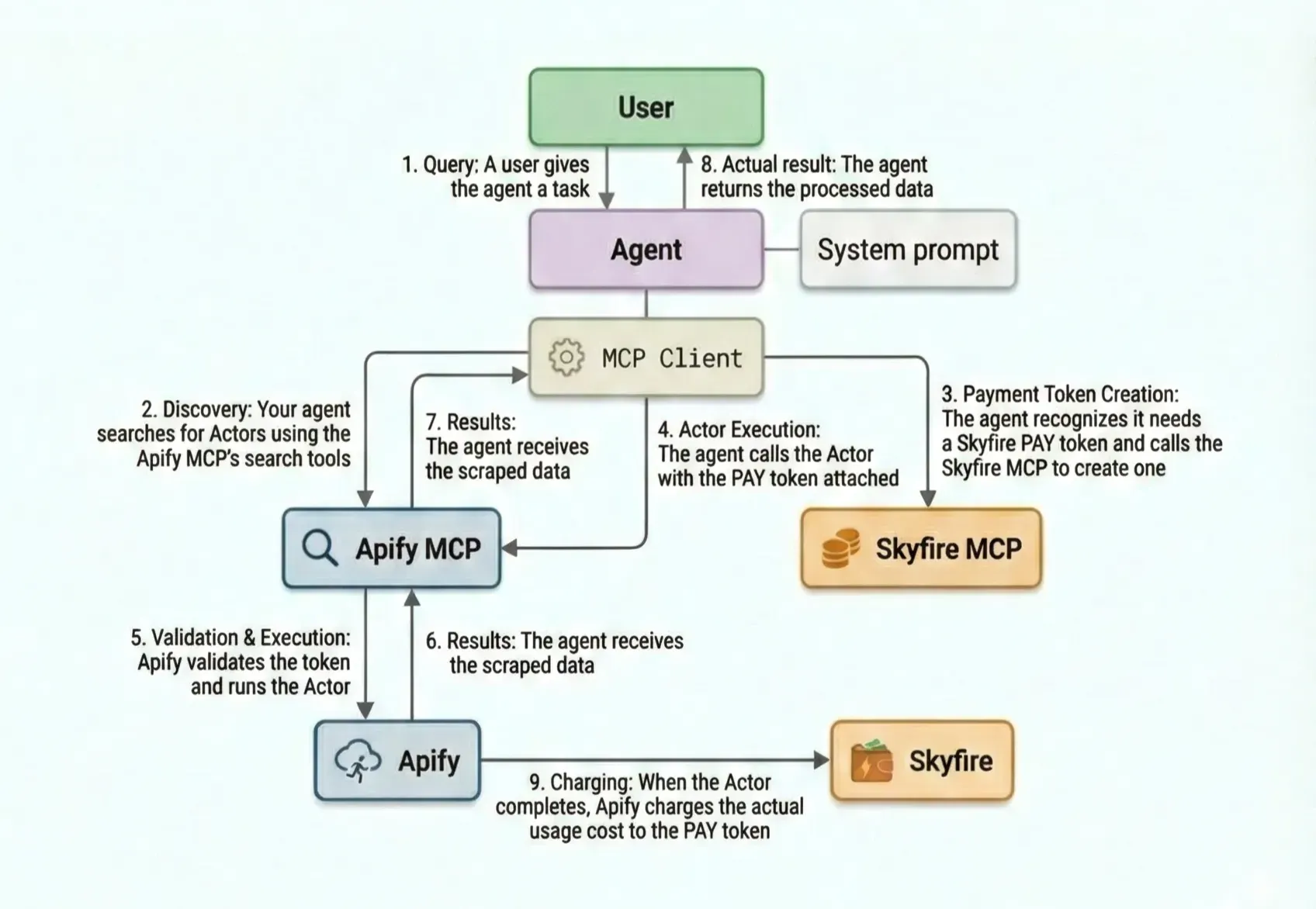
When you give your agent this task, it searches for the correct tool (Actor) on Apify MCP - in this case, some e-commerce scraper to search for the products.
It recognizes that the payment is needed, and it creates the PAY token using the Skyfire MCP. Then it uses the token to call the Actor.
The agent then searches Apify MCP again for an Actor that scrapes product reviews from YouTube.
It uses the scraped product information to call the YouTube reviews Actor and pick the best one based on that.
What's coming next?
If you think this all feels like a traditional workflow, you are right and wrong at the same time. It is the same workflow in the sense that you still need a token to access services.
But the twist is that we removed the need for a human in the loop, which allows anyone or anything to pay for services, including web data and the large collection of scrapers and automation tools that Apify provides.
This opens the door to a new ecosystem of tools and a new type of economy, one not driven by humans but by autonomous agents. This is just the beginning. We are actively working on making this possible, and here are our next steps.
This is just the beginning of the agentic economy at Apify. Here's what we're working on:
More payment providers
While Skyfire is our first integration, we're actively exploring additional agentic payment providers:
- x402 - Coinbase’s protocol leveraging blockchain for payments
- Google A2P - Google's agent payment protocol
- OpenAI ACP - OpenAI’s agentic commerce protocol
Expanded Actor support
We're working to whitelist more Actors for agentic payments. One day, it could potentially power all of Apify Store.

The future of web scraping is autonomous. With agentic payments, your AI agents can now discover, execute, and pay for data extraction without human intervention. We can't wait to see what you build.